
Are you looking for free Android accessibility apps? Without a doubt, having a disability can make life harder. Whether you can’t see or have a physical disability, you probably can’t use your phone like everyone else. If you are one of these users, you may already know that smartphones can sometimes be hard to use.
The good news is that many third-party developers and Google are working to make things a little bit easier for users with disabilities. Many apps in the Google Play Store can help you get more out of your Android phone.
Top 10 Free Accessibility Apps for Android
This post will provide a list of the best Android accessibility apps for disabled people. So, let’s take a look at the finest Android accessibility apps.
1. Accessibility Scanner
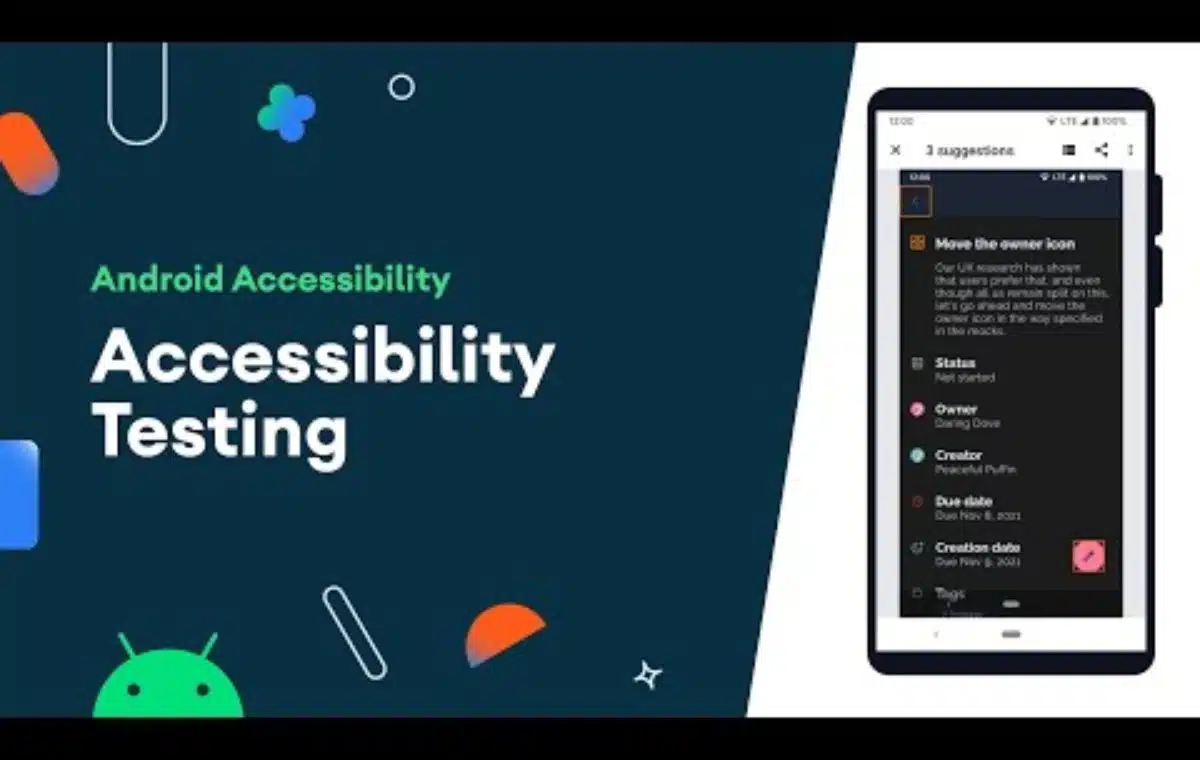
It is one of the helpful apps that everyone should use. The Android app promotes accessibility improvements for Android apps without needing any technical skills. The main purpose of this accessibility app is to make things easier to read.
It tells users a few ways to improve Android apps to make things easier to read or use. For example, it might suggest improving the text by changing the background’s contrast, color, brightness, etc.
2. Android Accessibility Suite
Android Accessibility apps are designed to help people who are blind or have low vision use their devices. Google supports the app, and it’s easy to use.
The Android Accessibility apps offer vibration, spoken, and audible feedback to help people who can’t see use their devices.
3. EVA Facial Mouse
It’s another great Android app for people who have trouble using touch screens. People with spinal cord injuries or cerebral palsy can use smartphones with the help of an Android app.
It lets people control their phones by moving their faces. It adds a cursor to the phone that you can move with your face.
4. Sound Amplifier
If you know someone who has trouble hearing, you should tell them about the Sound Amplifier Android app. Sound Amplifier, as its name suggests, is one of the best and most popular Android apps for making sounds louder.
It automatically picks up all the sounds coming from your microphone, boosts the frequencies that are related to speech, and lowers the rest. The Sound Amplifier’s interface is pretty easy to use. It’s one of the best Android Accessibility apps for people with disabilities that can help people with hearing loss listen better.
5. Live Transcribe
Google wants Live Transcribe to help people who are deaf or hard of hearing. Google’s automatic speech recognition technology is used in the Android app. Live Transcribe for Android is known for turning speech and sounds into text on the screen of your device in real-time.
What makes Live Transcribe even more useful is that it can also work with two languages. It can also translate the speeches into other languages.
6. Voice Access
Google made this app, which is one of the best accessibility apps on the Play Store. The app is made to help people who have trouble using touch screens.
Voice Access lets you control your device with your voice. To switch between apps and screens, edit text, open apps, etc. you have to use voice commands.
7. Look to Speak
Look to Speak is a Google-backed app for Android that helps people with hearing loss. The Android Accessibility apps is based on Eye Gaze technology, which uses the camera on your phone to pick up the light reflections from your pupil and translate them into actions.
With this app, you move your eyes to tell Android to say phrases you’ve already written down.
8. Speechnotes
This Accessibility apps are for people who struggle to write short or long texts. It’s a voice typing app that is used by millions of people.
The app is pretty accurate because it uses Google’s speech recognition service. It automatically understands many verbal commands for punctuation, new line, etc.
9. Envision AI
Envision AI is one of the greatest and most useful accessibility apps for Android. This is an OCR program that expresses itself through the visual world.
The software may be useful to blind and visually impaired users because it narrates what is going on around them. To utilize this software, the user must aim the phone’s camera at the things, and the program will narrate it for them.
Because it includes OCR capability, the software can read papers, handwritten notes, scan barcodes, and more. Overall, Envision AI is a fantastic Android accessibility app.
10. Lookout
Lookout is extremely similar to the Envision AI app mentioned above. The software is intended to alert those with limited vision or blindness about their surroundings.
Google supports the Android accessibility apps, which utilize the phone’s camera and sensors to recognize objects and text and tell you what it finds.
Currently, the app is available in over 20 languages and is only compatible with Android versions 6 and up.
So, those are the greatest and most useful Android accessibility apps. These apps can help you if you have a disability. If you believe we have overlooked a vital app, please let us know in the comment section below.
You can also read
If you are interested, you can also read Entertainment, Numerology, Tech, and Health-related articles here: Metaverse, QueenslandMax, Shower Standing Handle, August 11 Zodiac, How to pass a drug test, How to Roll a Joint, iFun, Emerald Chat, How to Play Mancala, August 8 Zodiac, OnePlus 10T Review, Jilo Virals, August 4 Zodiac, Findsnap, Tomb Raider Anime, Netflix August 2022 Schedule, Animixplay, Upcoming Marvel Movies 2022, July 31 Zodiac, Best Lily Collins Movies, Notepadqq, Flaxseeds with Milk Benefits, Imginn, Snaptik, Picuki, Alexis Clark Net Worth, Black Panther 2, Marvel Echo Release Date, Frozen Fruit Recipes, Black Tourmaline, Webtoon XYZ, Fastest VPN for Android, IFVOD, XXXX Dry Review, Highest Grossing Indian Movies of all Time, Highest Grossing Movies of All Time, Rush Limbaugh net worth
Gotham Season 7, Parag Agrawal Net Worth, Tara Reid Net Worth, Blonde Trailer, Fastest VPN for PC, Highest Paid CEO in India 2022, Highest paid athletes 2022, My5 TV Activate, Kissmanga, Highest Paid CEO 2022, Grey’s Anatomy Season 19, Alexa.com Alternatives,
The Resident Season 6, Kraven The Hunter, One Punch Man season 3, The Resident Season 5, Yellowstone season 5, Ozark season 4 part 2, How to Remove Bookmarks on Mac, Outer Banks Season 4, How to watch NFL games for free, DesireMovies
Apart from the above articles, you can read more
6streams, 4Anime, Moviesflix, 123MKV, MasterAnime, Buffstreams, GoMovies, VIPLeague, How to Play Music in Discord, Vampires Diaries Season 9, Homeland Season 9, Brent Rivera Net Worth, PDFDrive, SmallPDF, Knightfall Season 3, Crackstream, Kung Fu Panda 4, 1616 Angel Number, 333 Angel Number, 666 Angel Number, 777 Angel Number, 444 angel number,
Bruno Mars net worth, KissAnime, Jim Carrey net worth, Bollyshare, Afdah, Prabhas Wife Name, Project Free TV, Kissasian, Kickassanime, Moviezwap, Jio Rockers, Dramacool, M4uHD, Hip Dips, M4ufree, Fiverr English Test Answers, Fiverr SEO Skill Test, NBAstreamsXYZ, Highest Paid CEO, The 100 season 8, and F95Zone.
Thanks for reading. Stay tuned!