You land in Tokyo or Seoul. You can’t read the menu. You can’t read the street signs or the train board. You still need to eat, find your hotel, and ask for help. That’s where AI translation tools for travelers come in.
AI translation apps and earbuds turn speech, menus, and signs into English in seconds. Many keep some features working with no signal, but what works offline depends on the app and the language.
Pick one main app, add the app locals use in the country you’re visiting, and download offline language packs before you fly. Don’t rely on these tools alone for anything medical or legal, because they still make serious mistakes.
This guide covers what each tool does best and which phone and earbuds it needs. It also gives real accuracy numbers and ends with a setup checklist to finish before your trip.
What Are AI Translation Tools and How Do They Work?
AI translation tools are apps and devices that change words from one language into another. You can type, talk, or point your camera, and the tool gives you the meaning in your own language.
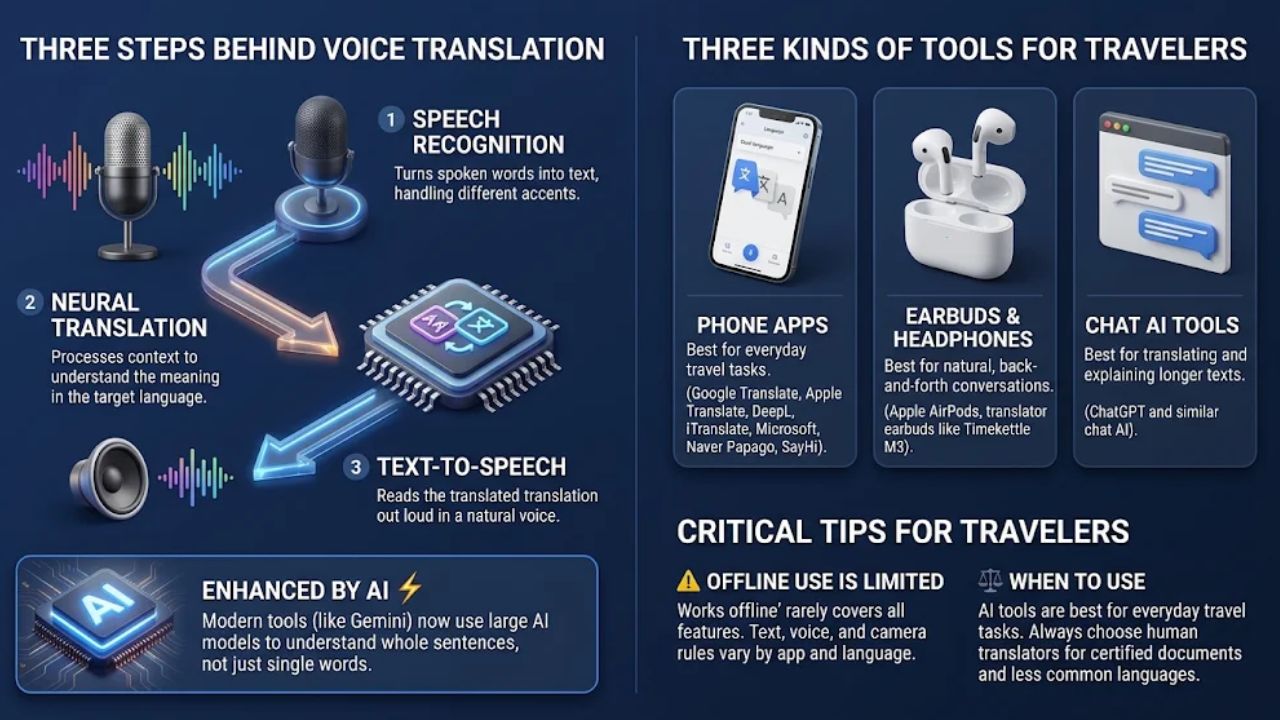
The three steps behind voice translation
Most voice tools work in three steps:
- Speech recognition turns spoken words into text, even with different accents.
- Neural machine translation works out what the words mean in the other language.
- Text-to-speech reads the result out loud in a natural voice.
Newer tools add large AI models on top of those steps. Google now builds its text translation into Search and the Translate app with Gemini, its AI model. This helps the app understand whole sentences, not just single words.
Apps, earbuds, and chat tools
Travelers mostly use three kinds of tools:
- Phone apps, such as Google Translate, Apple Translate, DeepL Translator, iTranslate, Microsoft Translator, SayHi, and Naver Papago.
- Earbuds and headphones, such as Apple AirPods with Live Translation, Google Translate’s headphone mode, and translator earbuds like the Timekettle M3.
- Chat AI tools, such as ChatGPT, that can translate and explain longer text.
Each kind has its own job. Apps cover most daily tasks, earbuds help with long talks, and chat AI helps you make sense of long text.
One thing to know up front: “works offline” rarely means every feature works offline. Text, camera, voice, and headphone modes each have their own rules, and those rules change by app and by language.
Human translators are still the right choice for certified documents and less common languages. AI tools are best for everyday travel tasks.
Key Features Travelers Need: Voice, Camera, and Offline Translation
You don’t need every feature. These five do most of the work on a trip:
- Voice and conversation mode: You talk, the app speaks the translation, and the other person answers in their own language. Conversation mode switches between the two speakers, so it works well at hotel desks, ticket windows, and taxi stands.
- Camera translation: Point your phone at a menu, sign, or train schedule, and the translation shows on screen. Google Translate offers camera translation in over 100 languages. This helps most in Japan, South Korea, and China, where you may not be able to sound out the script at all.
- Better handling of slang and idioms: Google says its Gemini update helps with “phrases with more nuanced meanings like idioms, local expressions or slang.” That helps when a waiter uses a casual phrase or a sign uses local wording.
- Live translation in your headphones: Google Translate has a beta that brings real-time, natural-sounding translations to your headphones using Gemini’s speech-to-speech skills. It keeps each speaker’s tone, emphasis, and cadence. On Apple’s side, Live Translation on AirPods works in English, French, German, Portuguese, Spanish, Italian, Chinese (Simplified and Traditional Mandarin), Japanese, and Korean.
- Offline language packs: You download a language before your trip, so some features keep working with no Wi-Fi or data. Which features work offline (text, camera, or voice) depends on the app and the language, so test each one at home. Offline mode also keeps more of your data on your phone.
One catch for headphone translation: Apple says Live Translation is not available in all languages and regions. Check your destination’s language before you count on it.
How AI Translation Tools Help You on the Road
Here’s how these features help in the places where travelers get stuck most.
Talking with locals
Say you need a room with two beds, or you want to know if the last train has left. You speak into your phone, the app says it in the local language, and the clerk answers into the same phone. That beats flipping through a phrasebook.
With headphone translation, it feels even more natural. You hear the other person in English in your ear while you keep eye contact. Keep your sentences short and simple, and the results get much better.
The camera is a big help wherever you can’t read the script. Point it at a ramen shop menu, a station map, or a ticket machine, and you get the meaning in seconds. Cities like Tokyo, Singapore, and Seoul have also added multilingual signs, so you’ll often have two ways to check.
Say you’re on a train platform in Seoul and the board changes. A quick camera scan can tell you if your train is delayed or moved. If you’re underground with no signal, this only works if your app supports offline camera translation for Korean and you downloaded the pack, so test it before the trip.
Using the app locals trust
Each country has its own favorite tools. In South Korea, the Korea Tourism Organization named Papago and NAVER Map among its “2024 Essential Apps for Foreign Tourists.” A government survey found that 48.3 percent of foreign visitors to Korea used Papago for translation during their trip.
So in Korea, Papago is often the best pick. Pair it with a global app as a backup.
Getting the tone right
Apps can give you the right words but the wrong tone. Use polite basics like “please,” “thank you,” and “excuse me,” and smile. A simple, polite sentence often works better than a long one the app may twist.
A quick privacy note: voice apps may store what you say. Check each app’s privacy settings before you talk about passport numbers, addresses, or card details.
Best AI Translation Tools for Travelers Compared
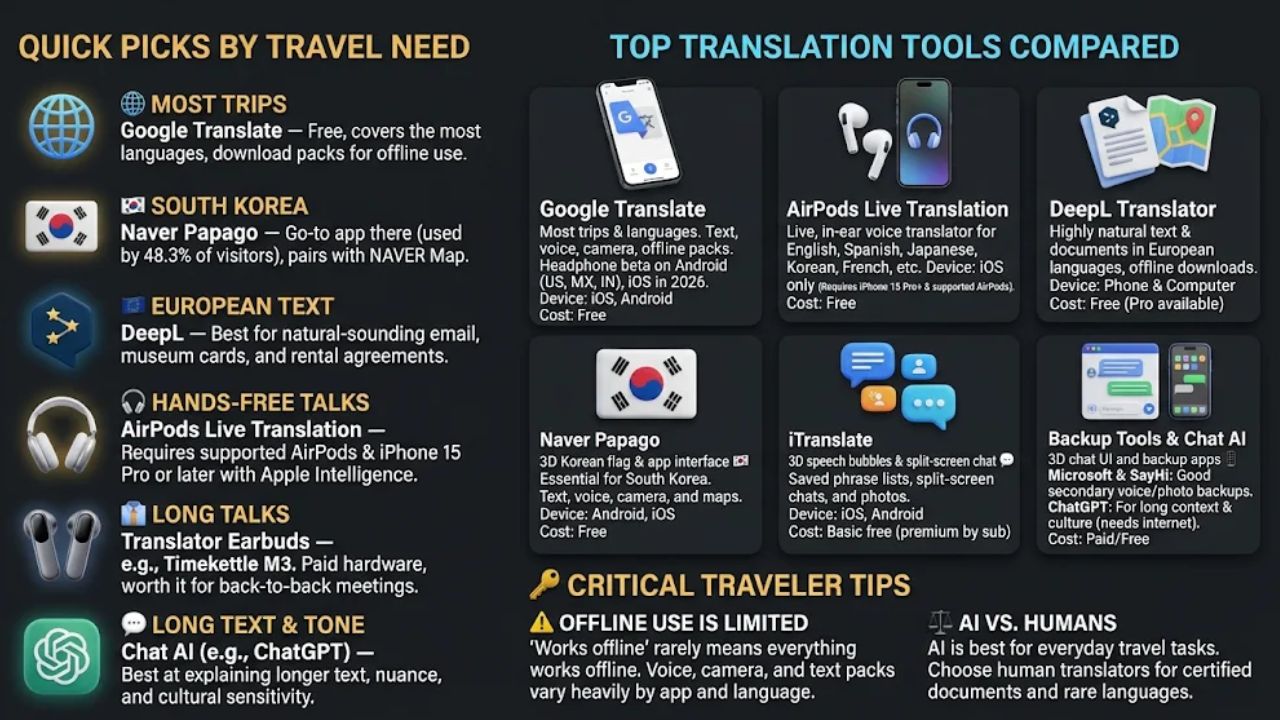
No single tool wins everywhere. Here are the quick picks, then the full table.
- Most trips: Google Translate. It’s free and covers the most languages.
- South Korea: Papago, with Google Translate as a backup.
- Long text in European languages: DeepL, for things like hotel emails and museum cards.
- iPhone with supported AirPods: AirPods Live Translation, if your destination’s language is on Apple’s list.
- Paid translator earbuds: Worth a look only if you’ll have back-to-back meetings or long talks. For most leisure trips, a free app plus headphones you own is enough.
The table lists what our sources confirm for each tool. Where a cell says “see the listing,” we couldn’t confirm it, so check the app store before you rely on it.
| Tool | Best for | Confirmed features | Phone or device | Cost |
| Google Translate | Most trips, most languages | Text, voice, and camera (camera in over 100 languages); offline language packs; headphone beta | Android and iPhone; headphone beta launched on Android in the U.S., Mexico, and India | Free |
| Apple Translate | iPhone owners who want Apple’s own app | See the App Store listing | iPhone | See the listing |
| AirPods Live Translation | Hands-free talks for iPhone owners | Live translation in your ears in English, French, German, Portuguese, Spanish, Italian, Chinese, Japanese, and Korean | Supported AirPods plus an iPhone 15 Pro or later with Apple Intelligence on | Needs supported AirPods |
| Naver Papago | South Korea | Translation app used by 48.3% of foreign visitors in a Korean government survey | Phone app | See the listing |
| DeepL Translator | Text and documents in European languages | Natural-sounding text; offline downloads | Phone and computer | See the listing |
| iTranslate | Saved phrases, split-screen chats | Text, voice, and photo; split-screen mode; offline language packs | Phone app, works well on iPhone | Basic free; premium by subscription |
| Microsoft Translator | Backup app | Photo and voice translation (cloud-based) | Phone app | See the listing |
| SayHi | Simple voice chats | Voice translation | Phone app | See the listing |
| Translator earbuds (e.g., Timekettle M3) | Long talks and meetings | In-ear voice translation; the earbuds have no camera | Pairs with a phone app | Paid device; check the current price |
| ChatGPT and other chat AIs | Long text, tone, explaining what something means | Translates and explains longer text | Phone and computer; usually needs internet | Check the plan |
Google Translate
Google Translate is the best all-around pick. It supports over 130 languages and handles text, voice, and camera in one free app. You can also download language packs for offline use.
Its newest trick is live translation in your headphones. Google announced the beta in December 2025 on Android in the U.S., Mexico, and India, and said iOS support would come in 2026. So if you’re on an iPhone, open the Translate app before your trip and look for the headphone option.
Google’s announcement gives two figures for the beta. It says the beta supports over 70 languages, and it lists nearly 20 languages it translates to and from English, including Spanish, Arabic, Chinese, Japanese, and German. Google doesn’t spell out how the two lists differ, so check that your exact language pair shows up in the app.
Apple Translate
Apple Translate is Apple’s own translation app for iPhone. It’s a separate thing from AirPods Live Translation, so the AirPods rules below don’t apply to the app by itself. Check the App Store listing for its offline and camera details.
AirPods Live Translation
If you already carry a newer iPhone and newer AirPods, this may be the easiest choice for hands-free talks. Apple’s support page lists AirPods 4 (ANC), AirPods Pro 2, and AirPods Pro 3, and one section also names AirPods Max 2. You need an iPhone 15 Pro or later with Apple Intelligence turned on, running the latest software.
The language list covers the big travel picks, including Japanese, Korean, and Chinese. Older iPhones and older AirPods won’t work, so check both before you leave.
Papago is made in Korea and is the go-to app there. Install it with NAVER Map for a trip to South Korea.
DeepL Translator
DeepL is known for natural-sounding text in European languages like German and French. Use it for longer text, like a hotel email or a museum card. For a rental agreement, use it only for a first read, and have a person who knows the language check it before you sign.
Use another app for live talks and quick sign scans.
iTranslate
iTranslate handles text, voice, and photos. Its split-screen mode lets two people read the translation at the same time.
You can also save phrases ahead of time for restaurants or taxis. Basic features are free, and the advanced voice features need a paid plan.
Microsoft Translator and SayHi
Microsoft Translator offers photo and voice translation and makes a good second app. SayHi is a simple voice tool for quick chats. Keep one of them as a backup in case your main app fails on a certain phrase.
Translator earbuds
Devices like the Timekettle M3 bring voice translation into your ears during talks. They make sense if you have back-to-back meetings or long talks. For most leisure trips, a free app plus headphones you already own may be enough.
ChatGPT and other chat AIs
Chat AIs are good at long text and at explaining what something really means. A 2025 study that compared Google Translate, DeepL, and ChatGPT on Chinese tourism texts reportedly found ChatGPT did best on fidelity, fluency, cultural sensitivity, and persuasiveness.
That result comes from summaries of the paper and covers tourism writing, not live street talk. Use chat AI to read a long notice or plan polite phrases, and use a classic app for fast, offline help.
How Accurate Is AI Translation, and When Should You Not Trust It?
These tools are very good, but not perfect. One useful test comes from a 2019 UCSF study of Google Translate on emergency room discharge instructions. It’s a high-stakes test, but it is not a current score for every app or every language.
What the numbers show
The researchers tested 100 sets of translated discharge instructions. Google Translate was 92% accurate for Spanish and 81% accurate for Chinese. So the tool did worse with Chinese, a language with a very different structure from English.
Most mistakes were small. Of the inaccurate Spanish translations, only 2 percent could have caused serious harm, and of the inaccurate Chinese ones, 8 percent could have. But “small chance” isn’t “no chance.”
A real example of a serious error
One doctor wrote, “hold the kidney medicine.” Google Translate turned that into “keep the medication” in Spanish and “keep taking” the medication in Chinese. The doctor meant stop, but the app said keep going.
Short English phrases with two meanings, like “hold,” are where apps slip. The UCSF researchers said Google Translate is best used together with human interpreters.
When to get a human
Don’t trust an app alone for these:
- Medical care, medicine doses, or a doctor’s instructions
- Serious food allergies
- Police reports, legal papers, or anything you sign
- Large payments or contracts
For these, ask your hotel, your travel insurer, or your embassy for an interpreter. For a food allergy, carry a card written in the local language by a trusted source.
How to get better results
- Use short, plain sentences. Skip slang and jokes, since sarcasm still trips up the software.
- Avoid words with two meanings, like “hold,” “book,” or “fine.”
- Translate the answer back into English. If it comes back different, you’ve found a problem. If it matches, that’s a good sign, not proof.
- Show the screen, not just the audio, so the other person can read it.
- For Korea, compare your main app with Papago if something looks off.
How to Set Up Your Translation Tools Before Your Trip
Do this a week before you leave, not at the airport. Most problems show up when you test at home.
- Pick one main app and one backup: For most trips, Google Translate is a strong main app. Add Papago for South Korea, and add DeepL if you’ll read long text in a European language.
- Download offline language packs: In Google Translate, iTranslate, or DeepL, download English and every language you’ll need. Do it on Wi-Fi, since the files can be large.
- Test offline mode the right way: Turn off both cellular data and Wi-Fi. Airplane mode alone may leave Wi-Fi on if it was already connected, so check that it’s off.
- Test each feature on its own: Try text, then camera, then voice, in each language you downloaded. If one fails, you’ll know before you’re stuck at a ticket machine.
- Check your gear for AirPods Live Translation: You need AirPods 4 (ANC), AirPods Pro 2, or AirPods Pro 3 (Apple’s page also names AirPods Max 2). Pair them with an iPhone 15 Pro or later that has Apple Intelligence on and the latest software.
- Check your gear for Google’s headphone beta: It launched on Android in the U.S., Mexico, and India, with iOS promised for 2026. Open the Translate app, look for the headphone option, and confirm your language pair is listed.
- Confirm your language is supported: Apple says Live Translation isn’t available in all languages and regions. Match your destination’s language to the supported list before you count on it.
- Update everything. Update your phone, apps, and earbuds. Apple’s feature needs an iPhone running the latest software.
- Plan your data so you skip roaming charges: Offline packs cover the basics. For live headphone translation and chat AI, plan on a travel data plan or hotel Wi-Fi, and check your carrier’s international rates before you go.
- Save key phrases: Save phrases like “Where is the station?”, “No meat, please,” and “I need a doctor.” Star them in your app, or build a phrase list in iTranslate, so you can show them fast.
- Write down the high-stakes stuff: Have a trusted source write out allergies, medicine names, and your hotel address in the local language. Don’t count on the app for these.
- Charge and pack: Translation apps use a lot of battery. Bring a power bank and your earbud case.
With these steps done, AI translation tools for travelers get you through most daily tasks, like ordering food, catching trains, and asking for directions. Bring in a human interpreter whenever a mistake could hurt you.
Frequently Asked Questions About AI Translation Tools for Travelers
1. Can AI translation tools help me talk to people on a trip?
Yes, apps like Google Translate can convert your speech or text into over 130 languages in real time.
2. Do these apps follow the style rules of each language?
Most quality apps handle basic style rules like formal pronouns and word order. They often struggle with slang, humor, and regional idioms, though. Keep your sentences short and direct for the most accurate translations.
3. Will the app work if I have no internet?
Many apps, including Google Translate, let you download language packs for offline use before you leave.
4. Which tool should I pick for my trip?
Choose an app with camera mode for reading signs and menus plus voice mode for conversations. Google Translate offers both features, with its Lens function translating text through your phone’s camera instantly.