Course platforms with expiring access can help a training provider honor a business customer’s contract without manually chasing every learner on the final day. The important question is whether the platform ends access for the right people at the right time—not just whether it offers an “expiry” setting.
A fixed contract end date, a learner’s enrollment duration and a subscription renewal are different triggers. A client that signs a one-year agreement in January may add a learner in October; granting that learner 365 days could unintentionally extend access beyond the agreement. Check the actual enrollment route, time zone, exceptions and renewal process before making a promise to a customer.
We reviewed platform documentation for capabilities relevant to access expiration; we did not test the products or independently verify every plan. This unranked shortlist contains five platforms rather than the seven originally requested: five documented routes were sufficiently clear for this review. A course expiration setting alone does not prove that a platform automatically reads and enforces a business contract.
Compare the Access Controls
| Platform | Documented route | Check before signing |
|---|---|---|
| Thinkific | Enrollment duration and individual expiry dates | Bulk and manual enrollments may need explicit dates |
| LearnWorlds | Relative duration or fixed date | Product and enrollment route can affect the rule |
| TalentLMS | Course time limit and individual expiration changes | Understand hard versus soft time limits |
| Teachable | Pricing-plan access duration; enrollment deadline is separate | Manual enrollments do not inherit certain pricing-plan limits |
| Moodle | Enrollment start, end or duration through applicable enrollment methods | Behavior depends on method, permissions and site configuration |
For a broader comparison of customer-company seat allocation, see Editorialge’s guide to selling training seats to business customers. Seat management and access termination are related but separate buying requirements.
1. Thinkific
Best for: Providers that sell a course with a fixed number of access days and can manage exceptions for business enrollments.
Why a team might choose it: Thinkific documents enrollment duration for checkout purchases and the ability to set an individual expiration date. It also says learner progress is retained when an expired learner later re-enrolls, a useful detail to verify for renewals and reporting.
What to consider: Its documentation distinguishes checkout from manual and bulk enrollment. A pricing duration does not automatically apply to bulk enrollments in the same way; administrators need to specify the appropriate expiry. Test a late-added learner against the actual contract end, and confirm time-zone behavior and current plan availability.
For a business customer, the distinction between purchasing and administrator-added seats deserves a test of its own. Thinkific says a duration can be attached to course pricing, while an administrator can set or edit a learner’s expiry separately. Its bulk-expiry options also depend on the circumstances and plan. Build the contract’s end date into the actual seat-provisioning process; a checkout setting alone is not proof that a bulk-added learner will receive the same cutoff.
Also check overlapping enrollments. Thinkific says the expiry furthest in the future determines access in overlapping enrollment situations. If the same learner obtains a course through more than one route, record that exception and review it before making a blanket promise that every route ends on the contract date. Editing an expiry date alone does not change the billing date.
2. LearnWorlds
Best for: Providers that need to compare a shared calendar cutoff with a period measured from enrollment.
Why a team might choose it: LearnWorlds documents course and learning-program expiry based on a period or a fixed date, and individual enrollment expiration can be changed without changing every learner’s setting. A fixed date can be useful when all learners under an agreement must lose access at the same time.
What to consider: Access through a learning program can behave differently from direct course enrollment, including when pricing-specific or course-level settings apply. Test every route the client will use, and confirm which plan and configuration support the needed behavior.
The choice between a fixed date and an enrollment-relative period changes the result for late joiners. A fixed date can mirror a common contractual cutoff, whereas a 90-day window can suit an individually licensed course. LearnWorlds also documents adjustments to an individual enrollment, which can be useful when a written extension covers one employee rather than the whole customer account.
Check the route into the material carefully. LearnWorlds notes that when a course is accessed through a learning program, the course’s own expiration setting may not apply in the same way. Test direct course access and program access separately, including any pricing-specific settings. An administrator should document which rule controls each route and how exceptions are approved.
3. TalentLMS
Best for: Training teams that want course time limits and the ability to adjust specific learners’ expiration dates.
Why a team might choose it: TalentLMS documents course time limits and individual expiration changes. A training manager can investigate how the course expires for late joiners and how an extension affects a learner already marked expired.
What to consider: Soft and hard time-limit behavior matters. Do not assume a generic duration will enforce a shared business-contract cutoff for every enrollment. Confirm date settings, renewal procedures, notifications and any administrative or plan limits with the provider.
TalentLMS says its course time limit calculates an expiration date from the enrollment date plus the configured limit. That makes the late-enrollment example important: a learner added shortly before a shared contract end may have a later calculated expiration unless the administrator handles the difference. Its support documentation also describes changing a specific user’s course expiration.
Before adopting that process for a large customer, work out who will maintain individual exceptions and what evidence confirms they were applied. Test expired and extended enrollments under the actual portal settings, and ask whether the applicable time limit blocks access or operates differently in the chosen configuration.
4. Teachable
Best for: Providers selling a course through eligible pricing plans with a defined access duration.
Why a team might choose it: Teachable documents limited product access duration on eligible pricing plans. A pricing-plan enrollment deadline is a separate control from the period during which an enrolled student can access the product. Its notification documentation also describes an automatic message when access expires, which may help communicate the end of access to learners.
What to consider: Teachable explicitly says certain pricing-plan limits, including limited duration and expiry date/time, do not apply to manually enrolled students. For corporate seats added by an administrator, verify the actual enrollment route and establish a separate way to manage contract-end dates if necessary.
Teachable’s documentation distinguishes limited product access from restrictions on a pricing plan, and says manual enrollments do not inherit certain plan limits. For a corporate customer, ask whether seats will be purchased through the relevant pricing plan or assigned directly by an administrator. Set up a representative test for both paths if the provider intends to use both.
An enrollment deadline determines when someone can join through a particular offer; it should not be treated as proof that existing students lose access at that deadline. Verify the product-access duration, available plan and renewal behavior independently, and document any manual steps for a common contract-end date.
5. Moodle
Best for: Organizations prepared to configure or administer their own enrollment methods and rules.
Why a team might choose it: Moodle documentation describes enrollment start, end and duration settings through applicable methods, including access-code enrollment. That flexibility can help an administrator align access windows with training arrangements.
What to consider: Moodle is not one uniform hosted configuration. Available methods, permissions, plugins, hosting and scheduled tasks determine actual behavior. Check whether expiration suspends or unenrolls a learner, whether historical completion records remain accessible to administrators, and who supports changes.
Moodle can be a strong fit for a team with an administrator who understands its enrollment methods. Its flexibility also creates a procurement question: who configures the instance, monitors the scheduled processes and supports changes after the contract is signed? Ask the actual hosting or implementation team to demonstrate the desired enrollment and expiration workflow.
Make the reporting requirement explicit before choosing suspension or unenrollment. Course access, an account’s existence, grades, completion records and a downloadable certificate are not the same thing. Moodle’s enrollment API guidance notes that suspension can sometimes be preferable to full unenrollment; the consequences depend on the method and configuration, so test the exact setup.
What We Compared and What We Did Not Test
We selected products with documentation describing an enrollment or access-expiration mechanism relevant to training providers. We compared the trigger, enrollment route and administrative questions that could affect a business contract. The list is not a ranking, and we did not purchase plans, enroll learners or run product tests. Confirm availability, pricing and contractual terms for the edition offered to you.
Choose the Right Expiration Model
Start with the agreement, then map its terms to a specific enrollment control. A shared fixed date fits a contract that ends for everyone at once. A duration from enrollment can fit individual access periods, but only if the agreement permits late starters to continue past the main end date. Subscription cancellation is another route, and must be checked against the paid-through date and the platform’s rules.
Harvard Online’s published FAQ illustrates why contract duration and learner access after a program can be separate matters: define both explicitly rather than assuming the end date controls every form of access.
Before the Contract Ends: A Practical Timeline
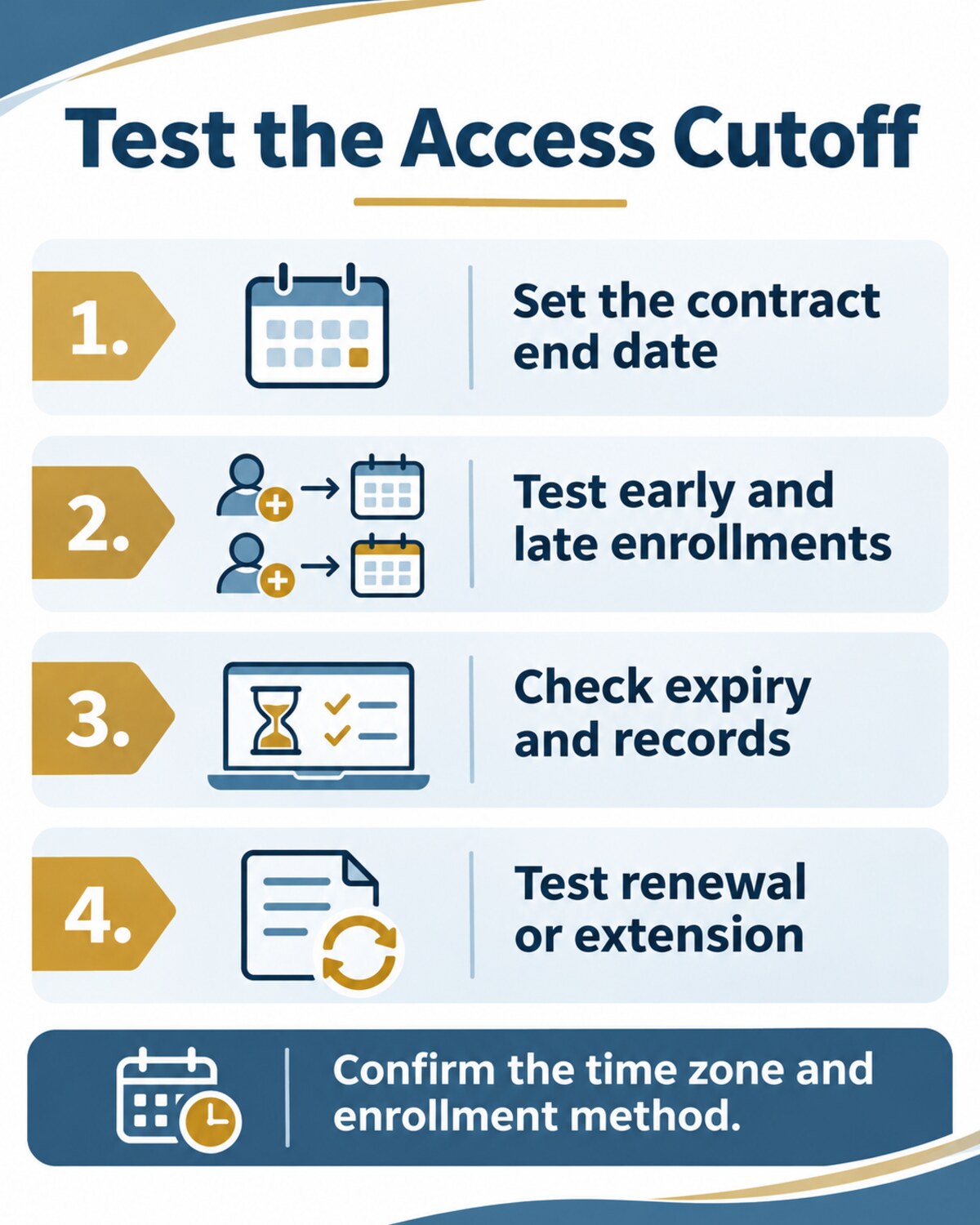
Several weeks before the cutoff, export the client’s current roster and compare it with the signed agreement. Identify late additions, learners with multiple enrollment routes and any approved extensions. Ask the client who needs the completion report and what information may be retained after access ends.
Shortly before the cutoff, test a synthetic learner using the same route as the customer. Confirm the displayed end date and the time zone, then repeat the check after the cutoff. If the agreement is renewed, record the new end date and the person who approved it; do not assume a billing renewal updates every existing enrollment.
A Hypothetical Contract-End Test
Suppose a training provider agrees that a client’s 50 seats expire on December 31. One employee joins on October 1 and another on December 15. Create test enrollments through the exact purchasing and administrative routes the real client will use. Confirm both access windows, what happens at the cutoff in the agreed time zone, whether certificates remain available, and what an administrator can still see after expiration. Then test a written extension and a renewed learner.
Record the actual result, screenshot or audit entry, test date, product plan and settings. This is a proposed test, not a claim that we ran it. Avoid using real learner records when synthetic data will do.
Common Gaps to Resolve Before Signing
A learner may hold access through a bundle or a second enrollment even after one route expires. A seat may be available for reassignment without the former learner automatically losing course access. An expired learner may still have a certificate or an account, while an administrator retains a report. Each outcome can be reasonable, but it should match the agreement and the provider’s privacy and retention rules.
Ask for a demonstration using your own hypothetical contract rather than relying on a generic sales walkthrough. Give the provider an early enrollee, a late enrollee, a manual exception and a renewal. Document the exact result and any required administrative steps before promising the client an automatic cutoff.
Questions to Ask Before Choosing
- Can all learners under one customer agreement share the same explicit end date?
- Do checkout, bulk upload, group seats and manual enrollment apply the same rule?
- Can a client administrator add a late learner without inadvertently extending the agreement?
- What happens to progress, completion reports and certificates after access ends?
- Which time zone controls the cutoff, and are reminders available?
- How do renewals, extensions and seat replacements work?
- Which edition and contract support these features, and what extra administration or integration is required?
Choose a platform only after testing the client’s actual workflow. If the end date must be enforced across many customers, a documented process for exceptions and renewals matters as much as the expiry switch.
Access also means being able to use the material during the contracted period. The Institute of Education Sciences discusses accessibility considerations for online learning, including captions and screen-reader support. For the broader course-creation process, see our guide to building and launching an online course.