

Google has officially launched a new version of its Gemini AI chatbot, specially designed for children aged 13 and older. This marks a significant move by the tech giant to make artificial intelligence accessible to younger users, while maintaining a strong emphasis on digital safety and parental control.
The announcement was made as part of Google’s broader efforts to promote safe and responsible use of AI among minors, a growing concern among parents and tech experts alike. The new version of Gemini is integrated with safety features that align with Google’s Family Link platform, ensuring that children interact with the chatbot in a secure, monitored environment.
How It Works: Access Through Supervised Accounts
According to Google, the child-specific version of Gemini will be available only through Google Accounts that are managed by parents or guardians. These supervised accounts are linked to an adult’s Google account and are configured through the Family Link app—a parental control platform that allows adults to monitor their child’s device usage, screen time, app activity, and content restrictions.
This setup ensures that:
- Children cannot create or access Gemini without parental permission.
- All activity on the chatbot is visible to the parent through the dashboard.
- Parents are notified when their child interacts with Gemini for the first time.
By integrating these controls, Google provides a layer of transparency and security, giving parents peace of mind while still allowing children to explore AI in a limited, controlled way.
Features Built for Kids: What Gemini Can Do
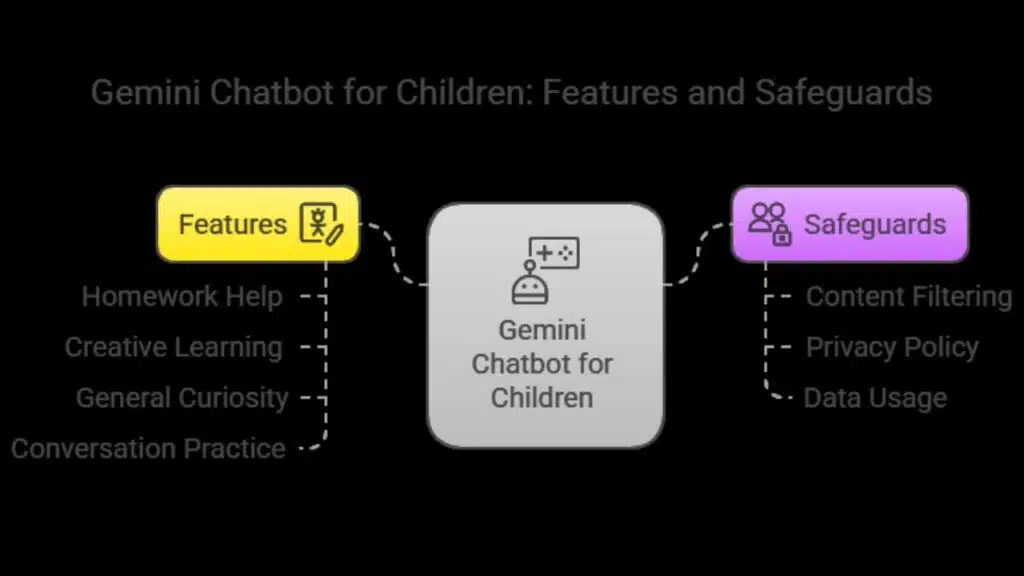
The Gemini chatbot for children is designed to assist with:
- Homework help: Answering educational queries using simplified language.
- Creative learning: Generating stories, poems, or writing prompts.
- General curiosity: Responding to questions in age-appropriate tones.
- Conversation practice: Engaging children in safe, friendly dialogue.
Importantly, Google has emphasized that the children’s version of Gemini has been fine-tuned to filter out inappropriate or harmful content. It is equipped with safeguards to avoid discussing adult themes, misinformation, or other potentially unsafe topics.
Moreover, Google has stated that conversations from these supervised accounts will not be used to train its AI models. This aligns with the privacy policy in place for educational accounts under Google Workspace for Education, which also prohibits data mining for advertising or AI training.
Education Meets Innovation: Encouraging Responsible AI Use
Google sees this move not only as a tech development but also as an educational milestone. By providing early access to generative AI in a guided environment, children can begin to understand how these tools work and how to use them responsibly.
“We’re committed to making AI helpful and accessible to everyone, including younger users,” a Google spokesperson told The Verge. “Our approach prioritizes transparency, safety, and parental involvement every step of the way.”
Google’s Gemini chatbot could support kids in:
- Boosting creativity: By helping them brainstorm ideas for school assignments.
- Improving digital literacy: By engaging with AI in a monitored setting.
- Expanding learning access: For children who may not have personalized tutoring support.
This educational benefit, however, is not without risks, which is why experts continue to emphasize the importance of strong parental involvement.
Comparison with Other Platforms: What Sets Google Apart?
Several social media and digital platforms—like TikTok, Instagram, and YouTube Kids—have already implemented parental control features that allow parents to supervise content and screen time. Google’s Gemini chatbot, however, goes a step further by enabling interactive, educational dialogue with AI, rather than just content consumption.
Additionally, Google’s history with child-friendly platforms like YouTube Kids and Google Classroom has given the company insight into what kinds of content and experiences are suitable for younger audiences.
While competitors like Meta and OpenAI have not yet released child-specific AI tools, Google’s move may influence the broader AI ecosystem to follow suit.
Expert Concerns and Cautions
Despite its promising features, experts warn of several key considerations:
- Content accuracy: Like all generative AI models, Gemini can still produce incorrect or misleading information. Google has acknowledged this and encourages parents to review and discuss AI-generated answers with their children.
- Emotional reliance on AI: Psychologists caution against children forming emotional connections with chatbots, which may lead to social isolation or unrealistic expectations about interpersonal communication.
- Screen time balance: While Gemini can be educational, it still adds to a child’s screen time, which needs to be moderated to prevent potential negative effects on mental and physical health.
Notably, previous AI platforms—such as Character.AI—faced criticism for exposing minors to inappropriate content due to the lack of strict content filters. This highlights the need for ongoing supervision and clear communication between parents and children about the purpose and limitations of AI tools.
A New Chapter for Youth-Focused AI
Google’s launch of Gemini for children represents a new chapter in the evolution of child-centric AI applications. With built-in privacy protections, parental oversight, and educational potential, the chatbot aims to offer a safe and valuable learning companion for children in today’s digital age.
However, the long-term success of this tool depends on:
- Continued refinement of AI safety protocols.
- Transparency in data collection and use.
- Parental engagement and tech education at home.
As more children begin to interact with AI, the tech industry may face increasing pressure to ensure these tools are not only innovative but also ethical, inclusive, and age-appropriate.
The Information is Collected from Engadget and MSN.






















