

Google has recently launched a set of exciting updates for its Gemini chatbot, giving users a chance to personalize their AI experience like never before. This new functionality, which was rolled out Thursday in experimental mode, is part of Google’s ongoing effort to make its AI services more intuitive, responsive, and closely aligned with the specific needs of users.
Gemini Can Now Reference Your Google Search History for Better Personalization
One of the most significant updates to Gemini is its ability to access and reference a user’s Google Search history. This feature, which is entirely opt-in, allows the chatbot to access search data to offer more relevant recommendations during interactions. By utilizing the search history, Gemini can understand the user’s interests, preferences, and past queries to provide tailored responses and suggestions.
For instance, if you frequently search for health and fitness tips, Gemini may offer you advice related to diet, exercise routines, or reminders about your fitness goals. The use of search data aims to enhance the conversational experience by creating a more personalized interaction where the chatbot better understands the user’s habits, needs, and preferences.
This feature follows the growing trend in AI technology where personalization is key to delivering more relevant and human-like interactions. Google’s move to incorporate search history into Gemini reflects its effort to bring more utility and efficiency to its chatbot by making it more context-aware. Users can choose whether or not they want to enable this feature, giving them control over their privacy and the information Gemini can access.
Seamless Integration with Google Apps: Calendar, Notes, Tasks, and Photos
In another major development, Google has also introduced the ability for users to connect their Google apps to Gemini. This includes linking popular apps such as Google Calendar, Notes, Tasks, and Photos. By integrating these apps with Gemini, users can experience a more seamless and synchronized AI interaction that pulls from various parts of their digital life.
For example, if you have a meeting scheduled on your Google Calendar, Gemini can remind you of the event or offer helpful advice about preparing for the meeting. If you’ve made to-do lists in Google Tasks, Gemini can check in on your progress and suggest next steps for tasks that are incomplete. By connecting Google Notes and Photos, Gemini can pull from your stored data to help with reminders, suggestions, and even picture-related queries.
The integration of these apps is designed to make Gemini not only a conversational assistant but a digital helper that can proactively support users in managing their daily lives. For instance, if you’re planning a trip, Gemini could suggest tasks related to packing or important items on your calendar, like flight details or meetings. This deeper level of integration aims to transform Gemini from a simple chatbot into an intelligent personal assistant that can actively participate in managing your tasks and scheduling.
Gems: A New Customizable AI Helper for Every User
Google is also rolling out a feature called Gems, a tool that allows users to customize their Gemini chatbot according to their needs and preferences. Gems enable users to create their own personal AI expert on any given topic. Whether you want an assistant for learning about history, tech, personal finance, or cooking, you can now customize Gemini to focus on those areas and provide more specialized assistance.
With this feature, you can design an AI that serves your unique interests, goals, or tasks. Users can program Gemini to offer expert-level advice on their chosen topics, whether it’s for professional development or personal learning. For example, a user interested in fitness could customize Gemini to act as a personal trainer, suggesting workouts, tracking progress, and providing tips on nutrition.
Gems is a significant step toward giving users more control over their AI experience. Instead of having a one-size-fits-all AI assistant, users can now create an AI tailored specifically to their needs. This is part of Google’s strategy to build a chatbot ecosystem that is flexible and adaptive to a wide variety of user requirements.
Google’s Efforts to Strengthen Gemini’s Position in the AI Market
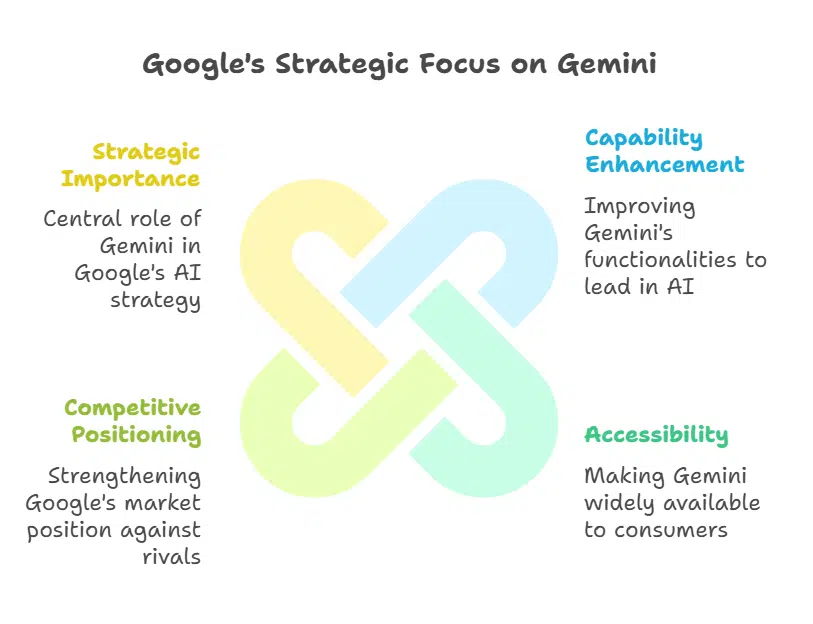
These new updates to Gemini come as part of a larger effort by Google to strengthen its position in the highly competitive AI market. With the rapid development of AI technologies by companies like OpenAI, Microsoft, and smaller startups, Google has been working tirelessly to catch up and establish itself as a leader in the field.
Demis Hassabis, co-founder of DeepMind, Google’s AI research division, has emphasized the need for the company to focus on scaling Gemini this year. In a recent internal meeting, Hassabis outlined the company’s goal to make Gemini more capable and more widely accessible to consumers. As AI technology continues to evolve, Gemini aims to be at the forefront, offering cutting-edge functionality and personalized user experiences.
Hassabis has also pointed out that scaling Gemini will be a major focus for Google in the coming year. As Google pushes forward with new AI developments, it’s clear that Gemini is going to be a central part of its AI strategy, with the goal of not only closing the gap with competitors but also establishing leadership in a highly competitive industry.
Launch of Open-Source Gemma 3 Models for Developers
Alongside these updates to Gemini, Google has also launched Gemma 3 models, which are open-source and specifically designed for developers. These models are built to help developers create AI applications that can analyze text, images, and short videos. The Gemma 3 models are also highly efficient, as they are optimized to run on a single GPU, making them ideal for developers working with limited resources.
Google has described the Gemma 3 models as the “world’s best single-accelerator model,” making them powerful tools for those creating AI-driven applications. By making these models open-source, Google is helping to democratize access to cutting-edge AI technology, enabling developers around the world to build more advanced AI tools.
This move is also indicative of Google’s commitment to fostering innovation in the AI space. By providing the tools necessary for developers to create new applications, Google is ensuring that Gemini and its associated technologies will continue to evolve and adapt to new use cases.
Google’s Competitive Stance Against DeepSeek and New AI Models
Google’s advancements in AI are not just about improving its own products but also about staying ahead of the competition. One of its biggest competitors is DeepSeek, a Chinese AI startup that has been gaining attention for its AI models. Hassabis, in a recent all-hands meeting, commented on the competition with DeepSeek, suggesting that the cost of DeepSeek’s AI training was likely “only a tiny fraction” of the total cost of developing its AI systems. He also implied that DeepSeek had probably used more hardware than it had let on, as well as Western AI models.
To stay competitive, Google has debuted two new AI models aimed at enhancing its capabilities in specific domains: Gemini Robotics and Gemini Robotics-ER (Extended Reasoning). These models are part of Google’s Gemini 2.0 platform, which the company has labeled as its most capable AI to date.
The Gemini Robotics models are designed to enhance AI’s ability to understand and interact with the physical world, focusing on tasks such as robotic control, automation, and complex problem-solving. Meanwhile, the Gemini Robotics-ER model focuses on extended reasoning, which allows AI to tackle more complex, multi-step tasks that require deeper understanding and inference.
The new updates to Google’s Gemini chatbot represent a major step forward in the evolution of personalized AI. By incorporating features like search history references, Google app integrations, and customizable Gems, Google is giving users more control over how their chatbot behaves and interacts. These features, combined with Google’s broader AI ambitions, show how the company is positioning Gemini to be a leading AI tool for personal use, as well as for developers building advanced AI applications.
With Google’s continuous efforts to innovate and compete with other industry leaders, Gemini is set to become an even more integral part of the AI landscape, helping users with personalized tasks, offering intelligent recommendations, and assisting developers in creating the next generation of AI applications. As the AI arms race heats up, Google’s Gemini is certainly one to watch in the coming years.






















