

If you’re planning to create a website, the first thing you need is a domain name. A domain name is your website’s address on the internet, making it easy for people to find you. Whether you’re starting a blog, an online store, or a personal portfolio, buying the right domain name is crucial for branding and online presence.
In this detailed step-by-step guide, we will walk you through the 10 easy steps to buy a domain name. By the end of this guide, you will have a clear understanding of how to choose, register, and protect your domain.
Your domain name represents your brand, which means choosing the right one requires careful thought. A poorly chosen domain can make it harder for users to find you or trust your site. This guide will ensure you avoid common mistakes and make an informed decision.
What Is a Domain Name?
A domain name is the unique address that people type into a web browser to visit your website. It consists of two parts:
- Website Name: This is the brand name or keyword you choose (e.g., “Google”).
- Domain Extension (TLD): This is the suffix after the website name (e.g., “.com”, “.net”).
A domain name acts as a virtual identity for your website. Without it, users would have to remember complex IP addresses. Choosing a simple and recognizable domain makes your website easily accessible.
Common Types of Domain Extensions
| Domain Extension | Purpose |
| .com | Commercial businesses (most popular) |
| .net | Network-related businesses |
| .org | Non-profit organizations |
| .edu | Educational institutions |
| .gov | Government websites |
| .io | Tech and startup businesses |
Why Choosing the Right Domain Name Matters?
Your domain name affects your brand, SEO, and credibility. A good domain name should be:
- Easy to remember
- Short and simple
- Relevant to your niche
A strong domain name can help build trust with users and search engines alike. It is often the first impression visitors have of your site. Additionally, a well-optimized domain can improve your rankings in search engine results.
Step 1: Brainstorm a Unique & Brandable Domain Name
Choosing the right domain name is the most important step. Follow these tips to pick the perfect name:
- Keep it short (under 15 characters)
- Avoid trademarked names
- Use simple and easy-to-pronounce words
- Include keywords related to your niche (if possible)
- Make it memorable and unique
Your domain name should reflect your brand’s identity. A unique and catchy name ensures that users can recall and revisit your website easily. Avoid confusing spellings and over-complicated words to keep it user-friendly.
| Good Domain Example | Bad Domain Example |
| TravelTips.com | My-Travel123.com |
| EcoLivingGuide.com | Eco-living-guide-site.net |
| FreshRecipes.com | Fresh-Recip3es.info |
Step 2: Check Domain Name Availability
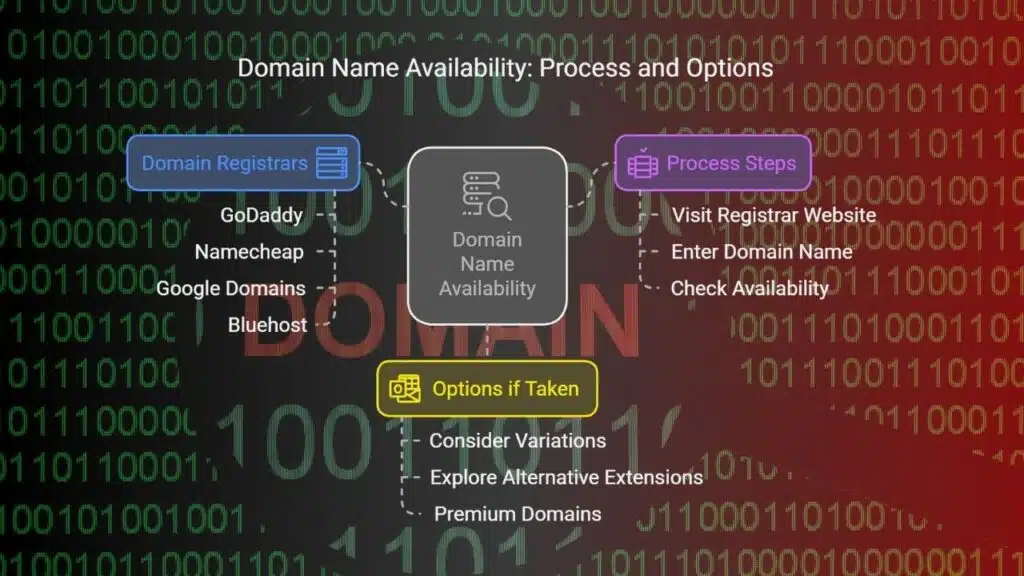
Once you have a domain idea, you need to check if it’s available. You can use domain name registrars like:
- GoDaddy
- Namecheap
- Google Domains
- Bluehost
Registering a domain is a first-come, first-served process. If your desired name is already taken, you may need to consider variations or alternative domain extensions. Some registrars also offer premium domains at higher prices.
How to Check Availability
- Visit any domain registrar website.
- Enter your desired domain name in the search bar.
- If it’s available, you can proceed to buy it.
- If it’s taken, try variations or check alternative extensions.
Step 3: Choose the Right Domain Extension
The .com extension is the best choice for most websites, but there are other options too.
| Extension | Best For |
| .com | General websites, businesses |
| .net | Networking and tech websites |
| .org | Non-profits and charities |
| .co | Startups and companies |
Domain extensions can impact how users perceive your website. A .com domain is often seen as more trustworthy than lesser-known extensions. If your preferred extension is unavailable, consider using a relevant alternative.
Step 4: Research Domain History (If Buying an Existing Domain)
If you’re buying a pre-owned domain, check its history:
- Use WHOIS Lookup to see ownership history.
- Check Wayback Machine for past website content.
- Use Google Transparency Report to check if the domain was blacklisted.
A domain with a bad reputation can negatively impact your website’s SEO. Domains previously associated with spam or malware may carry penalties. Researching beforehand can save you from future issues.
Step 5: Register Your Domain with a Reputable Registrar
Once you’ve selected your domain name, the next step is to register it with a trusted domain registrar.
What to Look for in a Registrar?
- Competitive pricing
- User-friendly domain management tools
- Good customer support
- Additional services like hosting, email, and security features
| Registrar | Price (Approx.) | Features |
| GoDaddy | $12/year | Large domain marketplace |
| Namecheap | $9/year | Free domain privacy |
| Google Domains | $10/year | Seamless Google integration |
Ensure that your registrar offers ICANN-accredited registration and renewal services. Once registered, your domain is officially yours for the chosen period.
Step 6: Consider Domain Privacy Protection

When you register a domain, your personal details (name, email, phone) are publicly visible. Domain privacy protection hides this information and prevents spam and hacking attempts.
Why Is Domain Privacy Protection Important?
- Protects against identity theft
- Prevents spam emails and calls
- Stops unauthorized access to your domain details
Most registrars offer WHOIS Privacy Protection for an extra $2-$5 per year. It’s a small price to pay for security and peace of mind.
Step 7: Secure Your Domain for the Long Term
Avoid losing your domain by:
- Registering it for multiple years (1, 3, or 5 years)
- Enabling auto-renewal to prevent expiration
- Locking the domain to prevent unauthorized transfers
Losing a domain can be disastrous, especially if someone else registers it after expiry. Many businesses have had to buy back their domains at high costs after forgetting to renew them.
Step 8: Link Your Domain to a Hosting Provider
After buying a domain, you need web hosting to make your site live. Popular hosting providers include:
- Bluehost – Best for beginners
- SiteGround – Great for speed and security
- Hostinger – Affordable hosting plans
How to Connect Your Domain to Hosting?
- Log into your hosting account.
- Find DNS settings.
- Update the nameservers provided by your host.
This process allows visitors to access your site when they enter your domain name.
Step 9: Set Up a Professional Email Address
A custom email (e.g., yourname@yourdomain.com) looks professional and helps build trust.
| Email Provider | Pricing | Features |
| Google Workspace | $6/month | Gmail, Drive, Calendar |
| Zoho Mail | Free | Up to 5 users |
| ProtonMail | $4/month | Secure & encrypted emails |
Setting up a custom email with your domain makes communication look more legitimate and increases credibility.
Step 10: Protect Your Domain & Build Your Website
How to Secure Your Domain?
- Enable two-factor authentication (2FA)
- Use strong passwords
- Turn on domain locking to prevent hijacking
First Steps to Build Your Website
- Choose a website builder (WordPress, Wix, Shopify)
- Pick a theme or template
- Add essential pages (Home, About, Contact, Blog)
- Optimize for SEO and mobile users
Your domain is the foundation of your online presence, but building a website and keeping it secure is just as important.
Takeaways
Buying a domain name is an important step in building an online presence. By following these 10 easy steps, you can secure the perfect domain for your website.
Key Takeaways:
- Choose a memorable and brandable domain
- Use a trusted registrar to register your domain
- Enable privacy protection to safeguard personal information
- Set up auto-renewal to keep ownership secure
- Link your domain to hosting and a professional email
Ready to buy your domain? Start by checking domain availability today!



























