
A buyer lands on your pricing page, wants to see how the product works, and finds only a form asking for a sales call. An interactive demo gives that buyer another option: explore a focused workflow before deciding whether a conversation is worthwhile.
Choosing the software behind that experience is less straightforward. Some platforms build guided tours from screenshots or captured screens. Others offer editable HTML, sandbox-like experiences, live overlays, or a combination. The useful starting point is the job: a short website walkthrough needs different controls from a sales engineer’s account-specific demonstration.
For B2B SaaS teams, Navattic and Storylane are worth shortlisting for marketing-led product tours, Arcade and Supademo for guided visual storytelling, and Reprise or Demostack when a more involved demo environment is under consideration. Those are starting points, not universal winners. Your product architecture, data policy, budget and the people maintaining demos will decide the fit.
Compare the 10 options at a glance
| Platform | Consider it when | Main question to ask |
|---|---|---|
| Navattic | You want an interactive product tour for your website | Which plan includes your required integrations and governance? |
| Storylane | Marketing and sales need shareable guided demonstrations | Are the capture format and features you need in the proposed tier? |
| Arcade | Your team wants a visual walkthrough and product story | How many publishing seats and demos will you need? |
| Supademo | Several teams need guided demos and instructional content | Which creator seats and advanced features are billable? |
| HowdyGo | You want to investigate HTML-based capture | Is the required sandbox, analytics and access control included? |
| Walnut | Sales wants personalized demos and deal spaces | How are access, add-ons and usage priced? |
| Reprise | Presales needs tours alongside more involved demo environments | Which environment supports your actual product and workflows? |
| Demostack | Your sales team is evaluating a cloned demo environment | What must engineering maintain, and what is included in the quote? |
| Tourial | Marketing wants campaign-focused guided demos | Which capture and analytics capabilities fit your campaign? |
| Demoboost | Sales and partner teams need reusable interactive demos | Which creation services, integrations and formats are in scope? |
The distinctions matter. A screenshot tour can be the right tool for explaining three carefully chosen steps. A clone or sandbox may support wider exploration, but ask exactly what the vendor captures and what remains simulated. Neither should be assumed to replicate every behavior of a live application.
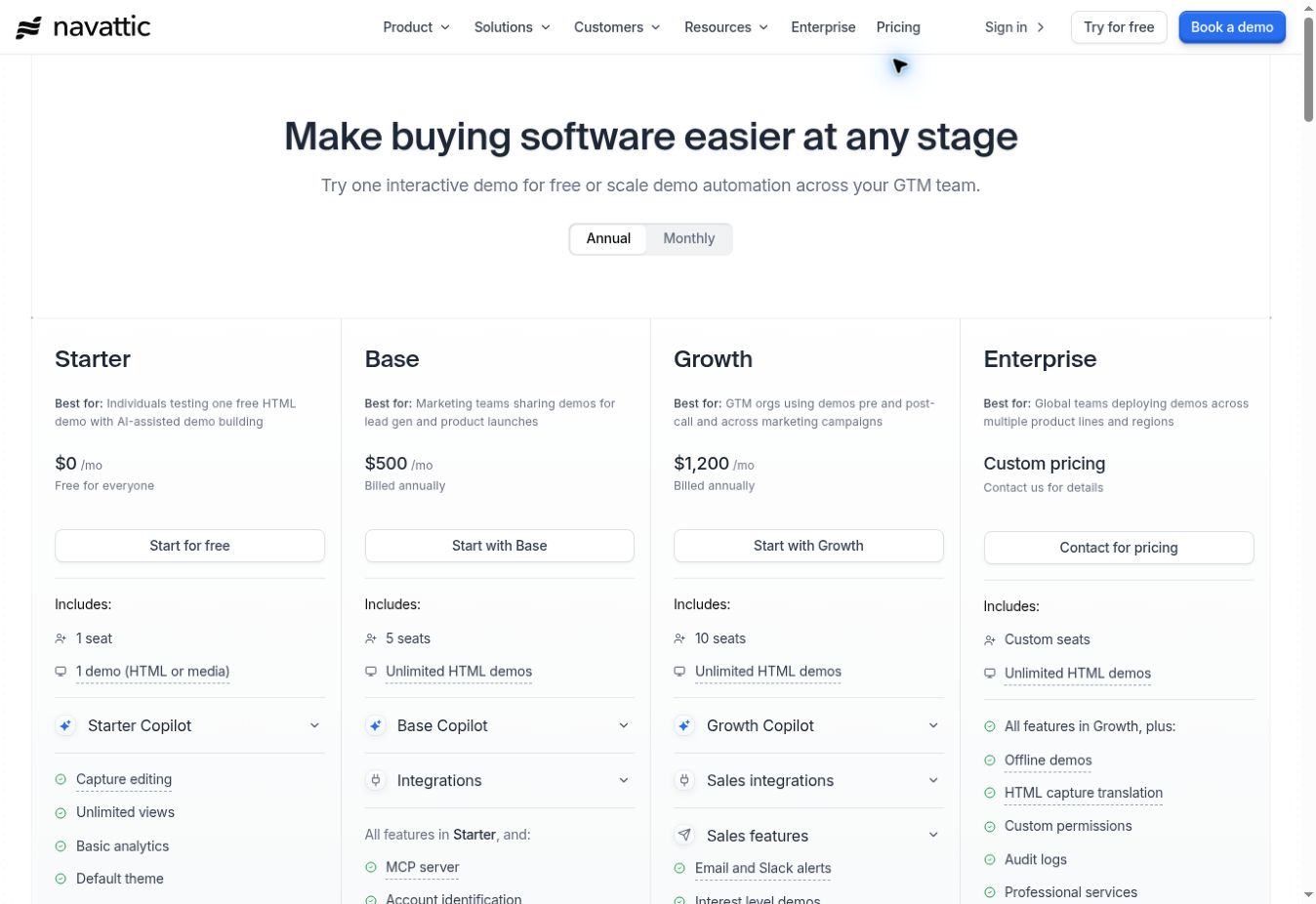
Navattic describes interactive demos that let prospects explore product workflows on their own. Its public pricing page lists a free Starter option with one seat, one HTML or media demo, unlimited views and basic analytics.
That makes Navattic a candidate for a team that wants a product tour on a landing page and expects buyers to navigate without a sales representative present. As the program grows, ask which paid tier covers the integrations, security controls and editing workflows you need; the page asks buyers to contact the company for some pricing.
The Navattic pricing page displayed Base at $500 per month and Growth at $1,200 per month with annual billing selected when viewed on November 6, 2026. Prices and taxes may differ by contract or region.
Buying check: Use a test screen with tables, drop-down menus and changing data. Ask which interactions survive capture, who maintains the demo when the product changes, and whether your CRM integration is included in the proposed plan.
2. Storylane
Storylane offers interactive demos built from product screenshots and video, alongside additional capabilities in higher packages. Its public plans page distinguishes capture formats, lead capture, analytics and sales-oriented functions.
What happened when the AI assistant tried a public Storylane tour
The notes below are from an AI assistant that operated the public demo; they are not a human editor’s personal experience.
“I opened a public six-step Storylane-hosted walkthrough of a Constant Contact email editor. The first screen highlighted a text block. I clicked Next, and the tour advanced to a second screen asking me to find Insert in the editor toolbar. After I clicked Next again, the third screen instructed me to choose Greeting Tag. I observed the step indicators change from 1/6 to 2/6 to 3/6. I did not finish the tour or create, edit, or publish a demo in Storylane.”
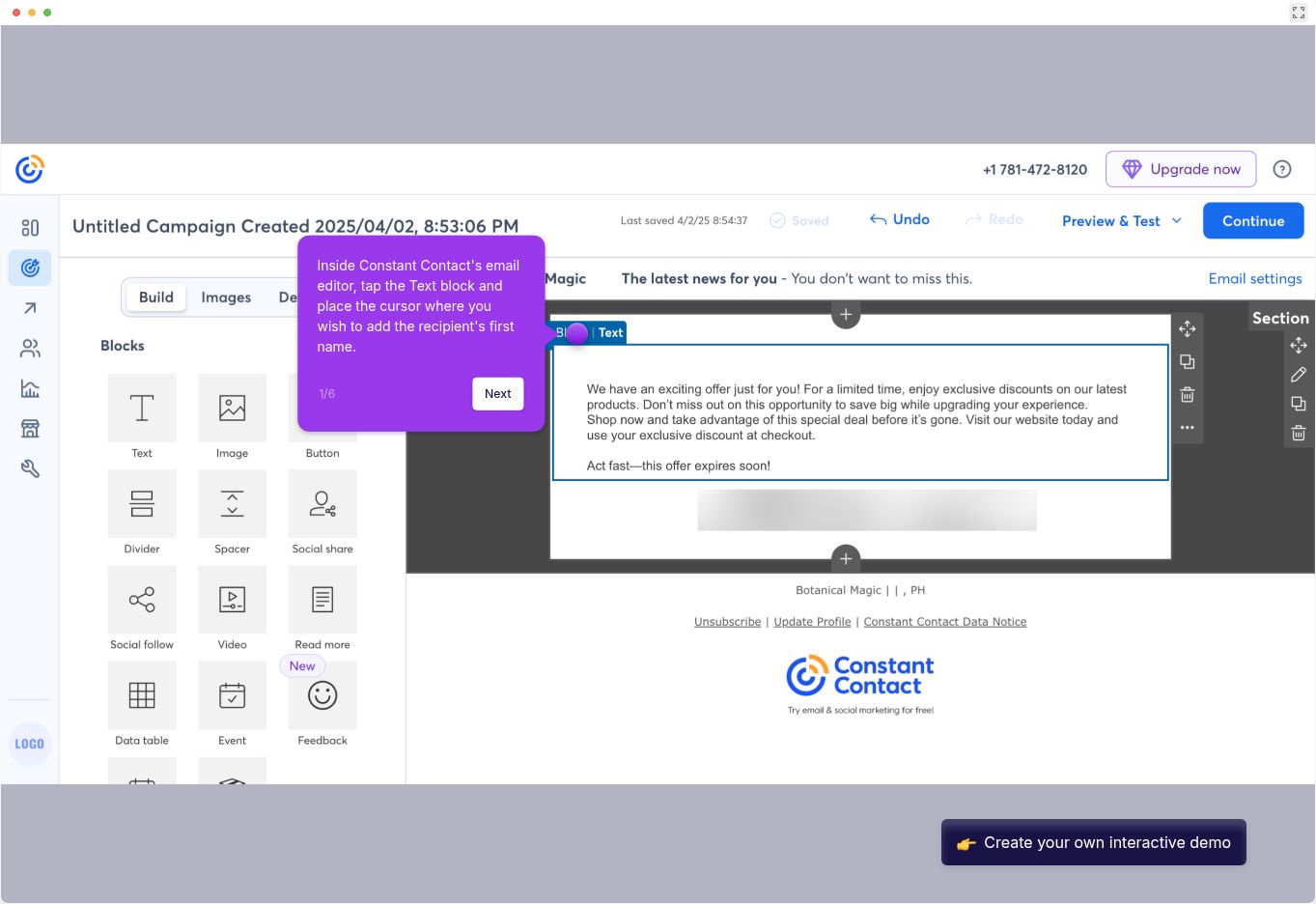
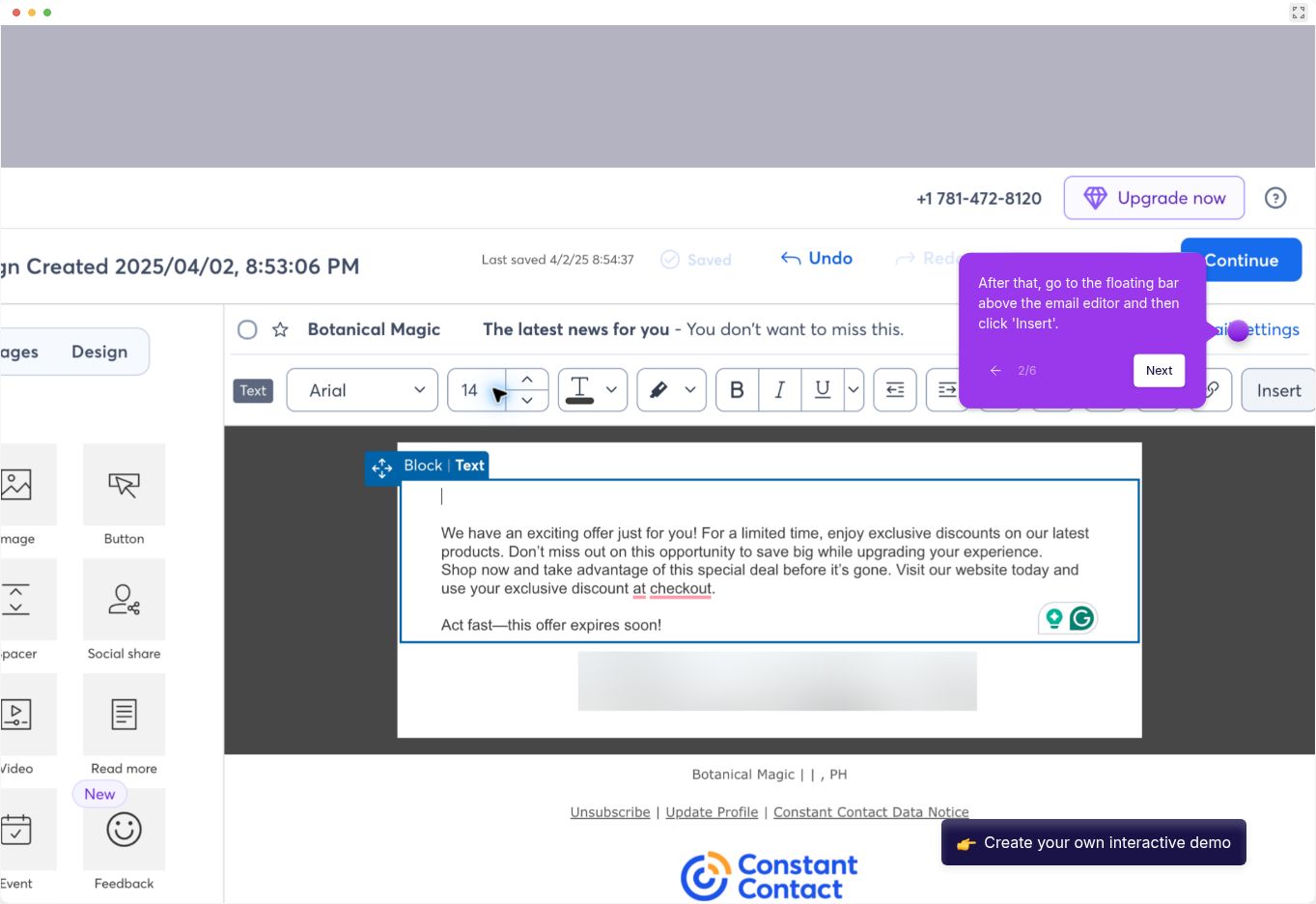
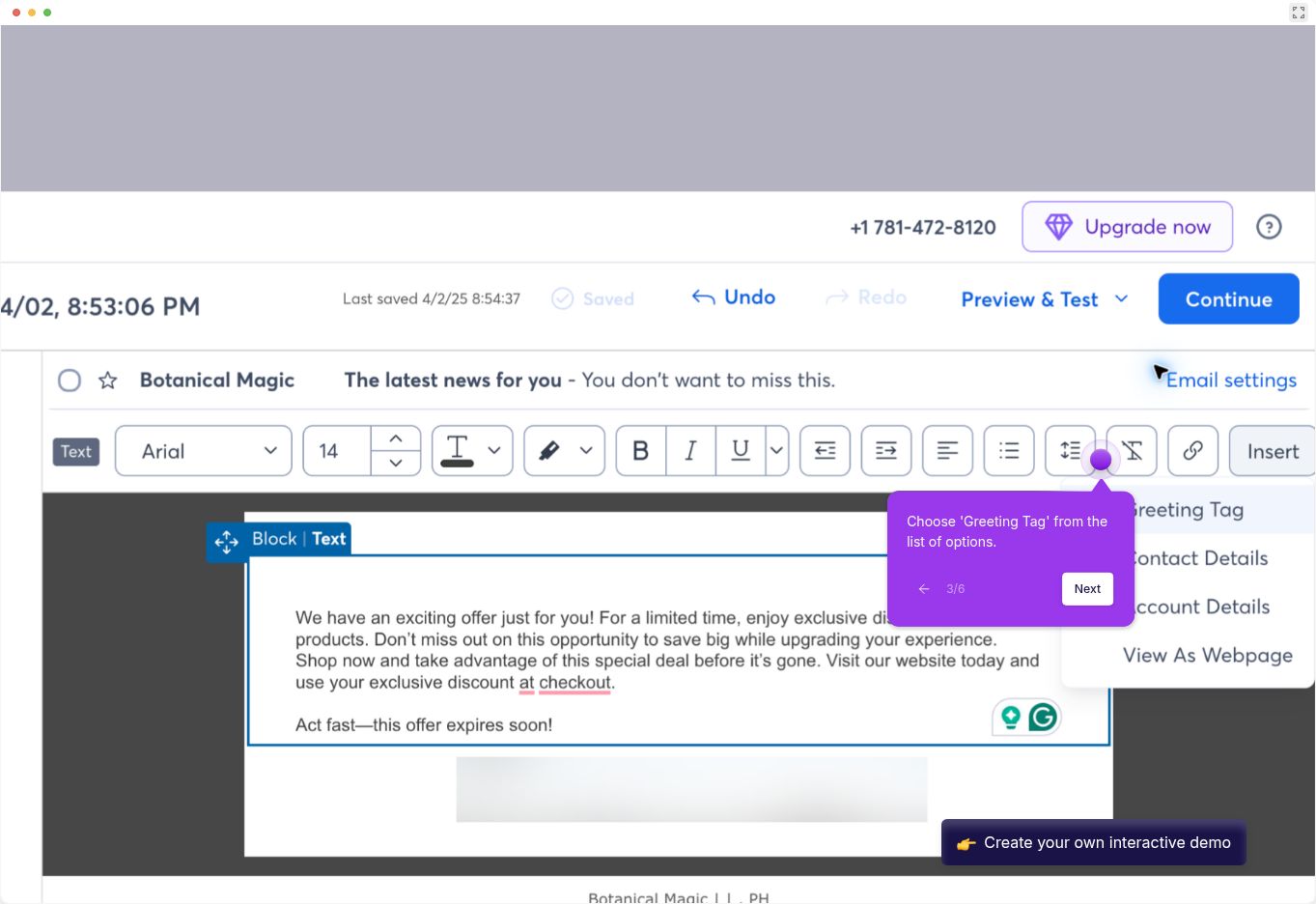
The changing tooltips show one way a visitor can be guided through a captured workflow. The images inside the player depict a Constant Contact interface; they do not show a live Constant Contact session. This narrow observation does not establish Storylane’s demo-building workflow, performance or suitability relative to the other platforms.
| Question | What this check actually established | What remains untested |
|---|---|---|
| Can a visitor progress through a guided tour? | In this one public tour, two Next clicks advanced the displayed step counter from 1 to 3. | Other tours, devices, accessibility and reliability over time. |
| Can an editor build or customize a demo? | Not tested. | Creation, branching, capture, editing and publishing. |
| How does it compare with the other tools? | Other vendors were assessed from public documentation. | A like-for-like hands-on comparison and performance ranking. |
The important detail is the difference between an entry-level visual tour and a plan offering the HTML or advanced capabilities your team may want. The pricing page displays more than one billing view, so verify the selected billing interval and actual checkout rather than comparing an isolated monthly figure.
Buying check: Ask for one demo created with your required capture type and one personalized version for an account executive. Confirm how creators, published demos, integrations and any add-ons affect the quote.
3. Arcade
Arcade focuses on interactive demos and storytelling. Its pricing page lists a free plan with one published demo and unlimited views. Paid plans add features; the page displays monthly and yearly options and per-seat pricing.
Arcade is worth evaluating when product marketing wants a compact, shareable walkthrough for a launch, landing page or help article. Do not assume the free publishing allowance will cover a growing library or that a particular capture format is included in every tier.
Buying check: Calculate how many colleagues need authoring access, how many demos must remain published, and which branding, analytics or export features are required.
4. Supademo
Supademo describes guided demonstrations using screenshots, video and HTML-based captures. Its pricing documentation distinguishes paid creators and administrators from viewer accounts; advanced capabilities depend on the plan.
It may be useful when one team creates a product tour and another wants related instructional content for onboarding or support. That broader usage also makes ownership important: a demo shown to prospects and a guide sent to customers can become outdated at different times.
Buying check: Count the people who must create or edit, not just those who need to view or share. Confirm the current tier for HTML capture, branching, workspace controls and any AI usage.
5. HowdyGo
HowdyGo describes HTML-based interactive demos. Its current plan comparison lists unlimited users and HTML demos across the named plans, while sandbox functionality, advanced analytics and security controls differ by tier or add-on.
That packaging is worth examining if multiple go-to-market colleagues need to contribute. Unlimited authoring does not make other limits disappear: compare the contract, viewer limits, optional sandbox access and export capabilities against your planned workload.
Buying check: Bring a sample product workflow with a menu, filter and editable text. Ask the vendor to show which elements remain interactive after capture and what work is needed when the live UI changes.
6. Walnut
Walnut describes personalized interactive demos and shared deal spaces for sales. Its pricing page lists custom pricing and identifies some functions, such as offline demonstrations and white labeling, as add-ons.
A sales-led B2B team could assess Walnut when a generic website tour is only one part of its demo program. A representative may also need an account-specific version and a place to share material after a meeting.
Buying check: Ask how many people can create, edit and present; what data enters a personalized demo; and how buyer engagement is associated with an account. Have the vendor itemize add-ons and usage charges.
7. Reprise
Reprise describes a range of demo options, including screen-based product tours and self-contained application clones. Its live-demo material discusses capturing frontend technologies for interactive demonstrations.
Reprise belongs in an evaluation when presales wants to explore more than a linear click-through. Still, the word “clone” can cover different technical approaches. Ask the team to identify which application behavior is reproduced, which data is synthetic and which integrations are simulated.
Buying check: Request a scoped demonstration against a representative workflow, a clear responsibility matrix for maintenance, and a full quote for creators, viewers, support and relevant environments.
8. Demostack
Demostack describes interactive tours, live overlays and product clones. Its Cloner page positions a clone as a separate environment for demonstrations. Those capabilities can be relevant to a sales organization that needs consistent examples across a complex product.
The scope of a clone is a technical and commercial question, not something to settle from a marketing label. Test the specific integrations, permissions and workflow variations your presales team needs to show. Clarify which elements require vendor services or internal engineering work.
Buying check: Request a proof of concept using non-sensitive sample data, a defined refresh process and an itemized proposal. Its pricing page directs buyers toward a scoped conversation rather than a simple comparable entry price.
9. Tourial
Tourial describes self-guided product experiences for sales and marketing. It is worth considering when a demand-generation team wants to connect a campaign to a focused product tour, rather than present the entire application.
Ask how demos are grouped, where they can be embedded and how buyer actions reach the tools your team already uses. If you need editable HTML, validate the exact capture method and plan directly with Tourial instead of relying on an older third-party comparison.
Buying check: Provide an actual campaign brief and request a current written quote, implementation scope, analytics examples and data-retention terms.
10. Demoboost
Demoboost describes interactive demos, sandbox environments, overlays, screenshot and video formats. Its sales and partner materials emphasize reusable demonstrations across buyer-facing teams.
Consider it when a single demo needs to support a marketing journey, a sales follow-up and partner enablement. Those are different audiences, so review how a team controls versions and prevents an outdated partner asset from being shared.
Buying check: Ask which formats and services are included in the proposal, how account-specific personalization works, and whether CRM integration and usage analytics require additional packages.
Test the same workflow with every finalist
A good comparison starts with a workflow, not ten feature lists. The following is an evaluation plan, not a test conducted for this article:
- Choose one product task—for example, create a project, invite a teammate and review a result. Use an authorized test workspace containing only synthetic data.
- Give each vendor the same starting screen and acceptance criteria. Ask for a shareable demo that demonstrates the task, includes one optional branch and ends with a relevant next action.
- Change a label or sample company name and check how that change reaches each published version. Record who can make the edit and what must be recaptured.
- Open the demo on desktop and mobile, test the embed and any form, and check keyboard navigation. Note failures rather than assuming a responsive claim covers your implementation.
- Review what the capture contains: hidden data, personal information, internal URLs or credentials must not be exposed. Ask about retention, access controls and deletion.
- Calculate the first-year cost for the same number of creators, required integrations, supported demos, onboarding and usage. Ask each vendor for the complete commercial terms in writing.
A small pilot can reveal whether an attractive viewer experience turns into a maintenance burden. Use two or three finalists and keep the workflow constant. A broad superiority claim requires comparable, repeatable evidence; one successful demo proves only that the tested path worked in that environment.
How should a SaaS team measure success?
Decide what the demo should help a buyer do. For a website tour, that might be reaching the end of the workflow or requesting a relevant next step. For a sales leave-behind, it might be engagement from additional stakeholders. Define the denominator, date range and tracking limitations before comparing results.
A demo view is not automatically a qualified lead, and a viewer reaching the final screen does not prove the demo caused a sale. Compare outcomes against a suitable baseline or controlled experiment when possible. Also track operational costs: the time needed to update each tour after a product release matters if your interface changes frequently.
If you are preparing a launch, Editorialge’s guide to launch tactics on a tight budget explains how one focused demo asset can support several channels.
Frequently Asked Questions (FAQs)
Is an interactive product demo the same as a free trial?
No. A guided demo usually presents a controlled, limited path through a product experience. A free trial generally provides access to some version of the product itself. Individual demo formats vary, so ask whether a prospective buyer is interacting with captured screens, a simulated environment or the actual application.
Is HTML capture always better than screenshots?
No. HTML can offer editable interface elements, while screenshot or video-based steps may be sufficient for a short, fixed story. The better option depends on the interactions you need to show, how often the interface changes, and what each platform can safely capture.
Can these platforms improve conversion rates?
They can provide a different way for prospects to explore a product, but this review did not measure conversion. Establish your own baseline and test placement, audience and message before attributing business results to a demo tool.