


A creator does not need another AI tool sitting unused in a browser tab. A small business owner does not need another dashboard. A marketer does not need ten disconnected prompts that produce average drafts and more work to clean up.
What people need is a workflow.
AI creative workflows matter because they turn scattered AI use into a repeatable system. Instead of asking ChatGPT for a random idea, a writer can build a research-to-outline-to-draft workflow. Instead of creating one product description at a time, an e-commerce team can create a full product content system. Instead of guessing what to post, a real estate agent can turn one listing into social posts, email copy, short videos, and follow-up messages.
That is where AI becomes useful across industries. It helps people reduce repeated work, organize raw inputs, create first drafts, test creative options, and move faster without removing human judgment.
Practical AI creative workflows for different industries, including authors, e-commerce brands, real estate agents, educators, podcasters, designers, and small business owners. The focus is execution, not theory.
AI Creative Workflows for Authors

Authors do not only write. They plan, research, outline, draft, edit, format, publish, and market. That is why AI Workflows for Authors should focus on the full writing process, not only text generation.
A strong author workflow uses AI as a planning partner, research organizer, editing assistant, and publishing support tool. For example, an author can turn scattered notes into a chapter outline, test book angles, clean up weak sections, prepare metadata, and create launch content without handing over creative control.
1. Book Idea Development Workflow
Industry use case: Authors, nonfiction writers, novelists, self-published creators
A book idea can sound strong at first and still fail during outlining. AI can help authors test whether an idea has enough depth, reader value, and structure before they commit months of work.
This is especially useful for nonfiction authors, memoir writers, and creators building authority books. AI can compare several angles, suggest reader problems, flag ideas that feel too broad, and help shape a stronger promise. The author still chooses the direction, but the early testing reduces wasted drafting time.
Step-by-step process:
- Write a rough book concept in plain language.
- Ask AI to generate multiple angles, reader promises, and possible titles.
- Compare the ideas by audience need, originality, and chapter potential.
- Ask AI to identify weak or overused angles.
- Choose one concept and turn it into a one-page book brief.
Tools: ChatGPT, Claude, Gemini, Notion AI, Sudowrite
Outcome/benefit: A clearer book concept with audience, promise, angle, and possible structure before drafting begins.
2. AI Outlining Workflow
Industry use case: Authors, bloggers, nonfiction writers, novelists
Outlining is where many writing projects either gain direction or become confusing. AI helps by creating several possible structures quickly, so the author can compare options instead of staring at a blank document.
This also helps authors spot structural problems before drafting too much. A chapter may repeat another chapter, arrive too early, or lack a clear reader payoff. By comparing multiple outlines, the writer can choose the strongest order, merge weak sections, and build a draft path that feels easier to follow.
Step-by-step process:
- Provide the book idea, target reader, tone, and main promise.
- Ask AI for three outline versions: beginner-friendly, problem-solution, and expert-level.
- Review the chapter order and remove repeated ideas.
- Ask AI to flag missing sections or weak transitions.
- Build the final outline manually.
Tools: ChatGPT, Notion AI, Reedsy Studio, Scrivener, Claude
Outcome/benefit: A chapter-by-chapter structure that reduces drafting confusion and keeps the book aligned with the reader’s need.
3. Editing and Rewriting Workflow
Industry use case: Authors, content writers, editors, publishing teams
AI can help authors edit faster, but it should not rewrite the whole manuscript blindly. The best approach is to use AI for focused editing passes.
For example, an author can run one pass for repeated ideas, another for weak transitions, and another for sentence clarity. This keeps the process controlled. Instead of letting AI reshape the whole manuscript, the writer uses it like an extra editorial lens and makes the final call.
Step-by-step process:
- Create a short style sheet for tone, spelling, voice, and terms to avoid.
- Ask AI to identify unclear paragraphs, repeated points, and weak transitions.
- Run grammar and clarity checks using editing tools.
- Rewrite only the sections that need improvement.
- Review the final text manually to protect voice and accuracy.
Tools: Grammarly, ProWritingAid, ChatGPT, Claude, Notion AI
Outcome/benefit: Cleaner writing, fewer repeated patterns, and a stronger draft without losing the author’s style.
AI Creative Workflows for E-Commerce Brands
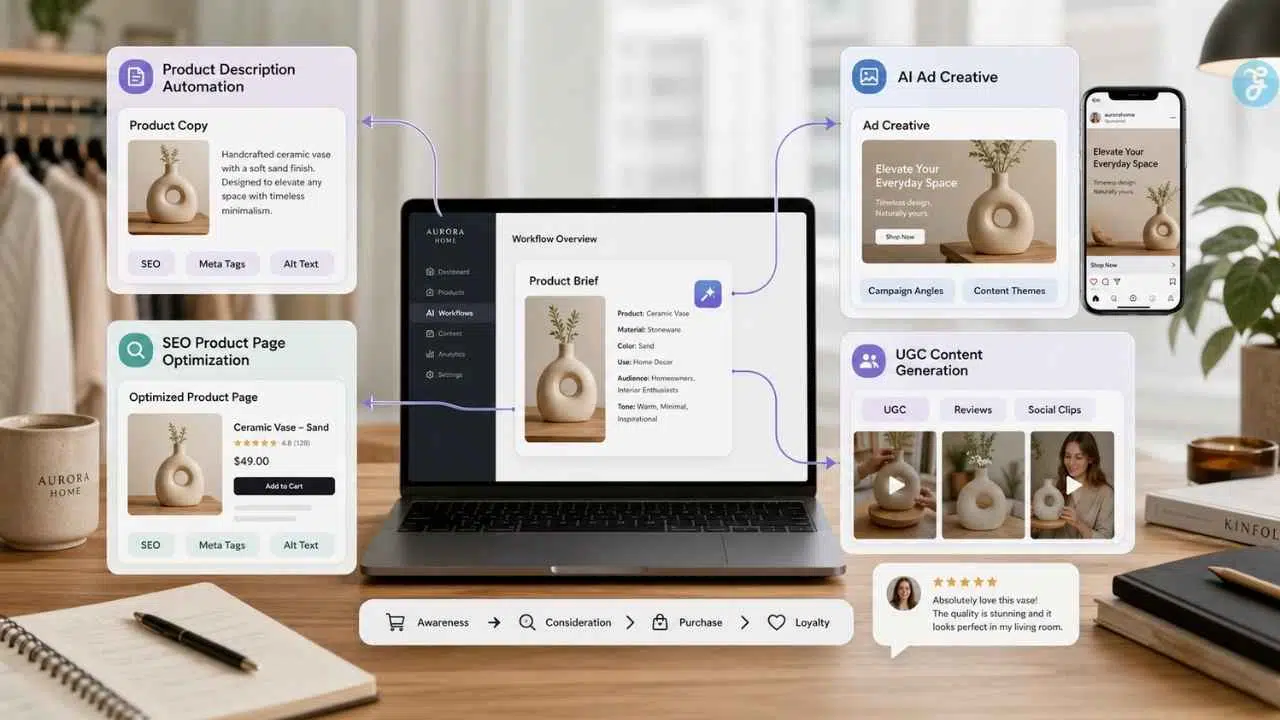
E-commerce teams work under constant pressure. Product pages need copy. Ads need new creative. Customers need fast answers. Inventory needs planning. That makes AI Workflows for E-Commerce Brands one of the clearest AI industry use cases.
Online stores benefit most when AI supports the full sales journey, not just isolated content tasks. A product brief can feed product copy, SEO metadata, ad angles, email campaigns, and support replies. This keeps messaging consistent while helping small teams move faster across daily marketing and operations work.
4. Product Description Automation Workflow
Industry use case: E-commerce brands, Shopify stores, product marketers
Product descriptions need more than pretty words. They need accurate product details, buyer benefits, SEO elements, and brand voice.
A strong product description also reduces hesitation. It answers simple buyer questions before they become reasons to leave the page. Size, fit, material, use case, delivery expectations, and care details all matter. When AI receives those inputs clearly, it can produce copy that feels useful instead of generic or inflated.
Step-by-step process:
- Create a product brief with name, category, material, size, use case, target customer, and claims to avoid.
- Ask AI to write a plain-language product explanation.
- Generate a sales-focused product page version.
- Create SEO elements such as meta title, meta description, and image alt text.
- Review all facts before publishing.
Tools: ChatGPT, Shopify Magic, Jasper, Grammarly, Notion AI
Outcome/benefit: Faster catalog updates, clearer product pages, and better conversion support.
5. AI Ad Creative Workflow
Industry use case: E-commerce ads, paid social, product launches
Ad creative gets tired quickly. AI helps teams generate more angles without starting from zero each week.
For small teams, this matters because creative testing often stops when the first few ideas are used. AI can turn one product brief into multiple hooks, visuals, captions, and audience angles. The team still chooses what fits the brand, but the starting point becomes much faster.
Step-by-step process:
- Define the product, offer, customer segment, and platform.
- Ask AI for ad angles based on objections, use cases, and buyer motivations.
- Generate copy variations for headlines, hooks, captions, and short video scripts.
- Create visual concepts using AI image or design tools.
- Test the strongest versions and feed results back into the next batch.
Tools: ChatGPT, Jasper, Midjourney, ImagineLab.art, Canva, Meta Ads tools
Outcome/benefit: Faster ad testing, more creative variety, and clearer campaign direction.
6. SEO Product Page Optimization Workflow
Industry use case: E-commerce SEO, product discoverability, organic search
Many product pages look fine but lack useful search signals. AI can help improve structure, metadata, buyer questions, and internal links.
For e-commerce teams, this workflow is especially useful when several products compete for similar keywords. AI can help compare search intent, rewrite thin descriptions, suggest FAQ sections, and spot missing product details. The final page should still read naturally for buyers, not like a keyword checklist written for bots.
Step-by-step process:
- Audit product title, URL, H1, description, meta tags, image alt text, reviews, and FAQs.
- Use AI to create a search-intent map.
- Rewrite product copy with buyer questions and natural keywords.
- Add useful FAQs, internal links, and accurate image alt text.
- Monitor queries and clicks after publishing.
Tools: RankPilot.ai, ChatGPT, Google Search Console, Shopify SEO fields, Ahrefs, Semrush, Grammarly
Outcome/benefit: Better search visibility, clearer product content, and stronger click-through potential.
7. UGC Content Generation Workflow
Industry use case: Social proof, organic marketing, paid creative
User-generated content works best when it comes from real buyer insight. AI should help organize customer language, not fake testimonials.
The best workflow starts by collecting reviews, support tickets, social comments, product photos, and post-purchase survey answers. AI can then group repeated phrases, objections, use cases, and emotional triggers into usable content angles. The brand still needs real proof, permission, and careful review before turning insights into campaign assets publicly.
Step-by-step process:
- Collect reviews, comments, product photos with permission, support questions, and survey responses.
- Use AI to group feedback into themes.
- Select 3 to 5 content angles based on real customer language.
- Create creator briefs, demo scripts, captions, and ad variations.
- Track saves, clicks, watch time, and comments.
Tools: ChatGPT, ImagineLab.art, Midjourney, Canva, CapCut, review platforms
Outcome/benefit: Better social proof content, stronger creator briefs, and more useful ad angles.
AI Creative Workflows for Real Estate Agents

Real estate agents need speed, but they also need trust. AI should support listing copy, lead response, local content, and follow-up without inventing property facts. That is the foundation of AI Workflows for Real Estate Agents.
In practice, the best real estate AI systems work like a disciplined assistant. They help agents prepare property briefs, organize buyer questions, draft follow-up messages, and repurpose listing content across channels. The agent still checks every detail, protects client trust, and makes the final call before anything goes live.
8. Property Listing Description Workflow
Industry use case: Real estate listings, MLS copy, property marketing
A listing description should help buyers understand what matters about a property. AI can speed up the draft, but the facts must come from the agent.
Best workflow turns a property brief into several usable marketing assets without changing the truth of the listing. Agents can use AI to shape tone, highlight verified features, and create reusable copy for MLS, social media, email, and flyers. The final check should always stay with the agent.
Step-by-step process:
- Collect verified property facts from the seller, MLS data, inspection notes, and walkthrough.
- Separate facts from opinions.
- Ask AI to create polished, warm, and concise listing versions.
- Remove vague or risky wording.
- Check final copy against MLS, brokerage, and advertising rules.
Tools: ChatGPT, Claude, Gemini, Canva Magic Write, Grammarly, ListAssist
Outcome/benefit: Faster listing copy, clearer property positioning, and reusable copy for flyers, email, and social posts.
9. Social Media Listing Promotion Workflow
Industry use case: Real estate marketing, listing visibility, lead generation
One listing can produce more than one post. AI helps agents turn one property brief into a full marketing kit.
The workflow should begin with one verified listing brief, then branch into platform-specific assets. A Facebook post may focus on practical property details, while Instagram needs stronger visuals, and short-form video needs a quick hook. AI helps reshape the same core information without changing the facts.
Step-by-step process:
- Create a listing asset folder with photos, video clips, property facts, and neighborhood notes.
- Ask AI for platform-specific content angles.
- Draft captions, short video hooks, email copy, and story sequences.
- Design visuals and edit short videos.
- Schedule posts and track engagement, clicks, inquiries, and showing requests.
Tools: ChatGPT, Canva, CapCut, Buffer, Later, Hootsuite, Meta Business Suite
Outcome/benefit: More content from each listing, better consistency, and stronger engagement signals.
10. CRM Pipeline and Task Prioritization Workflow
Industry use case: Lead management, client communication, operations
A CRM should not be a storage box. AI can help summarize notes, prioritize leads, and create follow-up tasks.
This is where the workflow becomes practical. The agent can see which leads need a call, which need nurturing, and which need better information before moving forward. Instead of relying on memory, the CRM becomes a daily decision board for follow-ups, showings, consultations, and stale opportunities that still deserve attention.
Step-by-step process:
- Clean CRM stages such as new lead, contacted, consultation booked, active buyer, active seller, under contract, closed, and nurture.
- Add key fields such as timeline, budget, location, property type, and next action.
- Use AI to summarize long notes and identify missing details.
- Create follow-up tasks based on lead stage.
- Review hot leads daily and stale leads weekly.
Tools: Follow Up Boss, HubSpot, Rechat, Zillow Premier Agent app, Monday.com, Notion, Zapier, ChatGPT
Outcome/benefit: Better lead organization, fewer missed tasks, and cleaner pipeline visibility.
AI Creative Workflows for Educators

Educators need support with planning, feedback, content adaptation, and admin work. AI Workflows for Educators should save time while keeping teaching judgment in the teacher’s hands.
Teachers also need room to focus on students, not only lesson files and grading queues. A practical AI workflow can turn one lesson objective into class activities, quizzes, feedback notes, and revision materials. The teacher still decides what fits the classroom, but AI can reduce the repetitive preparation around that decision.
11. Lesson Planning Workflow
Industry use case: Teachers, tutors, trainers, curriculum planners
Lesson planning takes time because teachers must connect objectives, activities, student level, and assessment. AI can produce a strong first structure when the teacher gives clear inputs.
This helps teachers move from a rough topic to a usable classroom plan faster. The teacher can then adjust pacing, examples, group activities, and support materials based on the actual class. AI should provide the draft structure, while the educator checks accuracy, learning fit, and student needs.
Step-by-step process:
- Provide grade level, subject, learning objective, time limit, and student needs.
- Ask AI to create a lesson outline with activities and discussion prompts.
- Add differentiation for advanced and struggling students.
- Create exit tickets or quick checks for understanding.
- Review for accuracy, age suitability, and classroom fit.
Tools: ChatGPT, Google Gemini, Microsoft Copilot, MagicSchool AI, Notion AI
Outcome/benefit: Faster lesson planning and more adaptable classroom materials.
12. Quiz and Worksheet Generation Workflow
Industry use case: Assessment, practice materials, homework support
AI can help educators create different levels of practice from the same lesson topic.
This is useful when a classroom has mixed learning speeds. A teacher can create easier recall questions, mid-level application tasks, and harder scenario-based exercises from one lesson plan. That saves preparation time while still giving students practice that matches their current understanding, not a one-size-fits-all worksheet.
Step-by-step process:
- Provide the topic, learning objective, and student level.
- Ask AI for multiple question types: short answer, multiple choice, scenario-based, and discussion.
- Generate answer keys and explanations.
- Adjust question difficulty.
- Review for accuracy and bias before use.
Tools: ChatGPT, Quizizz AI, Kahoot AI features, Google Forms, Microsoft Forms
Outcome/benefit: Faster assessment creation and more varied student practice.
13. Student Feedback Summarization Workflow
Industry use case: Grading support, formative feedback, student progress
Feedback takes time because it must be specific. AI can help summarize patterns and draft feedback, but the teacher should approve the final message.
Teachers can also use this workflow to spot class-wide patterns before they become bigger learning gaps. For example, AI can group repeated mistakes in essays, quiz answers, or reflections, helping the teacher adjust the next lesson, prepare small-group support, and write feedback that feels timely without sounding copied or rushed.
Step-by-step process:
- Collect student responses or assignment notes.
- Ask AI to identify common strengths and gaps.
- Draft general class feedback.
- Create individual feedback templates where appropriate.
- Review and personalize before sharing.
Tools: ChatGPT, Google Workspace, Microsoft 365 Copilot, Notion AI
Outcome/benefit: Faster feedback cycles and clearer learning support.
AI Creative Workflows for Podcasters
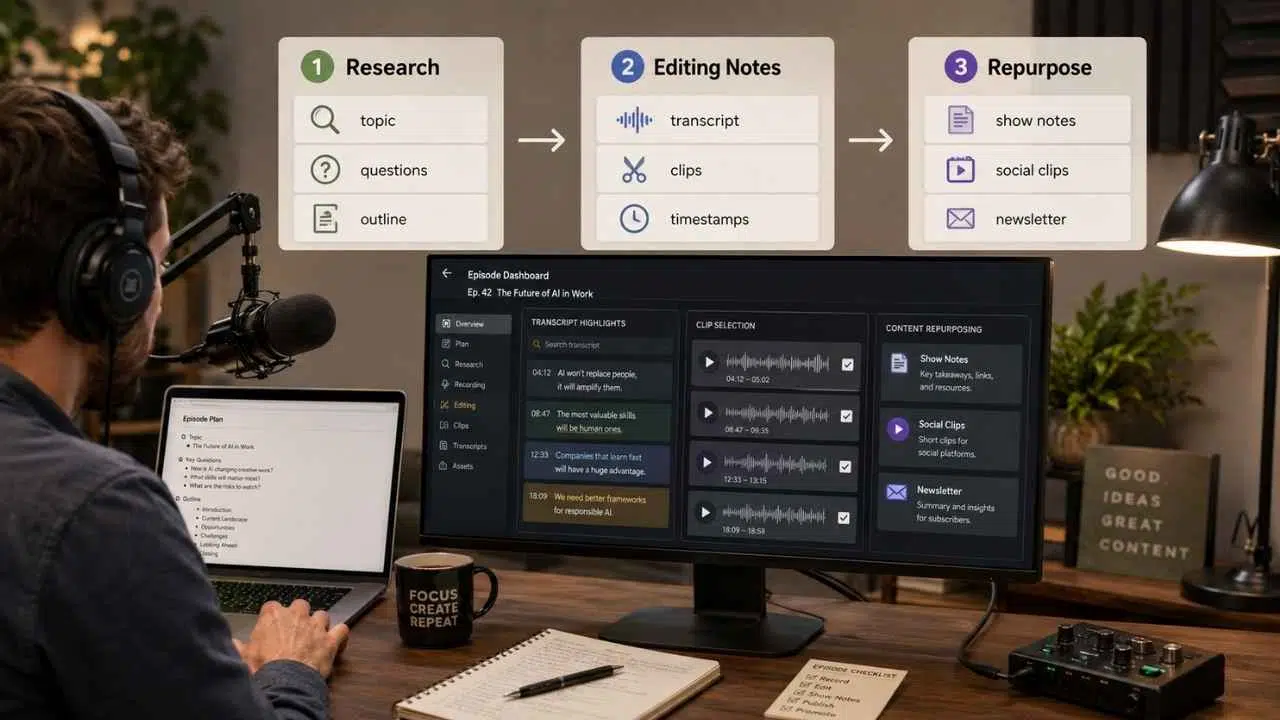
Podcasting is not only recording. It includes research, scripting, editing notes, clips, show notes, distribution, and promotion. That makes AI Workflows for Podcasters a useful cluster under this pillar.
For podcasters, the biggest value of AI is not replacing the host’s voice. It is reducing the production drag around each episode. A single recording can become research notes, a structured script, polished show notes, short clips, newsletter copy, and social posts when the workflow is planned properly.
14. Podcast Episode Research Workflow
Industry use case: Podcast planning, interviews, content development
A strong episode starts before recording. AI can help gather angles, questions, and structure from a rough topic.
For creators, this prevents episodes from becoming loose conversations with no clear listener payoff. The workflow can turn a basic idea into a focused episode brief, including talking points, guest questions, examples, possible objections, and a clear ending. It helps the host record with direction instead of improvising everything.
Step-by-step process:
- Define the episode topic and target listener.
- Ask AI for key questions, misconceptions, and subtopics.
- Create an episode outline.
- Draft guest questions if there is an interview.
- Add a short listener takeaway for the end of the episode.
Tools: ChatGPT, Perplexity, Notion AI, Google Docs, Descript
Outcome/benefit: Better episode structure, sharper questions, and less rambling during recording.
15. Podcast Editing Notes Workflow
Industry use case: Audio editing, production, post-production
AI can help turn transcripts into editing notes, which saves time before the human editor starts cutting.
This is especially useful for interview shows, where strong answers are often buried between pauses, side comments, and repeated explanations. Instead of listening back from the beginning every time, the producer can review AI-generated notes first, mark likely cuts, and focus the human edit on flow, clarity, and listener value.
Step-by-step process:
- Transcribe the episode.
- Ask AI to identify repeated sections, unclear moments, strong quotes, and possible clips.
- Mark timestamps for cuts or highlights where available.
- Create a cleaner episode flow.
- Send notes to the editor or use them during self-editing.
Tools: Descript, Riverside, Otter.ai, ChatGPT, Adobe Podcast
Outcome/benefit: Faster editing decisions and stronger episode pacing.
16. Podcast Repurposing Workflow
Industry use case: Content marketing, social clips, newsletters
One podcast episode can become multiple content assets. AI helps extract and reshape the strongest parts.
Useful for podcasters who publish consistently but struggle to promote each episode properly. A strong interview can become short clips, quote graphics, email notes, blog summaries, LinkedIn posts, YouTube descriptions, and newsletter sections. AI helps identify which parts deserve attention instead of treating every moment equally.
Step-by-step process:
- Upload or paste the episode transcript.
- Ask AI to identify key ideas, quotes, and clip-worthy moments.
- Create social captions, newsletter summaries, and short video scripts.
- Design quote cards or clip thumbnails.
- Schedule content across platforms.
Tools: ChatGPT, Descript, Canva, CapCut, Buffer, Notion AI
Outcome/benefit: More reach from each episode without recreating content from scratch.
AI Creative Workflows for Designers

Designers already think in systems: briefs, mood boards, versions, feedback, and final assets. AI Workflows for Designers should support that process without replacing taste or craft.
Design work moves through many small decisions before anything reaches the client. A logo, landing page, ad creative, or packaging concept usually needs research, references, layout tests, copy adjustments, and revision notes. AI can help designers move through those early and repetitive steps faster, while the designer still controls direction, quality, and final taste.
17. Creative Brief Expansion Workflow
Industry use case: Graphic design, brand design, campaign planning
Client briefs are often incomplete. AI can help turn a rough brief into a clearer working document.
For designers, this saves time before concept work begins. The workflow can surface missing audience details, unclear deliverables, weak brand direction, deadline risks, and approval gaps. It also gives the designer better questions to ask, so the first creative round starts with fewer assumptions and cleaner expectations from everyone involved.
Step-by-step process:
- Paste the client brief into an AI tool.
- Ask AI to identify missing details, unclear goals, and design risks.
- Generate questions for the client.
- Create a refined creative brief.
- Confirm direction before starting design.
Tools: ChatGPT, Notion AI, FigJam, Miro AI, Google Docs
Outcome/benefit: Fewer unclear projects, better client alignment, and cleaner design direction.
18. Mood Board and Visual Direction Workflow
Industry use case: Brand identity, social campaigns, web design, packaging
AI can help explore visual directions before a designer commits to one path.
AI is especially useful when the brief feels too open or the client has only vague references. It can turn loose ideas into style directions, mood options, color themes, layout references, and visual boundaries. Designers still choose the final direction, but AI can speed up early creative exploration.
Step-by-step process:
- Define brand personality, audience, industry, and visual restrictions.
- Ask AI for mood board directions.
- Generate image references or concept visuals.
- Organize options by color, style, layout, and emotion.
- Choose one direction and refine it manually.
Tools: Midjourney, ImagineLab.art, Canva, Adobe Firefly, Pinterest, Milanote
Outcome/benefit: Faster concept exploration and clearer visual direction.
19. Design Feedback and Versioning Workflow
Industry use case: Client revisions, campaign assets, brand consistency
Revision rounds can become messy. AI can help organize feedback and create version plans.
Especially useful when feedback arrives from several people at once. A client may comment on colors, a marketer may flag copy, and a designer may notice spacing issues. AI can group those notes into clear tasks, helping the team revise with less confusion and fewer missed changes overall.
Step-by-step process:
- Collect feedback from clients or team members.
- Ask AI to group feedback into layout, copy, color, image, and brand issues.
- Identify contradictions or vague comments.
- Create a revision checklist.
- Produce controlled design variations instead of random changes.
Tools: ChatGPT, Figma, Canva, Notion AI, Miro
Outcome/benefit: Cleaner revision rounds, fewer missed comments, and more focused design updates.
AI Creative Workflows for Small Business Owners

Small business owners often handle marketing, admin, operations, sales, customer service, and finance with limited help. AI Workflows for Small Business Owners should focus on saving time and reducing repeated manual work.
For a small business, AI works best when it removes the small delays that pile up during the week. It can turn repeat tasks into checklists, drafts, reminders, and reports, but the owner still decides what matters. Start with one workflow that protects time, cash flow, or customer trust first.
20. Marketing Automation Workflow
Industry use case: Email marketing, campaign planning, lead nurturing
Small business marketing often becomes inconsistent because the owner only promotes when there is spare time. AI can turn one offer into a full campaign.
AI makes that campaign easier to manage by turning one idea into emails, captions, landing page sections, and follow-up reminders. The owner still decides the offer and tone, but the repeated writing and scheduling work becomes lighter. That keeps marketing active even during busy sales, delivery, or client-service weeks.
Step-by-step process:
- Choose one campaign goal and one offer.
- Define the target customer.
- Ask AI for campaign angles.
- Draft emails, social posts, landing page copy, and ad copy.
- Build follow-up automation in an email or CRM tool.
- Review performance and improve the next campaign.
Tools: ChatGPT, Mailchimp, HubSpot, Canva AI, Zapier, Notion AI, Google Sheets
Outcome/benefit: Faster campaign creation, better follow-up, and less manual marketing work.
21. Invoice and Admin Automation Workflow
Industry use case: Invoicing, bookkeeping, reminders, document management
Admin work becomes painful when invoices are late, receipts disappear, and records are scattered. AI and automation can help create a cleaner system.
For many owners, the issue is not the invoicing tool itself. It is the lack of a repeatable process. AI can help turn scattered admin tasks into a weekly routine: invoice creation, payment reminders, receipt sorting, client updates, and simple finance reviews. That structure reduces last-minute pressure.
Step-by-step process:
- Create standard invoice templates.
- Set up customer and service categories.
- Automate recurring invoices where appropriate.
- Set payment reminder emails.
- Use AI to summarize unpaid invoices and admin tasks.
- Review reports weekly or monthly.
Tools: QuickBooks, Xero, FreshBooks, Wave, Google Workspace, Microsoft 365 Copilot, Zapier, ChatGPT
Outcome/benefit: Less admin time, fewer missed invoices, and cleaner records.
22. Customer Support Response Workflow
Industry use case: Customer service, support inboxes, lead response
Small businesses often answer the same questions again and again. AI can help create faster, more consistent replies.
For a small team, this matters because every repeated answer steals time from sales, service, or delivery. A simple AI-assisted support system can turn approved business information into reusable replies, helpdesk snippets, and chatbot responses while still letting a person handle refunds, complaints, complex orders, or sensitive customer situations.
Step-by-step process:
- Collect the top customer questions.
- Write approved answers for shipping, pricing, booking, refunds, services, and product details.
- Use AI to create response templates.
- Add templates to the inbox, chatbot, or helpdesk.
- Review unusual questions manually.
Tools: ChatGPT, Tidio, Intercom, Zendesk, Help Scout, Gmail, Google Docs
Outcome/benefit: Faster replies, fewer repeated messages, and better customer experience.
23. Weekly Business Review Workflow
Industry use case: Operations, planning, reporting, decision-making
Small businesses need regular review, but many owners only look at numbers when something feels wrong. AI can help summarize weekly activity and spot patterns.
A weekly review also keeps small issues from becoming expensive surprises. The owner can see which campaigns brought leads, which invoices are still unpaid, which products slowed down, and which tasks kept getting pushed aside. AI helps turn scattered notes and numbers into a short, usable business snapshot.
Step-by-step process:
- Collect weekly data: sales, leads, expenses, customer questions, campaign results, and overdue tasks.
- Add the data to a spreadsheet or workspace.
- Ask AI to summarize what changed.
- Identify risks, missed opportunities, and next actions.
- Create a short weekly action plan.
Tools: ChatGPT, Google Sheets, Notion AI, Microsoft Excel, Looker Studio, Zapier
Outcome/benefit: Better visibility, clearer priorities, and fewer decisions made from memory.
Industries vs AI Workflow Benefits
AI creative workflows look different in every industry, but the core value is similar: less repeated manual work, faster production, clearer decisions, and better follow-through. The comparison below shows how each industry can use AI to support real tasks instead of treating it as a separate tool or shortcut.
| Industry | Common Workflow Need | Best AI Workflow Benefit |
| Authors | Planning, drafting, editing, publishing | Faster structure, cleaner drafts, better revision control |
| E-Commerce Brands | Product content, ads, SEO, support | Faster catalog work, better campaign testing, stronger product pages |
| Real Estate Agents | Listings, leads, follow-up, local content | Faster marketing, better lead handling, stronger client communication |
| Educators | Lesson planning, quizzes, feedback | Less planning time and more adaptable teaching materials |
| Podcasters | Research, editing notes, repurposing | Better episode structure and more content from each recording |
| Designers | Briefs, concepts, feedback, revisions | Faster exploration and clearer client alignment |
| Small Business Owners | Marketing, admin, support, reporting | Less manual work and better weekly decision-making |
How to Start Using AI Workflows Today
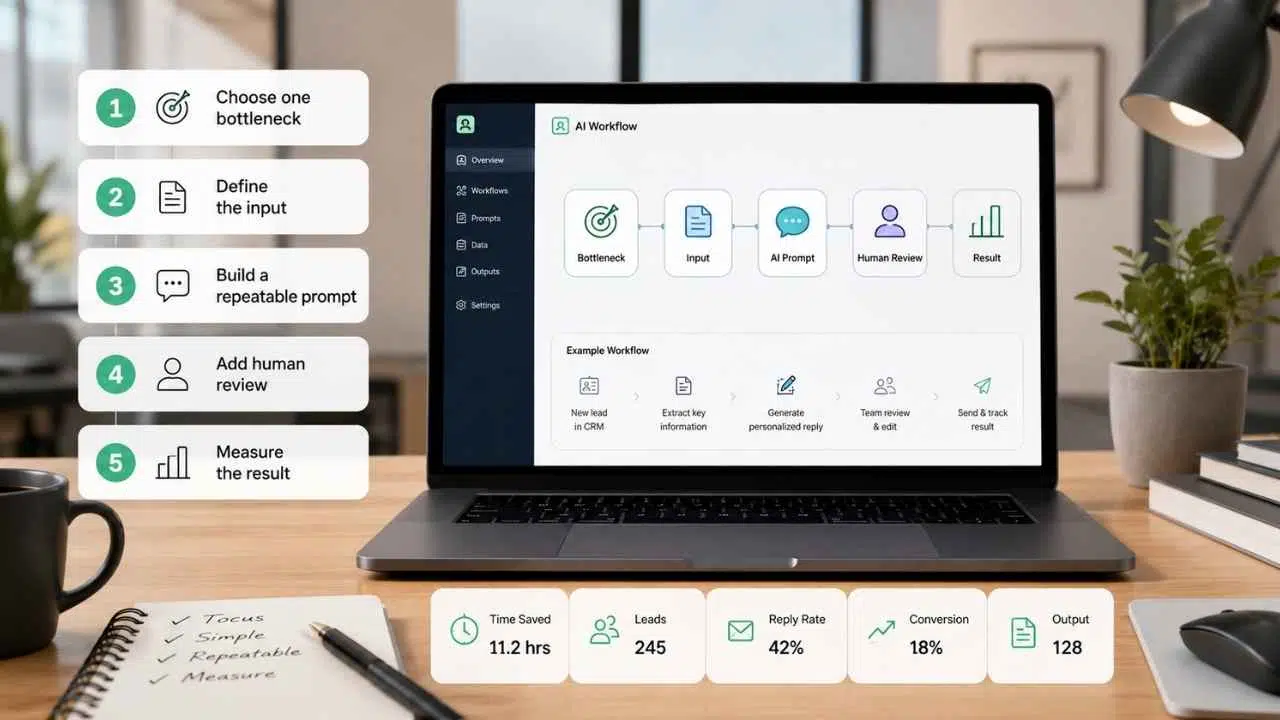
Start small. Pick one repeated task that slows your week, then build a simple AI-assisted process around it. The first workflow does not need to be advanced. It only needs clear inputs, a useful prompt, human review, and one measurable result, such as time saved or faster follow-up.
Do not start by collecting tools. Start by finding repeated work.
A good beginner roadmap looks like this:
1. Choose One Bottleneck
Pick one task that wastes time every week. It might be product descriptions, email follow-up, lesson planning, invoice reminders, social posts, or content repurposing.
Do not automate everything at once.
2. Define the Input
AI works better when the input is clear. Create a simple brief, checklist, spreadsheet, or template.
For example:
- Product brief for e-commerce
- Property brief for real estate
- Episode brief for podcasts
- Lesson brief for educators
- Campaign brief for small businesses
3. Build a Repeatable Prompt
Write one prompt that can be reused. Include the task, audience, tone, output format, and limits.
A weak prompt asks for “content.”
A stronger prompt says:
“Create three email follow-up options for a warm lead who asked about a service consultation. Keep the tone helpful, avoid pressure, and include one clear next step.”
4. Add Human Review
Every AI workflow needs review. Check facts, tone, brand fit, legal risk, customer impact, and missing context.
AI can create drafts, options, summaries, and first versions. People should make the final decision.
5. Measure the Result
Track something simple:
- Time saved
- Leads generated
- Reply rate
- Conversion rate
- Drafting speed
- Customer response time
- Content output
- Fewer missed tasks
If the workflow does not save time or improve quality, fix it or remove it.
Final Thoughts
AI creative workflows are useful when they make real work easier to finish. They are not useful when they create more drafts, more dashboards, and more decisions.
The pattern is simple across industries. Authors need better structure. E-commerce brands need faster content and testing. Real estate agents need sharper listings and follow-up. Educators need planning support. Podcasters need research and repurposing systems. Designers need clearer briefs and revision control. Small business owners need help with marketing, admin, support, and weekly planning.
The tools will keep changing. The workflow matters more.
Start with one repeated task. Create a clear input. Use AI to produce a useful first version. Review it carefully. Measure whether it helped. Then improve the system.
That is how AI for businesses becomes practical: not as a one-time experiment, but as a cleaner way to do the work that already matters.
Frequently Asked Questions (FAQs) About AI Creative Workflows
What are AI creative workflows?
AI creative workflows are repeatable processes that use AI tools to help with planning, writing, designing, editing, marketing, research, automation, or review. Instead of using AI for one random task, a workflow connects clear inputs, prompts, tools, human review, and measurable output.
Why are AI creative workflows useful for businesses?
AI creative workflows help businesses save time on repeated tasks, create first drafts faster, organize ideas, improve follow-up, and repurpose content across channels. They are most useful when the business already knows the task, the audience, and the result it wants.
Which industries can use AI creative workflows?
Authors, e-commerce brands, real estate agents, educators, podcasters, designers, marketers, freelancers, and small business owners can all use AI creative workflows. The exact workflow changes by industry, but the pattern is similar: define the task, structure the input, generate options, review carefully, and measure results.
What are some simple AI workflow examples?
Simple AI workflow examples include turning a product brief into a product description, turning a podcast transcript into social posts, turning lesson notes into a quiz, turning customer questions into support templates, and turning a real estate listing brief into captions, emails, and video scripts.
Do AI workflows replace human creativity?
No. AI workflows work best when they support human creativity, not replace it. AI can draft, summarize, organize, and suggest options, but people still need to check accuracy, add judgment, protect brand voice, and make the final decision.
How can beginners start using AI workflows?
Beginners should start with one repeated task that wastes time every week. Create a clear input, write one reusable prompt, review the AI output manually, and track one result such as time saved, faster replies, more content output, or better lead follow-up.






















