
Are you trying to turn an ai agent idea into something that saves time, cuts costs, and does not create a governance mess? I hear that from business owners all the time, and if you want a quick read on what is moving right now, I also keep an eye on Trending Content.
Most teams do not need more demos. They need an enterprise ai strategy that ties automation to one workflow, one owner, and one measurable result.
That is what I am going to walk you through here. I will show you where AI agents fit, where they break, and how to roll them out without losing sight of ROI.
I pay close attention to platforms like Dataiku, Databricks, Strategy, Zendesk, Salesforce, and OpenAI because the winners in this space are not just building smarter models. They are building governance, oversight, and clearer paths to measurable enterprise outcomes.
What Are AI Agents?
I think of AI agents as software workers that can understand a goal, choose the next step, use tools, and finish work with less hand-holding than a standard chatbot.
That difference matters for business owners. If a system can only answer questions, it helps. If it can move a workflow forward, it changes operating costs and speed.
What are AI Agents and Why do They Matter?
In OpenAI’s practical guide, an agent is framed as software that can carry out a workflow on your behalf, not just answer a prompt. That is the line I use in real planning, because a true ai agent should be able to reason through steps, call tools, and stop or escalate when it hits a limit.
A chatbot usually responds inside one conversation. An intelligent agent works across systems, which is why enterprise ai teams use them for support triage, document handling, reporting, approvals, and other multi-step work.
- Goal: The agent needs a defined job, such as triaging tickets or reconciling payments.
- Tool access: It should be able to read data, call a system, or trigger an action, not just write text.
- Context: Memory or state helps it carry details across steps so work does not restart from zero.
- Guardrails: It needs rules for what it can do, what it cannot do, and when a human must take over.
What are the Key Features of AI Agents Like Autonomy and Learning?
The features I care about most are autonomy, memory persistence, tool use, and visibility. If one of those is missing, the agent may look impressive in a demo but struggle in a live workflow.
As of July 2026, Databricks documents show that its AI governance layer can govern and monitor access to LLMs and agents with usage tracking, payload logging, and security controls. That is a practical reminder that a useful enterprise ai agent is not just smart, it is observable.
| Feature | Why it matters in business |
|---|---|
| Autonomy | Lets the agent complete routine steps without waiting for a person every time. |
| Memory | Keeps context across tasks so customers, employees, or analysts do not have to repeat themselves. |
| Tool calling | Turns the agent from a talker into a doer by letting it search, update, route, or create records. |
| Audit trail | Gives you a record of what happened, which is essential for troubleshooting and compliance. |
| Human approval | Prevents high-impact mistakes when the workflow touches money, pricing, legal content, or sensitive data. |
What Are the Benefits of AI Agents for Businesses?
The upside is real when the workflow is right. AI agents can remove repetitive work, speed up decisions, and reduce the kind of small manual errors that quietly drain margin.
The catch is that benefit does not come from buying a tool. It comes from matching the agent to a business process that has clear rules, clear data, and clear metrics.
How do AI Agents Increase Productivity?
Gartner’s 2025 CEO and senior executive survey found that 79% of IT leaders expect productivity gains from integrating AI agents into enterprise applications. I like that signal, but I trust operating proof even more, which is why IBM’s own experience matters: the company said AI and automation were on track to deliver $4.5 billion in productivity gains by the end of 2025.
IBM says its AskHR virtual agent now automates more than 80 HR tasks, handles over 2.1 million employee conversations each year, and achieves a 94% containment rate on common questions.
That is the pattern I look for in successful ai agents for enterprise. Start with routine, high-volume work where the handoff rules are clear, then let your people spend time on judgment, exceptions, and customer relationships.
How can AI Agents Improve Decision-Making?
Good decision-making depends on context, not just speed. That is why I pay attention to tools like Strategy, where the semantic layer turns technical data into business language such as revenue, churn, and margin, so the agent works from shared definitions instead of conflicting spreadsheets.
When your ai system can pull governed metrics, explain where the answer came from, and route an exception to a person, leaders make faster choices with less guesswork. That is especially useful in pricing, support operations, finance reviews, and inventory planning.
- Faster triage: Agents sort routine work before a manager opens the queue.
- Cleaner signals: Shared metric definitions reduce arguments about which number is right.
- Better escalation: Exceptions reach the right person with context attached.
- Continuous improvement: Logs show where the agent made good calls and where it needs tuning.
Why do AI Agents Offer Scalability and Flexibility?
Microsoft reported in February 2026 that more than 80% of Fortune 500 companies were already using active AI agents built with low-code or no-code tools. To me, that says the core question is no longer whether agents can spread across the enterprise. The real question is whether you can govern them as they spread.
That is where platform design matters. Dataiku launched Cobuild in June 2026 to generate governed pipelines, models, agents, and applications from a business objective, while Databricks documents support for everything from simple LLM calls to tool-calling and multi-agent systems. Flexibility is valuable only if the workflow stays controlled as it grows.
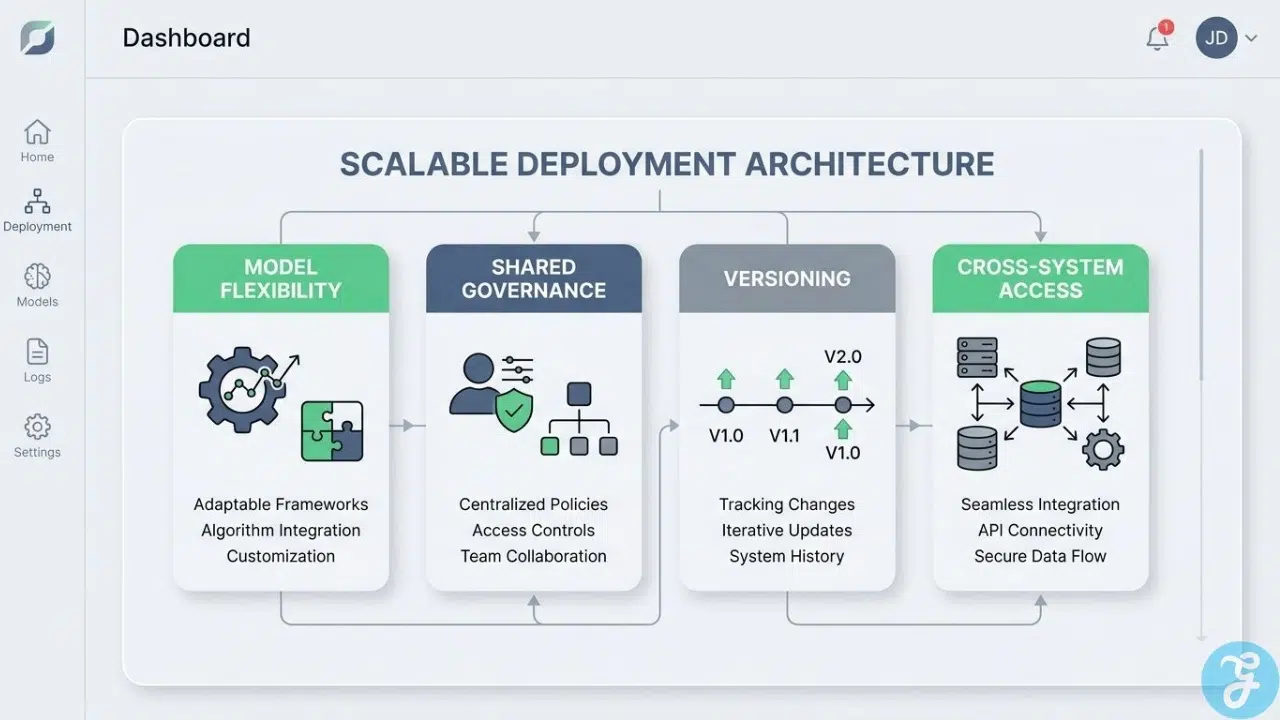
| What scalable deployment needs | Why it matters |
|---|---|
| Model flexibility | You can swap models as costs, quality, or policy needs change. |
| Shared governance | Policies follow the workflow instead of being rebuilt for every team. |
| Versioning | You can test updates without losing track of what changed. |
| Cross-system access | The agent can work inside existing enterprise applications instead of forcing a rip-and-replace project. |
How do AI agents reduce human Error?
One of my favorite examples here is European Air Transport, part of DHL Aviation. Its Dataiku case showed an AI agent cutting 40 to 50 hours of weekly manual document work down to about 30 minutes, while also processing thousands of documents automatically and reducing reporting latency from days to minutes.
That is a strong business case because the agent did not just work faster. It made the process more consistent. When you pair that kind of automation with approval gates for high-impact actions, you get better productivity without handing the wheel over completely.
Industry Use Cases for AI Agents
I always tell business owners to stop thinking about AI agents as one giant category. The better question is this: which workflow is expensive, repetitive, and clear enough to improve first?
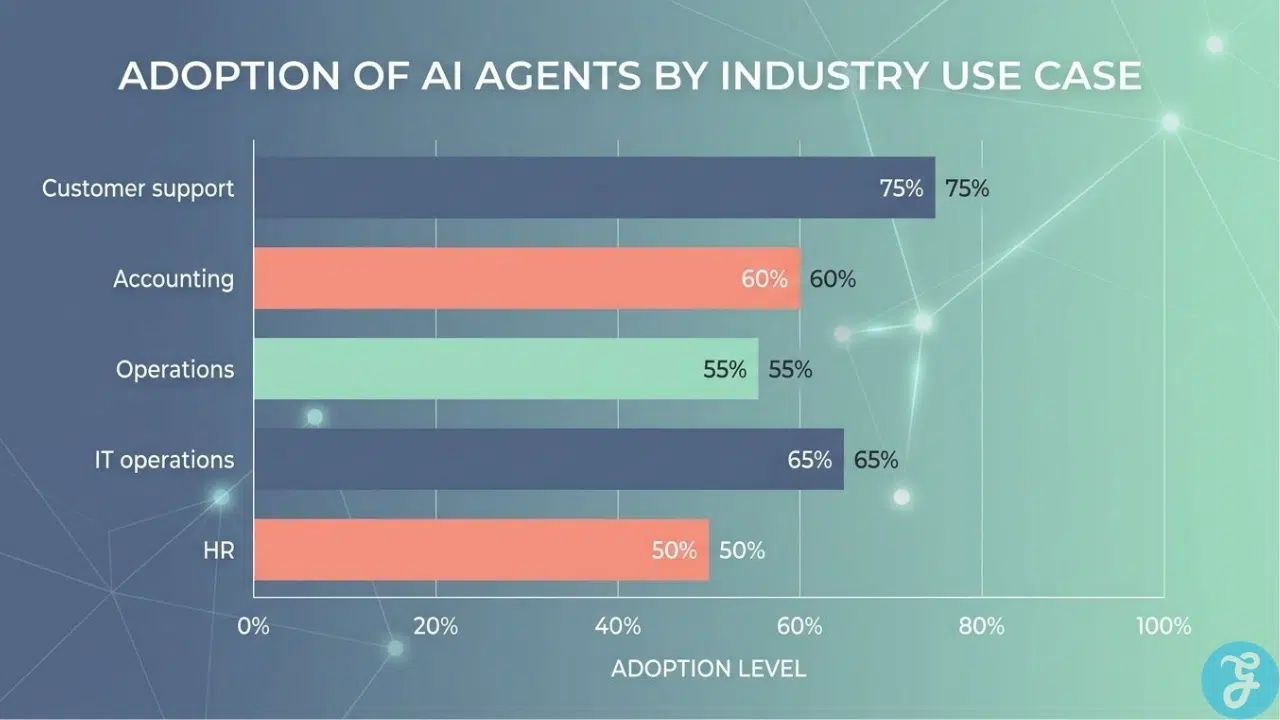
| Business function | Strong first use case | Metric to watch | Main caution |
|---|---|---|---|
| Customer support | Ticket intake, routing, password resets, status questions | Resolution rate, cost per case, response time | Do not count a reply as a resolution |
| Accounting | Payment reconciliation, document matching | Auto-apply rate, backlog, error rate | Keep human review for ambiguous cases |
| Operations | Document extraction, workflow routing, maintenance prep | Cycle time, manual hours saved | Bad source data will still create bad outputs |
| IT operations | Incident triage, alert clustering, runbook support | MTTR, escalation quality | Write access needs tight approval rules |
| HR | Interview scheduling, job post drafting, candidate communication | Time to fill, recruiter hours saved | Do not let AI make unreviewed hiring decisions |
How do AI Agents automate customer Service?
Customer support is one of the clearest use cases because the workflow already has queues, categories, policies, and handoff rules. In Salesforce’s March 2026 update, the U.S. Department of Labor rolled out DOLA, an autonomous support agent that can help across 28 labor programs, automate intake, open cases, and provide 24 by 7 support while staff focus on harder issues.
Zendesk is pushing the same idea from a different angle. Its 2026 service updates emphasize verified resolutions, meaning the useful metric is not how often the bot responds, but how often a customer issue is actually resolved without a human rescue. That is the metric I would put on the dashboard from day one.
How can AI Agents Manage Workflows?
Workflow management is where agents start to feel less like a chatbot and more like an operations layer. European Air Transport used agentic document processing to turn slow PDF-heavy reporting into near real-time operational insight, which is exactly the kind of change that frees managers from waiting on manual prep work.
DigiKey offers another strong example. Its 2026 accounting case showed AI assistance on 92% of incoming electronic payment receipts, with 62% auto-applied and only the messy edge cases routed for verification. That tells me a good workflow agent does not try to replace judgment. It narrows the pile of work that needs judgment.
How are AI Agents Used in Data Analysis and Reporting?
This is one of the most valuable enterprise applications because reporting delays often block every other decision. Roche’s 2026 Dataiku case described its Lex interface as an orchestrated patent research workflow that avoided an estimated $375,000 to $475,000 in consultancy spend, handled about 100 weekly requests to knowledge services, and supported 80 European patent users with plans to expand to 250 globally.
I like this use case because it combines named tools with a clear business result. Lex does not just summarize. It chooses among retrieval, full-text search, and deep search in one workflow, which gives attorneys faster answers and a cleaner operating model.
What Role Do AI agents Play in IT Operations and Monitoring?
IT operations teams benefit when agents reason across logs, alerts, runbooks, and system changes faster than a human can scan them. AWS introduced a DevOps Agent in 2026 that can trace a live incident back to the exact code or deployment change, which is a good example of how agentic automation can shorten the path from detection to root cause.
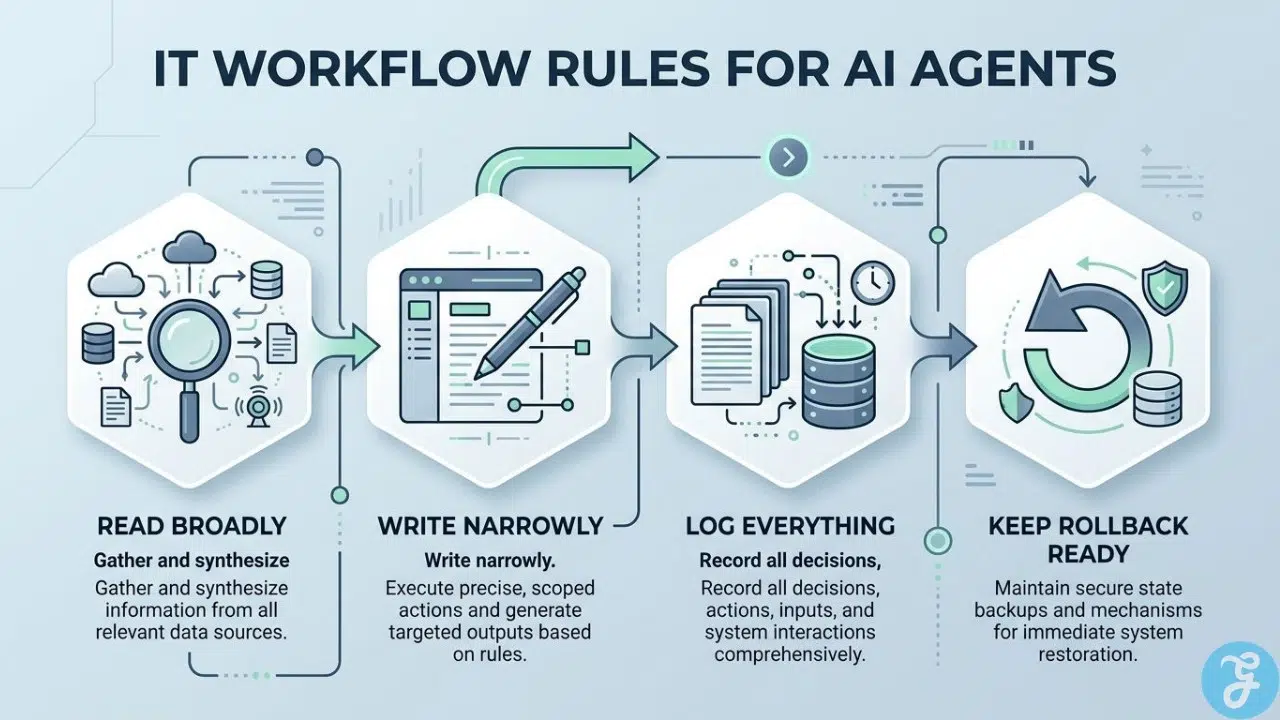
I would still keep firm controls around any production action. For IT workflows, the safest pattern is to let the agent investigate freely and act narrowly.
- Read broadly: Logs, metrics, tickets, and change history should be easy for the agent to inspect.
- Write narrowly: Limit what the agent can change without approval.
- Log everything: You want a trace of which signal triggered which action.
- Keep rollback ready: Reversing a bad action should be as easy as launching it.
How do AI Agents Support Human Resources and Recruitment?
HR is a smart place to use agents for process work, not final judgment. LinkedIn says its Hiring Assistant saves recruiters an average of 1.5 hours per role when identifying top-qualified applicants, and SHRM reported in April 2026 that 68% of HR professionals still have difficulty recruiting full-time employees in the U.S. That makes scheduling, outreach, intake, and candidate rediscovery strong use cases.
SHRM’s 2026 AI in HR research also found that 56% of HR professionals do not formally measure the success of their AI investments at all. That is a warning sign. If you use AI in recruitment, define the metric first, such as time to fill, recruiter hours saved, or qualified applicants per role, and keep human review in the decision loop.
What Are the Challenges and Risks of Using AI Agents?
This is the part too many companies skip. AI agents create real upside, but they also widen your attack surface, move faster than your existing controls, and can expose private data if you rush deployment. If you want a deeper look at those issues, I break down more on data privacy and security risks.
What Data Privacy and Security Issues Arise with AI Agents?
OWASP released its Top 10 for Agentic Applications in December 2025, and that matters because the risks are different once software can take action on its own. At the same time, NIST continues to expand its AI risk work for U.S. organizations, including an AI RMF profile effort for critical infrastructure announced in April 2026.
In plain English, the main risk is simple: an agent may have access to more systems than the average employee, and it can move through them faster. That means weak permissions, stale data, and poor logging become bigger problems the moment you add autonomy.
- Use least privilege: Give the agent only the minimum data and tools it needs.
- Separate read from write access: Reading a dashboard is lower risk than changing prices or records.
- Protect secrets: API keys, tokens, and connectors need rotation and access review.
- Log actions and prompts: You need traceability for audits and incident response.
- Test rollback: Every high-impact workflow should have a clean way to reverse a bad action.
Gartner’s September 2025 survey found that 74% of respondents viewed AI agents as a new attack vector, while only 13% strongly agreed they had the right governance structures in place.
That is why I prefer governed connectors and approval flows over wide-open access. Databricks, for example, now documents a path where requests are authenticated, authorized, and routed through a governance layer before they reach external systems.
How Can Organizations Manage Collaboration Between Humans and AI Agents?
Deloitte’s 2026 State of AI in the Enterprise found that only 21% of organizations had a mature governance model for agentic AI, and about 80% still lacked mature capabilities like clear autonomy boundaries, real-time monitoring, and full audit trails. The organizations seeing better results are the ones starting with lower-risk use cases and scaling deliberately.
That lines up with what I have seen in practice. Human oversight works best when it is designed into the workflow instead of bolted on later.
- Assign an owner for every agent and every workflow.
- Define escalation points before launch, not after the first mistake.
- Set approval thresholds for money, legal language, customer commitments, and sensitive records.
- Review weekly during the pilot so small issues do not turn into system habits.
What Are ethical Considerations for AI Agents?
Ethics is not abstract here. It shows up in biased outputs, poor explanations, and hidden decision rules. In the U.S., that is especially important in hiring, lending, healthcare, and any workflow that affects access, pricing, or compliance.
If you use AI in employment decisions, keep human review in the loop and audit the workflow for bias, accessibility, and consistency. For every sensitive use case, I want three things in place: a visible rule set, a review log, and a way to challenge the outcome.
A Five-Step Enterprise AI Agent Strategy
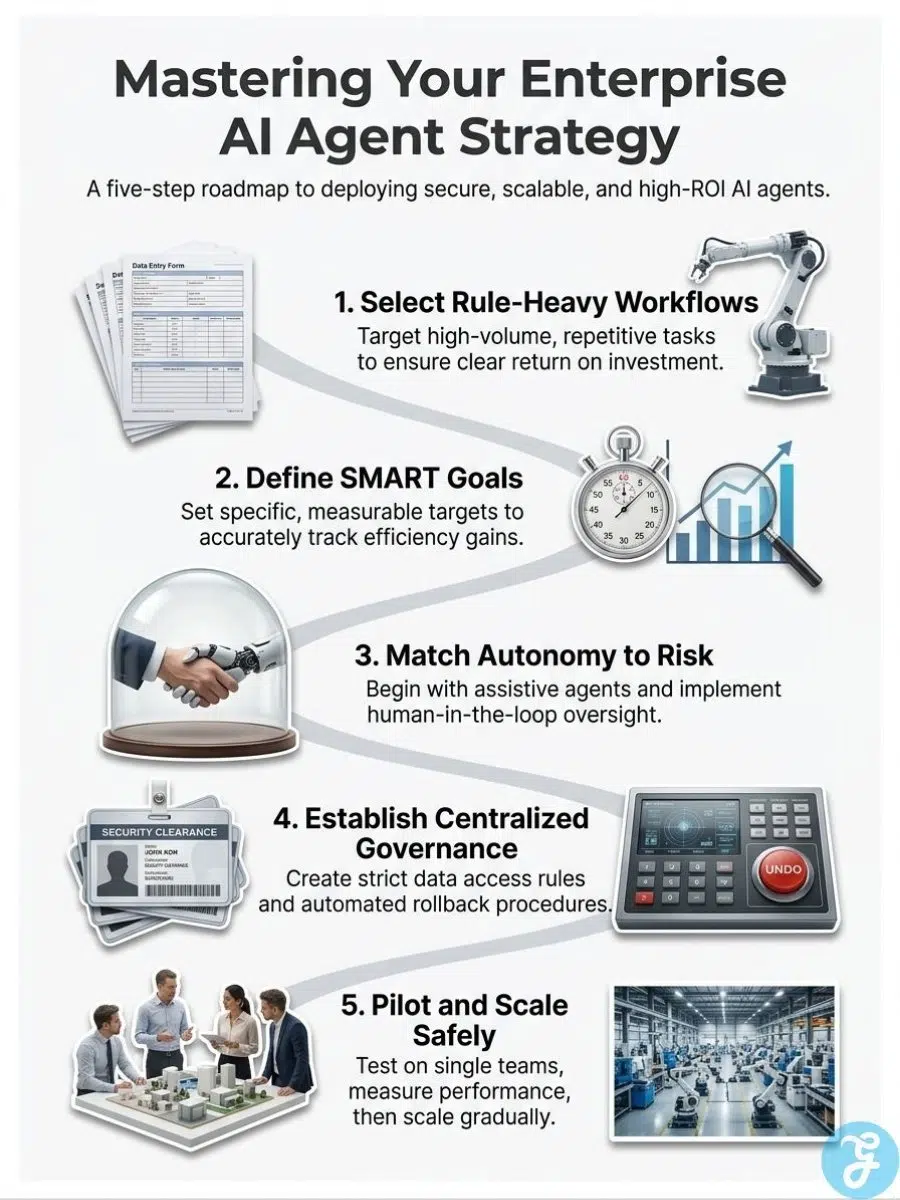
Gartner’s April 2026 guidance on agent sprawl is useful because it focuses on governance, inventory, identity, information access, monitoring, and training. I use the same logic in a simpler five-step playbook for business owners who want action, not theory.
The goal is straightforward: pick one workflow, prove ROI, and scale only after the controls are working.
How to Select the Right Workflow for AI Agents?
I look for work that is high volume, rule-heavy, repetitive, and measurable. If the task changes wildly every time, or if success depends mostly on deep human judgment, it is usually a poor first candidate for ai agent deployment.
| Good first workflow | Why it works |
|---|---|
| Support ticket triage | Clear categories, fast feedback loops, and easy before-and-after metrics |
| Payment reconciliation | High volume, structured rules, and obvious exception handling |
| Document extraction | Repeatable inputs, heavy manual effort, and strong time savings |
| Interview scheduling | Routine coordination with low decision risk |
I would avoid starting with pricing authority, final hiring decisions, or legal commitments. Those are better second or third wave use cases once your governance is mature.
How to Define the Desired Outcome For AI Agent Deployment?
If the outcome is fuzzy, the project will stay fuzzy. I want one business goal and a short KPI set before the build starts.
- Speed metric: Cycle time, first response time, or MTTR
- Quality metric: Error rate, reopen rate, or exception rate
- Financial metric: Cost per case, hours saved, or avoided spend
- Adoption metric: Usage rate, containment rate, or staff satisfaction
This is where many ai projects go sideways. SHRM’s 2026 HR research found that more than half of HR teams using AI were not formally measuring success, which is exactly how flashy pilots fail to become business value.
How to Set the Appropriate Autonomy Level for AI Agents?
I always match autonomy to risk. Start low, earn trust, then expand the scope.
| Autonomy level | Best use | Human role |
|---|---|---|
| Assistive | Drafting, summarizing, recommending | Human reviews every output |
| Guided action | Triage, routing, enrichment | Human approves critical steps |
| Bounded automation | Routine actions with strict rules | Human reviews exceptions and spot-checks logs |
| High autonomy | Fast, repetitive work with proven safeguards | Human oversees policy, rollback, and periodic audit |
This table sounds simple, but it saves a lot of pain. Most teams should spend more time in the first two levels than they expect.
How to Establish Data, Access, and Governance Controls?
I want controls in place before rollout, not after the first incident. That means a central inventory of agents, named owners, role-based access, approved connectors, and current data sources with clear permissions.
Gartner’s 2026 sprawl guidance makes the same point, and the platform market is moving there fast. Dataiku is emphasizing approval workflows and business impact validation, Databricks is emphasizing tracked and authorized access, and Strategy keeps pushing governed definitions and role-based permissions through its semantic layer. Different stack, same lesson: governance has to live inside the workflow.
How to Pilot, Evaluate, and Scale AI Agents Effectively?
My preferred rollout starts with one team, one workflow, one owner, and one KPI that matters to the business. If you cannot explain the pilot in one sentence, it is too broad.
Simple ROI formula: annual savings plus new gross profit minus annual agent cost, divided by annual agent cost.
For the cost side, include model spend, platform fees, integration work, internal labor, and review time. For the value side, count hours saved only if the work actually disappears or shifts to higher-value output.
- Keep the pilot narrow: Do not launch across five teams at once.
- Review logs weekly: Find bad patterns early.
- Scale in stages: Expand scope only after the controls and metrics hold up.
- Train staff: People need to know when to trust the agent and when to override it.
What Is the Future of AI Agents in Business?
I do not think the future belongs to the loudest demo. It belongs to the companies that can connect agents to real business data, set clear boundaries, and prove results fast.
What Emerging Trends are Shaping AI Agent Technology?
Gartner has forecast that by 2028, 33% of enterprise software applications will include agentic AI capabilities and at least 15% of day-to-day work decisions will be made autonomously. Pair that with Microsoft’s February 2026 note that more than 80% of Fortune 500 companies already use active agents, and the direction is hard to miss.
The next wave is less about chat and more about orchestration, evaluation, observability, and standards. In the U.S., NIST launched its AI Agent Standards Initiative in February 2026 to support secure, interoperable adoption, which tells me the market is moving from experimentation toward infrastructure.
How Will Multi-Agent Systems Transform Business Operations?
Multi-agent systems make sense when one model should not do every job. OpenAI’s agent guidance makes this practical: split the work when tasks, tools, or instructions become too complex for one agent to manage reliably.
I see real value here in operations, analytics, and service environments where one agent can triage, another can research, and a third can format or route the result. That structure improves scalability and keeps each role easier to test.
- Use multi-agent systems when tasks naturally split into specialist roles.
- Use a single agent first when one workflow is still small and easy to monitor.
- Add orchestration only after you understand handoffs, ownership, and failure points.
- Keep shared logs so you can see the full chain of actions across agents.
Ending Thoughts
My view is simple: an ai agent is useful only when it owns a clear workflow, works inside firm guardrails, and reports back in metrics you can trust.
Start small, prove value, then scale with care.
Frequently Asked Question(FAQs) on Enterprise AI Agent Strategy
1. What are AI agents, and why should I strategize around them?
AI agents are software that act for people, they can automate tasks, analyze data, and handle customer inquiries, like a handy virtual helper. You should strategize because they cut work, speed up marketing automation, and can predict consumer behavior when used well.
2. How do I start to use AI agents in my business?
Pick one task to automate, such as keyword research, customer inquiries, or market research. Run small tests, measure results, and loop in software developers and staff for human oversight.
3. Can AI agents work with generative AI for marketing?
Yes, AI agents can produce AI generated content and marketing materials, they can personalize customer interactions and create product demo videos. They also help analyze customer data and improve SEO when guided by people.
4. What risks come with using AI agents, and how do I manage them?
They can use out of date facts, make biased choices, or hurt your SEO if left alone. Set rules for data privacy, test outputs often, and keep humans in the loop to review content. This way you get the promises of generative AI, without nasty surprises.