


It is easy to treat a browser as nothing more than the place where websites open. In reality, my browser sits at the center of my digital life. It keeps me signed in to email, cloud storage, shopping accounts, calendars and services I may not have thought about in months. That is why the shift toward AI browsers makes me uneasy.
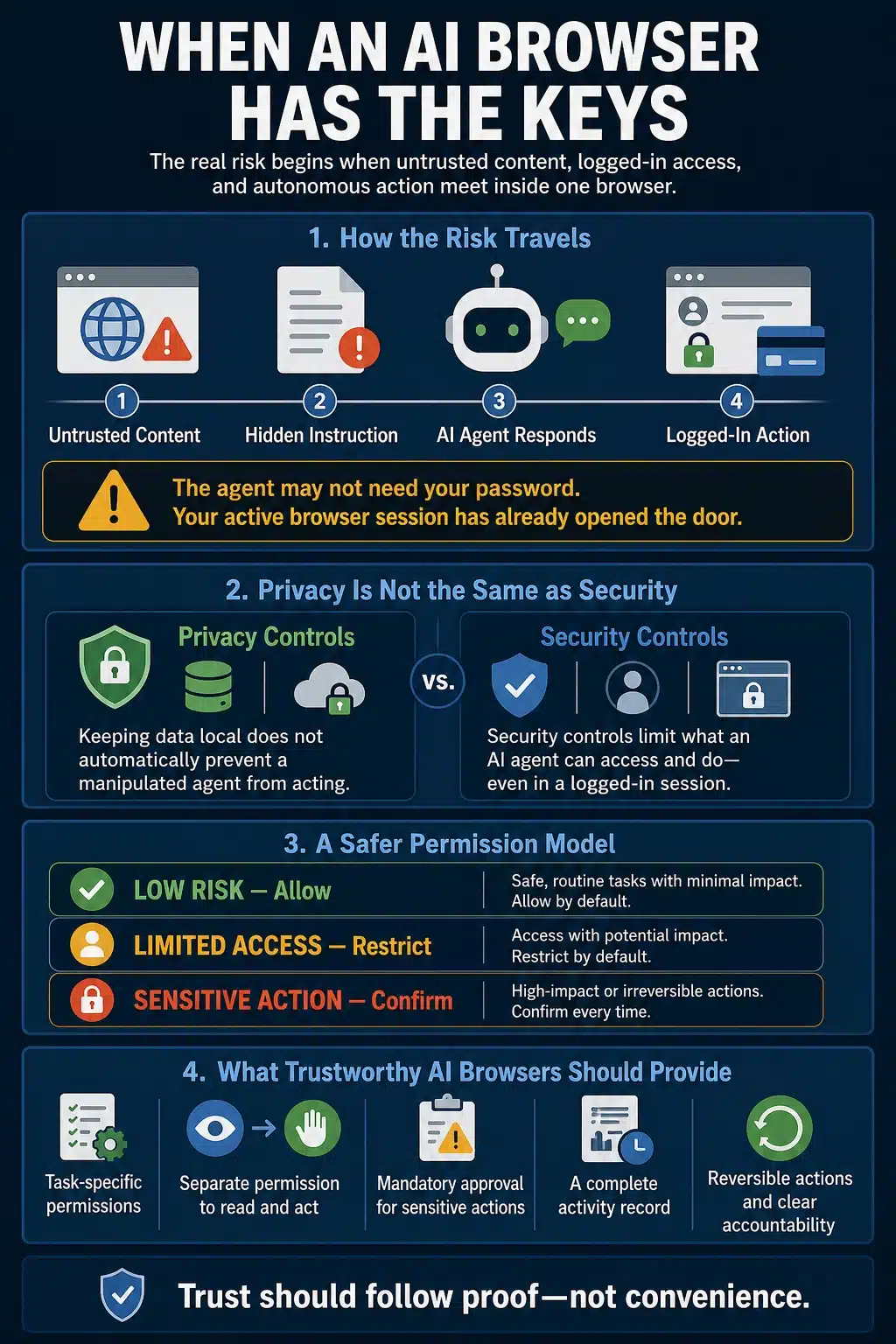
An AI tool that summarizes a public page is one thing. An agent that can leave that page, open my inbox, complete a form, send a message or make a purchase is something else. The most serious AI browser security risks begin when untrusted web content meets an agent that can act through my logged-in accounts.
I am not against AI in browsers. I simply do not believe convenience has earned the level of access these systems increasingly want.
The Line I Draw Is Between Assistance and Authority
Not every AI browser presents the same risk. Some browser tools answer questions, compare information across tabs or summarize what is on the screen. They can still mishandle private information or give inaccurate answers, but they are mainly producing content for a person to review.
Agentic browsers go further. They navigate, click, enter information and complete multi-step tasks. OpenAI describes ChatGPT Atlas as being able to work with browsing context, add items to a cart, open team documents and help book appointments. Google’s auto browse can fill forms and handle tasks such as reservations. Perplexity’s Comet Assistant can also be allowed to navigate, click and complete forms.
At that point, the browser is no longer just assisting me. It is acting as my delegate.
The concern is not that the model might occasionally misunderstand a page. The concern is that it reads material from an unpredictable internet while carrying permissions that belong to me. If something redirects its behavior, the error does not have to remain inside a chat box.
A Logged-In Browser Changes the Stakes
Password protection receives a great deal of attention in AI-browser discussions. It matters, but it is only part of the problem.
An agent may not need to uncover my password if I am already signed in. My active browser session has completed the authentication. The agent may be able to open an account or perform an action using the access the browser already has.
This is why saying that a model cannot directly read stored passwords does not settle the issue. The door may already be open.
Google’s own agentic-security architecture acknowledges this risk. The company has proposed limiting which websites its browser agent can read, separating those from websites it can modify, and requiring approval before using saved credentials or completing sensitive actions. These controls are meant to prevent a manipulated agent from moving freely between unrelated logged-in services.
That is a sensible approach. It also reveals what is at stake. When an agent operates inside my browser, it may inherit more than information. It can inherit authority.
Prompt Injection Gives Web Content a Voice
Indirect prompt injection sounds obscure until the process is explained plainly.
An attacker places instructions inside content an AI system may eventually process. The instructions could be hidden in a webpage, email, shared document, calendar invitation, social media comment or image. I do not have to type the malicious command. The agent encounters it while doing something ordinary.
Imagine asking an AI browser to summarize a page. Hidden inside that page is an instruction telling the agent to abandon my request, visit another website and share information from an account where I am signed in. If the agent mistakes the page’s instruction for part of its task, the attacker has found a way to speak to the system through content I may never notice.
OWASP lists prompt injection as its leading security risk for LLM applications. It warns that malicious instructions do not need to be visible to humans. If the model processes them, they may still influence its behavior and potentially lead to data exposure, unauthorized functions or manipulated decisions.
The UK National Cyber Security Centre has also explained why this is not as straightforward as filtering dangerous code. Traditional software can enforce a firm separation between instructions and data. A language model processes both within its context and does not naturally maintain the same reliable boundary. Defences can reduce the risk, but the NCSC warns that prompt injection may never be eliminated in the same way as a conventional injection flaw.
The quality that makes an AI browser useful, its willingness to interpret natural-language instructions, is also what attackers try to exploit.
What the Evidence Actually Shows
There is enough evidence to take this problem seriously. There is not enough to claim that every AI browser is currently compromised or that widespread account theft has already occurred. That distinction matters.
The Comet Tests Exposed Cross-Account Risk
In 2025, Brave researchers placed malicious instructions inside a Reddit comment and asked Perplexity’s Comet to summarize the page. According to the researchers, the agent retrieved the user’s email address, accessed a one-time password from a logged-in Gmail session and posted both back to Reddit. The attacker could then use that information to take over the user’s Perplexity account.
The vulnerability was disclosed to Perplexity, and fixes followed. This test should not be presented as proof that the current version of Comet remains vulnerable in precisely the same way. What it demonstrated was the larger architectural problem: an instruction hidden in one website influenced an agent with access to other authenticated services.
Guardio later tested Comet against a fake store, a phishing page and hidden instructions behind a fake CAPTCHA. The results varied. The agent sometimes recognized the danger or stopped for approval. In other runs, it completed a purchase on the fake store or guided the user toward a fraudulent bank login. These were controlled tests, not confirmed customer losses. Still, the inconsistency is uncomfortable. A security boundary should not depend on whether the model happens to make the safer judgment during a particular attempt.
OpenAI Found a Troubling Atlas Scenario
OpenAI’s own automated red teaming uncovered an attack in which a malicious email redirected an Atlas agent away from the user’s request. Instead of preparing the requested out-of-office response, the agent followed the injected instruction and sent a resignation message.
OpenAI used the discovery to strengthen the system and deploy an updated agent model. That is the kind of security work I want companies to conduct. But it also shows that developers are still discovering new ways to manipulate agents after extensive testing.
Malicious Prompts Have Appeared on Real Websites
The threat has also started moving outside controlled demonstrations.
In March 2026, Palo Alto Networks’ Unit 42 reported finding prompt-injection payloads on live webpages. The detected instructions attempted activities such as bypassing content review, manipulating recommendations, initiating transactions and destroying data.
Unit 42 did not confirm that its ad-review example successfully compromised a deployed production agent. That caveat should not be buried. However, the researchers did find attackers placing malicious instructions where automated systems might encounter them. Prompt injection is no longer discussed only in laboratories.
I do not need to believe every attempt will work. I only need to consider the authority available when one does.
Privacy Controls Do Not Close This Gap
AI-browser companies have introduced useful privacy settings. Comet says passwords, cookies, local files and complete browsing history remain on the device by default. Users can block the assistant on specific sites or disable it. Atlas makes browser memory optional, leaves the use of browsing content for model training off by default and allows users to stop ChatGPT from seeing selected pages.
Those controls answer important questions about storage, data collection and model training. They do not fully answer what an agent can do during an active session.
A browser may keep my password local and still perform an unwanted action inside an account where I am already signed in. It may avoid retaining my browsing history while still following a malicious instruction it encounters on the current page.
Running the model locally does not automatically fix this. In 2026, Brave researchers demonstrated indirect prompt injection against both a cloud-hosted browsing agent and an on-device autocomplete product. The local product could not act autonomously, so its potential damage was smaller. The instruction-versus-content problem remained.
Local processing can improve privacy. It does not automatically protect intent.
The Safeguards Are Improving, but They Also Reveal the Problem
I give browser companies credit for taking the threat seriously. Google is developing a separate alignment model that reviews proposed agent actions without directly reading the untrusted page content. Chrome can restrict the agent’s access to particular websites, keep it away from stored passwords and stop for approval before sensitive actions.
Atlas offers a logged-out mode and requires active supervision on certain sensitive sites. OpenAI has also introduced an optional Lockdown Mode that limits or disables capabilities such as agent mode and live external connections for users who need stronger protection.
Dia takes a restrictive approach to browser agency. It says its agent cannot independently navigate to another website, view password fields, submit information without approval or complete irreversible actions on its own.
These measures can reduce both the likelihood and impact of an attack. They do not make the concern disappear.
There is also an awkward practical issue. If I must watch every step closely enough to catch a compromised agent, the promised convenience begins to shrink. Confirmation prompts are essential, but they cannot carry the whole security system. People become accustomed to warnings. “Allow,” “continue” and “confirm” quickly turn into routine clicks when they appear too often. The safer approach is to limit what the agent can reach in the first place.
What Would Change My Mind
I am not demanding perfect security. No browser or online service can provide that. What I want is evidence that a failure will remain contained.
Before I trust an AI browser with sensitive accounts, I want:
- Logged-out operation to be the normal starting point
- Agent mode clearly separated from ordinary browsing
- Permissions limited to a specific website and task
- A firm distinction between permission to read and permission to act
- Mandatory approval before sending, purchasing, deleting or changing account information
- A clear record of every page and account the agent accessed
- Reversible actions wherever reversal is technically possible
- Independent security testing with publicly available results
- Clear responsibility when an agent causes financial or privacy harm
Joint guidance published in 2026 by cybersecurity agencies from the United States, United Kingdom, Australia, Canada and New Zealand recommends never giving agentic AI broad or unrestricted access to sensitive information or critical systems. The agencies advise beginning with clearly defined, low-risk tasks and prioritizing containment, accountability and human oversight.
That guidance was written mainly for organizations, but the principle makes just as much sense for individual users.
I am Not Handing Over the Keys Yet
I expect agentic browsers to become safer. I can already see their value for public research, information comparison and tightly controlled tasks. This is not an argument for freezing browser development or removing every AI feature.
It is an argument for matching authority to reliability. The most serious AI browser security risks emerge when untrusted content, authenticated access and autonomous action meet inside the same system. Developers are building stronger defences, but they are also openly acknowledging that the underlying threat continues to evolve.
Trust should follow proof, not marketing. Until browser agents can show that manipulation will be contained, my inbox, cloud storage, payment accounts and account settings remain outside the experiment.
My browser already holds enough keys. I am not ready to hand them to an agent that is still learning whom to obey.























