Designers rarely struggle because they lack taste. The real pressure is production speed. A client wants three logo directions by tomorrow. A landing page needs wireframes before the copy is final. A social campaign needs ten visual variations. A presentation deck needs to look polished, not patched together. A revision round arrives with vague comments like “make it more premium” or “can we try something fresher?”
AI can help designers move faster, but only when it is used inside a workflow. Random image generation is not a design process. A useful AI design workflow starts with a brief, explores directions, creates options, supports decisions, and leaves enough room for human judgment.
Design deserves its own cluster because designers work across strategy, visuals, systems, user behavior, brand language, client communication, and production. The best AI workflows designers use are not about replacing creativity. They are about reducing slow, repetitive, and messy parts of the creative process. Additionally, AI workflows designers can enhance efficiency and provide innovative solutions in various design tasks.
For Editorialge readers and creative teams using tools such as Midjourney, Figma AI, Adobe Firefly, Canva AI, and ImagineLab.art, the key is not “Which tool is best?” The better question is: where does AI actually improve the design workflow without weakening the final work?
Moreover, AI workflows designers should consider incorporating regular feedback loops to improve the design process continuously.
This is why AI workflows designers are essential in today’s fast-paced creative environment.
Below are 11 practical workflows for graphic designers, UI/UX designers, web designers, freelancers, creative teams, and students who want to use AI with more control.
By adopting AI workflows designers can not only speed up their work but also ensure a higher quality of output.
1. Mood Board Generation Workflow
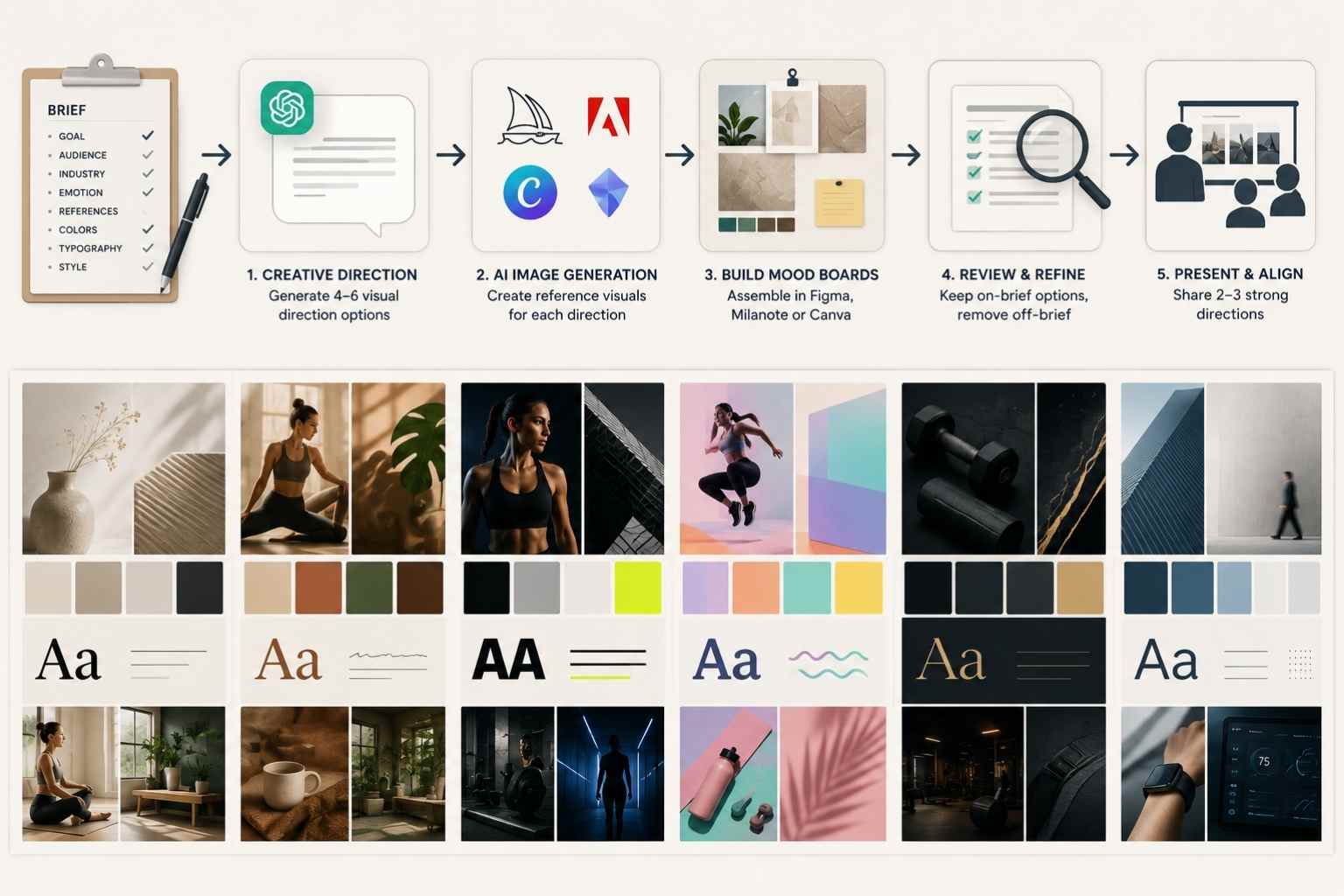
Use case: Visual direction, early concept planning, client alignment
Useful AI tools: Midjourney, Adobe Firefly, Canva AI, ImagineLab.art, Pinterest, Milanote, Figma, ChatGPT
Result: Faster visual direction, clearer client alignment, stronger creative starting point
These AI workflows designers utilize can transform traditional design methods into streamlined processes.
A mood board is not a decoration. It is a decision tool. It helps the designer and client agree on tone before production begins.
AI can speed up mood board creation by turning abstract direction into visual references. This is useful when a brief uses vague language such as “modern,” “premium,” “bold,” “trustworthy,” or “friendly.” Those words mean different things to different people.
In this context, AI workflows designers can act as a catalyst for innovation in design thinking.
A good workflow starts with the creative brief.
Collect:
-
- Brand or project goal
- Audience
- Industry
- Desired emotion
- Visual references
- Competitors
- Colors to explore
- Colors to avoid
- Typography direction
- Layout style
Utilizing AI workflows designers may also facilitate collaboration among teams, making the design process more inclusive.
- Image style
- Brand words
- Words the brand should not feel like
Then use AI to create several visual territories. For example:
-
- Minimal and editorial
- Warm and human
- Bold and high-contrast
- Playful and expressive
- Premium and restrained
When implemented correctly, AI workflows designers use can lead to remarkable advancements in creative industries.
- Technical and precise
A practical process:
-
- Write a short creative direction statement.
- Ask ChatGPT or another text tool to turn it into 4–6 visual direction options.
- Use Midjourney, Adobe Firefly, ImagineLab.art, or Canva AI to generate reference visuals for each direction.
- Build a mood board in Figma, Milanote, Canva, or a presentation deck.
- Add short notes explaining what each direction means.
- Remove visuals that are attractive but off-brief.
- Present 2–3 strong directions to the client or team.
Ultimately, AI workflows designers can create a synergy between human creativity and technological advancement.
- Use the approved board as the foundation for design production.
A useful prompt:
“Create five visual direction concepts for a boutique fitness brand targeting busy professionals. For each direction, include mood, color palette, photography style, typography feel, layout style, and words to avoid. Keep the directions distinct.”
The designer should not present AI images as final brand assets unless they are properly reviewed, licensed, and appropriate for use. At the mood board stage, AI is most useful as a visual exploration tool.
Output: A focused mood board with 2–3 strong creative directions and clear visual language.
2. AI Concept Sketching Workflow
Use case: Early ideation, campaign visuals, rough creative exploration
Useful AI tools: Midjourney, Adobe Firefly, ImagineLab.art, DALL-E, Procreate, Photoshop, Illustrator
Result: More concept options, faster early exploration, less blank-page friction
Thus, exploring AI workflows designers can open new avenues for creative exploration and execution.
Concept sketching is where designers test ideas before committing to polish. AI can help generate rough directions quickly, especially for campaign imagery, editorial graphics, poster ideas, packaging concepts, product visuals, and illustration styles.
The mistake is treating the first generated image as the answer. It is rarely the answer. It is a sketching partner.
Start with a clear concept statement:
-
- What is the visual idea?
- What should the viewer understand?
- What mood should it create?
- What format will it become?
- What brand constraints apply?
- What should the image avoid?
As such, employing AI workflows designers can significantly enhance productivity levels across the board.
Then generate variations.
A practical workflow:
-
- Write a one-sentence concept.
- Create 5–10 prompt variations.
- Generate rough images in Midjourney, Firefly, ImagineLab.art, or another image tool.
- Save only the strongest directions.
- Annotate what works: composition, lighting, metaphor, color, framing, tension.
- Rework the best idea manually.
- Move into Photoshop, Illustrator, Figma, or Canva for controlled design.
- Check originality, usage rights, brand fit, and technical requirements.
Hence, AI workflows designers establish can revolutionize the way design projects unfold.
For example, a designer working on a sustainability campaign might test:
- A product wrapped in natural materials
- A split-scene visual showing waste versus reuse
- A clean editorial product still life
- A symbolic visual using roots, hands, or repair tools
- A minimalist icon-led campaign style
AI helps create volume. The designer chooses direction.
This workflow is also useful for students learning visual thinking. They can compare generated options and ask why one composition works better than another. That learning happens only if they critique the output instead of accepting it.
Furthermore, AI workflows designers create can help bridge the gap between conceptualization and realization.
Output: A set of rough visual concepts ready for refinement, presentation, or manual production.
3. UI/UX Wireframe Generation Workflow
Use case: Product design, web design, app planning, UX exploration
Useful AI tools: Figma AI, Uizard, Relume, Galileo AI, ChatGPT, Whimsical, FigJam
Result: Faster wireframe drafts, clearer page structure, better early UX discussion
Wireframes are not final design. They are thinking tools. They show structure, hierarchy, user flow, and content placement before color and polish distract everyone.
AI can help UI/UX designers create first-pass layouts faster. This is especially useful for common screens such as landing pages, onboarding flows, dashboards, checkout pages, pricing pages, profile pages, and contact forms.
Start with the user goal.
For a landing page, define:
-
- Target user
- Page goal
- Offer
- Primary CTA
- Secondary CTA
- User objections
- Required sections
- Conversion path
- Brand tone
- Device priority
- Content available
Thus, AI workflows designers implement can be a game changer in developing user-centric designs.
A practical process:
-
- Write the user flow or page goal.
- Ask AI to suggest the page structure.
- Generate a low-fidelity layout in Figma AI, Uizard, Relume, or another wireframing tool.
- Review the hierarchy manually.
- Replace placeholder content with real content or realistic draft copy.
- Check whether the design supports the user’s decision path.
- Create 2–3 layout variations if needed.
- Move the best structure into a proper Figma file for design refinement.
Consequently, AI workflows designers adopt can facilitate a more integrated approach to design challenges.
A useful prompt:
“Create a landing page wireframe for a SaaS product that helps small e-commerce brands manage product descriptions and SEO metadata. The page goal is demo bookings. Include hero, problem section, product workflow, proof, pricing teaser, FAQ, and CTA sections. Keep the structure simple and conversion-focused.”
Figma AI can support design tasks such as generating or editing visual assets, organizing layers, replacing content, and rewriting or translating copy. But a generated wireframe still needs UX judgment. AI does not know your analytics, user interviews, product constraints, or technical limitations unless you provide them.
Do not let AI-generated UI become a patchwork of familiar SaaS patterns. If every layout looks like the same hero, three cards, testimonial block, and CTA strip, the designer still has work to do.
Output: A low-fidelity wireframe or flow that gives the designer and client a faster starting point.
4. Brand Identity Exploration Workflow
Use case: Logo exploration, visual identity, brand systems
Useful AI tools: Midjourney, Adobe Firefly, Canva AI, ImagineLab.art, ChatGPT, Illustrator, Figma
Result: Faster visual territory exploration, stronger identity presentation, better brand alignment
Brand identity work needs more caution than simple asset generation. A logo, color system, and visual language must be distinct, usable, flexible, and legally safe. AI can help explore directions, but it should not replace professional identity design.
The workflow should begin with brand strategy, not visuals.
Collect:
In essence, AI workflows designers explore can lead to greater innovation within established design practices.
-
- Brand mission
- Audience
- Market category
- Competitors
- Brand personality
- Positioning statement
- Visual references
- Logo usage needs
- Colors to avoid
- Accessibility needs
To sum up, AI workflows designers embrace are crucial for fostering creativity and efficiency in design.
- Cultural considerations
- Existing brand assets if any
Then use AI to explore identity territories:
-
- Wordmark direction
- Symbolic mark direction
- Editorial brand system
- Minimal tech identity
- Warm human identity
- Premium lifestyle identity
- Bold youth-focused identity
By incorporating AI workflows designers can ensure that their work remains relevant and impactful in the evolving market.
A practical workflow:
- Use ChatGPT to create brand attributes and visual territories.
- Generate reference visuals or mood images with Midjourney, Firefly, ImagineLab.art, or Canva AI.
- Do not use generated logos directly as final marks.
- Sketch or build original logo concepts manually in Illustrator or Figma.
- Test the identity across business cards, website hero, social avatar, packaging, pitch deck, and dark/light backgrounds.
- Check readability, scalability, contrast, and memorability.
- Run basic trademark and similarity checks where appropriate.
- Prepare a client presentation explaining the direction.
AI can help create supporting materials such as pattern ideas, brand texture, photography direction, color explorations, and mockup scenes. That is valuable. But final identity design needs ownership, originality, and consistency.
Ultimately, AI workflows designers should prioritize their unique perspectives and creativity alongside AI advancements.
For Editorialge’s sister platform ImagineLab.art, this is a natural use case: creative teams can use AI-generated visuals to explore early brand directions, campaign worlds, and visual references before a designer builds the final system.
Output: A set of brand identity directions, visual explorations, and manually refined design concepts.
5. Graphic Design AI Production Workflow
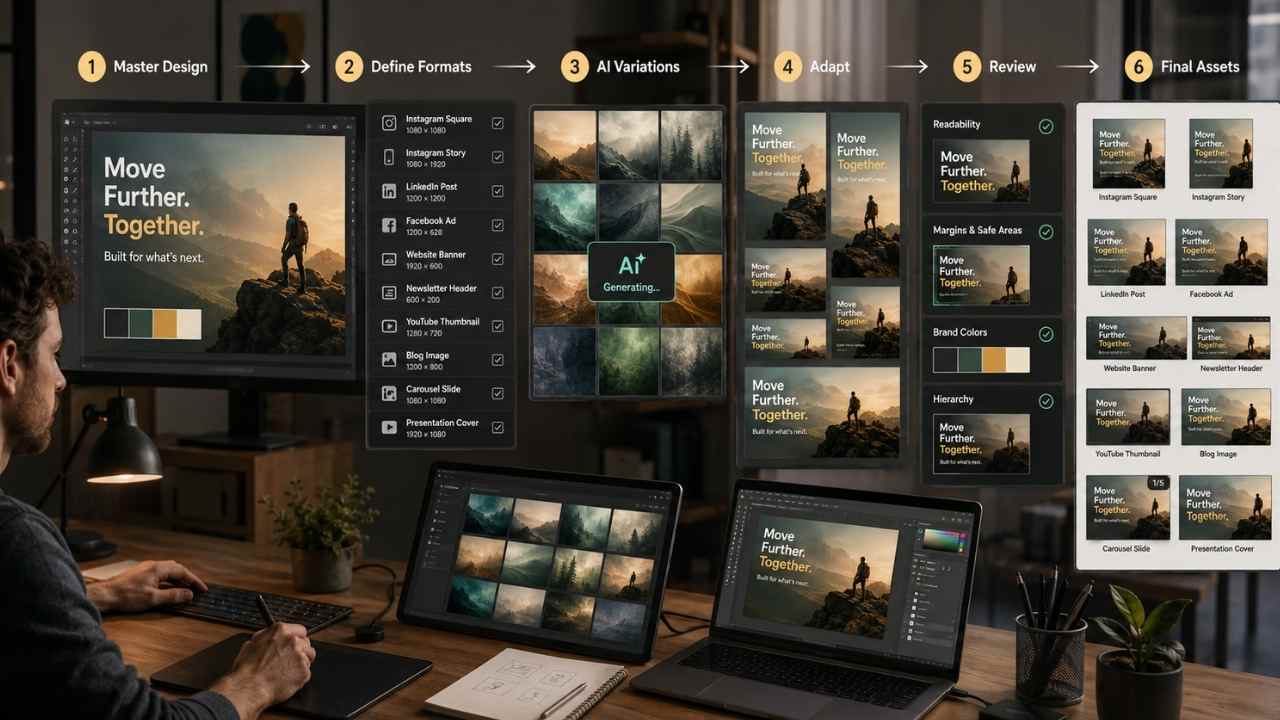
Use case: Social graphics, ads, posters, thumbnails, banners, campaign assets
Useful AI tools: Canva AI, Adobe Firefly, Photoshop, Illustrator, Midjourney, ImagineLab.art, Figma
Result: Faster asset creation, more campaign variations, better production consistency
Many designers spend a large part of the week adapting one idea into several sizes and formats. A campaign may need social posts, ad creatives, story graphics, banner ads, email headers, blog images, and thumbnails. This is where AI can be very useful.
The goal is not to generate random graphics. The goal is to build a production system from one approved creative direction.
A practical workflow:
-
- Start with the approved campaign concept.
- Define formats and sizes.
- Create one master design.
Incorporating AI workflows designers utilize can make the design process more efficient without sacrificing quality.
- Use AI to generate supporting backgrounds, textures, visual elements, or image variations.
- Use Canva, Figma, Photoshop, or Illustrator to adapt the master layout.
- Create platform-specific variations.
- Check text readability, margins, brand colors, and hierarchy.
- Export assets in the required formats.
- Store final files with clear naming.
A designer might produce:
-
- Instagram square
- Instagram story
- LinkedIn post
AI workflows designers have at their disposal can empower them to tackle complex design problems effectively.
- Facebook ad
- Website banner
- Newsletter header
- YouTube thumbnail
- Blog featured image
- Carousel slides
- Presentation cover
Canva AI is useful for quick design generation and template-based production. Adobe Firefly and Photoshop are useful for image creation, background changes, object removal, and generative edits. Figma helps when teams need organized design systems and collaboration.
The danger is sameness. AI-assisted templates can make every campaign feel clean but forgettable. The designer should still control hierarchy, contrast, spacing, tone, and brand distinction.
Output: A complete campaign asset set built from one approved direction.
AI workflows designers apply can be instrumental in creating visually stunning and functional designs.
6. Client Revision Automation Workflow
Use case: Client feedback, revision rounds, project management
Useful AI tools: ChatGPT, Claude, Notion AI, Figma comments, Loom, Google Docs, Trello, Asana
Result: Cleaner revision notes, fewer misunderstandings, faster client feedback cycles
Client revisions often become messy because feedback arrives in fragments: one comment in email, one in a call, three in Figma, two in Slack, and one vague note from a stakeholder who joined late.
AI can help organize revision feedback before the designer starts changing files.
A practical workflow:
-
- Gather all feedback from email, comments, meeting notes, and client calls.
- Paste the feedback into an AI tool.
- Ask AI to group feedback by category: copy, layout, color, imagery, content, technical, strategy, unclear.
- Ask it to identify conflicts.
- Separate quick fixes from strategic decisions.
Therefore, understanding AI workflows designers create is essential for modern design practices.
- Create a revision checklist.
- Send the client a short clarification note if needed.
- Update the design files.
- Track completed revisions and remaining questions.
A useful prompt:
“Organize this client feedback into a revision checklist. Group comments by design area, flag conflicting requests, identify unclear comments, and create a polite clarification message for the client. Do not change the meaning of the feedback.”
This workflow is especially useful for freelancers and small agencies. It prevents designers from reacting emotionally to messy feedback and helps clients see what is actually being changed.
It also protects project scope. If the client asks for a new landing page during a logo revision round, AI can help flag it as a new request, but the designer still needs to handle the scope conversation.
Output: A clean revision checklist, conflict summary, and client clarification message.
7. Presentation Deck Creation Workflow
The potential of AI workflows designers leverage can transform the entire design approach.
Use case: Client pitches, internal presentations, proposals, case studies
Useful AI tools: Canva AI, Gamma, Beautiful.ai, PowerPoint Copilot, ChatGPT, Figma, Adobe Express
Result: Faster deck structure, clearer storytelling, more polished presentations
Designers often need to present the work, not just create it. A strong deck can make the difference between a client understanding the concept and judging a design too early.
AI can help structure the deck before the designer polishes the visuals.
A practical design presentation workflow:
-
- Define the purpose of the deck.
- Identify the audience: client, executive team, creative director, investor, classroom, or design team.
- Ask AI to create a slide structure.
- Add design rationale, not just screenshots.
- Create a visual flow: problem, insight, direction, concept, applications, next steps.
- Build the deck in Canva, Gamma, PowerPoint, Figma, or Adobe Express.
In conclusion, AI workflows designers choose can significantly impact their creative journey.
- Remove weak slides.
- Add speaker notes if needed.
- Export and rehearse.
A useful prompt:
“Create a 12-slide client presentation structure for a brand identity concept. Include slide titles, what each slide should show, and short speaker notes. The goal is to explain the strategy behind the design, not just show visuals.”
For client-facing design decks, avoid dumping every exploration into the presentation. Show the strongest thinking. Clients often get confused when they see too many options without context.
AI can also help create:
-
- Proposal decks
- Campaign recap decks
- Design system onboarding decks
By integrating AI workflows designers can enhance both the quality and speed of their design processes.
- UX research summary decks
- Brand guideline presentations
- Case study slides
The final deck still needs a designer’s eye. AI can organize the story. The designer has to make it look intentional.
Output: A structured presentation deck with design rationale, visuals, and next steps.
8. UI Content and Microcopy Workflow
Use case: UX writing, interface copy, product design
Useful AI tools: ChatGPT, Claude, Figma AI, Notion AI, Grammarly, Writer, UX writing libraries
Result: Clearer interface copy, faster microcopy variations, better user flow support
Designers often work with unfinished copy. Buttons say “Submit.” Empty states say nothing useful. Error messages feel cold. Onboarding screens explain too much or too little.
AI can help create first-draft microcopy that supports the interface.
Use it for:
As such, AI workflows designers implement can be crucial in navigating today’s design challenges.
-
- Button labels
- Empty states
- Error messages
- Form hints
- Onboarding copy
- Tooltips
- Confirmation messages
- Pricing page snippets
- Settings explanations
- Dashboard labels
Thus, AI workflows designers utilize can be seen as essential tools in contemporary design practices.
A practical workflow:
- Define the user action.
- Identify the user’s likely emotion or confusion.
- Ask AI for several copy options.
- Check each option for clarity and tone.
- Test the copy inside the actual UI.
- Remove words that make the interface feel crowded.
- Keep terminology consistent.
- Ask a real user or teammate to read the flow.
A useful prompt:
In this context, AI workflows designers adopt can lay the groundwork for future innovations.
“Write microcopy options for an empty dashboard state in a project management app. The user has not created a project yet. Keep the tone calm and helpful. Include a headline, one short sentence, and CTA button options.”
For UI/UX designers, this workflow can reduce back-and-forth when copywriters are not available. It also helps students understand how language affects usability.
Still, AI-generated microcopy can be too cheerful or too vague. Good interface copy is usually specific, brief, and tied to action.
Output: A set of reviewed UI copy options for buttons, forms, states, and user flows.
9. Design System Documentation Workflow
Use case: Design systems, handoff, team collaboration
Useful AI tools: Figma AI, ChatGPT, Notion AI, Zeroheight, Supernova, Storybook docs, Google Docs
Result: Better documentation, cleaner handoff, less repeated explanation
A design system is not only components. It needs instructions. If no one knows when to use a component, the system slowly breaks.
AI can help designers document components, tokens, naming rules, usage notes, and handoff guidance.
A practical workflow:
-
- Audit existing components.
Ultimately, AI workflows designers should embrace can lead to successful and impactful projects.
- Group components by purpose.
- Use Figma AI or design file tools to clean up layer naming where appropriate.
- Ask AI to draft usage documentation for each component.
- Add examples of correct and incorrect use.
- Document spacing, color, typography, and accessibility notes.
- Add developer handoff notes.
- Review with design and engineering teams.
- Store documentation in Notion, Zeroheight, Supernova, Storybook, or another system.
A useful prompt:
“Create documentation for a button component system. Include primary, secondary, destructive, disabled, loading, and icon button states. Add usage rules, accessibility notes, and examples of when not to use each type.”
In summary, AI workflows designers incorporate are key to staying competitive in the design industry.
This workflow is practical for UI/UX designers and web designers who work in teams. It also helps freelancers hand off work more professionally.
AI can draft documentation quickly, but it cannot know all internal decisions unless you provide them. The designer should verify naming, states, accessibility guidance, and developer requirements.
Output: Cleaner component documentation, usage rules, naming guidance, and handoff notes.
10. Web Design Layout Variation Workflow
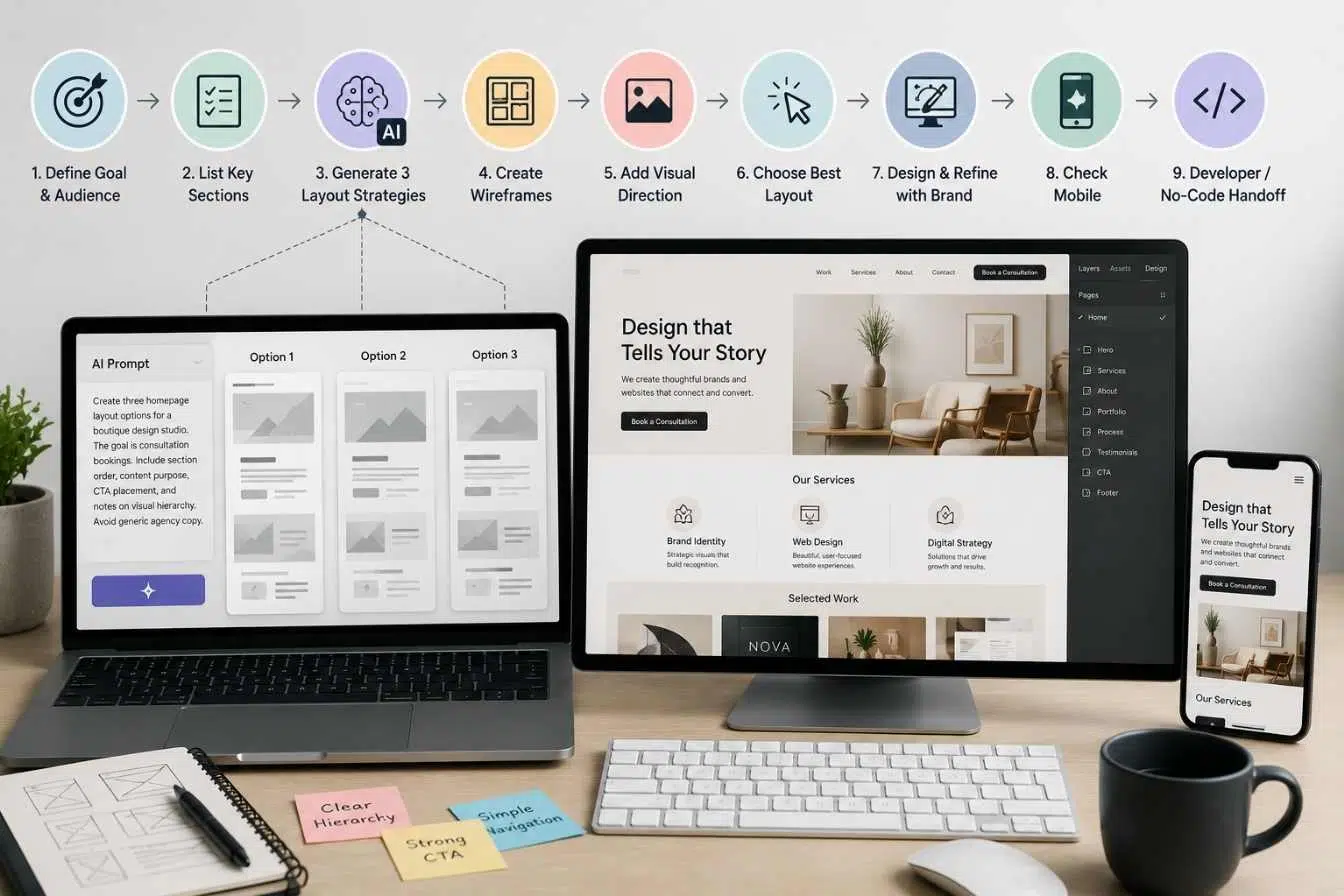
Use case: Website design, landing pages, portfolio sites, campaign pages
Useful AI tools: Figma AI, Relume, Webflow AI features, Framer AI, ChatGPT, Canva AI, Midjourney for visual direction
Result: Faster layout exploration, better page hierarchy, clearer design decisions
Web designers often need to explore several layout directions before choosing one. AI can help produce faster starting points for page structure, section order, and visual direction.
This workflow works well for:
-
- SaaS landing pages
- Agency websites
- Personal portfolios
By understanding AI workflows designers leverage, professionals can maximize their creative potential.
- Product pages
- Campaign microsites
- Service pages
- Event pages
- Lead-generation pages
Start with the page goal. A homepage has different needs from a pricing page. A portfolio site has different needs from a coaching sales page.
A practical workflow:
-
- Define the page goal and audience.
- List required sections.
- Ask AI to generate three layout strategies.
Consequently, AI workflows designers establish can elevate the standard of design projects.
- Create wireframes in Figma, Relume, Framer, Webflow, or another tool.
- Generate visual references if needed.
- Choose the strongest layout based on hierarchy and user action.
- Design the page manually with brand constraints.
- Check mobile layout early.
- Prepare developer or no-code handoff.
A useful prompt:
“Create three homepage layout options for a boutique design studio. The goal is consultation bookings. Include section order, content purpose, CTA placement, and notes on visual hierarchy. Avoid generic agency copy.”
AI can help designers avoid staring at a blank canvas. But the designer needs to decide what the page should persuade the visitor to do. A nice-looking layout without a clear conversion path is still weak.
Output: Several web page structure options that can be refined into a polished design.
This is how AI workflows designers can drive progressive changes in the creative landscape.
11. Portfolio and Case Study Repurposing Workflow
Use case: Personal branding, freelance marketing, job applications, agency case studies
Useful AI tools: ChatGPT, Notion AI, Canva AI, Figma, Adobe Express, Webflow, Framer, Grammarly
Result: Faster portfolio updates, clearer project storytelling, stronger professional positioning
Designers often delay updating portfolios because writing case studies feels harder than making the work. AI can help turn rough project notes into a clearer story.
A good case study is not just “here is the final design.” It explains the problem, role, constraints, process, decisions, and result.
Start with a project record:
-
- Client or project type
- Your role
- Problem
- Audience
- Constraints
In the end, AI workflows designers adopt should enhance their ability to produce outstanding work.
- Research or discovery notes
- Design direction
- Key decisions
- Before-and-after if available
- Deliverables
- Outcome if known
- Lessons learned
- Assets approved for public use
A practical workflow:
-
- Gather project notes and visuals.
Therefore, AI workflows designers explore can lead to impressive outcomes in various design disciplines.
- Ask AI to create a case study outline.
- Draft the problem, process, and outcome sections.
- Rewrite in your own voice.
- Add visuals, captions, and context.
- Create a short LinkedIn post from the case study.
- Create a portfolio thumbnail and project summary.
- Adapt the story for proposals or job applications.
- Remove confidential information.
A useful prompt:
“Turn these design project notes into a case study outline. Include project context, problem, my role, design process, key decisions, final deliverables, and results. Keep it professional and specific. Do not invent metrics.”
This workflow is useful for freelancers, students, and design teams. It helps turn finished work into proof of thinking.
Do not fake results. If you do not have conversion data, revenue impact, or user research outcomes, say what was delivered and what decisions were made. Honest case studies are stronger than inflated ones.
Output: A polished case study draft, portfolio summary, social post, and proposal-ready project description.
How Designers Should Choose the Right AI Workflow
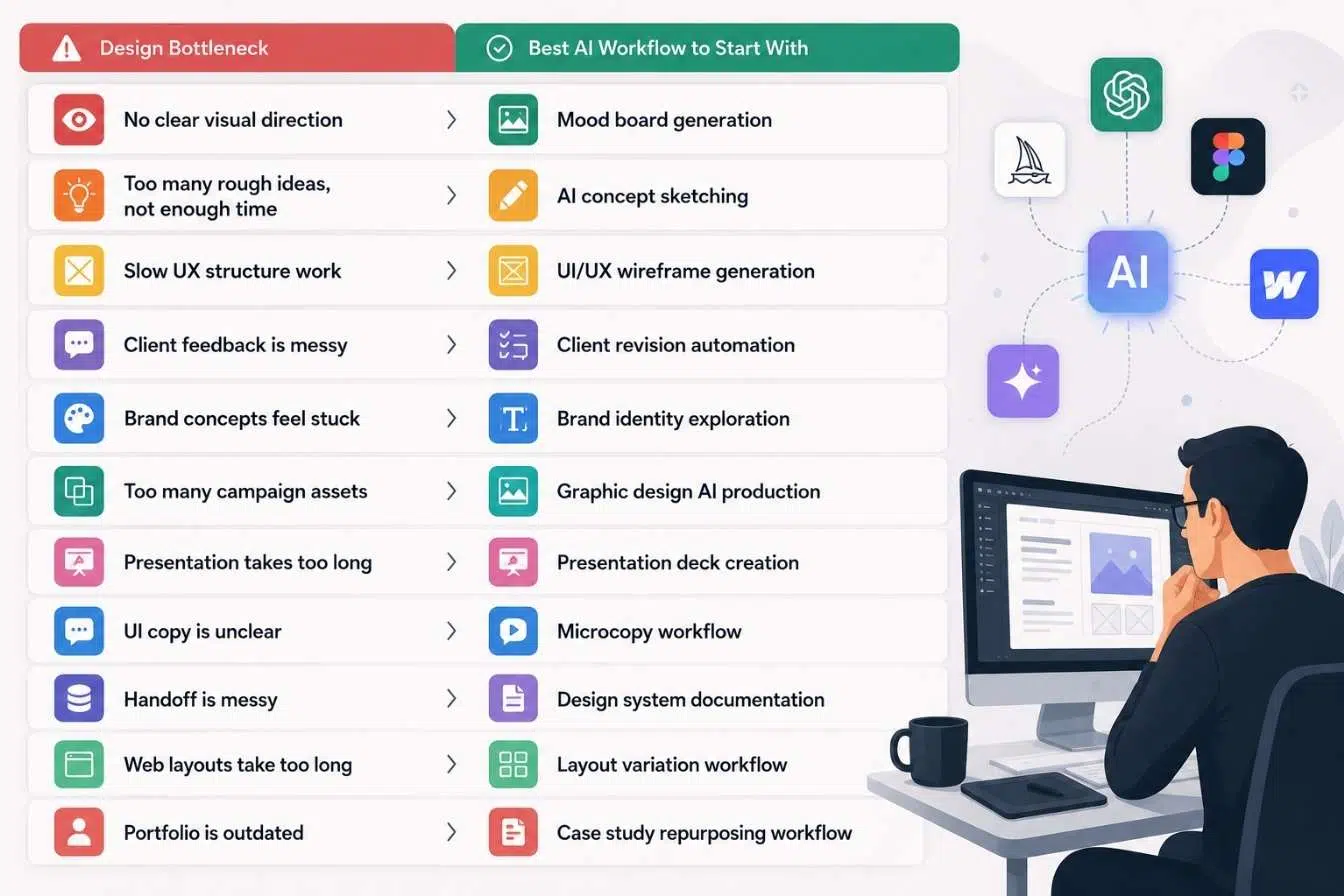
The best workflow depends on where the design process slows down.
|
Design Bottleneck |
Best AI Workflow to Start With |
|
No clear visual direction |
Mood board generation |
|
Too many rough ideas, not enough time By leveraging AI workflows designers can create innovative solutions that resonate with audiences. |
AI concept sketching |
|
Slow UX structure work |
UI/UX wireframe generation |
|
Client feedback is messy |
Client revision automation |
|
Brand concepts feel stuck |
Brand identity exploration |
|
Too many campaign assets |
Graphic design AI production |
|
Presentation takes too long |
Presentation deck creation |
|
UI copy is unclear |
Microcopy workflow |
|
Handoff is messy |
Design system documentation |
|
Web layouts take too long |
Layout variation workflow |
|
Portfolio is outdated |
Case study repurposing workflow |
Designers should avoid adopting every AI tool at once. Start with the workflow that removes the most friction from real projects.
Hence, AI workflows designers should continuously evolve to remain relevant in the fast-paced design industry.
Common Mistakes Designers Make With AI
AI can speed up creative production, but it can also create weak habits if the designer stops thinking carefully.
Treating AI Output as Finished Work
AI can produce impressive visuals quickly. That does not make them finished designs. Final work still needs hierarchy, alignment, contrast, usability, accessibility, brand fit, and production readiness.
Skipping the Brief
A vague prompt creates vague design. AI needs context: audience, constraints, format, tone, and purpose. The brief is still the foundation.
Presenting Too Many Options
AI makes it easy to generate dozens of directions. Clients do not need dozens. They need a few strong, well-explained choices.
Ignoring Licensing and Ownership Questions
Designers should check tool terms, client requirements, and brand safety before using AI-generated assets in commercial work. This matters more for logos, campaigns, packaging, and client-facing brand systems.
This is why understanding AI workflows designers use is vital for success in the current creative environment.
Losing Brand Consistency
AI variations can drift quickly. A campaign may start with one style and end with five unrelated visual languages. Designers should use brand guides, templates, and approved references to keep consistency.
Forgetting Accessibility
AI-generated layouts and graphics may look polished while failing contrast, readability, motion sensitivity, or screen-reader needs. Accessibility review still belongs in the design process.
How This Fits Into AI Creative Workflows
Design is one of the clearest examples of AI creative workflows because the work moves through stages: brief, exploration, concept, production, revision, delivery, and reuse.
AI can support each stage:
-
- It can turn vague direction into visual territories.
- It can generate rough concepts.
- It can speed up wireframes and layout options.
In summary, AI workflows designers embrace can streamline processes and enhance creativity.
- It can organize revision feedback.
- It can create first-draft decks and copy.
- It can help document systems and prepare handoff.
- It can repurpose finished work into case studies and marketing assets.
But design still needs human judgment. AI does not know the client’s politics, the audience’s expectations, the brand’s history, or the small visual choice that makes a layout feel right.
That is why the strongest design AI workflow keeps the designer in control.
Final Thoughts
AI workflows designers use should help creative production move faster without making the work feel generic. The designer still owns the brief, the judgment, the taste, and the final quality.
For graphic designers, AI can speed up mood boards, visual concepts, campaign assets, and presentation decks. For UI/UX designers, it can help with wireframes, microcopy, layout variations, and documentation. For freelancers and students, it can make portfolio writing, revisions, and concept development less painful.
Start with one workflow. Use AI to create options, not final answers. Review everything. Refine manually. Build a repeatable system only after it proves useful on real work.
In conclusion, AI workflows designers utilize represent the future of design innovation.
That is how AI becomes part of a designer’s process instead of becoming noise.
Frequently Asked Questions (FAQs) About AI Workflows for Designers
What are AI workflows for designers?
AI workflows for designers are repeatable systems that use AI to support design tasks such as mood boards, concept sketches, wireframes, campaign assets, client revisions, presentation decks, microcopy, documentation, and portfolio content.
Which AI tools are most useful for designers?
Common designer AI tools include Midjourney, Figma AI, Adobe Firefly, Canva AI, ChatGPT, ImagineLab.art, Uizard, Relume, Gamma, and Notion AI. The best tool depends on whether the designer needs visual exploration, UI structure, production assets, writing support, or presentation help.
Can AI replace graphic designers?
No. AI can generate visual options and speed up production, but design still requires strategy, taste, layout judgment, brand understanding, client communication, and final quality control.
How can UI/UX designers use AI?
UI/UX designers can use AI for early wireframes, user flow ideas, microcopy, empty states, design system documentation, layout variations, and research summary drafts. Human review is still needed for usability, accessibility, and product context.
Ultimately, AI workflows designers leverage will shape the next generation of design practices.
Is Midjourney useful for professional designers?
Midjourney is useful for visual exploration, mood boards, campaign concepts, illustration direction, and early creative references. Designers should be careful with final commercial use, licensing, brand fit, and originality requirements.
How can Adobe Firefly help designers?
Adobe Firefly can support image generation, generative editing, visual experimentation, and creative asset production. It is especially useful for designers already working across Adobe tools such as Photoshop, Illustrator, and Adobe Express.
How can Canva AI help design teams?
Canva AI can help create fast design drafts, presentation layouts, social media graphics, templates, and campaign assets. It works well for quick production and brand teams that need repeatable visual formats.
What is the safest AI workflow for designers to start with?
Mood board generation is a safe starting point because it supports early exploration without replacing final design work. Client revision organization and presentation deck structuring are also low-risk ways to save time.
Can designers use AI-generated logos for clients?
Designers should be careful. AI can help explore logo directions, but final logo design should be original, refined manually, checked for usability, and reviewed for potential trademark or similarity issues.
Hence, AI workflows designers develop will play a crucial role in the evolution of the industry.
How can freelancers use AI in design projects?
Freelancers can use AI to organize client briefs, explore concepts, create presentation decks, summarize revision feedback, draft case studies, and repurpose finished work into marketing content. AI should support the process, not replace professional judgment.