

Choosing an AI meeting assistant should be simple by now. Almost every product promises accurate transcripts, useful summaries, automatic action items, searchable notes, and connections to the apps teams already use. The trouble is that those feature lists make nine very different tools look almost identical.
The differences become clearer once you look at how each assistant captures a meeting, what its free plan actually includes, and whether the notes go anywhere useful afterward. A visible meeting bot may work perfectly for an internal team call but feel awkward in a sensitive client conversation. “Unlimited transcription” may still come with limits on summaries, storage, searches, or meeting length.
I don’t think the best AI meeting assistant is the one with the longest list of AI features. It’s the one that fits naturally into the meeting, produces a record people can trust, and reduces the follow-up work waiting after everyone leaves the call.
9 Best AI Meeting Assistants and Note-Takers
The nine tools below approach meeting support differently. Some focus on generous free plans or live transcription, while others stand out for bot-free recording, multilingual support, team governance, sales intelligence, or automated follow-ups. Each review explains where the tool fits best, what its pricing includes, and the limitations worth checking before you commit.
1. Fathom: Best Free AI Meeting Assistant for Individuals
Fathom is the easiest starting recommendation for an individual who wants to try an AI meeting assistant without immediately paying for one.
Its free plan includes unlimited recordings and transcripts, instant summaries, clips, playlists, and search across previous meetings. That is enough room to use the product regularly and decide whether it genuinely improves your workflow.
Fathom works especially well for customer interviews, consultations, and other conversations where a short clip or a clean follow-up is more useful than a full recording. It supports Zoom, Google Meet, and Microsoft Teams and can send meeting information into CRM and workplace tools.
There are still limits behind the generous free offer. Advanced summary templates, action items, conversational AI, and certain integrations have restricted use or require Premium, which starts at $16 per month with annual billing.
Fathom can capture meetings through its visible bot or a bot-free Mac option that remains in beta. Its mobile and in-person recording options are less developed than those of Fireflies, Otter, Granola, or MeetGeek.
For an individual who mainly attends online meetings, however, the free plan is difficult to overlook.
2. Fireflies.ai: Best for Integrations and Multilingual Teams
Fireflies is a better fit when meeting notes need to travel across a busy set of workplace tools.
It supports more than 100 transcription languages and offers several ways to record: a meeting bot, Chrome extension, desktop software, and mobile apps. That range is useful for teams that don’t conduct every conversation in the same platform or format.
The free plan includes unlimited transcription and AI summaries. “Unlimited” needs some explanation, though. Free storage is limited to 400 minutes per team, and certain advanced functions consume AI credits. The $10-per-seat Pro plan, billed annually, adds downloads, video recording, action-item management, and unlimited integrations.
Fireflies can search conversations, identify topics and tasks, create short soundbites, update CRMs, and send meeting information into other business systems. That makes it one of the strongest all-round choices for multilingual teams with complicated follow-up workflows.
The same depth may feel unnecessary if you only want a short summary after an occasional call. Teams should also examine how storage, AI credits, conversation intelligence, retention controls, and administrative features change between plans.
According to Fireflies’ security documentation, customer meeting data isn’t used for model training by default. Features such as private storage, custom retention, SSO, and HIPAA support depend on the chosen plan.
3. Granola: Best for Human-Guided, Bot-Free Notes
Granola doesn’t try to become an invisible replacement for the person taking notes. It works more like an intelligent notepad.
There’s no meeting bot waiting to be admitted. Granola captures microphone and system audio from the device, works across meeting platforms, and turns the rough notes a user writes during the conversation into a fuller record. Its desktop version handles online meetings, while the mobile app supports in-person discussions.
This approach leaves room for human judgment. Instead of asking AI to decide what mattered in the conversation, the user can mark the names, questions, decisions, or concerns that deserve attention. Granola then uses the transcript to complete the missing detail.
Its security documentation says raw meeting audio isn’t retained after processing. The transcript and completed notes remain available, but there’s no recording to replay if a name, figure, or speaker attribution looks wrong.
Third-party AI providers aren’t allowed to train on customer data. Granola may use anonymized data for its own product training unless the user opts out, while Enterprise accounts have training disabled by default.
The free plan restricts how far back users can access their meeting history. The $14 Business plan adds unlimited notes and history, stronger AI features, advanced integrations, and API access.
Granola makes the most sense for someone who already takes selective notes and wants help completing them, rather than someone who wants every meeting automatically recorded and archived.
4. Otter.ai: Best for Live Transcription
Most meeting assistants become useful after the call. Otter also gives users something practical while the conversation is happening.
Participants can follow the live transcript, identify speakers, mark important moments, and use Otter Chat to ask questions about one meeting or search across several. Its mobile recording support also makes it useful for interviews, lectures, and in-person conversations.
Otter no longer relies entirely on its visible Notetaker. Its desktop app supports bot-free recording, while the traditional bot remains available for Zoom, Google Meet, and Microsoft Teams.
The free plan includes 300 transcription minutes each month, but only 30 minutes are accessible per conversation. That is a meaningful restriction when even a routine team meeting can last an hour. Pro raises the monthly allowance to 1,200 minutes and supports meetings of up to 90 minutes.
Language coverage is another limitation. Otter currently transcribes in six languages: English, Spanish, French, German, Japanese, and Simplified Chinese. Fireflies, Fellow, tl;dv, and MeetGeek support far more.
Otter is worth considering when a readable live transcript is central to the meeting. For broad multilingual coverage or generous free meeting lengths, other options are stronger.
A summary can explain what happened in one call. It won’t necessarily reveal the objection that appeared in eight customer interviews or the product request that keeps returning every week.
That broader analysis is where tl;dv becomes useful.
The platform records Zoom, Google Meet, and Microsoft Teams meetings, identifies speakers, adds timestamps, and creates clips that can be shared without sending an hour-long recording. Users can search across their meeting library, track recurring themes, create multi-meeting reports, draft follow-up emails, and transfer findings into a CRM.
Its free plan includes unlimited recording and transcription in more than 40 languages. The recording allowance is generous, but the more valuable AI functions aren’t unlimited. Free users receive restricted access to AI notes, cross-meeting queries, reports, uploads, and integrations.
Pro costs $18 per user per month with annual billing and removes many of those caps.
tl;dv supports a visible meeting bot as well as a bot-free desktop recorder. Its strongest video and recording workflows remain centred on Zoom, Meet, and Teams, so it is less flexible for teams that rely on less common meeting platforms.
The clearest reason to pay for tl;dv is not a better summary of one meeting. It’s the ability to find patterns across many of them.
6. Krisp: Best for Noisy Meetings
Before an AI assistant can produce a reliable transcript, it needs to hear the conversation properly. That becomes difficult when a meeting includes traffic, keyboard noise, echo, background conversations, or poor microphones.
Krisp addresses the audio problem directly.
Its meeting assistant combines bot-free transcription, summaries, action items, audio and video recording, and in-person capture with Krisp’s established noise-cancellation technology. Nothing joins the meeting as an additional participant.
Cleaner audio cannot guarantee a flawless transcript. It can, however, give the transcription system a better starting point, particularly for remote workers, consultants, support teams, and hybrid offices.
Krisp Core costs $8 per user per month with annual billing. The plan includes unlimited bot-free note-taking, recording, noise cancellation, and integrations.
Unlike Fathom, Fireflies, Otter, or MeetGeek, Krisp doesn’t offer a permanent free plan. Users receive a seven-day trial. Its transcription language range is also smaller than that of the broadest multilingual assistants.
If poor sound repeatedly damages meeting notes, fixing the input and the transcript in one product may be more useful than adding another summary tool.
7. Fellow: Best for Secure, Structured Team Meetings
A collection of personal note-taking accounts can become difficult to manage once meeting recordings contain customer information, internal decisions, financial details, or employee conversations.
Fellow is built for that organizational layer.
It supports collaborative agendas, pre-meeting preparation, summaries, action items, search, and connections with CRM and project-management platforms. Meetings can be captured through a bot, botless recording, Zoom-native recording, or a mobile device.
Its larger advantage is control. Higher plans add organization-wide templates, transcript redaction, recording policies, user provisioning, domain management, retention settings, and meeting analytics. These features matter when a company needs consistent rules around who can record, view, share, download, or delete meeting information.
The low starting price can be misleading. Fellow’s free plan includes five AI notes and five recordings per user for life. The $7 Team plan provides ten recordings and notes per user each month. Unlimited recording begins with the $15 Business plan.
An individual looking for free transcription will find better value elsewhere. A company trying to manage agendas, ownership, permissions, and meeting records under one system has a stronger reason to consider Fellow.
8. Avoma: Best for Sales and Customer-Facing Teams
Avoma is more software than most people need if the goal is simply to receive a meeting summary. For sales and customer-success teams, that extra depth can be the point.
The $19 Meeting Assistant plan includes unlimited transcripts and summaries, video recording, follow-up emails, CRM note syncing, and the ability to ask AI questions about individual meetings. Only people recording meetings need paid recorder seats; view-only users don’t require the same subscription.
Avoma can expand into conversation intelligence, sales coaching, scheduling, lead routing, deal analysis, and revenue forecasting. A team can therefore connect what was said in the meeting with CRM hygiene, representative coaching, and active sales opportunities.
Those capabilities aren’t all included in the entry-level Meeting Assistant plan. Conversation intelligence, coaching, and revenue analysis require additional products or modules, which makes the total cost harder to judge from the starting price alone.
Avoma earns its place when meeting information is expected to influence a sales process. For internal notes and general team meetings, it is probably more platform than necessary.
9. MeetGeek: Best for Automated Post-Meeting Workflows
Many AI note-takers create a summary and wait for someone to decide what to do with it. MeetGeek puts more emphasis on automating the next step.
It can record through a meeting bot, browser, desktop app, or mobile device. The platform supports more than 100 transcription languages and works with online meetings, uploaded recordings, and in-person conversations.
Afterward, users can search previous calls, work with AI Chat, apply different note templates, review meeting analytics, and create workflows that distribute summaries, send follow-ups, update other tools, or trigger repeatable processes.
The free plan includes three transcription hours per month, with limited transcript and audio retention. Pro costs $9.99 per user per month and raises the allowance to 20 hours while adding longer storage, AI Chat, and more workflow features.
Twenty hours may be plenty for an individual with a few weekly meetings. It can disappear quickly for someone who spends several hours on calls every day, and additional usage may result in overage charges.
MeetGeek is most useful when the notes need to leave the meeting archive and begin a predictable series of follow-up actions.
Bot-Based or Bot-Free: Which Capture Method Is Better?
A visible meeting bot makes the recording difficult to miss. It can join scheduled calls automatically, capture meetings even when the account holder is absent, and give participants an obvious sign that a conversation is being documented.
It can also create friction. Some organizations block external bots, hosts may refuse to admit them, and an unfamiliar participant can feel awkward during a sensitive client or employee conversation.
Bot-free tools record through a desktop app, browser extension, or mobile device. They keep the participant list clean and can work when external bots are restricted. The user may need to remember to start the recording and keep the appropriate application running.
The less visible method isn’t automatically the more private one. When no bot appears, other participants may be less likely to realize that recording has started. Whichever method you use, tell people what is being captured.
Which AI Meeting Assistant Should You Choose?
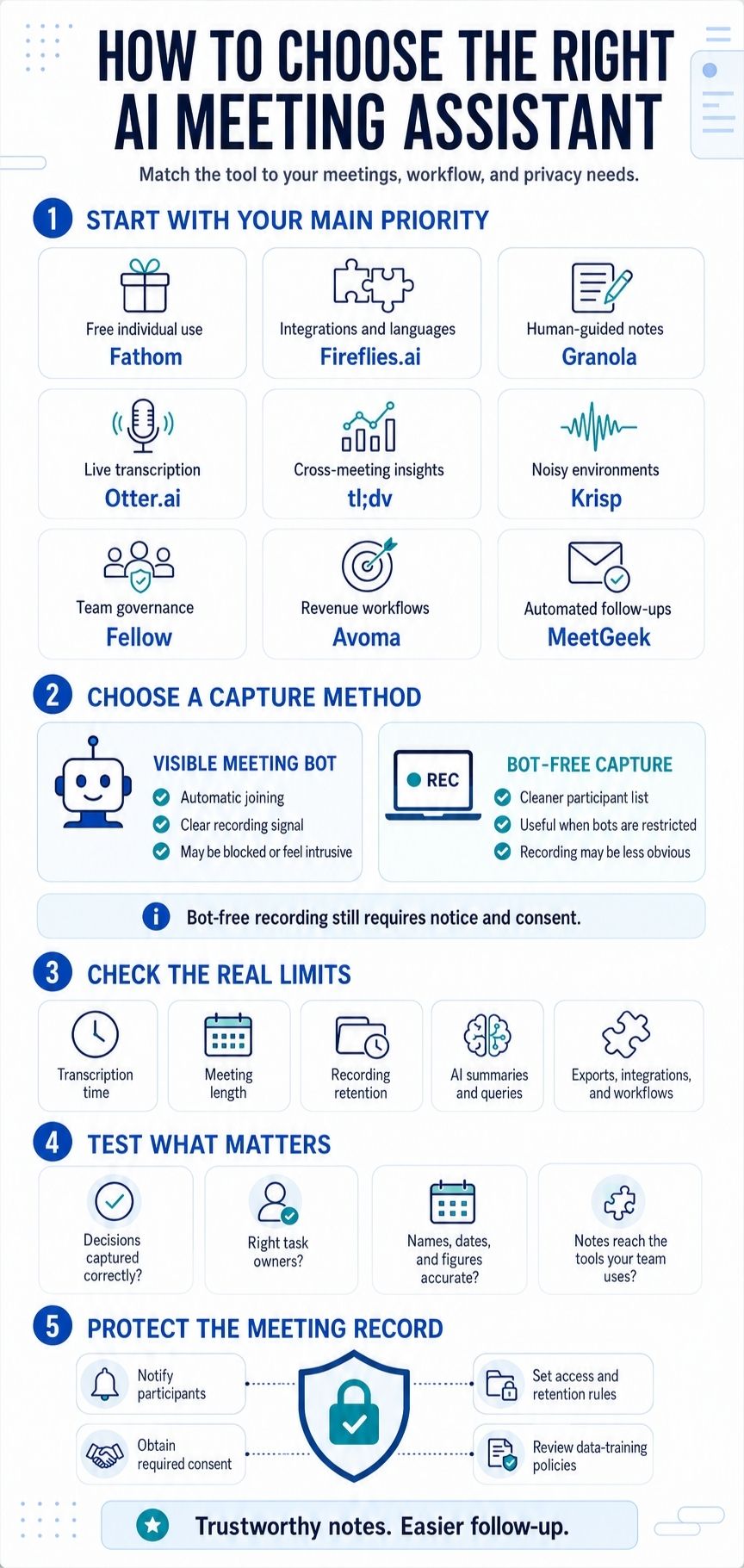
Start with the part of your meeting workflow that causes the most friction.
Whichever tool you shortlist, pay attention to what happens after the impressive demo. Check the action items, confirm the important details, review the data settings, and see whether the notes reach the people and systems that need them.
That is where an AI meeting assistant either becomes useful or turns into one more archive nobody opens.
Frequently Asked Questions on the Best AI Meeting Assistants
1. Which AI meeting assistants work without a bot?
Granola and Krisp are bot-free by design. Fathom, Fireflies, Otter, tl;dv, Fellow, and MeetGeek provide bot-free capture in at least some desktop, browser, or mobile workflows. Availability may depend on the operating system or meeting platform.
2 . Can one assistant cover Zoom, Google Meet, and Microsoft Teams?
Yes. Fathom, Fireflies, Otter, tl;dv, Fellow, and MeetGeek support all three in some form. The exact capture method may differ between platforms.
3. How accurate are AI-generated meeting notes?
There is no trustworthy universal accuracy percentage. Performance changes with noise, accents, terminology, speaker overlap, audio quality, and language. Research on meeting summarization continues to find omissions, hallucinations, and irrelevant details.
Review task owners, deadlines, decisions, financial figures, and anything intended to become a formal record.























