
Small business owners do not usually need more ideas. They need more time, fewer repeated tasks, cleaner systems, and better follow-through.
One person may be handling customer messages, invoices, social posts, sales calls, local SEO, website updates, product ideas, and late-night admin work. A small team may have the same problem at a slightly larger scale: too many moving parts and not enough people to keep everything consistent.
AI can help, but only when it is used as a workflow. Random prompts do not build a business system. A useful workflow starts with a real business task, gives AI the right input, adds human review, and turns the output into something the business can use.
Implementing AI workflows small business can streamline operations and reduce time spent on repetitive tasks.
Small businesses deserve their own cluster because they often need practical automation more than large companies do. A big company can assign teams to marketing, support, sales, finance, and operations. A small business owner often has to manage all of it.
By focusing on AI workflows small business, owners can achieve better resource management and time allocation.
AI workflows small business can significantly improve efficiency and productivity in various areas, making them essential for growth.
This is the best AI workflows small business owners can use. Implementing AI workflows small business will lead to simple, repeatable, and effective business outcomes: more leads, faster replies, less admin, better local visibility, and clearer decisions.
1. Marketing Automation System

Use case: Email marketing, campaign planning, lead nurturing, customer communication
Useful AI tools: ChatGPT, Mailchimp, HubSpot, Canva AI, Zapier, Notion AI, Google Sheets
Result: Faster campaign creation, better follow-up, less manual marketing work
Small business marketing often fails because the owner only promotes when there is spare time. That creates inconsistent posting, irregular emails, and weak follow-up after someone shows interest.
Using AI workflows small business effectively can enhance the overall marketing strategy and brand presence.
A marketing automation workflow helps the business stay visible without starting from zero every week.
Start with one offer, not ten. It could be a service consultation, a seasonal discount, a new product, a workshop, a local event, or a newsletter signup. Then build the campaign around the customer’s path.
When applying AI workflows small business, consider starting with core customer interactions.
A practical workflow:
- Choose the campaign goal.
- Define the target customer.
- Write the offer in plain language.
- Ask AI to create campaign angles.
- Draft emails, social posts, ad copy, and landing page sections.
- Review the message for accuracy and brand tone.
- Build the campaign in Mailchimp, HubSpot, or another marketing platform.
- Automate follow-up based on customer behavior.
- Track opens, clicks, replies, bookings, and purchases.
- Save the best-performing messages for future campaigns.
A useful prompt:
With AI workflows small business, ensure that the implementation aligns with customer needs for optimal results.
“Create a simple marketing campaign for a local cleaning business offering a spring deep-clean package. Include three email ideas, five social post ideas, one landing page outline, and a follow-up message for people who ask for a quote but do not book.”
AI can help create first drafts. The owner still needs to check the offer, dates, pricing, service area, availability, and claims. Do not let AI promise what the business cannot deliver.
This workflow is especially useful for service businesses, coaches, consultants, local shops, small e-commerce brands, and freelancers. It turns marketing into a system instead of an occasional scramble.
Output: A campaign package with emails, social posts, landing page copy, and automated follow-up.
Focusing on AI workflows small business can greatly benefit service-oriented industries.
2. Customer Service Chatbot Setup
AI workflows small business allow for better customer engagement through prompt responses and support.
Use case: Customer support, FAQs, lead capture, appointment routing
Useful AI tools: HubSpot, Intercom, Tidio, Zendesk AI, Shopify Inbox, ChatGPT, website chatbot builders
Result: Faster customer replies, fewer repeated questions, better lead routing
Small businesses often answer the same questions again and again. What are your hours? Do you deliver? What does this service include? How much does it cost? Can I book a call? What is your return policy?
A customer service chatbot can handle the first layer of these questions. It should not replace human service. It should reduce the repetitive work so the owner or team can focus on real customer problems.
Start with a support knowledge base.
Collect:
-
- Business hours
- Location or service area
- Pricing basics
- Services or products
- Booking process
- Delivery or shipping details
- Refund policy
- Return policy
- Common objections
- Contact options
- Emergency or escalation rules
Implementing AI workflows small business can streamline customer service processes significantly.
A practical workflow:
- List the top 30 customer questions.
- Write short approved answers.
- Create a chatbot flow for common questions.
- Add lead capture for serious inquiries.
- Set clear handoff rules for human support.
- Test the chatbot with real customer-style questions.
- Review failed responses every week.
- Update the knowledge base whenever policies change.
A useful prompt:
“Turn these customer FAQs into short chatbot answers for a small home repair business. Keep the tone friendly and clear. Do not give legal, safety, or pricing advice beyond the approved information. Include when the bot should hand off to a human.”
The chatbot should know when to stop. Refund disputes, complaints, custom pricing, safety issues, legal questions, medical advice, and sensitive customer situations should move to a person.
For small business AI, this is one of the quickest wins. Customers get faster answers, and the business spends less time repeating the same information.
Output: A basic customer service chatbot with FAQs, lead capture, and human handoff rules.
3. Social Media Content Pipeline
Use case: Social media planning, content creation, posting consistency
Useful AI tools: ChatGPT, Canva AI, ImagineLab.art, Buffer, Later, Hootsuite, Meta Business Suite, Notion AI
Result: More consistent content, faster creative production, better use of existing business knowledge
Many small business owners know they should post more often. The problem is not only time. It is deciding what to say.
A social media content pipeline turns everyday business activity into usable content.
Instead of asking AI to “write social posts,” start with real material:
-
- Customer questions
- Before-and-after work
- Product photos
- Testimonials
- Common mistakes customers make
- Seasonal offers
- Behind-the-scenes details
- Founder opinions
Leveraging AI workflows small business helps in creating engaging and relevant content.
- FAQs
- Local events
- New services
- Case examples
A practical workflow:
-
- Create a simple content bank.
- Group ideas into themes: education, proof, offer, behind-the-scenes, local, product, FAQ.
- Ask AI to turn each theme into posts.
- Create visual assets in Canva AI or ImagineLab.art.
- Adapt each post for the right platform.
AI workflows small business create a structured approach to content management and distribution.
- Schedule content in Buffer, Later, or another tool.
- Track saves, comments, clicks, messages, and inquiries.
- Reuse the best ideas in email, blog posts, ads, or website FAQs.
A useful prompt:
“Create a two-week social media content plan for a small bakery. Use these content themes: customer favorites, behind-the-scenes, seasonal products, local community, and ordering reminders. Include post ideas, short captions, image ideas, and a simple CTA.”
ImagineLab.art can support AI-generated visuals, infographics, and creative assets. Canva AI is useful for branded templates, campaign graphics, and quick design edits. AI should not fake customer stories or reviews. Use real customer insight wherever possible.
The key is consistency without becoming generic. A small business should sound like itself, not like a faceless brand account.
Output: A repeatable social content calendar with post ideas, captions, visuals, and scheduling notes.
4. Sales Funnel Automation
Use case: Lead generation, sales follow-up, lead qualification, booking calls
Useful AI tools: HubSpot, Zoho CRM, Pipedrive, ChatGPT, Mailchimp, Zapier, Typeform, Calendly
Result: Faster lead response, fewer missed opportunities, better conversion tracking
Utilizing AI workflows small business can enhance the lead generation process.
Small businesses often lose leads because follow-up is inconsistent. Someone fills out a form, sends a message, downloads a guide, or asks for a quote. Then the business gets busy, and the lead goes cold.
A sales funnel automation workflow keeps the next step clear.
A robust implementation of AI workflows small business can address follow-up lapses effectively.
Start by mapping the customer path:
- First contact
- Lead capture
- Qualification
- Follow-up
- Call booking or quote request
- Proposal
- Purchase
- Onboarding
- Review or referral request
A practical workflow:
- Create a lead form with only essential fields.
- Add questions that help qualify the lead.
- Connect the form to a CRM.
- Use AI to draft follow-up messages by lead type.
- Trigger an automatic confirmation email.
- Add a booking link if a call is needed.
- Create reminders for leads who do not respond.
- Tag leads by urgency, service interest, and value.
- Review the pipeline weekly.
A useful prompt:
“Create a sales follow-up sequence for a small web design studio. The lead filled out a website inquiry form but has not booked a discovery call. Write three emails and two short text reminders. Keep the tone helpful, not pushy.”
This workflow is useful for consultants, agencies, local service businesses, coaches, freelancers, and B2B startups. It does not need to be complex. Even a simple form, CRM, and follow-up sequence can recover leads that would otherwise disappear.
The owner should review automated sales messages carefully. Pushy automation can damage trust. The message should feel timely and useful.
Output: A basic sales funnel with lead capture, CRM tagging, follow-up emails, and booking reminders.
5. Invoice and Admin Automation
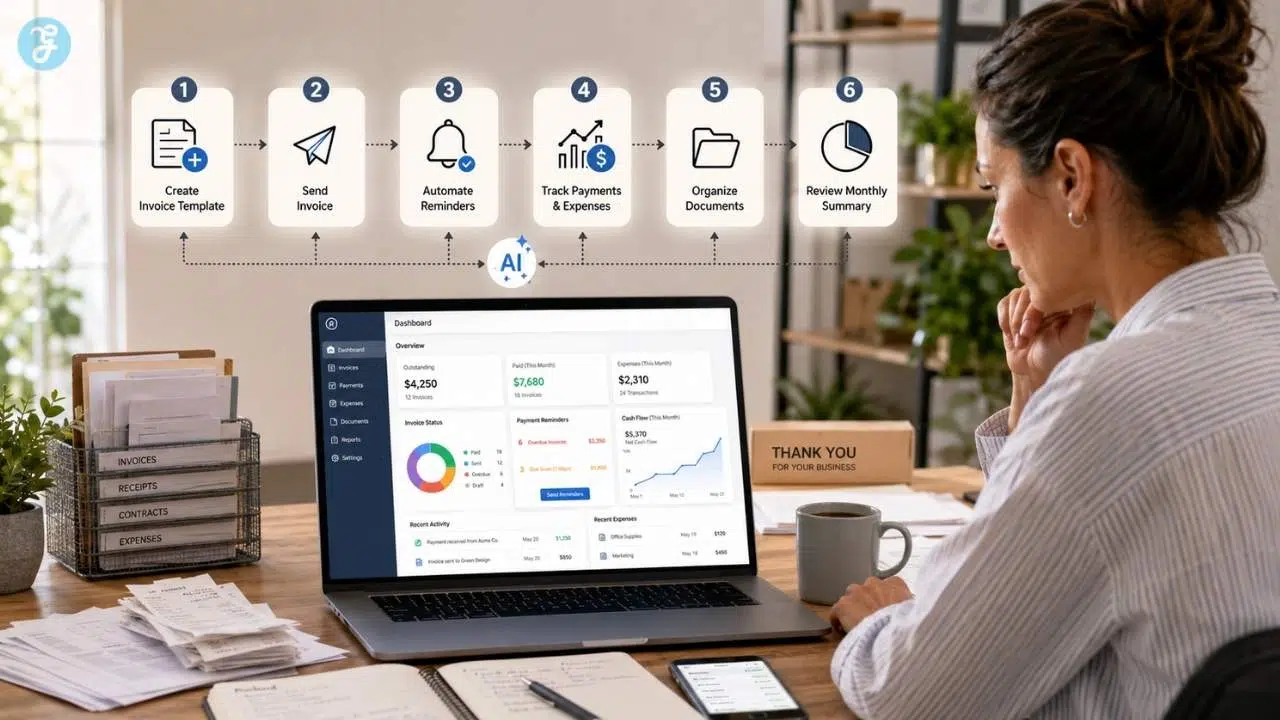
Use case: Invoicing, bookkeeping, reminders, document management, admin tasks
Useful AI tools: QuickBooks, Xero, FreshBooks, Wave, Google Workspace, Microsoft 365 Copilot, Zapier, ChatGPT
Result: Less admin time, fewer missed invoices, cleaner records
AI workflows small business can help automate invoicing and reduce administrative burdens.
Admin work is one of the quietest drains on small businesses. It does not look urgent until cash flow gets messy, invoices are late, receipts disappear, or tax season becomes painful.
AI and automation can reduce that mess.
This workflow should focus on accuracy and review, not blind automation.
A practical workflow:
- Create standard invoice templates.
- Set up customer and service categories.
- Use accounting software to track invoices, payments, and expenses.
- Automate recurring invoices where appropriate.
- Set payment reminder emails.
- Use AI to summarize unpaid invoices and overdue accounts.
- Connect form submissions, contracts, and invoices where possible.
- Review reports weekly or monthly.
- Keep human approval for unusual transactions or financial decisions.
A useful prompt:
“Create a monthly admin checklist for a freelance consultant. Include invoicing, payment follow-up, receipt organization, client status updates, tax document reminders, and a short finance review.”
QuickBooks, Xero, FreshBooks, and similar tools can help with invoicing and accounting workflows. Zapier can connect tools so forms, spreadsheets, CRMs, and accounting apps share information. ChatGPT can help draft reminder emails, checklists, and admin SOPs.
A warning matters here: financial records should be handled carefully. AI can summarize and draft, but a qualified accountant or bookkeeper should review important accounting and tax matters.
Output: A cleaner admin system with invoice templates, payment reminders, expense tracking, and review checklists.
6. Local SEO Optimization Workflow
Use case: Local search visibility, Google Business Profile, service pages, review management
Useful AI tools: RankPilot.ai, ChatGPT, Google Business Profile, Google Search Console, Semrush, Ahrefs, BrightLocal, Canva AI
Result: Better local visibility, stronger service pages, more qualified local traffic
Focusing on AI workflows small business enhances local SEO efforts and visibility.
For local businesses, search visibility can directly affect revenue. A customer looking for “plumber near me,” “best café in [city],” or “wedding photographer in [area]” is often close to taking action.
A local SEO workflow helps the business show up more clearly.
Start with the basics:
-
- Google Business Profile
- Accurate name, address, phone number
- Business hours
- Service area
- Website link
- Photos
Implementing AI workflows small business can optimize local service offerings.
- Services or products
- Reviews
- Local landing pages
- FAQs
- Internal links
- Basic schema where appropriate
A practical workflow:
- Audit your Google Business Profile.
- Check that business information is accurate.
- List core services and locations.
- Use AI to create service page outlines.
- Generate FAQ ideas from real customer questions.
- Use RankPilot.ai or another SEO tool to improve meta titles, descriptions, FAQs, and content structure.
- Create review response drafts.
- Add fresh photos and posts where appropriate.
- Track calls, clicks, direction requests, rankings, and form submissions.
- Update pages when services, hours, or offers change.
A useful prompt:
“Create a local SEO content plan for a small dental clinic in [city]. Include service page ideas, FAQ topics, Google Business Profile post ideas, review response templates, and internal linking suggestions. Do not make medical claims.”
RankPilot.ai can support SEO content, metadata, snippets, alt text, and AI visibility-related optimization. ChatGPT can help draft page outlines, FAQs, and review responses. Google Business Profile remains essential because it helps businesses appear on Search and Maps.
The review workflow needs care. Never fake reviews. Never use AI to mass-produce dishonest customer feedback. AI should only help draft respectful responses to real reviews.
Output: A local SEO system with optimized business profile content, service pages, FAQs, review responses, and tracking.
By concentrating on AI workflows small business, owners can navigate market changes more adeptly.
7. Business Idea Validation Workflow
Use case: New product ideas, service offers, market testing, startup planning
Useful AI tools: ChatGPT, Gemini, Perplexity, Google Trends, SurveyMonkey, Typeform, Notion AI, Google Sheets, Canva AI
Result: Faster idea testing, clearer customer assumptions, lower risk before launch
AI workflows small business can be pivotal in testing new ideas and services in the market.
Small business owners often get new ideas: a new service package, course, product, subscription, event, workshop, or digital offer. The danger is building too much before checking whether customers actually want it.
AI can help validate ideas faster.
The workflow starts with the assumption, not the product.
Ask:
Using AI workflows small business can streamline the process of evaluating customer needs.
-
- Who is this for?
- What problem does it solve?
- How painful is the problem?
- What are customers using now?
- What would make them switch?
- What would they pay for?
AI workflows small business are essential for understanding customer pain points effectively.
- What objections might stop them?
- Can this be tested cheaply?
A practical workflow:
- Write a one-page idea brief.
- Ask AI to identify customer segments.
- Ask for possible objections and risks.
- Create survey questions.
- Draft interview questions.
- Build a simple landing page or waitlist.
- Create test content or a small ad campaign.
- Collect responses, signups, comments, and objections.
- Ask AI to summarize patterns.
- Decide whether to build, revise, or drop the idea.
A useful prompt:
Integrating AI workflows small business leads to better decision-making based on customer feedback.
“Evaluate this small business idea: a weekend meal-prep service for busy professionals in [city]. Identify target customers, likely objections, validation questions, landing page sections, pricing assumptions to test, and the smallest useful pilot version.”
This workflow is helpful for entrepreneurs because it turns excitement into evidence. AI can generate options, but customer response matters more than AI’s opinion.
Do not confuse “AI says this is promising” with validation. Real validation comes from customer behavior: signups, calls, deposits, preorders, survey patterns, or repeated demand.
Output: A validation plan with customer segments, risks, survey questions, landing page copy, and test steps.
Simple AI Stack for Small Business Beginners
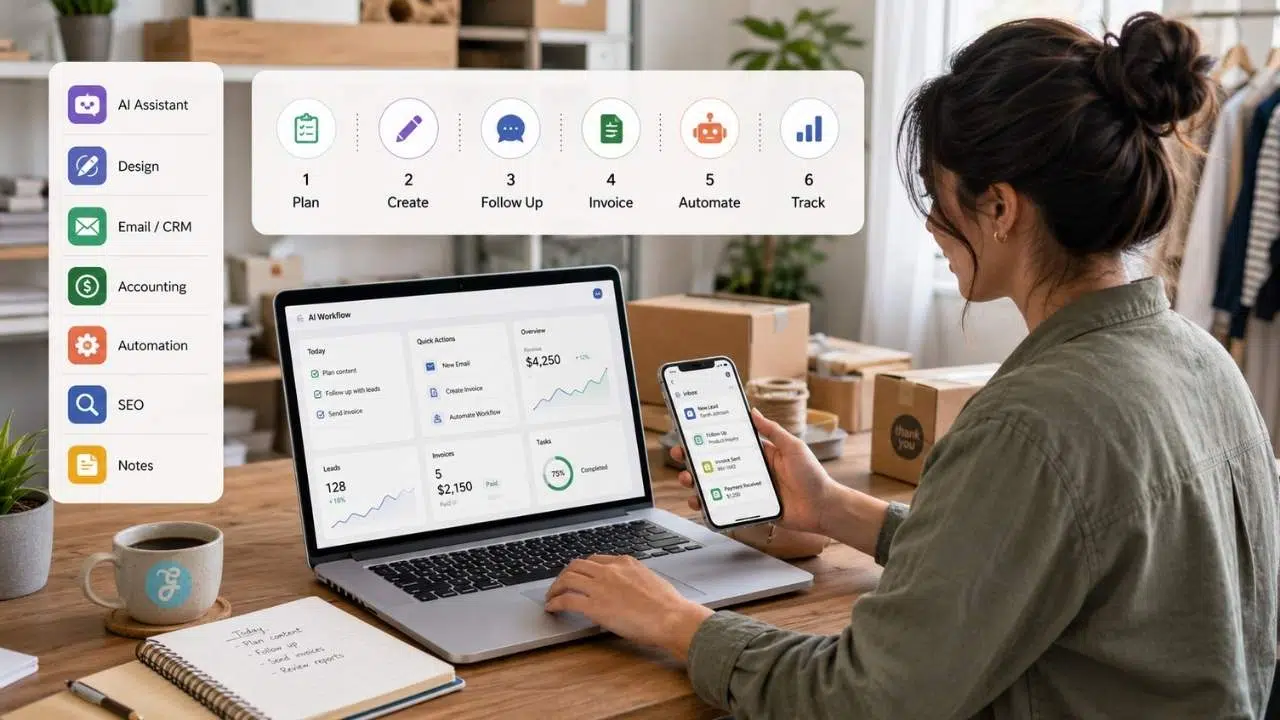
Small business owners do not need a complicated AI stack. Start with tools that support real daily tasks.
| Business Need | Beginner-Friendly Tool Types | Example Tools |
| Writing and planning | AI assistant | ChatGPT, Gemini, Claude |
| Visual content | Design and image tools | Canva AI, ImagineLab.art |
| Marketing automation | Email and CRM tools | Mailchimp, HubSpot |
| Sales follow-up | CRM and booking tools | HubSpot, Zoho, Pipedrive, Calendly |
| Admin and invoicing | Accounting tools | QuickBooks, Xero, FreshBooks, Wave |
| Tool connections | Automation platforms | Zapier |
| Local SEO | SEO and business profile tools | RankPilot.ai, Google Business Profile, Google Search Console |
| Internal organization | Notes and SOP tools | Notion, Google Drive, Microsoft 365 |
A practical starter setup could be:
Overall, AI workflows small business offer a streamlined approach to daily operations and customer engagement.
- One AI writing assistant for planning and drafting
- One design tool for social and marketing visuals
- One email or CRM tool for follow-up
- One accounting tool for invoices
- One automation tool if tasks repeat across apps
- One SEO workflow for local visibility
Keep it small. A tool stack should reduce work, not become another job.
How This Fits Into AI Creative Workflows
Small business is one of the clearest AI industry use cases because the work touches almost every part of a company. Marketing, sales, customer service, operations, finance, local SEO, and product ideas are often handled by the same person or a very small team.
That makes AI creative workflows useful in a practical way. They help small business owners turn repeated tasks into systems.
The pattern is simple:
- Find the task that repeats.
- Structure the input.
- Use AI to create a draft, summary, answer, or plan.
- Review it manually.
- Publish, send, automate, or track it.
- Improve the workflow based on results.
For a small business, AI is not valuable because it sounds advanced. It is valuable when it saves an hour, prevents a missed lead, improves a customer reply, or helps the owner make a clearer decision.
Common Mistakes Small Business Owners Make With AI
AI can save time, but it can also create sloppy systems if the business uses it without review.
By understanding common mistakes using AI workflows small business, owners can avoid potential pitfalls.
Automating Before Fixing the Process
If the current process is messy, AI may only make the mess faster. Write down the steps first. Then automate the parts that repeat.
Using Generic Prompts
A generic prompt creates generic output. Give AI business details: customer type, offer, tone, location, pricing rules, service limits, and what not to say.
Letting AI Handle Sensitive Customer Issues
Customer complaints, refunds, legal concerns, safety issues, and financial questions should move to a human. AI can help draft responses, but it should not make sensitive decisions alone.
Publishing Unchecked Content
AI can make incorrect claims, invent details, or use language that does not match the business. Check every public-facing output.
Buying Too Many Tools
Many small businesses waste time testing tools instead of fixing workflows. Start with the task, then choose the tool.
Forgetting Measurement
A workflow should have a result. Track time saved, leads captured, replies sent, invoices paid, bookings made, or local search actions. If nothing improves, revise the workflow.
Final Thoughts
AI workflows small business should be continually refined to meet evolving customer demands.
AI workflows small business owners use should be practical, not complicated. The point is to reduce repeated work, improve response speed, and make business systems easier to manage.
Start with the biggest bottleneck. If customers wait too long for answers, build the chatbot and FAQ workflow. If marketing is inconsistent, build the content pipeline. If leads go cold, build the sales funnel follow-up. If local visibility is weak, start with the local SEO workflow. If admin takes too much time, fix invoices and reminders.
Incorporating AI workflows small business is a step toward modernizing operational efficiency.
Use AI for drafts, options, summaries, and routine tasks. Keep human review for customer trust, pricing, finance, legal questions, sensitive issues, and final decisions.
A small business does not need to look like a tech company to use AI well. It only needs one useful workflow at a time.
AI workflows small business ultimately empower owners to focus on strategic growth.
Frequently Asked Questions (FAQs) About AI Workflows for Small Business Owners
For those curious about AI workflows small business, understanding the basics is crucial for effective implementation.
What are AI workflows for small business owners?
AI workflows for small business owners are repeatable systems that use AI to help with marketing, customer service, social media, sales follow-up, invoicing, local SEO, and business idea testing. The workflow includes human review before the final output is used.
What is the best AI workflow for a beginner small business owner?
The best starting workflow is usually the one tied to the biggest time drain. For many small businesses, that is customer FAQs, social content, lead follow-up, or invoice reminders.
Exploring AI workflows small business reveals numerous opportunities for innovation and improvement.
Can AI help small businesses save money?
Yes, AI can reduce time spent on repeated tasks such as drafting emails, creating social posts, summarizing customer questions, writing first-draft content, and organizing admin work. It should still be reviewed by a person.
Which AI tools are useful for small businesses?
Useful tools may include ChatGPT, Gemini, Claude, Canva AI, ImagineLab.art, Mailchimp, HubSpot, Zapier, QuickBooks, RankPilot.ai, Google Business Profile, and Notion. The right choice depends on the workflow.
Can AI replace employees in a small business?
AI can help with repeated tasks, but it does not replace trust, judgment, customer relationships, financial review, local knowledge, or strategy. It works best as support for owners and teams.
How can small businesses use AI for customer service?
Small businesses can use AI to create FAQ answers, chatbot flows, email replies, support summaries, and escalation rules. Sensitive issues should still go to a human.
How can AI help with local SEO?
AI can help draft service pages, meta descriptions, FAQs, review responses, Google Business Profile posts, and local content ideas. Business information, service claims, and customer reviews must be accurate.
Is AI safe for invoicing and bookkeeping?
AI and accounting tools can help with invoice templates, reminders, categorization, and reporting. Important financial decisions, tax matters, and unusual transactions should be reviewed by the owner, bookkeeper, or accountant.
As AI workflows small business evolve, so too will the methods and practices for successful execution.
How can entrepreneurs use AI to test business ideas?
Entrepreneurs can use AI to build idea briefs, identify customer segments, draft survey questions, create landing page copy, and summarize feedback. Real validation still comes from customer behavior.
AI workflows small business should always adapt to changing customer landscapes and preferences.
What is the simplest AI stack for a small business?
A simple stack includes one AI assistant, one design tool, one email or CRM tool, one accounting tool, one SEO workflow, and one place to organize notes and processes. Start small and add tools only when needed.
With AI workflows small business, even the smallest changes can lead to significant improvements.