Podcasting sounds simple from the outside: record a conversation, upload the episode, share it online. The real work is messier. A good episode needs an idea, structure, research, recording prep, clean audio, editing, show notes, titles, clips, social posts, email promotion, and some kind of listener feedback loop. AI workflows podcasters can use will streamline this process.
For independent podcasters and small production teams, that workload can become the reason the show slows down. The host has ideas but no production rhythm. The editor finishes the episode but the clips are late. The show notes are rushed. The title is too vague. The best moments stay buried inside a 48-minute recording.
AI can help podcasters, but not by replacing the host’s taste, curiosity, or voice. The useful role is more practical. AI can organize raw ideas, draft episode outlines, clean up repetitive editing tasks, summarize transcripts, identify clip moments, create first-draft promotional copy, and help the team reuse one episode across several channels.
Podcasting fits that theme well because it mixes creative work with production operations. The strongest AI workflows podcasters use are not random prompts. They are repeatable systems that help a show move from idea to published episode with fewer delays.
These AI workflows podcasters can utilize are designed to ensure that the creative process remains intact while managing production effectively.
Incorporating AI workflows podcasters should consider can significantly enhance their efficiency and output quality.
Who This Article Is For
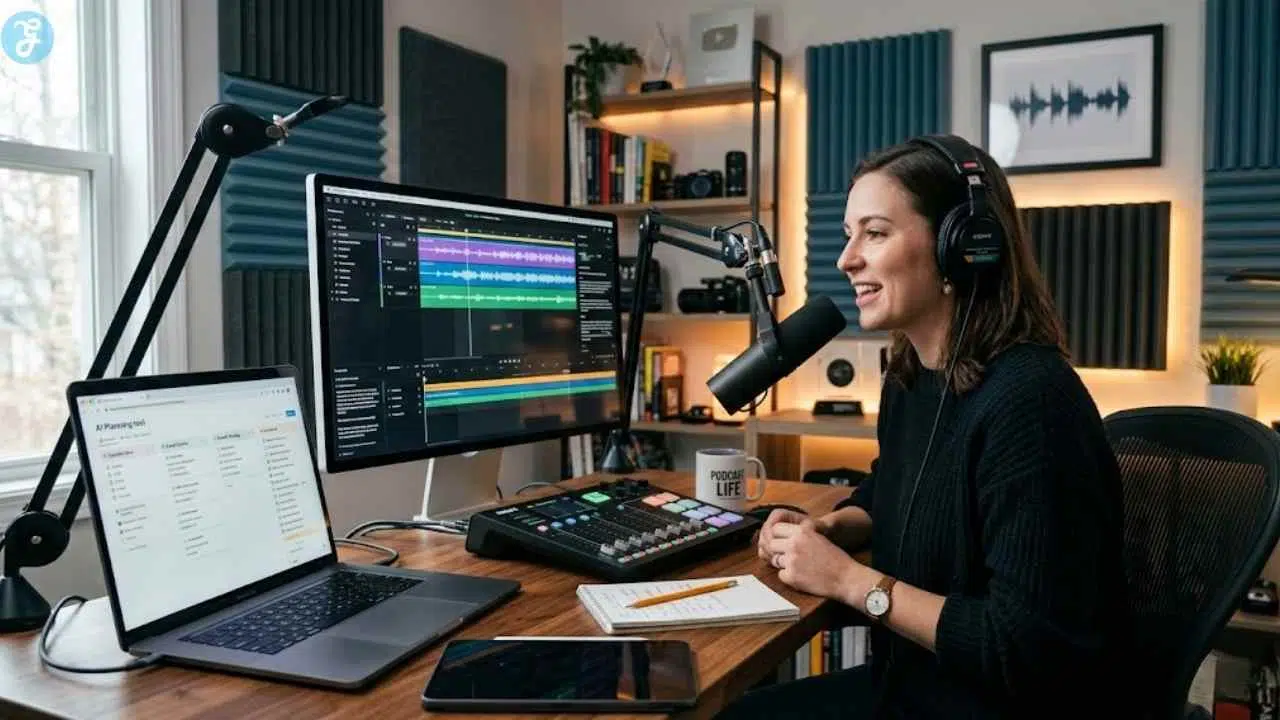
Utilizing AI workflows podcasters can benefit from helps in various stages including planning, recording, and editing.
This guide is written for:
- Independent podcasters managing most of the production themselves
- Podcast hosts and creators who want a clearer publishing rhythm
- Small podcast production teams
- Aspiring podcasters building a show from scratch
- Content marketers using podcasts for brand authority
- Entrepreneurs with branded podcasts
- Coaches, consultants, and educators who use audio content to teach
- Podcast managers and virtual assistants supporting multiple shows
The workflows below can be adapted for solo shows, interview shows, narrative podcasts, branded podcasts, educational podcasts, and video-first podcasts.
1. Episode Idea Generator Workflow

Use case: Planning, content strategy, episode development
Useful AI tools: ChatGPT, Claude, Gemini, Notion AI, Castmagic, Buzzsprout stats or podcast analytics exports
Result: Stronger episode topics, clearer audience promise, less planning friction
AI workflows podcasters use can enhance the clarity and direction of episode topics.
A weak episode idea usually sounds fine in a notes app but becomes thin when the host starts recording. A stronger idea has a clear listener problem, tension, angle, and reason to listen now.
AI can help podcasters move from loose topic ideas to episode concepts that are easier to plan and promote.
Start with your show’s position:
Understanding who the podcast is for is crucial when designing AI workflows podcasters will implement.
- Who the podcast is for
- What the audience wants to understand, solve, avoid, or improve
- Your usual episode format
- Your tone
- Topics you cover often
- Topics you want to avoid
- Past episodes that performed well
- Listener questions, comments, reviews, or community discussions
Then ask AI to create topic options around audience needs, not just keywords.
A useful workflow:
AI workflows podcasters should consider can include adding clear audience insights into episode planning.
- Add your show description and target listener.
- Add 5–10 past episode titles.
- Add audience questions or recurring problems.
- Ask AI to generate episode ideas with a listener promise.
- Sort ideas by format: solo episode, interview, panel, case study, tutorial, story, debate, or Q&A.
- Ask AI to identify which ideas feel repetitive or too broad.
- Choose 3–5 topics for the next production batch.
- Turn each chosen topic into an episode brief.
A practical prompt:
Using AI workflows podcasters can leverage helps create a more engaging and structured episode experience.
“Act as a podcast development editor. My podcast helps early-stage entrepreneurs build practical content systems. Generate 20 episode ideas. For each idea, include the listener problem, episode angle, suggested format, possible guest type, and why the topic is worth recording.”
The result should not be a long list of generic ideas. It should be a usable editorial calendar. For a branded podcast, AI can also help align topics with business goals without making the show sound like an advertisement.
For example, instead of “How to use AI for marketing,” a better episode angle might be:
“Why small teams should stop using AI for random content and start building repeatable campaign workflows.”
That gives the host a sharper position.
Output: A planned episode bank with topic, audience promise, format, possible guest, and promotion angle.
2. Guest Research and Interview Prep Workflow
Use case: Guest interviews, research, host preparation
Useful AI tools: ChatGPT, Claude, Gemini, Perplexity, Notion AI, Google Docs, Riverside notes, Descript transcripts from past guest content
Result: Better interview questions, stronger guest fit, less shallow conversation
Interview podcasts often fail for a simple reason: the host asks questions the guest has answered a hundred times. AI can help prepare better interviews by organizing research and finding less obvious angles.
By employing AI workflows podcasters can prepare better interviews, leading to richer content.
The goal is not to let AI write a stiff question list. The goal is to help the host understand the guest’s work, contradictions, expertise, and useful stories before recording.
A clean workflow:
The goal of these AI workflows podcasters can implement is to enhance the quality of each episode.
- Gather the guest’s bio, website, LinkedIn profile, book page, recent articles, previous interviews, or public talks.
- Summarize the guest’s main expertise.
- Ask AI to identify repeated talking points from their public content.
- Ask for underexplored angles or follow-up questions.
- Create a question list grouped by opening, core discussion, examples, tension, and closing.
- Add your own curiosity and audience-specific questions.
- Remove any question that sounds generic or overly flattering.
- Create a short guest brief for the host and production team.
A useful prompt:
The best AI workflows podcasters adopt will ensure the final output is engaging and relevant.
“Review these notes about a guest for a podcast episode. Create an interview prep brief with the guest’s core expertise, likely talking points, underexplored angles, 12 strong questions, 5 follow-up questions, and 3 questions to avoid because they are too generic.”
For coaches, consultants, educators, and business podcasters, this workflow helps avoid flat interviews. It also supports better guest management. You can send the guest a short prep note without revealing every question.
AI can also help create a guest intake form. Ask guests about their strongest story, contrarian view, audience takeaway, examples they can share, and topics they prefer not to discuss.
The host still needs to listen in the moment. A prepared question list is useful, but the best interview often comes from the follow-up question that was not on the page.
Output: A guest research brief with sharper questions, follow-up angles, and a clear episode direction.
3. AI Script Writing Workflow
Use case: Solo episodes, educational podcasts, branded podcasts, episode structure
Useful AI tools: ChatGPT, Claude, Gemini, Notion AI, Google Docs, Descript for script-to-edit workflow
Result: Better episode flow, less rambling, faster recording prep
Not every podcast needs a full script. Many shows are better with a structured outline. But solo episodes, educational episodes, brand explainers, audio essays, and coaching-style shows usually benefit from a stronger plan.
AI can help turn raw thoughts into a recording-ready structure.
Start with a rough idea. Then give AI the listener, episode goal, and format. The more specific the input, the less generic the script.
Include:
-
- Episode topic
- Target listener
Crafting effective AI workflows podcasters can trust increases the overall production quality.
-
- Main problem
- Promise of the episode
- Desired length
- Tone
- Key points
- Examples or stories
- CTA
- Phrases or claims to avoid
AI workflows podcasters may explore will guide them in maintaining a consistent tone throughout their episodes.
- Whether you want a full script or speaking outline
A practical process:
-
- Write your rough notes in your own words.
- Ask AI to organize them into an episode outline.
- Add a short opening hook, but avoid exaggerated claims.
- Ask AI to create transitions between sections.
- Request a short recap, CTA, and optional teaser for the next episode.
- Read the script aloud.
- Remove sentences that do not sound like the host.
- Convert the final version into a speaking outline if a full script feels too stiff.
Each of these AI workflows podcasters utilize plays a critical role in shaping the final product.
A useful prompt:
“Turn these rough notes into a 20-minute solo podcast episode outline. Keep the host voice calm, practical, and conversational. Include a short opening, 5 main sections, examples, transitions, and a closing CTA. Do not write hype-style language.”
For interview podcasts, AI can create a run-of-show instead of a full script:
- Cold open idea
- Host intro
- Guest intro
- First question
- Segment blocks
- Sponsor break placement
- Closing question
- CTA
- Episode outro
The script should support the host, not trap them. If the host sounds like they are reading an article, the audience will feel it. Keep the final recording natural.
By applying structured AI workflows podcasters can produce a more polished final product.
Output: A recording-ready script, outline, or run-of-show that keeps the episode focused.
4. Recording Prep and Production Checklist Workflow
Use case: Recording workflow, team coordination, remote podcast setup
Useful AI tools: Notion AI, ChatGPT, Google Docs, Riverside, SquadCast, Zoom, Google Calendar, project management tools
Result: Fewer recording mistakes, smoother guest experience, cleaner production handoff
Many podcast problems are not creative problems. They are preparation problems. The guest joins without headphones. The host forgets the sponsor read. The wrong mic is selected. The recording starts late. The editor receives files with no notes.
AI can help build a repeatable recording checklist.
A good checklist covers:
- Guest confirmation
- Recording link
- Headphone reminder
- Microphone check
- Camera check for video podcasts
- Internet connection
- Backup recording plan
- Episode outline
- Sponsor reads
- Release form if needed
- File naming
- Editor notes
- Publishing date
- Promotion assets
A practical workflow:
- Create a master production checklist for every episode.
- Use AI to tailor it for solo, interview, panel, or remote recording.
- Generate a guest prep email.
- Create a host prep note with talking points and reminders.
- Build a recording-day checklist.
- Create a post-recording handoff template for the editor or VA.
- Save everything in Notion, Google Docs, Trello, Asana, or another project system.
A useful prompt:
“Create a podcast recording checklist for a remote interview episode. Include guest prep, host prep, technical checks, recording-day steps, post-recording file handoff, and promotion asset reminders. Keep it simple enough for a small production team.”
This workflow is especially helpful for podcast managers and virtual assistants. It reduces the mental load of remembering every small step.
Do not overbuild it. A checklist that takes longer to manage than the episode itself will not last. Keep the workflow practical.
Output: A reusable production checklist with guest prep, recording steps, and post-recording handoff notes.
5. Audio Cleanup Automation Workflow
Use case: Editing, post-production, sound quality
Useful AI tools: Adobe Podcast Enhance Speech, Auphonic, Descript Studio Sound, iZotope RX, Riverside editing tools, Audacity with noise reduction, Logic Pro or Audition with AI-assisted plugins where available
Result: Cleaner speech, more consistent levels, less manual audio repair
Bad audio can make a good episode feel hard to finish. Listeners may tolerate a rough first episode, but repeated background noise, uneven volume, echo, and harsh audio create fatigue.
AI audio cleanup tools can help, especially for independent podcasters who are not audio engineers. They can reduce background noise, improve speech clarity, balance levels, and prepare files for publishing.
AI workflows podcasters can adopt will assist in achieving a better sound quality and consistency.
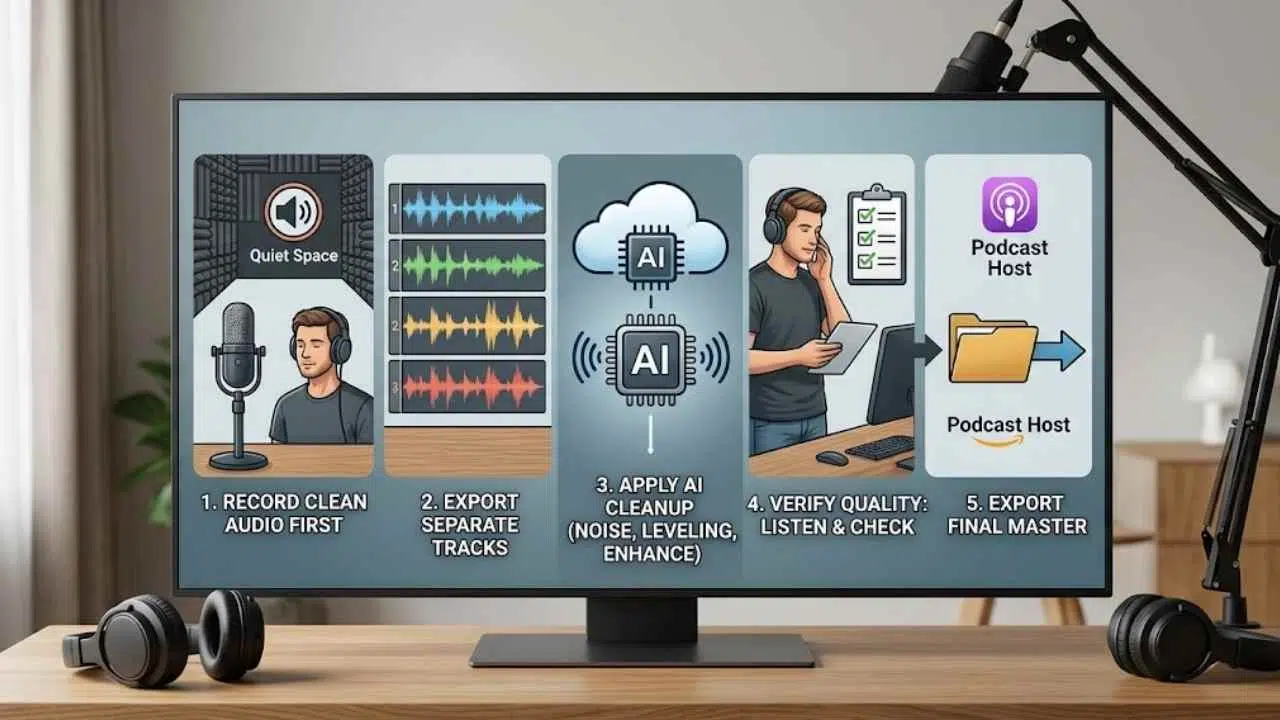
A practical workflow:
- Record the cleanest audio possible. AI cleanup should not be the first line of defense.
- Use headphones and a decent microphone.
- Record in a quiet space with soft surfaces.
- Export separate speaker tracks if possible.
- Run a short sample through the cleanup tool before processing the full episode.
- Apply noise reduction, leveling, and speech enhancement carefully.
- Listen to the full episode after processing.
- Check for robotic voice texture, clipped words, or overprocessed sound.
- Export the final master for the hosting platform.
A useful audio cleanup checklist:
- Is the background noise reduced without damaging the voice?
- Are both speakers at similar volume?
- Are breaths and pauses natural?
- Does the voice sound too sharp, thin, or artificial?
- Are music and speech levels balanced?
- Does the final file meet the podcast host’s requirements?
Adobe Podcast Enhance Speech can improve voice recordings with AI-powered cleanup. Auphonic is widely used for automatic audio post-production such as leveling, loudness normalization, and noise reduction. Descript Studio Sound can also help reduce noise and enhance voice recordings.
The warning is important: AI cleanup cannot fully rescue a terrible recording. It can improve audio, but it may create artifacts if pushed too hard. The best workflow is clean recording first, light AI cleanup second.
For instance, AI workflows podcasters implement should emphasize the importance of initial recording conditions.
Output: A cleaner, more balanced podcast episode ready for editing or publishing.
6. Transcript-Based Editing Workflow
Use case: Editing, content review, accessibility, clip selection
Useful AI tools: Descript, Riverside, Adobe Premiere Pro transcription, Otter.ai, Sonix, Trint, Podcastle
Result: Faster edits, easier review, searchable episode content
Transcript-based editing has changed podcast production for many small teams. Instead of only editing waveforms, the editor can review spoken words like a document. This makes it easier to remove repeated phrases, long tangents, false starts, and sections that do not serve the episode.
A practical workflow:
- Import the recording into a transcription-based editor.
- Generate the transcript.
- Correct speaker labels.
- Highlight strong moments, unclear sections, and possible cuts.
- Remove filler sections carefully.
- Check that cuts still sound natural.
- Mark clips, quotes, and title ideas.
- Export transcript, edited audio, and notes for show notes or blog content.
This is useful for:
These AI workflows podcasters are encouraged to follow will greatly enhance their editing processes.
- Interview cleanup
- Solo episode tightening
- Removing repeated explanations
- Finding quotable moments
- Creating accessibility transcripts
- Preparing clips for social media
- Reviewing guest statements before publishing
A practical prompt after transcript generation:
“Review this podcast transcript and identify sections that feel repetitive, unclear, or off-topic. Suggest possible cuts by timestamp or section heading. Do not change the meaning of the speaker.”
The editor should not remove all natural speech. Podcasts are not audiobooks. Small pauses, laughter, and conversational rhythm make the show feel human. Over-editing can make an interview sound sterile.
For sensitive topics, check edits carefully. A cut can change context. If a guest said something nuanced, do not compress it until the meaning shifts.
Output: A tighter episode edit, cleaner transcript, marked clips, and searchable content notes.
7. Show Notes Generator Workflow
Use case: Publishing, listener support, SEO, accessibility
Useful AI tools: Castmagic, Riverside AI Show Notes, Buzzsprout Cohost AI, ChatGPT, Descript, Podsqueeze, Swell AI
Result: Faster show notes, better episode summaries, cleaner publishing assets
Show notes are often rushed because they arrive at the end of the workflow, when everyone wants the episode published. That is why many podcasts end up with a vague two-line description and a pile of unformatted links.
AI can create a useful first draft from a transcript. The host or producer should then edit it for accuracy and tone.
A good show notes workflow:
- Upload the final transcript or audio.
- Ask AI to summarize the episode in plain language.
- Generate key takeaways.
- Identify timestamps or chapter markers.
- Pull mentioned tools, books, people, or resources.
- Draft the episode description.
- Create a shorter version for podcast apps.
- Create a longer version for the website.
- Review every name, link, claim, and timestamp.
- Add the final CTA.
A useful prompt:
“Create show notes from this podcast transcript. Include a short episode summary, 5 key takeaways, chapter markers, mentioned resources, a guest bio, 5 quote options, and a short podcast app description. Do not invent links or claims.”
Castmagic, Riverside, Buzzsprout Cohost AI, and similar tools can generate transcripts, summaries, chapter markers, social posts, and other content assets. These tools save time, but the output still needs editorial review.
Show notes should help three groups:
AI workflows podcasters can use effectively can streamline the generation of insightful show notes.
- Listeners deciding whether to play the episode
- Current listeners looking for resources
- Search engines and podcast platforms trying to understand the episode
Do not stuff keywords into show notes. Clear descriptions work better than awkward repetition.
Output: A reviewed show notes package with summary, key takeaways, chapters, links, guest details, and CTA.
8. Clip Repurposing System
Use case: Short-form video, podcast promotion, audience growth
Useful AI tools: OpusClip, Headliner, Riverside Magic Clips, Descript, CapCut, Canva, Adobe Express
Result: More promotional assets from one episode, faster short-form publishing, better reach across platforms
A strong episode can contain several good short clips. The problem is finding them, cutting them, captioning them, formatting them, and posting them consistently. Many podcasters publish the full episode and never reuse the best moments.
An AI clip repurposing workflow solves that.
A practical workflow:
- Record video when possible, even if the main show is audio-first.
- Generate a transcript.
- Ask AI to find strong moments: debate, story, tip, mistake, surprise, strong opinion, or clear lesson.
- Create several short clips for different platforms.
- Add captions.
- Format for vertical video if needed.
- Add a short title or hook on screen if appropriate.
- Review for context and accuracy.
- Schedule clips across YouTube Shorts, TikTok, Instagram Reels, LinkedIn, or X.
- Track which clips drive plays, follows, clicks, or subscribers.
A useful prompt:
“From this transcript, identify 10 short clip candidates. For each one, include the timestamp, the reason it works, a short hook, the platform it suits best, and any context needed so the clip is not misleading.”
OpusClip and Headliner can help turn longer videos or podcast recordings into short clips. Riverside and Descript can also support clip creation, captions, and repurposing. Canva and CapCut are useful for finishing the visual style.
One warning: not every clip needs to be dramatic. Podcast clips often perform well when they answer a specific question clearly. A thoughtful 40-second explanation can be more useful than a forced hot take.
Also check context before posting. A clip that sounds punchy outside the full conversation may misrepresent the guest or host.
Output: A batch of short clips with captions, platform formatting, hooks, and posting notes.
9. SEO Podcast Title Optimizer Workflow
Use case: Podcast SEO, episode discovery, publishing metadata
Useful AI tools: ChatGPT, Buzzsprout Cohost AI, Castmagic, Google Trends, Apple Podcasts, Spotify for Creators, YouTube Studio, Ahrefs or Semrush for web research
Result: Clearer episode titles, better search alignment, improved listener click potential
A podcast title has to do two jobs. It should be interesting to humans and clear enough for platforms to understand. Many podcast titles fail because they are clever but vague.
For example:
Weak: “The Big Shift”
Better: “How Solo Consultants Can Use AI to Turn One Podcast Into 10 Content Assets”
The second title is less mysterious, but it tells the right listener what they will get.
A practical title optimization workflow:
- Write the episode’s plain-language promise.
- Identify the main search phrase or topic.
- Generate 10 title options.
- Separate curiosity titles from search-friendly titles.
- Remove clickbait, vague wording, and misleading claims.
- Keep the title accurate to the episode.
- Check length for platform display.
- Create a shorter social title if needed.
- Use the title consistently in the show notes, website page, newsletter, and clips.
A useful prompt:
“Create 15 podcast episode title options from this transcript summary. Keep the titles clear, accurate, and searchable. Avoid clickbait. Include the main topic naturally. Mark the best options for Apple Podcasts, Spotify, YouTube, and blog SEO.”
AI can also help compare past titles with performance data. If you have downloads, watch time, click-through rates, or YouTube impressions, ask AI to identify patterns. It may reveal that practical “how to” titles outperform vague thought-leadership titles, or that guest-name-first titles only work when the guest is already known.
Podcast metadata should accurately represent the content. Do not use a keyword if the episode does not genuinely cover it.
Output: A set of accurate, searchable podcast titles and metadata variations.
10. Social Media Distribution Workflow
Use case: Promotion, community building, audience growth
Useful AI tools: ChatGPT, Castmagic, Buffer, Hootsuite, Later, Canva, Headliner, OpusClip, LinkedIn, Instagram, TikTok, YouTube Studio
Result: More consistent promotion, better repurposing, less manual posting work
A podcast episode should not be promoted once and forgotten. One episode can become a full content package if the workflow is planned before publishing.
A social media distribution workflow turns the episode into channel-specific assets.
For one episode, AI can help create:
- LinkedIn post
- X thread
- Instagram caption
- TikTok/Reels caption
- YouTube Shorts description
- Newsletter blurb
- Quote cards
- Carousel outline
- Guest promotion copy
- Community discussion prompt
- Short clip hooks
- Blog intro
- Email subject lines
A practical workflow:
- Start with the final transcript or show notes.
- Identify the strongest 3–5 audience takeaways.
- Create content for each platform separately.
- Keep the message native to the platform.
- Prepare guest or co-host share copy.
- Schedule posts across release week and the following week.
- Track engagement, plays, clicks, comments, and subscriber changes.
- Save top-performing formats for the next episode.
A useful prompt:
“Turn these show notes into a podcast promotion package. Include one LinkedIn post, one X thread, three short video captions, one newsletter blurb, one guest share message, and five discussion prompts. Keep the tone helpful and specific.”
For branded podcasts, this workflow matters even more. The episode may support sales enablement, newsletter growth, community engagement, or customer education. AI can help build those assets from the same source material.
Do not post identical copy everywhere. A LinkedIn audience may respond to a practical business lesson. TikTok or Reels may need a short clip with immediate context. Email may need a more personal introduction.
Output: A multi-platform promotion kit with posts, captions, guest copy, email copy, and scheduling notes.
Furthermore, AI workflows podcasters utilize must be tailored to fit their unique audience needs.
11. Listener Feedback and Episode Improvement Workflow
Use case: Analytics, audience development, content strategy
Useful AI tools: ChatGPT, podcast host analytics, Spotify for Creators, Apple Podcasts Connect, YouTube Studio, Google Sheets, Notion AI
Result: Better editorial decisions, stronger future episodes, more focused audience growth
Podcasters often check downloads but do not study what the data is trying to say. Downloads matter, but they do not explain everything. Audience retention, clip performance, comments, email replies, reviews, and listener questions can show what the audience actually values.
AI can help summarize this feedback into patterns.
A practical workflow:
- Export or collect episode metrics.
- Add qualitative feedback: comments, reviews, replies, DMs, and survey answers.
- Group episodes by topic, guest type, format, length, and title style.
- Ask AI to identify performance patterns.
- Compare strong episodes with weak episodes.
- Look for topic clusters that deserve follow-ups.
- Turn listener questions into new episode ideas.
- Review insights monthly before planning the next batch.
A useful prompt:
“Review this podcast performance data and listener feedback. Identify which episode topics, title styles, formats, and clip types seem to perform best. Suggest 10 future episode ideas based on the patterns. Be careful not to overstate conclusions from limited data.”
This workflow is helpful for entrepreneurs, educators, and content marketers because podcasting often serves a bigger business or learning goal. The right question is not only “Which episode got the most downloads?” It may be:
- Which episode created the most replies?
- Which one brought qualified leads?
- Which guest drove newsletter signups?
- Which topic created useful sales conversations?
- Which clip attracted the right audience?
AI can organize the evidence. The podcaster still needs to interpret it with business and audience context.
Output: A monthly insight report with topic patterns, audience questions, promotion lessons, and future episode ideas.
A Simple AI Podcast Workflow Stack
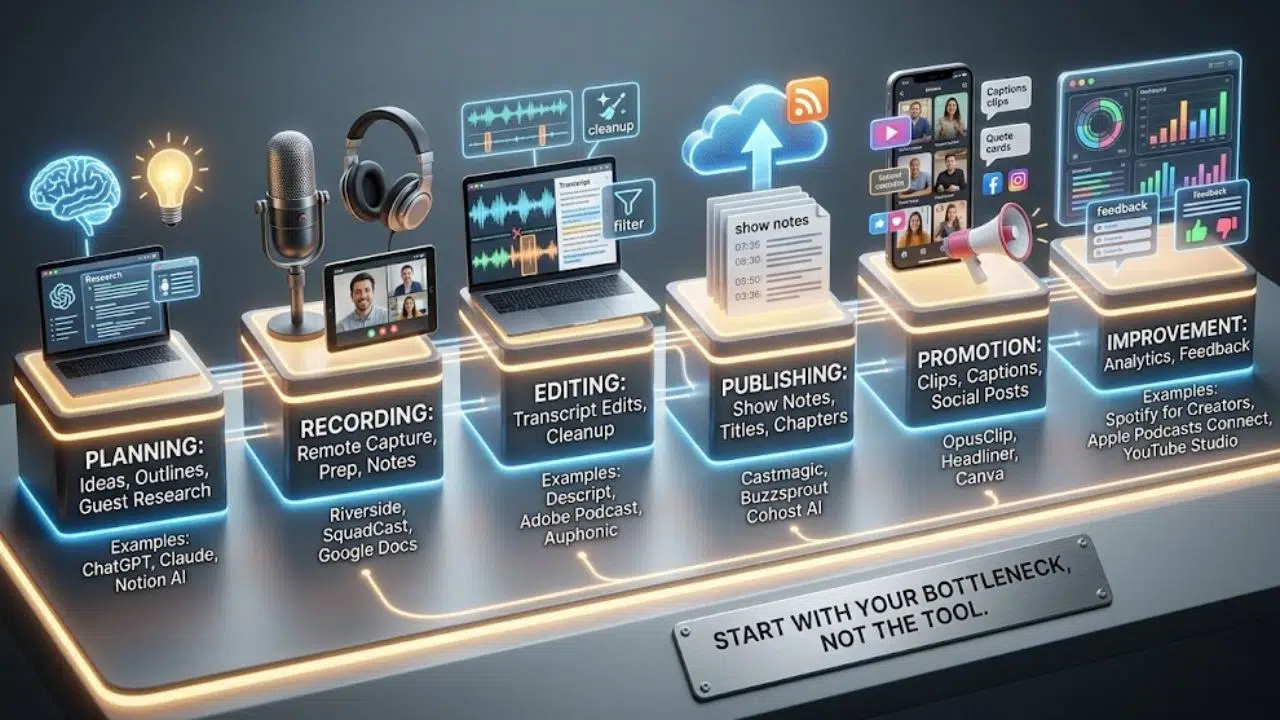
Podcasters do not need every tool at once. A practical stack can be simple.
Developing AI workflows podcasters find beneficial will require consistent review and adaptation.
| Production Stage | Workflow Need | Tool Examples |
| Planning | Ideas, outlines, guest research | ChatGPT, Claude, Gemini, Notion AI |
| Recording | Remote capture, prep, notes | Riverside, SquadCast, Zoom, Google Docs |
| Editing | Transcript edits, cleanup | Descript, Adobe Podcast, Auphonic |
| Publishing | Show notes, titles, chapters | Castmagic, Buzzsprout Cohost AI, Riverside |
| Promotion | Clips, captions, posts | OpusClip, Headliner, Canva, Buffer |
| Improvement | Analytics and feedback | Spotify for Creators, Apple Podcasts Connect, YouTube Studio, Sheets |
The best setup depends on the show. A solo audio podcast may need fewer video tools. A YouTube-first podcast may need stronger clip and caption workflows. A branded podcast may need better guest research, show notes, and distribution planning.
Start with the bottleneck, not the tool.
Common Mistakes Podcasters Make With AI
AI can make podcast production faster, but it can also create new problems if the workflow is careless.
Letting AI Flatten the Host Voice
AI-written scripts often sound too smooth. That can be bad for podcasting. Listeners usually want a host who sounds specific, curious, and human. Use AI for structure, then rewrite in the host’s natural voice.
Publishing Show Notes Without Checking Them
AI may mishear names, invent links, summarize a guest incorrectly, or miss important context. Show notes should always be reviewed before publishing.
Over-Cleaning Audio
AI audio tools can improve rough recordings, but too much processing may make voices sound thin, metallic, or unnatural. Process lightly and listen before exporting.
Turning Every Episode Into Too Many Assets
Repurposing is useful, but a small team can drown in its own content calendar. Start with a few strong assets: one newsletter blurb, two clips, one LinkedIn post, and one short thread. Expand only when the workflow is stable.
Using Clipbait That Misrepresents the Episode
Short clips need context. If a clip makes the guest sound more extreme than they were, it may get attention but damage trust.
Ignoring Listener Feedback
AI can generate endless ideas, but your audience gives better clues. Use comments, questions, reviews, and analytics to guide future episodes.
How AI Changes Podcast Production Workflows
AI changes podcasting by moving more work from manual production into structured review.
Before AI, many small podcast teams had a linear workflow:
Plan the episode, record it, edit it, write notes, publish it, promote it, then start again.
That workflow often breaks because every step depends on one tired person.
With AI, the workflow becomes more modular:
- Ideas become episode briefs.
- Episode briefs become outlines.
- Recordings become transcripts.
- Transcripts become edits, clips, show notes, and posts.
- Show notes become newsletter copy and social copy.
- Performance data becomes future episode planning.
This is where AI creative workflows matter. AI is not only helping with one task. It is connecting the production chain.
For podcasters, the biggest change is not speed alone. It is reuse. A single episode can now produce:
Overall, employing effective AI workflows podcasters can rely on will yield significant improvements in their production quality.
- A polished audio episode
- A transcript
- Show notes
- Chapter markers
- Social clips
- Quote cards
- Newsletter copy
- Blog post draft
- Guest share copy
- Future episode ideas
That does not mean every show should publish all of these every time. It means podcasters can choose the outputs that fit their audience and workflow.
The human work becomes more editorial: choosing the right angle, protecting the voice, checking accuracy, deciding what to cut, and making sure the audience receives something worth listening to.
Final Thoughts
AI workflows podcasters use should make the show easier to produce without making it feel manufactured. The host’s voice, taste, curiosity, and relationship with the audience still matter more than any tool.
It’s essential that AI workflows podcasters implement continue to allow for creativity while utilizing technology.
A strong AI podcast workflow does three things well. It reduces repeated work. It turns raw material into reusable assets. It keeps a human in control of the final decision.
Start with one bottleneck. If planning is slow, build the episode idea and script workflow. If editing takes too long, try transcript-based editing and audio cleanup. If promotion is weak, build the clip repurposing and social distribution system. If growth feels random, use AI to study listener feedback and episode performance.
Do not rebuild the whole show at once. Fix one stage, save the workflow, then improve the next one.
Frequently Asked Questions (FAQs) on AI Workflows for Podcasters
What are AI workflows for podcasters?
AI workflows for podcasters are repeatable systems that use AI to support podcast planning, scripting, recording prep, editing, audio cleanup, show notes, clips, promotion, and audience analysis. The key is to use AI as a production assistant, not as a replacement for the host or editor.
What is the best AI workflow for a beginner podcaster?
A beginner should start with episode planning, script outlining, and show notes. These workflows save time without requiring advanced editing skills. Once the show has a stable recording rhythm, audio cleanup and clip repurposing can be added.
Can AI edit a podcast automatically?
AI tools can help with transcript-based editing, noise reduction, leveling, captions, and clip selection. A human should still review the final edit for pacing, context, sound quality, and meaning.
Which podcast AI tools are useful for production?
Lastly, understanding AI workflows podcasters have at their disposal can empower them in their content creation journey.
Common podcast AI tools include Descript, Riverside, Adobe Podcast Enhance Speech, Auphonic, Castmagic, Buzzsprout Cohost AI, OpusClip, Headliner, Canva, ChatGPT, Claude, and Gemini. The best choice depends on whether the podcaster needs planning, editing, show notes, audio repair, clips, or distribution.
How can podcasters use AI for show notes?
Podcasters can upload a transcript or audio file to an AI tool and generate a summary, key takeaways, chapter markers, guest bio, resource list, and episode description. The final show notes should be checked for names, links, claims, and timestamps before publishing.
Is AI good for podcast SEO?
AI can help create clearer titles, descriptions, keywords, chapter markers, blog posts, and transcript-based content. It should not be used for misleading titles or keyword stuffing. Podcast metadata should accurately describe the episode.
Can AI help grow a podcast audience?
AI can support audience growth by making promotion more consistent. It can create clips, captions, social posts, newsletters, and content ideas from each episode. Growth still depends on the quality of the show, audience fit, distribution, and consistency.
Should podcasters use AI-generated voices?
AI-generated voices may work for certain formats, but they are not a good fit for every show. Personality, trust, and connection are major parts of podcasting. If a show depends on host credibility or guest relationships, the human voice is usually part of the value.
How do small podcast teams use AI without losing quality?
Small teams should use AI for first drafts, summaries, cleanup, and repurposing. They should keep human review for scripts, edits, titles, show notes, clips, guest communication, and final publishing.
What is the biggest risk of using AI in podcasting?
The biggest risk is publishing polished but inaccurate or generic content. AI can misquote guests, create weak summaries, overprocess audio, or flatten the host’s voice. A strong review workflow prevents most of these problems.