
Every digital product runs on physical servers sitting in data centers. How engineers access, configure, and manage those servers determines the service architecture. Cloud computing breaks these operational setups into distinct tiers called cloud service models.
Understanding these divisions matters because choosing the wrong layer creates unnecessary engineering overhead or restricts what your software can do.
When you run applications on your own hardware, your team manages every piece of the stack. You buy server racks, pull network cables, install hypervisors, patch operating systems, and handle physical disk failures. Cloud service models simply transfer chunks of that management burden to an external provider. The main distinction between Infrastructure as a Service, Platform as a Service, and Software as a Service comes down to where your control ends and the provider’s automation begins.
Infrastructure as a Service (IaaS): Provisioning Raw Virtual Hardware
IaaS gives engineering teams direct access to core computing resources. Instead of purchasing server hardware, you rent virtualized compute instances, storage volumes, subnets, and firewalls on a usage-based pricing schedule.
The provider maintains the physical facility. They oversee building security, power backups, cooling infrastructure, physical host servers, and hypervisor software. Everything running on top of that hypervisor belongs to you.
The Administrative Reality of Running IaaS
Operating an IaaS environment feels very similar to running a traditional on-premise data center, minus the physical hardware maintenance.
Your system administrators pick the operating system, configure security groups, define routing tables, and install database engines. If an operating system vulnerability emerges, your team must patch it. If a database cluster crashes due to memory leaks, your engineers handle the recovery.
This setup demands specialized technical knowledge. You get granular control over network topology and kernel settings, but you accept full responsibility for operational uptime and security hardening.
Ideal Use Cases for Infrastructure as a Service
IaaS shines when applications require non-standard operating system configurations or custom network protocols.
It also fits large enterprise workloads that demand predictable performance tuning at the kernel level. Major providers in this category include Amazon Web Services EC2, Google Compute Engine, and Microsoft Azure Virtual Machines.
Platform as a Service (PaaS): Delegating the Runtime and OS Layer
Platform as a Service shifts operational responsibilities further up the technical stack. Instead of configuring raw virtual servers, developers interact with an environment built explicitly to host and scale application code.
The vendor manages the underlying operating system, server hardware, runtime execution environment, database engine updates, and load balancing networks.
Focusing Purely on Code Delivery
PaaS transforms developer workflows by abstracting server management entirely. A developer writes application code locally and pushes the codebase directly to the platform.
The PaaS system automatically builds the application container, attaches storage volumes, sets up SSL certificates, and configures routing.
If incoming web traffic suddenly surges, the platform scales application instances horizontally without requiring a system administrator to provision new virtual machines. This accelerates development cycles, allowing engineering teams to ship features faster.
Architectural Constraints and Platform Trade-Offs
Delegating infrastructure setup introduces specific limitations.
Because the provider manages the underlying runtime, developers must adhere to supported programming languages or specialized runtime versions. Customizing kernel parameters or installing low-level system packages is often impossible.
Additionally, moving an application off a specific PaaS vendor can require rewriting deployment scripts or restructuring database connections. Well-known PaaS offerings include Heroku, Render, AWS Elastic Beanstalk, and Google App Engine.
Software as a Service (SaaS): Consuming Finished End-User Applications
Software as a Service sits at the top of cloud service models. In a SaaS setup, the vendor delivers a fully functioning, ready-to-use software application through a web browser, desktop client, or API endpoint.
Users do not configure servers, maintain codebases, or manage network connections. You simply authenticate, configure user settings, and interact with the application.
How SaaS Rewrote Software Delivery
Before cloud adoption, running enterprise software required purchasing licenses, installing binaries on local machines, and applying periodic updates manually. SaaS replaces this workflow with centralized web delivery funded primarily through recurring subscriptions.
The service provider maintains the complete application lifecycle. Their engineering team handles security patches, software updates, data backups, scaling operations, and infrastructure redundancy.
Updates deploy transparently across all users without downtime or user intervention.
Operational Challenges: Sprawl and Data Governance
While SaaS reduces technical overhead, it presents administrative challenges around security and data control.
When employees can launch software applications by entering a credit card, corporate IT departments struggle with software sprawl and unauthorized shadow IT tools. Furthermore, storing corporate data inside third-party application servers requires strict trust in vendor compliance certifications, encryption protocols, and user access controls. Notable SaaS tools include Salesforce, Google Workspace, Microsoft 365, Slack, Datadog, and Figma.
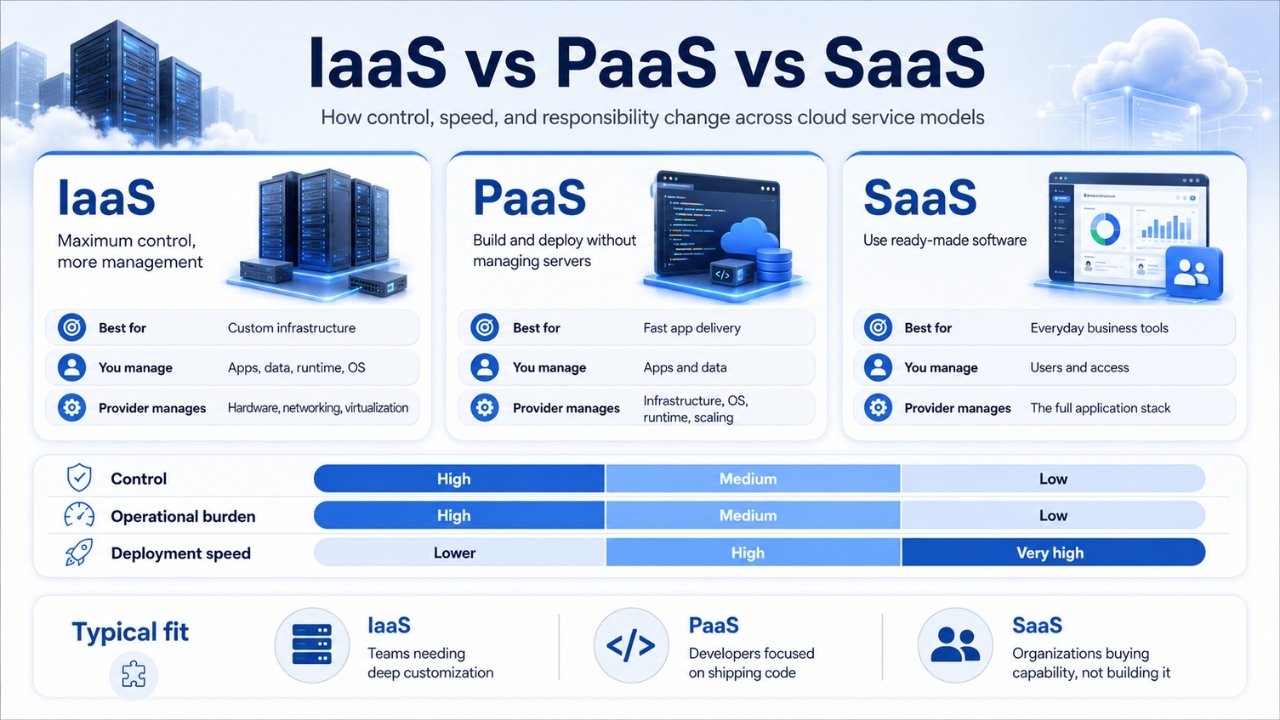
Evaluating Cloud Service Models Across Key Dimensions
Choosing among cloud service models involves balancing operational control against infrastructure overhead. Lower layers yield higher flexibility but demand deeper administrative expertise. Higher layers maximize development velocity while limiting system customization.
Security in cloud environments follows a clear division of duties between customer and vendor. The boundaries change depending on the chosen model.
In IaaS, the provider secures physical facilities, hardware host servers, and hypervisors. You remain responsible for operating system patches, network firewall rules, database encryption, access identity management, and application security.
In PaaS, the provider extends security duties to cover operating systems, runtime engines, and middleware components. Your responsibilities shrink to securing application code, user credentials, and stored data sets.
In SaaS, the vendor takes ownership of almost the entire security stack. You retain responsibility only for managing user access permissions, protecting login credentials, and controlling data classification.
Selecting the Optimal Cloud Service Model Architecture
Modern engineering teams rarely stick to a single model. Instead, companies mix and match cloud service models based on component requirements, budget allocations, and staff skill sets.
A growing company might build its core proprietary service on IaaS virtual machines to retain fine-tuned performance controls. At the same time, the team might deploy their public customer portal using a PaaS framework for rapid scaling, while using SaaS tools to handle team communication, email operations, and expense management.
Evaluating your technical requirements comes down to answering four foundational operational questions:
First, does your team possess dedicated infrastructure engineers to maintain OS patches, network routing, and server monitoring systems? If not, avoiding pure IaaS setups will save significant labor costs.
Second, does your application require specialized system packages or custom kernel modules? If yes, PaaS limitations may block your deployment pipeline, forcing an IaaS approach.
Third, how quickly do you need to launch product updates? Teams prioritizing speed over custom infrastructure configuration consistently achieve faster release cycles using PaaS solutions.
Fourth, is the capability you need a core business differentiator or a standard support function? Standard functions like team chat or project tracking should almost always be handled via SaaS solutions rather than custom-built internal applications.
Architectural Comparison Across Cloud Service Models
Selecting a cloud model requires balancing operational flexibility against engineering overhead. The matrix below outlines how management responsibilities, target users, and pricing structures shift across each layer.
| Dimension | Infrastructure as a Service (IaaS) | Platform as a Service (PaaS) | Software as a Service (SaaS) |
| Primary Focus | Virtualized computing resources, network routing, and raw storage volumes | Application build, deployment runtime, and automated scaling | Fully functional, web-delivered end-user applications |
| User Responsibilities | Operating system configuration, database setup, middleware, applications, and security updates | Custom application code, database schema design, and team access rules | User authentication settings, credential protection, and data permissions |
| Provider Responsibilities | Physical facilities, power backup, host hardware, network cables, and hypervisors | Physical infrastructure, OS patches, execution runtimes, and load balancing | Entire software stack, server management, data backups, and feature releases |
| Target Audience | Network architects, system administrators, and DevOps specialists | Software engineers, web developers, and agile engineering teams | Business professionals, enterprise staff, and consumer end users |
| Billing Model | Metered usage based on provisioned vCPUs, RAM, storage size, and bandwidth | Tiered pricing based on instance execution hours, memory usage, or API calls | Recurring per-seat subscription models or user license tiers |
| Industry Examples | AWS EC2, Google Compute Engine, Microsoft Azure Virtual Machines | Heroku, Render, AWS Elastic Beanstalk, Google App Engine | Salesforce, Google Workspace, Microsoft 365, Slack, Figma |
Balancing Operational Control against Development Velocity
Deciding where your stack sits across cloud service models is rarely an all-or-nothing choice. Modern system design is fundamentally modular, and engineering teams continually adjust their infrastructure strategy as software matures and workload requirements shift.
Starting with higher-abstraction platforms like PaaS or SaaS allows teams to validate products rapidly without sinking capital into infrastructure management. As workload volumes scale or strict regulatory constraints take effect, migrating specific system components down to IaaS virtual hardware can unlock granular performance tuning and predictable long-term unit economics.
The optimal cloud service model is simply the one matching your team’s current technical capacity and business priorities. Mapping your software requirements against the operational boundaries of each layer ensures you build an environment that balances architectural freedom with day-to-day maintainability.
Frequently Asked Questions(FAQs) on Cloud Service Models
Can an organization run IaaS, PaaS, and SaaS simultaneously?
Yes, combining cloud service models is standard industry practice. Most organizations run hybrid setups where core software infrastructure utilizes IaaS or PaaS components, while internal business operations rely on external SaaS applications.
Where does Serverless computing fit within these cloud service models?
Serverless computing, often called Function as a Service, acts as an extension of Platform as a Service. It abstracts server management even further by executing individual functions only when triggered by specific events. Instead of keeping application servers running constantly, the provider provisions compute resources instantly, executes the code, and scales back down to zero.
How do cost structures differ across cloud service models?
IaaS bills based on provisioned virtual hardware resources like vCPUs, RAM, block storage gigabytes, and outbound network transfer. PaaS charges based on resource usage tiering, instance runtime hours, or memory footprint. SaaS typically operates on per-seat monthly subscription pricing or tiered usage tiers based on record counts and API calls.
Which cloud service model offers better data security?
Security quality depends on configuration and management rigor rather than the model itself. A major SaaS provider offers sophisticated physical and network protection, but mismanaged user credentials can compromise security. Conversely, an IaaS setup gives you complete firewall control, but failing to apply operating system security updates leaves your servers vulnerable to exploits.