

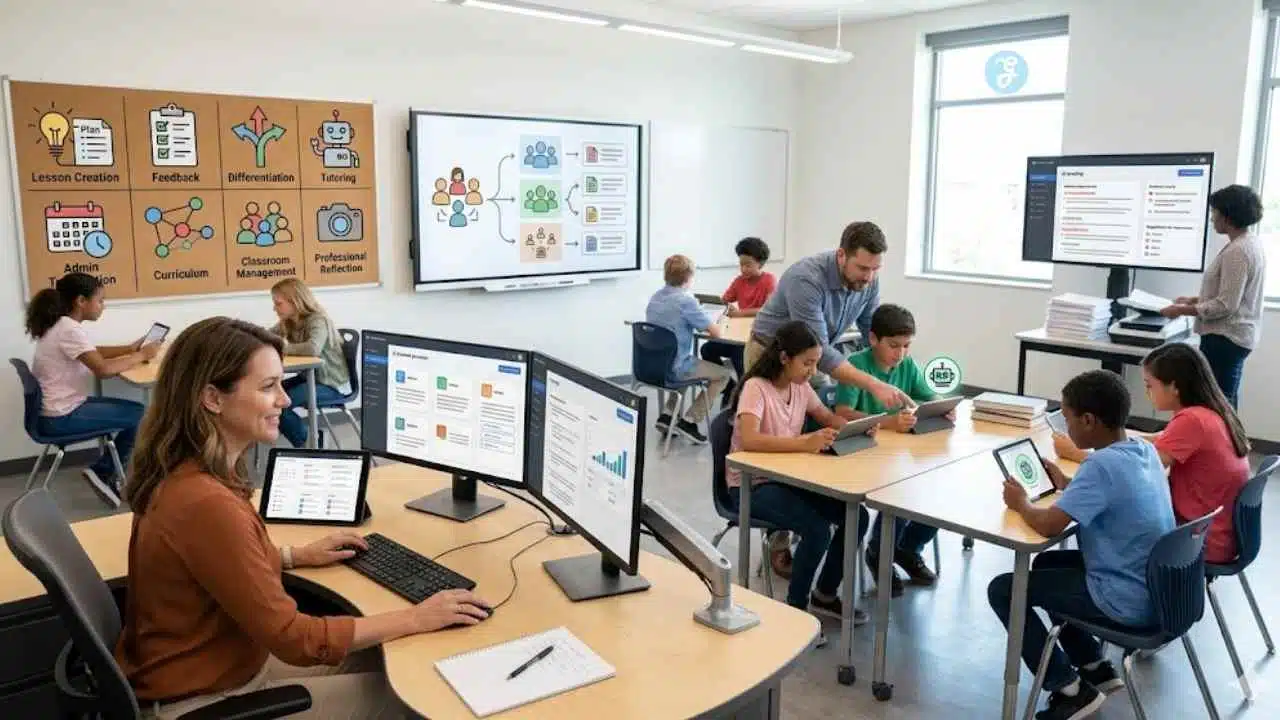
Teachers do not need another complicated system that eats up planning time. Most already have enough to manage: lesson plans, student questions, grading, parent communication, classroom materials, differentiated activities, quizzes, presentation slides, and administrative updates.
AI can help, but only when it is used as a teaching support tool, not as a replacement for professional judgment. The useful version of AI in education is practical. It helps a teacher turn a curriculum objective into a lesson outline. It creates first-draft quiz questions that the teacher improves. It summarizes patterns in student feedback. It gives a starting point for differentiated reading material. It reduces repetitive work so the teacher can spend more attention on students.
That is why workflows matter more than random prompts.
Education deserves its own cluster because the work is creative, structured, high-responsibility, and deeply human. A teacher AI workflow has to protect learning quality, student privacy, fairness, and classroom context. It cannot simply chase speed.
Below are eight AI workflows educators can use to save time and improve teaching quality without handing over the teacher’s role.
1. Lesson Planning Automation Workflow
Use case: Lesson planning and curriculum preparation
Useful AI tools: ChatGPT, MagicSchool, Khanmigo, Gemini for Education, Canva Magic Write, Notion AI
Result: Faster lesson drafts, clearer objectives, better organized classroom flow
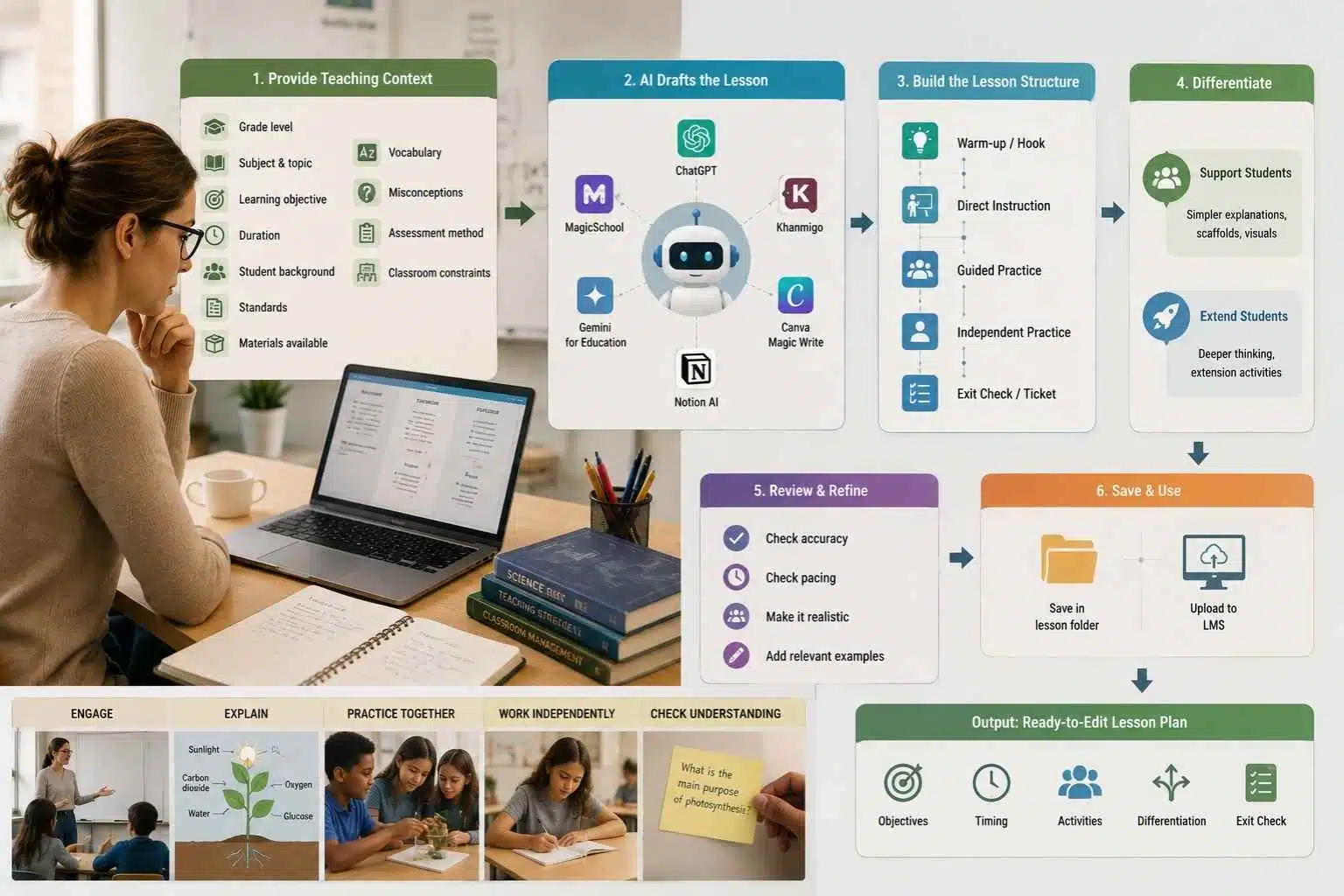
Lesson planning is one of the easiest places for teachers to start with AI because the task has structure. A good lesson plan needs objectives, prior knowledge, instructional steps, activities, checks for understanding, differentiation, and assessment. AI can draft that structure quickly.
The mistake is asking for a “lesson plan on photosynthesis” and accepting whatever appears. That usually creates a generic plan with shallow activities. A stronger workflow begins with teaching context.
Give the AI:
- Grade level
- Subject
- Topic
- Learning objective
- Class duration
- Student background
- Required standards, if available
- Materials available
- Vocabulary to include
- Common misconceptions
- Assessment method
- Classroom constraints
A practical process:
- Start with the learning objective, not the activity.
- Ask AI to draft a lesson sequence with timing.
- Request a warm-up, direct instruction section, guided practice, independent practice, and exit check.
- Ask for two differentiation options: one for students who need support and one for students ready to extend.
- Review the plan for accuracy, pacing, and classroom realism.
- Replace generic examples with examples your students will understand.
- Save the final plan in your lesson folder or LMS.
A useful prompt:
“Create a 45-minute Grade 7 science lesson plan on photosynthesis. Students already know that plants need sunlight and water, but many confuse food with fertilizer. Include a warm-up, teacher explanation, group activity, vocabulary practice, exit ticket, and two differentiation options. Keep the plan realistic for a classroom with limited lab materials.”
MagicSchool and Khanmigo can help generate lesson plans, learning objectives, rubrics, exit tickets, and other teacher materials. ChatGPT and Gemini can also help create alternative examples, explanations, and activities. Canva is useful when the lesson needs supporting visuals.
The teacher should still make the final decisions. AI does not know the mood of the class, the student who needs a quieter entry point, or the concept that always takes longer than the textbook suggests.
Output: A ready-to-edit lesson plan with objectives, timing, activities, differentiation, and an exit check.
2. Quiz and Test Generation Workflow
Use case: Assessment creation
Useful AI tools: Wayground/Quizizz AI, MagicSchool, Khanmigo, ChatGPT, Google Forms, Microsoft Forms
Result: Faster question creation, more balanced assessment coverage, easier formative checks
Assessment writing takes more time than many people think. A strong quiz needs different question types, fair wording, answer keys, distractors, difficulty balance, and alignment with what was actually taught.
AI can create a first draft. The teacher’s job is to check whether the questions measure the right learning.
Start with the material students were taught. Do not ask AI to build a quiz from a broad topic alone. Feed it the lesson objective, notes, reading passage, slides, or vocabulary list.
A clean workflow:
- Choose the assessment purpose: practice, exit ticket, quiz, unit test, review game, or diagnostic check.
- Provide AI with the lesson objective and student level.
- Ask for a mix of question types: multiple choice, short answer, matching, sequencing, scenario-based, or open response.
- Request an answer key and explanation.
- Ask AI to identify which objective each question measures.
- Remove confusing, trick-based, or poorly worded questions.
- Check factual accuracy.
- Import the final questions into your quiz tool or LMS.
- Review student results after completion and revise weak questions.
A practical prompt:
“Create a 12-question formative quiz for Grade 8 students on the causes of the American Revolution. Include 6 multiple-choice questions, 3 short-answer questions, and 3 source-based questions. Add an answer key, difficulty level, and the learning objective each question checks.”
Wayground/Quizizz AI can generate quizzes and lessons from text, links, or files. MagicSchool and Khanmigo can help with quiz questions and exit tickets. Google Forms or Microsoft Forms can handle delivery. The tool matters less than the review process.
Teachers should watch for three problems: questions that are too easy, distractors that are obviously wrong, and questions that assess reading confusion instead of subject understanding.
Output: A reviewed quiz or test draft with answer key, difficulty balance, and objective alignment.
3. Student Feedback Summarization Workflow
Use case: Student feedback, reflection, formative assessment
Useful AI tools: ChatGPT, Gemini, Microsoft Copilot, Google Forms, Microsoft Forms, Notion AI
Result: Faster insight from student responses, better lesson adjustment, clearer classroom patterns
Student feedback can be useful, but reading every reflection carefully after a full teaching day is hard. AI can help summarize patterns from exit tickets, surveys, reflection forms, and short student responses.
This workflow is not for grading individual students automatically. It is better for spotting trends.
For example, after a lesson, students may answer:
- What part was clear?
- What part was confusing?
- What question do you still have?
- How confident do you feel?
- What helped you learn today?
The teacher can export responses, remove names or identifying details, and ask AI to summarize themes.
A practical workflow:
- Collect short responses through a form or LMS.
- Remove student names and sensitive information.
- Ask AI to group responses into themes.
- Identify common misunderstandings.
- Ask for suggested reteaching steps.
- Create a short “next lesson adjustment” plan.
- Save useful patterns for future lesson revision.
A useful prompt:
“Summarize these anonymous student exit-ticket responses. Identify the top three concepts students understood, the top three misunderstandings, and what I should review at the start of the next class. Do not evaluate individual students.”
This can be especially helpful in large classes. Instead of guessing what students missed, the teacher gets a quick pattern map.
Still, AI summaries can flatten nuance. If a few students wrote something important but uncommon, AI may treat it as low priority. Teachers should scan the raw responses before relying on the summary.
Output: A short feedback report with class-level patterns, misconceptions, and next-step teaching ideas.
4. Personalized Learning Content Creation Workflow
Use case: Differentiation and student support
Useful AI tools: Diffit, MagicSchool, ChatGPT, Gemini for Education, Khanmigo, Canva
Result: More accessible materials, better support for mixed-ability classrooms, faster differentiated preparation
Teachers often have students working at different reading levels, language levels, and confidence levels in the same room. Creating separate materials for each group can take hours.
AI can help produce differentiated versions of the same concept. The teacher still needs to check that the content stays accurate and respectful.
A good workflow starts with one core learning goal. Then the teacher creates different access points.
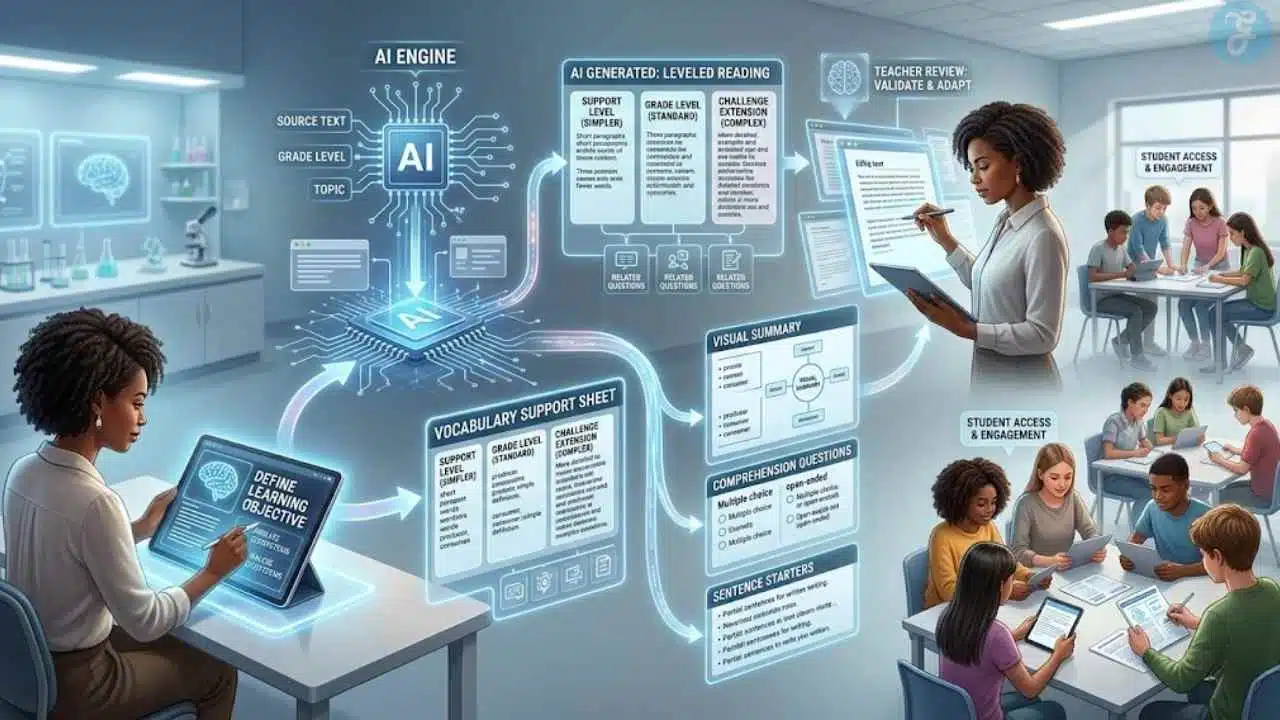
For example, for a lesson on ecosystems, the teacher may need:
- A grade-level reading passage
- A simpler reading passage
- A vocabulary support sheet
- A challenge extension
- A visual summary
- Comprehension questions
- Sentence starters for written responses
A practical process:
- Choose the exact learning objective.
- Provide the source text or topic.
- Ask AI to create materials at different reading levels.
- Request vocabulary support and comprehension questions.
- Add visuals or slides if needed.
- Check that simplified text does not remove essential meaning.
- Avoid labeling materials in a way that embarrasses students.
- Use flexible grouping or choice-based access.
A useful prompt:
“Create three versions of this reading passage for Grade 6 science: support level, grade level, and extension level. Keep the same core concept. Add vocabulary support, three comprehension questions, and one short writing task for each version.”
Diffit is designed for creating and adapting instructional materials for diverse classrooms. MagicSchool, ChatGPT, and Gemini can also help create leveled explanations, vocabulary lists, and extension tasks. Canva can turn the material into worksheets, posters, or slides.
The teacher should be careful not to make “personalized learning” mean lower expectations. Students may need different access routes, but they still deserve meaningful work.
Output: Differentiated reading, vocabulary, practice, and extension materials built around the same learning objective.
5. Grading Assistance Workflow
Use case: Assessment review, rubric support, feedback drafting
Useful AI tools: Gradescope, MagicSchool rubric tools, ChatGPT, Google Classroom, Microsoft Teams for Education, LMS grading tools
Result: Faster rubric-based review, more consistent feedback drafts, reduced grading fatigue
Grading is one of the most sensitive uses of AI in education. It can save time, but it also carries risk. A teacher should not blindly let AI decide scores for student work.
The safer workflow is grading assistance, not grading replacement.
AI can help with:
- Creating rubrics
- Sorting similar responses
- Drafting feedback comments
- Identifying common errors
- Suggesting revision guidance
- Summarizing class-level performance
- Checking whether feedback is clear and constructive
A responsible process:
- Build or refine the rubric before reviewing student work.
- Use AI to create sample feedback aligned with each rubric level.
- If using a tool like Gradescope, group similar answers where supported.
- Review the work yourself.
- Apply the rubric manually or through a teacher-controlled workflow.
- Use AI to draft feedback comments after you decide the issue.
- Check comments for tone, accuracy, and usefulness.
- Use class-level patterns to adjust future instruction.
A useful prompt:
“Create feedback comment banks for this writing rubric. Include comments for strong performance, developing performance, and revision needs. Keep the tone specific, respectful, and useful. Do not assign grades.”
For short-answer or fixed-format work, tools such as Gradescope can help group similar answers so instructors can review more efficiently. For writing assignments, AI-generated feedback needs extra caution because student voice, development, and context matter.
Teachers should avoid uploading identifiable student work into tools that are not approved by their school or district. Privacy rules and local policies matter.
Output: Rubrics, feedback comment banks, grouped response insights, and teacher-reviewed grading support.
6. Classroom Presentation Generator Workflow
Use case: Slide creation and classroom explanation
Useful AI tools: Canva, MagicSchool Presentation Generator, Gamma, Google Slides with Gemini support, PowerPoint Copilot, ChatGPT
Result: Faster slide drafts, clearer lesson visuals, better presentation structure
A classroom presentation should support teaching, not replace it. Slides work best when they make the concept easier to understand, give students something to discuss, or organize the flow of a lesson.
AI can quickly create a slide draft, but teachers should avoid slide decks that become walls of text.
Start with the lesson plan. Then ask AI to turn it into a presentation structure.
A practical workflow:
- Define the lesson objective.
- Break the lesson into 5–8 major teaching moments.
- Ask AI to create a slide outline.
- Request one visual idea per concept.
- Add discussion questions or quick checks.
- Build the deck in Canva, Google Slides, PowerPoint, or Gamma.
- Remove excess text.
- Add accessibility checks: readable font size, contrast, alt text where needed, and captions for video.
- Rehearse the flow before teaching.
A useful prompt:
“Turn this Grade 5 lesson plan on fractions into a 10-slide classroom presentation. Keep each slide simple. Include one visual idea, one student question, and one quick check for understanding. Avoid long paragraphs.”
Canva provides teacher templates and AI-supported content creation. MagicSchool can generate presentations. Google Slides and PowerPoint ecosystems can support slide creation depending on the school setup.
Teachers should keep slide decks flexible. If students need more time on a concept, the deck should not force a rushed pace.
Output: A classroom-ready slide draft with visuals, discussion prompts, and checks for understanding.
7. Parent and Student Communication Workflow
Use case: Communication, newsletters, reminders, family updates
Useful AI tools: ChatGPT, Khanmigo, Gemini, Grammarly, Canva, school-approved communication platforms
Result: Clearer messages, faster family communication, more consistent tone
Teacher communication takes many forms: weekly newsletters, assignment reminders, behavior updates, absence follow-ups, conference invitations, and student encouragement notes.
AI can help draft messages that are clear and respectful. It should not be used to hide responsibility, soften serious concerns too much, or send sensitive information without careful review.
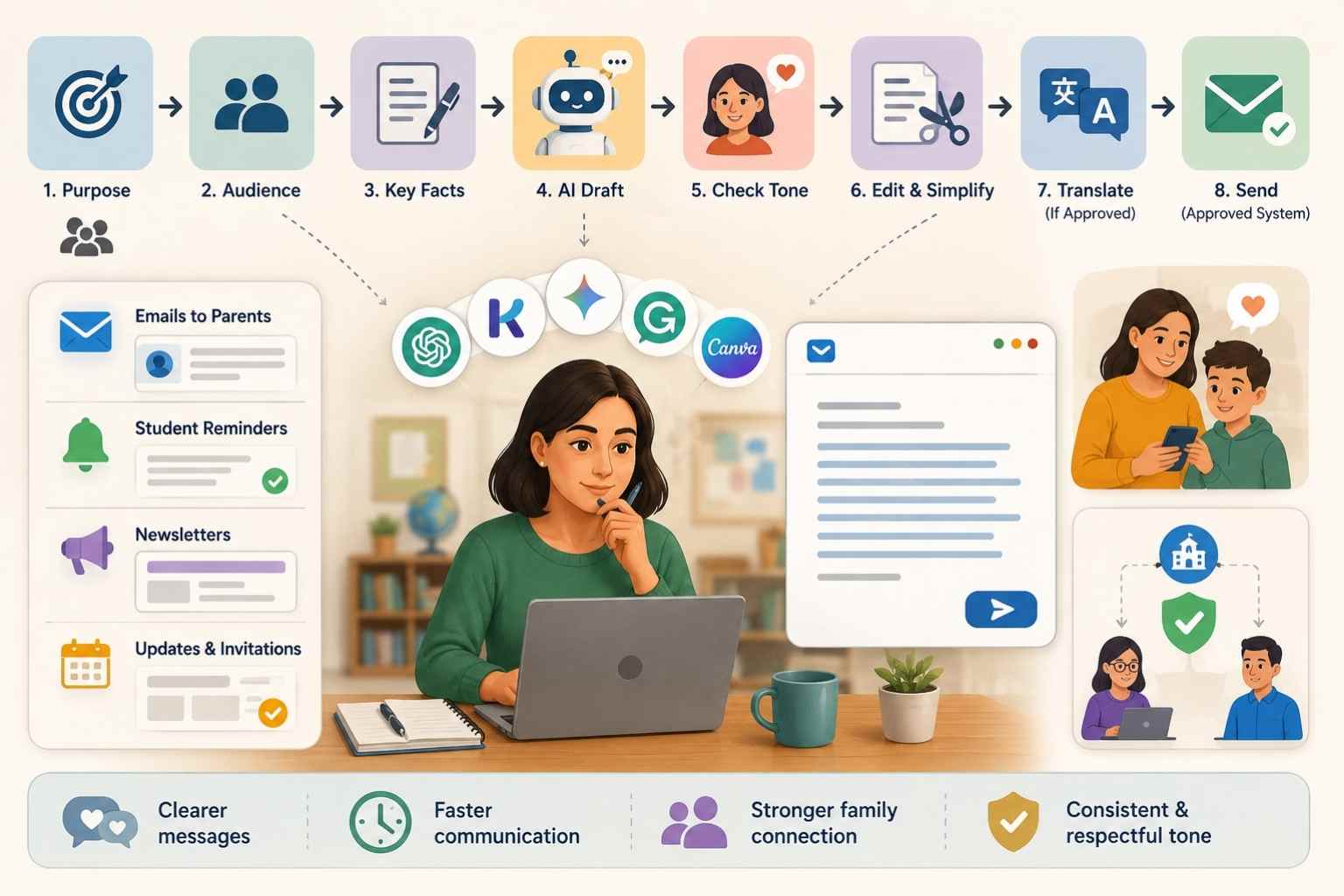
A practical workflow:
- Identify the communication purpose.
- Decide the audience: student, parent, class, small group, or administrator.
- Write the facts in plain language.
- Ask AI to draft a concise message.
- Check tone carefully.
- Remove unnecessary detail.
- Translate only if the school approves the translation workflow and someone can verify accuracy for important messages.
- Send through the approved communication system.
A useful prompt:
“Draft a respectful email to a parent explaining that their child has missed three homework assignments this week. Keep the tone supportive, include the next step, and avoid blame. Do not include private details about other students.”
AI can also help with newsletters:
- Weekly learning summary
- Upcoming dates
- Home practice suggestions
- Reminder notes
- Celebration of class progress
- Parent conference preparation
The teacher should always handle sensitive issues personally. AI is useful for drafting structure and tone, not for making difficult conversations automatic.
Output: Clear parent emails, student reminders, newsletters, and communication templates.
8. Classroom Resource Organization Workflow
Use case: Planning, resource management, content reuse
Useful AI tools: Notion AI, Google Drive, Microsoft OneDrive, ChatGPT, Gemini, Canva, LMS tools
Result: Easier reuse of teaching materials, cleaner planning, less time searching for old files
Many teachers have good materials buried in folders, old slide decks, downloaded PDFs, LMS pages, and unfinished documents. AI can help organize those resources into reusable systems.
This workflow is less exciting than generating a lesson plan, but it solves a real problem. Teachers lose time when they cannot find what they already made.
A practical workflow:
- Choose one unit or topic.
- Gather all related resources into one folder.
- Sort materials into categories: lesson plans, slides, worksheets, assessments, readings, videos, projects, rubrics, and extension tasks.
- Ask AI to summarize what each resource is for.
- Create a unit map showing when each resource should be used.
- Identify missing materials.
- Rename files clearly.
- Build a reusable checklist for next year.
- Save prompts and templates that worked well.
A useful prompt:
“Create a unit organization map for these Grade 9 biology resources. Group them by lesson sequence, identify duplicates, flag missing assessment pieces, and suggest a simple folder structure.”
This workflow works well for departments too. A team can use AI to compare materials, align lessons with outcomes, and reduce duplication. The human team still decides what belongs in the curriculum.
Output: A cleaner unit folder, resource map, reusable teaching sequence, and list of missing materials.
How This Fits Into AI Creative Workflows
AI Creative Workflows, should show how AI changes work in specific fields. Education is one of the most important examples because AI use in teaching is not just about productivity. It affects learning design, student feedback, access, assessment, privacy, and trust.
That is why AI workflows educators use must be more careful than many business workflows. A marketing team can test five ad headlines with limited risk. A teacher using AI to create learning materials has to think about accuracy, age-appropriateness, bias, accessibility, student data, and academic integrity.
The pattern is still similar across industries:
- Identify repeated work.
- Structure the input.
- Use AI for drafts, options, or summaries.
- Review with human expertise.
- Apply the output in a real context.
- Measure whether it helped.
- Improve the workflow over time.
For teachers, the human review step is not optional. It is the safeguard that keeps AI assistance aligned with learning quality.
Responsible Use of AI in Education
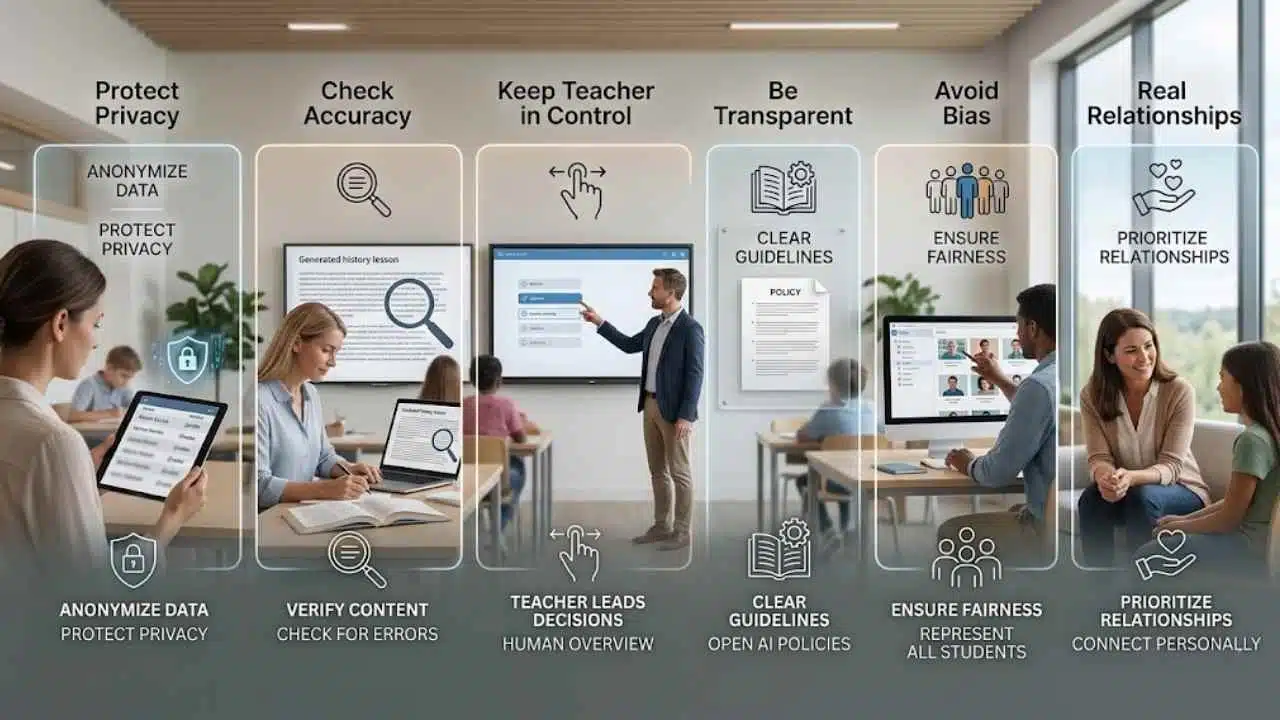
AI can help teachers save time, but education is not a place for careless automation. Schools and educators should use AI with clear boundaries.
Protect Student Privacy
Teachers should avoid entering identifiable student information into tools that are not approved by their school, district, or institution. Student names, grades, behavioral notes, health details, family circumstances, and private learning records require care.
Use anonymous or summarized data when possible.
Check Accuracy Before Teaching
AI can produce errors, outdated information, weak examples, or misleading explanations. Any lesson material, quiz answer, historical detail, science explanation, or reading passage should be checked before students see it.
Keep the Teacher in Control
AI should help draft, summarize, organize, or suggest. The teacher should decide what students learn, how they are assessed, and what feedback they receive.
Be Transparent When Needed
Schools should have clear expectations around when AI is used to support teaching materials and when students may or may not use AI for assignments. Confusion creates discipline problems and mistrust.
Avoid Bias and One-Size-Fits-All Output
AI-generated examples may carry cultural, language, gender, socioeconomic, or ability-related assumptions. Teachers should review materials for fairness and relevance.
Do Not Replace Real Student Relationships
A faster email draft is useful. A faster quiz is useful. A cleaner lesson outline is useful. None of that replaces noticing when a student is struggling, asking a better question, or adjusting instruction in the moment.
AI Adoption Roadmap for Educators
Teachers do not need to adopt every workflow at once. A safer approach is to start with low-risk, high-time-saving tasks.
Week 1: Start With Planning
Use AI for lesson outlines, warm-ups, exit tickets, and slide structures. Keep all outputs in draft mode until reviewed.
Week 2: Add Assessment Support
Try AI-assisted quiz generation and rubric drafting. Check every question and answer key manually.
Week 3: Improve Differentiation
Use AI to create vocabulary supports, leveled readings, and extension tasks. Make sure students are not locked into low-level work.
Week 4: Organize Feedback and Resources
Use AI to summarize anonymous student feedback and clean up one unit folder. This helps improve teaching without adding another daily burden.
After One Month: Build a Personal AI Teaching System
Save the prompts that worked. Create a small library for lesson planning, quiz creation, feedback summaries, parent messages, and differentiated content. Remove anything that creates more checking than value.
A good teacher AI workflow should make planning clearer and teaching more responsive. It should not make the classroom feel automated.
Final Thoughts
AI workflows educators use should begin with the teacher’s real workload, not with tool excitement. Lesson planning, quizzes, feedback summaries, differentiated materials, grading support, presentations, communication, and resource organization are all practical places to start.
The strongest approach is simple: use AI for first drafts and structure, then apply teacher judgment. That keeps the workflow useful without lowering the quality of instruction.
For Editorialge and Edutorial readers, this topic also fits the broader discussion of AI creative workflows because education shows the balance better than almost any other field. AI can save time. It can improve preparation. It can support access. But the teacher remains the professional who understands students, context, and learning goals.
Start with one workflow this week. Use it on one lesson, one quiz, or one set of student reflections. Review the result carefully. Keep what helps. Discard what adds noise.
FAQs
What are AI workflows for educators?
AI workflows for educators are repeatable systems that use AI to support teaching tasks such as lesson planning, quiz creation, feedback summarization, differentiated materials, grading support, presentations, and communication. The workflow includes human review before anything is used with students.
Can AI replace teachers?
No. AI can help with drafting, organizing, summarizing, and creating materials, but it cannot replace classroom judgment, student relationships, ethical decision-making, or professional teaching skill.
What is the safest AI workflow for teachers to start with?
Lesson planning is usually a safe starting point because the teacher can review and adjust everything before class. Quiz generation and presentation outlines are also useful early workflows when checked carefully.
Should teachers use AI for grading?
Teachers should be cautious. AI can help create rubrics, draft feedback comments, and group similar responses in approved tools, but final grading decisions should remain under teacher control.
How can teachers use AI without risking student privacy?
Use school-approved tools, avoid uploading identifiable student information, anonymize responses where possible, and follow local school, district, or institutional policy.
Which education AI tools are useful for teachers?
Common examples include MagicSchool, Khanmigo, Canva, Gemini for Education, Wayground/Quizizz AI, Diffit, Gradescope, ChatGPT, and school-approved LMS tools. The right tool depends on the task, school policy, student age, and data privacy requirements.
























