
Creating video content is fun, but the only thing a creator worries about is the file size. I have seen many vloggers telling how many spare hard disks they have to buy just to store their video files, and that’s kind of important as these videos have memories in them.
But what if I tell you that you can shrink these videos without losing the quality? Yes, that’s possible. With WinX Video Converter, you can shrink your large-sized videos into smaller sizes and still have the same quality.
That sounds like a money-saving scheme, isn’t it? You can save a lot of dollars on external hard drives and cloud storage plans if you could shrink less important or extremely large video files into smaller files.
Having said that, let’s quickly go through its key features along with a short guide where I demonstrate the product for you.
What exactly is WinX Video Converter?
The prominent feature of WinX is to convert the file format of a video. I discovered this software when my friend who owns an iPhone asked me to convert an AVI format video to MP4.
The video was quite large in size, and I decided to use the compression feature of the WinX video converter, which is super impressive. I could easily convert the file format and then compress the video size, which was done quickly by the software.
You can use WinX if you want to upload videos on Instagram, Facebook, TikTok, fastly and when you want to store videos on your device with limited storage.
Key Features of WinX Video Converter
Convert Videos
The key feature of WinX is to convert video file format. You can convert files to any format without having to look out for other softwares. It has various presets for various profiles, which makes the entire process easy for you.
There’s also the flexibility in customizing the output profiles in WinX. You can change the frame rate, aspect ratio, bitrate, and audio file format as well. Furthermore, if you mess up the customized settings, use the default button to reset everything.
Download 4k Videos
This feature of WinX has remained my favorite since the day I have started using it. If you often want to download 4K videos for different purposes, relying upon online tools is not good. Those online 4K downloading sites often compromise with the quality and redirect you to spammy sites.
Moreover, the downloading speed such sites offer is horrendous. But with Winx, you do not have to worry anymore. The software offers 16x downloading speed, and all credits go to its Level-3 GPU hardware acceleration.
Furthermore, its updated algorithm makes it easier to convert 4K videos. You can batch download videos from 1000+ sites, including the most used sites like Facebook, youtube, Dailymotion, Instagram, and more.
Editing Features
If you want to make slight changes to the video while compressing, or converting, then there’s no need to do it in a dedicated video editor, export it, and compress it again with WinX.
The process can be simplified with the inbuilt editing tools, such as trim, crop, merging footage, adding subtitles, and more.
Compressing Videos
A feature that hundreds of thousands of people google every month. You can use the WinX video compressor to compress a 1GB video file into 100Mb and still have the same quality.
That’s the power of the WinX video converter’s advanced algorithm and hardware acceleration.
You can change the video coded, file format, and various other video details before compressing it. And the best part is that it is available for Windows, as well as Macs.
How to Compress A Video Using WinX Video Converter?
If you plan to purchase the software, it is good to know how to use it. We are writing down a brief guide on how to compress a video using the WinX video converter.
- Download the free version of the WinX video converter. Install the software on your PC, and launch it.
- You now have to load the video file you want to compress. This can be done by clicking on the video icon on the top-right menu.
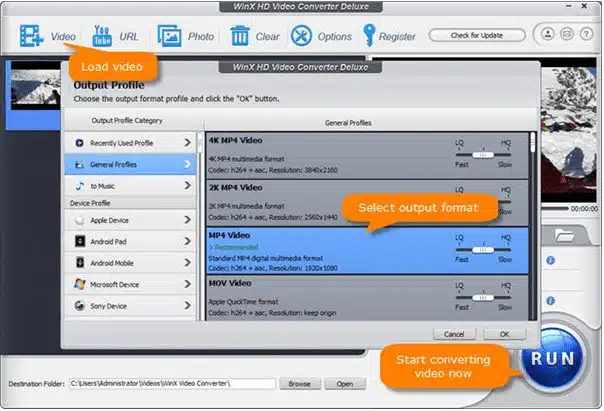
3. Select the output format and click ok.
4. Now the video will appear on the timeline. You have to click on the Settings icon and adjust the output according to your requirements.
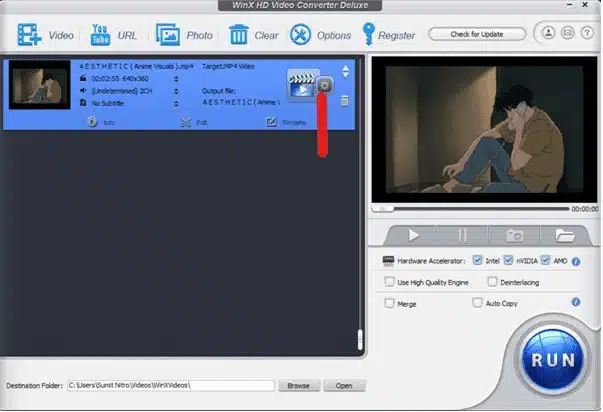
5. If you are confused and don’t know the proper settings, please click on the video icon next to the settings icon and choose a preset for YouTube, Facebook, or other video uploading sites. WinX will automatically choose the right settings for you.
6.You can even trim the unwanted part, just click on the edit button, and do the needful. Once that’s done, hit run and let WinX do the magic.
Pricing & Availability of WinX Video Converter
The software is available for MacBooks and windows. You can purchase a license for unlimited use and full features. The Video Converter Deluxe version costs $59.95 per license.
Verdict
WinX video converter has features that one can need anytime. Especially video creators who often have to keep large video files with them. The 4K video downloading feature is totally unique.
Moreover, the compression technology WinX uses is also fascinating, and you get to choose from dozens of presets. In this article, we have listed down all of its key features, along with the pricing.
Apart from this, you can also read Entertainment, Tech, and Health-related articles here: Gina Carano net worth, Bruno Mars net worth, KissAnime, Jim Carrey net worth, PDF Drive, How to delete Reddit Account, Sweet Home Season 2, How much are pearls worth, Rainbow Kiss, MovieRulz, Sex Education season 3, NFL Live Stream, Youtbe, Bailey Sarian Net Worth, Bollyshare, Afdah, Moviezwap, Y8, Jalshamoviez, Project Free TV, Kissasian, Holiday Season, Sears Credit Card, GoDaddy Email, Mangago, Jio Rockers, M4uHD, Hip dips, M4ufree, NBAstreams XYZ, CCleaner Browser review, Avocado Calories, Bear Grylls net worth, Highest Paid CEO, The 100 season 8, Sundar Pichai net worth, Grimes net worth, F95Zone, Sherlock Season 5, Homeland Season 9.