How to Document Team Processes begins with one clear task, not a lengthy manual. Identify a recurring workflow, list the actions in the order they happen, name the person or role responsible for each handoff, and store the current instructions in one easy-to-find place.
A useful process document also explains the required tools, decision points, common exceptions, and what “done” means. Test the draft with someone who did not write it, then update it when the workflow changes. This practical approach reduces repeated questions, speeds up onboarding, and helps teams complete their work accurately and consistently, even when staff changes.
How to Document Team Processes
Start with work that people repeat or regularly struggle to complete. Good candidates include:
- Processes involving approvals or handoffs
- Tasks that generate repeated questions
- Work that depends on one person’s memory
- Activities where errors create financial, legal, quality, or operational problems
- Processes that new employees must learn during onboarding
A standard operating procedure, or SOP, is useful for repeatable work that needs clear steps, responsibilities, tools, approvals, or quality checks. Not every small task needs a formal SOP.
A one-time decision may belong in project notes. A recurring customer handoff, invoice approval, content review, or incident response process deserves a more permanent reference.
The wrong first project is usually a huge operations manual. Choose one process that creates friction and document that well before expanding the system.
Define the Reader’s Task
Before writing, describe the reader’s job in one sentence:
As a [role], I need to [complete an action], so that [desired result].
For example:
As a new account manager, I need to prepare a customer renewal handoff so that sales, support, and finance have the same information.
This gives the document a clear boundary. “Customer renewals” is a broad subject. “Prepare a customer renewal handoff” is a task someone can complete.
Write for the person using the document, not the person who designed the process. Experienced employees may understand internal abbreviations and unstated assumptions. New employees usually will not.
Give the Current Version one Home
For most teams, choose one current location for each process. This might be a company wiki, knowledge base, documentation repository, or shared workspace with search and access controls.
Chat is useful for questions, reminders, and links. It is usually less reliable as the permanent home for instructions because important details become harder to find as conversations move on.
Link to the main process document instead of copying the same instructions into several channels or files. Multiple versions create uncertainty when one is updated and another is not.
The document should also identify an owner. Use a role or team name rather than one person’s name where possible. “Operations team” or “Finance systems owner” will remain useful when employees change roles.
Use a Compact Structure
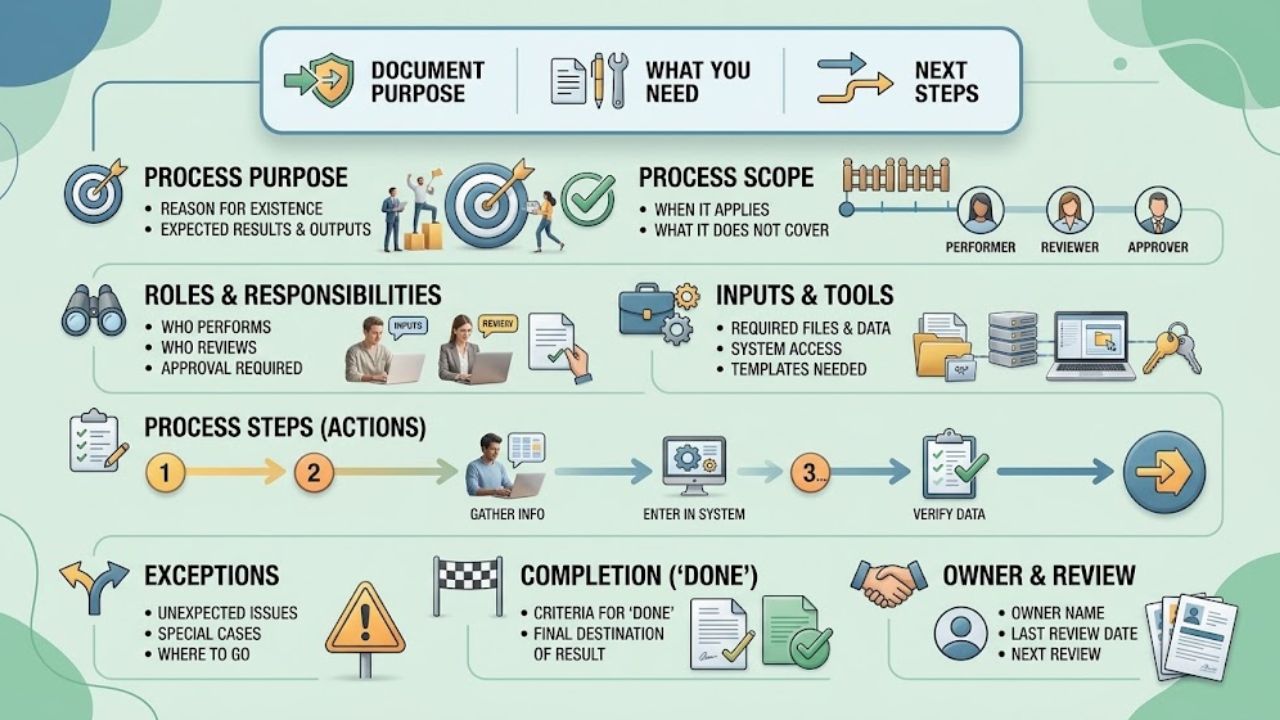
A short information block at the top helps readers decide whether they have found the right document.
| Section | What to include |
| Purpose | Why the process exists and what result it should produce |
| Scope | When the process applies and what it does not cover |
| Roles | Who performs, reviews, approves, or receives the handoff |
| Inputs and tools | Required files, systems, templates, and access |
| Steps | The actions in the order they should happen |
| Exceptions | What to do when the normal process does not apply |
| Completion | What “done” means and where the result goes |
| Owner and review | Current owner, review date, and related documents |
This is a guide, not a mandatory form. A simple process may need only a purpose, a few steps, and an owner. A higher-risk workflow may also need escalation contacts, approval rules, and a revision history.
Put background information after the basic instructions unless it is needed to prevent an error. Readers should reach the first useful action quickly.
Write the Steps as Actions
Do not write from memory alone. Use the latest completed example as your reference. A practical way to learn how to document team processes is to walk through the work as it actually happened, including the points where someone had to stop, ask a question, or make a decision.
Start each step with a clear action verb:
- Open the customer record.
- Confirm the contract date.
- Add the approved discount.
- Notify the finance owner.
- Save the final version in the project folder.
Avoid vague instructions such as “handle as necessary,” “review accordingly,” or “get approval if needed.” They leave the important decision to the reader.
One step should describe one meaningful action. If a sentence contains two actions performed by different people or separated by a decision, split it.
A useful procedure also explains what information is needed before a step begins, which system the reader should use, what result the step should produce, and who to contact when the process stops.
- Weak: Send the final materials to the team after approval.
- Clearer: After the editor marks the draft as approved, attach the final file to the project record and tag the launch owner. If approval is missing, return the draft to the review queue.
The second version removes guesswork. It tells the reader when to act, what to do, where to do it, and what happens when the condition is not met.
Make the Page Easy to Scan
Process documents are often consulted while work is already underway. Readers may be switching between the document and another system while looking for one specific answer.
Use descriptive headings, short paragraphs, numbered lists for sequences, and bullets for options or requirements. Keep names consistent. If the document calls something a “launch brief” in one section and a “campaign summary” in another, readers may assume those are different files.
“Approval checks before publishing” is more useful than “Important information.” A heading should tell readers what they will find beneath it.
Do not rely on screenshots alone. A screenshot can become outdated after a software redesign, and it may not be searchable or accessible to everyone. Keep the essential instruction in text, then add an image or recording when the visual detail genuinely helps.
If a process has several branches, separate them visibly. A clear “If this happens, do this” section is easier to follow than a long paragraph containing several hidden conditions.
Test it without Explaining It
A reliable test for how to document team processes is to give the draft to someone who did not write it and ask them to complete the task using only the document.
Do not fill in gaps while they work. Note where they stop, what they search for, and which terms they interpret differently. Check whether they have the required files, permissions, and system access.
This may reveal that the first step assumes an earlier task, a link points to an old location, two teams believe they own the same handoff, or a common exception is missing.
A process can be accurate and still fail if the reader cannot find the next action. Revise the places where people hesitate or ask for help.
Give the Document an Owner
Tools change, responsibilities move, and teams discover better ways to complete work. If you are deciding how to document team processes for a changing workflow, tie reviews to real triggers rather than relying only on an arbitrary calendar reminder.
Update the document when:
- The process changes
- A form, system, or policy is replaced
- A missing step causes an error
- A responsibility moves to another team
- A new approval requirement is introduced
Add an owner and a last-reviewed date. A frequently changing launch workflow may need regular checks, while a stable administrative task may only need review after a reported problem or major change.
Keep the current version in one place and archive outdated copies. A short revision note can explain what changed without forcing readers to study the entire history.
What Makes Process Documents Unreadable
Several habits make documentation harder to use:
- Writing the ideal process instead of the process people actually follow
- Starting with background before explaining the task
- Mixing policies, training material, project notes, and instructions on one page
- Using individual names instead of stable roles
- Copying the same instructions into multiple documents
- Explaining rare exceptions before the normal path
- Assuming readers understand internal abbreviations
- Treating a template as finished documentation
A template provides structure. It does not provide the team’s actual decisions, tools, handoffs, or exceptions. Those details must come from the people who perform the work.
Begin with one Process
When a team is learning how to document team processes, it should not begin by planning a complete operations manual.
Choose one process that generates repeated questions. Ask the person who performs it to describe a recent example from start to finish. Capture the normal path, the points where judgment is required, and what happens when information is missing.
Then:
- Write a short draft focused on one task.
- Add the owner, inputs, tools, handoffs, and exceptions.
- Ask another person to follow it without verbal help.
- Fix the points that cause hesitation.
- Link the document from the chat channel, project space, or onboarding materials where people already look for help.
That first document gives the team a practical standard for the next one.
Final Thoughts
The real test of how to document team processes is not whether the page looks complete. It is whether someone can use it at the moment of need without asking the author to translate it.
Start with one recurring task. Write for the person who must act. Show the normal path and the exceptions that genuinely matter. Then give the page an owner and a reason to be updated. When employees open the document instead of interrupting a colleague, it has earned its place.
Frequently Asked Questions (FAQs)
How can a manager learn how to document team processes?
Start with one recurring task that causes confusion. Ask the person who performs it to explain a recent example, document the steps and exceptions, and test the draft with someone else.
How long should a team process document be?
It should be long enough to help someone complete the task correctly. A simple process may fit on one page. A complex workflow should be divided into an overview and linked task-specific instructions.
Is an SOP the same as process documentation?
An SOP is one type of process documentation. It is generally used for repeatable work that needs consistent steps, responsibilities, approvals, or quality checks.
Should process documents include screenshots or videos?
Use them when a visual detail is difficult to explain with words. Keep the essential instruction in searchable text so the process remains useful when the image becomes outdated or unavailable.
When should a process document be updated?
Update it whenever the work, tools, responsibilities, or requirements change. Review it after a serious error or repeated confusion as well.