A new hire should not need insider knowledge to find the first-day schedule, request software access, or understand who approves their work. Yet those answers are often split across email, chat, shared drives, and poorly named documents. A self-serve onboarding wiki gives new team members one reliable place to start.
It should support onboarding, not impersonate a manager. Orientation usually handles immediate administration; onboarding continues as someone learns the role, the team, and the workplace. A self-serve onboarding wiki can remove unnecessary waiting, but it cannot provide judgment, feedback, or reassurance when a new employee is unsure.
What a Self-Serve Onboarding Wiki Must Do
The wiki should show an employee what to do next, where the right material lives, who owns a decision, and where to get help. Many company wikis explain the organization but fail to help someone complete a task.
Keep stable guidance in the wiki: working norms, tool instructions, approval routes, role expectations, and links to current policies. Personal HR cases, exceptions, performance discussions, and decisions requiring judgment need a named person.
Self-service should reduce queues, not discourage questions. Repeatedly telling a new hire to “check the wiki” shifts too much responsibility onto the newest person in the room.
Map the First Month
Plan the journey before creating pages. Preboarding should cover the first-day schedule, equipment arrangements, a primary contact, and secure sign-in instructions. Do not send confidential internal material to a personal email because company access is late.
On the first day, cover essential accounts, security expectations, introductions, and the manager meeting. Use the first week for role expectations, working norms, and a small task in the real workflow. Later weeks can introduce detailed procedures, finished examples, decision boundaries, and the first meaningful deliverable. This sequence keeps a self-serve onboarding wiki from presenting everything as equally urgent.
GitLab offers one useful example, not a universal timetable. Its remote process uses a standardized onboarding issue, at least two weeks of general onboarding, and a third week for team-specific training. Managers and onboarding buddies support the asynchronous material.
Build a Clear Self-serve Onboarding Wiki Structure
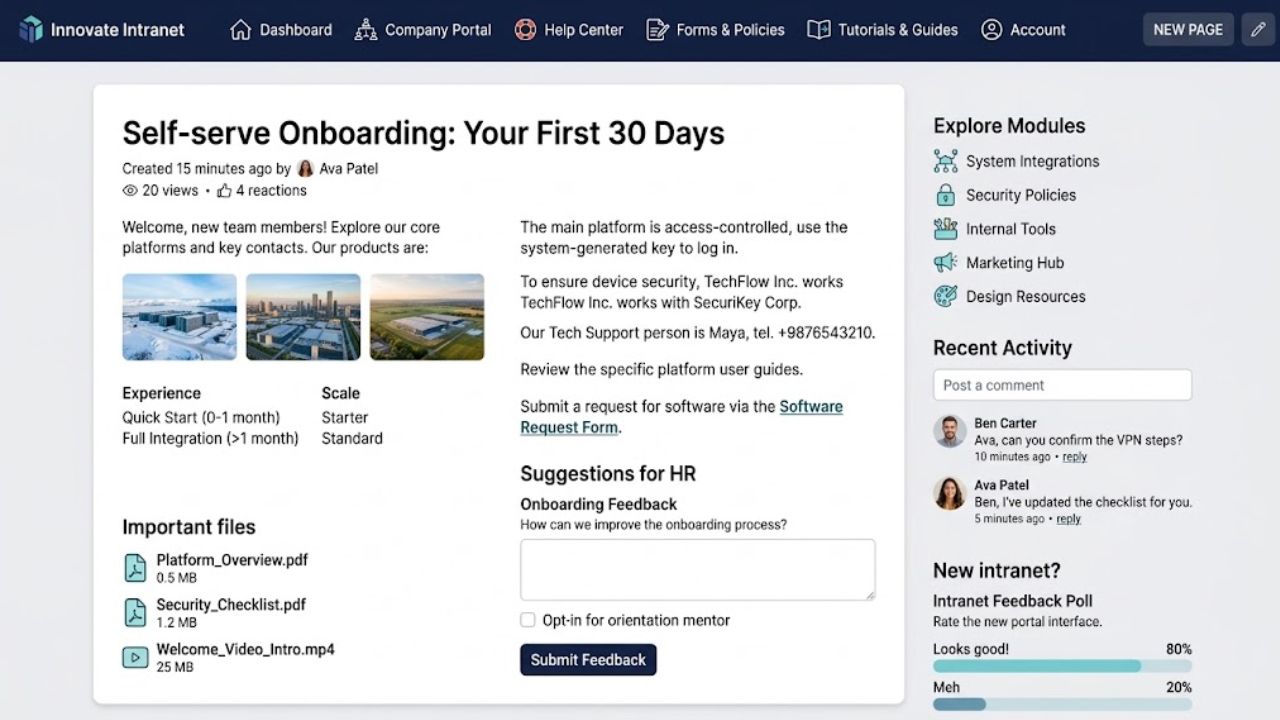
A self-serve onboarding wiki needs an obvious front door. Organize it around the questions a new employee will ask, not the departments that happened to create the documents.
| Wiki Area | What Belongs There | Likely Owner |
| Start Here | Onboarding route, first-day plan, key contacts | People Operations |
| How We Work | Communication norms, meetings, hours, decisions | Operations |
| People and Teams | Team map, responsibilities, approval routes | Department leaders |
| Tools and Access | Approved tools, access requests, setup help | IT or Security |
| Role Hubs | Expectations, procedures, templates, examples | Hiring manager |
| Policies and Support | Leave, expenses, conduct, benefits, support | HR |
Add a glossary for internal acronyms and project names that mean nothing on day one. Separate company-wide guidance from role and regional pages. Leave, benefits, holidays, and employment procedures can differ by country; the global page should point to the correct local version.
Most teams should start with their existing knowledge platform. Another app will not fix weak titles, duplicate instructions, or unclear ownership. Move to Notion, Confluence, or another system only when the current platform lacks adequate search, permissions, or maintenance controls.
Write Actionable Pages
Pages in a self-serve onboarding wiki should answer specific questions. “How to request software access” is clearer than “IT resources.” “Where to find approved proposal templates” is more useful than “Sales information.”
For a procedure, state who it covers, any prerequisites, the steps, and the expected result. Add the owner, review date, and help route. An access page should name the ticket form, required details, approval path, and response channel. “Contact IT” merely moves the confusion.
Do not promise a turnaround time without a real service standard. Screenshots can clarify buried settings, but interfaces change. Pair them with written steps. Give training videos a summary and links to the forms or pages shown.
Make Search Easy
Employees may search for “holiday,” “annual leave,” or “PTO” and expect the same policy. Include common alternatives in titles or tags. Keep one main page for each subject and archive duplicates.
Ask someone unfamiliar with the structure to find the leave process, request access, identify an approver, and report a security concern. If each answer requires a hint, fix the navigation. More pages will not solve poor findability.
Protect Sensitive Information
A self-serve onboarding wiki should be easy to use without opening every record to everyone. Apply least privilege: give employees the information and permissions required for their work while restricting sensitive material.
Do not place passwords, API keys, identity documents, bank details, medical information, HR cases, or performance notes in a general wiki. Use the approved password manager, HR system, or restricted case-management system. Check public-sharing settings; a public link can become an exposure.
Contractors and external partners should see only relevant sections. Because privacy and employment obligations vary by country, local legal and security guidance must shape permissions.
Keep Human Support
The self-serve onboarding wiki handles repeatable facts. Managers explain priorities, standards, and decision boundaries. A buddy can explain informal norms and answer awkward questions. HR and IT remain responsible for personal cases, accounts, devices, and security problems.
Provide one obvious help route: a dedicated channel, ticket form, or scheduled check-in. Asynchronous onboarding should not become silent onboarding.
Repeated questions are evidence. If several people miss the expense process, improve its title, placement, or instructions before assuming they failed to read it.
Maintain the Wiki
A self-serve onboarding wiki becomes unreliable when pages have no owner. Assign each operational page to a person or team, and transfer responsibility when roles change.
Some platforms have review controls. Notion currently documents page owners, verified pages, and notifications when verification expires, although availability can change by plan or product update. Other platforms may need calendar reminders or a review tracker.
Review a page whenever its policy, tool, approval route, or workflow changes. Check stable material on a schedule. Archive duplicates, repair broken links, and record significant policy revisions.
Start with one role or hiring group. After launch, examine failed searches, unresolved questions, access delays, and new-hire feedback. Use those signals to improve the material, not to judge individual learning speed.
Mistakes to Avoid
A large documentation dump may look complete while giving employees no sensible starting point. Other damaging problems include:
- Copying a policy without explaining the action it requires
- Leaving current and outdated procedures searchable together
- Restricting pages that every employee needs
- Allowing uncontrolled edits to critical policy pages
- Using video as the only source of instructions
- Naming a department as owner when no person accepts responsibility
The wiki should not double as the employee’s entire task tracker. Link it to a role-specific checklist so reference pages remain useful after onboarding ends.
Final Thoughts
A self-serve onboarding wiki succeeds when new team members find dependable answers and know who can help. Begin with common questions, give each important page an owner, and pilot the structure with one group. A smaller wiki that reflects real work is more useful than a polished library of uncertain instructions.
Frequently Asked Questions (FAQs)
How much content is needed before launch?
Start with access, contacts, working norms, role expectations, essential policies, and the first-week plan. Do not delay launch to document every exception. Add edge cases after the main route works.
Should every country and department use the same pages?
Use a common starting point, not identical instructions. Keep company-wide principles in the central wiki and link to local or role pages. Label the audience so employees do not follow another country’s leave or benefits process.
What if employees keep asking questions that the wiki answers?
Check the title, search terms, navigation, and wording. An answer can exist yet remain difficult to find or apply. Questions requiring judgment belong with a person, not a static page.
Should new hires be allowed to edit pages?
Let them suggest corrections; newcomers notice hidden assumptions quickly. Direct editing can suit ordinary team guidance. HR, legal, security, and formal policy pages need controlled ownership and review.