

The year is 2026, and the internet isn’t the same place it was five years ago. Cyber threats have evolved. We are no longer just dealing with teenage hackers guessing passwords in a basement. Today, we face AI-driven botnets that can scan millions of websites in seconds, ransomware that locks your files and demands cryptocurrency, and sophisticated phishing attacks that look terrifyingly real.
If you are running a business, a blog, or an online store, your web host is your first line of defense. It is the digital foundation of your house. If the foundation is weak, it doesn’t matter how strong your locks are—the house is still at risk.
Many people choose a web host based on price or storage space. That is a dangerous mistake. In 2026, security is the most important feature. A cheap host might save you $5 a month, but a security breach could cost you thousands in lost revenue, damaged reputation, and legal fees.
So, how do you know if a host is safe? You can’t just trust their marketing page. You need to look under the hood.
This guide is your 2026 Web Hosting Security Features. We are going to break down the 10 non-negotiable features you need to look for. Whether you are switching hosts or starting a new site, do not sign up until you have checked these boxes.
The Core Web Host Security Checklist (Features 1–10)
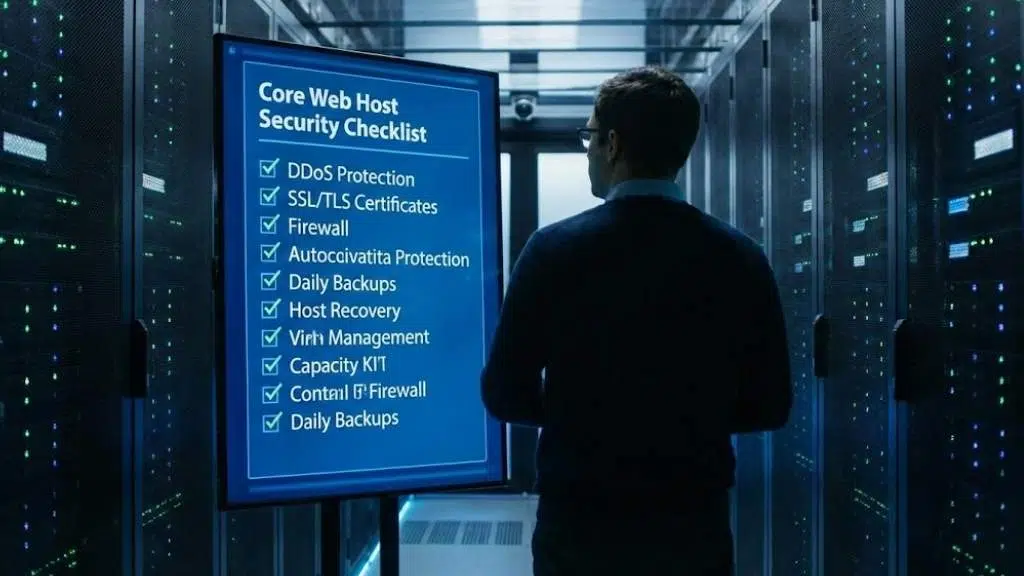
This isn’t a “nice to have” list. These are the essential standards for modern web safety. If a hosting provider is missing more than two of these, keep looking.
1. AI-Powered Web Application Firewall (WAF)
In the old days, a standard firewall was enough. It acted like a simple gatekeeper, blocking traffic from known “bad” IP addresses. But today’s attacks are smarter.
In 2026, you need a Web Application Firewall (WAF) that uses Artificial Intelligence (AI).
Why it matters
A traditional firewall looks at where traffic is coming from. An AI-powered WAF looks at what the traffic is doing. It analyzes behavior. If a visitor starts acting like a hacker—trying to inject malicious code into your contact form or guessing admin passwords—the AI detects the pattern and blocks them instantly.
What to look for:
- Layer 7 Protection: Ensure the WAF protects the “Application Layer” (where your website lives), not just the network.
- Behavioral Analysis: Look for terms like “smart rules” or “heuristic analysis.” This means it can stop new, unknown attacks (Zero-Day exploits) that haven’t been seen before.
- Vendor Names: Reputable hosts often partner with security giants. Look for WAFs powered by Cloudflare, Imunify360, or StackPath.
Pro Tip: Ask support, “Does your firewall block SQL injection and cross-site scripting (XSS) automatically?” If they say “you need a plugin for that,” run away.
2. Automated & Immutable Backups
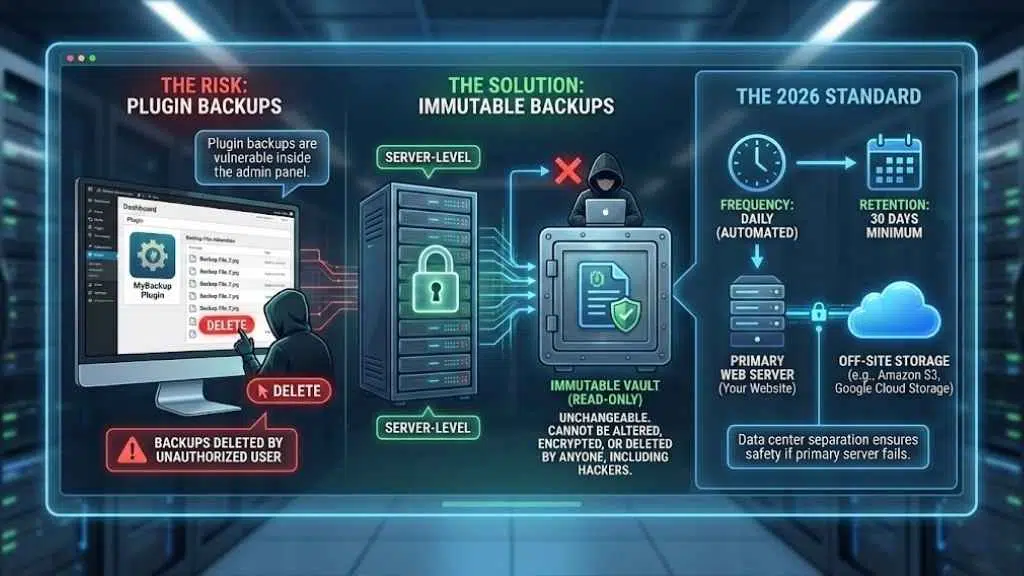
You might think, “I have a backup plugin, I’m safe.” Think again. If a hacker gets into your website admin dashboard, the first thing they often do is delete your plugin backups.
You need server-level backups that are immutable.
What does “Immutable” mean?
It means “unchangeable.” An immutable backup cannot be altered, encrypted, or deleted by anyone—not even by you, and certainly not by a hacker or ransomware. It is a read-only copy of your site stored in a safe vault.
The 2026 Standard
- Frequency: Backups should happen daily (automated), ideally overnight.
- Retention: Your host should keep these copies for at least 30 days.
- Off-Site Storage: The backups should not live on the same hard drive as your website. If the server melts down, your backups should be safe in a completely different data center (like Amazon S3 or Google Cloud Storage).
3. Advanced DDoS Mitigation (Layers 3, 4 & 7)
A DDoS (Distributed Denial of Service) attack is like a traffic jam caused on purpose. Attackers send thousands of fake visitors to your site at once to crash it.
In 2026, DDoS attacks are cheap to buy and easy to launch. Your host must have built-in mitigation.
The Protection Layers
- Layer 3 & 4 (Network): This stops the brute-force “volumetric” attacks that try to clog your internet connection. Most hosts have this.
- Layer 7 (Application): This is the tricky one. It stops attacks that mimic real human behavior, like hitting the “refresh” button 100 times a second on your checkout page.
Why you need it
If you don’t have this, your site will go offline during an attack. Worse, some hosts will shut your site down themselves if you get attacked because they don’t want the traffic affecting their other customers. A secure host absorbs the attack so your site stays online.
4. Real-Time Malware Scanning & Auto-Remediation
Getting hacked is stressful. Finding out you’ve been hacked weeks later because Google blacklisted your site is a nightmare.
A secure host doesn’t wait for you to report a problem. They scan your files continuously.
The Key Feature: Auto-Remediation
“Remediation” is a fancy word for “fixing.” Some hosts will scan your site, find a virus, and just send you an email saying, “You’re hacked, fix it.” That is not helpful.
Top-tier hosts in 2026 offer Auto-Remediation.
- The scanner detects a malicious file (like a PHP shell).
- It instantly quarantines the file or cleans the malicious code only, leaving the rest of the file intact.
- Your site keeps running, and the threat is gone before you even wake up.
Look for tools like: Imunify360, BitNinja, or SiteLock. These are industry standards for real-time scanning.
5. Free, Auto-Renewing SSL/TLS 1.3 Certificates
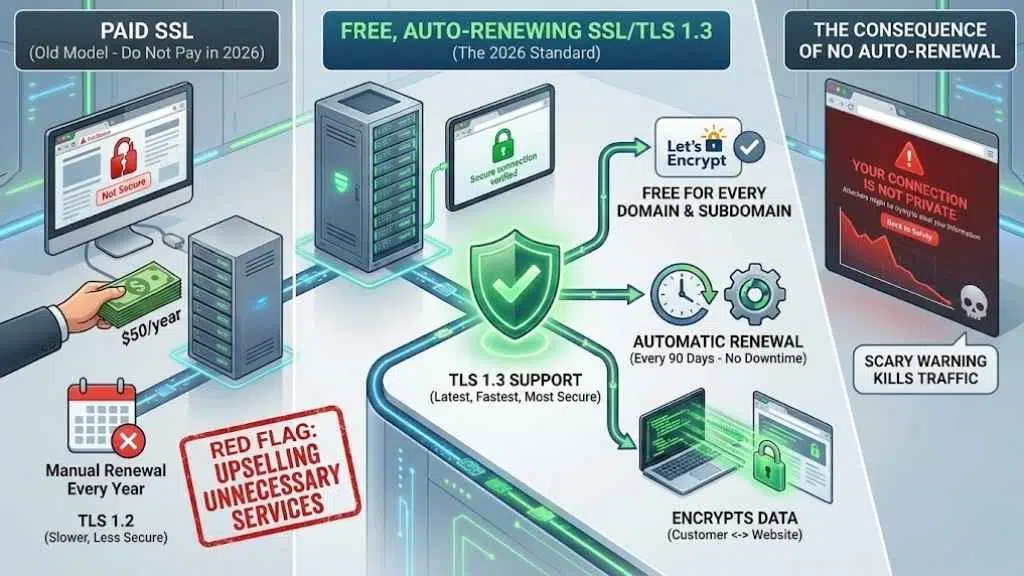
Do not pay for a basic SSL certificate in 2026.
SSL (Secure Sockets Layer) creates the little padlock icon in the browser bar. It encrypts data moving between your customer and your website. Years ago, you had to pay $50/year for this. Today, non-profit organizations like Let’s Encrypt provide them for free.
The Standard
- Free: Your host should offer free SSL for every domain and subdomain you host.
- Auto-Renewal: The certificate expires every 90 days. Your host must renew it automatically. If they don’t, your site will show a scary “Not Secure” warning to visitors, killing your traffic.
- TLS 1.3 Support: This is the latest, fastest, and most secure version of the protocol. Ensure your host supports TLS 1.3, not just the older 1.2.
Red Flag: If a host tries to sell you a “Premium SSL” for a simple blog, they are upselling you unnecessary services.
6. Containerization & Account Isolation
This is critical for “Shared Hosting” (where multiple websites live on one server).
Imagine living in an apartment building. If your neighbor leaves their stove on and starts a fire, your apartment might burn down too. In web hosting, if your “neighbor” on the server gets hacked, the infection can spread to your site if the server isn’t set up correctly.
The Solution: Containerization
Secure hosts use technology like CloudLinux or CageFS.
This puts every user in their own digital “cage” or “container.” You have your own file system and your own resources.
- If a neighbor gets hacked? The hacker is trapped in their cage. You are safe.
- If a neighbor uses too much CPU? Their site slows down, not yours.
Ask the host: “Do you use CloudLinux or CageFS to isolate accounts?” If the answer is no, avoid their shared hosting plans.
7. Two-Factor Authentication (2FA) & SSH Key Access
Security isn’t just about the server; it’s about the front door. How do you log in?
Two-Factor Authentication (2FA)
Your hosting dashboard (where you manage billing and domains) contains the keys to your digital kingdom. It must support 2FA.
- Good: SMS text codes (better than nothing).
- Best: Time-based apps like Google Authenticator or hardware keys like YubiKey.
SSH Key Access
For developers or tech-savvy users who use Secure Shell (SSH) to manage files, password access is a risk. Bots constantly try to guess SSH passwords.
A secure host allows you to disable password logins and use SSH Keys instead. These are cryptographic files on your computer that act as a key. No key file? No access. It makes brute-force attacks impossible.
8. Proactive Software Patching (Managed Updates)
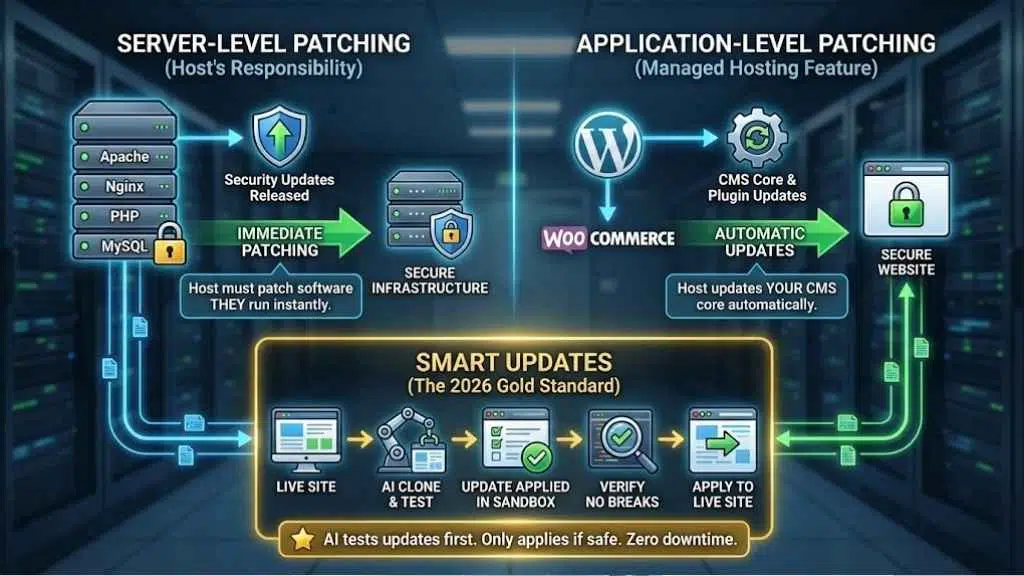
Software vulnerabilities are the #1 reason websites get hacked. If you are running an old version of PHP or an outdated WordPress plugin, you are a sitting duck.
Server-Level Patching
Your host is responsible for the software they run (Apache, Nginx, PHP, MySQL). They must patch these immediately when security updates are released.
Application-Level Patching (Managed Hosting):
If you pay for “Managed WordPress” or “Managed WooCommerce” hosting, the host should also update your CMS core automatically.
- Smart Updates: Some premium hosts use AI to test the update first. They clone your site, update it, check if it breaks, and only then apply the update to your live site. This is the gold standard for 2026.
9. Bot Management & Brute Force Protection
Not all visitors are human. In fact, nearly half of all web traffic is bots.
- Good Bots: Google, Bing (crawlers that help you rank).
- Bad Bots: Scrapers stealing your content, spammers filling your comment section, and hackers guessing passwords.
Login Protection
Your host should implement “Brute Force Protection” on login pages (like wp-login.php). This automatically bans an IP address if it fails to log in more than 5 times in a minute.
CAPTCHA Integration
Look for hosts that integrate invisible CAPTCHA challenges. This verifies if a visitor is human without forcing them to click on pictures of traffic lights.
10. Compliance Standards (ISO 27001, SOC 2, PCI-DSS)
Finally, look for the badges. You want a host that takes their own security as seriously as yours.
These are audits performed by third-party organizations:
- ISO 27001: The international standard for information security management. It proves the data center has strict controls on who can enter the building and access the servers.
- SOC 2 (Type II): A rigorous audit that checks how a company manages customer data over time.
- PCI-DSS: Essential if you handle credit cards directly (though most people use Stripe/PayPal).
Even if you are just a small blogger, hosting with a compliant provider means your data is sitting in a world-class facility, physically protected by biometric locks, 24/7 security guards, and redundant power systems.
The “Red Flags”: Security Warning Signs to Avoid
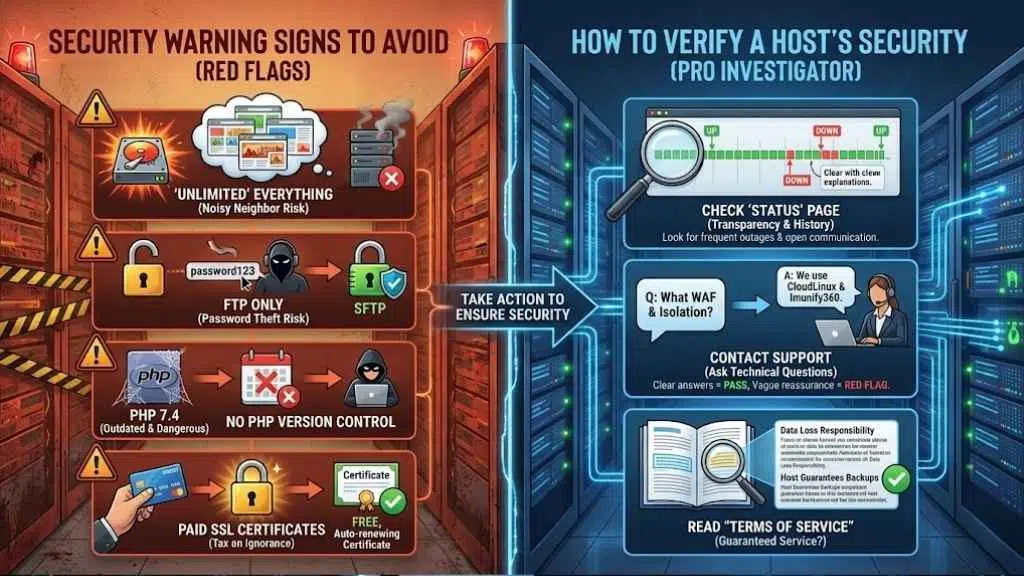
Sometimes it’s easier to spot a bad host than a good one. If you see these warning signs, close the tab.
- “Unlimited” Everything: There is no such thing as an unlimited hard drive. Hosts that promise this usually overcrowd their servers, leading to poor performance and security risks (the “noisy neighbor” effect).
- FTP Only: File Transfer Protocol (FTP) sends your password in plain text. Any hacker listening on the network can steal it. A secure host must offer SFTP (Secure FTP).
- No PHP Version Control: If a host forces you to use old PHP versions (like 7.4 or older) because “that’s what they support,” run. Old PHP versions stop getting security patches, making them dangerous.
- Paid SSL Certificates: As mentioned, basic encryption should be free. Charging for it is a “tax on ignorance.”
How to Verify a Host’s Security Before Buying
Sales pages can be misleading. Here is how to act like a pro investigator before you hand over your credit card.
- Check the “Status” Page: Search for [Host Name] status. Look at their history. Do they have frequent outages? Do they communicate openly when things break? Transparency is a security feature.
- Contact Support: Send a pre-sales question. Ask: “What WAF do you use, and is account isolation enabled on this plan?”
- If they answer clearly (e.g., “We use CloudLinux and Imunify360”), that’s a pass.
- If they say, “Our servers are very secure, don’t worry,” that is a vague red flag.
- Read “Terms of Service”: Search the document for “backup.” Some hosts state they are not responsible for data loss, even if they offer backups. You want a host that guarantees their service.
Final Thoughts
It is tempting to look at a $2.99/month hosting plan and think, “That’s good enough.” But in 2026, your website is your brand. It is your storefront. If it goes down, or if your customer’s data is stolen, the cost is far higher than the few dollars you saved on hosting.
By choosing a host that offers these 10 Essential Security Features, you aren’t just buying server space; you are buying peace of mind. You are buying the assurance that when you wake up in the morning, your website will be there, healthy, fast, and ready for business.






















