A task list is good at holding work. It is less useful when I need to decide what deserves my attention now, what can wait, and what I should actually finish by the end of the week.
That is where a personal sprint can help. It creates a short window for completing one meaningful outcome instead of making small amounts of progress across several unrelated projects.
The word “sprint” may suggest rushing, but that is not the point. A well-planned sprint should not require longer hours or an unsustainable pace. It is a way to narrow the commitment, make the work visible, and learn from what happens.
What Is a Personal Sprint?
A personal sprint is a fixed work cycle in which one person chooses a clear goal, selects the work needed to reach it, monitors progress, and reviews the result at the end.
The idea borrows from Agile, Scrum, and Kanban, but a solo adaptation is not formal Scrum. Scrum is a complete framework built around a team with defined accountabilities, events, and work artifacts. An individual can still use some of its most practical ideas without recreating the entire framework.
For personal work, I would keep only the elements that improve focus and decision-making:
- A fixed start and end date
- One Sprint Goal
- A clear definition of Done
- A realistic selection of work
- A visible workflow
- A limit on active tasks
- A brief review and adjustment cycle
A normal to-do list stores tasks. Time blocking reserves hours for them. A personal sprint does something different: it connects selected tasks to an outcome and creates a point at which the result must be inspected honestly.
When a Personal Sprint Is Worth Using
Personal sprints work best for projects that require several steps but can still produce a visible result within a short period.
That might include:
- Completing and editing an article
- Preparing a client presentation
- Publishing a portfolio page
- Finishing a course module
- Delivering a small freelance project
- Building and testing a basic product feature
They are less suitable for work dominated by unpredictable requests. Someone handling live support, emergencies, or on-call responsibilities may benefit more from a continuous Kanban-style workflow. Small recurring duties such as checking email, processing expenses, or updating records usually belong in routines or checklists.
My test is simple: if the work can produce a specific, reviewable result within one or two weeks, it is a reasonable candidate for a personal sprint.
How to Run a Personal Sprint in 8 Steps
The method does not require specialist software. A notebook, whiteboard, spreadsheet, or basic task app can handle the entire process.
1. Choose a Short, Fixed Duration
For a first personal sprint, I would choose five working days. That is usually enough time to complete something useful while keeping the planning horizon easy to understand.
A larger or more uncertain deliverable may need one or two weeks. Formal Scrum allows Sprints of up to one month, but an individual rarely needs such a long cycle to begin learning from the plan.
The important part is not finding a supposedly perfect duration. It is keeping the end date fixed. If Friday arrives and the work is incomplete, extending the sprint until Monday hides the planning problem. Close it on time, review what happened, and use that information when deciding what to take on next.
2. Write One Sprint Goal
A sprint should have one objective. Several supporting tasks are fine, but multiple unrelated goals divide attention and make success difficult to judge.
A useful structure is: By [review time], I will have [observable result] so that [reason or value].
For example: By Friday afternoon, I will have a complete, edited article ready for editorial review.
“Work on the article” is too vague. It describes an activity rather than a result. “Complete five tasks” has the same weakness unless those tasks combine to produce something meaningful.
The goal should be specific enough to guide decisions but flexible enough to survive reasonable changes in the task plan.
3. Define What Done Means
Without a clear finish line, work can remain “almost complete” for several days. Research expands, editing continues, and small improvements keep appearing. Before the sprint begins, write down the conditions the result must meet.
For an article, Done might mean:
- The research has been verified.
- The full draft is complete.
- Unsupported claims have been removed.
- The writing has received a final edit.
- The document is ready to submit or publish.
Done does not mean perfect. It means the work has reached the quality required for its intended use. The definition should prevent unfinished work from being counted as complete without encouraging endless polishing.
4. Plan From Real Capacity
A five-day sprint does not give me five empty days. Meetings, routine duties, appointments, existing deadlines, and personal commitments have already claimed part of that time.
Before selecting any sprint work, check the calendar and subtract those fixed demands. Then account for the kinds of interruptions that normally occur.
I would not commit every remaining hour. Doing so assumes that every estimate will be accurate and nothing unexpected will happen. How much space to leave depends on the role. A person with a predictable schedule may need little. Someone working with several clients will need more.
Recent experience is a better guide than an arbitrary buffer percentage.
5. Select Only the Work That Supports the Goal
The main backlog can contain every task, idea, and future project under consideration. The sprint backlog should be much smaller.
Each selected task should pass one test: Does completing this help achieve the Sprint Goal?
If it does not, it stays outside the sprint. The chosen work should also be divided into pieces that are small enough to finish. “Write article” hides too much. Research, outline, first draft, fact-checking, final edit, and submission are easier to plan and move through the workflow.
As a practical guideline, make each item small enough to complete within one focused work period or working day. If a task still feels uncertain, split it again or investigate the uncertainty before committing to the full piece of work.
6. Make the Work Visible and Limit What Is Active
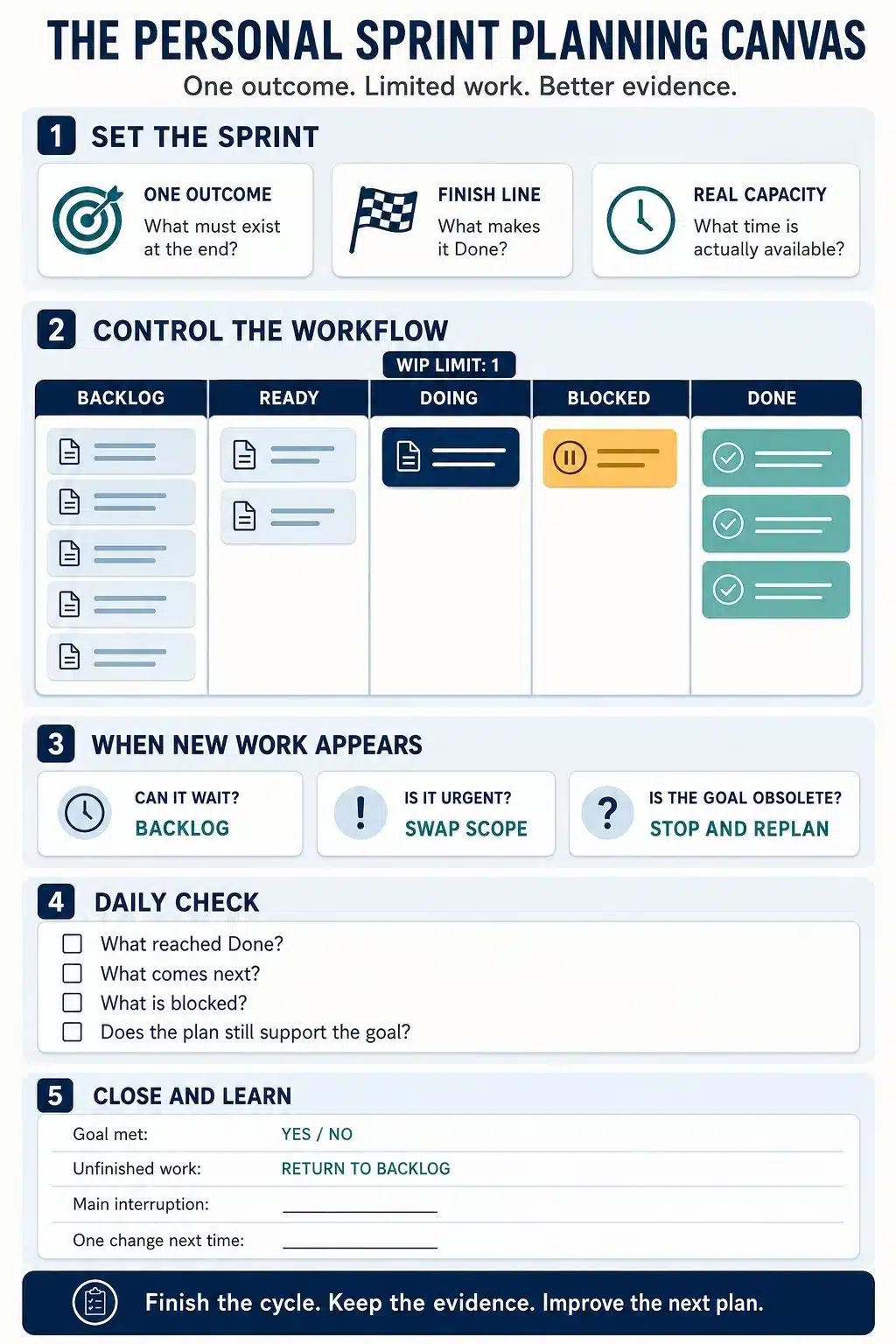
A simple board needs only a few columns:
Backlog → Ready → Doing → Blocked → Done
Backlog contains unselected work.
Ready holds the next tasks available to start.
Doing shows the work currently receiving attention.
Blocked identifies work that cannot move forward.
Done preserves evidence of completion.
For an individual sprint, I would set the initial Doing limit at one task. A second task can enter only when the first is genuinely waiting on an external response or dependency.
Difficulty and boredom are not blockers. Moving to another task whenever the current one becomes uncomfortable usually creates a board full of partially finished work.
The purpose of the limit is not rigid single-tasking. It is to make starting something new a deliberate capacity decision.
7. Inspect the Plan Briefly Each Day
A personal daily check should take only a few minutes. It is not a status meeting with myself, and it does not need to become a long journal entry.
The useful questions are:
- What moved to Done?
- What is the next smallest useful action?
- What is blocked?
- Does the current plan still support the Sprint Goal?
- Has anything changed my available capacity?
The answer should produce a clear plan for the day. If the check repeatedly takes 20 minutes, the board probably contains too much detail.
8. Close the Sprint With a Review and Retrospective
The review and retrospective answer different questions.
The sprint review asks: What did I actually complete?
Compare the result with the Sprint Goal and Definition of Done. Time spent is not the same as value delivered. An article that still needs fact-checking and editing is not ready simply because most of the words have been written.
The retrospective asks: What should I change about the way I work?
I would keep this brief:
- What helped the work move forward?
- What caused delay or confusion?
- Which estimate or assumption was wrong?
- What is one change worth trying next time?
Choose one meaningful adjustment rather than redesigning the entire system after a difficult week.
Unfinished work should return to the general backlog. It can then be selected again, divided into smaller pieces, deprioritized, or removed. Automatically carrying everything forward allows stale work and poor estimates to follow one sprint into the next.
How to Handle Interruptions During a Sprint
A sprint needs focus, but it should not force me to follow an outdated plan. Agile work allows adjustment when new information appears. The useful principle is to protect the Sprint Goal, not every original task.
When a new request arrives, there are three reasonable responses:
- It is not urgent: Add it to the general backlog.
- It is urgent but the Sprint Goal still matters: Add the request and remove or defer comparable planned work.
- It makes the Sprint Goal irrelevant: Close the sprint early, record why, and create a new plan.
What I would avoid is quietly adding new work while pretending the original capacity has not changed. That makes the sprint look like a planning failure when the real problem was unrecorded scope growth.
Final Thoughts
A personal sprint is not a challenge to work faster for a week. It is a way to decide what deserves attention, reduce unfinished work, and learn from a short planning cycle.
The version I recommend is deliberately simple: choose one outcome, define Done, plan from real capacity, limit active work, inspect progress briefly, and close the sprint on time.
Not every sprint will succeed exactly as planned. That is not a flaw in the method. The value comes from seeing why the plan changed and using that evidence to make the next personal sprint more realistic.
Frequently Asked Questions About Personal Sprints
1. How long should a personal sprint last?
Five working days is a sensible starting point for many individual projects. Larger deliverables may suit a one- or two-week cycle, but the duration should remain fixed after the sprint starts.
2. Is a personal sprint the same as Scrum?
No. Scrum is a complete framework designed around a team with defined accountabilities and events. A personal sprint is a lighter individual adaptation that borrows ideas such as time limits, clear goals, visible work, inspection, and adjustment.
3. What happens if I do not finish the sprint?
End the sprint at the planned time and return unfinished work to the backlog. Review whether the task was too large, poorly defined, blocked, or displaced by new work before deciding whether it belongs in the next sprint.
4. What should I do when urgent work appears?
Confirm that it is genuinely urgent. If it must enter the sprint, remove or defer other work so the change in capacity stays visible. If it makes the original goal irrelevant, close the sprint and replan.
5. Do I need story points, charts, or a project management app?
No. A notebook, whiteboard, spreadsheet, or simple task app is enough. The system only needs to show the goal, selected work, current task, blockers, and completed work clearly.