


Most professionals do not need another piece of productivity software. They just need a calendar that reflects reality rather than corporate habit. The standard schedule is built on an outdated assumption: that putting people in a room for an hour is the best way to move a project forward.
In practice, meetings expand to fill the time blocked for them. Making calls shorter is not about speaking faster or rushing through complex problems. It is about stripping away the administrative filler through effective meeting management so you can focus entirely on the core work.
10 Ways to Implement Effective Meeting Management and Save Time
1. Change the Company-Wide Calendar Defaults
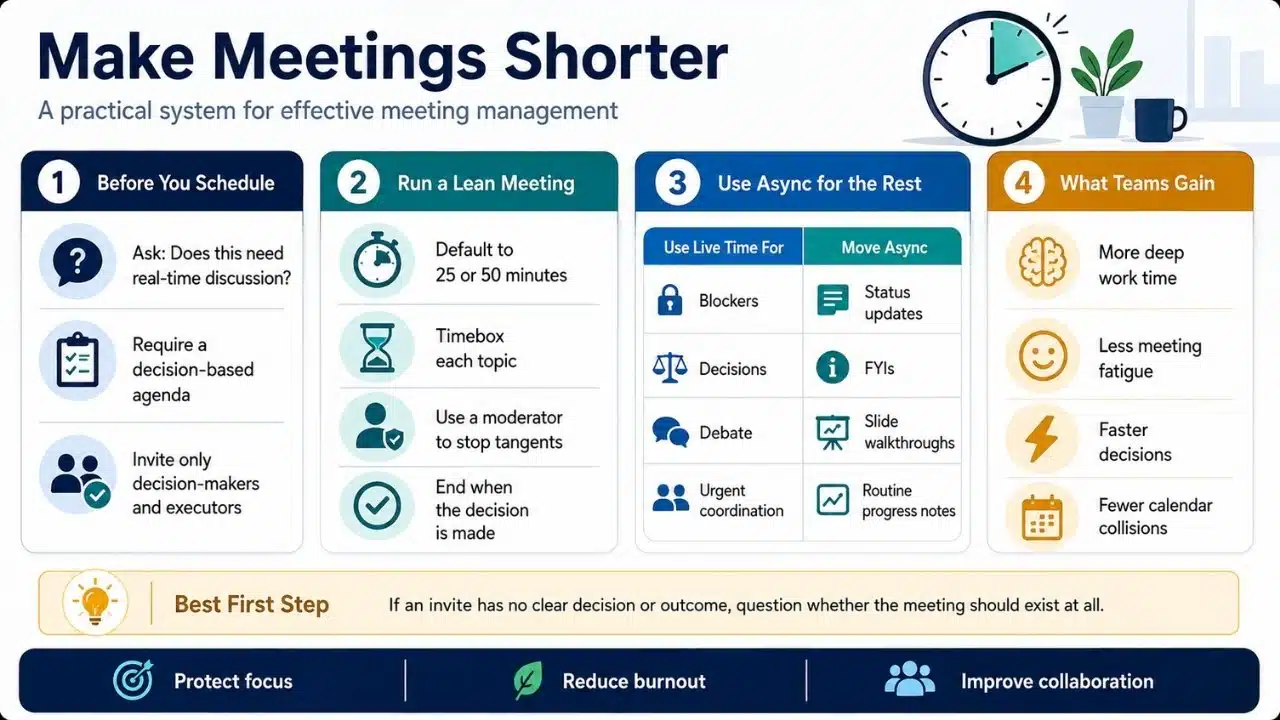
The easiest way to shorten meetings is to stop scheduling them in 30-minute and 60-minute blocks simply because Microsoft Outlook and Google Calendar suggest those increments. If your organization shifts the default lengths to 25 minutes and 50 minutes, you instantly buy back transition time. The realistic friction here is that people will initially ignore the 25-minute cutoff and talk right up to the 30-minute mark anyway. The meeting host must enforce the hard stop for the first few weeks until the culture adapts.
2. Kill the Round-Robin Status Update
Having eight people sit in a room while each person takes five minutes to list what they did this week is a massive drain on payroll. It requires no real-time collaboration. Status updates belong in a shared dashboard, an asynchronous Slack thread, or a Friday afternoon email. Reserve live time exclusively for topics that require debate, friction, or immediate problem-solving.
Review this breakdown of common syncs and their ideal alternatives before blocking off time on the calendar:
| Meeting Type | Realistic Value | Better Alternative |
| Weekly Status Update | Low | Shared dashboard or Slack thread |
| Project Kickoff | High | Keep live, but require pre-reading |
| Quarterly FYIs | Low | Pre-recorded screen-share video |
| Urgent Blocker Sync | High | 15-minute targeted call |
3. Require a Decision-Based Agenda for Effective Meeting Management
Never accept an invite where the agenda is just a broad topic. An agenda that says “Discuss Q3 Marketing” is an invitation to ramble. An agenda that says “Decide on Q3 budget allocation for the new software vendor” gives the room a clear finish line. Once the decision is made, everyone leaves, whether it took ten minutes or forty.
4. Move “FYI” Broadcasts to Video
If an agenda consists entirely of one person presenting slides while everyone else stays on mute, it is a broadcast. Do not drag a dozen people away from their deep work just to read them a presentation. Record a quick screen-share video, send it to the team, and let them watch it on 1.5x speed when they actually have a gap in their schedule.
5. Ban Live Ideation From Scratch
Brainstorming in a live room usually devolves into the loudest voices dominating the conversation while everyone else stares at a blank whiteboard. Instead of starting from zero on a call, require attendees to do the heavy lifting beforehand. Ask everyone to bring three written ideas or solutions. The live time is then spent filtering, combining, and debating those existing ideas.
6. Keep the Guest List Uncomfortably Small
Every additional attendee adds small talk, clarifying questions, and tangent opinions. Use a strict framework for invitations. If someone is not directly responsible for executing the work or accountable for the final approval, they should not be there. If someone just needs to be kept in the loop, send them the summary notes afterward.
7. Timebox Individual Topics
A common mistake is assigning an end time to the calendar block, but not to the items inside it. If you have three topics to cover in 30 minutes, assign 10 minutes to each. Put a timer on the screen if necessary. When the 10 minutes are up, the moderator must force a choice: either make a decision now or schedule a targeted 15-minute follow-up with only the people involved in that specific blocker.
8. Normalize the “Opt-Out” Culture
A major reason calls run long is that unneeded attendees ask basic questions simply to feel like they are contributing. Make it culturally acceptable for employees to look at an agenda and politely decline the invite if they realize their specific expertise is not needed.
9. Appoint a Ruthless Moderator
Every group needs a bad guy. This is the person whose sole job is to interrupt tangents, park irrelevant ideas, and force the room back to the core agenda. If someone starts diving into a technical side-issue that only applies to two people, the moderator must step in and move the conversation offline.
10. Stack Meetings to Force Hard Stops
An empty afternoon is a trap. If you have a single 45-minute sync on a Tuesday afternoon, there is no external pressure to end it on time. Conversely, if you schedule it right before another hard commitment—whether that is another call, leaving to pick up your kids, or a non-negotiable work block—you will naturally drive the conversation to a close precisely when you need to.
How Effective Meeting Management Prevents Employee Burnout
One of the most overlooked benefits of trimming your calendar is the direct impact on team energy levels. Zoom fatigue is not just a buzzword; it is a measurable decline in cognitive function caused by back-to-back video calls with no breaks. When a company adopts stricter guidelines for when and why people gather, employees gain longer stretches of uninterrupted deep work. This allows them to finish complex tasks within normal business hours rather than pushing critical thinking into the late evening.
The Role of Asynchronous Communication
A calendar overhaul fails if it is not paired with a strong asynchronous culture. If you cancel a 60-minute sync but replace it with 60 minutes of chaotic, unorganized Slack pinging, you have not solved the problem. Effective meeting management relies heavily on centralizing information. When project updates, briefs, and approvals live in a shared document or project management tool, team members can retrieve context on their own schedule without having to call a live sync just to get brought up to speed.
Frequently Asked Questions (FAQs) About Effective Meeting Management
Can status updates ever be live?
Live status updates are only useful if the work is highly urgent, physically dangerous, or changing by the hour. In standard corporate environments, these updates are better handled asynchronously to save time and prevent calendar bloat.
How do I enforce a hard stop when a senior leader is speaking?
Use a polite but firm time check five minutes before the scheduled end time. You can intervene smoothly by saying, “We have five minutes left and I want to respect everyone’s calendar, so let’s lock in the final decision on this core point.”
What if an important stakeholder opts out of a decision meeting?
If a required decision-maker declines the invite, you must cancel and reschedule the session. Holding a decision-based meeting without the person who actually owns the final approval is a guaranteed way to duplicate your efforts later.
What to Try First to Regain Your Time
You cannot overhaul your entire company’s communication habits overnight. Start with the lowest friction change: require a specific agenda for every call. If an invite lands in your inbox without a clear purpose, politely reply and ask what exactly needs to be decided. Once you get comfortable forcing clarity before the call starts, driving effective meeting management across your team becomes much easier and creates an immediate shift in daily productivity.























