Most SaaS waste does not come from one reckless purchase. It grows quietly. A team buys a tool for a short project. An employee leaves, but the paid seat remains. Another department adopts similar software. Then an annual contract renews before anyone asks whether the company still needs what it bought.
That is why I would not treat a SaaS subscription audit as a rushed cancellation exercise. The aim is to understand what the company pays for, who depends on it, what access it holds, and what the contract actually permits. Cost matters, but so do business continuity, security, and control.
A useful audit ends with more than a list of recurring charges. Every subscription should have a verified owner, a clear purpose, a documented decision, and someone responsible for the next action.
What Is a SaaS Subscription Audit?
A SaaS subscription audit is a structured review of the cloud software a company pays for or allows people to use. It brings financial records, contracts, user access, actual usage, business value, and security exposure into the same review.
The word “audit” can make the process sound more formal than it needs to be. A smaller company may manage it in a protected spreadsheet. A larger business may draw information from procurement, identity, expense, and SaaS-management systems. The method can change; the need for reliable evidence does not.
How to Audit Your Company’s SaaS Subscriptions
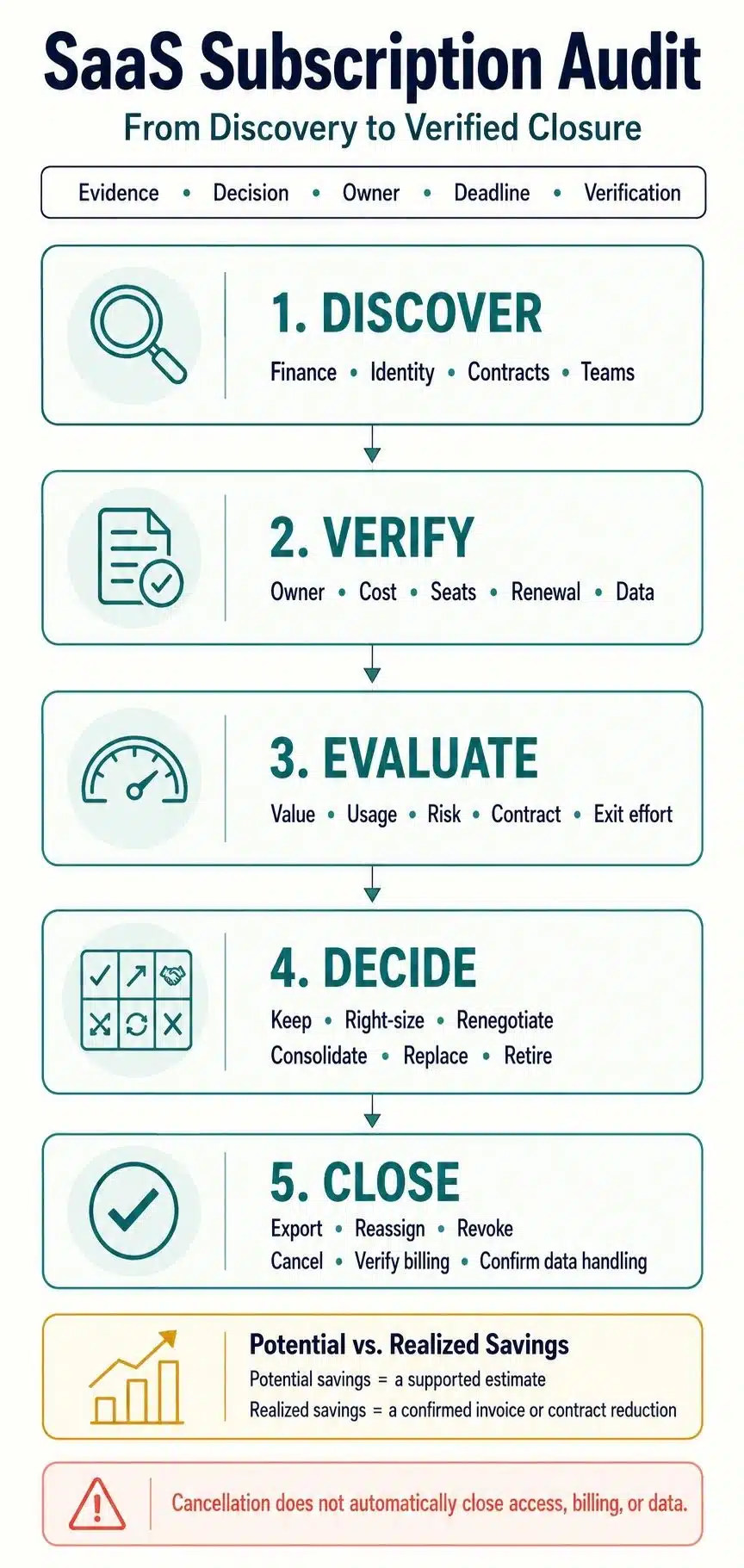
A reliable audit needs more than a list of charges. I would review the subscriptions in a clear order: find every app, confirm who owns it, compare paid access with meaningful use, examine the contract and security exposure, and document the final decision. This helps uncover real savings without putting important workflows or company data at risk.
1. Decide What the Audit Will Cover
Give the audit a clear boundary before collecting data. Otherwise, it can turn into an open-ended search with no agreed finish.
Define which departments, legal entities, payment methods, and billing period are in scope. Decide whether the review includes free applications, trials, employee reimbursements, AI tools, contractor accounts, and department-level purchases alongside centrally approved software.
One person should coordinate the work. Finance, IT, procurement, security, and department managers may all contribute, but shared input should not create vague accountability. The coordinator maintains the master register, follows up on missing information, and records the final decisions.
2. Find Subscriptions Across More Than One System
No single source will reveal the entire SaaS stack. Begin with money. Review the general ledger, accounts-payable records, corporate cards, expense claims, procurement files, and contract repository. Together, these sources should identify most paid products, including tools purchased outside the usual approval process.
Then compare the financial list with:
- SSO and identity-provider application lists
- Google Workspace or Microsoft 365 connected applications
- OAuth grants and third-party integrations
- Vendor admin consoles
- Browser, endpoint, or cloud-access data the company already collects
- Information from department heads and employees
Each source has a different blind spot. Finance may see a payment without recognizing the product behind the vendor’s billing name. An identity system may reveal access but miss accounts created with personal email addresses. A team manager may know which tools matter without knowing what they cost.
I would treat these sources as pieces of the same record, not competing versions of the truth.
3. Build One Reliable Subscription Register
Consolidate the applications you discover into one register. Standardize vendor and product names so that separate charges for the same platform are not mistaken for unrelated purchases.
For each subscription, record enough information to make and complete a decision:
- Product, vendor, business purpose, and department
- Business, technical, and budget owners
- Plan, billing frequency, and payment method
- Base price, paid add-ons, usage charges, and relevant taxes
- Seats purchased, assigned, and active
- Contract start, end, renewal, and cancellation-notice dates
- Auto-renewal and minimum-commitment terms
- Administrators, service accounts, guests, and integrations
- Types of company, employee, or customer data involved
- Export, retention, and deletion requirements
- Decision, action owner, deadline, and completion evidence
Missing fields often reveal the real problem. A renewal date without the cancellation deadline is not enough. A product without an owner gives nobody the authority to approve a change. An annual price without the contract term can make the immediately avoidable cost look much larger than it is.
4. Assign Real Ownership
“IT owns it” is usually too vague. A useful SaaS subscription audit separates three responsibilities:
- The business owner explains why the tool is needed and which work depends on it.
- The technical owner manages configuration, access, integrations, and offboarding.
- The budget owner approves the spending and renewal decision.
In a small company, one person may fill more than one role. That is fine as long as each responsibility has a name attached to it.
If nobody will take ownership of a subscription, do not cancel it on the spot. Mark it as unresolved and investigate its users, data, and integrations. An ownerless tool is a warning sign, but it is not yet proof that the tool has no value.
5. Reconcile Paid Access With Meaningful Use
Compare paid seats with assigned seats and active users. This usually exposes straightforward problems such as licenses held by former employees, contractors, duplicate accounts, or people who have moved into different roles.
A basic utilization calculation is: Active assigned users ÷ paid billable seats × 100
The result only means something when “active” has been defined properly. Vendor activity reports measure different actions, and last login is only one signal. I would not judge a quarterly reporting system, a specialist design application, and a daily messaging tool by the same activity window.
Do not ask an owner only, “Do you still need this?” The safest answer will usually be yes. Ask what work happens inside the product, who performs it, which paid features they use, what data lives there, and what would stop working if the subscription disappeared.
Also check whether:
- The product holds a system of record that would be difficult to move.
- Usage is seasonal, project-based, or limited to a specialist role.
- A cheaper plan would cover the features people actually use.
- Removing the tool would break an automation, customer workflow, or compliance process.
A rarely opened product can be necessary. A frequently opened one can still be replaceable. Usage data needs business context.
6. Review the Full Cost and the Contract
Normalize recurring charges so monthly, annual, and multi-year subscriptions can be compared. Keep base fees, paid seats, add-ons, overages, implementation charges, and other one-time costs separate. Lumping them together can produce a misleading cost-per-user figure.
Next, read the current contract or vendor terms. Confirm:
- The contract term, renewal date, and required cancellation notice
- Auto-renewal conditions
- Minimum seat or spending commitments
- Rules for reducing seats or changing plans
- Renewal price adjustments
- Usage limits and overage charges
- Data-export assistance
- Data retention and deletion provisions
- Security, incident-notification, and data-processing terms
This is where attractive savings estimates often collapse. Unused seats do not automatically equal an immediate reduction in the bill. The agreement may block seat reductions until renewal, impose a minimum commitment, or use tiered pricing.
Keep two figures separate:
- Potential savings: a supported estimate of spending that may be avoidable.
- Realized savings: a confirmed reduction in an invoice, contract, or future commitment.
Only the second belongs in a final savings report.
7. Review Security, Access, and Data Exposure
A cost-only audit can miss the applications that create the greatest risk. Free products and abandoned trials may never appear in the accounts, yet they can still store company data or retain access through OAuth permissions.
For each relevant application, check:
- Whether SSO and MFA are supported and enforced
- How users are added, changed, and removed
- Who holds administrative privileges
- Whether shared, dormant, guest, or service accounts remain active
- Which integrations and OAuth permissions have been granted
- What company, employee, or customer data the product processes
- Whether useful audit logs are available
- Whether the vendor’s security evidence is current and covers the service in use
- How data can be exported, retained, or deleted
Treat compliance labels carefully. A report or certificate may support a vendor review, but it does not guarantee that every product, location, or process is covered. Its scope, issuer, period, and validity matter.
8. Give Every Subscription a Clear Decision
“Keep” and “cancel” are not enough. I would give every subscription one of six outcomes:
| Decision | When it makes sense |
| Keep | The product is valuable, appropriately used, acceptably secured, and commercially reasonable. |
| Right-size | The tool is needed, but the company can reduce seats, add-ons, or the plan level. |
| Renegotiate | The product remains useful, but its price, commitment, or renewal terms need work. |
| Consolidate | Another approved tool can cover the work after dependencies and migration are addressed. |
| Replace | The underlying need remains, but the current product is no longer the right fit. |
| Retire | The product no longer provides enough value and can be removed safely. |
Consider business value, usage, cost, risk, and exit difficulty together. I would rather keep an expensive product with a clear purpose than cancel it using weak evidence and discover later that it supported a critical workflow.
9. Complete the Work Before Claiming Savings
An approved decision is not a completed action.
Before retiring a product, map its users, data, integrations, automations, and service accounts. Export records that must be retained, transfer ownership of shared assets, notify affected teams, and prepare an alternative where one is needed.
Then complete and verify the operational work:
- Cancel or change the subscription within the contractual window.
- Remove user licenses and administrative access.
- Revoke tokens, integrations, and connected applications.
- Reassign or disable service accounts safely.
- Confirm the final charge, credit, or revised invoice.
- Verify that recurring billing has stopped.
- Request data deletion or retention confirmation when appropriate.
- Record evidence that each action was completed.
Cancellation, access removal, billing termination, and data deletion are separate events. Completing one does not prove that the others happened.
Keep the Subscription Register Useful
A clean register starts becoming outdated as soon as someone buys another tool, changes roles, or leaves the company. The long-term answer is a lightweight operating process, not a larger cleanup once a year.
Before approving a new subscription, record its owner, purpose, payment method, data classification, and renewal terms. Employee departures and role changes should trigger access and license reviews. Each renewal should be reviewed according to the notice period in its contract rather than an arbitrary reminder applied to every vendor.
The review schedule should reflect how quickly the company changes. A smaller, stable business may need fewer portfolio reviews than a fast-growing company with decentralized purchasing. What matters is catching new charges, access changes, ownerless tools, and approaching deadlines while there is still time to act.
Final Thoughts
I do not judge a SaaS subscription audit by the number of tools it cancels. I judge it by how many uncertain subscriptions it turns into defensible decisions.
For every product, the company should be able to explain what it costs, who owns it, which work depends on it, what access it carries, what the contract permits, and what happens next. That standard still exposes unused seats and unnecessary tools. It also prevents a rushed attempt to save money from disrupting work or leaving company data behind.
Once this discipline becomes part of purchasing, access management, and renewals, the company no longer has to reconstruct its SaaS stack from scratch each year.
Frequently Asked Questions About SaaS Subscription Audit
1. How often should a company audit its SaaS subscriptions?
There is no universal schedule. Companies with frequent hiring, decentralized purchases, or a rapidly changing software stack may need quarterly portfolio reviews, while renewal checks and employee offboarding should happen throughout the year.
2. How can I find shadow SaaS subscriptions?
Compare financial records with SSO applications, OAuth grants, connected-app reports, vendor admin consoles, and department feedback. No single source will reveal every paid, free, or employee-created account.
3. Does a low login count mean a subscription should be cancelled?
No. Confirm meaningful feature use, seasonal work, integrations, data ownership, and business dependencies first. Low activity is a reason to investigate, not an automatic cancellation decision.
4. Can a SaaS subscription audit be managed in a spreadsheet?
Yes, especially for a smaller and relatively stable software stack. The spreadsheet still needs controlled access, named owners, renewal dates, action tracking, and regular maintenance if it is going to remain reliable.
5. Who should lead a SaaS subscription audit?
Finance, IT, procurement, security, and department owners may all contribute. One coordinator should maintain the register and action log so shared input does not turn into unclear accountability.