A strong welcome email sequence for a SaaS product can turn a new signup into an engaged, long-term user. The first few emails are more than a simple “thanks for joining” message—they help users understand your product, discover its value, and take the next step with confidence. But sending emails without a clear strategy can quickly lead to low engagement and missed opportunities.
A well-planned SaaS welcome email sequence focuses on three key elements: the right message, the right timing, and measurable results. From the first welcome email and product introduction to onboarding tips, helpful resources, and calls to action, every message should have a clear purpose. In this guide, we’ll explore how to create a personalized welcome email sequence, when to send each message, and which metrics can help you measure and improve its performance.
What Should You Include in a Welcome Email for a SaaS Product
A welcome email for a SaaS product needs four things: a clear subject line, a short confirmation of what the user signed up for, one specific next action, and a way to get help. Anything beyond that adds friction and lowers the odds the reader finishes the message.
Here’s what belongs in that first email, in order of priority:
- A subject line that confirms the signup. Something like “You’re in ’ let’s set up [Product]” works better than a generic greeting.
- One sentence restating the product service value. Remind the user what problem the product solves, in plain language.
- A single call to action button. Link directly to the step that drives activation, such as “Create your first project” or “Connect your data.”
- A human contact point. Even a reply-to address staffed by a real person builds trust early.
- Light brand personality. Keep the tone warm but brief; this is not the place for a company history lesson.
Many SaaS teams also include a short line about what’s coming next, so the user knows more help is on the way. That single sentence reduces confusion and sets up the rest of the onboarding email sequence without overloading the first message.
How Many Emails Should Be in a Welcome Email Sequence for a SaaS Product
Most SaaS welcome sequences work best with four to seven emails. Fewer than four rarely covers account setup, core feature adoption, and a conversion nudge; more than seven risks fatigue and higher unsubscribe rates.
A workable structure looks like this:
- Welcome and confirmation (immediate)
- Getting started / first action (day 1 or 2)
- Feature highlight or pro tip (day 3 to 5)
- Social proof or success story (day 7 to 10)
- Resource or webinar invite (day 10 to 14)
- Check-in or feedback request (day 14 to 21)
- Trial-ending or upgrade nudge, if applicable (day 25 to 30)
How Long Should a Welcome Email Sequence for a SaaS Product Last
A welcome email sequence for a SaaS product should generally run 14 to 30 days, which lines up with how long it typically takes a new user to reach a first meaningful result inside the product. Free trial sequences often compress this window to match the trial length; paid-plan sequences can stretch it out since there’s no countdown pressure.
A few rules of thumb:
- If your free trial is 14 days, your sequence should finish by day 14, with the last email timed to the trial deadline.
- If your free trial is 30 days or there is no trial (paid signup only), you have room to spread emails out and add a 45 or 60-day re-engagement message for users who stall.
- Once a user hits full activation ’ meaning they’ve used the core feature repeatedly ’ the welcome sequence should end and hand off to regular product update emails or lifecycle marketing.
Remember that a welcome sequence that never ends starts to feel like noise. Keep the sequence tied to a clear finish line: either the trial deadline, a defined activation milestone, or a fixed number of days, whichever comes first.
What Is the Best Time to Send the First Welcome Email After Signup
The first welcome email should send instantly, or within five minutes of signup, while the user is still inside or just outside the product. Any delay longer than that and open rates drop sharply because the moment of intent has passed.
Beyond the first email, timing follows a behavior-based pattern rather than a strict clock:
| Typical timing | Trigger type | |
|---|---|---|
| Welcome | Instant, within 5 minutes | Signup event |
| Getting started | Day 1, same send time as signup | Time-based or no first action taken |
| Pro tip / feature highlight | Day 3 to 5 | Time-based |
| Social proof | Day 7 to 10 | Time-based |
| Resource or webinar invite | Day 10 to 14 | Time-based |
| Check-in | Day 14 to 21 | Behavior-based (low usage) |
| Trial-ending nudge | 2 to 3 days before trial expires | Trial-date trigger |
Behavior-based triggers now outperform rigid calendar sends in most SaaS welcome programs. For example, if a user hasn’t logged in by day 2, send the getting started email again with a different subject line, rather than waiting for day 3 on autopilot. Timing beats volume: a well-timed four-email sequence consistently outperforms a poorly timed ten-email sequence.
Welcome Email vs Onboarding Email: What Is the Real Difference
A welcome email is the first single message sent after signup; an onboarding email sequence is the full series of messages ’ welcome included ’ that guides a user from signup to active, habitual product use. Welcome is a moment; onboarding is a journey.
Here’s a simple way to separate the two:
- Welcome email: Confirms the signup, sets expectations, and delivers one first action. Sent once.
- Onboarding email sequence: Covers account setup, feature education, social proof, support resources, and conversion nudges. Sent across days or weeks.
Think of the welcome email as the front door and the onboarding sequence as the hallway that leads somewhere useful. A SaaS product that only sends a welcome email and stops has no real onboarding; it has a greeting. Teams that confuse the two often stop at a single “thanks for signing up” message and wonder why activation rates stay flat.
Product Onboarding Email Subject Lines That Get Opened
A strong product onboarding email subject line is short, specific, and tells the reader exactly what they’ll get by opening it. Vague subject lines like “Hello there” or “Just checking in” consistently underperform subject lines that name a concrete action or outcome.
Examples that tend to work well for SaaS welcome sequences:
- “Your [Product] account is ready ’ here’s step one”
- “3 minutes to your first [outcome]”
- “You’re almost set up ’ one thing left”
- “How [Company] uses [Product] to save 5 hours a week”
- “Join our newsletter for product tips and release notes”
- “Your free trial ends in 3 days ’ here’s what to do”
Test your day-one subject line against your day-three subject line to see which one pulls a higher open rate, then reuse the winning pattern across the rest of the onboarding email sequence. Swapping the recipient’s first name into the copy text of the subject line or the preview text often improves opens by a noticeable margin, especially on mobile inboxes where only the first few words show.
8 Product Onboarding Email Templates for Your SaaS Welcome Sequence
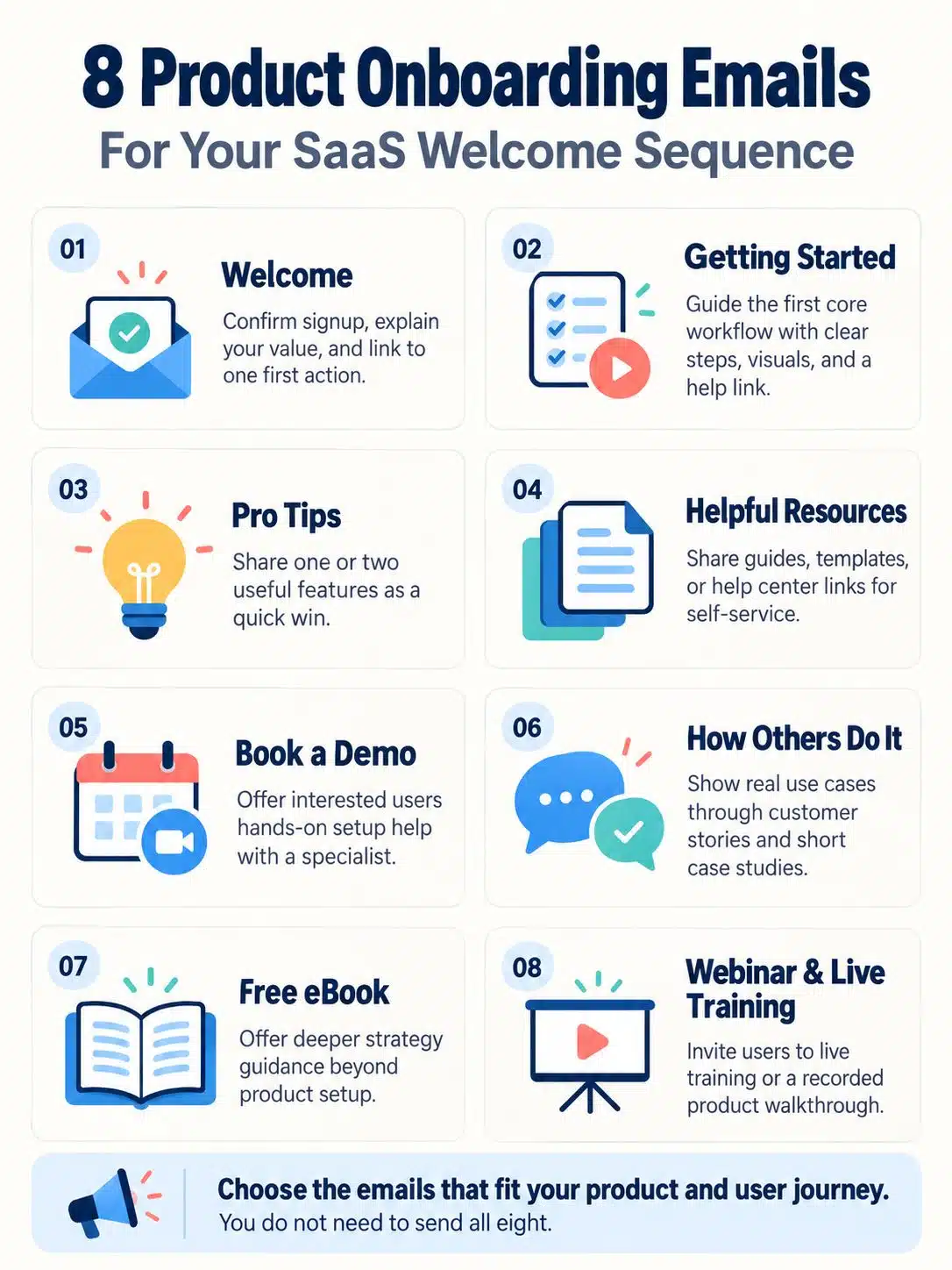
Below are eight proven onboarding email templates that cover the full welcome email sequence for a SaaS product, from first login to conversion. Each template maps to one job in the user’s journey, so pick the ones that match your product’s complexity rather than using all eight by default.
- The Welcome email. Confirms signup, states the product service value in one line, and links to a single first action.
- The Getting Started email. Walks through the first core workflow step by step, with screenshots or a short video. A getting started product email paired with a help get started link to your knowledge base moves users past the blank-screen problem fast.
- The Pro Tips email. Shares one or two advanced features most new users miss, framed as a quick win rather than a feature dump.
- The Sharing Helpful Resources email. Points to guides, templates, or a help center so users can self-serve instead of waiting on support.
- The Book a Demo email. Invites higher-intent users, often those on larger plans, to book time with a specialist for hands-on setup help.
- The How Others Do It email. Uses customer success stories and short case studies to show real-world use cases and build trust.
- The Read Our Free eBook email. Offers a deeper resource for users who want strategy context, not just product steps.
- The Webinar and Live Training Invitation email. Invites users to a live training session or recorded webinar for a guided walkthrough, which works well for products with a learning curve.
Should Welcome Emails Include a Call to Action
Yes, every welcome email and every email in the onboarding sequence should include exactly one call to action. A message without a clear next step wastes the attention a new signup gives it, and multiple competing buttons split that attention and lower click-through on all of them.
Guidelines for the call to action:
- Use one button, not three. “Start your first project” beats a row of links to pricing, blog, and support all at once.
- Make the action match the email’s single purpose: a getting started email should link to the product, not to a pricing page.
- Outcome-led copy on the button (“See your results”) tends to outperform generic copy (“Click here”).
- Save harder conversion asks, like upgrade prompts, for later emails once the user has experienced value.
A common mistake is adding a call to action out of habit even when the email’s real job is just to inform, such as a release note. In that case, a soft link to “Learn more” is enough; forcing a hard sell into every message trains users to ignore the sequence.
How to Personalize a Welcome Email Sequence for a SaaS Product
Personalizing a welcome email sequence means using real signup and behavior data ’ not just a first name ’ to change the content, timing, or order of messages each user receives. Validated personalization, where the data is confirmed accurate (correct name spelling, correct plan, correct role), performs far better than guessed or default values.
Practical ways to personalize:
- Segment by signup type. Free trial users get urgency-driven content; paid signups get depth-driven content.
- Segment by role or use case, captured at signup, so a marketer and a developer get different “pro tip” emails.
- Trigger on behavior, such as sending a different email to users who haven’t logged in within 48 hours versus those who have.
- Reference the plan tier so enterprise signups see a “book a demo” email while self-serve signups see more self-guided resources.
Welcome Email Sequence for Free Trial vs Paid Signup
A free trial welcome sequence should create urgency around the trial deadline; a paid signup welcome sequence should focus on setup depth and feature discovery since there’s no countdown pressure. Using the same sequence for both groups is a frequent and costly mistake.
| Element | Free trial sequence | Paid signup sequence |
|---|---|---|
| Primary goal | Drive activation before trial ends | Drive feature adoption and retention |
| Tone | Urgent, deadline-aware | Educational, relationship-building |
| Key email | Trial-ending reminder | Deep-dive feature or integration guide |
| Length | 4 to 5 emails over 14 days | 5 to 7 emails over 21 to 30 days |
| CTA focus | “Upgrade now” / “Add payment” | “Invite your team” / “Explore integrations” |
How to Measure Welcome Email Sequence Performance
Welcome email sequence performance is measured by tracking each email’s open rate, click rate, and downstream product activation, then tying those numbers to trial-to-paid or free-to-paid conversion. Looking at a single email in isolation misses the point; the sequence should be measured as a funnel.
Set up measurement like this:
- Tag every email and link with UTM parameters so clicks show up in product analytics, not just email analytics.
- Track activation events in the product, such as “first project created” or “integration connected,” and tie them back to which email, if any, triggered the click.
- Build a funnel view showing signup, to email open, to click, to activation, to paid conversion.
- Review email position performance, meaning compare how email 1 performs versus email 4 versus email 7, so you know which messages to fix first.
- Segment by product and plan, since a welcome sequence for an enterprise buyer should be judged against different benchmarks than one for a free-tier signup.
Over time, this view shows you not just whether users opened an email, but whether that open led to real product use. That distinction matters more for a SaaS product than for a typical marketing email list, because the end goal is an active account, not just a click.
What Metrics Matter Most for Welcome Emails
The metrics that matter most for welcome emails are open rate, click-through rate, activation rate, and trial-to-paid (or free-to-paid) conversion rate, in roughly that order of importance for SaaS products. Unsubscribe rate and spam complaints matter too, but mainly as warning signs rather than success measures.
| Metric | What it tells you |
| Open rate | Whether your subject line and send time are working |
| Click-through rate | Whether the email content and CTA are relevant |
| Activation rate | Whether clicks turn into real product use |
| Trial-to-paid conversion | Whether the sequence drives revenue, not just engagement |
| Unsubscribe rate | Whether volume or relevance is off |
Industry benchmark reports commonly cited in email marketing circles put welcome email open rates well above the average for standalone marketing sends, sometimes double or more, since the reader opted in moments earlier. That gap is exactly why welcome emails deserve more measurement attention than a standard newsletter: the audience is at peak interest, and a weak performance there usually signals a message or timing problem, not an audience problem.
How to Reduce Unsubscribes in a Welcome Sequence
Reducing unsubscribes in a welcome sequence starts with controlling volume and relevance: send fewer, more targeted emails rather than more generic ones. Most unsubscribes during onboarding happen because the sequence feels like a sales pitch disguised as help.
Concrete steps to lower unsubscribes:
- Cap the sequence at 4 to 7 emails and stop once a user activates, rather than continuing on autopilot.
- Separate transactional emails from marketing emails so account confirmations don’t count against marketing send limits or trigger spam filters.
- Segment by engagement, and slow down the send cadence for users who aren’t opening rather than sending more frequently to “catch” them.
- Make unsubscribe and preference options clear and easy to find, since hiding them increases spam complaints, which hurt deliverability far more than a clean unsubscribe does.
- Match content to signup context. A user who signed up from a specific integration page should see content related to that integration, not an unrelated feature.
Common Mistakes in SaaS Welcome Emails
The most common mistake in SaaS welcome emails is cramming too much into one message instead of spreading education across several focused emails. A second close contender is sending the first email too slowly, after the signup moment has already cooled.
Other frequent mistakes include:
- No clear single action. Multiple links and buttons with no priority confuse new users.
- Ignoring mobile formatting. Many onboarding emails are opened on a phone first; long paragraphs and tiny buttons kill click rates.
- Treating the sequence as “set and forget.” Many SaaS companies build a welcome sequence once and never revisit it, even as the product changes.
- Over-personalizing with unverified data. Using a name field that was entered wrong, or guessing a role that’s incorrect, reads as careless rather than thoughtful.
- Skipping the human contact option. Sequences with no way to reply to a real person feel cold and lower trust.
- Not aligning free trial and paid sequences, which confuses users who convert mid-sequence and then get redundant or contradictory messages.
Stand Out From Competitors With a Strong Customer Service Culture
A welcome email sequence stands out from competitors most when it reflects real customer service culture, not just automation. SaaS buyers increasingly compare the support experience, not just the feature list, when choosing between similar tools.
Ways to build that culture into the sequence:
- Route replies to a real person or a small team, not a no-reply inbox.
- Reference support channels clearly: live chat, help center, and a direct email for account questions.
- Highlight customer success stories that show real outcomes, not just logos.
- Set honest expectations about response times rather than overpromising instant answers.
Companies known for strong onboarding support culture, including several mid-market SaaS platforms, consistently report that early, responsive human contact during onboarding correlates with lower churn in the first 90 days. Take this seriously: an automated sequence with a genuine support layer behind it will consistently outperform a purely automated, reply-blocked one.
Final Thoughts
A welcome email sequence for a SaaS product works best when it stays short, sends fast, and asks for one action at a time. Four to seven emails, spread across 14 to 30 days and triggered by real product behavior, consistently outperform longer, calendar-based blasts. The first message should land within five minutes of signup, each email after that should map to a specific milestone, and every send should carry exactly one clear call to action.
Measurement matters as much as message and timing. Track open rate and click rate, yes, but weigh activation rate and trial-to-paid conversion more heavily, since those numbers tie the sequence to actual revenue and retention. Segment free trial sequences from paid signup sequences, personalize using verified signup and behavior data, and keep a real human reachable behind the automation.
Frequently Asked Questions
What is a welcome email sequence for a SaaS product?
A welcome email sequence for a SaaS product is a series of automated messages, typically four to seven emails sent over 14 to 30 days, that helps a new signup set up their account, learn the core feature, and move toward becoming a paying, active customer.
How many emails should be in a SaaS welcome sequence?
Most SaaS welcome sequences use four to seven emails. Simpler products with one core workflow can use fewer; products with multiple features or a longer learning curve often need the higher end of that range.
When should the first welcome email be sent after signup?
The first welcome email should send instantly, or within five minutes of signup, while the user’s intent and attention are still highest.
What is the difference between a welcome email and an onboarding email?
A welcome email is the single first message after signup. An onboarding email sequence is the full series, including the welcome email plus follow-up messages that cover setup, education, and conversion over days or weeks.