

Canadian Learning Technology Providers for Schools serve very different jobs: managing courses, explaining math, supplying curriculum content, supporting literacy and helping students plan their futures. Start with the problem your school needs to solve. D2L and Edsby address schoolwide workflows; Knowledgehook and Netmath focus on mathematics; mathies, TVO Learn and Alloprof offer useful public learning resources. The right shortlist depends on your province, language of instruction, grade range and existing board agreements.
This guide compares 15 Canadian companies, educational organizations and public-resource providers. “Canadian” refers to the documented Canadian base, origin or institutional partnership described in each entry; it is not a guarantee of Canadian ownership, Canadian-only hosting or approval by every province. The order groups useful starting points and different school needs. It is not a performance ranking.
How We Selected and Checked These Providers
Research checked on November 16, 2026. Selection considered a documented Canadian connection, a current school-relevant offering, a distinct teaching or operational use, and practical access conditions. Official product, help, organizational and pricing pages informed the comparison. Fit recommendations are editorial judgments, not measured learning-outcome scores.
Original browser checks were performed by the AI research assistant preparing this article: a three-tile construction in mathies, a school-board selection on D2L’s public Ontario page, and inspection of Knowledgehook’s plan comparison. The first three entries show those captures with editorial highlight boxes. These checks do not establish that the named human byline author tested all 15 products. No student records were entered, and no paid classroom or native mobile app was tested.
Canadian Learning Technology Providers for Schools at a Glance
Use the comparison to select a category first. A free manipulative and a district LMS are useful in different ways, so a single “cheapest” or “best overall” label would obscure the decision.
| Provider | Useful starting point | Access or buying route | Important check |
|---|---|---|---|
| D2L — Brightspace | School or board learning management | Board agreement; check existing entitlement | Access and features depend on the board |
| Knowledgehook — ClassOS | Math formative assessment | Free base access; paid Pro and district options | Confirm currency, term and reporting entitlement |
| Ontario Association for Mathematics Education — mathies | Free visual math exploration | Public browser tools | A manipulative library, not a class reporting system |
| TVO — TVO Learn | Ontario curriculum-linked resources | Free resources; eligibility and region vary | Check lesson access on your school network |
| Edsby | K–12 assessment and school communication | School or district procurement | Integration and permissions need local validation |
| SMART Technologies — Lumio and SMART displays | Interactive classroom lessons | Software and hardware scopes should be quoted separately | A display purchase does not define software entitlement |
| Nelson — Edwin | Curriculum-linked digital content | Check board access before requesting a new license | Province, grade and language coverage matter |
| Scolab — Netmath | Structured mathematics practice | Student licenses and school-board quotes | Verify curriculum and total school-year cost |
| Shoelace Learning — Dreamscape | Reading comprehension through games | Confirm classroom and school license scope | Evaluate the reading work, not just play time |
| Sprig Learning | Early literacy assessment and follow-up | Discuss the school’s assessment and implementation scope | Fit it around an existing literacy approach |
| Showbie | Assignment feedback and classroom workflow | Teacher and school requirements need separate scoping | Test feedback on the devices students actually use |
| myBlueprint | Education planning and student portfolios | School or district access | Match the product to the age group |
| Xello | Career exploration and future readiness | School or district procurement | Review Canadian pathway content in the demonstration |
| Hoot Reading | Teacher-led online literacy support | Scope a tutoring program, not just software seats | Scheduling and instructional dosage affect delivery |
| Alloprof | Quebec curriculum support and study resources | Free resources; tutoring has eligibility limits | Check subject and language coverage separately |
1. D2L — Brightspace
D2L belongs on your shortlist when the job is organizing courses, assignments, assessment and communication across a school system. Its Canadian roots are in Kitchener, Ontario. Brightspace is a learning management system: it supplies the environment in which teaching happens, rather than a complete replacement for subject resources.
Ontario is a particularly important purchasing distinction. D2L states that the Ministry-provided virtual learning environment is available at no cost to publicly funded Ontario school boards. Before requesting another license, ask your board what you already have. Parent access and individual features can depend on local configuration.
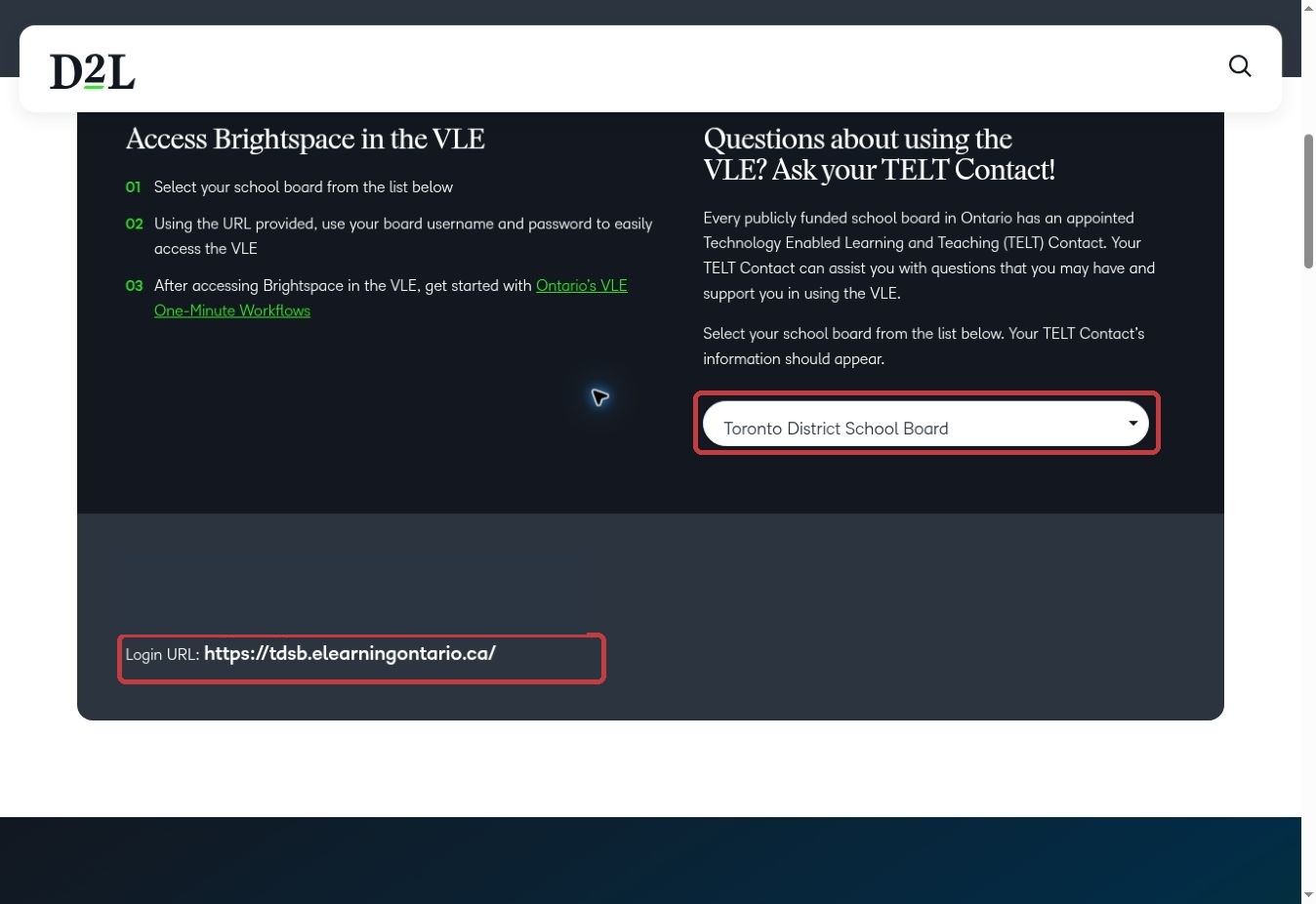
In our documented public-page check, selecting Toronto District School Board displayed its Brightspace login address and a support contact. That is a useful route into an existing service. We did not enter a school account, create a course or test grading; the screenshot supports the access-finding step only.
For a procurement demonstration, ask an administrator to show roster synchronization, a teacher assigning one task, and a student receiving feedback. Include the accessibility and export requirements of your actual school. A polished course demonstration alone will not reveal the effort required to maintain users and permissions.
2. Knowledgehook — ClassOS
Knowledgehook connects math activities with information teachers can use to decide what to teach next. The Toronto-based provider describes classroom Gameshows, standards-aligned content and a paid ClassOS Pro offering with Missions, enhanced reports and teacher support documents.
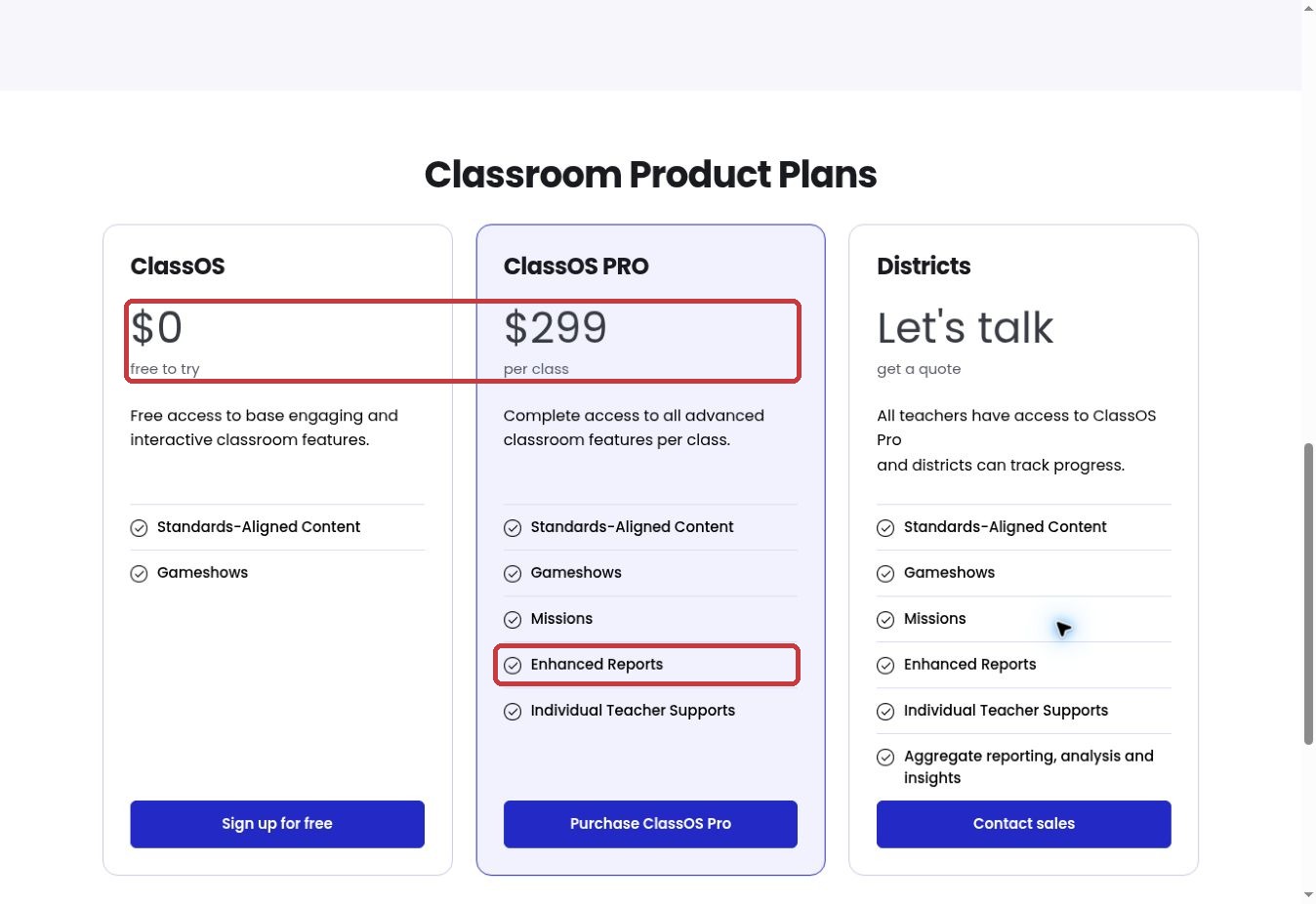
We followed the public teacher page to the ClassOS comparison and checked the plan columns. The base plan displayed $0, while Pro displayed $299 per class. The visible comparison did not establish the currency or billing interval, so treat that figure as a page observation, not a complete Canadian annual quote. District access uses a sales quote.
The practical buying question is whether you need a classroom activity or the additional follow-up information. Ask to see a wrong-answer pattern become a teacher decision: which concept needs attention, which students need another example, and what evidence appears after the next activity?
Our screenshot highlights the plan separation and Pro reporting feature. It is a pricing-page inspection, not a test of student diagnostics. Before a pilot, confirm your provincial curriculum, grade coverage, French-language requirements and the exact reporting tools included in the proposed agreement.
3. Ontario Association for Mathematics Education — mathies
mathies is a useful reminder that a learning technology provider need not be a commercial software company. Its About page identifies Ontario Ministry of Education-developed resources and credits the Ontario Association for Mathematics Education, in partnership with the Ministry and the Council of Ontario Directors of Education. The site now redirects to the OAME-hosted domain.
The collection includes virtual manipulatives, games and supporting materials for mathematics. Its browser Colour Tiles tool gives students a workspace for representing patterns and mathematical relationships. Other listed tools include Fraction Strips, Money and Number Chart; availability and controls differ by tool.
For our original browser test, we opened Colour Tiles without creating an account and dragged a red tile, a green tile and a second red tile into a row. All three remained in the workspace after deselection. The captured result shows an actual construction, rather than a promotional image. This narrow test does not establish accessibility conformance, native-app performance or learning gains.
Use that kind of open workspace when a teacher wants students to explain a representation. Pair it with a clear question and a place to record reasoning. It will not, by itself, give your school the assignment workflow or longitudinal reporting available in a managed platform.

4. TVO — TVO Learn
TVO Learn offers a different starting point from an LMS: learning materials organized around Ontario grades and subjects. Its official pages describe educator-created or curated activities, vocabulary and associated resources. For a teacher planning a lesson, that organization can be more immediately relevant than a large collection of loosely tagged videos.
The strongest fit is an Ontario classroom or family looking for material that connects with that curriculum. A teacher elsewhere in Canada should compare the actual expectations being taught rather than assume the grade label transfers unchanged. Teacher guides may be accessed through Ontario’s virtual learning environment.
Access deserves a practical check. The Grade 3 social studies activity we attempted redirected this browser to a region-restricted page. That observation is specific to our access environment; it does not mean an eligible Ontario classroom cannot use it. We therefore reviewed TVO’s public documentation without claiming to have completed that lesson.
Before putting a link into homework, open it on a student device and confirm that families can reach the same content. Keep a printed or locally permitted alternative when access is uncertain.
5. Edsby
Edsby is designed around K–12 schools rather than adapted from a workplace training platform. Its public materials describe assessment, reporting, communication and connections with a school’s student information system. That makes it relevant when your problem is fragmented school information, not simply a shortage of learning activities.
For an elementary school, the useful demonstration is a piece of student work moving through feedback and reporting. For a district, it is how class membership, staff roles and family visibility remain consistent. Ask the provider to show both, using sample accounts rather than real student records.
Edsby documents school-specific login addresses and browser and mobile access. An app-store listing is not the same as a successful deployment on your managed devices, so include those devices in the pilot. Request an agreement covering configuration, support and integration work instead of comparing only a headline license price.
6. SMART Technologies — Lumio and SMART displays
SMART combines classroom hardware with teaching software, including Lumio. Lumio’s role is turning lesson materials into interactive learning experiences; the displays serve a different purchasing need. Treat those as related decisions rather than automatically buying them together.
For a school with functioning student devices, begin with the lesson workflow. Can a teacher adapt an existing resource, involve learners and review their responses without rebuilding the lesson from scratch? If you also need classroom displays, evaluate visibility, installation, device connections and ongoing support separately.
The Canadian connection is SMART’s Calgary headquarters. It does not remove the need to check storage, contract terms or the exact features of the license offered to your school. Ask for a demonstration on the equipment you already own and an itemized quote that separates software, hardware, installation and training.
7. Nelson — Edwin
Nelson’s Edwin is most relevant when teachers need curriculum-linked material and learning tools in one environment. Nelson is a Canadian education content provider, and Edwin is its digital platform. It should be evaluated as a content-and-teaching resource, not assumed to replace every function of an LMS.
Ontario’s 2026 resource program makes existing access especially important. The provincial announcement names Edwin for Grades 1–12 resources in English and French, starting in September 2026. Your board should confirm the actual provisioning, included resources and teacher access before a school commits its own budget.
Outside that arrangement, ask for a demonstration of one exact unit from your province and language of instruction. Check whether teachers can adapt it, use printable materials and identify the relevant curriculum expectations. A broad catalog is valuable only when its content fits the lessons your staff need to teach.
The Ontario government announcement explains the provincial Edwin resource arrangement; confirm implementation with your board.
Content review remains important even with a provincial arrangement. In November 2026, The Trillium reported teachers’ concerns about dated or unsuitable Edwin material; Nelson said a flagged Indigenous studies lesson had been removed. Review the current version of the actual resource you intend to teach, including its terminology, dates and cultural context.
8. Scolab — Netmath
Netmath, from Montreal-based Scolab, focuses on mathematics activities and teacher visibility into practice. The current site describes resources for learners aged 6–16 and offers Canadian English and French routes. That is a useful basis for exploration, but each school still needs to check the subjects and grades included in its own curriculum.
A worthwhile pilot would assign a small set of questions on a current topic and ask the teacher to interpret the resulting information. Look for explanations and opportunities to revisit a concept, not just whether students completed the activity. The goal is to support instruction rather than accumulate exercise counts.
Netmath’s pricing page requests the number of student licenses, provides a school-year estimate and directs boards to a quote. It also states a minimum purchase and excludes taxes. Obtain the final written total for your enrollment, term and support needs; a dynamic calculator’s isolated number is not a reliable cross-provider comparison.
9. Shoelace Learning — Dreamscape
Shoelace Learning brings reading practice into games such as Dreamscape. Its public materials describe comprehension questions, adaptive content and teacher information. A Government of Canada profile traces the business to Halifax and explains how teachers can assign practice and monitor progress.
This is a candidate when you need another route into sustained reading practice, particularly for students who respond to game-based tasks. It is not a reason to replace explicit reading instruction or assume that more game time automatically produces better comprehension.
Ask a demonstrator to separate the game mechanics from the learning task: show a passage, the question being answered, the feedback and what the teacher can infer from the result. Confirm current reading-level coverage and licensing directly, since different pages and product generations describe different grade ranges. Keep your pilot outcome tied to comprehension evidence rather than rewards earned.
A Government of Canada profile of Shoelace Learning provides background on its Halifax origins and reading-game approach.
10. Sprig Learning
Sprig Learning focuses on early learning assessment and resources, with Sprig Reading supporting reading-skill monitoring. Its Ottawa-based team describes an approach intended to complement existing reading programs. That makes it a candidate for schools looking to improve how they notice needs and plan follow-up, rather than buy another standalone student game.
For a literacy lead, the key question is whether the information is useful at the point of teaching. Ask to see how a teacher records or reviews a skill, chooses the next instructional step and checks progress later. Include the time required to collect the information in your evaluation.
Sprig also emphasizes culturally relevant early learning. Discuss the actual content, community involvement and language requirements of your setting rather than treating that phrase as a universal endorsement. Request a school-specific scope and implementation plan, and avoid adopting another assessment process unless staff can explain how it improves an existing decision.
11. Showbie
Showbie’s Canadian origins are in Edmonton. Its current positioning centers on teaching, feedback, assessment and independent practice. It is relevant when teachers need a more coherent way to distribute work, respond to it and keep the learning conversation connected to the task.
A useful evaluation begins with an ordinary piece of work, such as a worksheet or short explanation. Have a teacher provide feedback and check what the learner sees next. If voice, annotation or other feedback modes are important to your staff, make them explicit demonstration requirements and confirm they are included in the proposed plan.
The practical advantage to look for is continuity between the submitted work and the next student action. Ask about administrative oversight, retention and export before rollout. This article did not test a logged-in Showbie classroom or its mobile app, so it does not make device-specific usability claims.
12. myBlueprint
myBlueprint offers education and career/life planning tools, including All About Me for younger learners and Education Planner for older students. Its Canadian focus and school-board relationships make it relevant to schools that want reflection and pathway planning to continue across several years.
The products solve different developmental tasks. Younger students can collect and reflect on learning artifacts; older learners need planning tools connected to future study and work. Ask how information carries forward and what staff can review without exposing unrelated private material.
For procurement, have a teacher, a counselor and a family representative examine the proposed workflow. Confirm provincial course information, school-specific access and the handling of students who transfer. The value is not merely having a digital portfolio: it is whether students revisit it and use it to make better-informed choices.
13. Xello
Xello is based in Toronto and offers future-readiness experiences for elementary through secondary education. Its Canadian website separates elementary and middle/high-school offerings. That distinction is useful because an early exploration activity should not look like a senior student’s postsecondary planning task.
Consider Xello when counselors and classroom teachers need a shared structure for career exploration, self-reflection and planning. Ask to see how students move from learning about themselves to comparing pathways and identifying a realistic next action.
For a Canadian school, request examples involving the postsecondary, apprenticeship and employment routes your students actually consider. Confirm the relevant regional content and educator reporting. A global platform can offer breadth, but your decision should turn on the quality and maintenance of the local information students will use.
14. Hoot Reading
Hoot Reading combines technology with one-to-one reading instruction. Its Winnipeg headquarters and school-facing service make it a Canadian option for teams that need additional instructional capacity. The provider describes assessment-informed sessions with qualified teachers and progress reporting.
That service model changes the comparison. You are evaluating who teaches, when students attend, how sessions fit the timetable and how classroom staff receive useful information. A low software subscription price from another provider is not an equivalent cost benchmark.
Ask for a program proposal specifying session frequency, duration, staffing continuity, missed-session arrangements and reporting. Then agree on the reading measures your school will use to review progress. We have not observed a tutoring session here and do not present the provider’s advertised growth figures as results achieved by our own test.
15. Alloprof
Alloprof is a Quebec organization offering free academic support resources. It is particularly relevant when a school wants students and families to find explanations, practice and study help connected with Quebec learning. Its services also support the adults helping those students.
Access is not identical across its offerings. Alloprof’s FAQ says anyone can access its online resources, while tutoring services are reserved for Quebec students. French and English resource coverage should be checked for the particular subject and grade rather than assumed to be identical.
For a teacher, a practical use is selecting one explanation or exercise that reinforces the week’s work and telling students precisely when to use it. It is a supplementary learning service, not a school information system. Before recommending personalized help, confirm the student’s eligibility and the current service arrangements.
Build a Shortlist Around One School Need
If your school already has a functioning LMS, adding a second one may create more work than value. Start by checking what the board provides, what teachers use consistently and which unmet need remains. Our guide to digital learning tools for teachers offers a broader way to think about classroom roles.
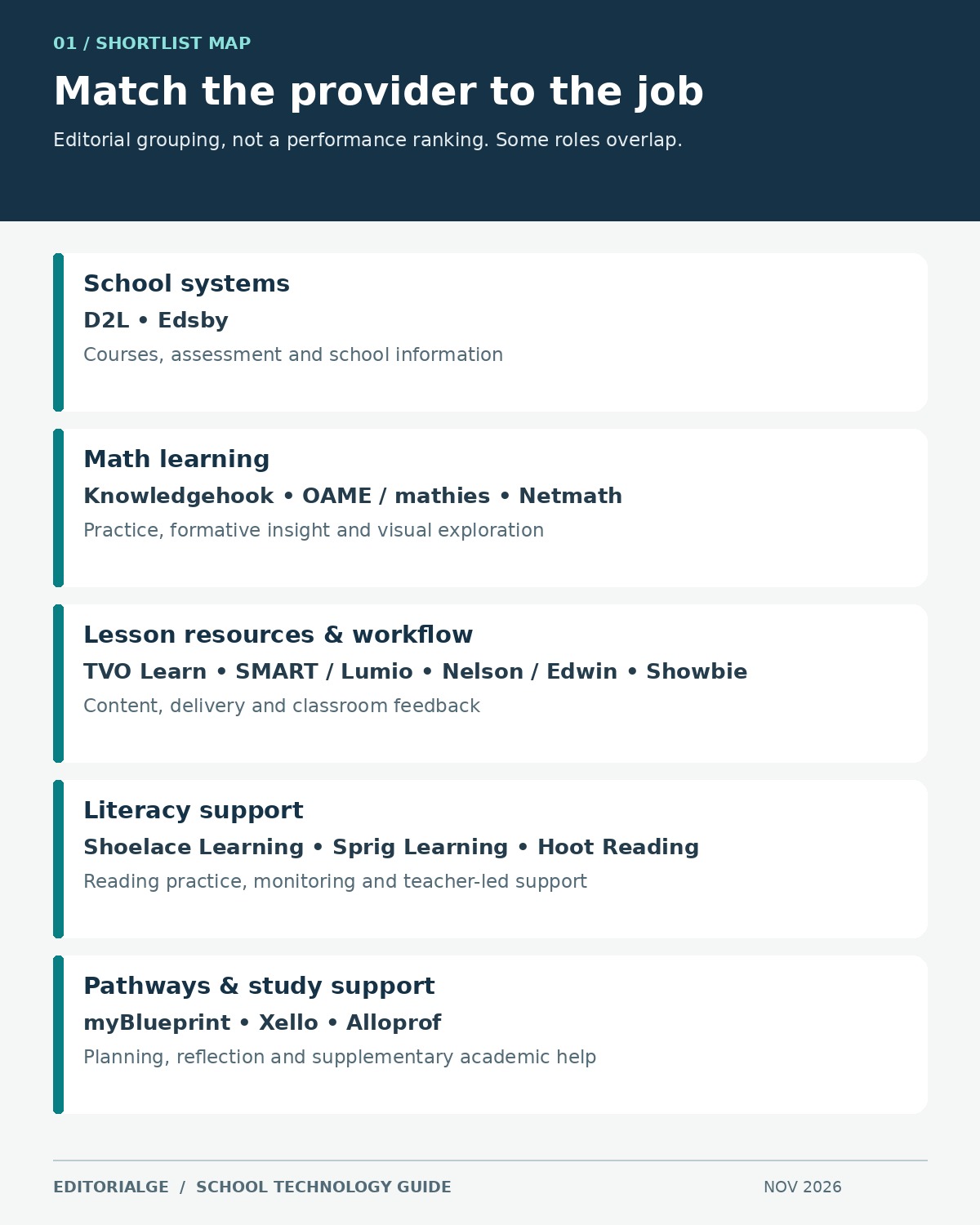
- For course organization and schoolwide information, compare D2L and Edsby against your current system.
- For mathematical explanation and practice, distinguish an open tool such as mathies from managed activities and reporting in Knowledgehook or Netmath.
- For literacy, separate game-based practice, teacher assessment and live tutoring. Shoelace, Sprig and Hoot address different parts of that work.
- For lesson resources and delivery, check existing access to TVO Learn or Edwin, then assess whether Lumio or Showbie would improve a specific classroom workflow.
- For future planning, compare myBlueprint and Xello using the same student age group and local pathways.
What Your School Should Verify Before Paying
Curriculum and language fit
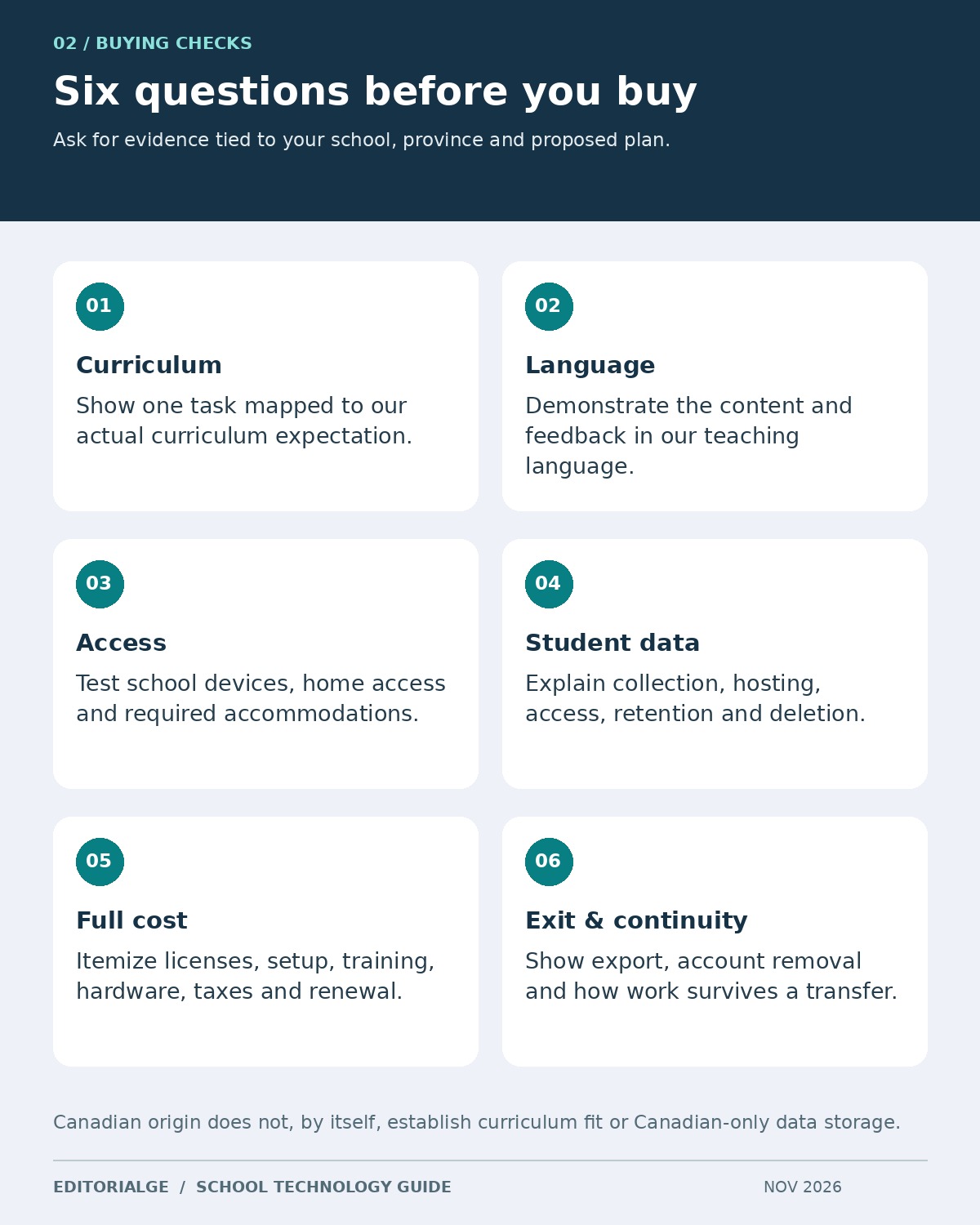
Give the provider one real curriculum expectation and ask it to locate a suitable task. Review the explanation, vocabulary, reading demand and feedback. An English interface with a French menu is not equivalent to complete French instructional content. For Indigenous language or culturally specific material, involve the appropriate community and education staff in reviewing suitability.
Data handling and classroom access
Ask your board’s privacy and technology teams to review the proposed service. Request clear answers about information collected, hosting and support access, subprocessors, retention, deletion and whether student material is used for AI training. A Canadian address does not answer those questions. Establish who can see each type of student information before creating accounts.
Test keyboard navigation, captions, readable contrast, assistive technology and the actual devices in your classrooms. Include a learner who needs an accommodation in an appropriately approved evaluation. A vendor accessibility statement is useful documentation, but it does not replace checking the task your students must complete.
Total cost and existing entitlement
Request a written quote in an explicit currency, with the billing term, enrollment basis, minimum commitment, taxes and renewal conditions. Separate implementation, integrations, training, hardware and tutoring from software access. Ask what happens when students transfer or a school reduces its license count.
For illustration only, 500 licenses at an assumed C$12 each would be C$6,000. Add an assumed C$1,500 setup fee and C$1,000 training budget and the first-year total becomes C$8,500 before tax. Those are invented planning inputs, not any provider’s prices. The example shows why comparing only a per-student rate can conceal a substantial part of the budget.
Home access and alternatives
Open the proposed homework task on a modest device and an ordinary home connection. Check regional eligibility and whether an adult must create an account. Prepare a workable alternative where needed. The digital divide in education technology is a practical lesson-design issue as well as an infrastructure concern.
Use an Eight-Step Pilot Before a Wider Rollout
The following is a recommended school pilot, not a claim that we ran it across these providers. Adapt it to the service: a tutoring program needs a different observation period from a simple manipulative.
- Choose one current teaching or operational problem and a clear success criterion.
- Confirm the approved access route, contract scope and staff responsible for the pilot.
- Prepare a sample lesson or task using synthetic information first.
- Run the task on the school’s actual devices, including relevant accessibility settings.
- Inspect what learners see, how they respond and what useful feedback reaches the teacher.
- Record setup time, interruptions and any work that must be repeated outside the tool.
- Export or retain an approved sample of the work and check the account-removal process.
- Compare the result with your starting workflow and decide whether to adopt, adjust or stop.
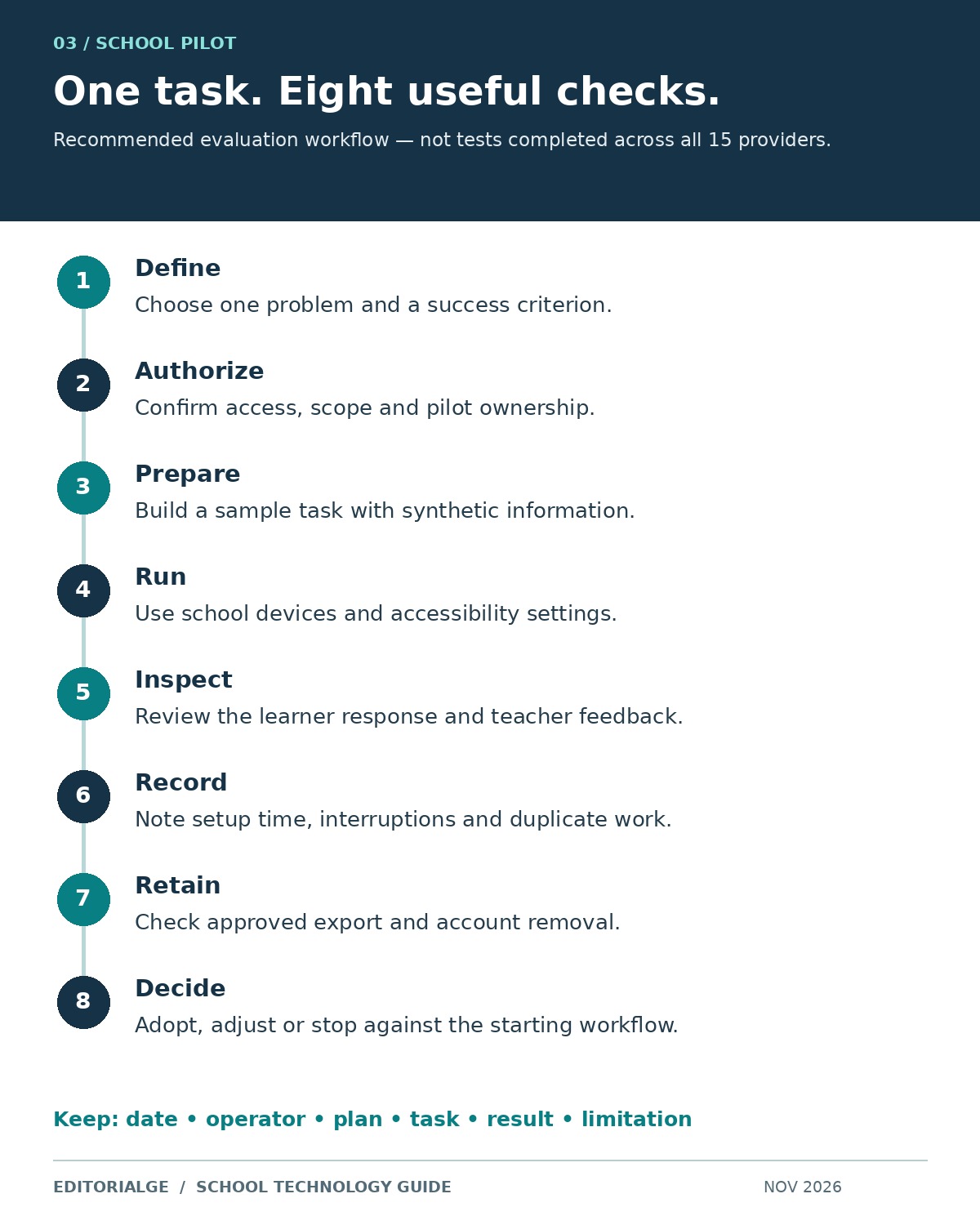
Keep the evidence modest and specific: the task, date, plan, device, operator, observed result and limitation. A screenshot of a completed action can support an interface observation. It cannot by itself prove improved attainment, long-term reliability or that every teacher will find the tool easy to use.
Frequently Asked Questions
Does a Canadian provider necessarily store student data in Canada?
No. Company location and data location are separate questions. Obtain the current hosting, backup, subprocessor and support-access details for the exact service your school is considering, then have the board assess them.
Are there free Canadian learning resources for schools?
Yes. mathies offers public learning tools, TVO Learn provides free resources with access conditions, and Alloprof offers free academic resources. Free access does not make every service unrestricted: Alloprof tutoring has Quebec eligibility requirements, and the TVO lesson attempted in our browser was region-restricted.
Should a school choose an LMS or a specialist learning tool?
Choose an LMS when the unmet need is organizing courses, users, assignments and communication. Choose a specialist tool when an existing environment is adequate but a particular teaching task needs support. Confirm how the specialist tool will fit the current workflow before adding another login.
Which providers were tested for this guide?
mathies Colour Tiles received a limited original construction test. D2L’s public board selector was operated, and Knowledgehook’s public plan page was inspected. The remaining entries are research-led assessments, not hands-on classroom reviews. No comparative learning-outcome benchmark was performed.
Choose the Provider That Improves the Next Lesson
The most useful Canadian Learning Technology Providers for Schools are the ones that solve a defined problem within your curriculum, budget and access requirements. Check existing board entitlements first, shortlist two or three services within the same category, and run one representative task before widening the commitment. Keep the teacher’s next decision and the student’s next learning action at the center of the purchase.