
Robotic process automation (RPA) uses software bots to do routine work in the apps employees already use. A bot follows rules set by the team to copy spreadsheet values, fill in forms, or export a report.
The best office tasks for RPA have clear rules, consistent digital records, predictable screens, and few exceptions. Common examples include entering approved records into an older system, gathering routine reports, and checking whether records match.
Watch two people do the same task. Where do they enter the same values and stop for the same reasons? Those steps are worth a closer look. Keep a person in charge wherever someone needs to interpret a policy, call a customer, or decide how to handle an exception.
How robotic process automation works in an office
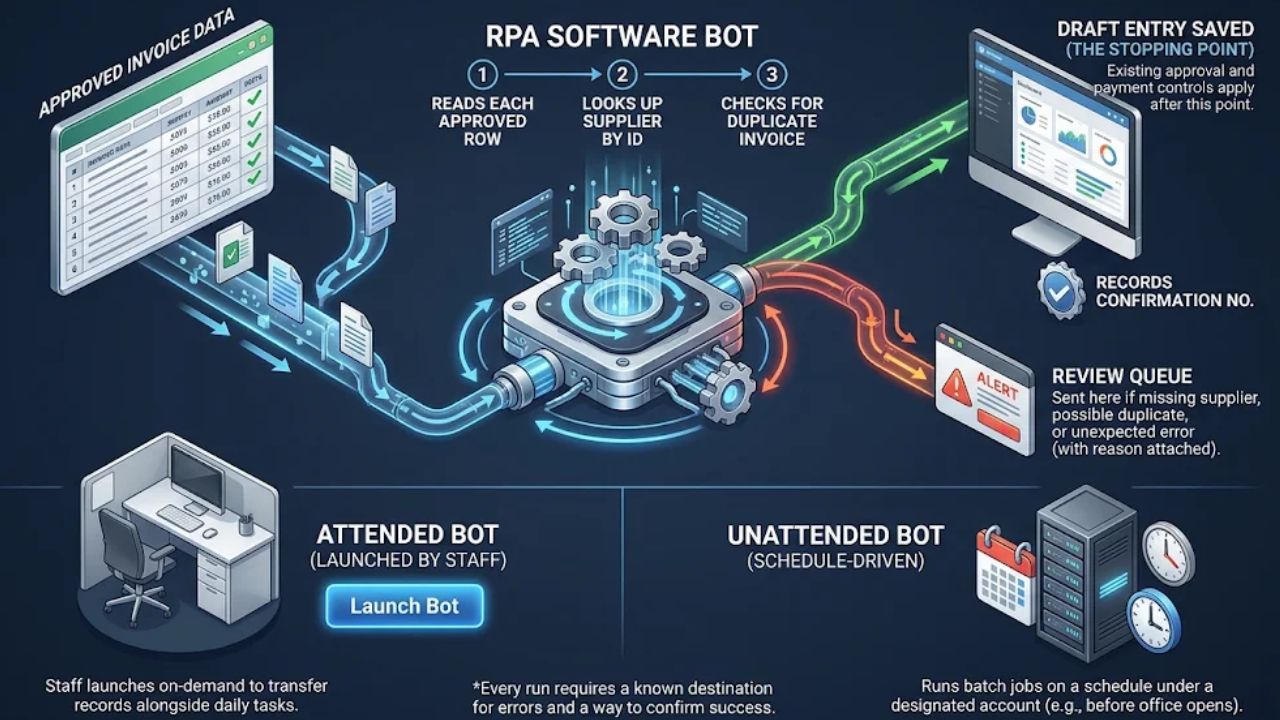
Say your accounts payable team receives approved invoice data in a spreadsheet and retypes it into an accounting app. A bot reads each approved row, looks up the supplier by ID, and checks for an invoice with the same number from that supplier. After saving a draft entry, the bot records the confirmation number. Missing supplier, possible duplicate, unexpected error? Send the row to the review queue with the reason attached.
The draft entry is the stopping point. Staff have already checked the incoming data, and the team’s usual approval and payment controls still apply. The person reviewing the queue knows which entries the bot saved and which rows need attention.
An attended bot starts when a staff member launches it. Think of a support agent who clicks a button to transfer a verified record while helping a customer. An unattended bot runs without a staff member at the keyboard. For example, it can use a designated account to export yesterday’s report on a schedule before the office opens. In either case, tell staff where errors go and how they’ll know the job finished.
Which office tasks fit RPA best?
“Automate accounts payable” is too broad to build. Start with one instruction. Create a draft entry for each approved invoice row in the legacy accounting app. That gives you a defined input, a rule the bot can follow, and a result staff can verify. The same approach works for tasks in HR, customer service, and office operations.
| Office task | What a bot can do | What goes to a person |
| Data entry between systems | Copy approved fields from a standard file or form into an older CRM or desktop app. | Missing IDs, possible duplicates, and conflicting values. |
| Invoice entry and matching | Create draft entries from approved data and compare specified fields with purchase-order records. | Amount mismatches, unmatched orders, changes to supplier bank details, and payment approval. |
| Routine reporting | Export a report for a set period, save it with a standard name, and confirm the export finished. | Failed exports and unusual figures that need explaining. |
| Employee onboarding administration | Add verified details to an HR record or create standard onboarding tickets after a hire is approved. | Identity discrepancies and decisions about which access to grant. |
| Customer service ticket routing | Send tickets to the right queue using a category or account type supplied with the request. | Unclear requests, sensitive complaints, and cases that need a policy exception. |
| Record reconciliation | Compare two files using an agreed identifier and flag unmatched records or different values. | Discrepancies that need investigation or a correction to official records. |
Start with routine reports or approved data entry when staff can check the results quickly and fix errors easily. For invoices, look at what arrives. A standard template gives the bot predictable fields. Scans from different suppliers may call for document extraction and a check of the captured values before entry.
A support form with a reliable “billing” label is straightforward to route. An email that mixes a billing question with a disputed refund takes interpretation. If there’s enough free-form email to justify an AI classifier, use it to suggest categories and decide who checks the uncertain ones. For form submissions, use the category already supplied.
Five questions to ask before building a bot
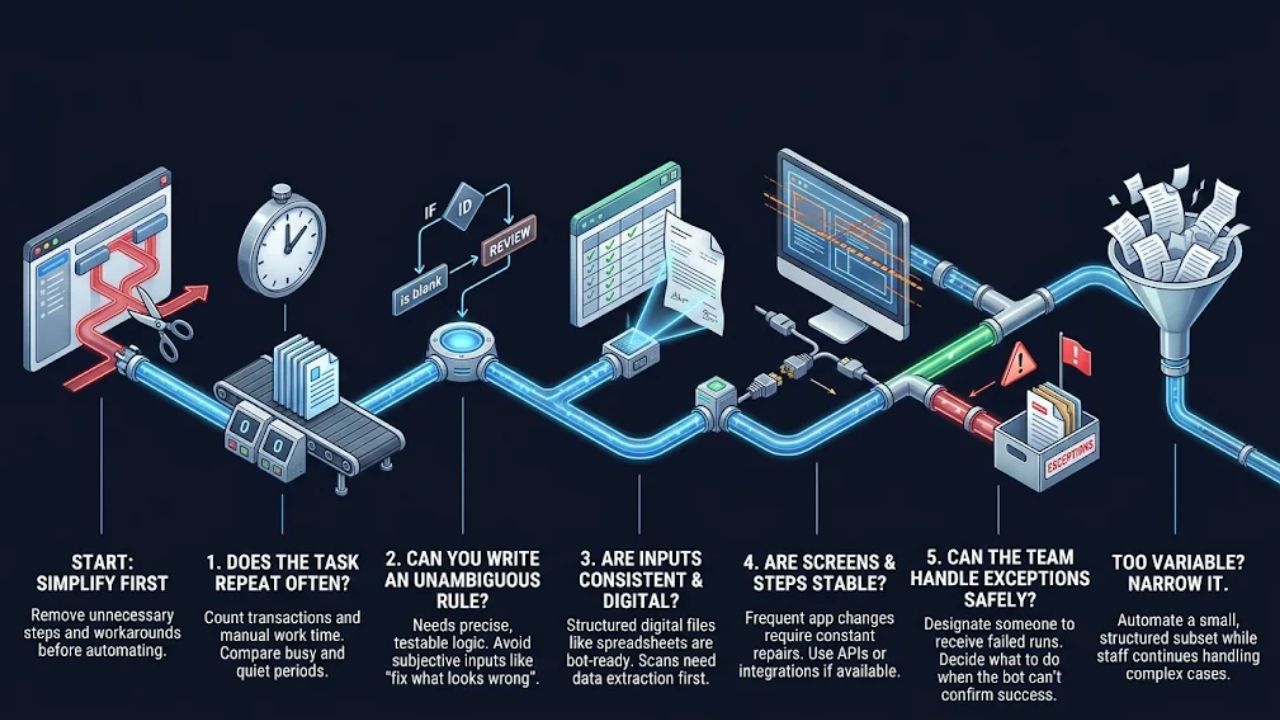
Simplify the job first. Remove unnecessary steps and workarounds before you turn them into instructions a bot has to follow. Then look at the task’s complexity, inputs, exceptions, and software requirements. These questions draw on NHS England’s RPA delivery guide.
Does the task repeat often enough?
Count the transactions and time the work staff actually do. A five-minute task adds up across hundreds of requests. If volume varies, measure a busy period and a quiet one.
Can you write down an unambiguous rule?
Send the row for review if the supplier ID is blank” is easy to test. When the instruction is “fix anything that looks wrong,” ask staff to describe the cases they know how to resolve and the ones they escalate.
Are the inputs consistent and digital?
A spreadsheet with fixed columns and required IDs gives the bot predictable fields. For free-form emails or scanned forms, work out how to extract and verify the required data first.
Are the screens and steps stable?
Check how often the app moves fields or changes its confirmation screens. Frequent changes mean more repairs and retesting. Look for a supported import, connector, or application programming interface (API) that handles the same action.
Can the team handle exceptions safely?
Review actual cases to see how often they stray from the usual process. Assign someone to handle those cases and decide what the bot should do when it can’t confirm success.
When a task looks too variable, narrow it. A support desk could start with form submissions that include a required category. Staff keep handling free-form email while the team checks how often the bot routes the form submissions to the right queue.
When a simpler automation makes more sense
Use the CRM’s built-in import if it accepts a clean spreadsheet and flags rejected rows. Use a supported connector when two cloud apps already offer one that handles the transfer. Both choices save you from maintaining a bot that clicks through screens. RPA earns its place when the work has to happen through an interface and there’s no suitable direct connection. A larger workflow can use a bot for one step. It sends an invoice to a reviewer, passes approved data to the bot for entry, and sends exceptions back to finance. When the job mostly consists of routing and reminders, map those steps first. For the broader picture, see this guide to workflow automation and the guide to choosing a business automation approach.
Test a candidate before committing to it
Run a small pilot with one team, one queue, and approved test records. For an invoice draft, check the supplier, invoice number, total, and status in the destination app. Test a normal record, a duplicate, a missing field, and an interrupted run. A timeout deserves its own test. Before retrying an invoice that appeared to fail, look for an existing draft. The app may have saved it before the bot got confirmation.
Write error messages the reviewer can act on. “Invoice 2047 requires review because the purchase-order total differs” gives the finance team a place to start. A bare “Run failed” leaves staff to find the affected row and check whether the app saved it. For batch work, record which rows succeeded and which still need attention so staff can resume after a partial failure.
Count completed records, exceptions that take staff time, and errors in the output. A run marked successful can still pull the wrong date range or write a value to the wrong field. Compare a sample of results with the source data.
Take a batch of 300 records a month. At two minutes per record, manual entry takes 10 hours. Allow two hours to review exceptions and another hour to check runs and maintain the bot. That frees up seven hours of staff time each month. Factor in one-time setup work and software costs separately when deciding whether the pilot is worth expanding.
Give the pilot an owner who can pause it, investigate errors, and restart safely. Limit the bot’s access to the actions it needs, and log the reference numbers staff uses to reconcile each run. Expand your use of robotic process automation once the team can verify the output, trace a failed record, and restart without duplicating completed work.
Final Thoughts
Give your first bot a job your team can check in minutes. Entering approved records or exporting a routine report is a good starting point. Before expanding your use of robotic process automation, make sure staff can verify the results, know where exceptions go, and can restart an interrupted run without creating duplicates.
Frequently Asked Questions About Robotic Process Automation
Does RPA require coding?
Many simple bots use visual builders or screen recorders. More complex automations may need scripts or help from IT.
Is RPA artificial intelligence?
Standard RPA follows rules you define. AI can interpret inputs such as free-form emails, then pass a suggested category to the bot for routing.
Why do RPA projects fail?
Common problems include choosing a task with too many exceptions and letting the bot go unmaintained when the software it uses changes.