On-Page SEO Signals That Still Drive Organic Traffic begin with a page that answers the right question, explains its subject clearly, and gives readers a reason to continue. AI search changes where those answers appear. It does not remove the need for accessible pages, useful evidence, descriptive titles, and relevant links. The practical challenge is deciding which improvement will solve the problem your page actually has.
A title edit cannot repair an inaccessible page. A schema validator cannot tell you whether an answer is useful. A screenshot can document an observation, but it cannot prove a traffic increase. This guide separates those jobs so you can spend your next editing hour sensibly.
What “Signals” Means in This Guide
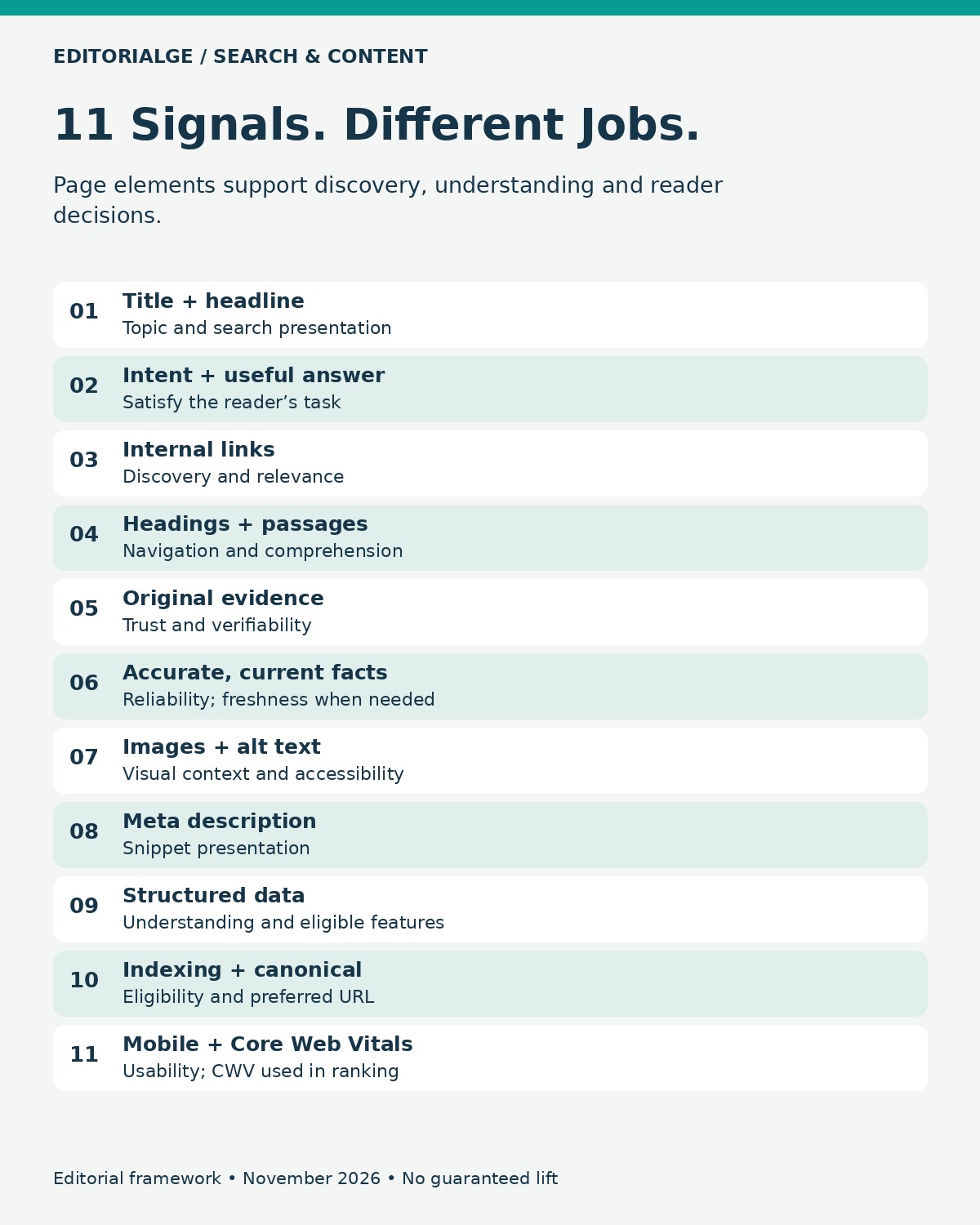
The 11 items below are page elements and practices that influence discovery, understanding, presentation, or reader experience. They are not 11 equally weighted Google ranking factors. Some are technical prerequisites; others help people choose and use a result. Their order is a practical reading sequence, not a published ranking-weight hierarchy.
SEO addresses search discovery and organic performance. Answer engine optimization, or AEO, makes answers clear and usable. Generative engine optimization, or GEO, concerns visibility in generated responses. E-E-A-T describes experience, expertise, authoritativeness, and trustworthiness; it is not a standalone numerical ranking factor you can raise by adding a biography.
Google’s AI-feature guidance retains the established SEO foundations and does not require a special AI schema or extra machine-readable file. A supporting page must be indexed and eligible for a search snippet, but eligibility never guarantees inclusion. Other answer engines have their own retrieval and presentation behavior.
The KDD 2024 research on generative engine optimization investigated visibility in generated responses and found that effects varied by domain. It is useful research context, not a forecast of how much traffic an individual website will gain.
Page Review: Findings From the Checks
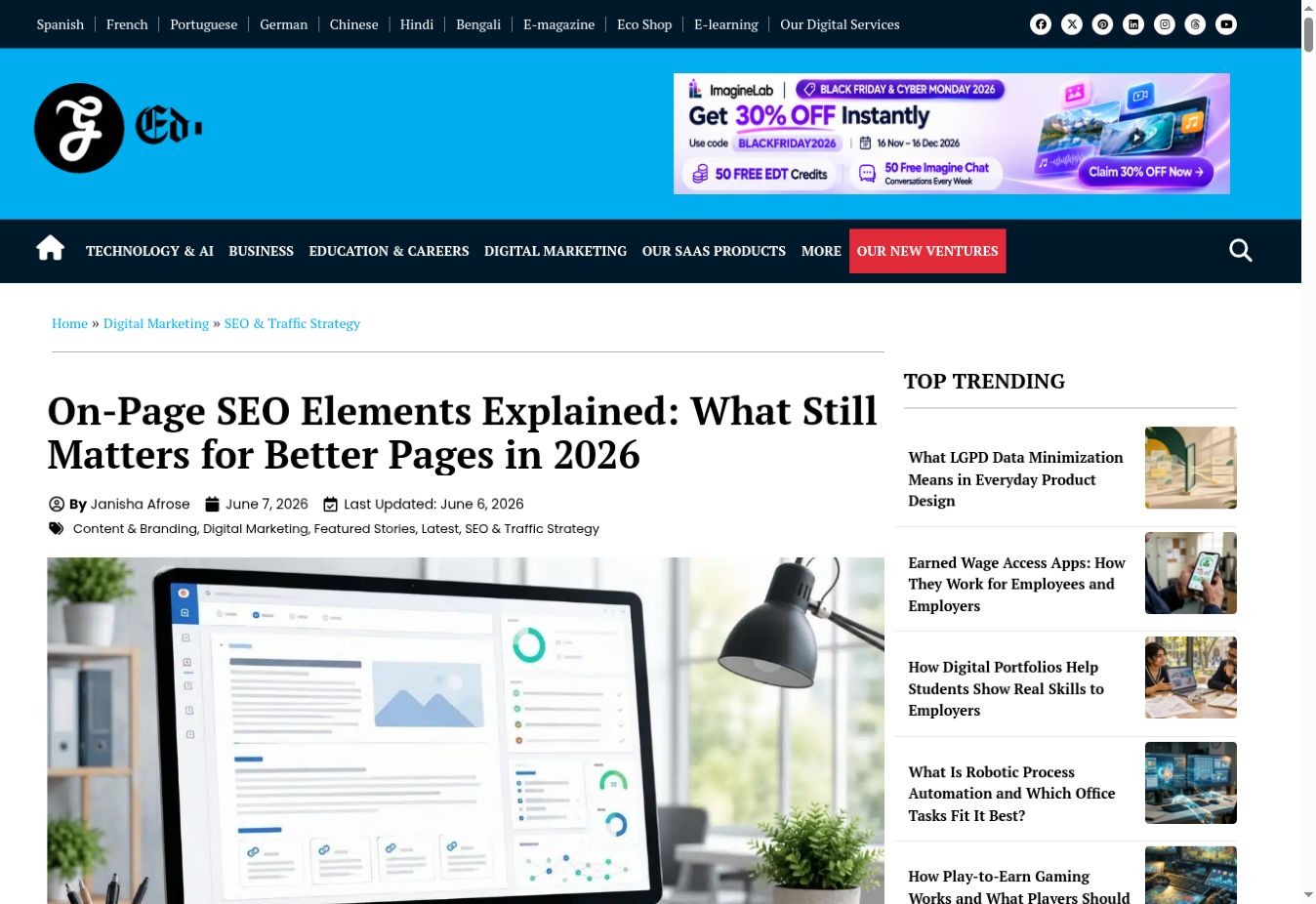
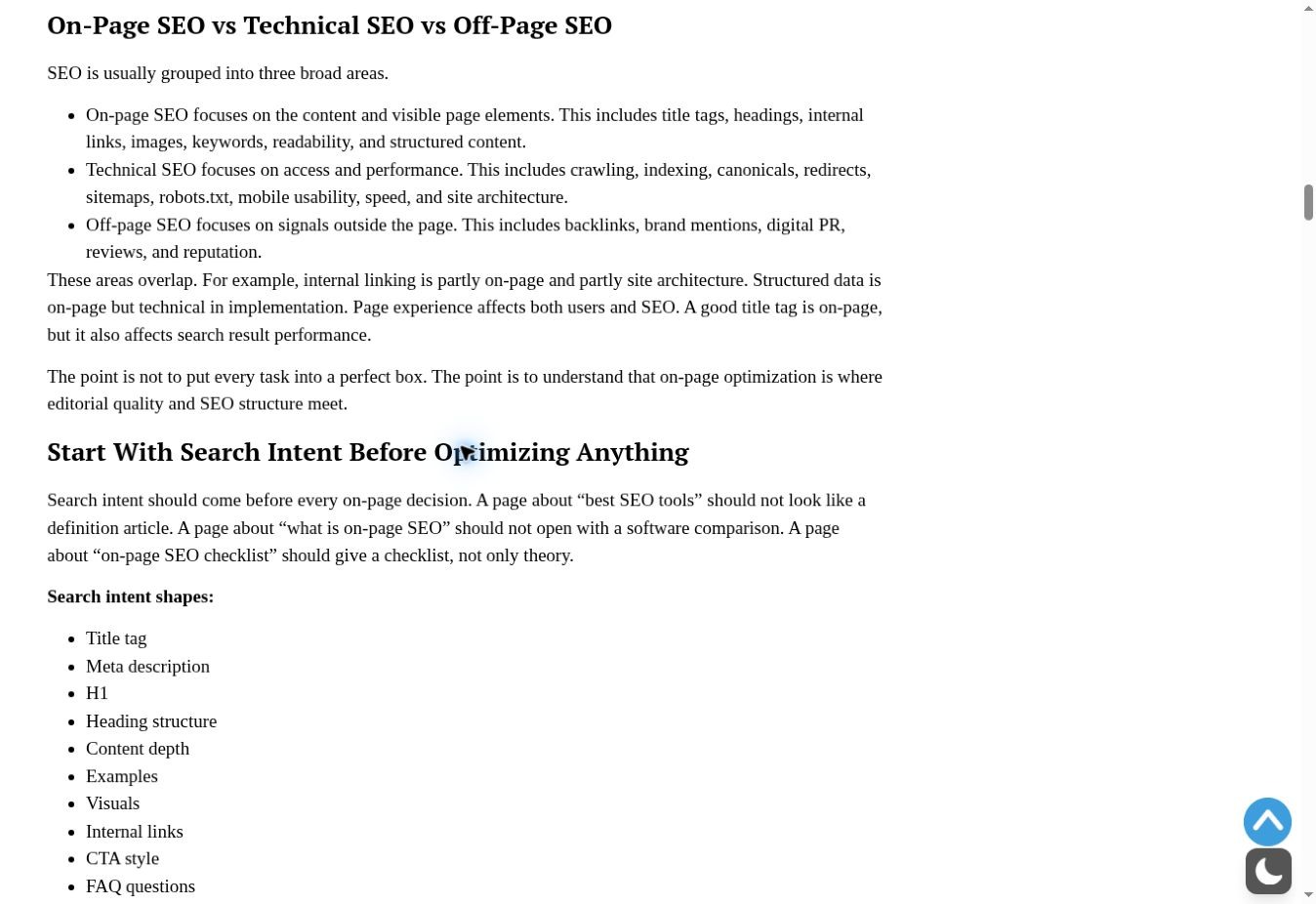
Methodology: The page title, main heading, search-intent explanation, and internal-link destination were checked on November 16, 2026. Three original screenshots and page metadata document the findings.
The review examined Editorialge’s existing on-page SEO elements guide, including its rendered title, main heading, search-intent explanation, and a contextual internal-link destination. Three original browser captures and separately recorded page metadata support the findings.
The main finding was that alignment matters more than identical wording. The browser title was shorter than the visible headline, while both described the same topic. The page also contained an intent explanation and a working route to a related heading guide. These are reproducible page observations. The review did not include Search Console data or a controlled ranking experiment, so these findings establish neither ranking impact nor traffic lift.
Open the original-evidence checklist
- Capture 1: visible headline; browser title and H1 recorded separately.
- Capture 2: search-intent section and concrete examples.
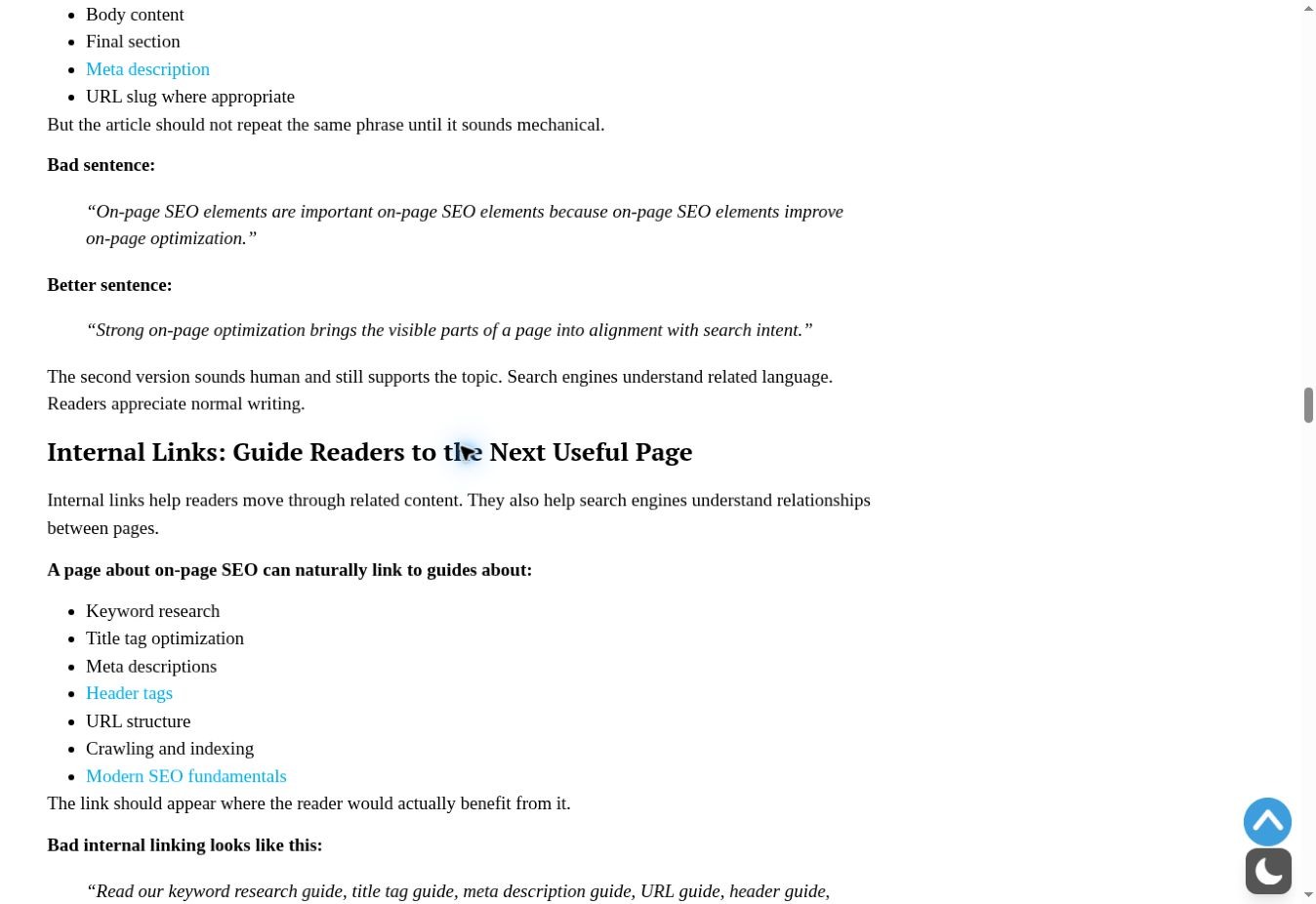
- Capture 3: internal-link section; “Header tags” destination opened successfully.
- Additional DOM check: one H1, a self-referencing canonical, and an index/follow robots directive.
- Scope: one public desktop page inspection, not an account audit or mobile performance test.
The orange outlines below are editorial annotations over authentic captures. Click an image to inspect the original screenshot without the overlay.
On-Page SEO Signals That Still Drive Organic Traffic: At a Glance
| Page element | Main job | First question to ask |
|---|---|---|
| 1. Title and headline | Topic clarity and presentation | Does the promise match the page? |
| 2. Intent and useful answer | Reader task completion | Can the visitor finish the task? |
| 3. Internal links | Discovery and relevance | Is the next useful page reachable? |
| 4. Headings and passages | Navigation and comprehension | Does the outline make sense? |
| 5. Original evidence | Trust and verifiability | Can the reader check the claim? |
| 6. Accurate, current facts | Reliability | Has anything material changed? |
| 7. Images and alt text | Visual context and accessibility | Does the image teach something? |
| 8. Meta description | Search snippet presentation | Does it describe this page specifically? |
| 9. Structured data | Understanding and feature eligibility | Does markup match visible content? |
| 10. Indexing and canonical | Eligibility and preferred URL | Is the intended version available? |
| 11. Mobile layout and CWV | Usability; CWV used in ranking | Can people comfortably use the page? |
1. A Descriptive Title That Matches the Main Headline
A useful title tells the searcher what the page will deliver. The visible headline should confirm that promise once the visitor arrives. Google can construct a search title link from several sources, including the title element and prominent headings, so your preferred title is not a guaranteed display instruction.
Choose a specific subject and a credible benefit. For a hypothetical guide, “CRM Migration Checklist for a Small Sales Team” says more than “The Ultimate Business Guide.” Keep the title concise without chasing a universal character limit; display width and context affect truncation. Repeated keyword variants usually consume space that could explain the page.
Review finding: the inspected page’s browser title was “On-Page SEO Elements: 2026 Page Optimization Checklist.” Its longer H1 added an explanatory angle. That difference was coherent. The screenshot verifies the visible heading; the browser-title value comes from the separate DOM inspection.
Try this: read the title, H1, and opening paragraph as one sequence. If they promise different tasks, decide which task the page should own before editing individual words. After a change, review the actual search appearance when the page has been reprocessed.
2. An Answer That Satisfies the Actual Search Intent
A page can mention the right topic and still be the wrong result. Someone choosing a service needs decision criteria. Someone fixing an error needs an actionable sequence and a way to recognize success. Someone researching a definition may need a short explanation before the detail.
Write the intended outcome in the margin: “After reading, the visitor can…” Then check whether the page supplies the inputs, steps, exceptions, and examples needed to reach that outcome. This is an editorial test, not a keyword-density calculation.
Review finding: the inspected article distinguishes tool comparisons, definitions, and checklists. That is a useful way to explain intent because each example implies a different page format. The explanation was present on the page; whether it satisfies actual searchers would require query and user evidence.
For AEO, place a direct answer near the relevant question, then explain the conditions that can change it. For GEO, make that passage understandable when read separately: name the product, process, audience, or limitation rather than relying on “this” and “it.” These are clarity practices, not a guaranteed citation formula.
3. Crawlable Internal Links With Descriptive Context
Internal links give readers routes through a subject and help search engines discover related pages. Google also uses links to understand relevance. A normal anchor element with an href offers a clearer crawlable path than an interface action that only behaves like a link through script.
Start with the moment a reader needs more detail. A migration guide might link to a field-mapping worksheet at the field-mapping step. A generic “read more” link in a distant footer does less to explain that relationship. There is no universal ideal link count; relevance and maintenance matter more than filling a quota.
Review finding: The navigation check followed “Header tags” in the inspected article’s internal-link section. It opened the heading-hierarchy guide, whose H1 described structuring H1–H6 for SEO. The destination matched the anchor’s topic. This confirms a working reader path, not Google’s crawl history or the link’s ranking contribution.
Audit in both directions. The page should link to useful supporting material, and relevant established pages should help readers discover it. When two articles answer essentially the same question, review their roles before adding another competing URL.
4. Logical Headings and Passages That Keep Their Meaning
Headings should reveal the argument or workflow. “Before You Import the File” is more useful in a migration tutorial than “More Information.” A reader scanning only the headings should understand where preparation ends, execution begins, and verification happens.
MIT’s guidance for content creators explains how meaningful heading structure helps assistive-technology users navigate. That accessibility benefit is a good reason to use real heading elements and a logical hierarchy. It should not be repackaged as proof that adding H2 tags directly raises rankings.
Use short, self-contained explanations under each heading. If a paragraph says a method is “faster,” specify faster than what and under which conditions. Put essential qualifications beside the claim. A table is valuable when readers compare the same attributes across options; prose is often better for explaining why a decision changes.
A practical check is to copy one section into a blank document. Can a colleague identify its subject and limitations without the previous three sections? If not, restore the missing context rather than adding more repeated keywords.
5. Original Evidence and Clear Accountability
Evidence gives readers something to inspect beyond the writer’s confidence. Depending on the subject, that may be a documented workflow, an original comparison, a calculation with inputs, or a screenshot of a setting actually used. E-E-A-T is a quality framework, not an instruction to attach an “expert reviewed” badge to every article.
For a software tutorial, record the test date, environment, task, action, result, and limitation. “I opened the export menu and downloaded a CSV containing these columns” is narrower and more verifiable than “I thoroughly tested the platform.” A public pricing-page review does not establish reliability under production load.
The evidence in this guide illustrates that boundary. The captures document page elements and a navigation check. They are not analytics dashboards, testimonials, or proof that an optimization caused organic growth. The featured illustration and three explanatory infographics serve a different purpose and are not presented as test evidence.
Make ownership clear as well. A named contributor’s biography should reflect real credentials. If a specialist has reviewed the work, identify the actual review scope. Describe the review scope accurately and retain records that support the published observations.
6. Accurate Facts and Meaningful Freshness
Freshness matters when the question requires current information. Google describes systems that favor fresher material for queries where it is expected. That does not mean every evergreen definition needs a new date every month.
Separate changeable facts from stable explanations. Product limits, interface steps, eligibility rules, and prices need different review schedules from a basic explanation of HTML headings. Assign an owner and a trigger: a product release, changed documentation, a broken workflow, or a reader correction.
When updating, preserve a short change log. “Replaced the retired export step and recaptured the menu” is more informative than “updated for 2026.” Recheck comparisons and conclusions that depend on the changed fact. A single altered condition can invalidate the recommendation even if the rest of the article still reads well.
Do not confuse a recent date with original reporting. If the evidence was collected months earlier, keep its date visible and describe what was rechecked. For an older article that still answers a stable question accurately, substantial rewriting may be unnecessary.
7. Useful Images, Relevant Captions, and Honest Alt Text
An image should earn its place. A screenshot can show where a control sits. A diagram can explain a dependency. A comparison graphic can reduce the effort of scanning repeated attributes. Generic artwork may set the tone, but it should not substitute for the information a reader came to find.
Google uses alt text alongside visual analysis and page context to understand images. Describe the relevant content naturally. “Export menu with CSV selected” is more helpful than a string of target keywords. Put a longer explanation in the surrounding text or caption when the image contains a complex argument.
For authentic evidence, retain the original capture, date it, and explain the annotation. Avoid editing a screenshot so that it appears to show an option or outcome that never existed. Keep important numbers and conclusions available as text so readers do not have to interpret a small image.
Check the delivered file, not just the design canvas. Compression that turns menu labels into blur defeats the purpose. Reserve image dimensions to reduce layout movement, and use a responsive presentation that remains legible on narrow screens.
8. A Specific Meta Description and Useful Snippet Text
The meta description is a presentation opportunity, not a direct ranking boost. Google often generates snippets from the page itself and may use the supplied description when it is a better summary for a query. Different queries can therefore produce different snippets.
Describe the real scope. A hypothetical article on migration might promise a preparation checklist, a sample field map, and rollback checks only if those items are present. Avoid vague promises such as “everything you need to know” when a precise summary can help a visitor decide.
Also inspect the article’s actual answer passages. A polished description cannot repair misleading body text. Keep claims and their qualifications close together so the page offers useful material even when a search engine selects another passage.
To evaluate an edit, compare click-through rate for similar query, device, country, and position groups. A change in average CTR across the entire site can reflect a different query mix or a different search layout. Do not label it a description-test win without examining those alternatives.
9. Structured Data That Matches the Visible Page
Structured data describes content in a machine-readable form and can support eligibility for relevant search features. It does not guarantee a rich result, an AI citation, or a ranking improvement. Correct syntax is only one part of correct implementation.
Use a type that describes the actual page. An editorial article should not claim product ratings it never collected. Names, dates, images, and other marked-up facts should agree with what readers can see. Check whether a theme and an SEO plugin are producing conflicting versions.
Run the appropriate validator and then conduct a content review. Does the markup describe this article, or a template left over from another page? Is an update date justified? Does an author identity correspond to the visible attribution? A tool can catch malformed code while missing a misleading claim.
For an FAQ section, write questions because they help readers. Do not assume that adding FAQ markup creates a universal search enhancement. Feature support and eligibility are specific, and there is no special schema required to enter Google’s AI search features.
10. Indexability and a Consistent Canonical URL
These checks overlap with technical SEO, but they belong in a page-level review because they determine which version can participate in search. An excellent article on the wrong canonical URL or behind an unintended indexing restriction needs a technical repair before more prose.
A canonical annotation communicates a preferred representative among duplicate or very similar pages. It is a signal, not an absolute command. Align relevant internal links, sitemap entries, and canonical declarations with the intended URL rather than sending contradictory preferences.
The DOM inspection found a self-referencing canonical and an index/follow robots directive on the example page. That is a limited implementation observation. It does not prove that Google selected that canonical, indexed the page, or successfully rendered every component. Those questions require the appropriate Search Console inspection and crawl evidence.
Keep established URLs stable unless there is a good reason to change them. If a page genuinely moves, plan the redirect and update its references. Do not rewrite a functioning URL merely to squeeze in another keyword variation.
11. A Usable Mobile Layout and Healthy Core Web Vitals
Content and interface arrive together. A helpful explanation becomes difficult to use when text is obscured, controls are cramped, or a shifting image makes a reader lose their place. Review the experience of reaching the answer, not just the appearance of the top banner.
Google states that Core Web Vitals are used by its ranking systems. It also says there is no single page-experience signal and that perfect tool scores do not guarantee top rankings. Other usability improvements remain worthwhile for readers without needing to be described as direct ranking factors.
Test representative pages and templates on a real narrow screen. Open tables, expand disclosures, follow links, and check whether overlays cover essential information. Use field performance data where available; a laboratory run is a diagnostic snapshot, not a complete account of real visitors’ experiences.
Prioritize a recurring template problem over polishing one already usable article. If every article shifts when an ad loads, that shared issue can frustrate many readers. Record the change, check the affected templates, and evaluate relevant field data over an appropriate period.
Which Improvement Should You Make First?
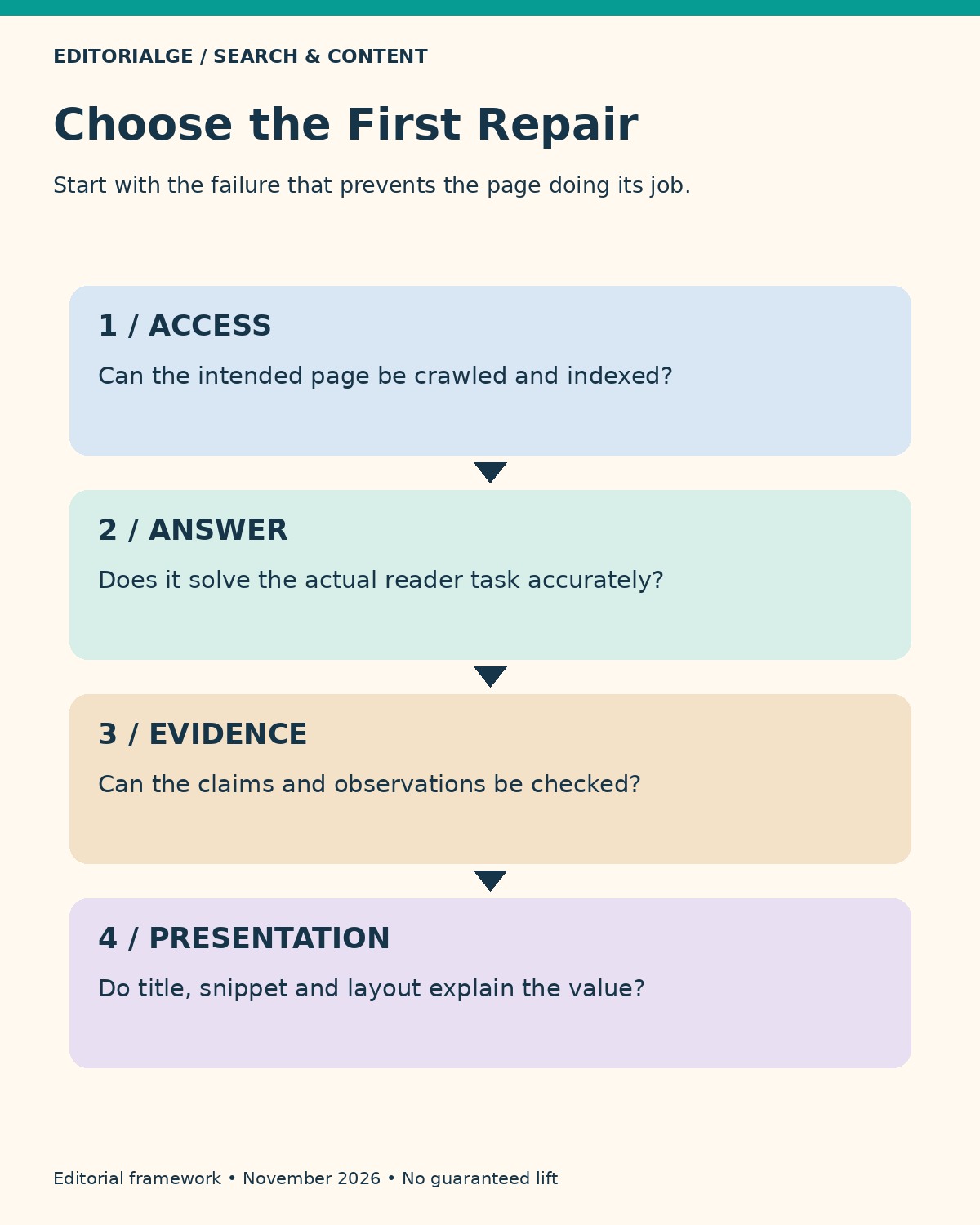
Choose the repair that addresses the observed failure. The following sequence is an editorial triage method, not an algorithmic scoring model.
| Observed problem | First action | Evidence to retain |
|---|---|---|
| Wrong page version or indexing restriction | Investigate access and canonical settings | URL inspection and change record |
| Page answers a different task | Rework intent, structure, and necessary detail | Query examples and before/after outline |
| Claims cannot be verified | Add sources, actual tests, and limits | Dated observations and original files |
| Relevant impressions but weak clicks | Review search appearance and competing results | Comparable query/device groups |
| Visitors cannot use the page comfortably | Fix the obstructing layout or performance issue | Reproduction steps and post-fix check |
Start with a small set of important pages. Record one primary hypothesis for each: “The title promises a checklist, but the page contains only a definition.” That gives an editor a concrete assignment and makes the eventual review more informative than a list of checked SEO boxes.
Measure Traffic Without Confusing It With AI Visibility
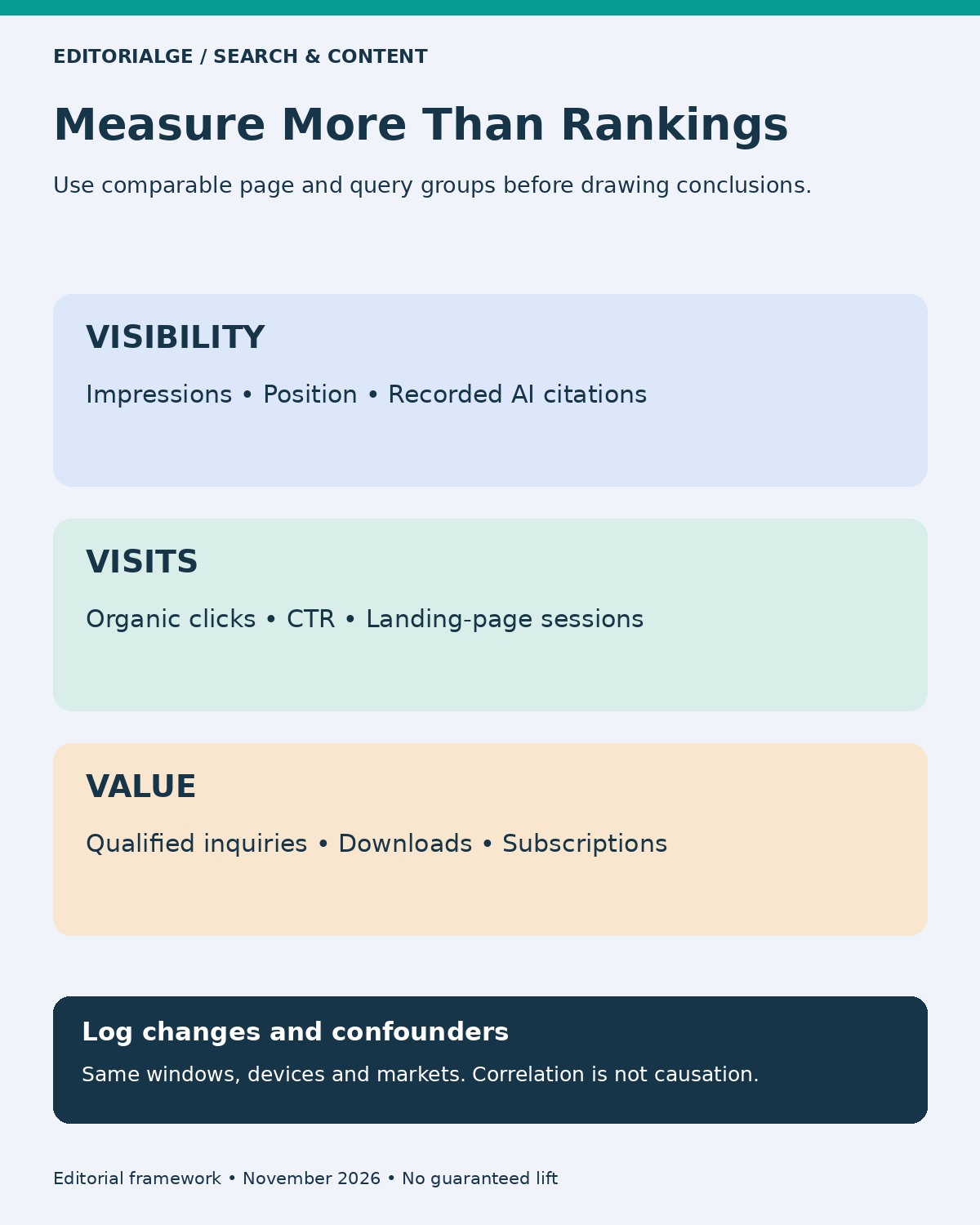
Record the baseline before editing: landing page, query group, impressions, clicks, CTR, relevant conversions, and the date range. Log the actual changes. Choose comparable windows long enough to reduce day-to-day noise, and note seasonality, campaigns, site releases, and major search changes.
Track AI citations separately when you can observe them. Save the query or prompt, engine, date, market, and the cited URL. A mention is not necessarily a link, and a link is not necessarily a visit. Repeating a small prompt set can document changes in that sample; it does not measure the entire population of user queries.
Editorialge’s guide to measuring content performance provides broader planning context. For this workflow, keep the decision focused: did the page become easier to find, did qualified visits change, and did those visitors complete a useful action?
If several edits ship at once, report the combined outcome. Without a suitable experimental design, attributing the result to one heading or caption would overstate the evidence. A useful report can acknowledge uncertainty and still identify the next sensible improvement.
Frequently Asked Questions
Are traditional on-page SEO practices still relevant to AI search?
Yes. Accessible content, clear explanations, useful links, and reliable evidence remain relevant. Google’s AI search guidance builds on existing SEO foundations. That does not guarantee selection by Google or any other answer engine.
Which of these 11 items are direct ranking factors?
They do not all have that status. Google documents link signals and Core Web Vitals in ranking contexts. Meta descriptions concern presentation; canonical settings concern preferred URLs; E-E-A-T is not a single ranking factor. Evaluate each item by its actual function.
Do short answers increase the chance of an AI citation?
A direct answer can improve clarity, but there is no universal answer length or citation guarantee. Include enough context, evidence, and qualification to avoid turning a nuanced answer into a misleading extract.
How do I demonstrate firsthand experience responsibly?
Describe the task you performed, the date and environment, what happened, and what the check cannot prove. Attach genuine evidence where helpful. Do not turn a public-page inspection into a claim of prolonged product use or measured business results.
Should I rewrite every older article?
No. Prioritize meaningful inaccuracies, unresolved reader needs, access problems, and valuable pages with identifiable weaknesses. Keep useful material that remains correct. A new date or more words alone is not a substantive improvement.
Build the Page Around a Verifiable Reader Outcome
The On-Page SEO Signals That Still Drive Organic Traffic work together when they help a page become discoverable, understandable, credible, and usable. Begin with the reader’s task, repair the largest obstacle, and document what changed. Treat search visibility, visits, and business value as separate outcomes. That approach gives SEO, AEO, GEO, and E-E-A-T a practical role without turning any of them into a promise the evidence cannot support.