SCORM testing tools help you find package and playback problems before a course reaches learners. The useful distinction is between checking the ZIP and manifest, observing a course communicate with a test player, and confirming that it behaves correctly in the destination learning management system (LMS).
This documentation-based comparison covers seven tools for different parts of that job. It is not a hands-on ranking or a certification of any product. Confirm the SCORM version, browser, data-handling terms and current availability before using a real course.
SCORM testing tools compared
| Tool | Main review task | Important boundary |
|---|---|---|
| SCORM Cloud | Hosted playback and debug logs | Destination LMS can behave differently |
| ADL SCORM 2004 Test Suite | Conformance-oriented testing | Version and environment matter |
| SCORM Debugger | Playback and runtime event logs | Review upload and account terms |
| SCORMR | Course testing and debugging | Beta; public sign-ups are not open |
| SCORM Lab | Browser-based runtime inspection | Not the destination LMS |
| Openbox Learn Package Checker | Package structure review | Structural checks do not prove runtime behavior |
| SCORM Test LMS | Local test environment and API calls | Requires local setup and security review |
1. SCORM Cloud: launch and inspect a runtime log
Rustici documents importing SCORM content, launching it in SCORM Cloud and examining debug logs. This is a useful neutral reference when you need to determine whether a package starts and what it reports during an attempt. Capture the course version, test account and relevant log lines when reporting a defect.
SCORM Cloud’s free trial lists limits of three courses, 5 GB of content and 10 active registrations; the course sandbox allows repeated launches. Check current terms and whether your course may be uploaded to a hosted service. A successful run in this reference environment does not guarantee identical behavior in every destination LMS.
2. ADL SCORM 2004 Test Suite: examine conformance
The Advanced Distributed Learning Initiative’s programmer guide describes the SCORM 2004 fourth-edition test suite for more detailed testing. This is a different question from whether a reviewer likes the course: conformance testing examines an implementation against a particular specification and edition.
ADL’s repository describes the fourth-edition suite and lists Internet Explorer 8 or earlier and Java 6 Update 10 as prerequisites. Those legacy requirements make it a specialist option requiring an isolated environment and security review, rather than a straightforward modern browser check. Verify that the package uses the relevant SCORM edition; a conformance result does not replace accessibility, instructional or destination-LMS review.
3. SCORM Debugger: see package events as it runs
SCORM Debugger describes detecting SCORM 1.2 or 2004 packages and displaying a log of events during playback. It can help a developer follow communication when a course appears to work visually but fails to report the expected status.
Look for initialization, stored values, commit and termination, then compare the output with the authoring tool’s reporting settings. Confirm upload handling and data retention before using confidential material.
4. SCORMR: investigate a troublesome course
SCORMR presents itself as a tool for running, testing and debugging e-learning packages, including SCORM. Its documentation describes identifying authoring tools to aid diagnosis. It may be useful when a training team has inherited a package and needs to understand what produced it.
As of November 16, 2026, SCORMR describes itself as beta and says public sign-ups are not open; interested users can register interest. Its site lists SCORM 1.2 and 2004 support. Availability should be confirmed before including it in a purchase shortlist. Detection of an authoring tool is a clue, not proof that the package is compatible with your particular LMS.
5. SCORM Lab: inspect the browser runtime
The browser-based SCORM Lab describes a debugger for SCORM 1.2 and 2004. It presents runtime calls and course data while the package runs, making it a candidate for investigating the sequence of a failed interaction.
Distinguish the browser tool from similarly named products. Before using sensitive materials, verify its current handling of files and seek the appropriate internal approval; a browser-based interface alone is not proof of privacy or security.
6. Openbox Learn Package Checker: start with the ZIP
Openbox Learn offers a SCORM package checker and explains the role of the imsmanifest.xml file. A structure check can help identify an invalid or misplaced manifest before a reviewer spends time on a learner journey.
A package that passes structural checks can still lose progress or report an incorrect score. Follow the inspection with playback, resume and completion tests; confirm what information the checker processes and retains.
7. SCORM Test LMS: investigate locally
The SCORM Test LMS project describes a local test environment for SCORM 1.2 and 2004 packages, showing API calls and saved values. It may suit a technically capable team that wants to examine a package without relying solely on a hosted LMS.
The project lists Node.js 18 or later as a requirement and identifies a GPL-3.0 license. Review the current release, security and license obligations before installing it. A local harness is still an approximation: exercise the actual destination system with a representative learner account before release.
A practical workflow for SCORM testing tools
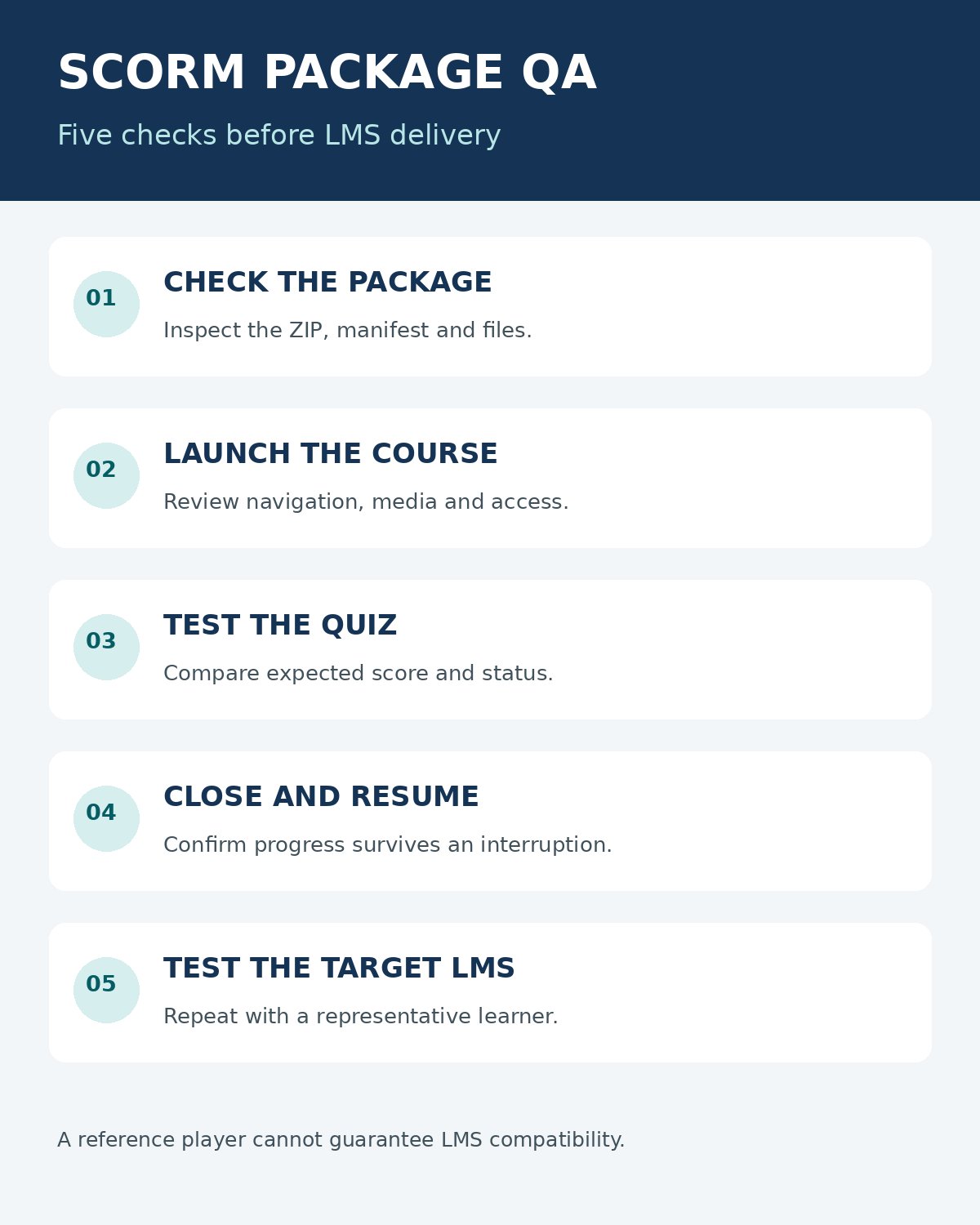
Keep a copy of the original export and record the authoring tool, version, SCORM edition and completion settings. First inspect the ZIP and manifest; then run the package in a reference player, complete the lesson, close it midway and resume. Finally, repeat the important journeys in a test area of the destination LMS.
- Verify that the manifest is where the package expects it and referenced files are present.
- Check launch, navigation, media and keyboard access.
- Complete and fail a quiz where appropriate; record the expected and actual score and status.
- Close and resume an incomplete attempt, then check whether progress persists.
- Inspect the event log for errors and repeat in the destination LMS with a test learner.
SCORM versions represent completion and success differently, and individual LMS settings can influence reporting. Keep the exact edition and the evidence for the failed step with the bug report rather than assuming a single “passed” label explains everything.
The University of Minnesota’s SCORM testing guide describes checking launch, completion and non-completion in SCORM Cloud. For the wider purchasing decision, see Editorialge’s guide to choosing a learning management system.
Choosing SCORM testing tools
Choose SCORM testing tools for the failure you need to investigate. A checker can expose packaging issues; a runtime log shows what a course sends; the destination LMS reveals the behavior your learners will actually encounter. Use all three perspectives when completion records matter.