
Landing page review tools help agencies collect feedback on the page clients will actually see, instead of trying to reconcile screenshots, emails and vague change requests. Before a paid campaign launches, however, a clear approval also requires checks that a comment tool cannot do for you: the offer, tracking, forms and destination all need owners.
This unranked comparison draws on product documentation checked on November 16, 2026. It covers eight tools for website feedback, with different approaches to commenting, technical reports and review decisions. A feedback mark or approval is not proof that an ad account, form or analytics configuration works.
Choose the review workflow before the tool
For a client commenting on copy and layout, start by examining Pastel or MarkUp.io: their shared review links keep the discussion close to the page. When feedback must become a developer task, look more closely at BugHerd, Marker.io, Feedbucket or zipBoard. Filestage deserves attention when the decision itself needs a structured review process. Usersnap is useful when visual reports need browser context, although its mobile capture limits matter.
These are fit judgments from documented workflows, not measured winners. A staging site behind a login, a personalized offer and a public brochure page create different access problems. Use the actual page and the client’s device in a small trial before committing the whole approval process.
Landing Page Review Tools Compared
| Tool | Useful when | Consider before inviting a client |
|---|---|---|
| Pastel | Reviewers need to comment on a shared landing-page canvas | Free plan permits one active canvas; check current limits |
| BugHerd | Page-specific feedback needs to become work for a website team | Check how reviewers access the staging site and approval workflow |
| Marker.io | Developers need screenshots and technical context with reports | A site widget or other setup may be required; manage captured data |
| Filestage | A team wants structured review decisions and website proofing | Default viewer needs no extension; legacy fallback is available |
| zipBoard | A shared website review should connect comments with tracked tasks | Confirm staging access and permissions for each reviewer |
| Usersnap | Capture annotated screenshots with technical context | Screenshot mode and mobile support have limitations |
| Feedbucket | Collect client comments directly on a staging website | Website installation and data-capture settings need review |
| MarkUp.io | Share a website link for contextual review comments | Verify access to protected staging pages and approval records |
1. Pastel
Pastel lets teams create a feedback canvas from a landing-page URL and sharing it with clients. Reviewers can click where they see an issue and leave a comment without creating an account. This makes it useful for an agency seeking feedback on copy, an offer or the placement of a call to action before a campaign starts.
Its FAQ describes a free plan with one active canvas, a practical limit for a team managing several pages at once. For a password-protected or personalized staging page, confirm what each reviewer can actually see. Record the approval separately if the client’s sign-off must identify a specific page version and campaign.
2. BugHerd
BugHerd describes feedback attached directly to website elements, so a client can point to the exact field, image or button that needs attention. The product is suited to a handoff between account managers and developers: a comment such as “the mobile form hides the submit button” has a location the fixing team can inspect.
Its website and creative-review materials discuss feedback and approval workflows, but the agency should establish whether the final decision is made within the product or in its own project process. Check access to staging pages and avoid assuming a resolved comment means the form, conversion event and destination have been tested end to end.
3. Marker.io
Marker.io focuses on capturing website feedback as actionable reports. Its documentation describes an annotated screenshot, page URL and technical context accompanying an issue. That detail can help a developer investigate a broken layout or an interactive element that only fails in a particular browser.
For client review on staging, Marker.io documents installing a JavaScript snippet and restricting feedback to members and invited guests. Decide who installs and removes the widget, and review what screenshots or logs might capture before collecting information from a page with customer data. A technical report supplements the client’s creative approval; it does not replace it.
4. Filestage
Filestage offers review decisions and a website-review workflow, making it a candidate where several people must review a page in sequence. Its documentation describes linking comments to the relevant position and providing screenshots as context, which can make a change request easier to find during a later review round.
Filestage now uses an extension-free website viewer by default and retains a legacy extension-based viewer for sites that do not work with the newer setup. Test that requirement with the actual client and their device before making the tool the sole approval channel. Its published free tier limits active projects and new files; review current terms and which approval features are included before planning a large campaign.
5. zipBoard
zipBoard documents reviewing a live website URL, adding visual annotations and turning comments into tasks. It can suit a team that wants feedback and the subsequent work in one place, particularly where the same reviewer must check both a landing page and related deliverables.
Its website feedback guide says reviewers can annotate without client sign-in. That does not remove the need to verify access to a private staging page, nor does a comment resolve disagreements over the final offer. Agree who can close a task and who has authority to approve the launch-ready version.
6. Usersnap
Usersnap lets reviewers capture screenshots from a website and annotate the area that needs attention. Its feedback workflow can collect the page URL, browser details and screen size alongside a report, giving a developer a starting point when a client identifies a broken layout or confusing form.
Its documentation notes that the widget does not start in screenshot mode on mobile devices and that native screen capture is not supported in mobile browsers. Check the actual mobile-review experience and the information captured before sending a private staging link to clients. An annotated report is not itself a final sign-off.
7. Feedbucket
Feedbucket describes an agency-oriented workflow in which clients comment on a staging website and submit annotated screenshots. It can also collect a page URL, device information and console logs, making it useful when account managers need to turn visual feedback into a fixable development task.
The website must have Feedbucket installed for the on-page workflow. Confirm staging access, review who can see feedback and check whether screenshots or console details could expose private information. Record the final approval separately if the campaign process requires a specific reviewer and version.
8. MarkUp.io
MarkUp.io describes creating a review from a live website link and collecting comments in context. That can suit a client who needs to point out wording, image placement or a call to action without assembling an email thread of screenshots.
Live-page comments may refer to content that changes during review. Save the version and decision in your project record, and check whether the chosen review method can access a password-protected staging page. The product’s documentation describes contextual feedback; it does not establish that conversion tracking has been tested.
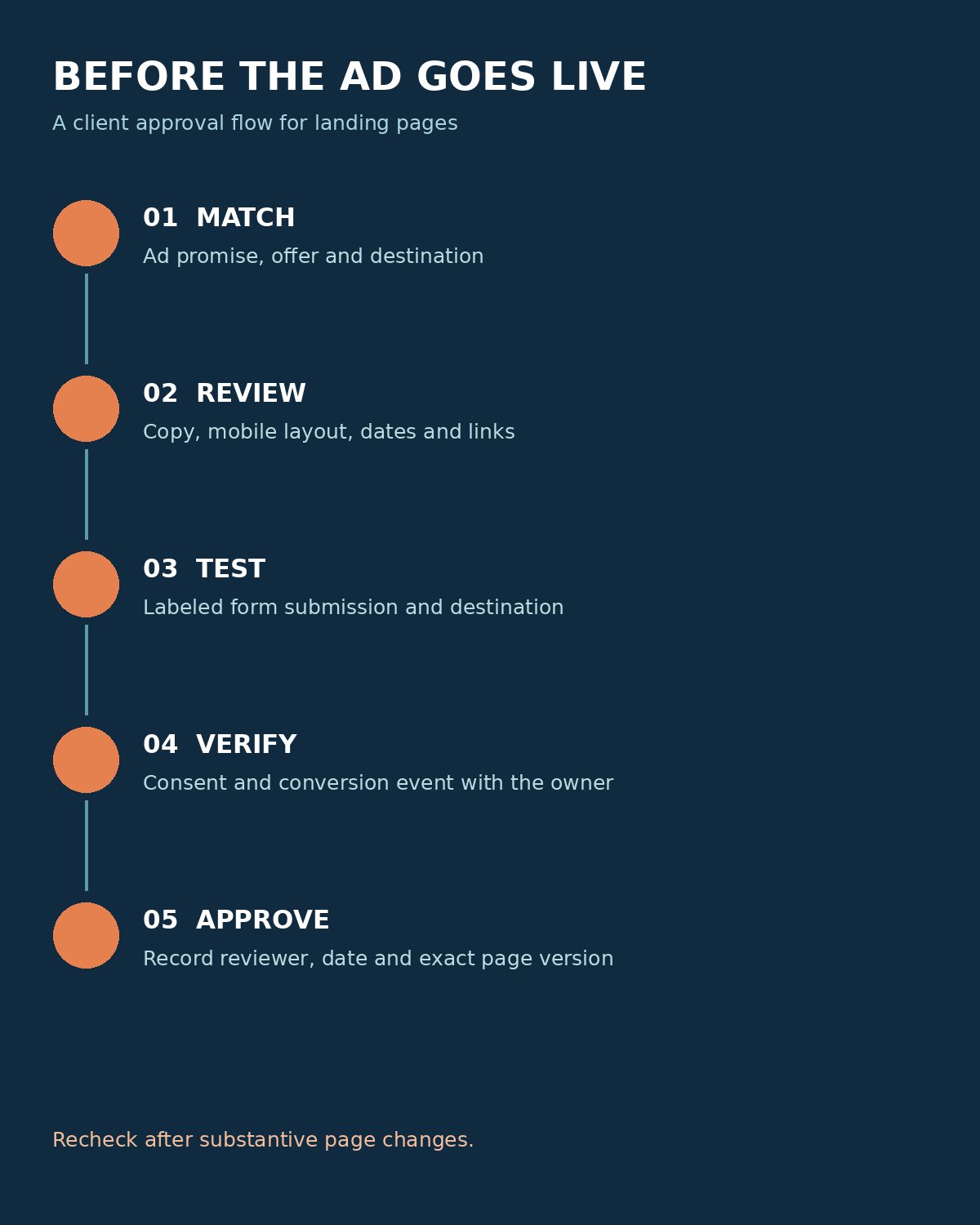
A Practical Approval Sequence for a Paid Campaign
Consider a hypothetical agency launching a webinar campaign. The client reviews the headline, date, registration promise and privacy language on a staging URL; the developer owns form behavior and the analytics specialist owns event verification. The project manager records the page URL, version, campaign, reviewer and decision date. A later change to the offer or form returns that item to review.
- Check the ad promise against the headline, offer, audience and destination page.
- Review mobile layout, copy, prices, dates and links; assign each comment to a named owner.
- With permission, submit a clearly labeled test form and confirm its expected destination and confirmation message. Remove test data under the agreed process.
- Verify consent, measurement and tracking with the responsible specialist; page comments alone do not establish a working conversion event.
- Record the approver, date and exact version. Recheck after substantive changes and again before launch.
The Commonwealth of Massachusetts notes that automated tools cover only part of accessibility testing in its web testing checklist. Include keyboard and form checks in the launch review, and involve an accessibility specialist where needed. For the next stage, explore Editorialge’s landing-page testing ideas once the page is safe and ready to run.
Choosing Landing Page Review Tools
Choose landing page review tools by the handoff that causes the most delay: a client who needs a simple link, a developer who needs technical context, or a team that needs formal review decisions. Then test the chosen workflow on one representative staging page with the people who will approve and fix it.