
Choosing among expert-service marketplaces for US digital business owners starts with the job you need finished. A WordPress repair, a Shopify migration, a brand identity, and a fractional marketing engagement require different kinds of expertise—and different buying protections. This guide compares 12 options by service model, practical fit, buyer costs, and the questions that matter before you commit.
A specialist directory can help you find someone who understands your platform. An open marketplace gives you more responsibility for screening. A managed network can help with matching, but you still need to agree on deliverables and evaluate the person assigned to your project.
Quick Answer: Which Marketplace Should You Shortlist?
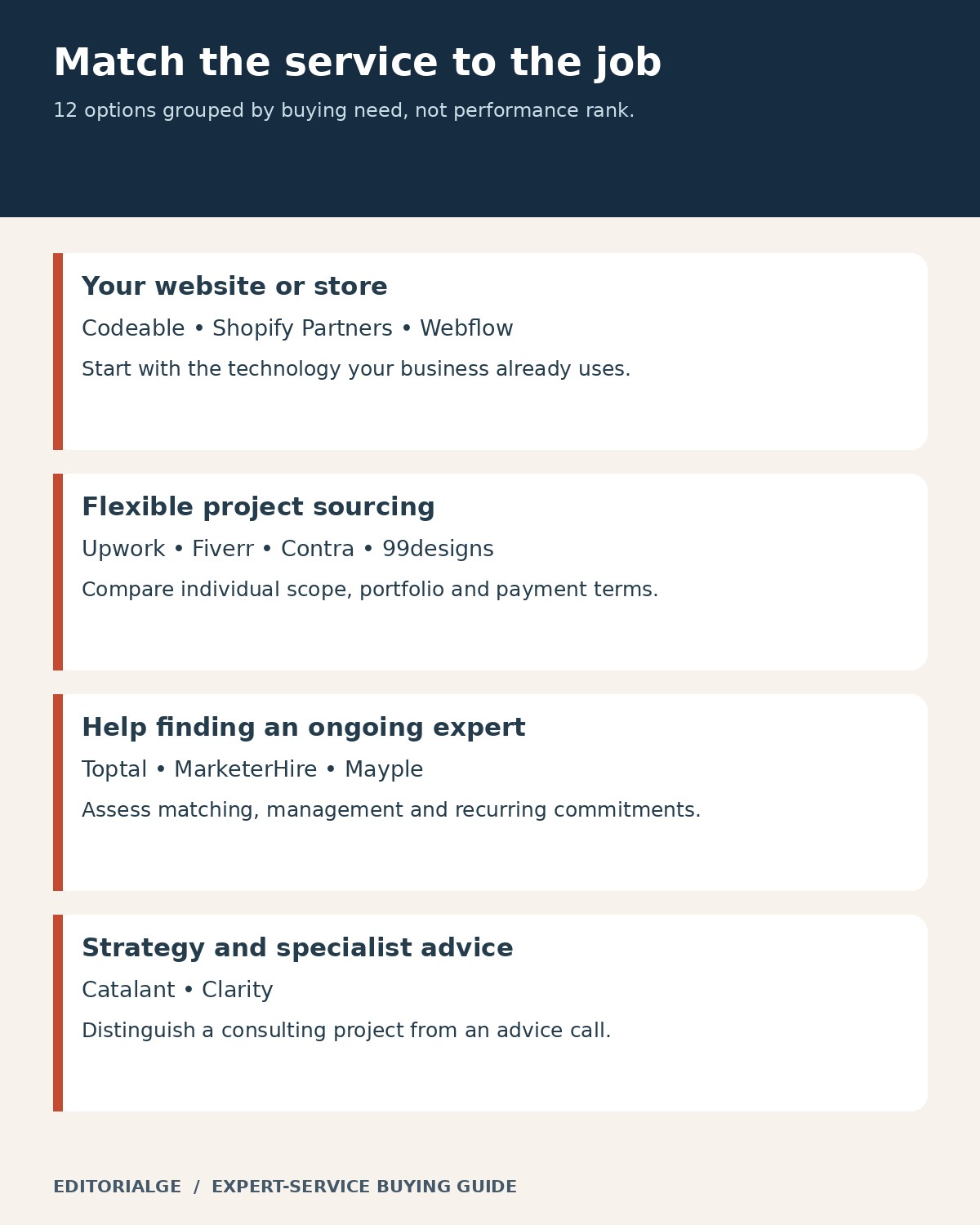
For an existing website or store, start with Codeable for WordPress, Shopify Partner Directory for Shopify work, or Webflow Certified Partners for Webflow projects. Compare Upwork, Fiverr, and Contra when you can define and manage the work yourself. Consider Toptal, MarketerHire, or Mayple when matching assistance matters. Look at 99designs for design, Catalant for substantial consulting projects, and Clarity for focused advice calls.
These are editorial fit recommendations, not rankings of measured freelancer performance. The first three receive additional coverage because their public interfaces support useful, reproducible checks for common digital business needs.
How This Guide Was Researched and Checked
Research and public-interface checks were completed on November 16, 2026. The comparison draws on official product pages, pricing pages, help centers and platform terms. Selection focused on relevance to US business buyers, a clear expert-service offering, distinct use cases and enough public information to explain the buying process.
Evidence comes from two distinct sources. Sukanta Parthib, Founder and CEO of Editorialge Media LLC, supplied his Upwork pricing screenshots and three Fiverr purchase invoices, and the first-person notes in those two sections reflect his stated experience and records. Two redacted invoices are reproduced.
The founder’s Fiverr invoices document his earlier purchases, while his Upwork screenshots document public pricing panels rather than completed contracts. No delivery-quality or return-on-investment claims are inferred from those records. Published fees and account-specific terms can change.
Expert-Service Marketplaces for US Digital Business Owners at a Glance
“Marketplace” is used broadly here. Shopify and Webflow are specialist partner directories; several other entries use managed matching. A directory listing does not by itself establish a payment-protection arrangement. These services can be relevant to US buyers without limiting all talent to the United States.
| Platform | Strongest fit | Buying model | Cost or scope check |
|---|---|---|---|
| Codeable | WordPress and WooCommerce | Specialist project matching | Fixed estimate; check included service fee |
| Shopify Partner Directory | Shopify migrations and store work | Partner discovery | Partner-specific proposal and contract |
| Webflow Certified Partners | Webflow design and development | Certified partner discovery | Profile starting prices are not final quotes |
| Upwork | Broad freelance hiring | Job posts and packaged projects | Client fee plus contract initiation fee |
| Fiverr | Clearly packaged deliverables | Service packages and custom offers | Buyer service fees and extras |
| Toptal | Specialized professional capacity | Screened talent matching | Subscription plus engagement charges |
| Contra | Portfolio-led independent talent | Freelance discovery and projects | Platform and processing charges |
| 99designs | Brand and visual design | Contests or one-to-one projects | Different pricing for each route |
| MarketerHire | Ongoing marketing specialists | Managed matching | Custom budget and agreed engagement |
| Mayple | Paid media and marketing help | Matched marketing services | Management fee versus advertising spend |
| Catalant | Strategy and operational consulting | Consultant project marketplace | Negotiated scope and project agreement |
| Clarity | A specific business question | Expert advice calls | Expert’s per-minute rate and duration |
12 Marketplaces and Expert Networks to Compare
1. Codeable: A Focused Route for WordPress Projects
Best for: A business with a WordPress or WooCommerce problem that needs specialist scoping, development or repair.
Why people choose it: Codeable concentrates on one technology ecosystem. That focus can make a brief about a plugin conflict, custom feature or store improvement more relevant than a general request for a web developer.
Its pricing documentation describes an estimate built from scope, complexity and urgency, using an $80–$120 hourly basis. This is a basis for estimating, not a promise that every project is sold by the hour. The current fee explanation says the displayed final estimate includes the 17.5% service fee; avoid adding it again when comparing the total.
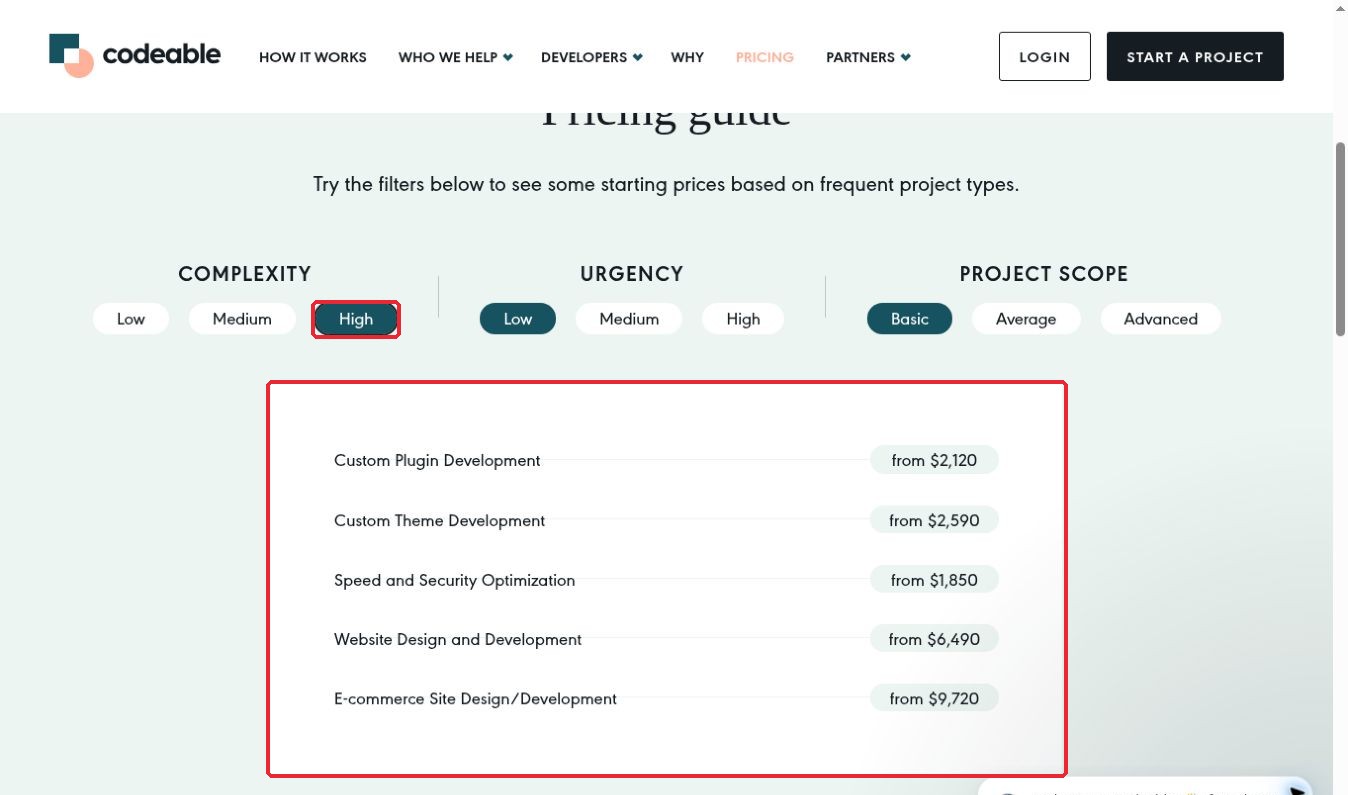
First-hand observation: I changed the public pricing guide’s Complexity setting to High while leaving Urgency at Low and Scope at Basic. The guide displayed custom plugin development from $2,120 and website design and development from $6,490. That interaction makes the role of complexity visible, but the calculator is an illustration, not a quote for your site.
Before choosing: Describe the current stack, reproduce the problem and explain what a successful fix looks like. Ask whether testing, staging, deployment and post-delivery corrections are included. Codeable is a focused option for this ecosystem; it is a less natural starting point for an unrelated native mobile application or general business strategy assignment.
2. Shopify Partner Directory: Find Commerce-Specific Expertise
Best for: Shopify store owners comparing migration, design, development or other commerce partners.
Why people choose it: The directory organizes providers around Shopify services, reducing the effort needed to find firms that work within the platform. A migration has different risks from a fresh visual redesign, so service specialization matters.
First-hand observation: I expanded the Migrations service, opened its partner listings, searched the Primary location filter for United States and selected it. The interface showed one location selected and displayed partner names. This is useful for building a geographically relevant shortlist; it does not establish that every person working on your project will be US-based.
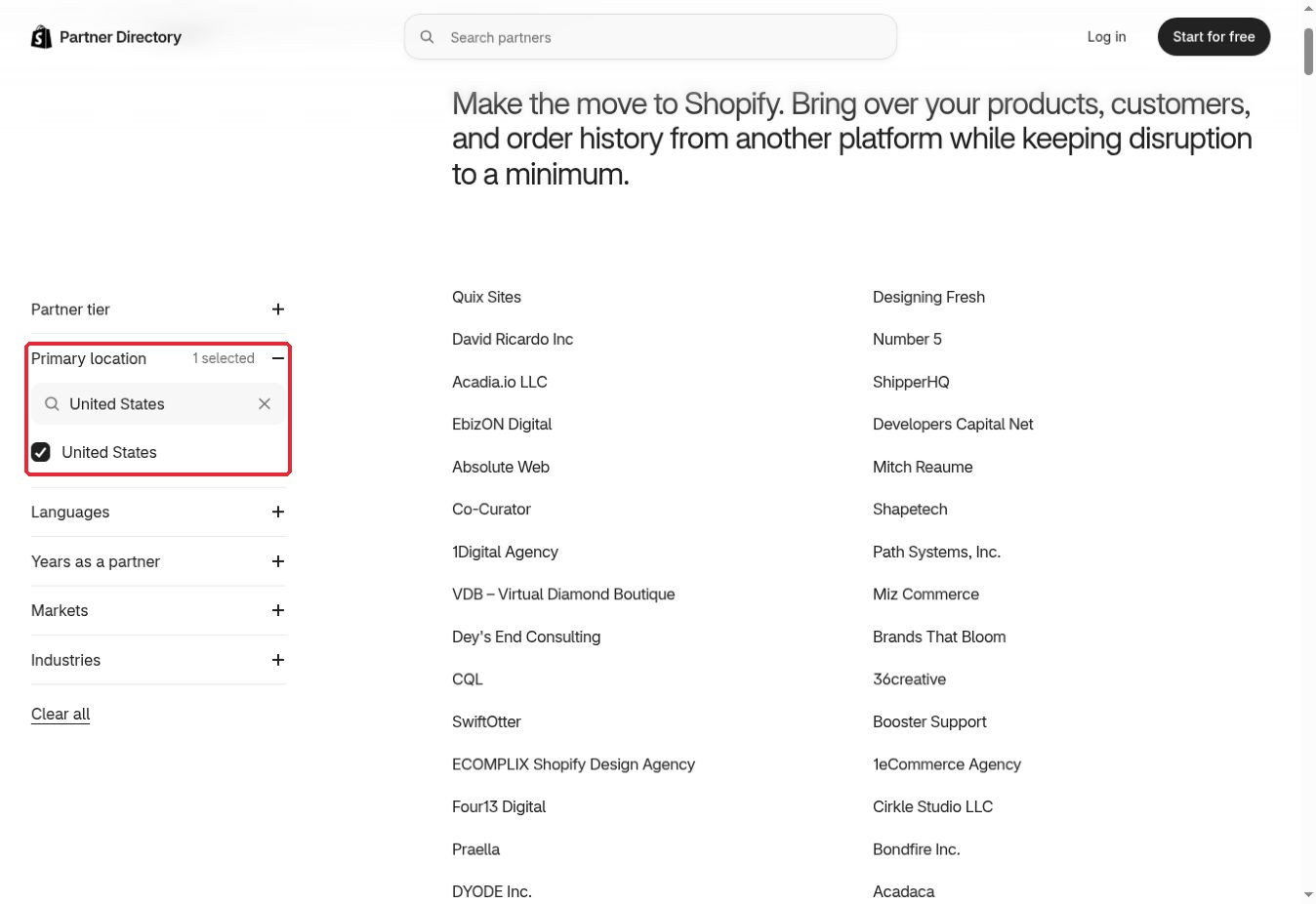
Use the directory to discover candidates, then request a written proposal. Confirm the contracting entity, payment route, milestones and any dispute process. A partner listing is not itself a standardized price or a promise that Shopify will manage your project.
Before choosing: For a migration, ask who handles product variants, customer data, order history, redirects and launch verification. Request a rollback plan and a clear division of responsibility for paid apps and ongoing subscriptions. A polished portfolio is helpful, but a migration plan tells you more about whether the provider understands the operational risk.
3. Webflow Certified Partners: Shortlist Webflow Specialists
Best for: Businesses commissioning a Webflow marketing site, redesign or platform-specific development project.
Why people choose it: The directory combines partner profiles with discovery controls such as location and budget. Webflow describes its certified partners as vetted; that designation should support, rather than replace, your project-specific checks.
First-hand observation: I selected United States and the displayed $1,000–$5,000 budget option. The interface recorded both filters. In the captured results, the location control and profile starting prices were visible. One visible card still advertised a $500 starting price, so I would not treat a budget filter as a strict guarantee about each listing’s minimum quote.
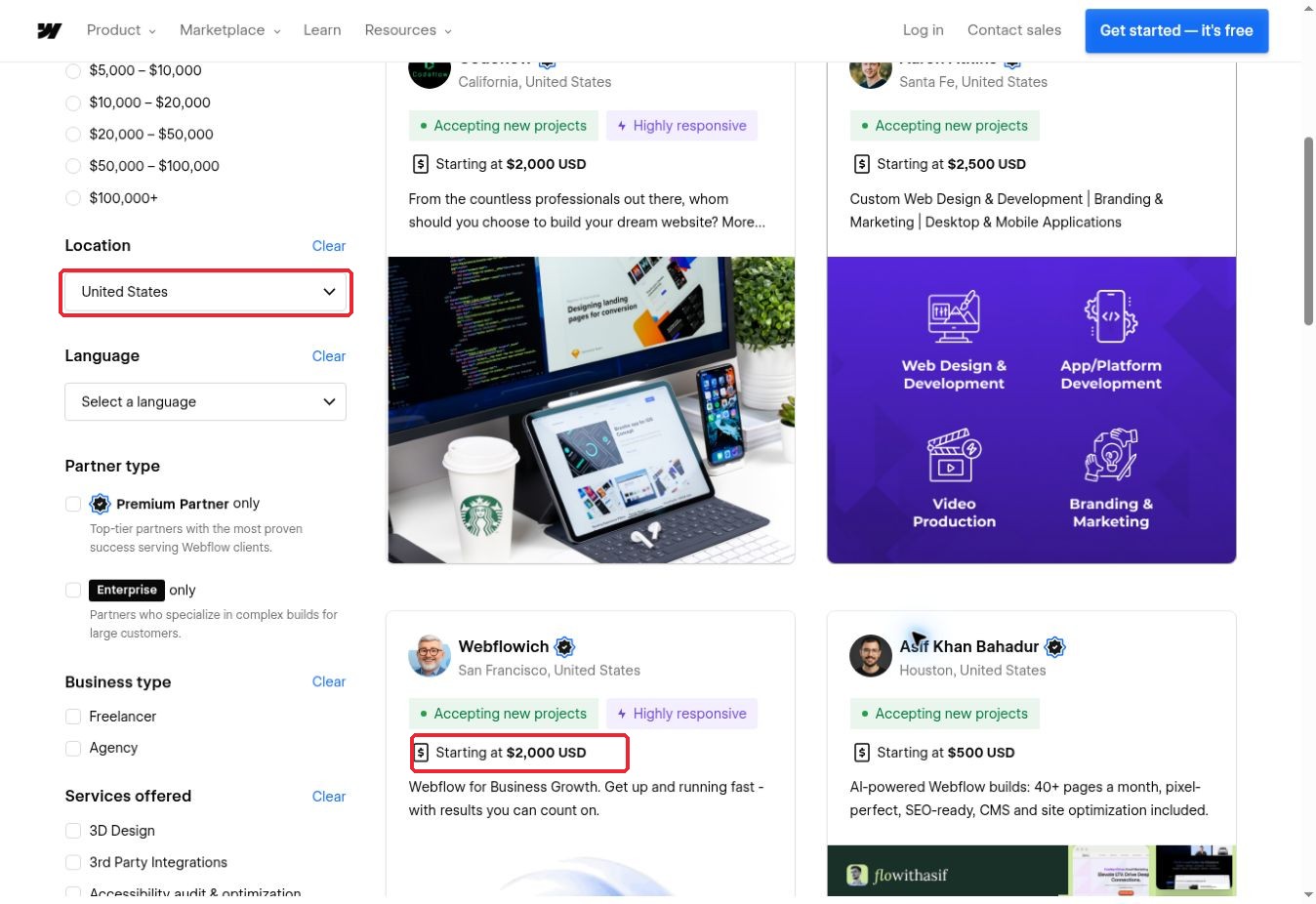
This is a useful distinction: filtering makes discovery easier, while the proposal determines the actual project budget. A profile’s starting price may cover a smaller service than the complete site you need.
Before choosing: Specify CMS collections, content migration, integrations, accessibility expectations and handover training. Confirm who owns the workspace and pays hosting or other platform subscriptions. Ask for examples with comparable content structure and maintenance needs, rather than selecting solely on visual style.
4. Upwork: Separate Client Fees From Freelancer Costs
Best for: Owners who need access to several freelance disciplines and can invest time in candidate selection.
Why people choose it: Job posts and predefined Project Catalog services support different ways of buying freelance work. Compare the same brief across candidates and make each milestone independently reviewable.
My observation — Sukanta Parthib, Founder and CEO, Editorialge Media LLC: I use Upwork and supplied the client and freelancer pricing screenshots shown here. In these captures, the client Basic plan shows a 5% service fee and Business Plus shows 10%. The freelancer screen shows a free Basic membership and Freelancer Plus at $19.99 a month. My practical takeaway is to separate the client’s extra charge, the freelancer’s commission and an optional membership before comparing costs.
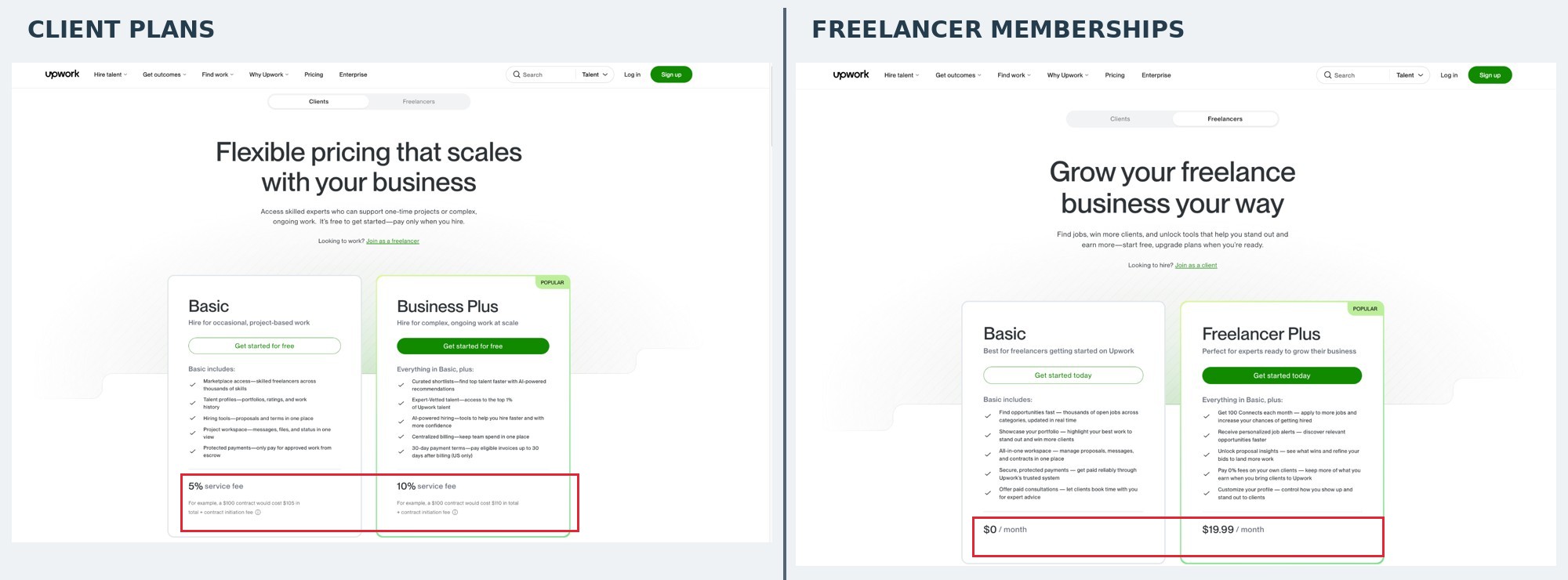
The client screenshot illustrates a $100 contract costing $105 on Basic or $110 on Business Plus, plus a contract initiation fee. These are the displayed figures in the supplied capture, not proof of a charge on a particular Upwork transaction. The screenshot’s capture date was not supplied.
Upwork’s public pricing information is not fully consistent: its client pricing page indexed during this review matches the screenshot’s 5% and 10%, while the Client Marketplace Fee help article still lists up to 7.99% for Basic. Check the fee shown for your account and payment route before committing. The initiation-fee guidance lists $0.99–$14.99 for an applicable new contract.
Freelancer commission is separate. Upwork’s Freelancer Service Fee help page describes a 0%–15% fee per contract, with the applicable percentage shown before the engagement. The $19.99 monthly membership in the screenshot is not a 19.99% commission. Likewise, the advertised 0% benefit for bringing your own clients is conditional; it does not make all marketplace earnings commission-free.
Before choosing: Ask what the candidate personally did in comparable projects, specify ownership and handover, and agree on reporting. The supplied screenshots substantiate the pricing comparison; they do not document a paid Upwork contract or its outcome.
5. Fiverr: What My Actual Invoices Show About Buyer Fees
Best for: A discrete service whose scope, revisions and delivery can be agreed before ordering.
Why people choose it: Packages and custom offers let buyers compare defined deliverables. The amount on a service listing is only part of the budget, so the final invoice matters.
My first-hand buying experience — Sukanta Parthib, Founder and CEO, Editorialge Media LLC: I have used Fiverr to purchase services and provided three of my actual invoices for this comparison. On a $35 order, I paid a $5.43 service fee and $40.43 in total. On a $380 order, I paid a $20.90 service fee and $400.90 in total. Comparing these payments shows why I look at the full checkout amount rather than the advertised service price alone.
Two invoices are reproduced below: one below $50 and one above $50. Account details and invoice/order references have been redacted for confidentiality. Dates, service descriptions, fees and totals are preserved. These are the founder’s supplied purchase records, not an independently commissioned platform test or evidence that every buyer receives identical terms.
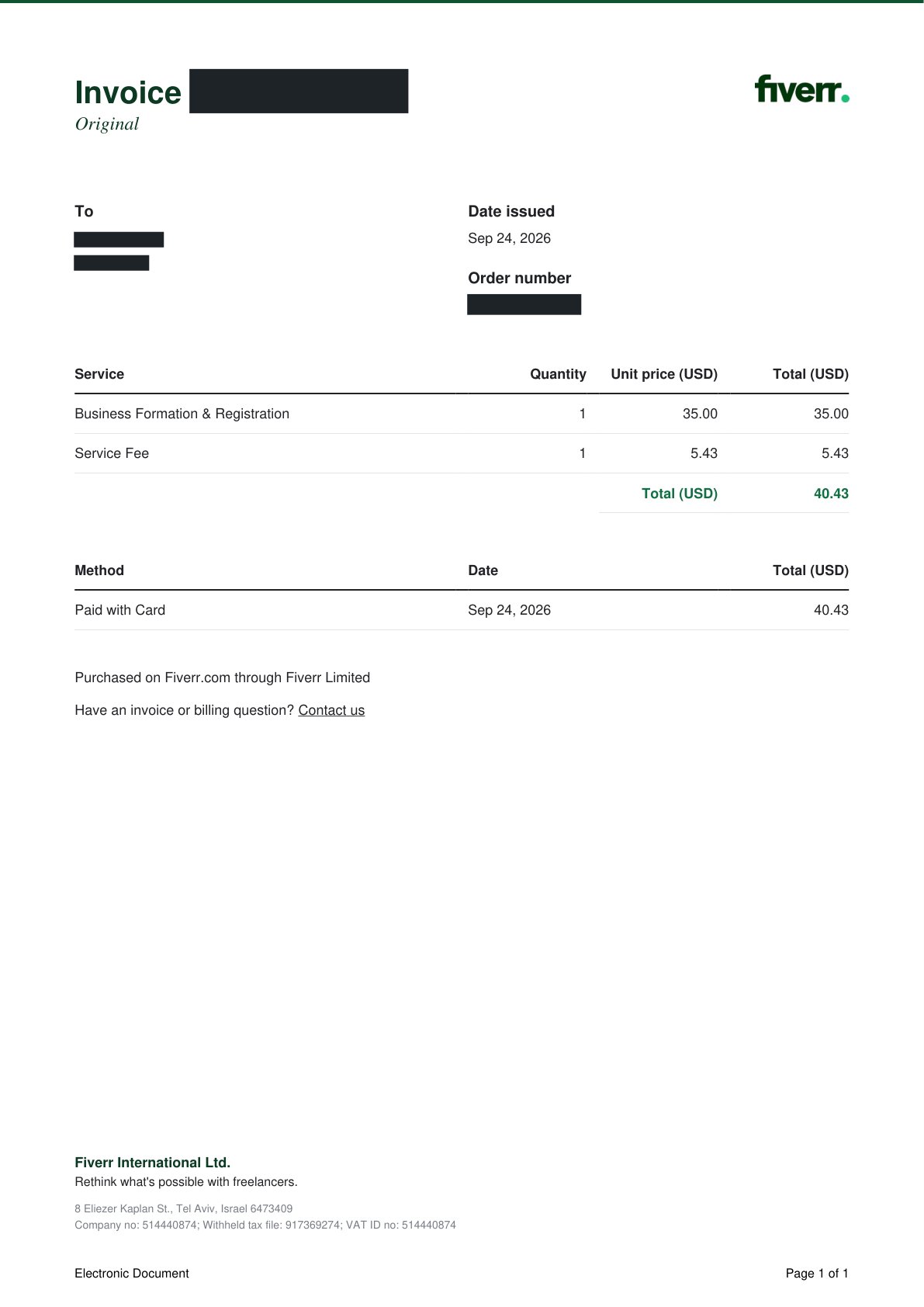
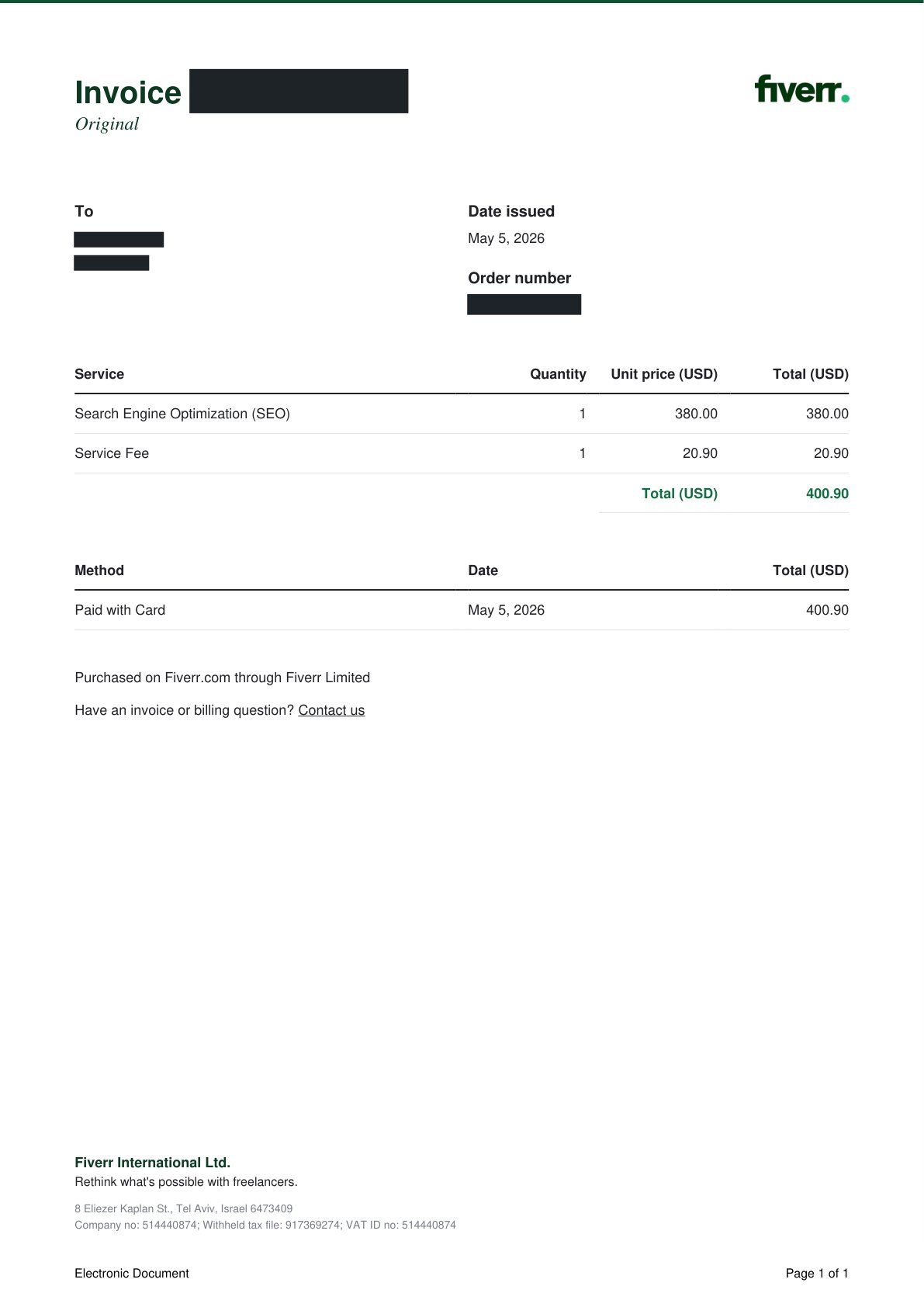
| Invoice date | Service price | Buyer fee | Total paid | Fee as share of service price |
|---|---|---|---|---|
| September 24, 2026 | $35.00 | $5.43 | $40.43 | About 15.51% |
| May 5, 2026 | $380.00 | $20.90 | $400.90 | 5.50% |
Why $50 is not the fee threshold: The two examples sit on opposite sides of $50, but that does not establish a pricing rule at $50. The third supplied invoice, dated April 9, 2026, shows a $135 service with a $10.93 fee and a $145.93 total. Its fee is consistent with 5.5% plus $3.50, rounded to cents—even though the order is above $50.
Fiverr’s payment-specific help page currently describes a standard 5.5% buyer fee plus $3.50 on orders under $200. The supplied invoices are arithmetically consistent with that formula: $35 × 5.5% + $3.50 rounds to $5.43; $135 × 5.5% + $3.50 rounds to $10.93; and $380 × 5.5% equals $20.90. The invoice itself lists the fee amount, not this formula, so the calculation is an analysis of the records alongside the published guidance.
The 15.51% figure is the effective fee burden on this particular $35 order, not a separate published commission tier. These are buyer service fees, not deductions from a freelancer’s earnings. Additional payments can carry their own fees; check the final checkout breakdown and applicable taxes.
My takeaway: A small fixed charge has a larger proportional effect on a low-value order. For my buying decisions, the useful comparison is the complete cost for the agreed scope, including revisions and required files. These invoices support what I paid; they do not establish delivery quality or return on investment.
Before choosing: Confirm source files, commercial rights, revision limits and delivery dates. For multi-stage work, ask for a complete custom scope rather than assuming several low-priced packages cover the entire project.
6. Toptal: Matching for Specialized Professional Capacity
Best for: A business that needs a specialized professional and wants help narrowing the candidate search.
Why people choose it: Toptal emphasizes screening and matching across areas including development, design, finance and project management. The practical attraction is the matching process, not a guarantee that any selected expert will fit every business.
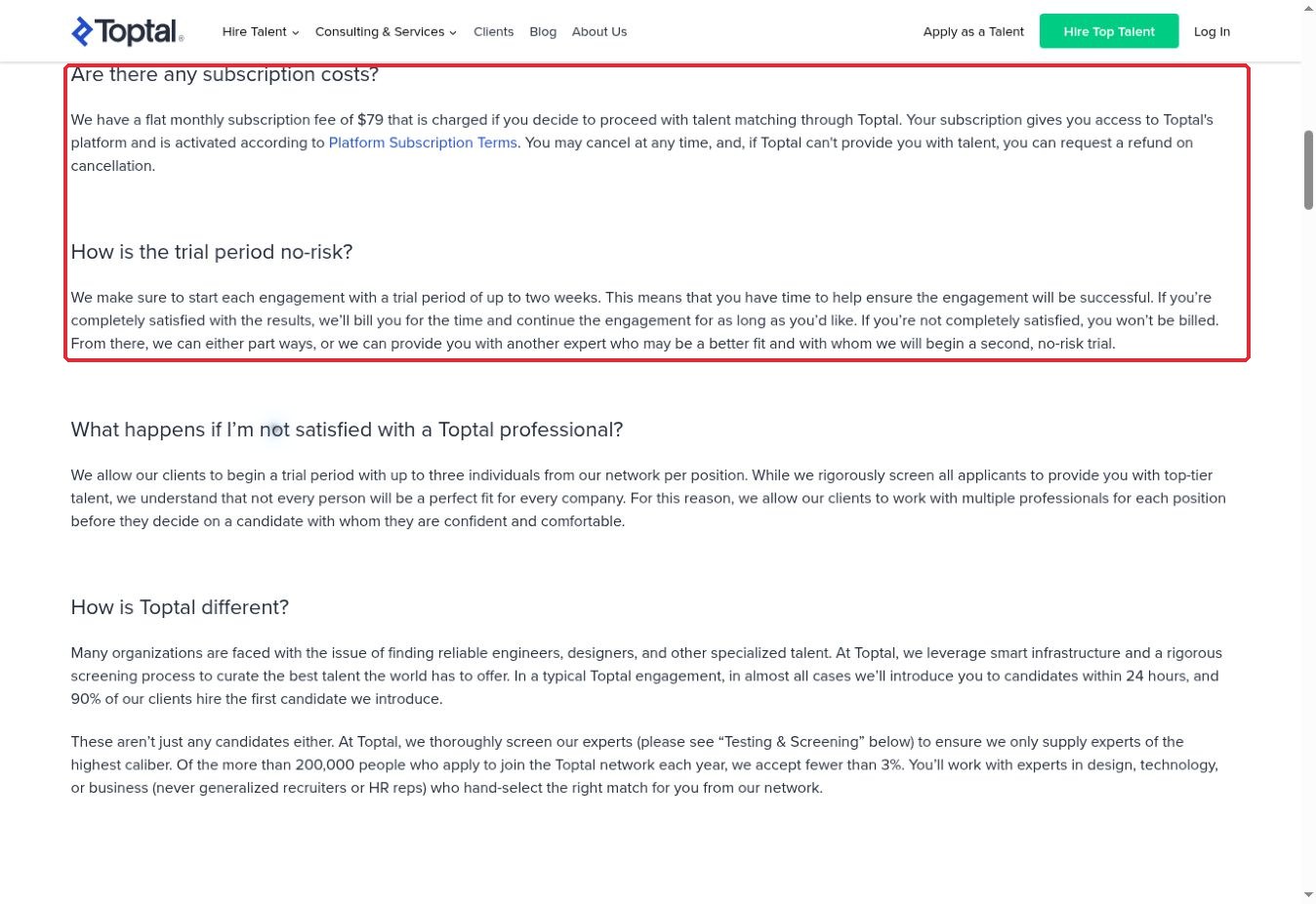
The official FAQ lists a $79 monthly platform subscription when you proceed with talent matching, alongside the cost of the engagement. It describes a trial of up to two weeks: if satisfied, you are billed for that time. “No-risk” should therefore not be read as two weeks of universally free work.
Before choosing: Get the proposed rate, expected hours, start date and trial conditions in writing. Explain your technical environment and the level of independent decision-making required. This route is most compelling when a poor match would consume significant management time; a very small, easily specified task may not justify the additional process.
First-hand observation: I followed the subscription-cost question in Toptal’s FAQ and reviewed the adjacent trial explanation. Seeing the monthly platform fee beside the rule that satisfactory trial work is billed helped me distinguish access costs from engagement costs. I did not start matching, hire talent or test the trial.
7. Contra: Portfolio-Led Independent Talent
Best for: Buyers who want to evaluate an independent professional through a visible portfolio and a clearly agreed project.
Why people choose it: Contra combines talent discovery with project and payment workflows. It is worth considering when the individual’s style, relevant examples and working approach matter as much as a standardized service category.
Do not interpret commission-free positioning as a promise that the buyer pays nothing beyond the expert’s fee. The current client help page lists platform fees that scale with the payment and are capped at $29 per transaction, with plan-dependent waivers. Payment processing is separate and depends on the method and eligibility.
Before choosing: Check the actual payment breakdown, especially for multiple installments. Ask whether the person whose portfolio you reviewed will do the work, what collaboration is expected from your team and how changes are approved. A strong visual portfolio is an opening to a discussion about business requirements, not a substitute for that discussion.
8. 99designs: Compare the Two Design Buying Routes
Best for: Brand identity and visual design projects where the selection process matters.
Why people choose it: 99designs offers design contests and direct one-to-one projects. Those are meaningfully different workflows: one explores competing concepts, while the other starts with a selected designer.
The platform’s fee guidance lists a 5% client platform fee for one-to-one projects. Do not apply that figure to every contest package; compare the pricing for the route you actually intend to buy. The designer’s own fee schedule is separate from the buyer’s costs.
Before choosing: State the required file formats, usage rights, brand applications and handover assets. Ask about fonts, stock imagery and any third-party licensing. A logo image alone may not cover your website, social templates and print materials. If continuity matters, consider how the chosen designer can support later work instead of treating the first design as an isolated purchase.
9. MarketerHire: Matching for Ongoing Marketing Work
Best for: A business with a defined marketing gap that needs ongoing specialist support.
Why people choose it: MarketerHire’s model centers on matching a business with marketing talent rather than asking the buyer to sift through an unrestricted gig catalog. Its roles span areas such as paid media, SEO, content, email and marketing leadership.
The current general pricing page directs buyers to discuss their needs and agree on a budget. It describes a two-week refundable trial and month-to-month engagements; confirm the written conditions for your proposal. Older or role-specific starting prices should not be treated as a universal minimum for every engagement.
Before choosing: Decide whether you need strategic direction, hands-on execution or both. Agree on expected capacity and the assets your team must provide. A skilled marketer cannot make meaningful progress if campaign approval, product information or analytics access remains unresolved. Our comparison of an agency versus an in-house social media team helps frame that division of responsibility.
10. Mayple: Marketing Packages With Separate Budget Components
Best for: Businesses comparing managed marketing help, particularly paid media services.
Why people choose it: Mayple makes it possible to explore defined marketing service packages and matching support. That can be helpful when you know the channel you need help with but want assistance finding a suitable specialist.
Its paid-media pricing page lists a $1,000 one-time audit and management starting at $1,800 per month, with a displayed media-budget band starting at $5,000–$10,000. These are different budget components. Do not assume the management fee includes the money spent on advertising, tracking setup or every optional service.
Before choosing: Ask who owns the ad accounts, conversion data and creative assets. Separate an audit recommendation from implementation and ongoing optimization. Agree on reporting and business objectives, while recognizing that published success stories are not forecasts for your campaign. If your available advertising spend is very small, the combined service commitment may be disproportionate.
11. Catalant: A Marketplace for Substantial Consulting Projects
Best for: Established digital businesses tackling strategy, operations or a specialized consulting initiative.
Why people choose it: Catalant connects clients with independent consultants and boutique firms. Its marketplace model supports project proposals and agreements, making it more relevant to a defined consulting assignment than a quick production task.
The customer terms distinguish Catalant’s platform role from the expert’s consulting work. Your assessment should therefore cover the specific consultant, proposed team and project agreement. A platform relationship does not mean Catalant itself performs every engagement.
Before choosing: Define the decision the consulting work must support. Ask what data is required, who conducts the analysis and whether implementation is included. A market-entry recommendation, an operating model and an implementation plan are different deliverables. Request a scoped proposal rather than expecting a universal catalog price. For a very small owner-operated business with a narrow question, a shorter advisory format may be more practical.
12. Clarity: Pay for a Focused Expert Conversation
Best for: An owner who needs targeted advice before making a decision or commissioning larger work.
Why people choose it: Clarity’s format is built around expert calls. The expert sets a per-minute rate, and the final charge reflects the call duration. That makes the preparation of your question especially important.
Its published process asks you to provide a reason for the call and propose times. This is an advisory purchase: a conversation should not be confused with a finished website, financial model or marketing implementation.
Before choosing: Prepare the relevant facts and two or three decisions you want to resolve. Check whether the expert’s background matches your business stage and problem. Decide in advance how much time you can afford and what a useful answer would look like. If you need written deliverables or follow-up execution, confirm a separate arrangement rather than assuming the call includes them.
Compare the Total Commitment, Not Just the Headline Rate
Use the same scope when asking for quotes. Otherwise, a $1,000 proposal that excludes migration, testing and training may appear cheaper than a $1,600 proposal that includes them. The difference may be scope rather than efficiency.
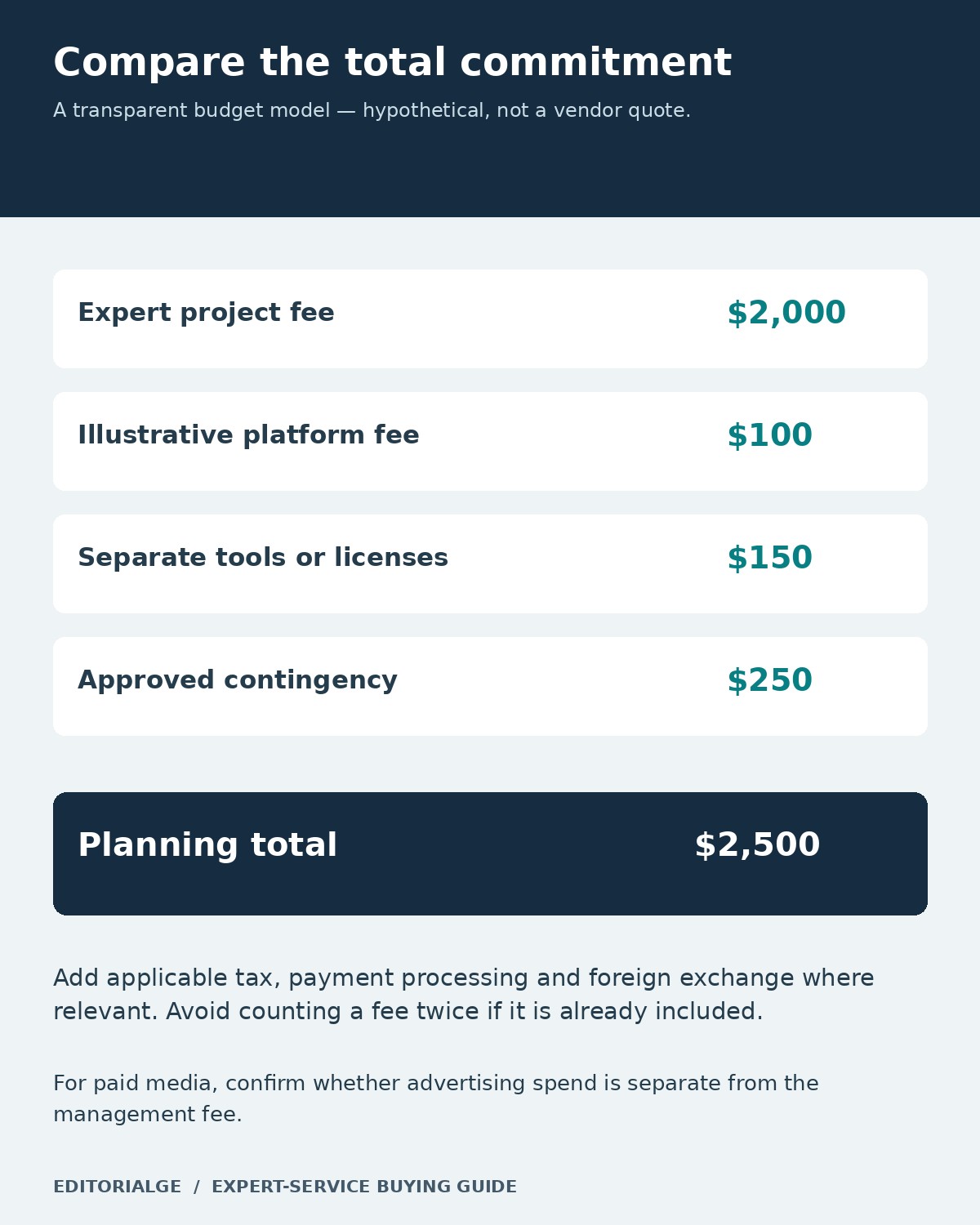
A useful comparison separates expert compensation, platform charges, processing costs, subscriptions, third-party licenses and approved contingency. For ongoing work, compare a realistic period such as three months rather than only the first invoice. Record whether the quote is fixed, hourly, recurring or only an indicative starting price.
Cross-border hiring adds another question: can your chosen contractor actually receive the agreed payment through the permitted route? Our guide to global payment tools for freelancers explains why receiving eligibility and withdrawal costs deserve separate attention. Follow the marketplace’s payment rules rather than assuming an external transfer is acceptable.
A Practical Eight-Step Pilot Before a Larger Engagement
The workflow below is a recommended buyer process, not a claim that we completed paid hiring tests on these platforms. Use it to turn a promising profile into a more accountable decision.
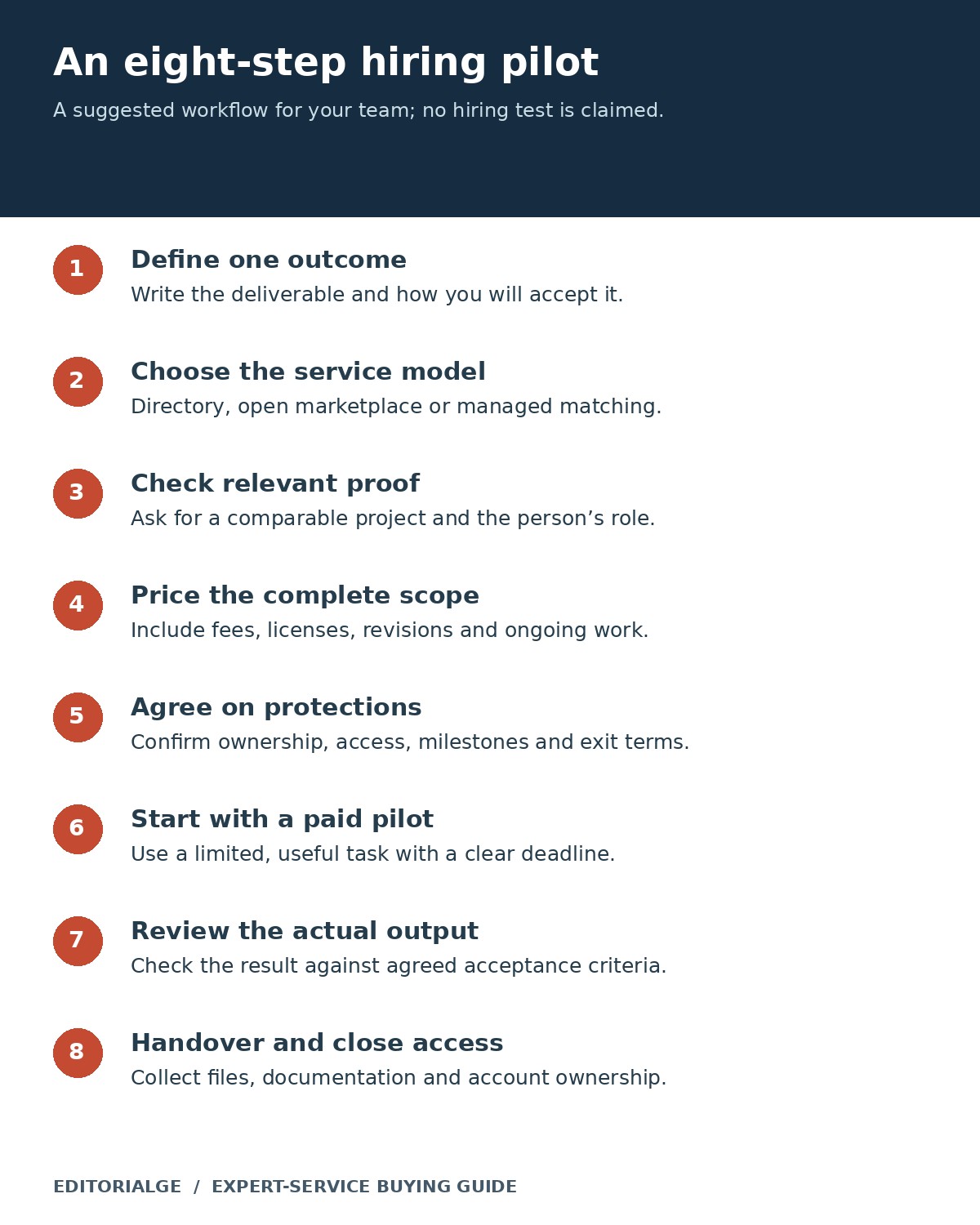
Start with one useful outcome: a documented site audit, a tested integration on staging, a small design asset set or an agreed analysis. State the acceptance criteria before work begins. For example, “the form submits successfully and records the required fields in the CRM” is easier to assess than “improve our lead generation.”
Review communication as well as output. Did the expert identify missing information, explain a tradeoff and document the work? Record any revisions against the original brief. If the pilot succeeds, expand the engagement with the same ownership, approval and handover rules.
US Buyer Checks: Classification, Access and Ownership
Hiring through a marketplace does not settle worker classification. The IRS guidance on contractors and employees considers behavioral control, financial control and the relationship between the parties. An ongoing arrangement may require closer review than a discrete project. Obtain advice appropriate to your circumstances, including relevant state rules.
Before giving access to customer data or production systems, agree on permissions and security expectations. The FTC’s Start with Security guide emphasizes reasonable safeguards by service providers. Use individual accounts, appropriate access limits and a handover process that removes unnecessary access when work ends.
Confirm ownership of source files, code, accounts and documentation. Identify any assets licensed from a third party and any restrictions on reuse. If AI tools will handle confidential material or generate deliverables, agree on that use and the review process beforehand. These questions are easier to resolve before payment than during a disputed handover.
Frequently Asked Questions
Which marketplace is best for a small US digital business?
The best shortlist depends on the work. Start with a platform specialist for an existing WordPress, Shopify or Webflow project. Use a broad marketplace for a clearly scoped freelance task, or managed matching when you need help identifying a suitable professional. There is no single winner across all service categories.
Do these marketplaces only list US-based experts?
No. This guide is written for US buyers, not limited to US-only talent. Where location matters, use the available filter and confirm the contracting entity, the actual delivery team and working-hour overlap. A business location is not proof that every contributor works there.
Does a vetted or certified badge guarantee the result?
No. It describes a platform’s selection or qualification process. Ask for evidence relevant to your project, agree on acceptance criteria and evaluate a limited engagement before expanding the relationship.
What do the screenshots prove?
The evidence has different scopes: public-interface captures document controls and published terms; the founder’s Upwork screenshots document the displayed pricing; and his redacted Fiverr invoices document two actual billed purchases. None of these alone establishes freelancer quality or business results. Captions identify provenance and limitations.
Should you choose an advice call or a project engagement?
Choose a call when a knowledgeable conversation can resolve a focused decision. Choose a project when you need a defined output, implementation or continuing responsibility. If you need both, specify where advice ends and delivery begins.
Choose the Platform That Fits the Work
The most useful expert-service marketplaces for US digital business owners make it easier to find relevant expertise and agree on a manageable engagement. Begin with your existing technology, the outcome you need and the amount of supervision you can provide. Then compare complete scope, total cost, ownership and a practical first milestone.
A credible profile earns a place on the shortlist. Clear terms and a well-reviewed first deliverable earn the larger commitment.