


Robots.txt for publishers often treats the file like a small technical detail until one wrong line blocks important articles, images, or entire sections from being crawled. That is when this simple text file becomes a serious SEO problem.
For publishers, robots.txt is not just a developer file. It affects crawl access, content discovery, resource visibility, sitemap discovery, and sometimes how search engines understand your site structure. Used carefully, it can help control crawler activity and reduce crawling of low-value areas. Used badly, it can hide useful content from crawlers and create indexing confusion.
The tricky part is that robots.txt does not work the way many people think. It can stop crawling, but it does not guarantee that a URL will stay out of search results. It can guide good crawlers, but it does not secure private content. It can clean up crawl paths, but it cannot fix weak content, poor internal linking, or bad canonical rules.
This robots.txt guide explains how the file works, what publishers should block, what they should never block, and how to avoid the mistakes that quietly hurt technical SEO.
What Is a Robots.txt File?
A robots.txt file is a plain text file that gives crawl instructions to search engine bots and other automated crawlers.
It usually lives at: https://example.com/robots.txt
The file tells crawlers which parts of your website they are allowed or not allowed to crawl. These instructions are called crawler directives.
A very simple robots.txt file may look like this:
- User-agent: *
- Disallow: /wp-admin/
- Allow: /wp-admin/admin-ajax.php
- Sitemap: https://example.com/sitemap.xml
This means the rule applies to all crawlers, blocks the WordPress admin area, allows the admin AJAX file, and points crawlers to the sitemap.
For publishers, the file is usually used to manage crawl access to admin areas, internal search pages, low-value technical paths, duplicate URL patterns, or specific bot types.
Why Robots.txt Matters for Publishers
Publishers often have more crawl complexity than small business websites.
A publishing site may include:
- Thousands of articles
- Category archives
- Tag pages
- Author pages
- Date archives
- Internal search result pages
- Media files
- Sponsored content
- Pagination
- Syndicated content
- AMP or mobile paths
- Staging or preview URLs
- Multiple language versions
- Ad and tracking parameters
Without careful control, crawlers can waste time visiting pages that do not help search visibility. That is where robots file SEO becomes useful.
A clean robots.txt file can help publishers:
- Reduce crawling of low-value sections
- Keep technical paths out of crawl activity
- Point crawlers to XML sitemaps
- Avoid unnecessary server load
- Control access for specific bots
- Support a cleaner technical SEO setup
But the goal is not to block everything that looks messy. The goal is to guide crawlers without hiding important content or resources.
Robots.txt Is About Crawling, Not Indexing
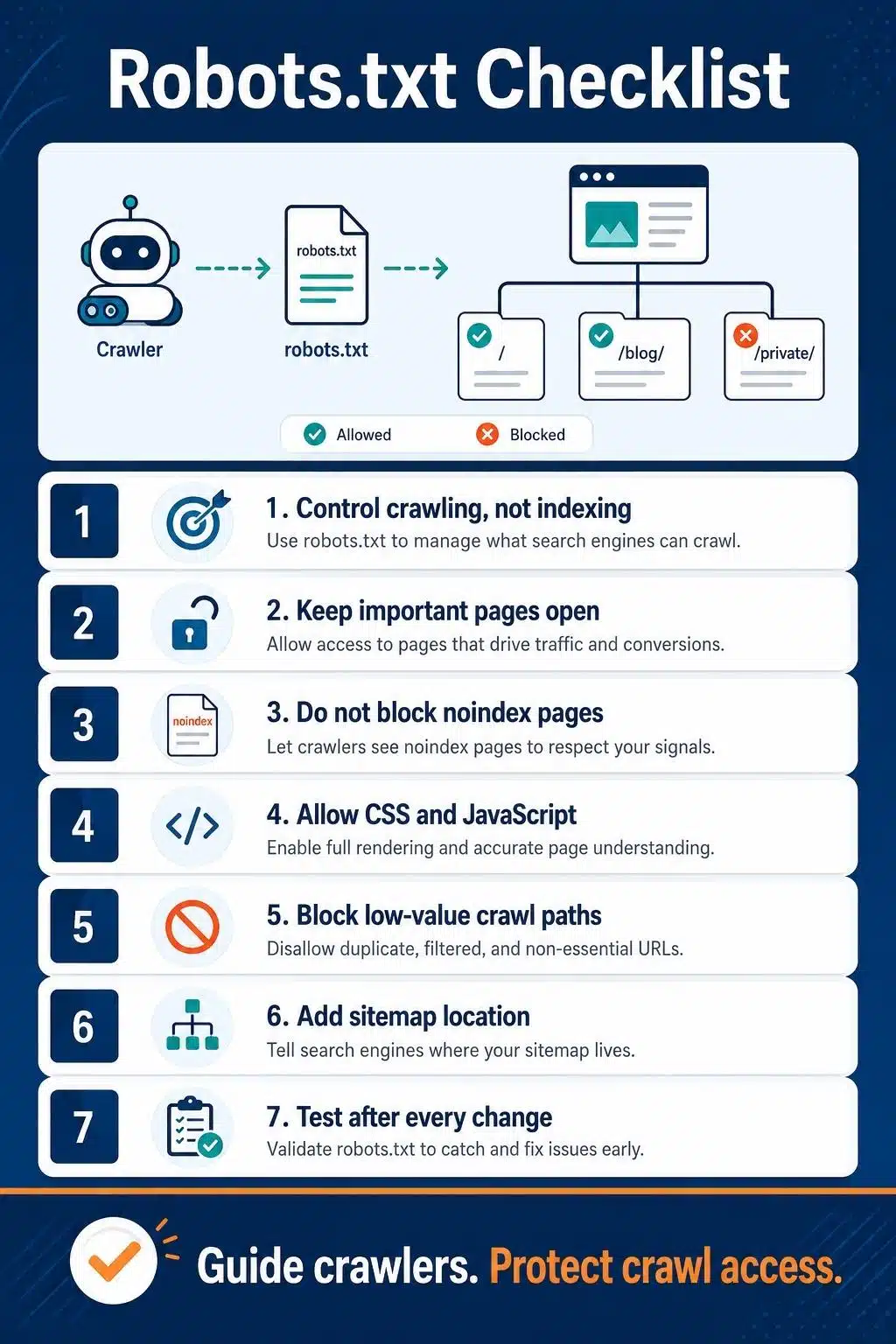
This is the most important point. Robots.txt controls crawling. It does not reliably control indexing.
If you block a page in robots.txt, a search engine may not crawl the page content. But the URL can still appear in search results if other pages link to it. In that case, the search result may show the URL without a proper title or description.
This is why robots.txt should not be used as your main method for removing pages from search results.
Use this simple rule:
- Use robots.txt to control crawling.
- Use noindex to control indexing.
- Use password protection for private content.
For example, if a thin tag page should not appear in Google, use noindex, not robots.txt. If a confidential document should not be public, use login protection, not robots.txt. Robots.txt is a crawl instruction, not a privacy tool.
Basic Robots.txt Directives Publishers Should Know
Most publishers only need a few common directives.
| Directive | What It Does | Publisher Use |
| User-agent | Targets a specific crawler or all crawlers | Apply rules to Googlebot, Bingbot, or all bots |
| Disallow | Blocks the crawling of a path | Block admin areas, internal search, or low-value technical paths |
| Allow | Allows crawling of a specific path inside a blocked area | Allow needed files inside otherwise blocked folders |
| Sitemap | Points crawlers to your XML sitemap | Help crawlers discover the sitemap location |
| Comment | Adds notes using # | Explain the rules for future editors or developers |
The most common user-agent pattern is:
User-agent: * This targets all crawlers that follow robots.txt.
A specific crawler rule may look like:
- User-agent: Googlebot
- Disallow: /example-folder/
Be careful with crawler-specific rules. They can create confusion if the team does not maintain them properly.
A Simple Robots.txt Example for WordPress Publishers
A basic WordPress publisher setup might look like this:
- User-agent: *
- Disallow: /wp-admin/
- Allow: /wp-admin/admin-ajax.php
- Disallow: /?s=
- Disallow: /search/
- Sitemap: https://example.com/sitemap_index.xml
This is a simple example, not a universal template. It blocks the WordPress admin area and internal search result URLs. It also points crawlers to the XML sitemap index.
Before copying any robots.txt example, check your own site structure. A rule that is safe on one site can be harmful on another.
For example, blocking /tag/ may be fine if all tag pages are thin and noindexed. But if your tag pages are strong topic landing pages, blocking them could hurt discovery.
What Publishers Should Usually Block
Publishers can often block areas that do not help search engines understand valuable content.
Common candidates include:
- Admin folders
- Login areas
- Internal search result pages
- Cart or account pages, if applicable
- Duplicate technical paths
- Staging folders, if publicly accessible
- Filter URLs that create crawl traps
- Parameter-heavy duplicate URLs
- Temporary files
- Script-generated low-value pages
Internal search pages are a common issue for publishers. They can generate endless low-quality combinations and waste crawl attention. In many cases, they should not be crawlable or indexable.
Filter and parameter URLs also need care. If faceted navigation or tracking parameters create many duplicate URLs, robots.txt may help limit crawling. But canonical tags, noindex rules, URL parameter handling, and internal linking cleanup may also be needed.
Do not use robots.txt as a shortcut for every technical problem. Use it carefully as part of a bigger technical SEO system.
What Publishers Should Not Block
The most dangerous robots.txt mistakes happen when publishers block things search engines need.
Avoid blocking:
- Article URLs you want indexed
- Category pages that support topical authority
- Important author pages
- CSS files needed for rendering
- JavaScript files needed for page layout
- Images that should appear in image search
- Video files that should be discoverable
- XML sitemaps
- RSS feeds, if they support discovery
- API routes needed to render content
- Canonical pages
- Pages with noindex tags that crawlers need to see
That last point is important. If you want Google to see a noindex tag, do not block the page in robots.txt. The crawler needs access to the page to read the noindex directive.
Blocking CSS or JavaScript can also cause problems. Search engines need to render pages to understand layout, content, links, and mobile usability. If blocked resources make the page hard to understand, SEO can suffer.
Robots.txt vs Noindex vs Canonical
Publishers often mix these up, so this table makes the difference clear.
| Method | Main Job | Best Use | Common Mistake |
| Robots.txt | Controls crawling | Stop crawlers from accessing low-value or technical paths | Using it to remove pages from search results |
| Noindex | Controls indexing | Keep a crawlable page out of search results | Blocking the page in robots.txt so crawlers cannot see the noindex tag |
| Canonical | Signals preferred URL | Consolidate duplicate or similar pages | Using canonical when the page should simply be noindexed or removed |
Use the right tool for the right problem.
If the page should not be crawled, robots.txt may help.
If the page should not appear in search results, use noindex.
If the page is a duplicate of another useful page, use canonical.
For large publisher sites, these three signals should work together, not against each other.
How Robots.txt Supports Sitemap Discovery
Your robots.txt file can include a sitemap directive.
Example:
Sitemap: https://example.com/sitemap_index.xml
This helps crawlers find your XML sitemap. It is especially useful for publishers with multiple sitemap files, such as post sitemaps, page sitemaps, category sitemaps, news sitemaps, or video sitemaps.
If your site uses the pillar guide on technical SEO for publishers as part of a wider SEO architecture, your robots.txt and XML sitemap should support that structure. The sitemap should list important canonical URLs. Robots.txt should avoid blocking the paths on which those URLs depend.
Do not block your sitemap file.
Do not list old sitemap URLs.
Do not point to staging sitemaps.
Do not point to HTTP sitemaps if HTTPS is your canonical version.
Keep the sitemap directive simple and accurate.
Robots.txt Best Practices for Publishers
A good robots.txt file should be short, clear, and safe.
Follow these best practices:
- Keep the file at the root of the host.
The correct location is usually https://example.com/robots.txt. - Use only rules you understand.
Do not copy complicated patterns from another website. - Block low-value crawl paths, not important content.
Avoid blocking articles, categories, and useful resources. - Keep noindex pages crawlable.
Crawlers need to access a page to see the noindex tag. - Add your sitemap URL.
Point crawlers to your XML sitemap or sitemap index. - Test changes before and after publishing.
Small syntax mistakes can create large SEO issues. - Comment important rules.
Use comments so future editors and developers know why a rule exists. - Review after migrations and redesigns.
Robots.txt errors often happen during site moves, CMS changes, or theme rebuilds. - Watch subdomains separately.
A robots.txt file applies only to the host where it lives. - Avoid using robots.txt for security.
Private content needs authentication or server-level protection.
The best robots.txt file is not the longest one. It is the clearest one.
Common Robots.txt Mistakes
Mistake 01: Blocking the Whole Site by Accident
This is the nightmare mistake. A line like this can block the entire site from crawling:
- User-agent: *
- Disallow: /
This sometimes happens when a staging rule is moved to production. For publishers, it can affect articles, categories, images, and important landing pages. Always check robots.txt after migrations, redesigns, and hosting changes.
Mistake 02: Using Robots.txt to Hide Pages From Search
Robots.txt does not reliably remove URLs from search results.
If other pages link to a blocked URL, the URL can still appear in search. Use noindex or password protection when the goal is to prevent indexing.
Mistake 03: Blocking Pages That Have Noindex Tags
This creates a conflict. If a page is blocked by robots.txt, crawlers may not be able to see the noindex tag. Keep noindex pages crawlable until search engines process the directive.
Mistake 04: Blocking CSS or JavaScript Needed for Rendering
Search engines need important page resources to understand the layout and content. If blocked CSS or JavaScript changes how a page renders, it can affect how crawlers understand the page.
Mistake 05: Blocking Important Categories or Topic Hubs
Some publishers block category, tag, or archive paths without reviewing their value. If those pages support topical authority, internal linking, or content discovery, blocking them may weaken SEO.
Mistake 06: Forgetting Subdomains
Robots.txt is host-specific. A rule on example.com/robots.txt does not automatically control news.example.com, shop.example.com, or m.example.com. Each host needs its own file if crawl rules are needed.
Mistake 07: Not Testing After Changes
Robots.txt mistakes often stay hidden until rankings or crawl activity drop. Use Search Console, URL Inspection, and manual checks after every important robots.txt update.
When Should Publishers Update Robots.txt?
You do not need to edit robots.txt often. A stable file is usually better than one that changes constantly.
Update it when:
- You launch a new site section
- You migrate to a new CMS
- You change the permalink structure
- You create or remove subdomains
- You discover crawl traps
- You add major filtering or search functionality
- You fix staging or development access issues
- You change sitemap locations
- You clean up low-value crawl paths
- You recover from accidental blocking
After an update, test important URLs. Do not assume the rules work correctly just because the file loads.
Final Thoughts
Robots.txt for publishers should treat this file as a crawl management tool, not an indexing tool, privacy tool, or SEO shortcut.
A strong robots.txt setup helps crawlers avoid low-value areas while keeping important articles, resources, sitemaps, and topic hubs accessible. That balance matters for publishers because one careless directive can affect thousands of URLs.
Keep the file simple. Block only what should not be crawled. Use noindex for pages that should stay out of search results. Keep resources open when they help search engines render pages correctly. Add your sitemap location. Test every important change. That is the safest approach to robots file SEO.
Robots.txt will never replace good content, clean internal linking, canonical consistency, or a healthy sitemap. But when it is configured carefully, it becomes one of the quiet technical signals that keeps a publisher’s site easier to crawl and easier to manage.
Frequently Asked Questions About Robots.txt for Publishers
1. What is robots.txt in SEO?
Robots.txt is a plain text file that tells search engine crawlers which parts of a website they can or cannot crawl. In SEO, it is mainly used to manage crawl access and reduce crawling of low-value or technical areas.
2. Should publishers use robots.txt?
Yes, most publishers should use robots.txt carefully. It can help manage crawling of admin areas, internal search pages, technical paths, duplicate URL patterns, and sitemap discovery. But it should not block important articles, topic hubs, or resources needed for rendering.
3. Can robots.txt stop a page from being indexed?
Not reliably. Robots.txt can stop crawling, but a blocked URL may still appear in search results if other pages link to it. To prevent indexing, use a noindex tag, X-Robots-Tag header, or password protection.
4. Should I block tag pages in robots.txt?
Not automatically. If tag pages are thin and low-value, they may be better handled with noindex or cleanup. If tag pages are useful topic pages with strong internal linking, blocking them can hurt discovery. Review their SEO value before making a rule.
5. Should XML sitemaps be listed in robots.txt?
Yes, listing your sitemap or sitemap index in robots.txt is a good practice. It gives crawlers another clear way to find your sitemap location.
6. Is robots.txt the same as noindex?
No. Robots.txt controls crawling. Noindex controls indexing. If you want a page removed from search results, use noindex and make sure crawlers can access the page to see that directive.
7. How often should publishers audit robots.txt?
Publishers should audit robots.txt after site migrations, redesigns, CMS changes, permalink updates, sitemap changes, subdomain launches, or traffic drops. For active publisher sites, a quarterly check is a smart habit.






















