
A publisher can do many things right and still lose search visibility. The article may be well written. The headline may be sharp. The topic may have demand. The editorial team may publish consistently. But if search engines struggle to crawl the page, understand the mobile version, process pagination, choose the correct canonical URL, or separate important articles from low-value archive pages, the content may never get the search performance it deserves.
That is why the technical SEO for publishers needs is different from a basic website checklist. For blogs, news sites, magazines, and digital media brands, technical SEO is the system that helps search engines discover, crawl, render, index, understand, and refresh content at scale. It keeps new articles visible, old evergreen pages accessible, category pages useful, sitemaps clean, and crawl resources focused on URLs that matter.
Technical SEO will not make weak content useful. But without it, useful content can easily get buried.
In this guide, I’ll explain technical SEO for blogs, publisher SEO, and news site SEO in a practical way. It is written for editors, SEO managers, content leads, developers, and site owners who need a clear working roadmap, not a pile of random technical tasks.
What Technical SEO Means for Publishers
Technical SEO is the work that makes a website easier for search engines to access, process, and understand. For a publisher, that includes more than article pages.
A publishing site usually has:
- News articles
- Evergreen guides
- Category pages
- Tag pages
- Author pages
- Paginated archives
- Topic hubs
- Internal search pages
- Image and video pages
- Syndicated content
- Updated articles
- Tracking parameter URLs
- Mobile templates
- JavaScript modules
- XML sitemaps
- News sitemaps
That is a lot of moving parts. A small business site may have 50 important pages. A publisher may have 50,000 URLs, many of them created automatically by the CMS. Not all of those URLs deserve to be indexed. Not all of them deserve crawl attention. Some help readers. Some help search engines. Some create duplicate, thin, or confusing paths. Good publisher SEO begins by separating useful URLs from noise.
The goal is simple:
Search engines should find the right content quickly, understand the main version of each page, and avoid wasting time on low-value or duplicate URLs.
Why Publishers Need a Different Technical SEO Approach
Publisher websites grow fast. Every new article can create related URLs around it: category archives, tag archives, author pages, paginated pages, feeds, image attachment pages, and sometimes parameter versions. That growth creates technical risk.
Common publisher problems include:
- New articles are not discovered quickly
- Important evergreen content is buried too deep
- Thin tag pages are indexed without value
- Paginated archives are handled incorrectly
- Mobile pages missing content from desktop
- Sitemaps filled with redirected or noindex URLs
- Robots.txt used for the wrong purpose
- Canonical tags pointing to the wrong page
- JavaScript hides important content or links
- Ad scripts are slowing down mobile pages
- Old URLs are wasting crawl resources
- Search Console warnings ignored until traffic drops
This is why technical SEO for blogs and news sites should not be treated as a one-time plugin setup. It needs routine maintenance.
A publisher’s technical health changes every time the site publishes, updates, deletes, redirects, redesigns, monetizes, or changes templates.
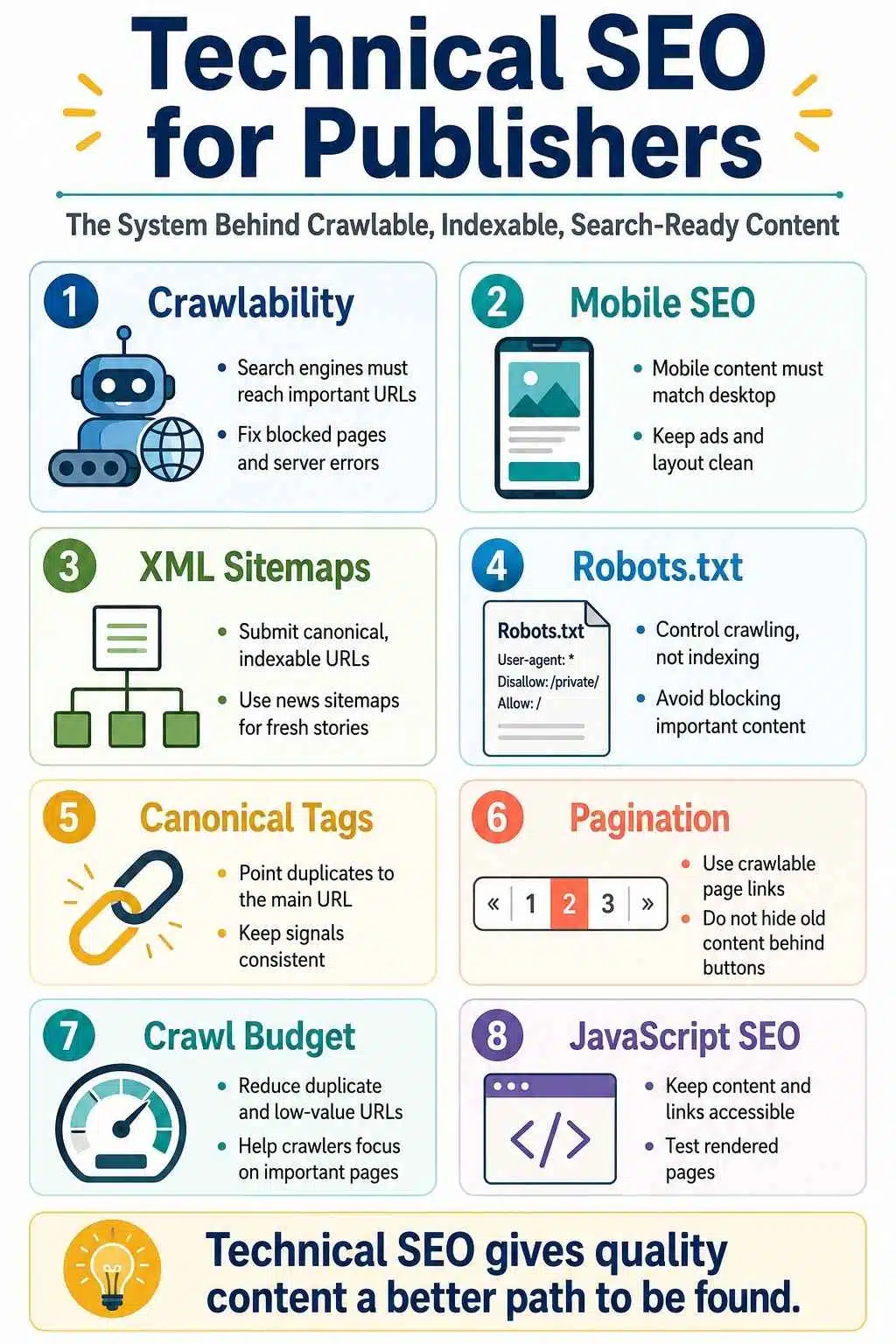
The Search Flow Publishers Should Understand
Before fixing technical issues, publishers need a simple understanding of how search works.
Crawling
Crawling is when search engines discover and fetch URLs. For publishers, crawling matters because fresh content has a short opportunity window. A news article, seasonal guide, product update, sports story, or trend piece loses value when discovery is delayed.
Search engines usually discover URLs through links, sitemaps, feeds, redirects, and previously known pages. If your new article is not linked well, not included in the right sitemap, or hidden behind JavaScript, discovery may slow down.
Rendering
Rendering is when search engines process the page to understand what users see after HTML, CSS, and JavaScript load.
This matters because modern publisher sites often use JavaScript for menus, related articles, infinite scroll, ads, comments, video blocks, paywalls, and interactive layouts. If important content or internal links only appear after user actions, search engines may not process them reliably.
Indexing
Indexing is when search engines decide whether a URL belongs in their search database and what the page is about. A page can be crawlable but still not indexed.
That may happen because the page looks duplicate, low value, blocked, redirected, canonicalized elsewhere, or technically unclear.
Ranking
Ranking is where content quality, relevance, authority, freshness, links, user experience, and search intent matter. Technical SEO supports ranking by removing friction.
It does not replace editorial quality. The best publisher SEO happens when technical clarity and useful content work together.
The Technical Foundation Every Publisher Needs
Before going into advanced work, every publisher should make sure the basics are clean.
Important pages should:
- Return a valid 200 status code
- Be accessible to search engine crawlers
- Contain indexable content
- Have a clear title tag and meta description
- Use a logical H1 and heading structure
- Include a correct canonical URL
- Be linked internally
- Appear in the correct XML sitemap
- Work properly on mobile
- Load without major layout or script problems
That sounds simple, but publisher sites often fail at the template level. One template mistake can affect thousands of articles.
If the article template has a wrong canonical tag, every article can inherit the problem. If the mobile template hides internal links, discovery can suffer across the site. If the CMS puts noindex on the wrong archive type, entire sections can disappear from search.
Technical SEO for publishers should always look at templates, not just individual URLs.
Site Architecture: Help Search Engines Understand the Publication
A publisher’s site architecture should make the editorial structure clear. Search engines and readers should be able to understand:
- What the publication covers
- Which topics are most important
- Which categories are the main sections
- Which articles are cornerstone resources
- Which authors are connected to which topics
- How can older articles still be found
- How new articles connect to existing coverage
A clean publisher structure often includes:
- Homepage
- Main categories
- Subcategories where needed
- Topic hubs
- Article pages
- Author pages
- Breadcrumbs
- Related articles
- HTML pagination
- XML sitemaps
The common mistake is relying only on recency. New articles appear on the homepage for a short time, then disappear into deep archives. After a few days, they may only be reachable through page 17 of a category archive or a weak tag page.
That is not enough for strong long-term SEO. Important evergreen articles need stable internal links. Strong categories should point to the best guides. New articles should link to relevant older resources. Topic hubs should organize related coverage.
Search engines follow links. If your own site treats an article as unimportant, search engines may do the same.
Internal Linking for Publisher SEO
Internal linking is one of the most practical technical SEO tools publishers control. Good internal links help search engines discover new content, understand topical relationships, and keep valuable older articles alive.
For publishers, internal links should connect:
- New articles to evergreen guides
- Evergreen guides to supporting cluster articles
- Category pages to important topic hubs
- Related news updates to the main explainers
- Author pages to relevant expertise areas
- Old articles to newer, updated resources
Automated “related posts” widgets can help, but they are not enough. A contextual link inside the article body is often more useful because it appears where the reader actually needs the next step.
Do not add links just to add links. A good internal link should help the reader understand the topic better or continue the journey naturally.
Mobile SEO for Publishers
Mobile SEO is critical for publishers. Many readers reach articles through mobile search, Google Discover, social feeds, messaging apps, and mobile browsers. That means the mobile version of your site must carry the real editorial experience.
A publisher’s mobile page should include:
- Full article content
- Same main headline
- Equivalent title and meta information
- Correct canonical tag
- Important internal links
- Author and date details
- Structured data where relevant
- Proper images and videos
- Readable font size
- Stable layout
- Ads that do not block the article
A common problem is mobile content reduction. The desktop article may show full content, author details, related articles, breadcrumbs, and useful internal links. The mobile version may remove or hide some of that to simplify the design.
That can hurt both users and search understanding. Mobile-first thinking does not mean “make it smaller.” It means the mobile page should be complete, usable, and technically clear.
Ads and Mobile Experience
Publishers need revenue. Ads are part of the business. But uncontrolled ad setups can damage mobile SEO and reader trust.
Watch for:
- Ads are pushing the article too far down
- Sticky ads covering content
- Intrusive popups
- Layout shifts
- Slow ad scripts
- Too many third-party tags
- Video ads are loading before the article
- Interstitials that interrupt reading
A publisher page should feel like content supported by ads, not ads hiding content. That balance matters for both SEO and user experience.
Core Web Vitals and Performance
Page performance is not just a developer concern. For publishers, performance affects crawling, mobile experience, engagement, ad viewability, and return visits.
The biggest performance problems often come from:
- Heavy themes
- Oversized images
- Too many plugins
- Slow ad scripts
- Social embeds
- Video players
- Comment systems
- Tracking scripts
- Font loading issues
- Poor caching
- Weak hosting
- JavaScript-heavy templates
Start with the page types that matter most:
- Article template
- Category page
- Homepage
- Tag archive
- Author page
- Mobile article page
Do not only test the homepage. For publishers, the article template usually matters more because that is where most organic search traffic lands.
A practical performance review should ask:
- Does the article load quickly on mobile?
- Does the main content appear early?
- Are images compressed?
- Are ads causing layout shifts?
- Are unnecessary scripts loading on every page?
- Are old plugins still active?
- Is caching working?
- Does the page remain usable on slower connections?
Performance improves when teams remove what is not needed, not when they simply add another optimization plugin.
XML Sitemaps for Publishers
XML sitemaps help search engines discover important URLs. They are especially useful for large publisher sites, frequently updated blogs, news sites, and content libraries with deep archives.
A publisher may need:
- Article sitemap
- Page sitemap
- Category sitemap
- News sitemap
- Image sitemap
- Video sitemap
- Sitemap index file
The sitemap should include canonical, indexable, working URLs.
Do not fill sitemaps with:
- Redirected URLs
- 404 URLs
- Noindex pages
- Parameter URLs
- Duplicate versions
- Internal search pages
- Thin tag pages
- Staging URLs
- Old test URLs
A sitemap is not a storage folder for every URL. It is a signal that says, “These are the URLs we want search engines to know about.” Keep it clean.
Use Lastmod Honestly
The <lastmod> field should reflect meaningful updates. Do not automatically refresh the date every day if nothing important has changed.
Use lastmod when:
- A guide was substantially updated
- Facts were corrected
- New sections were added
- Data changed
- Product, legal, health, finance, or event details were refreshed
- The article received a real editorial update
Minor formatting changes should not pretend to be major updates. For publishers, honest update signals matter.
News Sitemaps for News Sites
News site SEO needs special sitemap handling. A news sitemap is not the same as a normal article sitemap. It is designed for fresh news content and should be used carefully.
A strong news sitemap should:
- Include only recent news articles
- Update when new news articles are published
- Use the correct publication name
- Use the correct language
- Include the publication date
- Include the article title
- Avoid old evergreen URLs
- Stay separate from general archive sitemaps where possible
Mixed publishers should separate sitemap types.
For example:
- Standard article sitemap for evergreen content
- News sitemap for recent news articles
- Video sitemap for video content
- Sitemap index file to organize them
This makes monitoring easier and reduces confusion. A news sitemap should support freshness. It should not become an archive dump.
Robots.txt for Publishers
Robots.txt tells crawlers which URLs or paths they can request. It is useful, but often misunderstood. For publishers, robots.txt can help manage crawl waste in areas such as:
- Internal search result pages
- Certain filtered URLs
- Duplicate parameter paths
- Admin areas
- Low-value generated paths
- Some crawl-heavy technical folders
But robots.txt should not be used as the main method for keeping normal pages out of search results. If a page should not appear in search, use noindex where appropriate, or protect private content with authentication. This distinction matters.
A blocked URL may still be discovered through links. If search engines cannot crawl it, they may not see a noindex tag on the page.
Common publisher robots.txt mistakes include:
- Blocking article sections by accident
- Blocking CSS or JavaScript needed for rendering
- Blocking sitemaps
- Blocking paginated archives that help discovery
- Leaving staging rules on the live site
- Using robots.txt instead of noindex
Review robots.txt after every redesign, migration, plugin change, CMS update, or developer deployment. One wrong rule can damage a large section of a publisher’s site.
Noindex and Index Control
Not every crawlable page should be indexed. That is normal. Publishers should use noindex carefully for pages that may exist for users or navigation but do not deserve search visibility.
Possible noindex candidates include:
- Thin tag pages
- Internal search pages
- Login pages
- Thank-you pages
- Duplicate date archives
- Weak author pages
- Low-value filtered archives
- Temporary campaign pages
But be careful. If a noindexed page is also the only path to older, important articles, discovery may suffer over time. Index control is not just about removing weak pages. It is about keeping search results clean while preserving useful crawl paths.
Canonical Tags for Publishers
Canonical tags help search engines understand the preferred version of duplicate or similar pages. This is a major publisher issue because the same article can appear through multiple URL patterns.
Canonical issues often happen with:
- Tracking parameters
- Category-based article paths
- AMP or legacy mobile URLs
- Print versions
- Syndicated content
- HTTP and HTTPS versions
- WWW and non-WWW versions
- Republished content
- Updated article versions
- Pagination pages
- Tag and archive duplicates
A clean canonical setup should point each article to the main version of the URL.
Good canonical practice includes:
- Use absolute canonical URLs
- Point to the final preferred URL
- Avoid canonicals to redirect URLs
- Avoid canonicals to noindex URLs
- Keep internal links consistent with canonical URLs
- Include canonical URLs in sitemaps
- Avoid multiple canonical tags on one page
- Keep canonical tags in the valid head section
A canonical tag is a strong signal, but it is not an absolute command. Search engines may choose a different canonical if your signals conflict. That is why internal links, sitemaps, redirects, and canonicals should all point in the same direction.
Pagination SEO for Publisher Archives
Pagination matters for publishers because archives grow every day. Category pages, tag pages, author pages, long lists, and older article archives often depend on pagination.
Good pagination should be:
- Crawlable
- Logical
- Fast
- Useful to readers
- Supported by unique URLs
Each paginated page should have its own URL. Search engines should be able to follow normal HTML links to page 2, page 3, and deeper pages. Avoid making “load more” buttons or infinite scroll the only way to reach older content.
For publisher archives, watch these mistakes:
- Canonicalizing every paginated page to page one
- Using JavaScript-only pagination
- Relying only on infinite scroll
- Hiding older articles behind interaction
- Blocking paginated pages without another discovery path
- Creating endless low-value paginated tag archives
Infinite scroll can work for users, but search engines still need crawlable URLs. A good setup can support both: smooth browsing for readers and clean paginated URLs for crawlers.

Categories, Tags, and Archives
Categories and tags are useful when they create meaning. They become a problem when they create clutter.
A strong category page usually represents a main editorial section. It may deserve indexing because it helps readers browse a topic and helps search engines understand the publication’s structure.
A strong tag page should have:
- A clear topic
- Enough quality articles
- Search or editorial value
- A short, unique description
- Useful internal links
- Clean pagination
Weak tag pages usually have:
- One or two articles
- No unique description
- Overlapping tags
- Duplicate meaning
- Thin content
- No clear search value
Publishers should audit tags regularly. Merge similar tags. Noindex weak ones. Delete useless ones carefully. Turn important topics into proper hubs rather than relying on random tag archives.
Categories should be stable. Tags should be controlled. Archives should support discovery, not flood search engines with low-value URLs.
Crawl Budget for Large Publishers
Crawl budget matters most for large or frequently updated sites. A small blog does not need to obsess over it. A large publisher with thousands of posts, daily updates, multiple archives, parameters, redirects, and old URLs should take it seriously.
Crawl waste often comes from:
- Duplicate parameter URLs
- Thin tag pages
- Internal search pages
- Redirect chains
- 404 URLs linked internally
- Faceted navigation
- Session IDs
- Tracking URLs
- Old test pages
- Soft 404 pages
- Infinite calendar archives
- Low-value paginated pages
Better crawl efficiency comes from:
- Clean internal linking
- Accurate sitemaps
- Correct canonical tags
- Reduced duplicate URLs
- Fast server responses
- Fewer redirect chains
- Fewer internal 404s
- Controlled tags and archives
- Strong topic hubs
- Removing or noindexing low-value pages where appropriate
Crawl budget optimization is not about forcing Google to crawl more. It is about making the site easier and more worthwhile to crawl.
JavaScript SEO for Modern Publisher Sites
JavaScript is not bad for SEO. The problem starts when JavaScript hides essential content, links, metadata, or navigation from search engines.
Publisher sites should be careful when using JavaScript controls:
- Article body content
- Related article links
- Navigation menus
- Infinite scroll
- Paywall previews
- Comments
- Video modules
- Canonical tags
- Structured data
- Pagination
- Article recommendations
For important pages, the main content and important links should be available reliably. Use real crawlable links. Avoid depending on user clicks to reveal key content. Make sure the rendered page matches what search engines need to understand.
Safer approaches include:
- Server-side rendering
- Static generation
- Hybrid rendering
- HTML source with primary content
- Crawlable anchor links
- Stable canonical tags
- Clean structured data
- Proper URL handling for dynamic pages
A simple rule works well:
Do not make search engines work harder than readers.
Images and Video SEO for Publishers
Publisher content often depends on images and video. Make those assets easy to understand.
For images:
- Use relevant image file names where practical
- Add helpful alt text
- Compress large files
- Use responsive image sizes
- Avoid oversized hero images
- Keep important image URLs crawlable
- Use stable image URLs
- Include key images in structured data where relevant
For video:
- Place the video near relevant text
- Use a strong thumbnail
- Add VideoObject structured data where appropriate
- Provide useful surrounding context
- Make the video accessible on mobile
- Avoid burying video below heavy ads or widgets
Visual content should not be technically invisible.
Search Console Monitoring for Publishers
Google Search Console should be part of every publisher’s routine. Focus on patterns, not isolated warnings.
Useful areas to review include:
- Page indexing
- Sitemaps
- Crawl stats
- Core Web Vitals
- URL Inspection
- Structured data reports
- Search performance
- Discover performance, if available
- Google News performance, if available
- Manual actions
- Security issues
Look for patterns such as:
- Fresh articles crawled but not indexed
- Important pages excluded from indexing
- Duplicate pages without clear canonicals
- Sitemaps containing non-indexable URLs
- Server errors during traffic spikes
- Mobile performance drops
- Structured data errors on article templates
- Large crawl activity on low-value URLs
Do not panic over every excluded page. Some exclusions are normal. The real concern is when important content is repeatedly ignored, misread, blocked, duplicated, or slowed down.
Common Technical SEO Mistakes Publishers Should Avoid
Here are the mistakes worth fixing first.
1. Indexing Too Many Low-Value URLs
More indexed pages do not always mean more traffic. Thin tags, duplicate archives, and internal search pages can create noise.
2. Using Robots.txt for the Wrong Job
Robots.txt controls crawling. It is not the right tool for keeping normal pages out of search results.
3. Canonicalizing Paginated Pages to Page One
Paginated archive pages should not automatically point their canonical tag to page one. That can weaken discovery and confuse page relationships.
4. Depending Only on Infinite Scroll
Infinite scroll can help users, but crawlers still need crawlable URLs and links.
5. Letting Tags Grow Without Control
Random tags create thin pages, duplicate topics, and crawl waste.
6. Removing Important Content From Mobile
Mobile pages should contain the primary content and key signals search engines need.
7. Ignoring JavaScript Rendering
If article content, links, or metadata depend too heavily on JavaScript, search engines may process them less reliably.
8. Leaving Sitemaps Dirty
Sitemaps should not include redirects, noindex pages, broken URLs, parameter versions, or duplicates.
9. Allowing Ads to Break the Reading Experience
Ads may support the business, but they should not block, slow, or destabilize the article.
10. Fixing Individual Articles While Ignoring Templates
Template problems scale. Fix the template, not just one URL.
Technical SEO Checklist for Publishers
Use this checklist during monthly reviews, redesigns, migrations, and major content audits.
Crawlability and Indexability
- Important pages are crawlable
- Important pages return 200 status codes
- No accidental noindex tags
- Main article content is indexable
- URL Inspection confirms access
- Search Console indexing reports are reviewed
Architecture and Internal Links
- Main categories are clear
- Important evergreen content is linked
- Topic hubs support key subjects
- Breadcrumbs are present
- Older articles are reachable
- Internal links use descriptive anchor text
Mobile SEO
- Mobile content matches desktop content
- Mobile pages include primary metadata
- Mobile pages include structured data where relevant
- Ads do not block reading
- Layout is stable
- Font size and navigation are usable
Sitemaps
- Sitemaps include canonical URLs
- Redirected URLs are removed
- Noindex URLs are removed
- Broken URLs are removed
- The news sitemap is kept fresh
- Sitemap index is used for larger sites
Robots and Noindex
- Robots.txt does not block important content
- CSS and JavaScript needed for rendering are not blocked
- Low-value crawl paths are controlled carefully
- Noindex is used where indexing should be prevented
- Staging rules are not live
Canonicals and Duplicates
- Each article has the correct canonical
- Internal links support the canonical URL
- Sitemaps list canonical URLs
- Parameter duplicates are handled
- Syndicated or duplicate versions are managed carefully
Pagination and Archives
- Paginated pages have unique URLs
- Pagination uses crawlable links
- Infinite scroll has a crawlable fallback
- Tags are controlled
- Category pages are useful
- Thin archives are improved or noindexed
Crawl Budget
- Duplicate URLs are reduced
- Redirect chains are fixed
- Internal 404s are cleaned up
- Server errors are monitored
- Low-value URL types are controlled
- Important pages are easy to reach
JavaScript and Rendering
- Main content is not hidden behind JavaScript
- Links use crawlable HTML anchors
- Canonical tags are stable
- Structured data is reliable
- Rendered HTML is tested after major changes
Frequently Asked Questions About Technical SEO for Publishers
1. What Is Technical SEO for Publishers?
Technical SEO for publishers is the process of making sure search engines can crawl, render, index, and understand publisher content efficiently. It covers site architecture, mobile SEO, sitemaps, robots.txt, canonicals, pagination, crawl budget, JavaScript SEO, structured data, and performance.
2. Why Is Technical SEO Important for Blogs?
Technical SEO for blogs matters because blogs grow into large archives over time. Without clean categories, internal links, sitemaps, canonicals, and mobile performance, older posts can become buried, duplicated, slow, or difficult for search engines to process.
3. How Is News Site SEO Different From Normal SEO?
News site SEO is more time-sensitive. News publishers need fast discovery, clean news sitemaps, accurate publication dates, strong mobile performance, stable URLs, article structured data, and minimal technical friction during the first hours after publishing.
4. Should Publishers Index Tag Pages?
Only useful tag pages should be indexed. A tag page may deserve indexing if it has enough quality articles, a clear topic, a unique context, and search value. Thin or duplicate tag pages should usually be improved, merged, noindexed, or removed carefully.
5. Are XML Sitemaps Enough for Publisher SEO?
No. XML sitemaps help discovery, but they do not guarantee crawling or indexing. Publishers still need crawlable internal links, clean architecture, correct canonicals, strong content, and working URLs.
6. Should Paginated Pages Canonical to Page One?
Usually no. Paginated archive pages should generally have their own unique URLs and canonical signals. Canonicalizing every paginated page to page one can make deeper archive pages harder to process correctly.
7. Does Robots.txt Remove Pages From Google?
Robots.txt controls crawling. It is not the right tool for removing normal pages from search results. To prevent indexing, use noindex where appropriate, or protect private content with authentication.
8. When Does Crawl Budget Matter for Publishers?
Crawl budget matters most for large or frequently updated sites. A small blog does not need to obsess over it. A large publisher with thousands of URLs, archives, tags, parameters, and daily updates should manage crawl waste carefully.
Technical SEO Is the Infrastructure Behind Strong Publishing
Technical SEO is not the glamorous part of publishing. Readers do not see the sitemap. They do not notice the canonical tag. They do not care how pagination is built. They do not think about crawl budget, JavaScript rendering, or robots.txt rules.
But search engines do. For publishers, technical SEO is the infrastructure that helps good editorial work reach the audience it was made for.
A news article needs fast discovery. An evergreen guide needs stable internal links. A category page needs clean pagination. A mobile article needs full content. A sitemap needs canonical, indexable URLs. Robots.txt needs restraint. Canonical tags need consistency. JavaScript needs to reveal content and links clearly. Crawl budget needs to focus on pages that matter.
That is the practical heart of technical SEO publishers should understand. The goal is not to trick search engines.
The goal is to make the site easier to crawl, easier to understand, and more trustworthy.