A list of suggested article subtopics can look like a ready-made publishing calendar. It is only a list of possibilities. Before assigning a writer, an editor needs to know what each proposed page would help a reader do, whether another page already does that job, and what evidence would make the new piece worth reading.
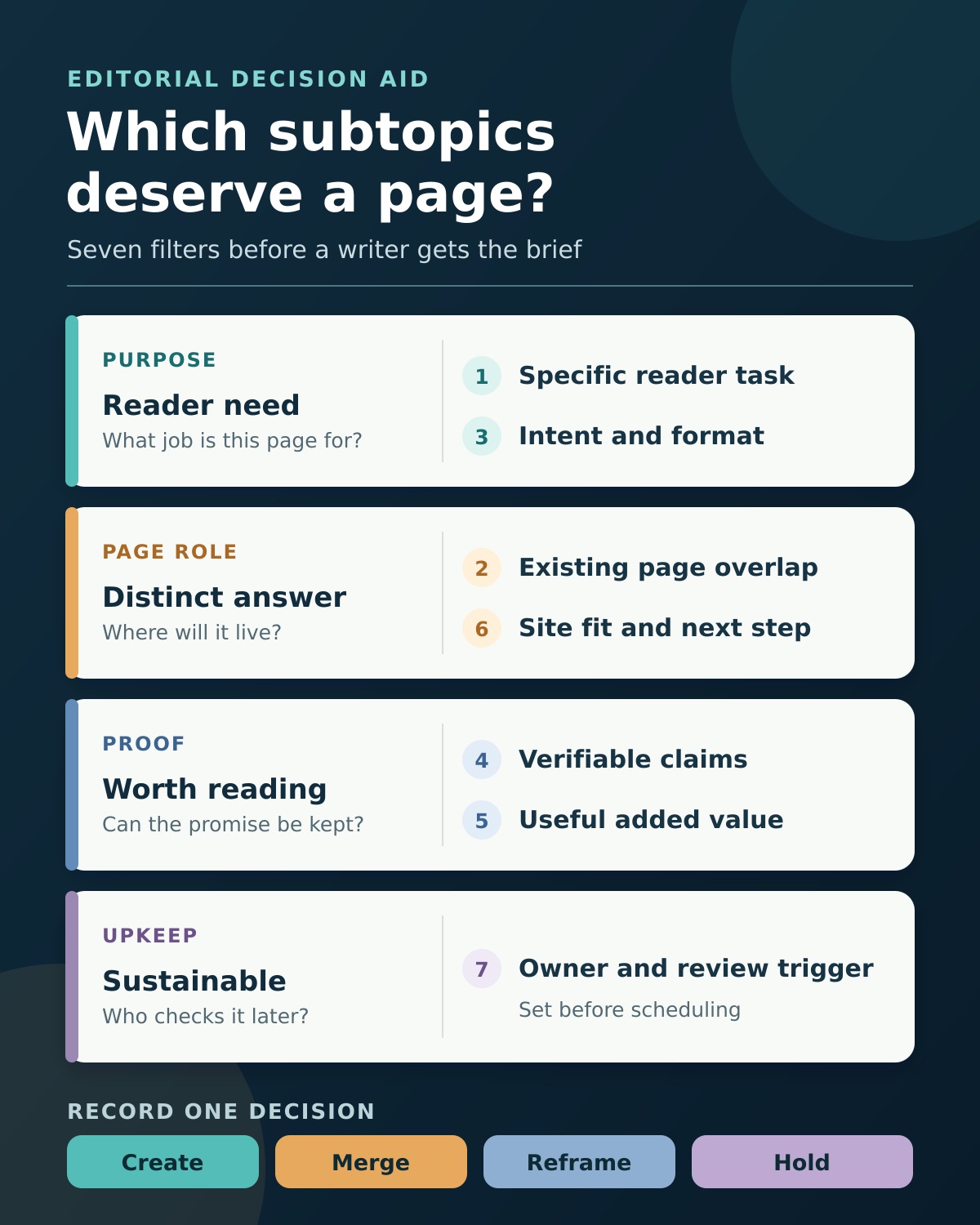
Use the seven filters below to turn a suggestion into one of four decisions: create a separate article, add it to an existing page, reframe it, or hold it. They are editorial checks, not a Google scoring system. For the earlier discovery stage, see this guide to topic research methods for publishers. Here the question is what to do with the subtopics already on your desk.
Before reviewing article subtopics, place each suggestion beside its proposed parent topic, intended audience, and the exact reader question it might answer. That small amount of context prevents a plausible title from being mistaken for a complete assignment.
1. Can you name the reader’s specific task?
Ask who would open the proposed article and what they should be able to decide or complete afterward. “AI tools for business” is a subject area. “How a small support team should hand off an AI-drafted reply for approval” describes a task and a situation. The latter gives a writer a clearer boundary: the piece must explain the approval handoff, what information the reviewer needs, and what happens when the reply is rejected.
Write a one-sentence promise in the brief: “This page helps [reader] [make a decision or complete a task] when [situation].” If the sentence works equally well for five other suggestions, narrow the idea. If the only answer is a definition or two, it may belong in the parent article instead of a new URL.
The suggested title can change at this stage. Protect the reader’s job, not the wording produced by a keyword tool, meeting, or AI prompt.
2. Does an existing page already do that job?
Search the publication’s live archive, draft queue, and planned assignments before approving a new page. Compare the proposed answer with the parent guide and nearby articles, not just their titles. A page called “workflow automation basics” might already explain approval gates in enough detail to satisfy the proposed subtopic, even if the phrase does not appear in its headline.
Open the closest pages and record their reader task, scope, and missing information. If the new suggestion would largely repeat an existing answer, update that page or add a clearly labeled section. If it would solve a distinct problem with its own examples and steps, a separate article may be justified. Similar keywords alone do not prove that two pages compete in search; the reader’s need and the actual page content matter more.
A content audit gives the broader inventory and keep, update, or consolidate decisions. This filter applies that discipline before another page enters the archive.
3. Does the likely intent support a separate article and format?
Look at the actual questions people ask and the kinds of results returned in the target market. A query about “approval workflow examples” may call for a template and annotated example. A query about “approval workflow software” may signal comparison intent. Those are related subtopics, but one article cannot always satisfy both well.
If you have access to the site’s data, check relevant queries and pages in Google Search Console. Its Performance report can filter by query, page, country, and device. Use it to find clues about existing demand and page coverage, while remembering that some queries are anonymized or omitted from displayed data. A low or absent count does not automatically make a useful editorial idea worthless, especially for a new audience question.
Record the intended format alongside the intent: short answer within a parent page, tutorial, decision checklist, comparison, or reported feature. If the proposed format cannot deliver what the reader is looking for, reframe the pitch before commissioning it.
4. Can the important claims be verified?
List the three to five claims the article would need to make. A software comparison may depend on current features, pricing conditions, integrations, and availability. A safety or finance subtopic may require qualified review. An operational how-to may need official documentation plus a workflow that can actually be followed.
For each claim, note a suitable source and whether it has been opened and checked. A suggested heading or search snippet is not evidence. If the piece promises a first-hand test, name the real tester, task, date, environment, and records needed; otherwise frame it as a researched guide. A vendor page can establish what the vendor documents, but it cannot by itself prove an independent performance verdict.
Hold a promising subtopic when a central claim cannot yet be substantiated. You can also narrow the promise: a guide to questions buyers should ask may be supportable even when a definitive “best product” ranking is not.
5. What would this page add beyond a rewritten summary?
A separate page has to earn its space in the archive. Identify the useful addition before drafting: a tested sequence with real records, an original comparison of documented conditions, a decision table, a carefully explained example, a template, or reporting that answers a question other pages leave unresolved. New wording around familiar points is not the same thing as new value.
Google’s people-first content guidance asks whether a page offers original information or analysis and substantial value beyond sources it draws on. Treat those as useful self-assessment questions, not as a guarantee of ranking. If the team cannot state the added value in a sentence, improve the research plan or merge the idea into a stronger existing article.
For instance, “tips for checking an AI infographic” is a vague suggestion. A field-by-field validation sheet showing the figure, denominator, date, source, and final signoff for each graphic element gives the reader something they can use during an actual review.
6. Does it fit the publication and the reader’s next step?
An appealing search term is not automatically right for every publication. Check whether the intended audience belongs to the site’s coverage, whether the team can explain the subject credibly, and whether the article has a sensible relationship to nearby pages. A highly specialized buying guide may attract readers the publication cannot serve well; a low-volume operational question may still be essential to its regular audience.
Sketch the path in both directions. Which parent page would help a reader understand the context, and which existing guide answers the natural follow-up? These should be editorial connections, not an excuse to create pages solely for links. The same reader-first test appears in this guide to internal linking fundamentals: link when the destination genuinely helps someone continue the task.
If the suggestion cannot be placed in a coherent reader journey, either explain why it deserves independent coverage or leave it out of the current cluster.
7. Can the team publish and maintain it responsibly?
Estimate the work after drafting as well as the work before it. A stable explainer with a clear source trail may need occasional review. A “best tools” list with prices, plan limits, and changing integrations needs a named owner, a dated verification pass, and a trigger for updates when a material condition changes. If screenshots, permissions, or specialist review are essential, assign them before setting a publication date.
Put an owner and review trigger in the brief: “Recheck when the vendor changes its plans,” “Review after the next policy update,” or “Confirm the steps against the current interface before release.” These are more useful than declaring every article “evergreen.”
When a team lacks the access or maintenance capacity to keep a consequential comparison accurate, hold it or choose a more durable, narrower question. A good idea scheduled before it can be verified is still a weak assignment.
A worked subtopic decision
Consider an illustrative parent guide about automating repetitive work in a small team. Three suggestions emerge from a brainstorming session. The table shows decisions an editor might make after checking the actual archive and available evidence; it does not describe a real site’s publishing plan.
| Suggested subtopic | What the filters reveal | Editorial decision |
|---|---|---|
| “What is workflow automation?” | A brief definition serves the same reader as the parent guide. | Add or improve a section in the parent. |
| “How to record manual approvals in an automated task” | A distinct operational job could support a template and an example. | Commission a separate how-to once the workflow and example are verified. |
| “Best AI agents for small teams this year” | The comparison requires current product checks and ongoing maintenance; no owner has been assigned. | Hold until evidence and review ownership are in place. |
<figure> <img src=”7-filters-article-subtopics-infographic-4×5.png” width=”600″ height=”750″ alt=”Seven article-subtopic filters grouped by reader purpose, page role, proof, and upkeep, leading to create, merge, reframe, or hold.”> <figcaption>Editorial decision aid: seven checks grouped into purpose, page role, proof, and upkeep.</figcaption> </figure>
Do not average the seven filters into a single score. Strong search interest cannot compensate for a duplicate answer or an unsupported central claim. Record the suggested title, parent URL, reader job, closest existing page, evidence needed, added value, owner, and final decision in one row. That record makes the next discussion about evidence and reader value instead of whose idea sounded more exciting.
Reviewing article subtopics: Give each approved page a clear job
Reviewing article subtopics is a small but consequential editorial step. Approve a separate page when it answers a distinct reader need with supportable evidence, useful added value, a sensible place in the publication, and a realistic upkeep plan. Otherwise, merge, reframe, or hold the suggestion, and keep the reason visible for the next planning round.