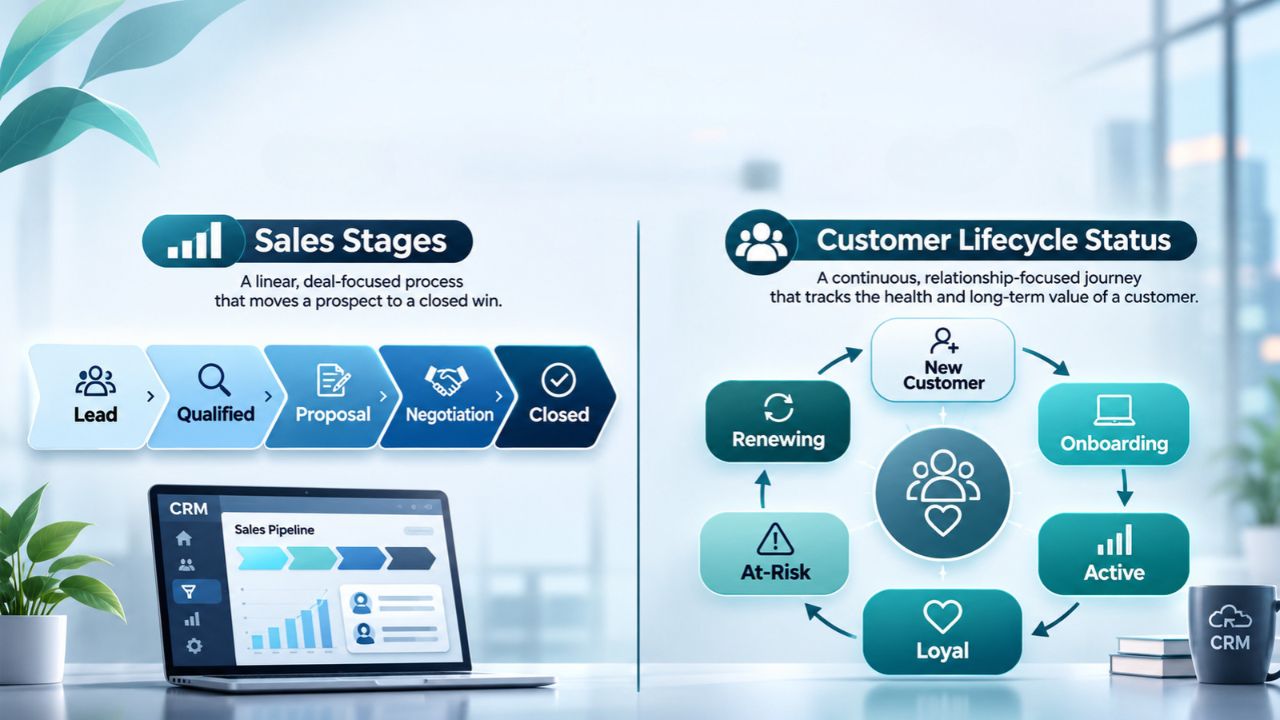
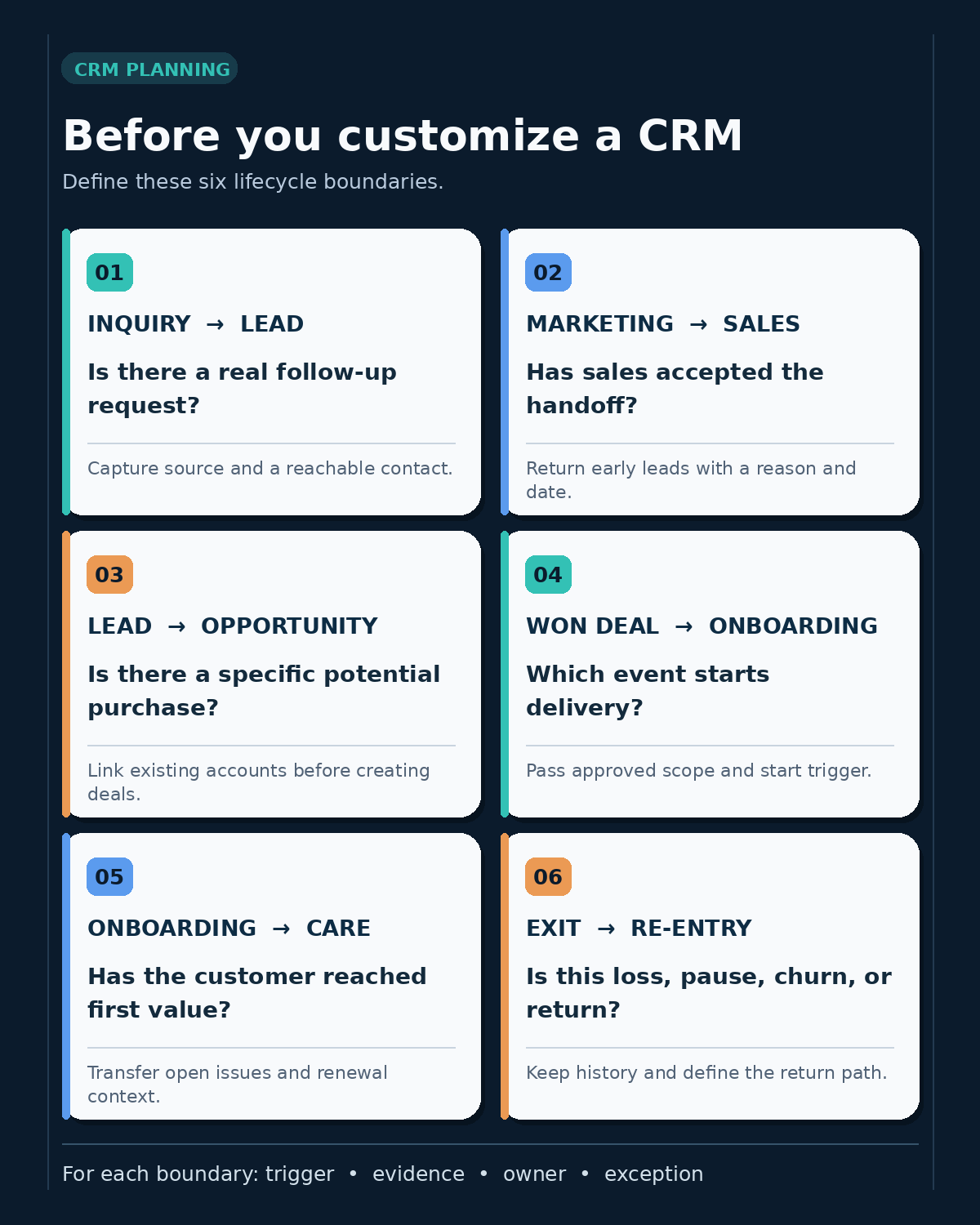
The CRM says “customer.” Sales has marked a deal as won, onboarding lacks the approved scope, and billing has no start date. The disagreement began when those teams attached different events to the same label. Before customizing a CRM, define the events that move a relationship from one team and record to the next. These six CRM lifecycle boundaries give each transition an observable trigger, an owner, and a way to handle exceptions.
What are CRM lifecycle boundaries?
A boundary is the rule for moving from one state of work to another. It answers more than “What should the dropdown say?” It identifies the record affected, the evidence that justifies the change, the team that acts next, and what happens if the usual sequence fails.
Keep the levels separate. A contact can be a customer while a new deal with that customer is still in discovery. A “call tomorrow” reminder is a task, not a relationship stage. HubSpot, for example, distinguishes contact and company lifecycle stages from the more detailed Lead Status property within a sales-qualified stage. Its default automated lifecycle updates generally move forward, so a plan that assumes easy backward movement needs a specific check before it becomes an automation rule. HubSpot’s lifecycle-stage documentation explains those product-specific behaviors.
For existing fields that already mix stages, tasks, and outcomes, start with this CRM status field audit.
1. When does an inquiry become a lead?
An email address is not automatically a sales lead. It may belong to a newsletter subscriber, an existing customer asking for support, or someone who downloaded a resource without requesting contact. Define which event is enough to create a sales-work record: a request for a quote, a product demo inquiry, a referral with a known need, or another signal your team actually handles.
Specify the minimum information needed at intake and the destination for incomplete requests. A useful intake rule might require a reachable person, a company or buying context where relevant, the source of the request, and a reason for follow-up. If the same person already exists, decide whether to update the contact, attach a new inquiry, or flag it for review. Do not create a fresh customer record merely because a new form arrived.
This boundary determines who is in the sales queue and what the first response should be. Keep contact permission and communication preferences separate from sales qualification; interest in a product does not itself establish permission for every marketing message.
2. When does marketing hand a lead to sales?
“Ready for sales” needs a test that two people can apply to the same record. Depending on the business, that might mean a stated project, a plausible use case, an identifiable decision process, and permission for a sales conversation. A score can help prioritize records, but the score alone is not an agreed handoff unless sales knows what it means.
Define the receiving owner and the acceptance action. For example, sales may accept the lead after confirming the business need, return it to nurture with a reason, or disqualify it when it is outside the service area. Set a response window that the team can actually meet and decide what happens if the owner is absent. The handoff is complete only when the receiving team acknowledges the work, not when an automation changes a label.
Record a return reason and a next review date for leads that are early rather than lost. Otherwise, a recycled lead may bounce between queues or disappear from both. If this handoff is a recurring source of confusion, document the rule as a short operating procedure alongside other team process handoffs.
3. When does a qualified lead become an opportunity?
An opportunity should represent a specific potential transaction that someone can advance or close. Agree on the minimum evidence: a real buying problem, an identifiable buyer or buying group, a product or service scope, and a next commercial action. The threshold need not require a finalized budget or close date if those details normally emerge later. It should, however, keep casual conversations out of a forecast of active deals.
Decide which records are created or linked at conversion. One company can have several contacts and more than one independent deal. A renewal or expansion may deserve its own opportunity even though the company is already a customer; overwriting an old deal erases useful history. Check duplicate accounts before creating a new one, and specify which fields carry forward to the deal.
This is a configuration choice with real platform consequences. Microsoft’s Dynamics 365 Sales documentation describes options for automatic or seller-controlled account, contact, and opportunity creation during qualification. Use that example to frame the decision, then verify how your own CRM and plan implement it.
4. When does a won deal become an onboarding obligation?
“Closed won” is a sales outcome. Onboarding is work another team must be able to start. Define the event that opens that work in your business: an executed agreement, an accepted purchase order, confirmed payment, or another agreed trigger. These events can occur on different dates, so one generic “customer date” may not serve sales reporting, billing, and delivery equally well.
The handoff should carry only the information needed to act: the purchased scope, primary customer contact, promised start date, implementation constraints, owner, and any commitments made during sales. Identify the source of truth for contract terms and payment status. If a deal is marked won but the signed scope is missing, create an exception for review instead of launching a generic welcome sequence with inaccurate details.
When the CRM, billing system, and project tool exchange these signals, define which system owns each field and what happens after a failed or repeated update. An integration can move the record, but it cannot decide the business rule for the team. The iPaaS explainer gives more context on cross-system ownership and duplicate handling.
5. When does onboarding end and ongoing account care begin?
A kickoff meeting is not proof that onboarding worked. Choose an observable completion condition tied to what the customer bought: an approved data import, a live campaign, trained account administrators, or a first useful report. Some accounts may need a formal customer sign-off; others may have a product event that confirms they can use the service. Define the evidence by customer type rather than forcing every account through the same checklist.
Name the person who takes responsibility after that condition is met. The ongoing owner needs open issues, goals, contacts, renewal terms, and a next check-in. If implementation ends with an unresolved blocker, assign the blocker and decide whether the account is genuinely active or still in an exception state.
Renewal and expansion are future commercial motions, not substitutes for the customer’s current service state. Track their dates and opportunities separately where that improves ownership and forecasting. A customer success journey map can help teams decide which milestones deserve a CRM field and which belong in a project or support system.
6. When does a relationship end, pause, or re-enter?
A lost deal, an unresponsive prospect, and a customer who cancels are different outcomes. Define the event and date for each. A proposal rejected by the buyer may be closed lost with a reason. A prospect who requested a later discussion may remain in a dated nurture queue. A canceled customer may still have an active support issue or a contractual end date in the future.
Then define the return path. If a lost prospect comes back with a new project, the team may open a new deal linked to the same contact and company rather than rewrite the old deal as if it had never been lost. If a former customer returns, preserve the earlier account history and create the new commercial and onboarding work that the return actually requires. Decide who may reopen records, which automations should run again, and whether a re-entry is a new reporting cohort.
Finally, separate lifecycle reporting from data retention and contact permission decisions. An inactive record need not be deleted merely to clear a pipeline, and retaining it does not authorize continued outreach. Apply the organization’s privacy and retention rules to the underlying data and keep suppression choices visible to the systems that send messages.
Turn the six boundaries into a configuration brief
Before adding fields or workflows, put each transition into a short register. The example below is illustrative; the trigger and owner should reflect the company’s actual process.
| Boundary | Evidence to agree on | Next owner or exception |
|---|---|---|
| Inquiry → lead | A request with a reachable contact and defined reason for follow-up | Intake owner reviews duplicates or incomplete details |
| Marketing → sales | Qualification criteria met and sales accepts the record | Sales returns early leads with a reason and review date |
| Lead → opportunity | A specific potential purchase and next commercial action | Sales links the existing account or resolves a duplicate |
| Won deal → onboarding | Agreed commercial trigger plus approved scope | Delivery owner holds incomplete handoffs for review |
| Onboarding → account care | Customer has reached the defined first usable outcome | Account owner takes open issues and renewal context |
| Exit → re-entry | Recorded loss, cancellation, pause, or new buying event | Named owner opens appropriate new work without erasing history |
For each row, add the record type, field or system that holds the evidence, who may change it, and one normal and one exception test case. Pilot three awkward records before bulk imports or automation: an existing customer asking about a second product, a marketing-qualified lead returned by sales, and a won deal missing its approved scope. Check the resulting associations, queue owners, notifications, and reports with the people who use them. A technically valid transition can still send work to the wrong team.
Define the work before the fields
The value of these CRM lifecycle boundaries is a shared decision at each handoff. Once the teams agree on the trigger, evidence, owner, and exception, the CRM configuration has a concrete job: represent those decisions without losing the history of how a relationship moved.