Two employees can have the same green checkmark next to “Refund Approvals” and have learned different rules. One took the lesson before the approval threshold changed. The other took it afterward. If the completion report lists only the lesson title, a manager has to reconstruct which rule each employee was taught before deciding who needs an update.
A versioned workplace training lesson connects seven records: the lesson register, a snapshot of the released materials, a change log, an approval record, an assignment record, completion and assessment evidence, and a retirement record. Tie them together with a stable lesson ID and a specific release number.
The CDC Quality Training Standards recommend subject-matter review, an expiration date for revisiting content, and learner assessments aligned to objectives. The workflow below turns those ideas into a practical record set for learning teams, HR staff, and managers. The refund example is fictional.
1. Lesson register
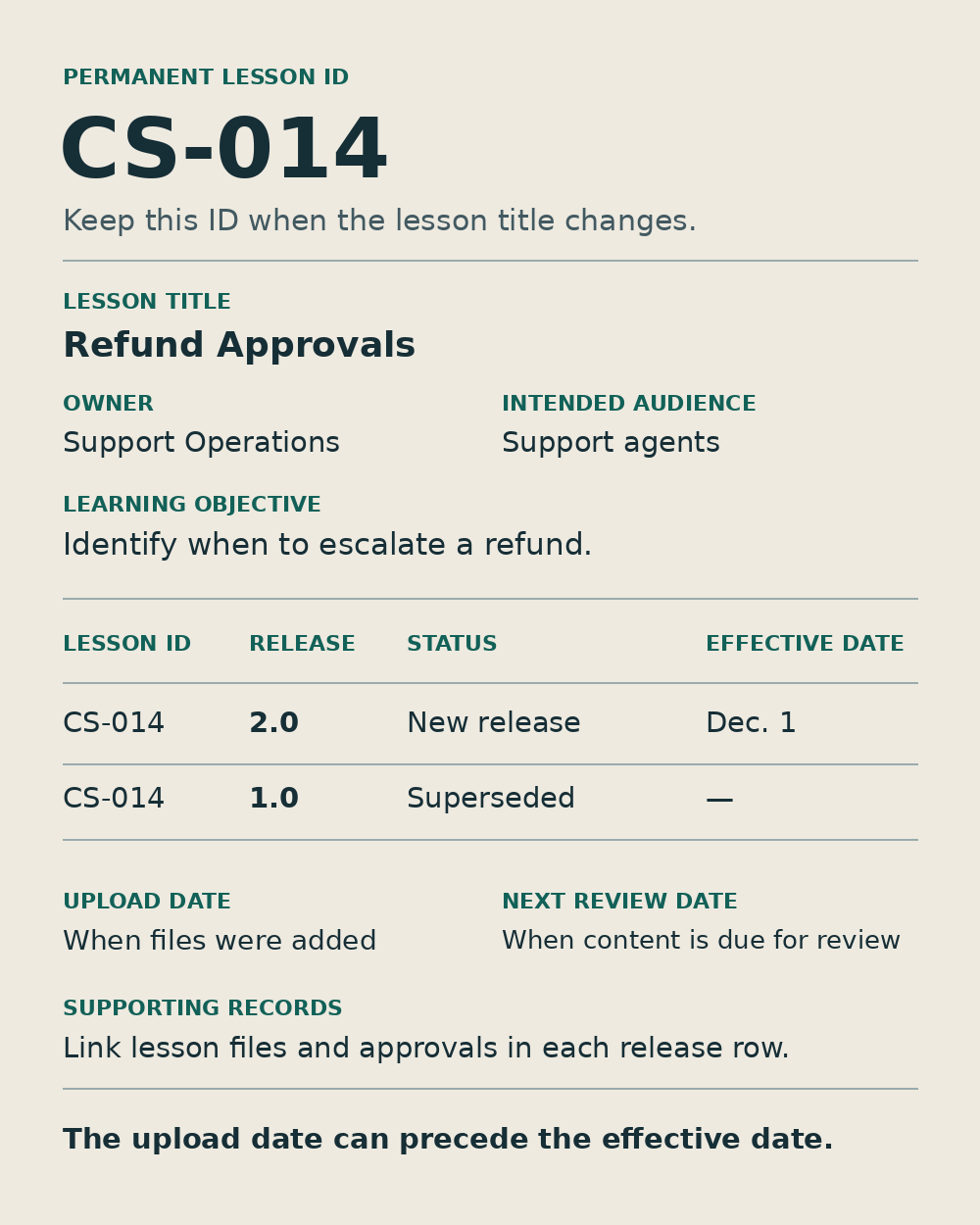
Give the lesson a permanent ID and keep one register entry for each release. Record its title, owner, intended audience, learning objective, status, effective date, and next review date. Keep the permanent ID when the title changes. For a small team, a spreadsheet with one row per release and links to the supporting records is enough to start.
For example, lesson CS-014 teaches support agents to identify when to escalate a refund. Release 2.0 takes effect on December 1. Version 1.0 stays in the register as superseded. Record both the date the materials were uploaded and the date the new rule applies if those dates differ. An early upload for review can otherwise look like an early rollout.
2. Released lesson snapshot
Preserve the materials learners received, along with the editable source. For an online lesson, that could include the delivered package, captions, downloadable job aid, and a manifest linking to each component. For an instructor-led lesson, keep the slides, facilitator notes, exercises, and answer key. Put the release number on any PDF or handout likely to circulate independently.
Check what happens when a lesson links to a living policy page. A link that points to today’s refund policy can make yesterday’s training impossible to reconstruct. Record the policy revision used in the lesson and keep an authorized copy or a stable revision link. If the training uses a standard operating procedure, document the decision points and exceptions in the underlying team process documentation so the lesson owner has a clear source to work from.
3. Change log
Explain what changed, why it changed, and whether it changes what employees must do. Include the old and new instructions, the triggering policy or process revision, and the lesson sections, job aids, or questions affected. “Updated refund guidance” leaves the next reviewer guessing. “Refunds over $150 now require supervisor approval, down from $250” tells them which behavior to review.
A typo fix and a new decision rule call for different rollout decisions. For the refund change, flag the $200 scenario in the quiz and the threshold in the job aid. Record the proposed response, such as assigning a short update to agents who already completed the old release. That gives the approver something concrete to accept or revise.
4. Review and approval record
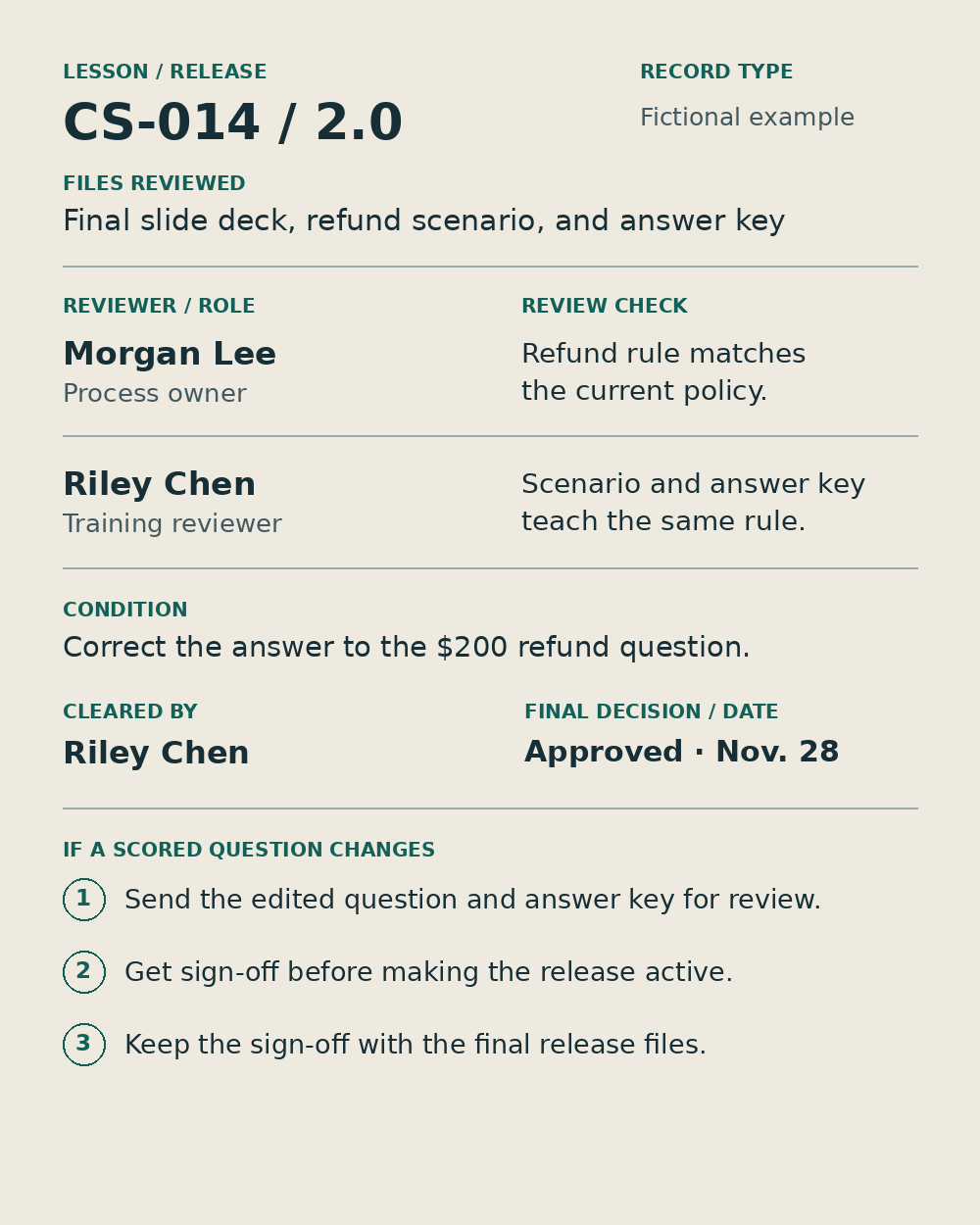
Save the reviewer, their role, the exact release they saw, the decision, and the date. Capture any conditions and who cleared them. The process owner can check that the refund rule matches policy, while the training reviewer can verify that the scenario and answer key teach the same rule. On a small team, the review may fit in a single ticket or approval thread linked from the register.
Tie approval to the final files. If a reviewer approves the slide deck and the author later rewrites a scored question, send the affected change back for review before moving the release to active. Keep the final sign-off alongside the released materials so the next owner can find both.
5. Assignment and rollout record
Record which release went to which cohort, when it was assigned, when it was due, and how exceptions will be handled. Note the cutoff for people already in progress. A learner who started version 1.0 before the policy changed might finish it before the cutoff and receive the short update, or move directly to version 2.0 if they are still in progress when the new rule takes effect.
In the example, new agents get 2.0 and active agents who completed 1.0 receive the threshold update. Record a separate decision for people who no longer handle refunds. Before replacing a module in a learning management system, check whether a learner’s completion export still identifies the release they received. A course title that stays constant across revisions is a poor substitute for that field.
6. Completion and assessment evidence
Connect each completion to the learner or approved learner identifier, lesson ID, release, and completion date. If the objective includes a skill or decision, also record the assessment version and the result you need. Separate status fields help here. Someone can finish viewing the lesson and still miss the question about where to route a $200 refund.
Pull one sample report after the switch and compare it with the assignment record. Can you still tell that the first employee completed 1.0 and the second completed 2.0? If the report omits versions, preserve an authorized export tied to each release or use release-specific assignments that carry that detail. Keep access to individual results limited to staff who need it.
7. Retirement and replacement record
When 2.0 takes over, record when 1.0 stopped accepting assignments, where its released files and completion evidence are kept, and which release replaced it. Document who handled the transition and whether anything still needs attention, such as a contractor cohort scheduled to finish after the cutoff.
Check the places employees use to find training. An onboarding wiki might point to the new release while a team chat pin still sends staff to the old job aid. Update those entry points and keep archived releases accessible to authorized staff who need to reconstruct training history.
Sample register for a versioned workplace training lesson
This fictional example shows the records linked to one version change. A team can store them in a single register or in separate systems as long as the links resolve to the exact release.
| Record | Example entry for CS-014 |
|---|---|
| Lesson register | Refund Approvals 2.0 · Support Operations · effective Dec. 1 |
| Released snapshot | 2.0 lesson, captions, job aid, and quiz · refund policy revision 4 |
| Change log | Supervisor approval threshold drops from over $250 to over $150 |
| Approval | Support Operations approves 2.0, including the corrected $200 scenario |
| Assignment | New agents receive 2.0 · active 1.0 completers receive the threshold update |
| Completion and assessment | Agent A17 · CS-014 2.0 · Dec. 2 · passed quiz 2.0 |
| Retirement | 1.0 closed to new assignments Dec. 1 · archived materials linked · 2.0 replaces 1.0 |
Check the trail before the next release
Pick one completion from before the change and one from after it. Start with the completion report and follow each record back to the lesson files, the approved rule, and the assignment decision. Then follow the old release forward to its replacement. A versioned workplace training lesson passes this check when a colleague can reconstruct what each employee was taught and determine who still needs the update.