Tools for documenting data imports that partially fail help you answer a deceptively difficult question: which records reached the destination, which were rejected, and what should be retried? A completion badge alone does not answer it. Some systems tolerate individual bad rows; others reject an entire batch or return only a sample of errors. Your incident record needs to distinguish those outcomes before anyone repeats the load.
This comparison draws on vendor documentation rather than hands-on benchmarking. The eight options cover different destinations and parts of the workflow; they are not interchangeable import services or a measured ranking. Check the relevant connector, file format, permissions and current plan before relying on a particular log.
Compare Tools for Documenting Data Imports That Partially Fail
| Tool | Useful evidence | Boundary to verify |
|---|---|---|
| Azure Data Factory | Skipped incompatible rows and log files | Only supported copy scenarios and configuration |
| Microsoft Fabric Data Factory | Copied and skipped rows and files | Connector and activity settings |
| Salesforce Data Loader | Separate success and error CSV files | Salesforce records and job type |
| Snowflake COPY | Load history and validation results | Validation can differ from the actual load |
| Amazon Redshift COPY | Load history and error detail views | Error tolerance and transaction outcome |
| Google BigQuery load jobs | Job status and bad-record information | Returned error detail may be limited |
| Amazon Quick SPICE | Skipped-row counts and error report | Dataset ingestion, not a general database audit |
| Microsoft 365 Organizational Data Service | Partial-success status and validation report when available | Organizational data imports only |
1. Azure Data Factory: Record Incompatible Rows in a Copy Pipeline
For a team already moving tabular data through Azure Data Factory, copy activity can be configured to skip and log certain incompatible rows. The documented log can include original row data plus an error code and message. Preserve the activity run ID, source path and configuration with that file: a CSV of errors without its corresponding run can easily be mistaken for a later attempt.
Fault tolerance applies to supported scenarios, not every connector or every error. Before production, run a small file containing a deliberate type mismatch and verify both the destination count and the log. Treat the log as sensitive because rejected rows can contain the same personal or commercial data as the source.
2. Microsoft Fabric Data Factory: Connect Copy Counts to a Run
Fabric’s copy activity supports logging for copied or skipped files and rows, with fault-tolerance options. Its documented consistency check for tabular copies compares rows read with rows copied plus incompatible rows skipped. That gives an operator a useful reconciliation starting point, especially when a pipeline already runs in Fabric.
Do not assume the same logging behavior across every source and destination. Record the workspace, activity run, source version, destination and logging settings. A reconciliation count also cannot tell you whether a logically incorrect but well-formed value was accepted.
3. Salesforce Data Loader: Save the Success File as Well as Errors
Salesforce Data Loader produces success and error CSV logs for supported record operations. Keep both: the success file can identify records that should not be blindly inserted again, while the error file explains which records need correction. Store the operation, object, mapping, user and job time alongside those outputs.
The tool is built for Salesforce data, so it will not document an unrelated warehouse load. For retries, use the appropriate stable identifiers and confirm whether the operation is insert, update or upsert. A corrected CSV and a second attempt should be linked to the original job, not treated as an unrelated import.
4. Snowflake COPY: Separate Validation From the Load
Snowflake’s COPY workflow offers load-history information, error handling and validation options. A team can use validation results to investigate problematic staged records and preserve those results with the query ID. The ON_ERROR setting affects whether a file is skipped or a load continues, so it belongs in the incident record.
Validation is a separate operation and does not itself load the file. Check documented restrictions for the exact COPY configuration, and compare validation with the actual query result and destination state. In particular, a first error per file is not necessarily a complete inventory of every bad row.
5. Amazon Redshift COPY: Join Load History to Error Detail
Redshift provides load history and load-error diagnostic views. A practical record links the COPY query ID and source file to loaded-row counts, the error message and, where available, row and column detail. This helps a data engineer explain whether a malformed field caused the problem and where the next investigation should start.
The permitted error threshold and the final transaction outcome matter. An error view is not proof that a specific row was committed or rolled back. Check the result of the load and the destination table before retrying, particularly when the same source file might be processed twice.
6. Google BigQuery: Keep Job Errors and Reconcile Counts
BigQuery load-job settings can allow a specified number of bad records for supported formats, and job metadata reports errors and statistics. Retain the job ID, input locations, schema, bad-record threshold and job result. That makes a later review more useful than a screenshot of a failure banner.
There is a significant reporting limit: the command-line documentation notes that at most five errors of any type are returned, regardless of the configured threshold. A short error list therefore is not a complete rejected-row file. Use source-side validation or a separate quarantine process when every rejected record must be retained.
7. Amazon Quick SPICE: Investigate Skipped Dataset Rows
For a reporting team loading a dataset into SPICE, the ingestion details can show skipped-row counts, field names and error messages, and provide an error report. This is useful when a dashboard looks plausible but silently omits some input rows. Save the dataset and ingestion identifiers with the downloaded report and the expected row count.
Its scope is dataset ingestion rather than a universal record of the upstream pipeline. Fixing a field in a dashboard alone may leave the source problem in place; trace the source and confirm that the next ingestion includes the corrected data.
8. Microsoft 365 Organizational Data Service: Review a Partial Upload
For organizations importing supported employee-related organizational data, the service can show a partial-success status when some uploaded rows were not imported. Its review details may include a validation report. Preserve the uploaded file version, report and review date so the administrator can distinguish accepted and rejected rows across attempts.
This is a specialized service, not a general ETL platform. Availability of a validation report depends on the result and connection. The person resolving errors should confirm what was actually applied before resubmitting corrected data.
Build a Reusable Partial-Import Record
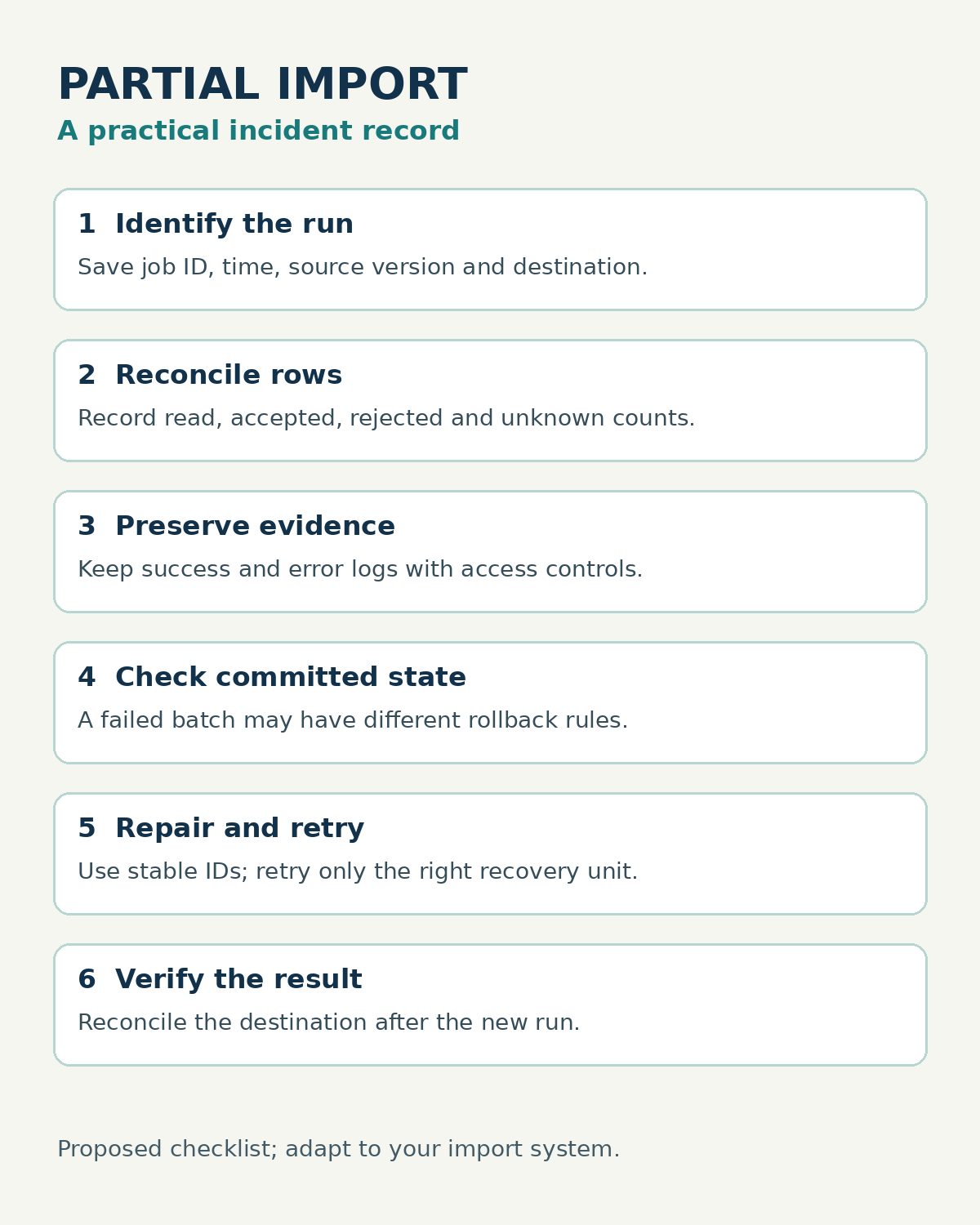
Start with one run identifier and a protected copy of the source file, or an immutable file version and checksum. Record the destination, initiating account, time, schema and mappings, error-handling settings, and counts read, accepted, rejected and unknown. Link the native success report, error report and query or activity ID. Mark any count as unknown when the tool does not expose it.
Next, decide the recovery unit. A rejected row, a whole file and an entire transaction are different retry targets. Identify stable record keys, record whether the destination supports idempotent updates, and check what already committed. Where a log contains customer data, restrict access and set a retention period consistent with your organization’s policy. The FTC’s data-protection guide offers a useful starting point for limiting access to sensitive records.
A Small Test Before the Next Real Import
Use synthetic records and a staging destination. Include a valid row, a bad type, a missing required value and a duplicate identifier. Run the import with the intended production settings; then compare source rows with destination rows and the saved logs. Correct one failed record and retry it separately. Document exactly which rows were accepted and whether a retry duplicates any earlier success. This is a proposed test, not a claim that the products above were tested.
For a concrete example of migration records and import checks, see our guide to LMS migration tools.
Choose Based on the Evidence You Need
The best tools for documenting data imports that partially fail are the ones that fit the system already receiving your data and provide enough evidence for a safe correction. For Salesforce records, start with Data Loader’s two output files. For a pipeline, evaluate the copy activity’s configured logs; for warehouse loads, preserve native job and query diagnostics. Whichever route you choose, reconcile actual destination state before rerunning the failed portion.