


A useful page can still get lost inside your own website.
That usually happens quietly. A new article is published, but no older posts point to it. A service page exists, but it sits several clicks away from the homepage. A category page lists posts by date, but it does not guide readers toward the best resources. Search engines may still discover some of those URLs through a sitemap or external link, but readers are unlikely to find them naturally.
That is why internal linking fundamentals matter. Internal links are links from one page on your site to another page on the same site. They help readers move through your content, help search engines find and understand pages, and help you show which pages are central to a topic.
Good internal linking is not about filling every paragraph with blue text. It is a publishing habit, a navigation tool, and a site architecture decision at the same time. A strong internal link should answer a simple editorial question: what would help the reader next?
When that answer is clear, internal links stop feeling like SEO decoration. They become part of how the website explains itself.
What Internal Links Actually Do
Internal links have three practical jobs.
They help readers continue their journey. Someone reading a beginner SEO guide may need a glossary, a checklist, a deeper tutorial, or a related service page. If those next steps are not linked, the reader has to search again or leave.
They help search engines discover URLs. Google can find pages by following links from pages it already knows. Sitemaps can also help discovery, especially on larger or more complex websites, but they do not guarantee that every submitted URL will be crawled or indexed.
They provide context. The clickable words in a link, known as anchor text, help explain what the destination page is about. A link that says “click here” gives almost no information. A link that says “technical SEO checklist” sets a clearer expectation.
A basic internal link looks like this:
<a href="/technical-seo-checklist/">technical SEO checklist</a>
That small line connects two pages, describes the destination, and gives users and crawlers a route to follow.
Internal Linking Fundamentals Start With Site Structure
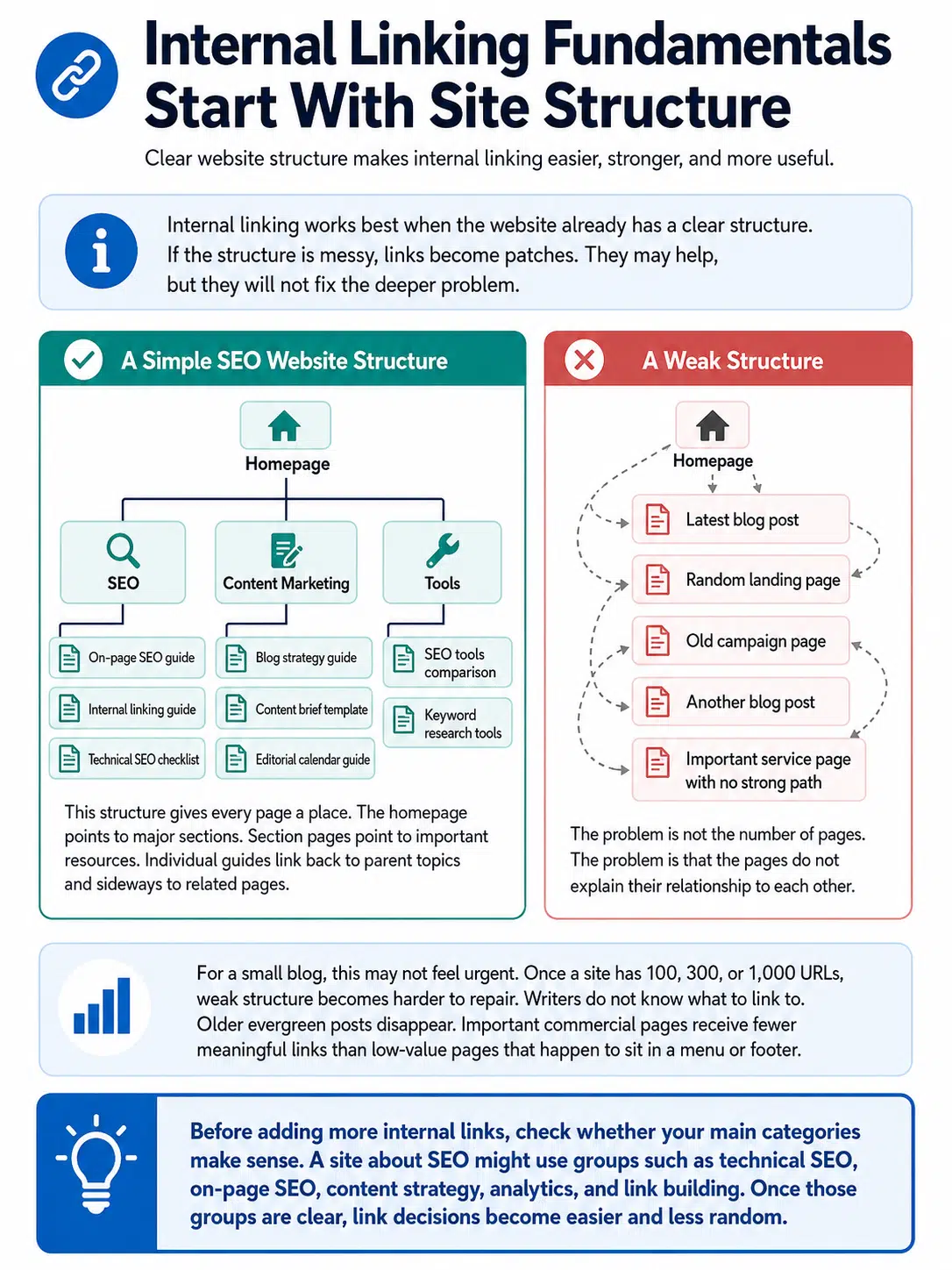
Internal linking works best when the website already has a clear structure. If the structure is messy, links become patches. They may help, but they will not fix the deeper problem.
A simple SEO website might look like this:
Homepage
│
├── SEO
│   ├── On-page SEO guide
│   ├── Internal linking guide
│   └── Technical SEO checklist
│
├── Content Marketing
│   ├── Blog strategy guide
│   ├── Content brief template
│   └── Editorial calendar guide
│
└── Tools
    ├── SEO tools comparison
    └── Keyword research tools
This structure gives every page a place. The homepage points to major sections. Section pages point to important resources. Individual guides link back to parent topics and sideways to related pages.
A weak structure looks more like this:
Homepage
│
├── Latest blog post
├── Random landing page
├── Old campaign page
├── Another blog post
└── Important service page with no strong path
The problem is not the number of pages. The problem is that the pages do not explain their relationship to each other.
For a small blog, this may not feel urgent. Once a site has 100, 300, or 1,000 URLs, weak structure becomes harder to repair. Writers do not know what to link to. Older evergreen posts disappear. Important commercial pages receive fewer meaningful links than low-value pages that happen to sit in a menu or footer.
Before adding more internal links, check whether your main categories make sense. A site about SEO might use groups such as technical SEO, on-page SEO, content strategy, analytics, and link building. Once those groups are clear, link decisions become easier and less random.
Link Equity Distribution, Without Guesswork
SEO people often talk about “link equity.” The phrase is useful, but it can also lead beginners into overconfidence.
Google uses links as one signal for discovery and relevance, but it does not publish a simple score showing exactly how much value one internal link passes to another page. So it is safer to think in editorial and structural terms: which pages deserve more attention, and which pages should support them?
Not every page on your site has the same value.
A homepage, product category, service page, or evergreen guide usually deserves stronger internal support than a tag archive, expired announcement, or thin campaign page. That does not mean every important page should be linked from everywhere. It means your internal links should reflect real priority.
| Page Type | Internal Linking Priority | Practical Use |
|---|---|---|
| Homepage | Very high | Link to major categories, services, or key resources |
| Topic hub or category page | High | Link to the best guides in that subject area |
| Commercial page | High when relevant | Link from educational guides, comparisons, and buying-intent content |
| New article | Medium | Support it from older relevant articles and hub pages |
| Outdated or thin page | Low | Update, merge, redirect, noindex, or remove instead of linking heavily |
The mistake is treating all pages equally. A privacy policy must be accessible, but it does not need the same editorial linking attention as a core service page or major evergreen guide.
A Useful Internal Link Should Feel Natural
The best internal links pass a simple reader test: would someone reasonably want this next?
In an article about keyword research, these internal links could make sense:
- keyword intent examples
- free keyword research tools
- on-page SEO checklist
- how to write SEO titles
- content brief template
Those links sit close to the reader’s current problem. They are not random.
A weaker set of links might include:
- company culture page
- unrelated affiliate review
- latest press release
- homepage repeated several times
- product page forced into every section
More links do not automatically make a page better. Too many irrelevant links can make an article feel less trustworthy.
This is where editorial judgment matters. A link should earn its place in the sentence. If the paragraph becomes awkward after adding the link, rewrite the sentence or remove the link. Internal links should feel written into the page, not pasted in after the article is finished.
Anchor Text: Clear Beats Clever
Anchor text is one of the most common beginner mistakes.
Weak anchor text is vague:
- click here
- this article
- read more
- learn more
- full guide
Those phrases can work for buttons, but they are usually poor choices inside article copy because they hide the destination.
Over-optimized anchor text creates the opposite problem:
- best internal linking fundamentals SEO guide for ranking
- internal linking fundamentals for beginners SEO strategy
- on-page SEO site architecture link equity distribution guide
That kind of anchor text looks forced and makes the article harder to read.
Better anchor text is descriptive and natural:
| Weak Anchor | Better Anchor |
|---|---|
| Click here | internal linking checklist |
| Read more | guide to crawlable links |
| This post | beginner on-page SEO guide |
| Learn more | SEO content audit process |
| Our service | technical SEO audit service |
The anchor should describe the destination, not repeat the same keyword every time.
If a page is about internal linking fundamentals, natural anchors might include “internal linking basics,” “internal link structure,” “internal linking mistakes,” or “how internal links help SEO.” Variation is normal when the sentence is natural.
Avoid linking to the same destination several times from one article unless there is a clear reader reason. One strong contextual link is usually better than five repeated links to the same URL.
Topic Hubs Make Internal Linking Easier
A topic hub is a central page that organizes a subject and links to related resources. For beginners, this is one of the cleanest ways to build internal links without making the site messy.
A hub for on-page SEO might look like this:
On-Page SEO Hub
│
├── Title tag optimization
├── Meta description writing
├── Header structure
├── Internal linking fundamentals
├── Image alt text
├── URL structure
└── Content refresh process
The hub links to the supporting pages. Each supporting page links back to the hub. Closely related supporting pages can also link to each other where useful.
This creates a clear topic cluster. Readers can explore the subject without returning to search results. Search engines also get a clearer view of how the pages relate.
A hub page does not have to be complicated. It can be a category page, a resource page, a long guide, or a landing page. What matters is that it helps people choose the right next page.
For a small site, start with a few strong hubs. Do not create twenty categories with two posts each. Thin categories add clutter instead of clarity.
Where Beginners Should Add Internal Links First
If your site already has content, do not open every article and add links randomly. Start where the work is most likely to help.
Link from older pages to newer important pages
New posts often get published, shared once, and then forgotten. Older pages that already receive traffic can help introduce readers to newer related content.
For example, an old “SEO basics” article can link to newer guides about title tags, URL structure, internal links, and content audits.
This is one of the easiest internal linking wins because it uses pages that already exist. It also prevents new evergreen content from becoming isolated after the first week of promotion.
Link from strong pages to pages that need support
Some pages already have visibility, backlinks, or regular traffic. These pages can be useful places to add links to closely related resources.
Be careful here. A strong article should not become a dumping ground for every page you want to rank. Add links only where they help the reader.
A practical example: if a detailed guide about “technical SEO basics” gets steady traffic, it may be a good place to link to a crawlability checklist, an XML sitemap guide, or a technical SEO audit service page. It is probably not a good place to link to every unrelated blog post published that month.
Fix orphan pages
An orphan page has no internal links pointing to it. Search engines may discover it through a sitemap or external link, but readers cannot reach it naturally from your website.
Common orphan pages include:
- new blog posts not added to category pages
- service pages created outside the main navigation
- old campaign landing pages
- tool pages
- author resources
- seasonal pages
Some orphan pages deserve internal links. Others should be updated, redirected, noindexed, or removed. Do not automatically save every orphan page. Sometimes the page is orphaned because it is no longer useful.
Improve category and hub pages
Many category pages are technically present but editorially weak. They list posts by date and leave readers to figure out what matters.
A better category page might include a short introduction, links to the most useful beginner resources, links to advanced guides, and a clean archive below. That small change can improve navigation without requiring a full redesign.
This is especially useful for blogs that publish frequently. A chronological archive is not enough once readers need guidance.
How Many Internal Links Should a Page Have?
There is no fixed number that works for every page.
A short update may need only two or three internal links. A long guide may naturally need fifteen or more. An ecommerce category page may contain dozens of product links because that is the purpose of the page.
The better question is: are the links useful, visible, and relevant?
Too few links create dead ends. Too many links make the page noisy. Repeated links in menus, widgets, breadcrumbs, body copy, author boxes, and footers can also inflate link count without improving the reader’s path.
For editorial content, these are practical working ranges:
- Short article: 2–5 useful internal links
- Standard blog post: 5–10 useful internal links
- Long guide: 10–20 useful internal links, if the topic supports them
- Hub page: enough links to organize the topic clearly
Do not treat these as rules. A narrow article should not be padded with links just to hit a target. A detailed guide should not avoid useful links because someone once heard that too many links are bad.
The reader’s path matters more than a neat number.
Internal Links Must Be Crawlable
A link that looks clickable to users may not always be easy for search engines to process.
For most websites, the safest route is a standard HTML anchor element with an href attribute:
<a href="/example-page/">descriptive anchor text</a>
Most normal text links in WordPress, Shopify, Webflow, Wix, Squarespace, and similar platforms are usually handled this way. Problems are more likely to appear in custom themes, JavaScript-heavy templates, filters, tabs, app-style menus, and infinite-scroll layouts.
Be careful with:
- buttons that behave like links but do not use proper link markup
- JavaScript-only navigation
- infinite scroll without crawlable pagination or archive links
- images used as links with empty or unhelpful alt text
- important links hidden behind scripts or filters
- staging URLs accidentally linked from live pages
You do not need to become a developer to understand this. You only need to know when a link is a real crawlable link and when it is just a clickable design element.
A simple check: open the page, hover over the link, and see whether the browser shows a real destination URL. For deeper checks, inspect the HTML or use a crawler. If the link only works after a script runs, ask a developer to confirm whether search engines can access it properly.
Internal links do not all have the same job.
Menus help users reach major areas of the site. They should not include every page.
Breadcrumbs show where a page sits in the hierarchy. They are useful for ecommerce sites, documentation sites, large blogs, and publications with deep categories.
Example:
Home > SEO > On-Page SEO > Internal Linking Fundamentals
Footers are useful for legal pages, company information, contact pages, and a small set of important resources. They should not become a keyword-link warehouse.
Related-post widgets can help discovery, but they are often less precise than hand-placed contextual links. A widget may recommend posts by category or date, not by actual reader intent. On a busy content site, that can send readers from a beginner guide to an advanced opinion piece simply because both posts share the same category.
For most beginner websites, the highest-value internal linking work happens inside body content and on hub pages. Menus, breadcrumbs, and footers should support the structure, not carry the whole strategy.
Common Internal Linking Mistakes
Internal linking problems usually come from normal publishing habits, not one big technical failure.
Linking only to new posts.
This slowly buries older evergreen content. Strong old pages still deserve links, especially if they explain core topics.
Using the same anchor text everywhere.
Natural variation reads better and gives more context. Repeating one exact phrase across dozens of links can make the site feel engineered rather than edited.
Forgetting commercial pages.
Educational content should not be aggressively salesy, but relevant service pages, demos, product pages, or comparison pages deserve links when they help the reader make a decision.
Adding links after writing without editing the sentence.
This creates awkward copy. Internal links should fit the paragraph. If the linked phrase feels bolted on, fix the sentence.
Relying only on plugins.
Tools can suggest opportunities, but they do not always understand reader intent. A tool may suggest a link because two pages share a keyword even when the context is different.
Leaving redirected URLs inside old articles.
If an internal link points to a URL that redirects, update it to the final destination. One redirect is not a crisis, but redirect chains become messy on larger sites.
Using nofollow as a casual internal-control tool.
For normal internal links, this is usually the wrong instinct. If you do not want a page indexed, use proper indexing controls. If you need to manage crawler access, handle that directly. Do not treat nofollow as a simple internal ranking-control switch.
A Simple Internal Linking Workflow for New Content
Use this checklist before publishing a new page.
Choose the parent topic.
Decide where the article belongs: technical SEO, on-page SEO, analytics, content strategy, ecommerce, or another clear section.
Add links to older relevant pages.
Link only where the destination helps the current reader.
Find older pages that should link to the new article.
Search your own site for related phrases. A query like this can help:
site:example.com "internal links"
Replace the domain and phrase with your own.
Use descriptive anchor text.
Make the link clear without stuffing keywords.
Check the click path.
Can someone reach this page from a hub, category page, or related article without depending only on search?
Review after the page has data.
If the page starts earning traffic, backlinks, or conversions, it may deserve stronger internal placement.
For a normal article, this may add ten or fifteen minutes to the publishing process. For an evergreen guide, commercial page, or major topic hub, it is worth spending longer.
How to Audit Internal Links on an Existing Site
A beginner audit does not need to be complicated. Start with four checks.
Check crawl depth.
Important pages should not be buried too far from the homepage or main hubs. If a key page takes five or six clicks to reach, review the path.
Find orphan pages.
Compare your sitemap, CMS export, analytics pages, and crawler data. If a URL exists but no internal page links to it, decide whether it deserves links or cleanup.
Review anchor text.
Look for vague anchors such as “click here,” “read more,” and “this post.” Replace them on important pages first.
Compare links against page value.
Your most internally linked pages should not only be login pages, tag archives, and old announcements. Core guides, categories, and commercial pages should receive appropriate attention.
Google Search Console can help you review internal links, but its Links report is not a complete crawl of every link on your site. SEO crawlers and site audit tools can add more detail, especially for larger websites.
A practical audit does not need to fix everything at once. Pick one important section, such as “SEO,” “Health,” “Finance,” “Reviews,” or “Travel,” and clean that cluster first. Internal linking becomes easier when you improve one topic area at a time.
What to Fix First
If the site is messy, fix problems in this order:
- Broken internal links
- Important orphan pages
- Weak links to core category, hub, service, or product pages
- Vague anchor text on high-value pages
- Old articles that should link to newer evergreen content
- Footer or menu links that add clutter
- Redirect chains inside internal links
This order keeps the work practical. Broken links and orphan pages are clearer problems than fine-tuning every anchor on the site. Start with obvious friction, then improve structure.
One warning: do not turn an internal linking cleanup into a full redesign unless the site truly needs it. Many sites improve by fixing category pages, adding contextual links, updating old posts, and removing dead paths. Start there before making the project bigger than necessary.
Final Thoughts
Internal linking is how a website explains itself.
Strong internal linking fundamentals help readers find the next useful page, help search engines discover and understand content, and help site owners direct attention toward the pages that matter most. The work is not flashy, but it is one of the most practical SEO improvements you control directly.
Start with one important topic cluster. Improve the hub page. Add links from older related articles. Fix orphan pages. Replace vague anchors with clear ones. Then repeat the process every time you publish or update content.
A site with thoughtful internal links feels easier to use. It also gives search engines a clearer map. That is a strong foundation for beginner SEO.






















