
An editor finds the right image in the media library and wants to reuse it in a newsletter. The article shows a credit, but the original license is in an old email thread. The downloaded file has a different name from the approved master, and no one can tell whether the newsletter crop is permitted. The image is easy to find; the decision to reuse it is not.
An editorial image register connects those loose pieces. It gives each visual a traceable identity and records who made it, what it shows, how it may be used, and where it appears. For a small team, that can be a shared table with links to evidence. A larger publisher may use the same structure in a digital asset management system.
The eight metadata fields below are practical groups for an editorial workflow. They are not a claim that a photography standard prescribes exactly eight fields. The IPTC Photo Metadata User Guide defines separate properties for creators, credit, usage terms, descriptions, accessibility text, releases, and digital source type. A register can connect those file-level properties to the license documents and page-level decisions that the image file alone cannot carry.
What an Editorial Image Register Needs to Answer
Before publication, an editor should be able to answer four questions without searching multiple chats and folders: Which asset is this? Where did it come from? What use is permitted? How will readers encounter it on this page? After publication, the same record should show every live placement that may need a correction or license review.
That scope is broader than a rights ledger. Rights and source-file tracking remain essential; tracking image rights and source files across a publishing team explains the intake and storage workflow. The register described here adds factual captioning, accessibility, version control, and publication status to the handoff. Treat the eight items as field groups: a spreadsheet may use several subcolumns or linked tabs, while a DAM may expose them as separate properties.
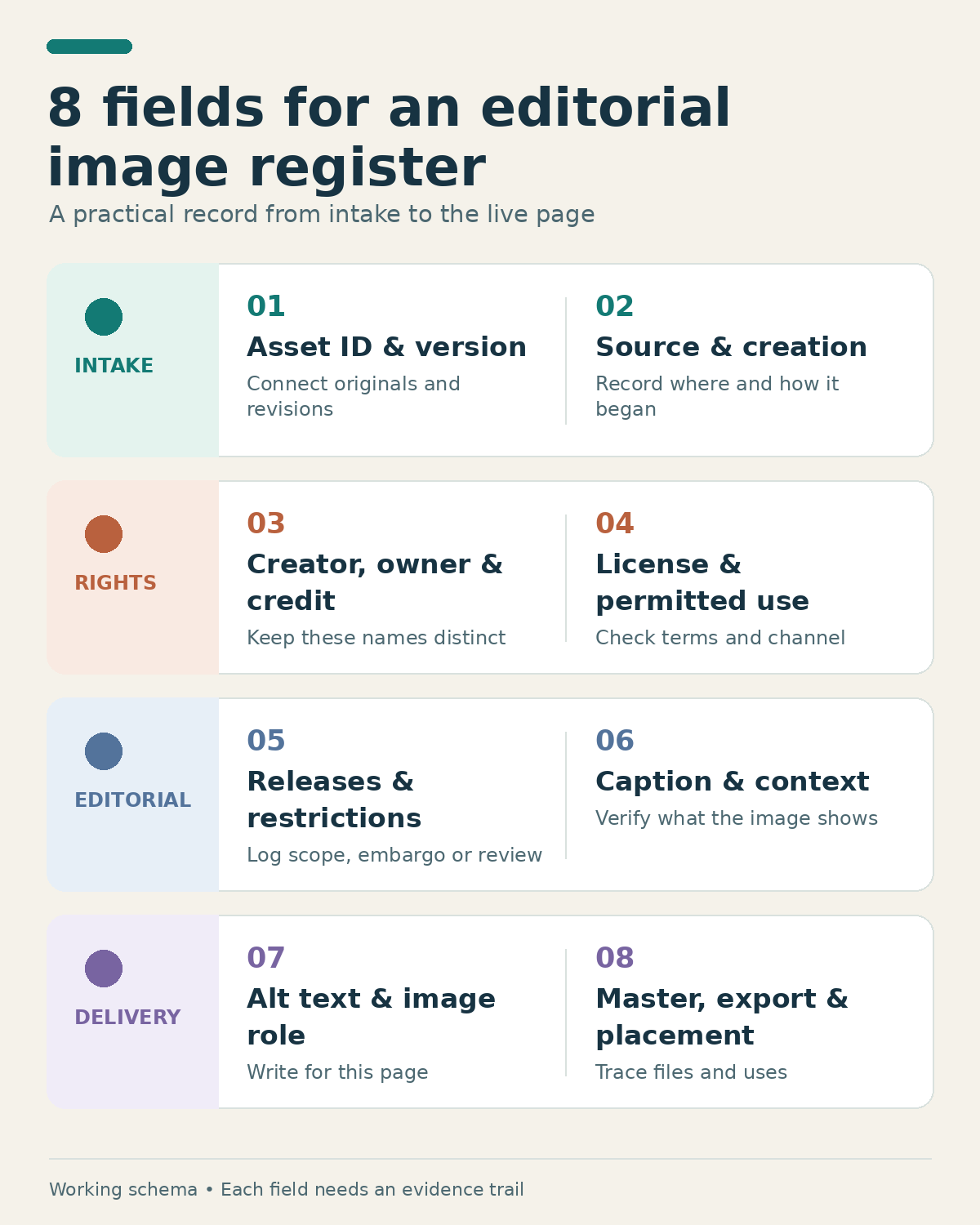
8 Metadata Fields to Record for Every Editorial Image
1. Asset ID and Version
Give an image a stable ID as soon as it enters the team’s asset library. Use that ID on the intake record, license evidence, editable master, and exported derivatives. A web crop named IMG-2026-042-web-16×9-v2.webp can then point back to IMG-2026-042, even if the CMS renames the uploaded file.
Versioning matters when an editor fixes a label, changes a crop, removes a background detail, or replaces a misleading illustration. Record what changed and which export is approved. A minor filename change does not make a new photograph; an unrelated image should not inherit the old asset’s rights record.
Keep any identifier supplied by the photographer or agency as a separate value. An internal asset ID helps your team work; it is not automatically the same as a supplier’s image number or an IPTC Digital Image GUID. This distinction makes it easier to reconcile an invoice, a source file, and a published crop later.
2. Source and Creation Method
Record the supplier or acquisition route: staff photography, commissioned illustration, stock library, press kit, archive, user submission, or AI-generated artwork. Link to the original download page, assignment, or restricted intake record. Include the acquisition date and the location of the unedited original or editable master. A social export is a derivative, not a substitute for the source.
Creation method also affects how the image should be presented. A synthetic illustration of an office discussion should not be captioned as a photograph of a real meeting. For AI-assisted work, record the tool and known version, generation date, relevant prompt or reference inputs, and material human edits. IPTC’s Digital Source Type and AI provenance properties can carry some of this information in a file, but the register should retain the supporting production record.
If an image contains data or a simulated interface, add a verification note before it moves to layout. The checks used for an AI-generated infographic are especially useful when a plausible-looking visual might contain invented numbers or labels.
3. Creator, Copyright Owner, and Required Credit
These are three different answers. The creator made the image. The copyright owner is identified by the applicable agreement or other reliable record. The credit line is the wording required for publication. A staff photographer, a stock agency, and the party named in a licensing contract can all appear in one asset’s paperwork without being interchangeable.
Enter the exact visible credit and its placement rule. Does it belong immediately below the image, in a gallery credit field, or with the article’s image credits? An embedded credit line may help carry attribution, but it does not necessarily satisfy a requirement for visible credit. Check the actual agreement rather than inferring ownership because a commission was paid or a press kit was received.
If the owner or credit is unclear, mark the record “needs review.” Do not fill an uncertain field with the publication’s name to make the form complete. Before release, compare the verified values with the final export’s IPTC Creator, Credit Line, and Copyright Notice where those fields are used.
4. License Evidence and Permitted Use
Store a link to the agreement, stock receipt, permission email, or license deed. The register should summarize the operational terms: permitted channels, territory, duration, required attribution, and whether cropping, compositing, or other modifications are allowed. Include an expiration or review date when relevant and the person who checked the terms.
“Approved for web” is too vague if the team also publishes newsletters, organic social posts, paid ads, and syndicated stories. An image permitted on one article page may require another check before use in a campaign. A subscription or download receipt does not tell the next editor everything about the license; preserve the terms that applied to that acquisition.
Use explicit statuses such as “verified for this placement,” “limited,” and “unknown.” Never enter “perpetual” as a convenient default. The register is a pointer to the governing evidence and a prompt to compare it with the intended use, not a replacement for reading the agreement.
5. Releases, Embargoes, and Other Restrictions
For images involving recognizable people, sensitive locations, private property, or restricted agency material, record whether a release or other permission is relevant and what its scope covers. “Not applicable” should mean someone considered the question; it is different from a blank field. A release limited to one use does not automatically clear an unrelated ad or another territory.
Add any embargo, instruction not to alter the image, privacy concern, or condition attached by the supplier. An editorial photograph does not universally require a model release; the need depends on the context, jurisdiction, and intended use. The register should send uncertain cases for the appropriate review rather than pronounce a legal answer.
Keep signed releases and sensitive personal details in restricted storage. The working row needs a document ID, status, scope, and reviewer, not a public copy of someone’s private information.
6. Caption and Factual Context
A caption should help readers understand what they are seeing. Record verified names, roles, location, event, and date when relevant. Keep a note of the source for details that are easy to get wrong. The date the image was uploaded to the CMS is not necessarily the date the scene occurred.
Check a supplier’s caption against the final crop and the story. A wide photograph may show a group at an event, while a tight crop makes one person appear to be the subject. If the person or action cannot be verified, narrow the caption instead of guessing. If the picture is a conceptual illustration or reconstruction, label it so readers do not mistake it for documentary evidence.
The register can hold more factual context than the public caption, including uncertainty and a correction history. IPTC separates Description/Caption from Alt Text (Accessibility). A factual caption may name people, dates, and the source; the text alternative should convey what the image contributes in its particular page context.
7. Alt Text and Accessibility Role
Record whether the image is informative, functional, or decorative on each page. Then write or review the HTML text alternative for that placement. A photo that illustrates an editor comparing two exports may need a short description in this article. Used only as decorative background beside a complete text heading, it may call for an empty alt attribute instead. The same file can serve different purposes in different layouts.
For a chart or infographic, alt text can introduce the point, while nearby HTML text supplies the detailed steps or data. Do not force an entire diagram into one unwieldy sentence. The W3C’s image guidance ties the text alternative to the image’s purpose and surrounding content. Writing useful image alt text also requires editorial judgment rather than a string of search keywords.
Review the final CMS output. An IPTC accessibility field embedded in the source file does not guarantee that the site’s HTML alt field will be populated after upload, and a generic media-library description may not fit every page.
8. Master, Export, and Live Placement
Connect the editable master to the specific derivative being published. Record the export filename, format, dimensions, crop, revision, CMS media ID, and reviewer. When the page goes live, add its URL and the date or status of the placement. A license may cover the original but a badly cropped derivative can still change the meaning of the picture.
If an image appears in several articles and channels, keep one parent asset record and a placement record for each use. The placement can hold its page-specific caption, alt text, credit display, crop, and permission decision. That structure is more dependable than stuffing many URLs and conflicting captions into a single cell.
Inspect the delivered web file and rendered page. Some optimization pipelines remove embedded metadata, while CMS settings may alter filenames or generate several sizes. Google Search Central recommends retaining key rights and identification metadata where possible, but metadata alone does not guarantee a particular search display. A register should tell the team which actual pages need attention if the credit changes, an error is corrected, or a license expires.
A Sample Register Entry Editors Can Adapt
Here is a fictional record for a staff-made illustration. It shows the kind of answer each field group should provide; it is not an actual Editorialge asset, a license determination, or a required IPTC template.
| Field group | Synthetic example entry | Release check |
|---|---|---|
| Asset ID and version | IMG-DEMO-001; web export v2 |
Is this the approved derivative of the recorded master? |
| Source and creation method | Staff-made vector; editable master in the team’s asset folder; no AI used | Can the editor locate the original production file? |
| Creator, owner, and credit | Staff illustrator; Example Publisher; visible credit: “Illustration: Example Publisher” | Do the agreement and displayed credit match? |
| License evidence and use | Internal agreement on file; web and newsletter allowed; edits allowed | Does this placement fit the documented scope? |
| Releases and restrictions | No recognizable people; no embargo; release status not applicable | Has the “not applicable” decision been checked? |
| Caption and context | “Conceptual illustration of an editorial image review workflow” | Could a reader mistake it for a real newsroom photograph? |
| Alt text and role | Informative here: “Illustration showing an image moving through source, rights, and publication checks” | Does the text describe this page’s use? |
| Master, export, and placement | SVG master; 1600 × 900 WebP; CMS media ID and live URL recorded after publication | Did the final export and page pass inspection? |
For a small spreadsheet, put the stable asset details in one row and add a linked placement tab if the image is reused. Use controlled values for “verified,” “limited,” “not applicable,” and “needs review,” and store links to proof rather than uploading contracts into a public media library. A DAM can model the same relationships with linked assets and use records.
Make the Register Part of the Publishing Handoff
An image register works only if someone updates it when an export changes or a new placement goes live. At intake, assign the ID and capture the original source and permission evidence. Before layout approval, check the proposed crop, caption, credit, release status, and intended channel. After upload, inspect the actual file and page, then add the CMS media ID and live URL.
If a required answer is unknown, name the reviewer and hold that image’s use until the question is resolved. Once the asset is live, the register becomes a map for corrections, attribution changes, license renewals, and replacements. Start with the eight field groups, then add subfields only when a real editorial decision requires them. An editorial image register earns its place when the next editor can make a sound decision from the record without rebuilding the image’s history.