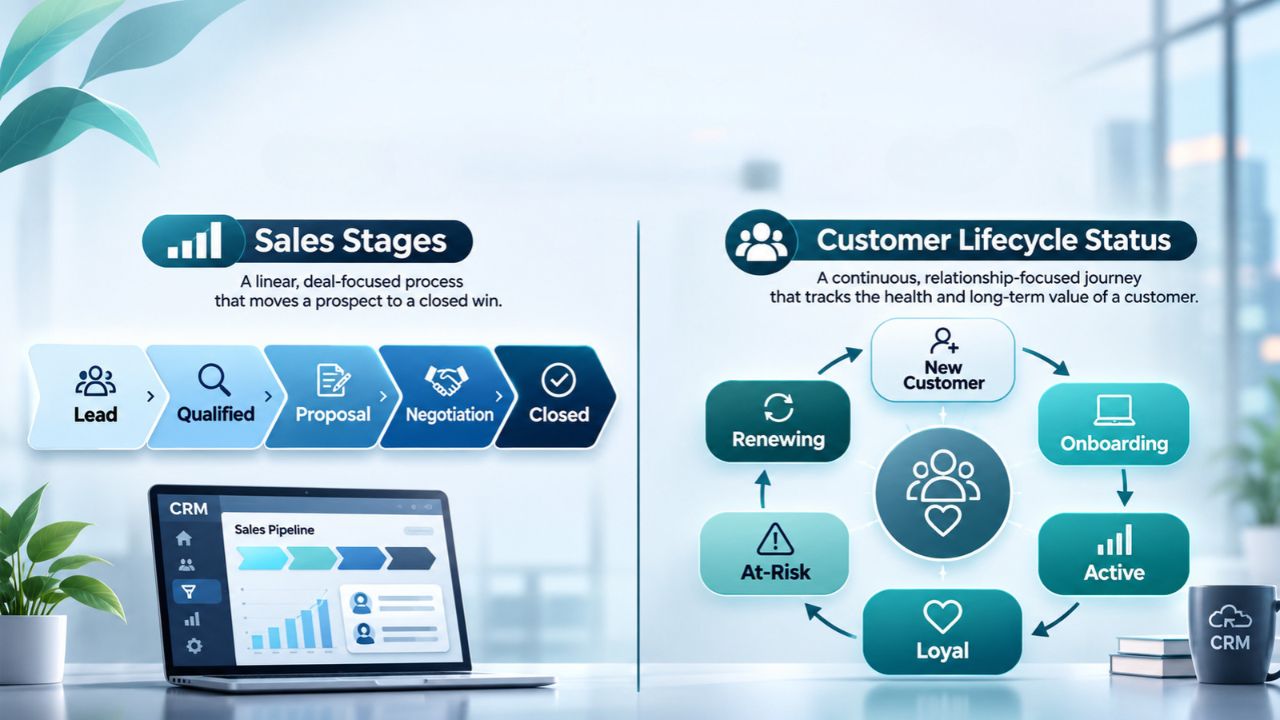
A customer paying for 20 seats asks for a proposal for 10 more. Where does the account belong in your CRM? It’s an active customer, and the extra seats are a deal at the proposal stage. Keeping sales stages on individual deals and customer lifecycle status on the account lets the sales rep follow up on the quote while the customer success team keeps supporting all 20 existing users.
What we checked
We inspected three definitions in HubSpot’s public documentation. Its lifecycle property describes a contact or company. Its deal stages carry probabilities used to calculate weighted pipeline value. And its won and lost stages both close a deal. Those details matter if you’re adapting an existing CRM.
A probability belongs to a potential purchase, and a closed deal tells you little about whether a customer still has an active contract. This was a documentation review. The workflow below is a proposed setup for a business that sells to accounts.
Give each field one job
| Field | Where it belongs | Question it answers | Example |
|---|---|---|---|
| Sales stage | One deal or opportunity | How far has this purchase progressed? | Proposal sent |
| Deal type | The same deal | What is the customer buying or renewing? | Expansion |
| Customer lifecycle status | The buying account, or the individual in a consumer business | What relationship do we have with this buyer today? | Active customer |
| Contract status | Each agreement or subscription | Is this particular agreement in force? | Active through June 30 |
If your CRM already uses “Lifecycle stage” to record milestones such as Lead, Opportunity and Customer, keep that history. Create a separate current customer status when you need to distinguish active and former customers. Otherwise, cancelling a subscription can erase the very milestone you need to measure acquisition.
Define sales stages a rep can verify
For a small sales team, a workable starting pipeline is Discovery, Proposal sent, Contract review, Closed won and Closed lost. Give each stage an entry rule. A rep can move a deal to a proposal sent when the buyer receives a priced offer. A draft quote sitting in the rep’s inbox stays in Discovery. Contract review begins when the buyer confirms that someone is reviewing terms.
Choose a consistent event for Closed Won, such as both parties signing the order. Record the close date and keep the service start date separately. A December signature for a February start can count as a December sale while the account remains a customer awaiting activation.
Let the account status follow the relationship
For a subscription business, start with Prospect, Pending Activation, Active Customer, and Former Customer. Define the buying account first. If a parent company negotiates but each subsidiary signs and pays separately, decide which entity owns the contract before aggregating customer counts.
Use the contract or billing system to confirm effective dates. Mark an account active when its first agreement takes effect. When a cancellation arrives, record the request date and the effective end date. At the effective end, check all agreements for that account. Only move it to the former customer if it previously had service and its last active agreement has ended. Route gaps or conflicting dates to an owner for review.
Walk one account through the rules
| Event at the same account | Deal update | Account update |
|---|---|---|
| Buyer signs its first annual agreement | Original deal closes won | Pending activation until service starts |
| Service starts for 20 seats | Original deal stays closed won | Active customer |
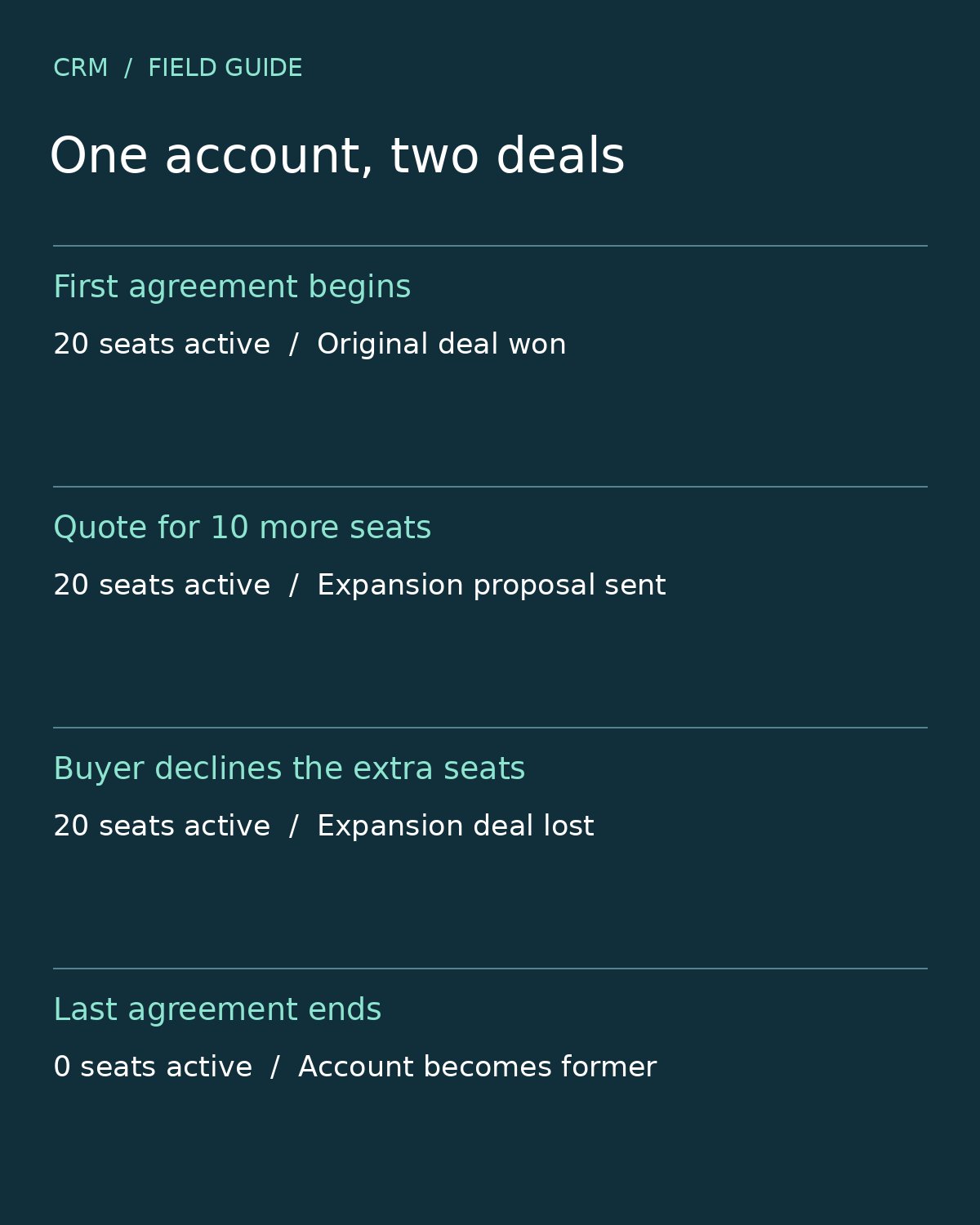
| Buyer requests a price for 10 additional seats | Open a separate expansion deal and advance it when the quote is sent | Active customer |
| Buyer declines the extra seats | Close the expansion deal lost and record the reason | Active customer with 20 seats |
| Buyer later cancels its only agreement | Preserve both deal outcomes | Former customer on the effective end date |
The fourth row is a quick diagnostic. If declining ten extra seats triggers a win-back email or removes twenty paying seats from a report, trace the automation that copies the deal outcome onto the account.
Move existing records without losing the history
Export account IDs, deal IDs, old status values, timestamps and linked contract IDs before changing the fields. Map unambiguous values first. “Proposal sent” can populate a deal stage when you know which deal received the proposal. A legacy account labelled “Negotiation” could belong to a prospect or a longtime customer discussing a renewal. Check its agreements before assigning a relationship status.
Build the new fields alongside the old ones. Preview changes on accounts with parallel deals, future start dates, cancellations and reactivations. Check the resulting email audiences as well as the records. A correct dashboard can hide an onboarding email queued twice. Trigger onboarding on the account’s first qualifying activation and record that it ran. Give returning customers a separate reactivation rule if they need a different welcome.
Check the reports before switching over
Count distinct deal IDs for pipeline and win rate. For a closed-deal win rate, divide wins by wins plus losses in the same close-date period and deal type. Count distinct account IDs with qualifying service on the reporting date for active customers. Keep the first activation date for acquisition reporting, especially when calculating customer acquisition cost payback. A renewal or expansion can add revenue without adding a newly acquired account.
As a final check, give a sales rep and a customer success manager the same account. The rep should be able to identify the next open purchase and its stage. The manager should be able to identify the services the buyer has today. When both can answer using the same record, your sales stages and customer lifecycle status are doing their respective jobs.