


Traffic reports flag declining pages, but deciding which ones deserve editing requires closer inspection. Knowing how to run a content audit comes down to three clear steps: inventorying your existing assets, evaluating performance data, and assigning actionable outcomes—Keep, Update, Consolidate, or Remove.
Whether low traffic signals outdated advice, weak internal linking, or a niche audience, a systematic content audit turns underperforming URLs into organic growth. Review what exists, align each page with current search intent, and assign clear ownership for every change to boost rankings, optimize crawl budget, and improve site authority.
How to Run a Content Audit in 8 steps
1. Choose a Goal and Set Boundaries
Start with the decision you need to make. Recovering search traffic requires different evidence from improving lead generation or reducing outdated support content.
Write a short brief: “Identify resource-center articles worth updating to help potential customers choose a product.” Define the folders, languages, and content types included.
Choose one main success measure before exporting data. For a lead-generation audit, that might be completed inquiries from organic visits. This keeps traffic volume from becoming the default measure of every page’s worth.
A small site may be manageable in full. For a large archive, begin with one topic cluster or business area. Include strong performers alongside struggling pages so the audit captures what already works.
2. Build an Inventory Beyond the Sitemap
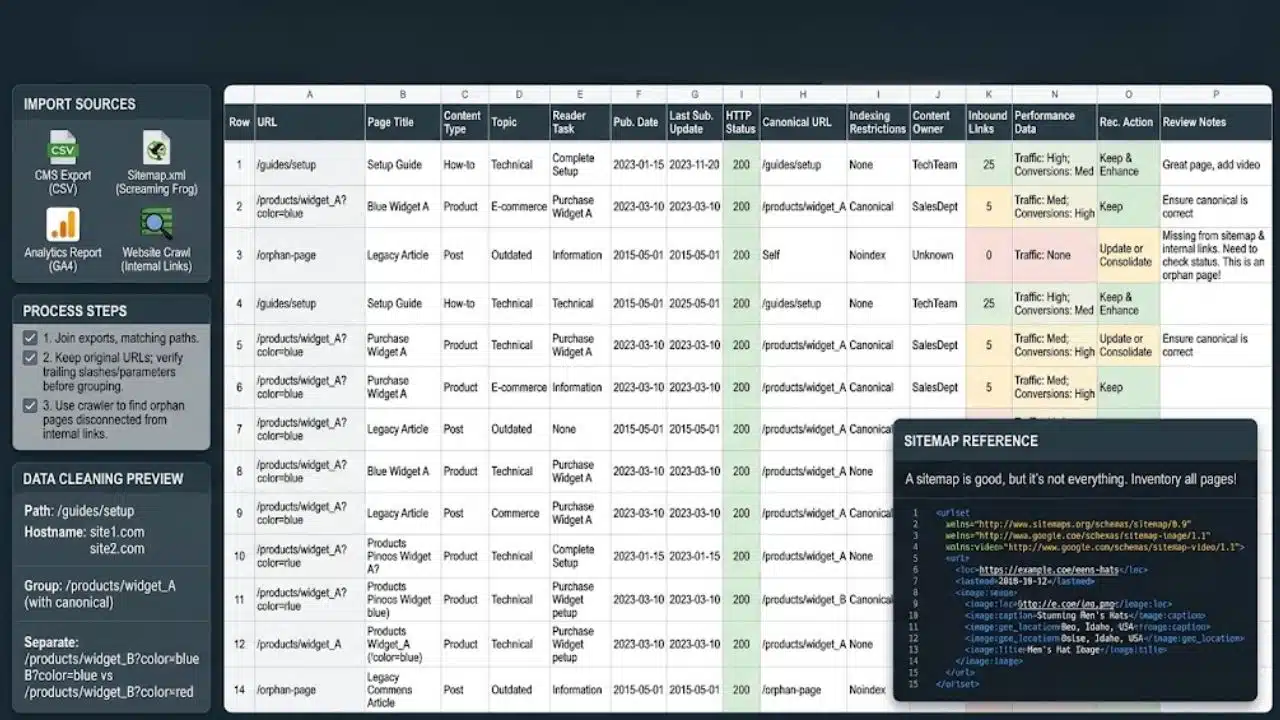
Combine URLs from your content management system, XML sitemap, analytics reports, and a website crawl. Even with a crawler such as Screaming Frog, a crawl following internal links can miss orphan pages disconnected from that network.
Use one spreadsheet row per URL. Record:
- Page title, content type, topic, and the reader’s task.
- Publication date and last substantive update.
- HTTP status, declared canonical URL, and indexing restrictions.
- Content owner and links pointing to the page.
- Performance data, recommended action, and review notes.
Watch the URL formats when joining exports. GA4’s Landing page and Landing page + query string dimensions use paths such as /guides/setup; the latter also retains query parameters. Match these to your crawl’s format, keeping hostnames separate when a property covers several sites.
Keep the original URLs. Confirm whether trailing slashes and parameters represent the same content before grouping rows. Removing every parameter automatically can combine different pages.
3. Add Performance Data with Enough Context
For an initial review, compare the last three complete months with the previous period. For seasonal topics, also compare the same months a year earlier, where data exists.
- Search visibility: Export clicks, impressions, click-through rate, and average position by page from Google Search Console’s Performance report. Inspect queries where performance changes. Its interface tables have a 1,000-row limit, so missing rows do not prove zero activity.
- Visitor outcomes: Use the GA4 Landing page report to review sessions, engagement, and configured key events, such as completed inquiries. For Google organic traffic, filter Session source/medium to google/organic. These are session outcomes; they cannot establish that one page alone caused a conversion.
Check tracking before interpreting missing events. Most Search Console performance data goes to Google’s selected canonical URL, the version it treats as representative. A duplicate URL can therefore appear to have no activity.
Flag recently published pages separately so a few days of data are not judged against a full quarter.
4. Read the Page and Diagnose the Problem
Open each priority URL and try to complete the task its title promises. For tutorials, check prerequisites, missing steps, and outdated screenshots. In comparisons, verify that the differences help readers choose.
Inspect titles, headings, links, and mobile layout. Use Google’s people-first content questions to assess accuracy, usefulness, and original value. Word count cannot settle those questions.
Write a diagnosis an editor can act on: “Setup instructions omit the required account permissions.” A note saying “Improve quality” leaves the next person to repeat the investigation.
When impressions are strong, but clicks are weak, check queries, position, and competing results before changing the title. If visits rise while inquiries remain flat, examine the offer, audience fit, and form.
Resolve access or unintended indexing restrictions before commissioning a rewrite. Better wording will leave those technical problems untouched.
5. Assign an Action and Explain the Evidence
Record an action and a short reason for every reviewed URL. These labels keep decisions consistent across reviewers.
| Action | When it fits |
| Keep | The page remains accurate, useful, and appropriate for its purpose. |
| Update | The reader need remains valid, but information, structure, or guidance needs work. |
| Merge | Several pages repeat the same task and would serve readers better together. |
| Retire | The content has no continuing purpose and cannot reasonably be improved or consolidated. |
| Investigate | Missing data or technical faults prevent a sound decision. |
Low traffic alone is insufficient grounds for removal. A support page may matter to existing customers even when few people find it through search.
Suppose two articles cover the same employee onboarding checklist, with useful instructions scattered between them. Consolidation may help. A separate guide to onboarding remote staff might deserve its own URL because the practical requirements differ.
Before merging, inspect query overlap, reader intent, existing links, and conversions. Shared keywords alone do not demonstrate harmful competition. Preserve unique information and choose a destination that suits the combined topic.
6. Turn Recommendations Into a Realistic Work Queue
When planning how to run a content audit with a small team, choose a first batch that fits your next editing cycle. Prioritize by business value, severity, confidence in the diagnosis, and effort. Correct misleading instructions promptly. Give a useful page with a clear, limited fix priority over a speculative rewrite requiring extensive research.
Each task needs a URL, diagnosis, exact changes, owner, deadline, and success measure. For example: “Add permission requirements, replace obsolete setup steps, and verify the signup link; track completed inquiries from organic landing sessions.”
Group recurring template problems into one implementation task. A broken navigation link shared across dozens of pages needs a template fix rather than separate writing assignments.
7. Publish Carefully, Especially When URLs Change
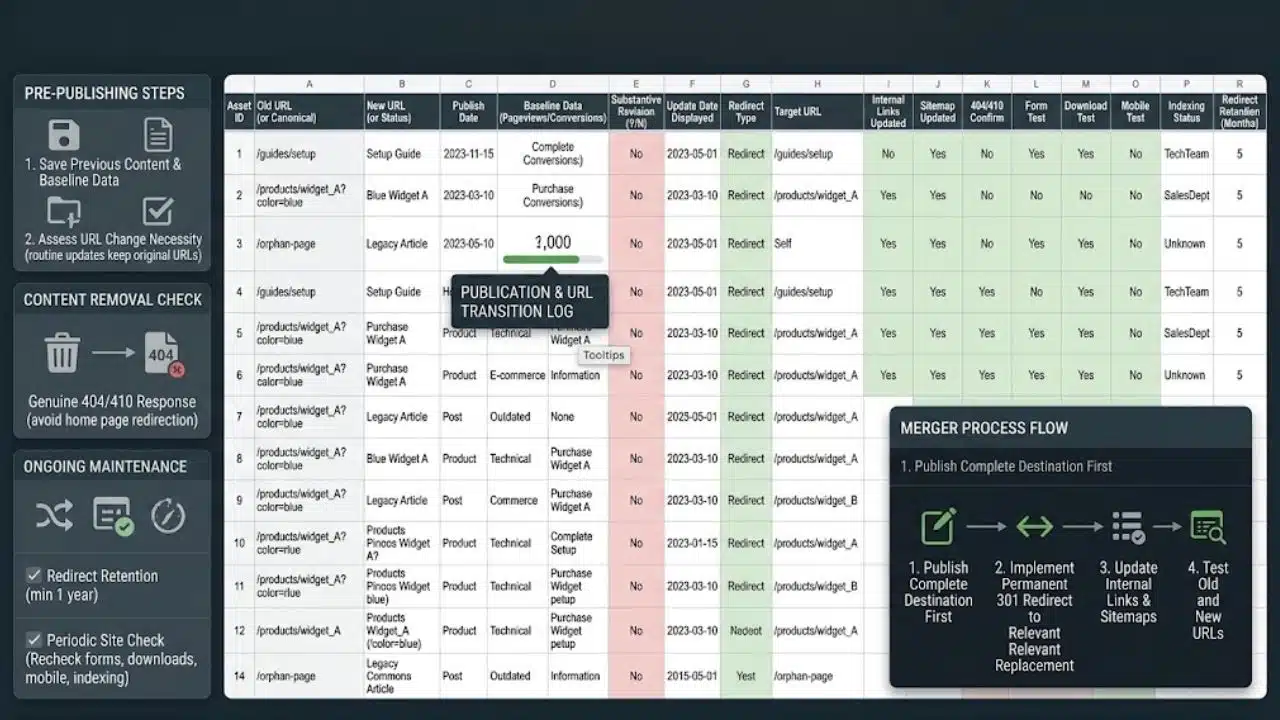
Save the previous content and baseline data. Keep existing URLs for routine updates unless there is a clear reason to change them.
For a merger, publish the complete destination first. Use a permanent server-side redirect, such as a 301, directly to that relevant replacement. Update internal links and sitemap entries, then test the old URLs and destination.
If content is permanently removed without a suitable replacement, return a genuine 404 or 410 response. Avoid sending unrelated retired pages to the homepage.
Keep redirects long-term; Google generally recommends at least a year for URL changes. Recheck forms, downloads, mobile formatting, and indexing settings. Change displayed update dates when the content has received a substantive revision.
8. Measure the Outcome and Schedule Maintenance
Record what changed and when. Check implementation immediately, then schedule a first performance review after four to eight weeks as a planning checkpoint. Allow longer for low-traffic or seasonal pages: search effects can take days to months.
Use comparable periods and traffic segments. For mergers, total clicks and tracked outcomes across the original URLs, including any existing destination. Compare those totals with subsequent performance after consolidation. Do not add averages or percentages together.
Account for campaigns, tracking changes, and wider traffic shifts before attributing gains to an edit. Schedule reviews around how quickly content changes: software instructions deserve closer attention than stable reference pages.
Final Thoughts
Knowing how to run a content audit should make the next publishing decision clearer. Choose a manageable batch with specific problems and available owners. Leave uncertain cases marked “Investigate” until the evidence supports a decision.
Finish that batch before widening the scope. At the review, record what improved, what stayed unclear, and which pages need another look.


























