
The most useful repetitive tasks small teams can automate are not the decisions that define the business. They are the handoffs around those decisions: recording a request, creating a task, sending a reminder, routing an exception, or assembling a report.
Saving ten minutes is not a win if the automation sends the wrong price, gives someone unnecessary access, or hides a failed task. The better model is a visible workflow in which software handles the predictable path while a named person retains authority over exceptions and consequential actions.
Workflow automation does not require removing people from a process. It can coordinate records, reminders, approvals, and status changes while leaving judgment with the person accountable for the result. A dependable workflow should be easy to inspect, easy to pause, and easier to recover than the manual process it replaced.
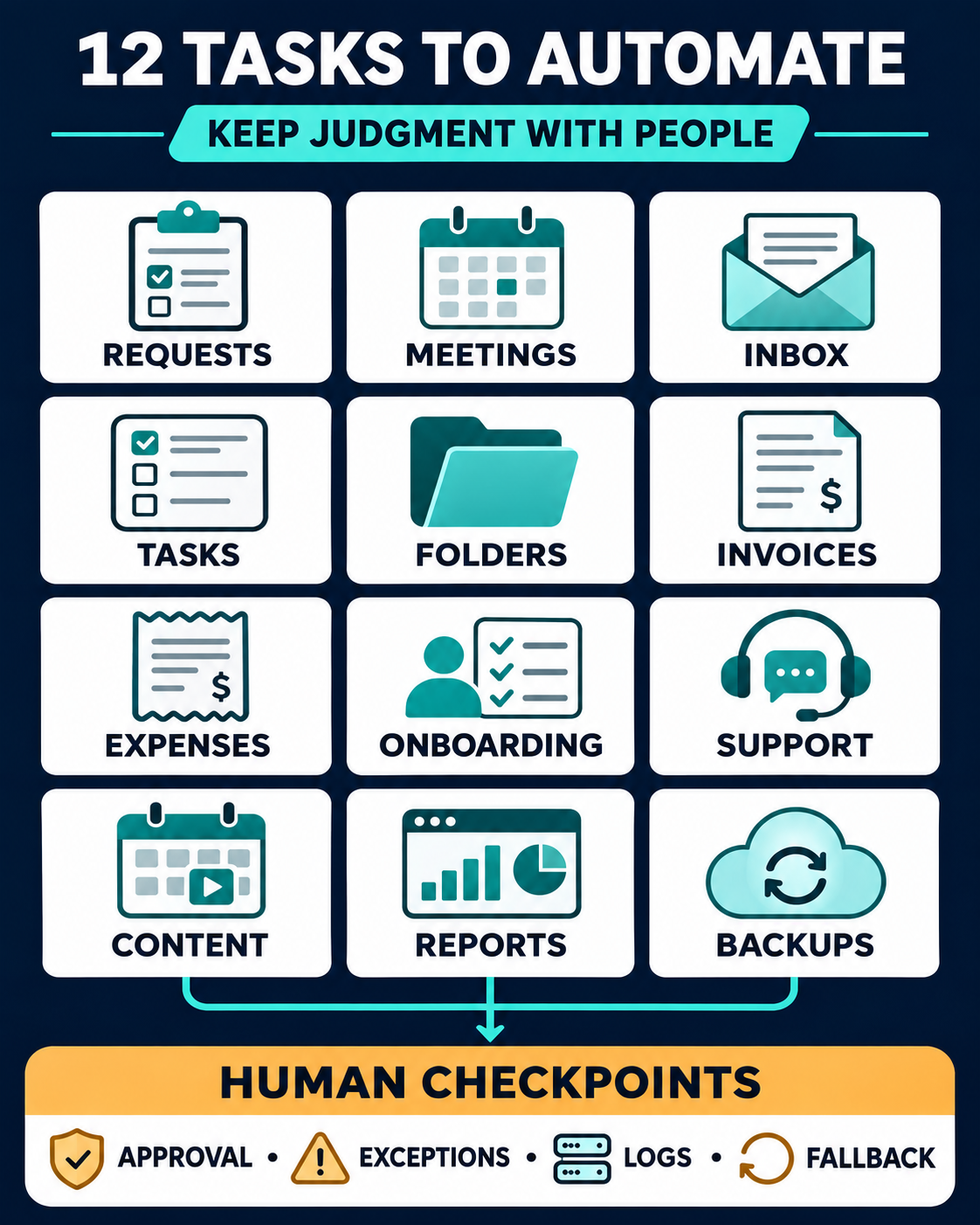
Automate the Normal Path, Not the Authority
Before choosing a tool, define five controls:
- Owner: One person is responsible for the workflow, even when several people use it.
- Approval point: The system must stop before a payment, permission change, public statement, binding promise, or other high-impact action.
- Exception route: Missing fields, duplicates, unusual values, and failed connections must enter a visible review queue.
- Activity record: The team should be able to see what ran, what changed, and where a process stopped.
- Manual fallback: Staff need a documented way to finish the work if the automation is unavailable.
If an AI component classifies messages, extracts information, or drafts responses, its role needs even clearer boundaries. The NIST AI Risk Management Framework emphasizes defining and differentiating human roles and responsibilities in AI-assisted decision-making and oversight. For a small team, that means deciding who may approve, override, correct, and stop the system before it goes live.
The following tasks are strong candidates because their routine paths can be described in rules and their results can be checked.
| Repetitive task | What software can handle | What remains human |
|---|---|---|
| New request intake | Record, acknowledge, and assign | Qualification and promises |
| Meeting scheduling | Offer times, create events, and remind | Complex changes and priority conflicts |
| Inbox triage | Label, route, summarize, and draft | Sensitive replies and commitments |
| Task creation | Build records from approved requests | Scope, priority, and deadlines |
| Folder and template setup | Create standard assets and names | Access approval and unusual structures |
| Invoice preparation | Build drafts and send routine reminders | Amounts, tax treatment, and disputes |
| Expense collection | Capture receipts and suggest fields | Coding exceptions and reconciliation |
| Onboarding checklists | Create tasks and send prompts | Scope, access, and relationship management |
| Support intake | Create, categorize, route, and escalate | Complaints, refunds, and security issues |
| Content handoffs | Move approved work and schedule it | Claims, tone, timing, and final sign-off |
| Recurring reports | Refresh data and distribute summaries | Metric definitions and interpretation |
| Backups and alerts | Run scheduled jobs and report failures | Restore tests and access control |
1. Capture and Route New Requests
A website form, shared email address, or sales inquiry often starts the same chain: copy the contact details, record the source, assign an owner, send an acknowledgment, and set a follow-up date. Automation can complete that administrative sequence as soon as a valid request arrives.
The first response should confirm receipt, not make a sales decision. A person still needs to assess fit, urgency, budget, capacity, and any promise about price or delivery. Missing consent, an invalid email address, or an unclear service request should move to review instead of entering an ordinary sales sequence.
Use a stable request ID and check for an existing contact before creating a new one. Send the acknowledgment only after the record has been saved successfully. The step-by-step process for automating repetitive work tasks shows why input checks, duplicate protection, and visible error handling matter before more actions are added.
2. Schedule Meetings and Send Reminders
Back-and-forth scheduling is predictable enough to automate. A booking page can show available times, collect essential information, add a video link or location, create the calendar event, and send reminders.
Control begins with the calendar rules. Set buffers, working hours, lead time, meeting length, cancellation conditions, and the calendars that determine availability. If several employees accept appointments, decide whether bookings rotate evenly, follow service type, or go to a named person.
Do not let the system resolve a priority conflict on its own. High-priority rescheduling, accessibility requests, paid bookings, and same-day cancellations may need a person. When comparing scheduling tools, test rescheduling, cancellation, time zones, reminders, and calendar conflicts—not only the first successful booking.
3. Sort Inbox Messages and Prepare Routine Replies
Email rules can separate receipts, system notifications, newsletters, supplier messages, customer requests, and internal approvals. An AI-assisted step may summarize a long thread or prepare a draft response. Used carefully, this turns the inbox into an intake point instead of an informal task list.
Keep automatic sending limited to factual, low-risk acknowledgments. Drafts involving a price, deadline, complaint, attachment, confidential information, or commitment should wait for review. The reviewer must see the original message and relevant history, not only an AI summary.
Start with a few categories and a visible “needs review” label. Overly broad rules can hide important messages as efficiently as they hide newsletters. A practical system for managing email should make commitments easier to find without forcing the team to live in the inbox.
4. Turn Approved Requests Into Task Records
Small teams often retype the same approved request into a project board: client name, deliverable, owner, deadline, source document, and status. A workflow can create the task, link the approved record, apply a template, and notify the responsible person.
Approval must come first. The automation should not decide that a proposal is accepted, interpret vague scope, or invent a deadline. It should act only when an authorized status changes or a designated person submits the final request.
Use a unique project or request ID so an edited form does not create duplicate work. If an accepted proposal begins the sequence, test the complete handoff from agreement to project and invoice. The same principle applies when evaluating proposal automation software: the next operational step matters as much as the proposal document.
5. Create Project Folders, Templates, and Checklists
Every new project may need the same folder structure, naming convention, brief, meeting-notes file, quality checklist, and delivery folder. Automation can generate these from an approved template and place the links in the project record.
The risky part is access. A copied folder can inherit the wrong permissions, expose another client’s template data, or invite people who do not need the files. Keep external sharing and elevated access behind explicit approval. Use clean templates containing placeholders rather than real customer information.
Record the template version and appoint someone to maintain it. A folder structure that no longer matches the work will create confusion at scale. Teams that need instructions close to the task can compare SOP and process documentation tools by how they preserve current procedures, completion records, approvals, and export options.
6. Prepare Invoices and Send Routine Payment Reminders
When a billing event is unambiguous—an approved milestone, completed order, or recurring service date—software can create a draft invoice and schedule reminders after it becomes due. It can also alert the account owner when payment is late.
Require human review for a client’s first invoice and for changes to rates, discounts, credits, taxes, currency, bank details, or disputed amounts. An automation should never treat a newly extracted amount or a supplier’s changed payment instruction as sufficient authority to move money.
Link every invoice to the approved agreement or order, and require an “approved to send” status. Reminders should stop when payment, a dispute, or a negotiated extension is recorded. A sound business automation approach can streamline invoice intake and routing without transferring validation or payment authority to software.
7. Collect Receipts and Prepare Expense Records
Receipt collection is repetitive but rarely clean. A workflow can save attachments from an approved channel, extract the merchant, date, amount, and currency, suggest a category, and ask the employee for missing information.
Treat extraction and categorization as preparation. Duplicate receipts, unusual vendors, mixed personal and business purchases, uncertain tax categories, and amounts above a threshold belong in an exception queue. A bookkeeper or authorized reviewer should reconcile the record with the actual transaction.
Keep the original image or file attached to the record. Set a confidence or rule threshold below which the system cannot continue. The aim is a complete review packet, not automatic accounting based on an imperfect scan.
8. Launch Client or Employee Onboarding Checklists
After an agreement or hiring decision is approved, a workflow can create an onboarding project, assign standard tasks, send document requests, schedule meetings, and remind people about incomplete steps. This reduces the chance that one team member remembers a requirement that another forgets.
Use a formal trigger. A verbal “looks good” in chat should not create accounts, invite external users, or grant system access. A person needs to confirm the relationship, role, scope, start date, required systems, and least-privilege access.
Keep a completion record for each onboarding run rather than marking the template itself complete. Add a stop route when a contract changes, a hire does not start, or required information is missing. The checklist coordinates the work; the account owner or manager remains responsible for the relationship and access decisions.
9. Acknowledge and Route Customer Support Requests
Support intake is a strong automation candidate because the opening steps are consistent. Software can create a ticket, identify the account, tag the topic, assign an owner, acknowledge receipt, and alert the team when the case has waited too long.
Routine questions may receive an approved saved answer. Complaints, cancellations, refunds, suspected fraud, security reports, and emotionally charged messages need a human path. An AI-generated reply should not close a case merely because it sounds complete.
Preserve the original message, customer history, internal notes, assignment changes, and escalation outcome. When choosing customer support tools, prioritize context, ownership, permissions, reporting, and human escalation over a headline automation rate.
10. Move Approved Content Through Scheduling and Publication
Automation can move an approved draft to the next stage, notify a reviewer, schedule a social post, update the content calendar, and alert the owner if publishing fails. It is especially useful for status changes and reminders that otherwise require repeated messages.
The system should schedule only the exact approved version. New claims, price changes, legal language, executive quotations, breaking-news reactions, and sensitive customer references need renewed review. Keep final sign-off with a named person, and make it possible to pause scheduled content during an incident or sudden change in context.
A content calendar should reveal the owner, channel, status, publication time, and blocker. If AI creates summaries or draft copy, count the review work as well as the generation time. Some AI features that require human review become slower than manual work when checking is extensive.
11. Compile Recurring Dashboards and Status Updates
Weekly reporting often begins with the same manual routine: open several systems, copy numbers, calculate changes, update a chart, and send a summary. Automation can retrieve approved fields, refresh the dashboard, calculate defined measures, and distribute a standard report.
It cannot decide what a metric means. Name the source of truth, formula, reporting period, time zone, owner, and acceptable delay for every important number. A missing data source should produce a visible warning—not a blank value that looks like zero or an old figure presented as current.
Use timestamps and show when a connector last refreshed. A person should investigate anomalies and explain what changed. When comparing marketing reporting tools, consider connector reliability, refresh limits, data ownership, maintenance, and the work needed to validate the final report.
12. Run Backups and Send Failure Alerts
Backups need automation because they must happen consistently, including on quiet days when nobody remembers them. Scheduled jobs can copy essential files and records, retain versions, and notify the owner when a run fails or has not completed on time.
A successful status is not proof that recovery works. A person must test restoration, confirm which systems are covered, protect at least one recovery copy from ordinary user accounts, and document who can restore data if the usual administrator is unavailable. File synchronization should not be treated as a complete backup plan.
Begin with a non-critical restore test and record the result. Review coverage whenever the team adds an app or data source. A practical approach to affordable cybersecurity for small businesses combines automated backups with protected copies, restore practice, and clear ownership.
How to Choose Repetitive Tasks Small Teams Can Automate Safely
Choose one task rather than redesigning the business at once.
- Observe the current process: Follow several real cases and record the normal steps, exceptions, delays, and corrections.
- Remove unnecessary work: Do not automate a duplicate approval, an obsolete spreadsheet, or data nobody uses.
- Define acceptance criteria: State what the workflow must create, when it should stop, and what counts as failure.
- Test representative cases: Include a complete case, a missing field, a duplicate, an unusual value, a permission failure, and an unavailable connected app.
- Pilot at low volume: Keep the manual route ready and compare the complete effort, including review and recovery.
- Document ownership: Record the trigger, connected systems, permissions, approval points, exception queue, alerts, pause control, and fallback.
- Review after changes: Recheck the workflow when a field, policy, subscription, integration, or team role changes.
Before purchasing a platform, test the software against the real job and at least one awkward failure case. A polished demonstration proves that the happy path can work. It does not show whether the team can detect a duplicate, recover a half-finished run, export its records, or continue when a connection expires.
Automate the Friction, Keep the Decision
The most useful automation is often unremarkable: a record appears in the right place, an owner receives the right alert, and an exception waits visibly for review. Nobody has to remember the handoff, but somebody remains accountable for the result.
That is the practical standard for choosing repetitive tasks small teams can automate. Let software perform stable, reversible coordination. Keep judgment, authority, sensitive communication, and difficult-to-reverse actions with people. When the normal path is clear and the exception path is visible, a small team can save time without surrendering control.