
Legal technology is the software and digital tools law firms use to manage cases, organize documents, research legal questions, and handle tasks such as billing and client communication. Its practical value starts with a familiar problem: too much of a lawyer’s day can disappear into work that supports a case rather than moves it forward.
Think of the time spent searching for the latest contract, chasing an unsigned form, or piecing together billable hours from scattered notes. These everyday frustrations can slow a firm down and leave clients waiting for answers. The right legal technology can help reduce repetitive work, keep information accessible, and make deadlines easier to track.
But buying software does not automatically fix a struggling process. This guide explains what legal technology includes, which problems it can solve for law firms, and where human judgment remains essential.
What Is Legal Technology? A Definition Law Firms Actually Use
Legal technology, often shortened to “legal tech,” is the category of software and digital tools designed specifically to support legal work: case and matter management, document drafting, contract review, e-discovery, billing, and legal research. Unlike generic office software, legal tech is built around how law firms actually operate, including conflict checks, privilege protection, and court filing standards.
The term covers a wide range of tools, not a single product. Common categories include:
- Practice management software for tracking matters, deadlines, and client communication
- Document automation tools that generate contracts, pleadings, and agreements from templates
- E-discovery platforms that search, tag, and produce documents for litigation
- Billing and time-tracking systems that capture billable hours and generate invoices
- Legal research platforms that search case law, statutes, and regulations
- AI-powered contract review and drafting assistants
Legal technology has existed in some form since the 1970s, when early computer-assisted legal research tools like Lexis and Westlaw launched. What has changed since 2023 is the speed of adoption: generative AI has moved legal tech from a back-office efficiency tool into something attorneys use daily for drafting, summarizing, and reviewing work product.
How Does Legal Tech Help Law Firms Save Time?
Legal technology saves law firms time by automating repetitive tasks like document review, time entry, legal research, and client intake, so attorneys spend more hours on substantive legal work instead of administrative tasks. The time savings compound across a firm, since paralegals, associates, and partners all benefit from faster document turnaround.
Specific time-saving use cases include:
- Automated time capture. Tools that log time as attorneys work (rather than relying on end-of-day memory) reduce lost billable hours, a chronic problem in firms that still track time manually.
- AI-assisted document review. Generative AI tools can scan contracts or discovery documents and flag relevant clauses or risk language in minutes instead of hours.
- Template-based drafting. Document automation software generates first drafts of standard agreements, cutting drafting time for routine matters significantly.
- Faster legal research. AI research assistants summarize case law and statutes, reducing research time that used to take associates half a day.
- Client intake automation. Online intake forms and e-signature tools reduce the back-and-forth that used to consume paralegal hours.
What Problems Do Law Firms Face Without Legal Technology?
Law firms without legal technology face slower document turnaround, inconsistent billing, lost revenue from under-tracked time, and higher risk of missed deadlines or compliance errors. These problems compound as a firm grows, because manual processes don’t scale the way software does.
Common pain points for firms still relying on manual or outdated systems:
- Lost billable hours. Attorneys who track time manually, at the end of the day or week, routinely underreport hours because details are forgotten.
- Slow contract turnaround. Drafting and reviewing contracts clause-by-clause without automation can take days instead of hours, frustrating clients who expect faster responses.
- Data silos. Client information scattered across email, spreadsheets, and paper files makes it hard to get a complete picture of a matter.
- Compliance exposure. Manual tracking of conflict checks, retention schedules, and deadlines increases the risk of malpractice claims or ethics violations.
- Client dissatisfaction. Clients increasingly expect transparency on costs and status updates; firms without client portals or automated billing struggle to deliver this.
Legal Tech vs. Traditional Law Firm Software: What’s the Difference?
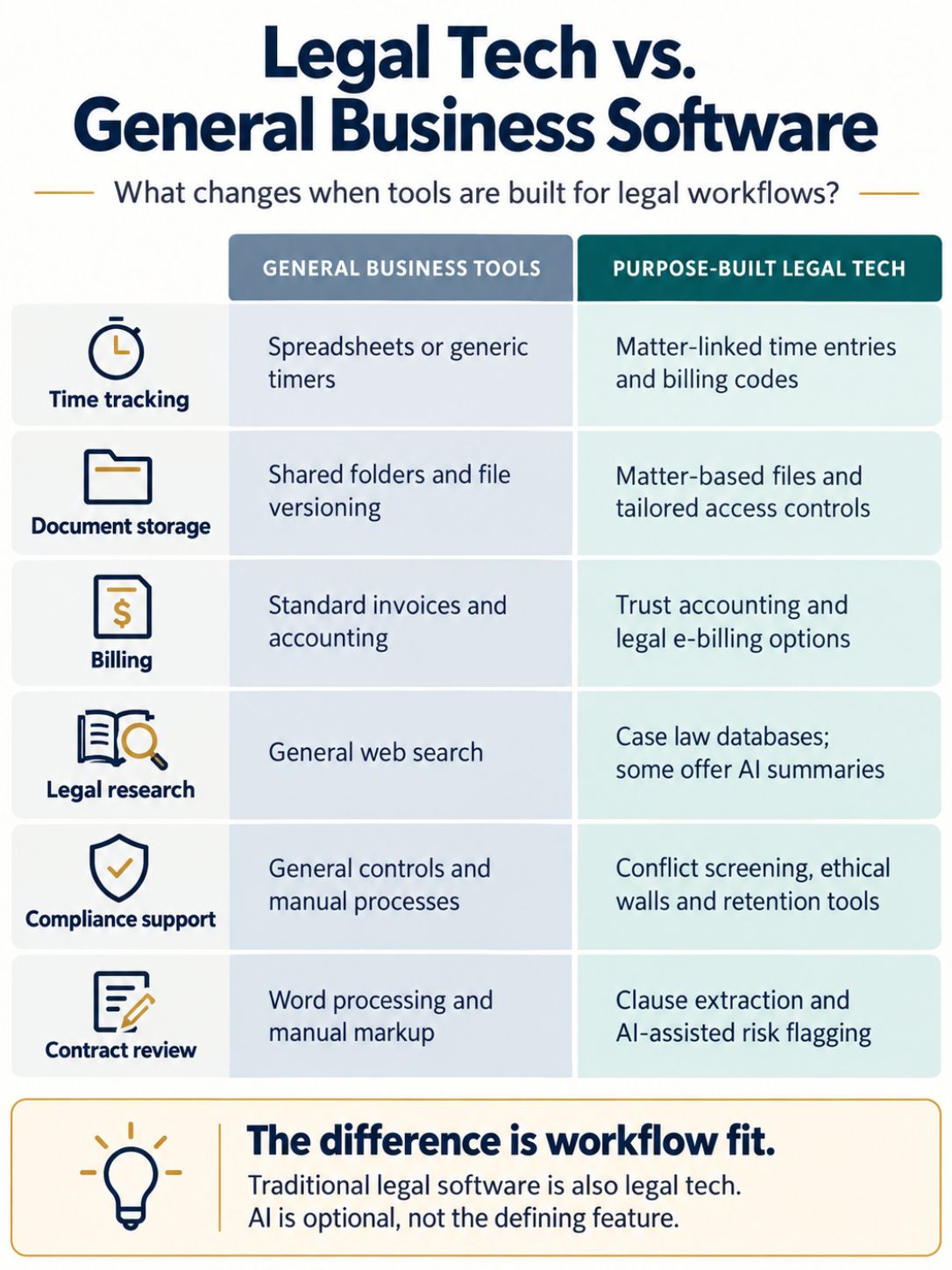
Legal tech refers to purpose-built tools designed around legal workflows, while traditional law firm software often means generic business tools (like basic accounting or file storage) adapted for legal use. The difference matters because legal-specific tools understand matter-based billing, conflict checks, and litigation hold requirements that generic software doesn’t.
| Feature | Traditional Software | Purpose-Built Legal Tech |
|---|---|---|
| Time tracking | Manual spreadsheets or generic timers | Automatic capture tied to matters and billing codes |
| Document storage | Generic cloud drives | Matter-centric storage with version control and privilege tagging |
| Billing | Standard invoicing tools | Trust accounting, LEDES billing codes, split billing |
| Research | General web search | Case law databases with AI-powered summarization |
| Compliance | Manual tracking | Built-in conflict checks, ethical walls, retention rules |
| Contract review | Manual markup | AI clause extraction and risk flagging |
How Much Does Legal Technology Cost for Small Law Firms?
Legal technology costs for small law firms typically range from $30 to $150 per user per month for core practice management, billing, and document tools, with AI-specific add-ons often priced separately. Larger firms with enterprise e-discovery or custom AI platforms can spend six or seven figures annually.
Rough cost tiers for planning purposes:
- Entry-level practice management (solo or small firm): roughly $30 to $80 per user per month, covering case management, basic billing, and document storage.
- Mid-tier platforms with AI research or drafting add-ons: roughly $80 to $200 per user per month.
- E-discovery and enterprise AI platforms: custom pricing, often based on data volume or document count, which can run into thousands of dollars per matter for large litigation.
- Custom AI platforms built in-house: reserved almost exclusively for large firms with dedicated innovation budgets; some Am Law 100 firms have announced proprietary AI subsidiaries or platforms in 2026 specifically to control cost and data handling at scale.
What Are the Best Legal Tech Tools for Document Management?
The best legal tech tools for document management combine secure cloud storage, version control, and search functionality built around matters rather than generic folders. Firms should prioritize tools that integrate with their existing case management and billing systems rather than standalone storage apps.
Key features to look for in a document management system:
- Matter-centric organization: documents tied automatically to the correct case or client file
- Version history: full audit trail of every edit, who made it, and when
- Full-text search: ability to search inside PDFs, scanned documents, and email attachments
- AI-powered review: automatic flagging of key clauses, dates, or risk language in contracts and discovery documents
- Access controls: permission settings that enforce ethical walls between matters or practice groups
- Integration: compatibility with email, e-signature tools, and billing software
Can Legal Technology Replace Lawyers?
Legal technology cannot replace lawyers. It automates repetitive tasks like document review, research, and drafting, but it cannot replace legal judgment, client counseling, courtroom advocacy, or the ethical responsibility a licensed attorney holds for the advice given.
What AI and legal tech can do:
- Draft first versions of routine contracts and pleadings
- Summarize lengthy case files or discovery documents
- Flag risk language or missing clauses in contracts
- Answer basic legal research questions faster than manual search
What legal tech cannot do:
- Exercise professional judgment on strategy or settlement decisions
- Appear in court or sign pleadings on a client’s behalf
- Guarantee accuracy without attorney review (AI tools can produce incorrect citations or “hallucinated” case law)
- Replace the attorney-client relationship or the duty of confidentiality
Legal Tech for Contract Management and Review: How It Works
Legal tech for contract management automates the drafting, review, and tracking of agreements using templates, clause libraries, and AI tools that flag risk or inconsistency. This category has become one of the fastest-growing segments of legal tech because contract work is high-volume and highly repetitive across most practice areas.
A typical AI-assisted contract review workflow looks like this:
- Upload or receive the contract into the platform.
- AI extracts key terms such as parties, dates, payment terms, and termination clauses.
- AI flags risk language by comparing clauses against a firm’s playbook or standard positions.
- Attorney reviews flagged items and accepts, edits, or rejects suggested changes.
- Final version is tracked with full version history and signature workflow.
Contract lifecycle management tools also help firms and in-house legal departments track renewal dates, obligations, and compliance deadlines across hundreds or thousands of active agreements, something that’s nearly impossible to manage reliably with spreadsheets once a portfolio grows past a few dozen contracts.
How to Implement Legal Technology in a Law Firm
Implementing legal technology successfully requires a clear rollout plan: assess current workflow gaps, pick tools that integrate with existing systems, train staff thoroughly, and measure results before scaling further. Firms that skip planning and buy tools reactively often see low adoption and wasted spend.
A practical implementation checklist:
- Audit current pain points. Identify where time is lost: billing, document review, research, or intake.
- Set a budget and timeline. Decide whether you need an all-in-one platform or point solutions for specific problems.
- Involve end users early. Attorneys and paralegals who will use the tool daily should weigh in before purchase, not after.
- Pilot with one practice group. Test the tool on a small scale before firm-wide rollout.
- Train thoroughly. Budget real time for training; one-hour onboarding sessions rarely produce lasting adoption.
- Track adoption metrics. Measure usage rates, time saved, and client satisfaction after 60 to 90 days.
- Review data security and compliance before signing any contract, including where data is stored and who can access it.
Legal Technology for Billing and Time Tracking
Legal technology for billing and time tracking automates the capture of billable hours and generates client-ready invoices, reducing the revenue leakage that happens when attorneys track time manually. This is one of the highest-ROI categories of legal tech because it directly affects firm revenue.
Key capabilities to look for:
- Passive time capture: software that logs activity (calls, emails, document edits) automatically so attorneys don’t have to remember to start a timer
- Matter-based coding: time entries tied directly to the correct client and matter for accurate billing
- LEDES-compliant billing: support for standardized billing codes required by many corporate clients and insurers
- Trust accounting: built-in compliance with bar association rules on client trust funds
- Client portals: real-time visibility into billed hours and outstanding invoices, which reduces billing disputes
Firms that still rely on end-of-day manual time entry commonly underbill because details get lost between the work and the write-up. Automated capture tools address this directly by recording activity as it happens rather than relying on memory hours or days later.
What Are Common Mistakes When Adopting Legal Tech?
The most common mistakes when adopting legal tech are skipping staff training, choosing tools that don’t integrate with existing systems, ignoring data security requirements, and rolling out too many tools at once. Each of these mistakes reduces adoption and wastes budget.
Mistakes to avoid:
- No training plan. Attorneys and staff abandon tools they don’t understand within weeks.
- Buying in isolation. Tools purchased without checking integration compatibility create duplicate data entry instead of saving time.
- Ignoring client requirements. Some corporate clients now require specific security certifications or prohibit certain AI tools from touching their confidential data; skipping this check can create a client relations problem later.
- Over-trusting AI output. Treating AI-generated research or drafts as final without verification creates serious malpractice risk.
- Rolling out too much at once. Firms that implement five new tools simultaneously overwhelm staff and see adoption collapse across all of them.
Legal Tech Solutions for Solo Practitioners vs. Large Firms
Solo practitioners need affordable, all-in-one platforms that bundle billing, case management, and document tools, while large firms often need enterprise-grade, customizable systems that integrate AI across multiple practice groups and offices. The right solution depends heavily on firm size, budget, and matter complexity.
| Factor | Solo / Small Firm | Large Firm |
|---|---|---|
| Budget | $30 to $200 per user/month | Six to seven figures annually |
| Tool approach | All-in-one platform | Multiple integrated systems, sometimes custom-built |
| IT support | Vendor-managed, minimal in-house IT | Dedicated legal operations or innovation team |
| AI adoption | Off-the-shelf AI features bundled into practice management | Custom AI platforms or proprietary subsidiaries |
| Priority | Speed of setup, low cost, ease of use | Security, integration, scalability across offices |
Large firms have increasingly moved toward building or co-developing their own AI tools rather than relying solely on off-the-shelf products. Several major firms announced proprietary AI platforms or AI-focused subsidiaries in September and October 2026, reflecting a push to control data handling, customize outputs to firm-specific precedent, and avoid dependence on a single outside vendor.
How Does AI Legal Technology Work in Law Firms?
AI legal technology works by using large language models trained on legal text to draft documents, summarize cases, answer research questions, and flag risk in contracts, all under attorney supervision. Most firms today use AI as an assistant layer on top of existing legal tech rather than as a standalone replacement for traditional tools.
How AI typically gets used inside a firm’s workflow:
- Drafting assistance: generating first drafts of emails, memos, contracts, or pleadings based on firm templates
- Summarization: condensing long depositions, case files, or discovery documents into key points
- Research: answering natural-language questions about case law, with citations the attorney must verify
- Risk flagging: scanning contracts for unusual or missing clauses compared to a firm’s standard playbook
- Conversational document review: newer platforms, such as Relativity’s claiR, let attorneys query entire document sets in plain English instead of building Boolean search strings
Final Thoughts
Legal technology is no longer an optional upgrade; it’s become the operational backbone for firms that want to stay competitive on cost, speed, and client experience. The problems it solves are concrete: lost billable hours, slow contract turnaround, scattered case data, and compliance risk from manual tracking. The near-universal experimentation with generative AI reported across the legal industry in 2026 shows how fast this shift is moving, even as firms work out hard questions about pricing, accuracy, and client trust.
For firms deciding where to start, the practical path is straightforward. Audit your current workflow gaps first. Pick tools that integrate with what you already use. Train your team properly instead of assuming a short demo is enough. Verify every AI output before it reaches a client or a court. And revisit your pricing model if AI is genuinely cutting the hours behind your billable work.
FAQ about Legal Technology
What is legal technology in simple terms?
Legal technology is software built specifically to help law firms manage cases, contracts, billing, and research more efficiently than manual processes or generic business tools. It ranges from basic practice management software to advanced AI tools that draft documents and review contracts.
What problems does legal technology solve for law firms?
Legal technology solves problems like lost billable hours, slow contract review, scattered case files, and inconsistent billing. It also reduces compliance risk by automating conflict checks and deadline tracking.
Is legal technology only for large law firms?
No. Solo practitioners and small firms can access affordable, all-in-one legal tech platforms for roughly $30 to $200 per user per month. Large firms typically need more complex, integrated systems, but the core benefits apply at every firm size.
Can AI legal technology replace a lawyer’s judgment?
No. AI tools can draft, summarize, and flag risk, but they cannot replace legal judgment, client counseling, or courtroom representation. Every AI-generated output still requires attorney review before it’s used in client work.