


In the ever-evolving world of web hosting, Virtual Private Servers (VPS) are a popular choice for those seeking control and scalability at an affordable price. However, unmanaged VPS hosting presents unique challenges that can be daunting for users without the right expertise. Understanding how to avoid unmanaged VPS hosting issues is essential for anyone looking to make the most of this hosting option.
While unmanaged hosting offers cost savings and flexibility, it also requires significant technical know-how to avoid common pitfalls. This guide explores the top challenges associated with unmanaged VPS hosting and provides actionable solutions to help you navigate these effectively.
Whether you’re a seasoned developer or a beginner, this article will equip you with the tools and insights needed to manage your server like a pro.
What Is Unmanaged VPS Hosting?
Unmanaged VPS hosting is a hosting option where the service provider delivers the server infrastructure but leaves all management responsibilities—including setup, maintenance, security, and troubleshooting—to the user. Unlike managed hosting, which includes support services, unmanaged hosting offers:
- Greater flexibility and control.
- Lower monthly costs.
- The ability to customize your server environment.
Unmanaged VPS hosting is ideal for businesses and developers who require tailored solutions but are prepared to take full responsibility for their server’s performance and security.
Why Choose Unmanaged VPS Hosting Despite the Risks?
While unmanaged VPS hosting poses several challenges, it remains an attractive option for many users due to its benefits:
- Cost Efficiency: Unmanaged hosting is significantly cheaper than managed hosting plans, making it ideal for startups and small businesses.
- Customization: Users have complete control over software installations, server configurations, and resource allocations.
- Learning Opportunity: For tech-savvy individuals, managing a VPS server can be an excellent way to build valuable skills, such as Linux administration and server optimization.
For these reasons, unmanaged VPS hosting is a preferred choice for developers, businesses with in-house IT teams, and tech enthusiasts who value independence.
How to Avoid Unmanaged VPS Hosting Issues
1. Lack of Technical Expertise
One of the biggest challenges of unmanaged VPS hosting is the steep learning curve. Users without sufficient technical expertise may find tasks like server setup, software installation, and configuration overwhelming. Without this knowledge, troubleshooting even minor issues can lead to prolonged downtime.
How to Avoid It
- Invest in Learning: Enroll in online courses or tutorials covering Linux, server management, and hosting basics.
- Use Documentation: Most VPS providers offer extensive documentation to help users navigate common tasks.
- Hire a Professional: If managing a server seems overwhelming, consider hiring a freelancer or IT consultant.
| Key Tips for Beginners | Actions |
| Learn Linux basics | Take free courses on platforms like Codecademy |
| Leverage provider support | Check VPS provider’s guides and forums |
| Outsource complex tasks | Hire freelancers for critical configurations |
2. Server Security Risks
Why Security Matters in VPS Hosting
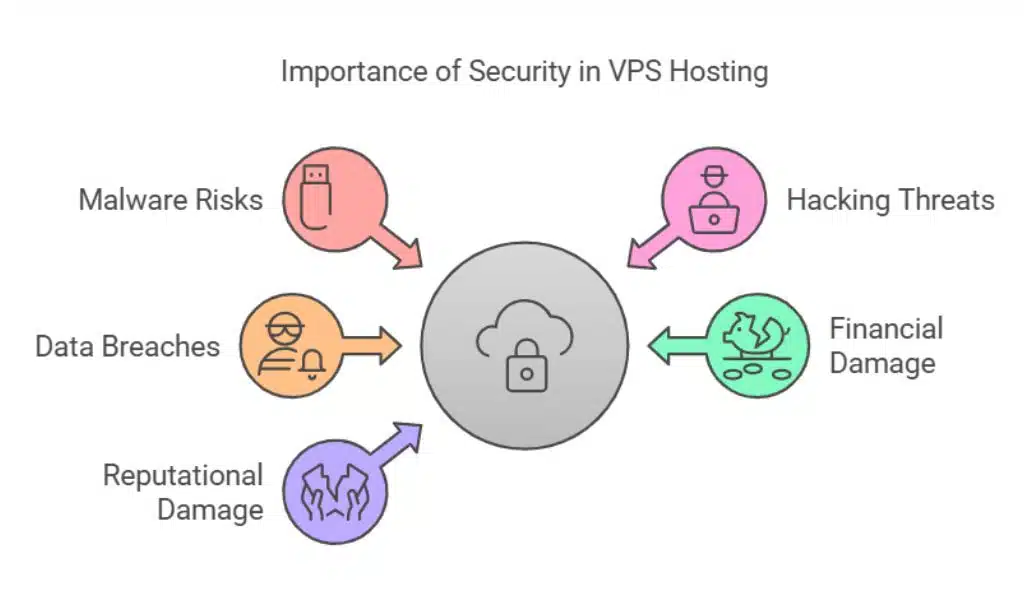
Unmanaged VPS hosting leaves server security entirely in your hands. Without robust security measures, your server becomes vulnerable to malware, hacking, and data breaches. A single vulnerability could compromise sensitive data, leading to financial and reputational damage.
How to Mitigate Security Risks
- Install firewalls and intrusion detection systems.
- Regularly update your server’s operating system and software.
- Use strong, unique passwords and enable two-factor authentication (2FA).
- Configure security protocols like Secure Shell (SSH).
| Security Measure | Description |
| Firewall Installation | Prevents unauthorized access |
| Regular Updates | Fixes vulnerabilities in software |
| Two-Factor Authentication | Adds an extra layer of security |
| SSH Key Authentication | Enhances login security |
3. Poor Performance Optimization
Symptoms of Poor Performance
Slow website load times, high bounce rates, and frequent server crashes are common indicators of a poorly optimized VPS. Performance issues often arise from resource mismanagement or unoptimized server configurations.
How to Improve Performance
- Monitor Server Resources: Use tools like New Relic or htop to track CPU and memory usage.
- Optimize Configurations: Fine-tune server settings for better performance.
- Use Caching: Implement caching solutions to reduce server load.
- Upgrade Hardware: Ensure your server has sufficient CPU, RAM, and storage for your workload.
| Optimization Tools | Function |
| htop | Monitors CPU and memory usage |
| New Relic | Tracks application performance |
| Redis | Caching system to improve database speed |
4. Overlooked Backup Management
Risks of Not Backing Up Your Server
Without backups, you risk losing critical data due to hardware failures, accidental deletions, or cyberattacks. Many users neglect regular backups, assuming their provider will handle them—a dangerous misconception.
Setting Up Reliable Backups
- Automated Backups: Schedule regular backups using tools like rsync or third-party solutions.
- Test Restorations: Periodically verify that backups can be restored successfully.
- Off-Site Backups: Store backups in a separate location for added security.
| Backup Method | Advantages |
| Automated Backups | Saves time and ensures consistency |
| Off-Site Storage | Protects against local hardware failures |
| Incremental Backups | Reduces storage requirements |
5. Misconfigured Server Settings

Common Misconfigurations to Avoid
Misconfigurations can lead to security vulnerabilities and performance issues. For example, incorrect firewall rules or resource misallocations can cause significant disruptions to server operations.
Step-by-Step Guide to Configuring Your Server Correctly
- Follow best practices provided by your hosting provider.
- Use configuration management tools like Ansible or Puppet.
- Regularly review and audit server settings.
| Configuration Tool | Benefit |
| Ansible | Automates server setup and management |
| Puppet | Simplifies complex configurations |
| Webmin | Provides a user-friendly interface for setup |
6. Downtime Due to Maintenance Delays
Why Maintenance Is Critical for VPS Hosting
Failure to perform regular maintenance can lead to unexpected downtime, affecting your website’s reliability and reputation. Maintenance tasks include updating software, monitoring hardware health, and addressing server logs.
Creating a Maintenance Schedule
- Set reminders for software updates and hardware checks.
- Perform routine health checks to ensure optimal server performance.
- Use automation tools for recurring tasks.
| Maintenance Task | Frequency |
| Software Updates | Weekly or as updates are released |
| Log Reviews | Daily or weekly |
| Hardware Inspections | Monthly |
7. Resource Overutilization
Recognizing the Signs of Overutilization
Symptoms include high CPU usage, slow response times, and frequent crashes. Overutilization often occurs when server resources are insufficient to handle workload demands.
Balancing Resource Allocation
- Scale Resources: Upgrade your VPS plan as your website’s needs grow.
- Monitor Usage: Use tools like Nagios to keep track of resource utilization.
- Optimize Applications: Ensure applications are lightweight and resource-efficient.
| Resource Monitoring Tool | Functionality |
| Nagios | Monitors network and resource usage |
| Grafana | Visualizes server metrics |
| Prometheus | Provides real-time data insights |
8. Ineffective Monitoring Tools
Problems with Insufficient Monitoring
Without proper monitoring, you may miss critical alerts about server performance and security. This can lead to issues being detected only after they’ve caused significant damage.
Recommended Monitoring Solutions
- Tools like Datadog, Zabbix, and PRTG provide comprehensive monitoring capabilities.
- Set up email or SMS alerts for immediate notifications.
| Monitoring Tool | Feature |
| Datadog | Monitors cloud and on-premises systems |
| Zabbix | Open-source monitoring for scalability |
| PRTG | Offers detailed network performance insights |
9. Ignoring Software Updates
How Outdated Software Impacts Your Server
Running outdated software increases the risk of vulnerabilities, compatibility issues, and reduced performance. Regular updates are crucial to maintaining a secure and stable server environment.
Automating Software Updates
- Enable automatic updates for your operating system and critical software.
- Use package managers like APT or YUM for Linux servers.
| Update Method | Advantage |
| Automatic Updates | Reduces manual effort and ensures security |
| Manual Testing Before Updates | Prevents compatibility issues |
10. Limited Scalability Options
Challenges of Scaling with Unmanaged VPS Hosting
Unmanaged VPS hosting can be difficult to scale efficiently during traffic surges. A lack of planning can result in slowdowns or server crashes during peak usage.
Strategies for Scalability
- Use containerization tools like Docker for better resource management.
- Consider cloud hosting solutions for dynamic scaling.
- Opt for scalable VPS plans that allow for quick upgrades.
| Scaling Tool | Benefit |
| Docker | Simplifies application scaling |
| Kubernetes | Orchestrates containerized workloads |
| AWS Auto Scaling | Adjusts resources based on demand |
Proactive Strategies for Managing Unmanaged VPS Hosting
Setting Up a VPS Management Routine
- Daily: Monitor server logs and resource usage.
- Weekly: Check for software updates and security patches.
- Monthly: Review server performance and optimize configurations.
Choosing the Right Tools for VPS Management
Invest in tools for:
- Security: Firewalls and antivirus software.
- Monitoring: Tools like Grafana for real-time insights.
- Backup Management: Solutions like Acronis or Veeam.
When to Transition to Managed Hosting
If unmanaged VPS hosting becomes too time-consuming or complex, transitioning to managed hosting might be a better option.
Managed vs. Unmanaged VPS Hosting
| Feature | Managed VPS Hosting | Unmanaged VPS Hosting |
| Cost | Higher | Lower |
| Technical Knowledge | Minimal | Extensive |
| Support Included | Yes | No |
Takeaways
Unmanaged VPS hosting offers immense flexibility and cost benefits but comes with its challenges. Learning how to avoid unmanaged VPS hosting issues is crucial for creating a secure and high-performing server environment.
By following the strategies outlined in this guide, you can confidently tackle the challenges of unmanaged VPS hosting. Assess your technical skills and hosting needs carefully to determine whether unmanaged VPS is the right choice for you. With the right approach, you can harness its potential while minimizing risks. Happy hosting!




























