


Crawl budget optimization becomes important when search engines keep crawling old, duplicate, or low-value URLs while your important articles wait to be discovered or refreshed.
For small websites, this may not be a serious problem. A clean site with a few hundred pages can usually be crawled without much trouble. But publishers are different. A growing publisher site may have thousands of articles, old archives, tag pages, category pages, author pages, search URLs, pagination, redirects, media files, and duplicate URL variations.
That is where crawl budget SEO becomes practical. The goal is not to “force” Google to crawl everything. The goal is to make your site easier to crawl. Search engines should quickly find your best content, avoid unnecessary URL traps, and understand which pages deserve attention.
For publishers, crawl efficiency is a quiet technical advantage. Readers may never notice it, but it can affect how quickly new content is discovered, how often important evergreen pages are refreshed, and how cleanly your site is understood over time.
What Is Crawl Budget?
Crawl budget is the amount of crawling attention a search engine can and wants to spend on your website. It is not a fixed number you control directly. It depends on several signals, including server performance, site health, update frequency, content quality, URL structure, internal linking, and how much value search engines see in crawling your site.
In simple terms, crawl budget answers two questions:
- How much can a crawler safely crawl without hurting your server?
- How much does the crawler want to crawl based on your site’s value and freshness?
For publishers, this matters because large websites often create more URLs than they realize. A site may have 20,000 published articles, but hundreds of thousands of crawlable URL variations because of tags, filters, parameters, old redirects, pagination, and internal search pages.
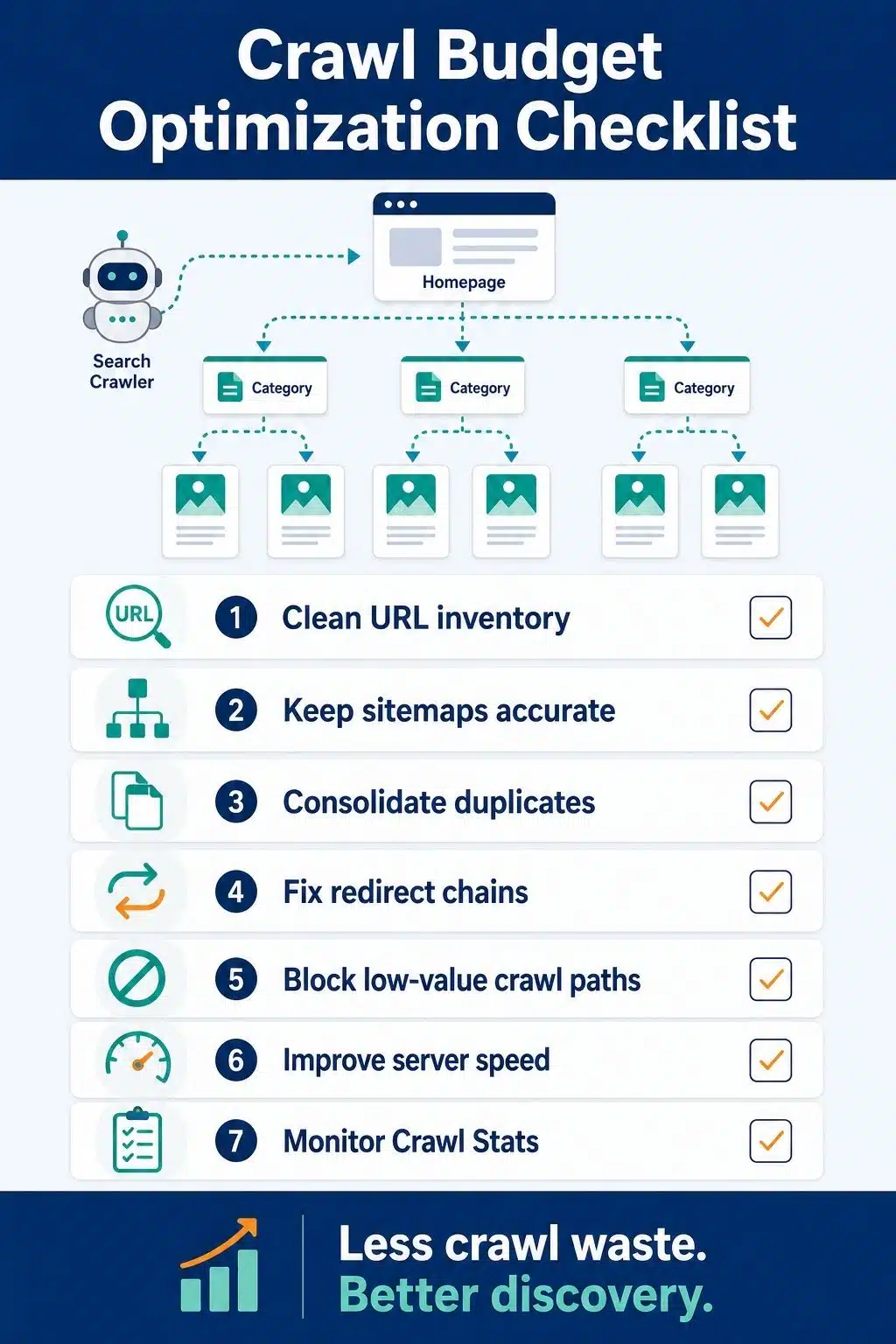
Crawl budget optimization is about reducing waste and improving access to important URLs.
Does Every Publisher Need to Worry About Crawl Budget?
No. Not every publisher needs to obsess over crawl budget. If your website has a small number of pages, your new articles are crawled quickly, your sitemap is clean, and Search Console does not show major discovery or indexing delays, crawl budget is probably not your biggest issue.
You should pay closer attention if:
- Your site has thousands of URLs.
- You publish or update content daily.
- You have a large archive.
- New articles are discovered slowly.
- Many URLs are marked “Discovered – currently not indexed.”
- Googlebot spends time on parameter URLs or low-value pages.
- Your server logs show heavy crawling of useless paths.
- Your sitemap contains old, redirected, or non-canonical URLs.
- Your site has many tag, search, filter, or pagination URLs.
For a publisher, crawl budget becomes more important as the site grows. The bigger the URL inventory, the more discipline you need.
Crawl Budget vs Indexing
Crawling and indexing are not the same. A page can be crawled but not indexed. A page can also be discovered but not crawled yet. This is why crawl budget optimization should not be treated as a magic indexing fix.
Crawling means a search engine visits the URL. Indexing means the search engine decides the page is suitable to store and potentially show in search results.
If your site has thin content, duplicate pages, poor internal links, weak topical structure, or low editorial value, improving crawl efficiency alone will not solve the deeper problem. Search engines still need a reason to index and rank the page.
Strong crawl budget SEO works best when it supports strong content.
| Issue | What It Means | Best Fix |
| Discovered but not indexed | Google knows the URL but has not crawled/indexed it | Improve internal links and sitemap quality |
| Crawled but not indexed | Google crawled it but did not index it | Improve content quality and reduce duplication |
| Redirect chains | Crawlers pass through multiple redirects | Redirect directly to final canonical URL |
| Parameter URLs | Many duplicate URL variations exist | Control parameters, canonicalize, or block crawl paths |
Why Crawl Budget Matters for Publishers
Publishers often have a crawl problem because their websites keep expanding. Every new article adds value. But every weak tag page, useless archive, redirect chain, attachment page, internal search result, and duplicate URL adds noise. Over time, that noise can make it harder for crawlers to prioritize the pages that matter most.
Crawl budget optimization can help publishers:
- Improve discovery of fresh articles
- Support faster recrawling of updated evergreen content
- Reduce wasted crawling on duplicate URLs
- Improve crawl efficiency across large archives
- Help search engines focus on canonical pages
- Reduce server stress from unnecessary crawling
- Clean up technical SEO signals
- Make site migrations easier to manage
This is especially important for evergreen clusters. If you publish a pillar article and many supporting cluster articles, crawlers should easily discover that structure through internal links, sitemap entries, and clean URLs.
Strategy 01: Clean Up Your URL Inventory
The first step in crawl budget optimization is knowing what URLs exist.
Most crawl problems begin with a messy URL inventory. A publisher may think the site has 8,000 useful articles, but search engines may see 80,000 crawlable URLs.
Common URL clutter includes:
- Tag archives with little value
- Date archives
- Internal search result URLs
- Tracking parameter URLs
- Print versions
- Old HTTP versions
- Non-www and www duplicates
- Trailing slash variations
- Author archives with thin content
- Attachment pages
- Paginated archive URLs
- Filter or sort URLs
- Deleted content still returning soft 404s
The goal is not to remove everything. The goal is to decide which URLs deserve crawling, indexing, internal links, and sitemap inclusion.
Start with a simple question:
Would I want this URL to be discovered and evaluated by search engines?
If the answer is no, decide whether it should be noindexed, blocked from crawling, redirected, removed, canonicalized, or improved.
Strategy 02: Keep XML Sitemaps Clean and Updated
Your XML sitemap should guide crawlers toward important, indexable, canonical URLs.
For publishers, this means your sitemap should include:
- Original articles
- Evergreen guides
- Important pages
- Strong category pages
- Topic hubs
- Useful author pages, if indexable
- News or video URLs, when relevant
It should not include:
- Noindex pages
- Redirected URLs
- 404 pages
- Soft 404 pages
- Blocked URLs
- Duplicate parameter URLs
- Old HTTP URLs
- Non-canonical URLs
- Thin tag pages
- Staging URLs
A messy sitemap wastes trust. If the sitemap is full of URLs that redirect, return errors, or point to non-canonical versions, crawlers receive mixed signals.
Keep your sitemap boring and reliable. If your article was updated meaningfully, use accurate lastmod data. But do not refresh lastmod dates across the whole site for tiny template changes. For crawl efficiency, honest update signals matter more than fake freshness.
Strategy 03: Consolidate Duplicate Content
Duplicate URLs are one of the biggest crawl budget problems on publisher sites. A single article can appear through multiple URL versions because of tracking parameters, category paths, AMP versions, syndication, print pages, and old permalink structures.
- Use canonical tags, redirects, and internal linking discipline to consolidate duplicates.
- Use redirects when an old URL has been replaced.
- Use noindex when a crawlable page should not appear in search.
- Use robots.txt when a low-value path should not be crawled at all.
For duplicate content canonical issues, make sure your canonical tags, XML sitemap, internal links, and redirects all point to the same preferred URL. Mixed signals make crawling less efficient.
Strategy 04: Use Robots.txt Carefully
Robots.txt can help reduce crawling of low-value areas, but it should be used with care.
Publishers may use robots.txt to block crawling of:
- Internal search result pages
- Admin areas
- Duplicate filter URLs
- Certain parameter-based URLs
- Temporary technical paths
- Low-value automated pages
But do not block important pages, article URLs, CSS, JavaScript, images needed for search, XML sitemaps, or pages where crawlers need to see a noindex tag.
A common mistake is blocking a page in robots.txt and expecting Google to read its noindex tag. If the crawler cannot access the page, it may not see the noindex directive. Robots.txt is for crawl control. It is not a privacy tool, and it is not the same as noindex.
Strategy 05: Fix Redirect Chains
Redirects are normal. Problems begin when redirects become long, messy, or outdated.
For example:
- Old URL redirects to another old URL.
- That URL redirects to an updated URL.
- That URL redirects again to the final article.
This creates unnecessary crawl work. For publishers with years of content, redirects can pile up after slug changes, category changes, CMS migrations, HTTPS moves, and content pruning.
A cleaner setup is simple: The old URL should redirect directly to the final canonical URL.
Avoid redirect chains. Remove redirect loops. Update internal links so they point directly to the final URL. This improves crawl efficiency and gives users a faster experience.
Strategy 06: Remove or Improve Low-Value Pages
Crawl budget optimization is not only technical. It is also editorial. If your site has thousands of weak pages, search engines may spend time discovering and evaluating content that does not help your site’s overall quality.
Low-value pages may include:
- Thin tag pages
- Very short, outdated posts
- Duplicate news rewrites
- Old event posts with no ongoing value
- Empty author pages
- Weak category pages
- Media attachment pages
- Auto-generated archive pages
- Search pages
- Pages with no unique purpose
You have several options.
- Improve the page if it has value.
- Merge it with a stronger page.
- Redirect it if there is a better replacement.
- Noindex it if users need it, but search does not.
- Remove it if it has no purpose.
For evergreen publishers, content pruning should be careful. Do not delete old pages just because they are old. Review traffic, backlinks, internal links, topical value, and search intent first.
Strategy 07: Strengthen Internal Linking
Internal links help crawlers understand which pages are important. A sitemap says a URL exists. Internal links show how that URL fits inside your site.
For cluster content, link naturally from specific articles to your broader guide on technical SEO for publishers. Also, link from the pillar page back to relevant clusters. This creates a cleaner crawl path and stronger topical structure.
Good internal linking helps crawlers reach:
- New articles
- Updated evergreen content
- Pillar pages
- Cluster pages
- Category hubs
- High-value archives
- Related explanatory guides
Avoid burying important content too deep. If a strong evergreen article is only reachable after many clicks, it may not receive the crawl attention it deserves.
Use descriptive anchor text. Link to canonical URLs. Remove internal links that point to redirects, old slugs, or parameter versions.
Strategy 08: Improve Server Performance
Crawl capacity depends partly on how well your server responds. If your site is slow, unstable, or frequently returns server errors, crawlers may reduce crawling to avoid overloading it.
For publishers, server strain often comes from:
- Heavy themes
- Too many plugins
- Large images
- Uncached pages
- Ad scripts
- Recommendation widgets
- Video embeds
- Poor database performance
- Traffic spikes
- Inefficient hosting
Improving performance helps both users and crawlers. Use caching. Compress images. Reduce unnecessary scripts. Optimize database queries. Monitor 5xx errors. Use a reliable CDN when appropriate. Keep article templates lightweight. A faster site does not guarantee more crawling, but it removes one common limit.
Faceted navigation is not only an ecommerce issue. Publishers can create similar problems with filters, sorting options, topic combinations, date filters, search parameters, and archive controls.
For example:
/articles/?topic=seo&year=2026&sort=popular
That may be useful for users, but if every combination becomes crawlable, the site can create thousands of low-value URLs. Control these carefully.
If filtered URLs do not need to rank, block, or restrict crawling. If some filtered pages are valuable, make them clean, indexable, internally linked, and unique enough to deserve search visibility. Do not let every combination become a crawlable page by accident.
Strategy 10: Monitor Crawl Data Regularly
You cannot improve crawl efficiency if you never look at crawl data.
Use Google Search Console Crawl Stats to review:
- Total crawl requests
- Average response time
- Server response codes
- Crawl purpose
- File types crawled
- Host availability issues
- Googlebot type
Also, review the Pages report for indexing patterns, especially:
- Discovered – currently not indexed
- Crawled – currently not indexed
- Soft 404
- Duplicate without a user-selected canonical
- Alternate page with proper canonical
- Page with redirect
- Blocked by robots.txt
For larger publishers, server log analysis can go deeper. It shows exactly which URLs bots crawl, how often, and what status codes they receive. Look for wasted crawling. Then fix the source.

Common Crawl Budget Mistakes
Mistake 01: Worrying About Crawl Budget Too Early
Small websites usually do not need advanced crawl budget work.
If your site has a few hundred clean pages and new content is crawled quickly, focus on content quality, internal linking, and basic technical SEO first.
Mistake 02: Keeping Messy URLs Crawlable
Parameter URLs, internal search URLs, duplicate filters, and old archive patterns can waste crawl attention.
Large site crawling becomes harder when every low-value URL is open to crawlers.
Mistake 03: Submitting Bad URLs in the Sitemap
A sitemap full of redirects, noindex pages, 404s, and non-canonical URLs creates confusion.
Your sitemap should include only important canonical URLs.
Mistake 04: Blocking the Wrong Pages
Robots.txt can help crawl efficiency, but blocking important pages, resources, or noindex pages can create SEO problems.
Review before blocking.
Mistake 05: Ignoring Server Errors
Frequent 5xx errors, timeouts, and slow responses can reduce crawl capacity.
If crawlers cannot access your site reliably, crawl budget optimization becomes harder.
Mistake 06: Letting Redirect Chains Grow
Redirect chains waste crawler time and slow users.
Update internal links and redirect old URLs directly to the final canonical page.
Mistake 07: Treating Crawling as Indexing
Getting crawled does not mean getting indexed.
Crawl efficiency helps discovery, but search engines still need useful, unique, trustworthy content worth indexing.
Final Thoughts
Crawl budget optimization is not about chasing bots. It is about building a cleaner, easier-to-crawl publishing system. For small sites, it may not be urgent. For large publishers, it can become a serious part of technical SEO. The more URLs your site creates, the more important crawl efficiency becomes.
Start with the basics. Keep your sitemap clean. Consolidate duplicate URLs. Fix redirects. Remove low-value crawl paths. Improve server performance. Strengthen internal linking. Make sure crawlers can reach your best content quickly.
The best crawl budget SEO strategy is not complicated. It is disciplined. When search engines spend less time on junk URLs, they have a clearer path to your articles, topic clusters, evergreen guides, and updated pages. That is the real value of crawl budget optimization for publishers.
Frequently Asked Questions About Crawl Budget Optimization
1. What is crawl budget optimization?
Crawl budget optimization is the process of helping search engines crawl your site more efficiently. It focuses on reducing wasted crawling, cleaning up duplicate or low-value URLs, improving server response, and making important pages easier to discover.
2. Does crawl budget affect SEO?
Yes, crawl budget can affect SEO for large or frequently updated sites. If search engines spend too much time crawling low-value URLs, they may discover or refresh important pages more slowly. For small sites, crawl budget is usually less important than content quality and basic technical SEO.
3. How do publishers improve crawl efficiency?
Publishers can improve crawl efficiency by cleaning XML sitemaps, fixing redirects, removing soft 404s, controlling internal search pages, consolidating duplicate URLs, improving internal links, and keeping important pages fast and crawlable.
4. Should I block low-value pages with robots.txt?
Sometimes, robots.txt can help block crawl paths that should not be crawled at all, such as internal search results or useless parameter URLs. But do not block pages where search engines need to see a noindex tag, and do not block important content or resources.
5. Is noindex good for crawl budget?
Noindex can keep pages out of search results, but crawlers still need to fetch the page to see the noindex tag. For pages that should not be crawled at all, robots.txt may be more useful. Use each method for the right purpose.
6. How can I check crawl budget issues?
Use Google Search Console Crawl Stats, the Pages report, URL Inspection, and server logs if available. Look for high crawling of redirects, errors, parameter URLs, soft 404s, and low-value pages. Also, check whether important content is stuck as discovered but not indexed.
7. Do sitemaps help crawl budget?
A clean sitemap helps crawlers discover important canonical URLs. It does not guarantee indexing, but it supports better crawl discovery. A messy sitemap with redirects, noindex pages, and broken URLs can weaken crawl efficiency.






















