


When modern consumer AI first took off, the interface was just a text box that answered questions. As these platforms scaled, developers loaded them up with file editors, code generation, project managers, automated agents, meeting transcription, and deep research across enterprise databases.
As products evolved, tech vendors began treating every raw model capability as a mandatory UI addition. This blurs the line between system capability and actual user need, directly driving AI tool feature bloat as platforms shift from answering queries effectively to capturing a user’s entire daily workflow.
The Battle for the Default Workspace
Major AI platforms are actively expanding their footprints to replace existing software stacks. OpenAI positioned ChatGPT as a full work environment using custom GPTs, scheduled tasks, projects, and enterprise app integrations. Google pushed Gemini into agentic territory with proactive briefs and Gemini Spark to handle automated actions. Meanwhile, Microsoft expanded 365 Copilot across notebooks and agents, and Notion merged its AI agent with enterprise search and meeting notes.
Why Owning the Interface Matters
This expansion reflects a massive land grab across the tech industry. In 2026, Andreessen Horowitz framed consumer AI as a winner-take-all battle to become the user’s “default AI.” Market data from Menlo Ventures showed enterprise generative AI spending reached $37 billion in 2025, with $19 billion captured by the application layer.
When controlling the primary interface becomes the main goal, building a specialized tool creates strategic risk. If a subscriber leaves to write documents, edit photos, or run code elsewhere, the platform loses user retention—an incentive that explains why AI tool feature bloat has escalated far beyond routine product experimentation.
Roadmaps Driven by Competitor Checklists
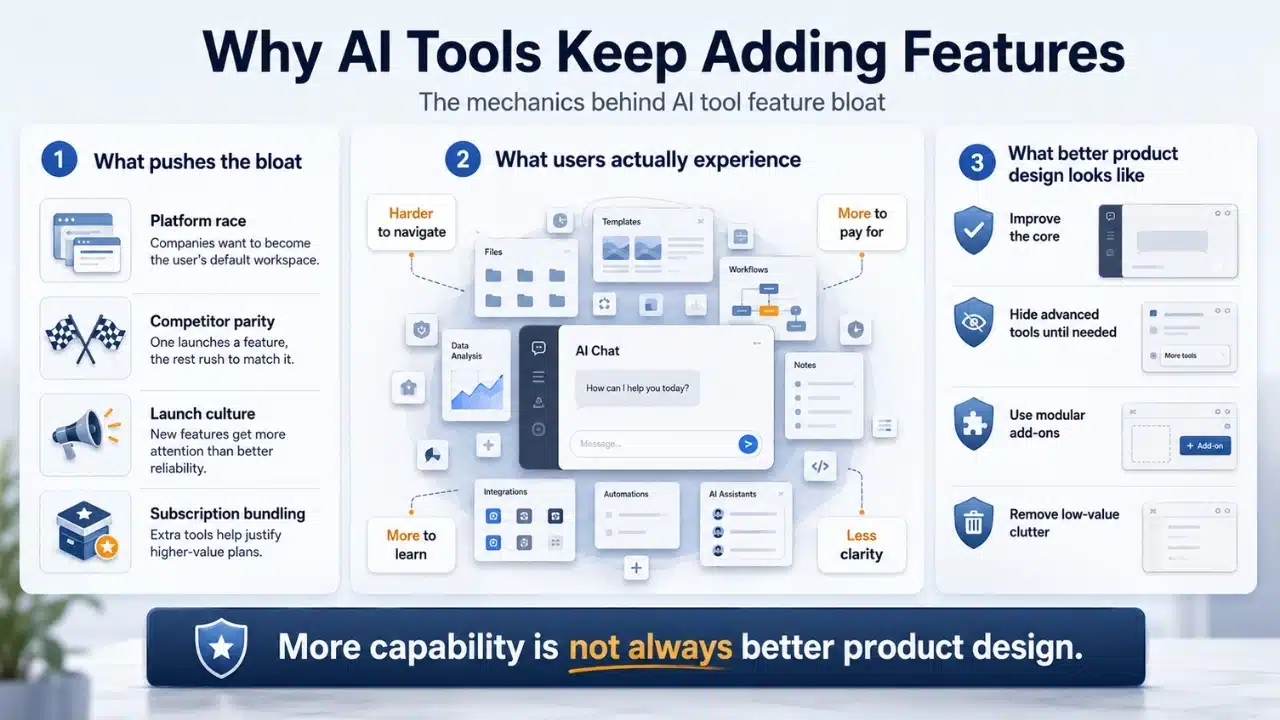
Feature roadmaps in this space are increasingly shaped by defensive parity rather than direct user demand. When one vendor rolls out deep research or autonomous agents, competitors quickly replicate the feature set to protect market share, turning novel tools into standardized vendor requirements.
New Features Get More Attention Than Better Reliability
This dynamic prioritizes high-profile announcements over practical product health. Engineering teams get little marketing traction for incremental 20 percent reliability gains in basic search, even though existing subscribers benefit from it daily.
Keynotes favor flashy autonomous agents over core performance tuning, shifting resources toward surface-level features while background stability and basic UI design fall behind. Users end up suffering from AI tool feature bloat—a dashboard packed with visible capabilities that rarely improve the core experience.
Feature Fatigue Makes More Look Better Than It Feels
This trajectory mirrors classic software bloat documented by academic research. A study in the Journal of Marketing Research highlighted “feature fatigue,” showing that consumers evaluate potential purchases based on overall capability, but judge long-term value strictly on usability.
Dense pricing tables featuring dozens of tools create strong upfront sales appeal, but they leave everyday users navigating bloated navigation bars just to draft an email. A product might seem more valuable on paper because it does more, but crowded interfaces make daily use far worse.
Subscription Bundling Makes the Problem More Expensive
Bundling exacerbates the problem across paid tiers. Platforms like ChatGPT and Google AI combine model reasoning, image generation, deep research, and storage into all-inclusive subscriptions.
It functions like a gym membership that inflates monthly fees by including mandatory spa packages when the member only wants access to a treadmill.
This is where AI tool feature bloat becomes more than an interface problem, forcing users to pay for an expanding package of capabilities even when only a small fraction of those tools actually matter to them.
Advanced Features Are Useful Without Belonging Everywhere
Advanced tools hold clear utility for specific workflows. Software developers rely on coding agents, researchers need intensive synthesis engines, and marketing teams use generative media pipelines.
However, traditional enterprise platforms accommodate power users without cluttering the baseline interface by utilizing progressive disclosure, modular add-ons, and granular settings. Platforms can keep specialized tools accessible without forcing every user to navigate an over-crowded workspace.
Good Product Design Requires Restraint
Effective product development requires strategic exclusion. Not every model breakthrough requires a new sidebar button, high-tier subscription benefit, or defensive reaction to competitor updates.
Sustainable design means tightening existing workflows, merging redundant menus, and occasionally sunsetting low-utility tools. Adding another capability is easy to present as progress, but deciding that a tool does not deserve permanent space inside the main product requires actual discipline.
Every New Feature Creates Another Way to Fall Short
Piling features onto a platform expands its surface area for failure. A tool attempting to act as a code editor, project manager, search engine, and creative suite gets measured against specialized tools built for those exact tasks.
Every new capability creates another area where users can reasonably expect the product to perform well. Addressing AI tool feature bloat shouldn’t mean halting research, but being far more selective about which capabilities become permanent parts of the interface so vendors can prioritize speed, accuracy, system reliability, and UI clarity.


























