

Digital security threats evolve every day, but hackers almost always leave digital footprints behind. Whether you accidentally reused a password across multiple platforms or fell victim to a subtle phishing link, early detection is your best defense against identity theft, reputational damage, and financial loss.
Recognizing the subtle indicators and clear signs of a compromised account can mean the difference between a quick password reset and a full-scale security disaster.
10 Key Signs of a Compromised Account
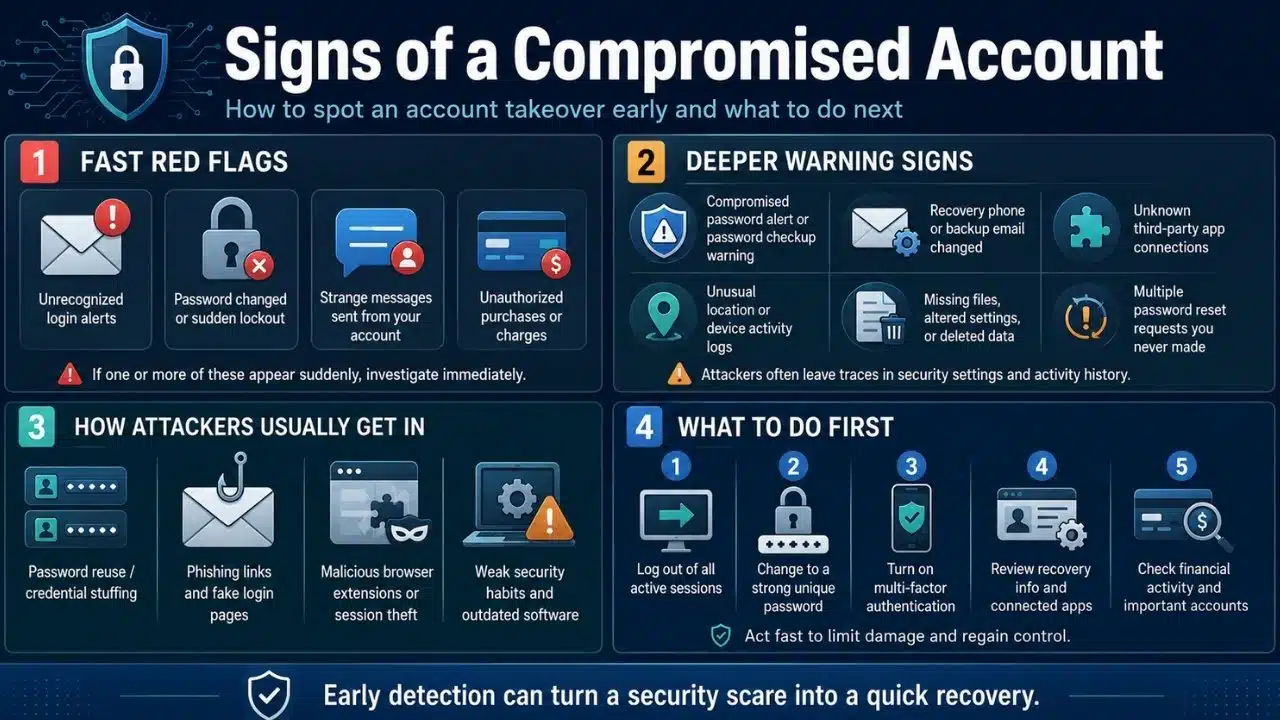
1. Unrecognized Login Alerts and Notifications
Receiving an automated email notification about a successful login from a city, country, or device you do not recognize is an immediate red flag. While using a legitimate VPN can sometimes shift your apparent location, consistent login alerts from unfamiliar geographic regions or unusual times usually point to unauthorized access.
2. Sudden Password Changes That You Did Not Authorize
If you suddenly find yourself locked out of an online profile because your login credentials no longer work, an attacker may have taken over and changed your password. This is often accompanied by an automated confirmation email stating that your account security or recovery details were recently updated.
3. Google Password Compromised Alerts as Prime Signs of a Compromised Account
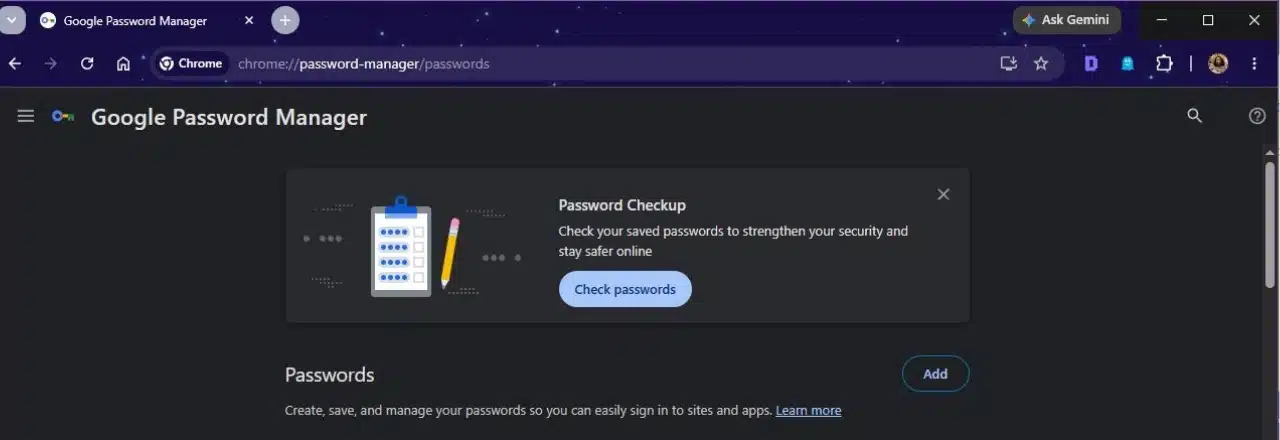
Automated security tools frequently flag credential leaks before you notice any suspicious activity on your profile. If you want to evaluate your security standing, use a simple 2-step way of checking:
-
First, checking all saved passwords in your browser or account settings.
-
Second, checking the Password Checkup results and noticing any compromised passwords.
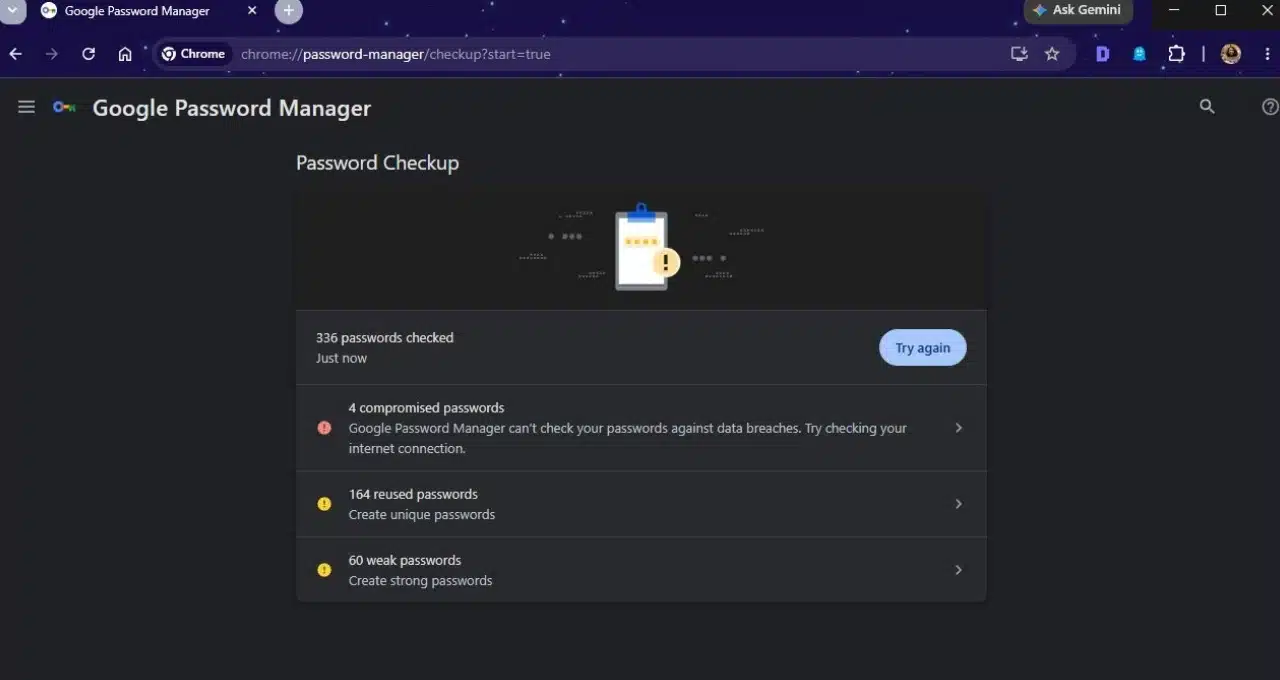
If there are any compromised passwords found in a data breach, then that’s a sign that the account may have been compromised and the credentials should be changed ASAP.
4. Unfamiliar Messages or Emails Sent From Your Profile
When cybercriminals gain control of an email account or social media profile, they frequently use it to blast spam, phishing links, or malware to your contacts. If friends or colleagues ask why you sent them a bizarre link or a strange request for money, your profile has likely been hijacked.
Finding unexpected charges on a linked credit card, digital wallet, or online retail platform points directly to a security breach. Attackers often test stolen credentials by making small, low-value purchases or immediately draining available gift card balances before the owner notices.
6. Missing Files, Altered Settings, or Deleted Data
An intruder may alter your profile settings to maintain long-term access or cover their tracks. If you notice missing cloud files, disabled security logs, or altered backup email addresses, someone else has been modifying your workspace without your permission.
7. Sudden Lockouts and Recovery Phone Number Changes
If an unauthorized user seizes control of a primary account, one of their first tactical moves is updating your recovery phone number and backup email address. This locks you out completely and prevents automated password reset links from reaching your legitimate inbox.
8. Third-Party App Connections You Do Not Recognize
Malicious actors often grant external software permissions to compromised profiles to siphon data continuously. Periodically reviewing your connected applications and finding rogue tools with full access to your data is a major warning indicator.
9. Unusual Location Logs in Your Account Activity History
Many platforms maintain an active session log showing recent IP addresses, browser details, and device types. Reviewing this history and spotting active connections from foreign countries or unfamiliar operating systems confirms a breach.
10. Multiple Password Reset Requests You Never Initiated
If your inbox suddenly floods with unexpected verification codes or password reset confirmations from various websites, it means an attacker is actively attempting to break into your profiles using automated credential-stuffing scripts.
How Cybercriminals Gain Access to Personal Profiles
Understanding how accounts get taken over helps you prevent future breaches. Most compromises do not happen through sophisticated movie-style hacking; they happen through basic security gaps. Credential stuffing occurs when automated bots test username and password combinations leaked from previous data breaches across hundreds of popular websites. Phishing emails trick users into entering credentials on fake login pages, while malicious browser extensions silently steal session cookies. Keeping your software updated and using unique passwords for every site eliminates the vast majority of these risks.
What to Do Next to Protect Your Digital Identity
Recognizing the early signs of a compromised account allows you to take control before irreversible damage occurs. Do not wait for financial loss or complete profile lockout to update your security protocols. Take a few minutes today to review your connected devices, run a password checkup, and secure your digital life against potential threats.
Frequently Asked Questions (FAQs) About Signs of a Compromised Account
What should I do first if I notice suspicious activity?
Immediately log out of all active sessions across all devices through your account settings. Change your primary password to a strong, unique phrase and enable multi-factor authentication to block the attacker from logging back in.
Are free password managers reliable for tracking breaches?
Yes, most modern password managers automatically cross-reference your saved logins with public data dumps and alert you if your credentials appear online. They provide an easy way to spot compromised details before an attacker exploits them.
Can a hacker bypass multi-factor authentication?
While advanced phishing can sometimes trick users into handing over basic SMS codes, hardware security keys make unauthorized access nearly impossible. Using authenticator apps or security keys is much safer than relying on text messages.


























