
The best Trello alternatives depend on what your team needs beyond a visual board. Asana adds structure for task ownership and deadlines, Notion connects projects with documents, and Jira is built for software teams tracking issues. For simpler task planning, Todoist may be enough; Airtable suits workflows that depend on organized records.
This guide compares 10 project and task management tools by their strengths, limitations, and ideal use cases. Start with the problem you want to solve—such as coordinating a larger team, tracking dependencies, or keeping project information together—then check each tool’s current features, plan limits, and availability in your region before switching.
Which Trello Alternative Should You Choose?
| Tool | A good starting point if you need… |
|---|---|
| Asana | Clear task ownership and structured team projects |
| ClickUp | A highly customizable workspace with many work views |
| monday.com | Visual workflows that teams can adapt to different processes |
| Notion | Tasks alongside notes, documents, and team knowledge |
| Jira | Software development and issue tracking |
| Todoist | Straightforward personal and shared task lists |
| Airtable | Project tracking built around structured information |
| Basecamp | A shared place for project conversations and files |
| Zoho Projects | Timelines, task dependencies, and project planning |
| Linear | A focused issue tracker for product and engineering teams |
1. Asana: for clearer task ownership
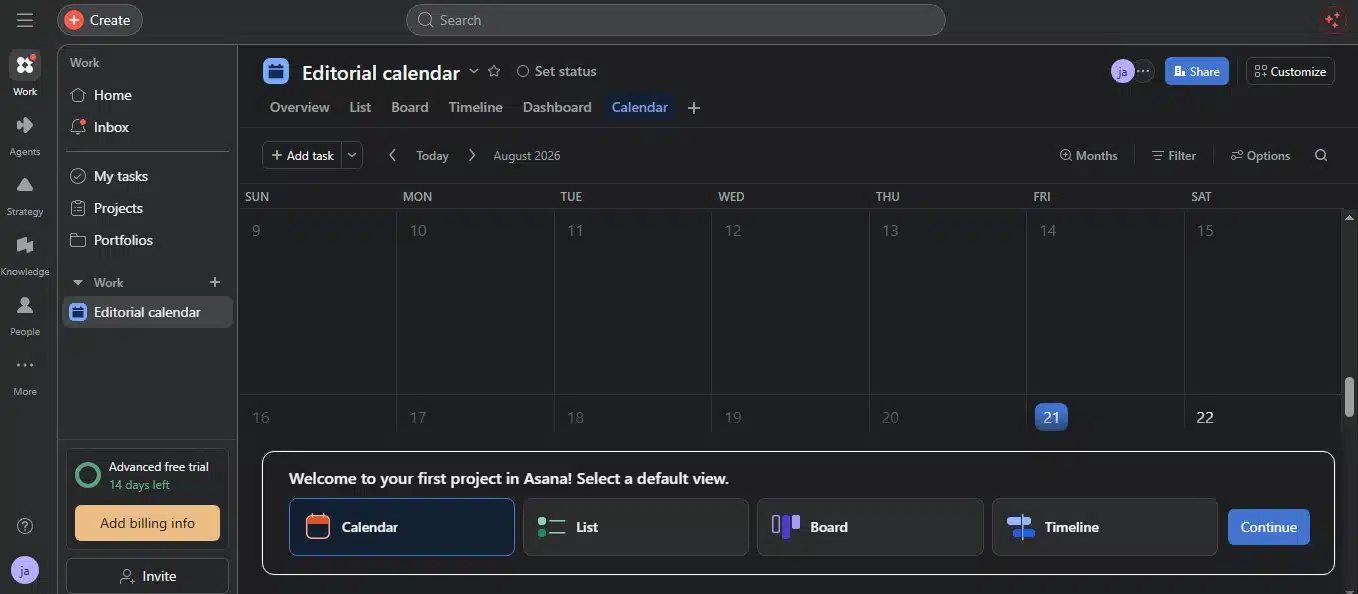
Asana is a sensible next step when a team needs more structure around who is doing what and when. Tasks sit inside projects, and teams can view the same work as a list, board, or calendar. Its Personal plan is free for up to two users and includes unlimited tasks and projects. Personal, Starter, Advanced, & Enterprise plans
That flexibility can make handoffs and deadlines easier to follow than a board alone. The trade-off is that Asana asks teams to maintain a more structured system. If you only need a shared list of a few tasks, that extra organization may not help.
2. ClickUp: for teams that want more customization
ClickUp is a broad work-management platform with multiple ways to organize and view tasks. It can be useful when a team wants to bring several work processes into one workspace, but that flexibility calls for some setup decisions.
The practical risk is spending too long tuning the workspace. Choose a small set of statuses and views first, then add more only when the team has a clear reason. ClickUp’s Free Forever plan has feature-specific limits, so check the features you rely on before settling into it.
3. monday.com: for visual workflows across different teams
monday.com organizes work on boards with columns for information such as status and ownership. This can suit teams that want a visual way to track marketing, client work, or internal processes.
Its current Free plan is limited to two seats, three boards, and three docs. That makes it more practical for a solo user or a small trial than for a team planning to run several projects together without upgrading.
Try mapping one real workflow before building several boards. If the columns help people understand the next step, the setup is earning its place. If the board becomes crowded with fields few people use, simplify it.
4. Notion: for projects that depend on documentation
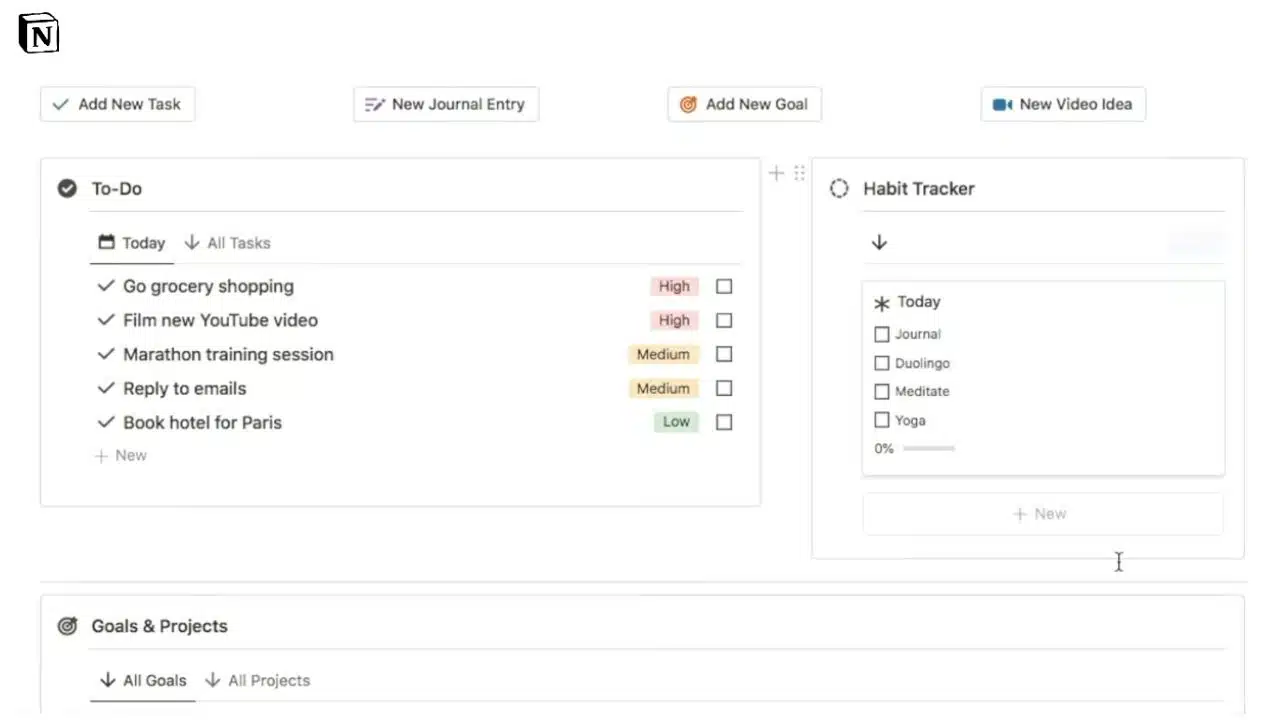
Notion can bring tasks and project information together. A team might use a database to track assignments while keeping briefs, meeting notes, and process documents nearby. That can be useful when work gets delayed because people cannot find the context behind a task.
Notion’s flexibility has a cost: teams must decide how to structure and maintain their pages and databases. Its Free plan is positioned for individuals, while team collaboration features and plan details depend on the current subscription and region.
Choose Notion when documentation is part of the work itself. If you mainly need to assign tasks and watch deadlines, a dedicated project manager may take less upkeep.
5. Jira: for software development teams
Jira is designed for tracking software work, including issues and planned development tasks. Its boards and issue-focused workflow can help product and engineering teams manage bugs, features, and backlogs.
Atlassian’s Jira Cloud Free plan supports up to 10 users and includes 2 GB of storage. That can be enough for a small team trying the system, but storage and other plan limits matter as a project grows.
Jira is more specialized than a general project board. That is an advantage for development teams and a reason other teams may find it unnecessarily involved.
6. Todoist: for personal tasks and lightweight planning
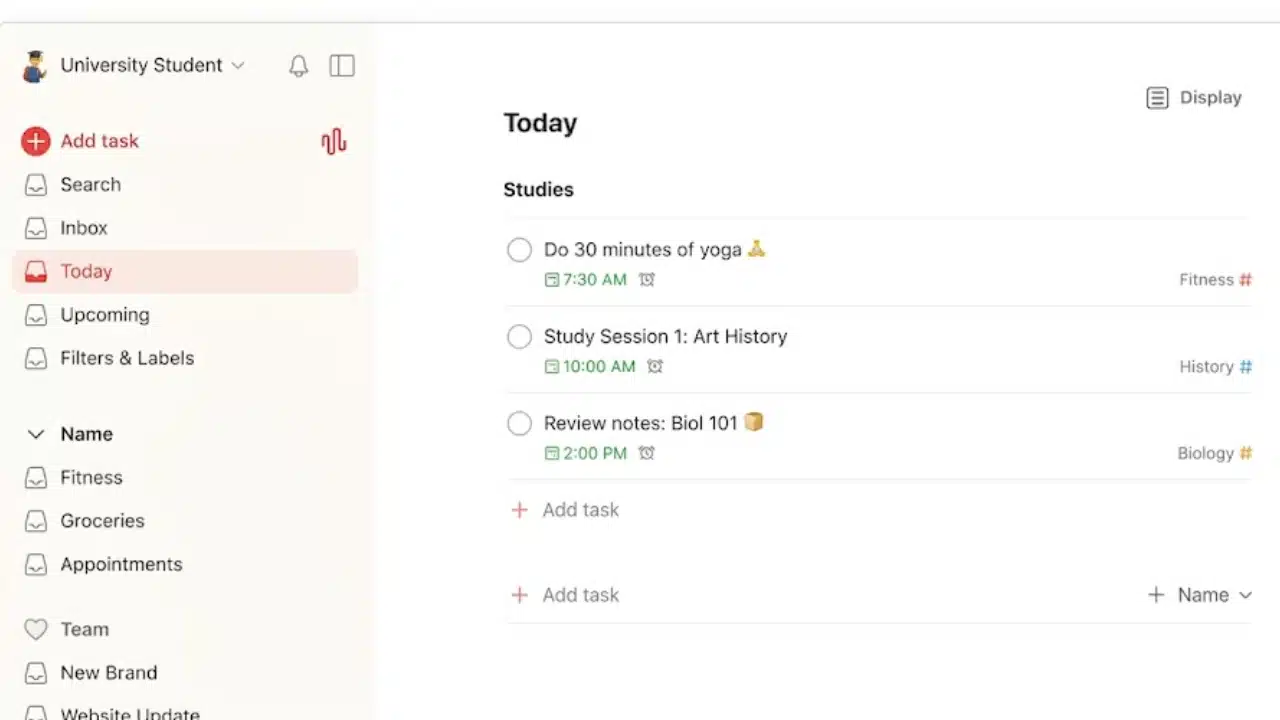
Todoist is a lighter choice for people who want projects and tasks without adopting a full project-management system. Tasks can be organized in list or board layouts, making it possible to keep a familiar visual workflow for smaller projects.
It is a better match for personal planning, recurring tasks, or modest shared projects than for complex work with many dependencies and reporting needs. Before moving a team to Todoist, check its current team-project limits and plan features. A clean task list is useful only if it covers the collaboration the group actually needs.
7. Airtable: for work built around structured information
Airtable combines spreadsheet-like records with multiple ways to view and organize them. It can be useful for work such as a content calendar, where each item may need an owner, format, campaign, status, and publication date.
The Free plan’s current record limit is 1,000 per base. That may be enough for a small workflow, but a growing list of records and attachments can eventually push a team toward an upgrade.
Airtable makes more sense when the information itself needs structure. If you only want to move a few tasks through stages, a simpler board may be easier to manage.
8. Basecamp: for project communication in one place
Basecamp centers projects around shared communication and coordination. It can suit a team that wants project discussions, to-dos, schedules, and files together rather than spread across multiple channels.
The current free plan is limited to one project. That gives a small team a way to try Basecamp, but can be restrictive for freelancers or agencies managing several active client projects.
Basecamp deserves consideration when keeping project context and conversations together matters more than advanced reporting. Teams needing detailed workload views or extensive task customization should compare it carefully with other options.
9. Zoho Projects: for schedules and dependencies

Zoho Projects is worth considering when a team needs to plan work over time, track task dependencies, or get a clearer view of a project schedule. Those features can help when completing one task affects the start of another.
Zoho’s public pages do not present identical free-plan limits, so it would be unwise to rely on one project or user count without checking the plan page for your region.
For a small business, Zoho Projects may offer a useful step up from a basic board. Before setting up a team, confirm the plan’s project limits and whether the timeline features you need are included.
10. Linear: for product and engineering teams
Linear focuses on issue tracking and product planning. Teams that already describe their work as issues, projects, and development cycles may find it more suitable than adapting a general-purpose board to software work.
That focus is also its main limitation. Linear is not the obvious choice for a team managing a mix of client approvals, everyday operations, and general task lists. Consider it when product or engineering work dominates the workflow; otherwise, compare a broader tool first.
Final Thoughts
The right Trello alternatives depend on what the current board cannot handle. Asana adds structure around responsibilities, Notion connects tasks to documentation, Airtable supports record-heavy workflows, and Jira or Linear suit software teams. Todoist is a lighter option, while Basecamp emphasizes shared project communication.
Start by naming the problem you want to solve. Then try one active project in the tool that appears to fit, and check how its free plan handles your team size and work volume. A replacement is useful only if people can keep it current and understand what needs attention.
Frequently Asked Questions (FAQs)
What is the easiest alternative to Trello?
Todoist is a reasonable option for people who mainly need to organize tasks and smaller projects. Teams should check whether its collaboration and plan limits fit their workflow.
Which alternative is best for software development?
Jira and Linear are both designed with software and product work in mind. Compare their workflows with the way your team tracks issues, plans work, and coordinates releases.
Which option is best for a team that relies on project documents?
Notion is worth considering when project tasks need to sit alongside briefs, notes, and process documentation. Teams should plan how they will organize and maintain the workspace.
Can I switch from Trello without losing my work?
Check each provider’s current import and migration options before moving a live project. Test with one board first, and confirm whether the details your team needs—such as attachments, comments, and task information—are included.
Should I choose a tool based on its free plan?
Use the free plan to test the workflow, but check its limits against your likely team size and project volume. A low-cost start can become inconvenient if a key feature or collaboration limit forces an early change.