Teamwork.com is the strongest overall choice for agencies because it connects client projects, time tracking, budgets, capacity planning, and invoicing. The Best Project Management Tools for Agencies do more than organize tasks; they reveal scope changes, overloaded staff, delayed approvals, and projects at risk of losing money.
Productive is better for detailed profitability and resource planning, while ClickUp, Wrike, Asana, monday.com, Scoro, and Basecamp serve different workflow and collaboration priorities. This guide compares eight platforms by agency-specific features, usability, scalability, client access, reporting, and practical limitations, helping you choose a system your team can maintain without adding unnecessary administrative work.
Best Project Management Tools for Agencies: Quick View
| Tool | Choose It When | Check Before Paying |
| Teamwork.com | Client delivery and budgets must stay connected | Financial features vary sharply by plan |
| Productive | Utilization and profitability guide decisions | All plans require at least three seats |
| ClickUp | The agency wants a highly configurable workspace | Poor setup can create unnecessary complexity |
| Wrike | Creative reviews and approvals cause delays | Advanced financial controls require Pinnacle |
| Asana | Campaign coordination matters more than invoicing | Deeper budget tools use an add-on |
| monday.com | Teams prefer visual, adaptable boards | Time tracking requires Pro |
| Scoro | Sales, delivery, and billing need one system | Implementation and modular pricing take planning |
| Basecamp | Client communication is the main problem | Project caps and limited resource planning |
Among the best project management tools for agencies, Teamwork.com and Productive provide the clearest connection between project delivery and commercial performance. The others make more sense when a specific issue—creative approval, customization, or client communication—matters more than profitability reporting.
What Most Lists Miss
Even the best project management tools for agencies will produce poor information if the underlying process is inconsistent.
Three details often cause trouble after purchase:
- Guest access: A client should not be able to see internal notes, rates, cost data, or another client’s work.
- Time-recording discipline: Financial dashboards are misleading when staff enter incomplete timesheets days later.
- Workspace design: If every account manager invents different statuses and fields, portfolio reports become difficult to trust.
Do not judge a platform from a polished sample workspace. Rebuild one real project, including its brief, staffing plan, revisions, approvals, budget, and final report.
Best Project Management Tools for Agencies: 8 Top Picks
The best project management tools for agencies fall into three groups: agency-focused operational platforms, configurable work-management systems, and simpler client-collaboration tools.
1. Teamwork.com
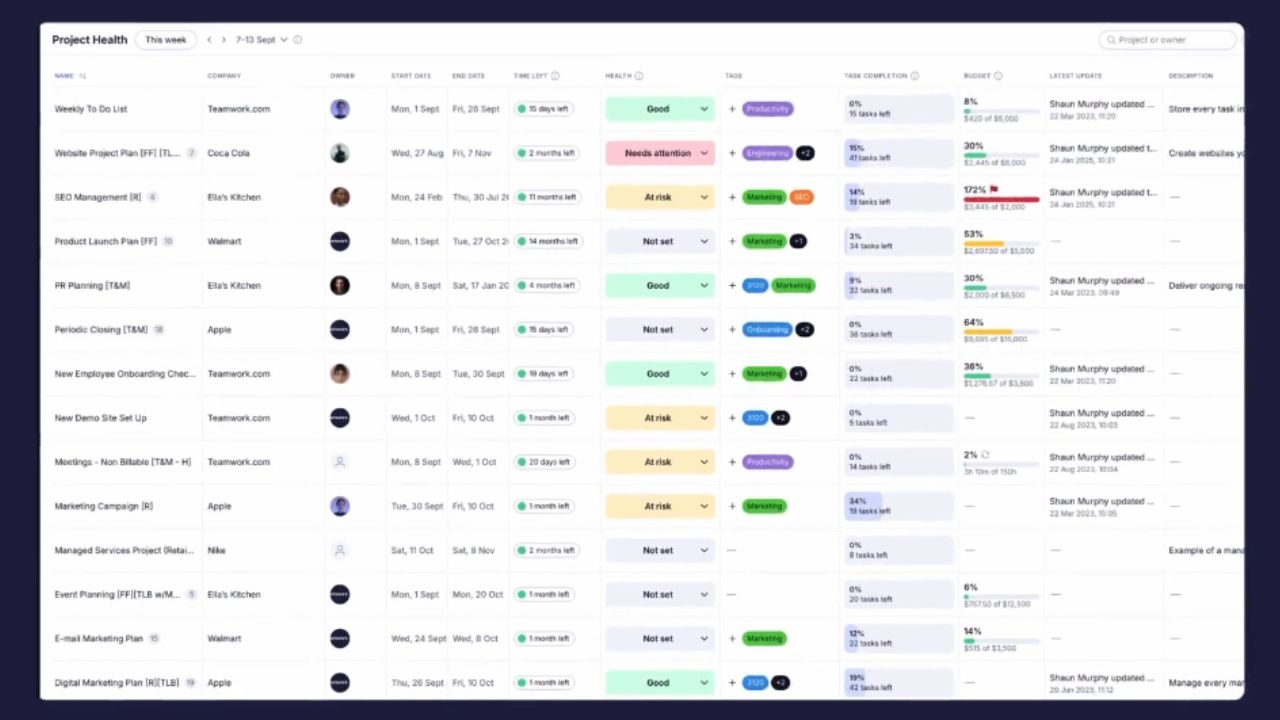
Teamwork.com is the strongest general recommendation because it treats projects as paid client engagements. Teams can organize work by client, record billable hours, monitor budgets, plan workloads, and create invoices from tracked time.
Plan selection matters. Basics includes billable-time reporting. Accelerate adds capacity planning, time budgets, retainers, and client invoicing. Optimize brings more advanced scheduling, multi-currency budgets, cost data, and profitability reporting.
An internal marketing department may not need that commercial layer. A client-service agency probably does. That distinction is why Teamwork.com leads this ranking of the best project management tools for agencies.
2. Productive
Productive deserves serious consideration once managers can no longer judge staffing and margins from a spreadsheet. Its resource planner accounts for current bookings, tentative work, availability, and time off. Logged hours connect with services and budgets, while reports cover utilization, revenue, costs, and profitability. Higher tiers add recurring budgets, rate cards, and more advanced reporting.
All plans currently require at least three seats. That makes Productive unnecessary for some solo operators and two-person studios, but its operational depth becomes useful as the number of clients, roles, and billing arrangements grows.
3. ClickUp
ClickUp offers more freedom than the first two tools. Agencies can combine tasks, documents, request forms, automations, workload views, time records, and client dashboards. Dashboards can also be shared without exposing the entire workspace.
That freedom is easily overused. A workspace with dozens of statuses and custom fields soon becomes harder to manage than the work itself.
Before importing projects, settle four things: hierarchy, naming rules, required fields, and client permissions. Also check the plan limits for dashboards, workload reporting, and time tracking rather than assuming every advertised capability is included.
4. Wrike
Wrike is a stronger choice when creative review is the recurring bottleneck. A design request can enter through a form, become an assigned task, move through production, and collect in-context comments and approvals. Wrike supports proofing across more than 30 file types and allows external stakeholders to participate as reviewers.
Its agency-grade financial controls are less accessible. Advanced capacity planning, billable-rate budgeting, and deeper reporting currently sit in the custom-priced Pinnacle plan. For smaller agencies, Wrike is easier to justify when scattered feedback and approval delays already carry a clear cost.
5. Asana
Asana is well suited to campaigns, editorial calendars, launches, and recurring marketing work. Forms, dependencies, timelines, rules, templates, portfolios, and dashboards create structure without making ordinary task updates unusually difficult.
Starter includes unlimited free guests. Advanced adds workload views, approvals, proofing, and native time tracking. Broader cost and revenue monitoring uses the Timesheets and Budgets add-on.
Choose Asana when another system already handles accounting and invoicing. Agencies wanting delivery and profitability in one platform will find more depth in Teamwork.com or Productive.
6. monday.com
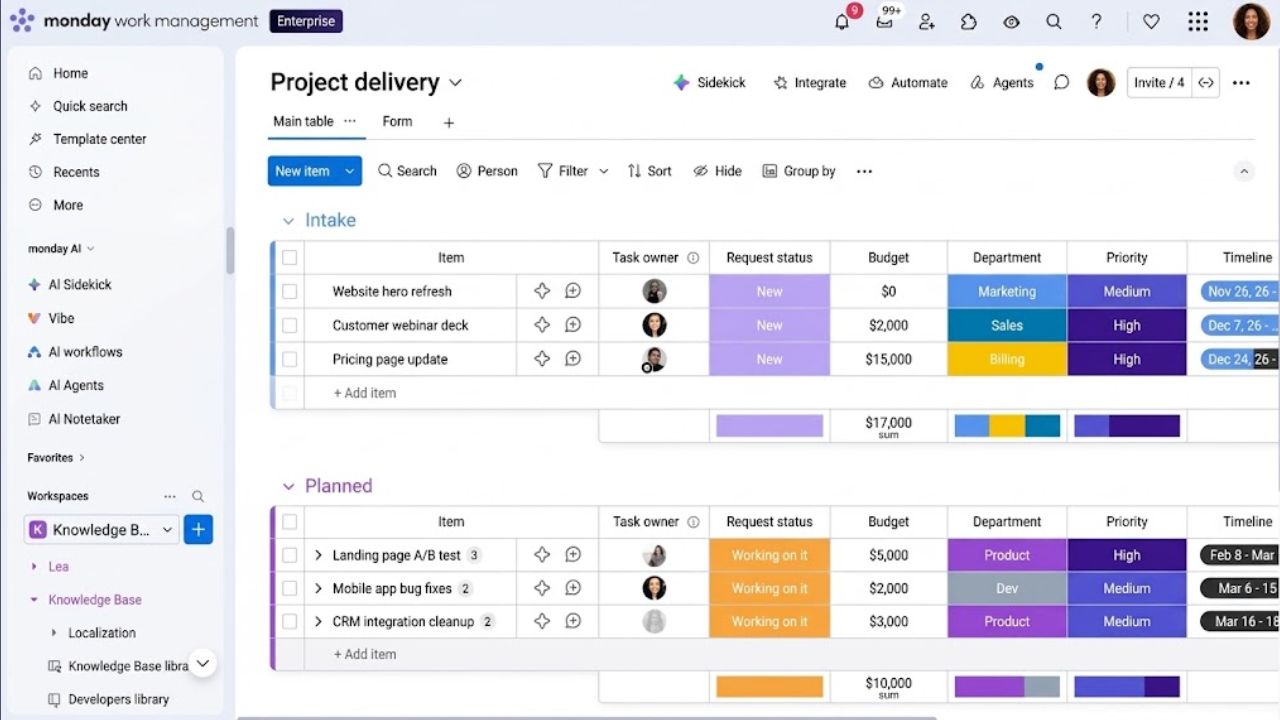
monday.com is visually approachable, but flexibility alone should not drive the decision. Its boards work well for campaign calendars, content pipelines, client onboarding, creative requests, and recurring account work.
Guest access begins with Standard, while native time tracking requires Pro. Paid subscriptions currently start at three seats.
The common mistake is allowing every manager to build a different workflow. A handful of approved templates will produce better reporting than dozens of colourful but incompatible boards.
7. Scoro
Scoro is the most operationally ambitious option here. Its modular applications can connect estimates, project budgets, schedules, time records, margins, invoices, and revenue reporting.
The platform includes at least two core applications, while extra applications and integrations affect the final price. Buyers need to map the complete quote-to-invoice process before selecting modules.
This is not a casual weekend setup. Scoro says implementation may take several days, weeks, or months, depending on data migration and workflow complexity. It suits an established agency trying to replace several disconnected systems, not a small team looking for a better task list.
8. Basecamp
Basecamp earns its place for a narrower reason: it keeps client communication understandable. Projects can contain to-do lists, schedules, messages, files, chat, automatic check-ins, and client-visible areas. Internal conversations can remain private. Time tracking is also included in current plans.
Studio is listed at $59 per month with annual billing and unlimited users, but it permits only 10 active projects. That cap can become restrictive sooner than expected.
When comparing the best project management tools for agencies, consider Basecamp for predictable projects and communication-heavy client relationships. Do not choose it for detailed capacity planning, rate management, or profitability analysis.
Final Thoughts
The best project management tools for agencies should help managers see workload, scope, approvals, time, and financial risk before those problems reach the client.
Shortlist two platforms and recreate a recently completed project in each. Add the original estimate, assign the actual team, enter a scope change, invite a client as a guest, and produce the report management would use. Then calculate the full cost of seats, add-ons, integrations, and onboarding.
The better choice is not the platform with the longest feature list. It is the one the team can maintain consistently while still producing reliable operational answers.
Frequently Asked Questions (FAQs)
Which of the best project management tools for agencies is suitable for a small team?
Teamwork.com has a free plan for up to five users and five projects, making it a practical starting point for a small client-service team. Basecamp Studio becomes interesting when many people need access, but its 10-active-project limit needs attention. ClickUp suits a small agency that wants more customization and is willing to govern the setup carefully.
How should an agency test project management software?
Use a real, completed project rather than starting with a blank template. Recreate its tasks, estimated hours, client feedback, revision rounds, permissions, and budget. This makes it easier to compare the software’s reports with what actually happened.
Testing should include at least one regular team member and one client-style guest account. An owner-only trial will not reveal whether everyday updates are too cumbersome.
They can, provided permissions are tested from the client’s account rather than assumed from an administrator’s view. Clients should see the documents, dates, requests, and approvals relevant to them. Internal cost data, staffing discussions, draft notes, and unrelated projects should remain private.