
You’ve heard AI-powered travel planners can plan a whole vacation from one sentence. Before you trust one with real money, you want to know two things: will it fit the plan to you, and will it get the details right?
Here’s the short answer. You tell the AI your dates, budget, travel party, and what you like. The AI compares those details with large sets of travel data on places, transport, hotels, and activities, then builds a day-by-day plan.
Next, you tweak the plan until it feels right, then check the key facts before you book. This guide walks through each step. It also shows how many travelers really use AI, explains a real case where a chatbot got it wrong, and gives you a simple checklist to use before you pay for anything.
What Are AI-Powered Travel Planners, and How Do They Build Your Itinerary?
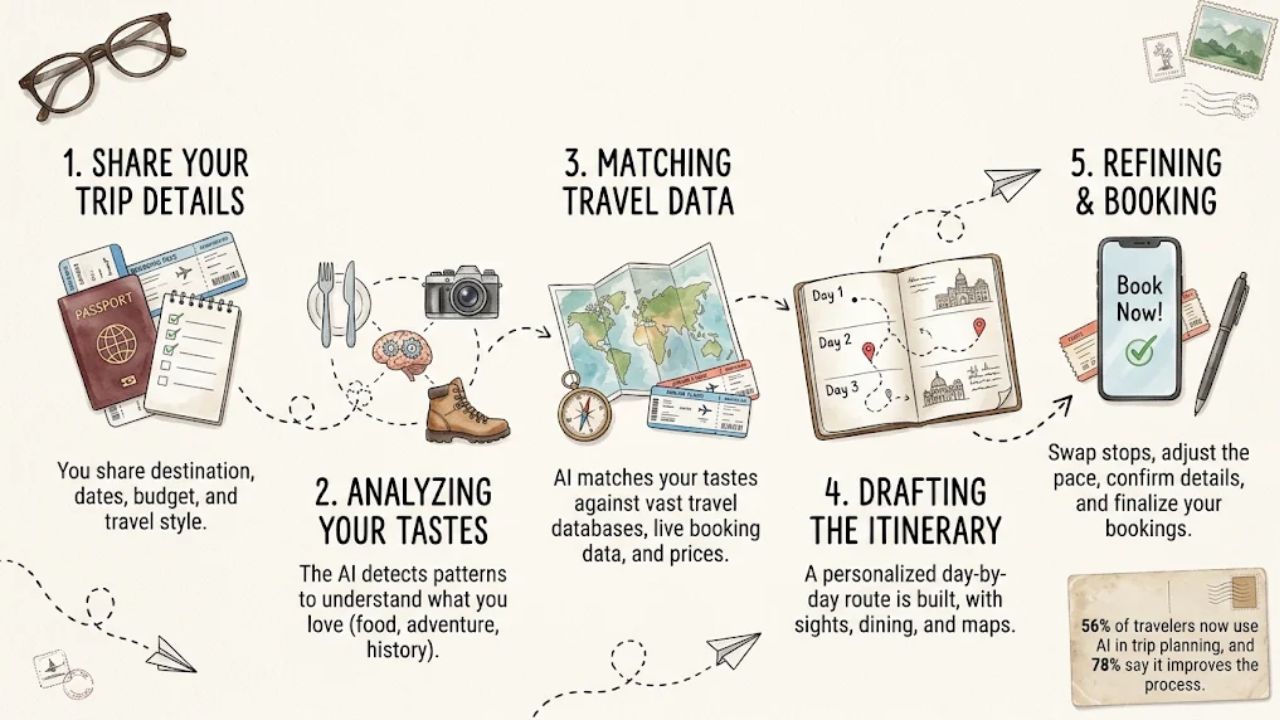
An AI-powered travel planner is an app or chatbot that turns your trip details into a custom plan. Some, like ChatGPT, are general chat tools. Others are trip planner apps built only for travel.
Both kinds use algorithms and machine learning to study what you want and what is out there. Here is what happens between typing your request and getting a finished plan.
You type a request into a chat box or fill out a short form. Many forms ask for your starting point, destination, travel dates, who is going with you, and your travel style.
The more you share, the better the plan fits you. A vague request gets a vague plan.
Step 2: The AI builds a picture of your tastes
The planner looks for patterns in what you tell it. It might spot that you love cultural places or that your trips center on food, then shape the plan around those tastes.
Some apps also keep track of your choices over time. If you pick street food over fine dining, the app notes that for next time.
Step 3: It matches your tastes to travel data
Next, the AI checks your details against large sets of travel data. That data covers destinations, ways to get around, places to stay, activities, and your own preferences.
Some apps link to live booking data, so they can show current prices and openings. Others work only from what they learned in the past, which may be out of date.
Step 4: It drafts a day-by-day plan
The AI puts the pieces in order. You get a plan for each day, often with places to see, where to eat, and how to get from one spot to the next.
Some apps add a map so you can see each day’s route at a glance.
Step 5: You refine the plan, then book
The first draft is a starting point. You can ask the AI to slow the pace, swap a museum for a hike, or cut the budget.
Once the plan looks right, you check the key facts and book. Some apps let you book inside the app. Others send you to outside sites.
How many travelers already plan this way?
You would not be alone in trying this. Research firm Phocuswright reported in 2025 that 56% of U.S. travelers now use AI in trip planning. The same research found that 78% of travelers say generative AI improves trip planning.
Other 2025 surveys found lower numbers. A Global Rescue survey from fall 2025 found that 22% of travelers have used generative AI to plan a trip, with higher use among international travelers and women. Adobe’s 2025 survey put the share of consumers who have used AI services to plan trips at 29%.
These results can’t be compared directly. The gaps may come from who was asked, when, or how each survey defined AI use.
Also note what the numbers measure. They show how many people use AI and whether they find it useful. They don’t show how often AI gets the facts right, so trust still has to be earned with checks.
Which Features Make an AI Travel Planner’s Plan Feel Personal?
Not every AI planner fits a trip to you equally well. These features make the biggest difference between a plan made for you and a list anyone could find online.
Questions about your taste, not just your destination
Good planners ask about more than where you’re going. They ask who is coming, how fast you like to move, and what you enjoy most.
The AI uses those answers to find what you like, such as cultural sites or food-focused stops, and builds the plan around them. If you want kid-friendly spots, a good planner works them in.
Options for different kinds of trips
Your trip might be about beaches and islands, cities and culture, or wildlife. A strong planner can handle solo trips, family holidays, trips to several cities, and road trips.
Some apps also mix AI with people. Layla, for example, starts with a talk about your preferences and budget, then makes a plan that human advisors refine.
Live updates and price alerts
Some planners watch for price drops on flights and hotels, flight schedule changes, and restaurant openings. They send you an alert when something changes.
Mindtrip, for example, can send a rain alert along with indoor activity ideas for your destination.
Booking in one place
Some apps let you plan and book in the same spot. Mindtrip brings your stays, flights, dining, experiences, and events together on one platform.
Layla lets you book on your own or work with advisors for hotels, flights, transfers, and activities, with no subscription fees.
How to write a request that gets a good plan
Even the best features can’t help if the AI doesn’t know what you want. Put these five things in your first message:
- Dates: When you leave, when you come back, and any fixed plans in between.
- Budget: A dollar amount, and whether it covers flights, hotels, food, or all three.
- Pace: Packed days or slow mornings, and how much walking you can handle.
- Interests: What you must do, what you love, and what you want to skip.
- Travel party: Who is coming, plus any ages, needs, or limits.
Here is a sample request you can copy and change. The trip details are made up for illustration:
Plan a trip to Chicago from Denver for two adults, October 9 to 12. Our budget is $1,500 for hotel, food, and activities, not counting flights. We have no car and want to walk no more than 4 miles a day. Slow mornings, please. We must visit one big art museum and try deep-dish pizza. We love food tours and skip anything with long lines.
That gives the AI far more to work with than a one-line request with just the city name.
What refining looks like, step by step
Say the first draft groups nearby stops on each day, which saves walking. But day two packs a museum, a food tour, and a river walk into one afternoon.
You reply: Day two is too full. Move the river walk to day three and add a coffee break after the museum. Keep the same total budget.
The new draft spreads the stops out and adds rest, and the budget stays the same. This back-and-forth is where the plan starts to feel like yours. All the details in this example are illustrative, not tested picks.
What You Gain From Planning a Trip With AI
The biggest gain is speed. The AI does the first round of digging, so you get a full first draft fast instead of starting from a blank page.
You also get ideas tied to what you said you like, not a generic top-ten list. Mindtrip, for example, draws ideas from real travelers and local experts. AI can also point you to lesser-known spots and explain why each one fits your trip.
Changes are easy, too. Want a cheaper hotel or a rest day? Just say so. One thing AI does not save you from is checking the details, which we’ll cover below.
Popular AI Travel Planners and What Each One Does Best
You don’t need to test a dozen apps. Start with one of these three, based on how you like to plan.
| Tool | Pick It If You Want | What You Still Need to Check |
| ChatGPT | A day-by-day draft from a typed chat, with easy back-and-forth changes | It’s a general chatbot, not a booking site. Check every price, hour, and rule yourself. |
| Mindtrip | Travel-focused planning and booking in one place, plus alerts like rain warnings with indoor ideas | It connects to live inventory, but still confirm prices, fees, and refund rules on the seller’s page. |
| Layla | Day-by-day plans with maps, human advisors, 24/7 support, and the option to change plans before checkout | Advisor help is useful, but read the final booking terms and check travel times before you pay. |
How to pick one
If you mainly want ideas, start with a chatbot like ChatGPT. You type a request and get a draft in one short chat.
If you want to plan and book in the same place, try a travel app such as Mindtrip or Layla. For a trip across several cities, an app with support is worth a look, because there are more moving parts. Layla, for example, can plan a road trip from New York to Seattle and let you adjust each stop.
Keep in mind that live data helps, but it is not a promise that every suggestion is right. A plan can still pair a real hotel with a wrong fee or a closed museum.
After you book: an organizer, not a planner
TripIt does a different job. It doesn’t build your plan. It pulls trip details and updates from your confirmation emails, so your bookings stay in one place.
For hotels alone, tools like Google Hotels show current options side by side. That makes it easy to check what an AI suggested.
Where AI Travel Planners Get It Wrong and How to Check Their Work
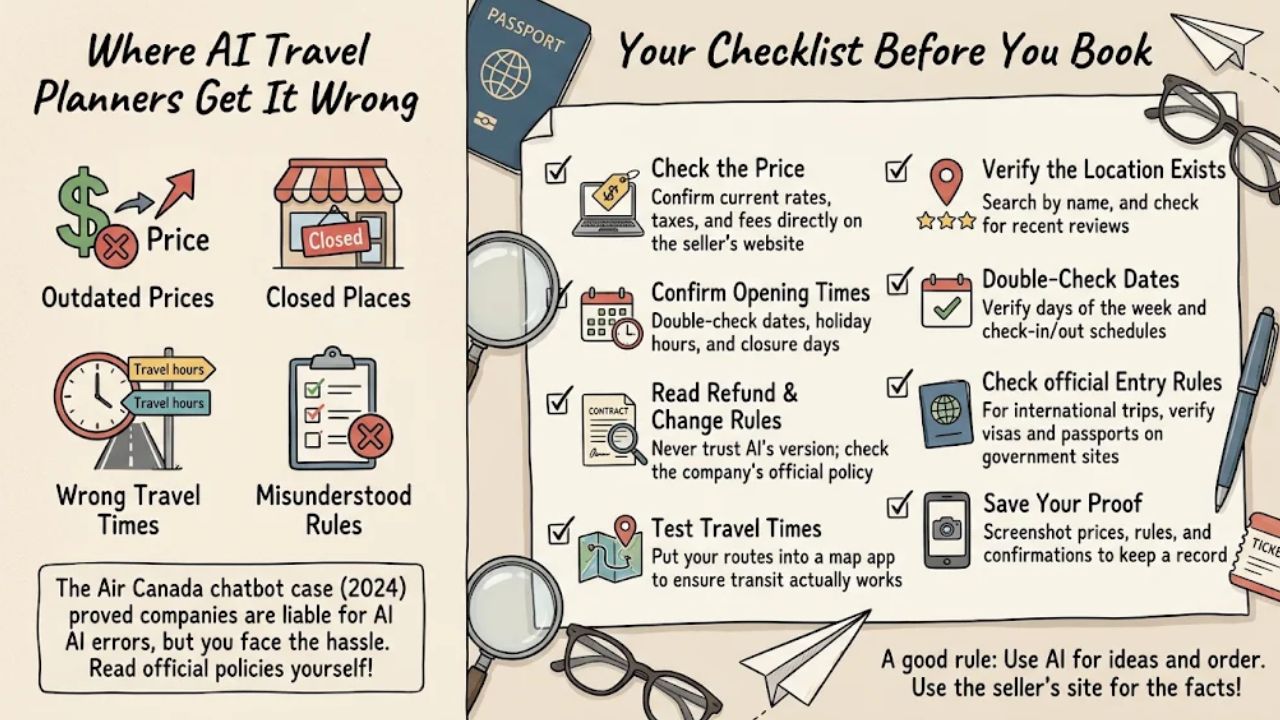
AI can sound sure of itself and still be wrong. It may list a price that has changed, a place that has closed, or a travel time that can’t work. It can even describe rules that don’t exist.
This is not just a small risk. A real case shows what can happen.
The Air Canada chatbot case
On February 14, 2024, the British Columbia Civil Resolution Tribunal in Canada found Air Canada liable for wrong information its AI chatbot gave a customer. Tribunal member Christopher C. Rivers awarded $650.88 in damages for negligent misrepresentation.
He found that Air Canada did not take reasonable care to make sure its chatbot was accurate. The tribunal said Air Canada was still responsible for all the information on its website, whether it came from a regular page or a chatbot.
The customer won, but it took a tribunal case to get there. That is a lot of hassle for one wrong answer.
A trip planner app iso’d the airline or hotel slkkus, so don’t xrynxb the same outcome. The lesson is simple: when an AI tells you about a company’s rules, read the company’s own written policy before you pay.
Your checklist before you book
Run through this list for every booking in your AI plan:
- Check the price on the seller’s site: Open the airline, hotel, or tour page and confirm today’s price, taxes, and fees.
- Confirm opening days and hours: Look at the place’s own website for the exact dates you will be there. Watch for holidays and days it is closed.
- Read the refund and change rules: Find the written policy from the company you pay. As the Air Canada case shows, a chatbot’s version of the rules can be wrong.
- Test the travel times: Put each day’s route into a map app. Make sure you can really get from one stop to the next in the time the plan gives you.
- Make sure each place exists: Search for every restaurant, tour, and hotel by name. Look for recent reviews and a working website.
- Match the dates: Check that the days of the week line up with the plan, and that check-in and check-out dates are right.
- Check entry rules on official sites: For trips abroad, confirm passport and visa rules with government sources, not the AI.
- Save proof: Take screenshots of prices, rules, and confirmations. If something goes wrong, you’ll have a record.
A good rule: use the AI for ideas and order, and use the seller’s own site for facts you will pay for.
How to Start Your First AI-Planned Trip
You don’t need to hand over your whole trip on day one. Start small and build trust as you go.
- Pick a low-risk trip: A weekend away is a good first test. If the plan has gaps, the cost of a mistake stays small.
- Choose one tool: Use a chatbot for ideas, or a travel app if you want to book in one place.
- Write a full request: Include your dates, budget, pace, interests, and travel party.
- Push back on the draft: Ask for changes until the plan matches how you like to travel.
- Run the checklist: Confirm prices, hours, refund rules, and travel times before you book anything.
AI-powered travel planners can give you a solid, personal first draft fast. Treat one like a helpful friend who knows a lot but sometimes mixes things up.
Let it do the legwork, then check its work before you pay.
Frequently Asked Questions About AI-Powered Travel Planners
1. How does an AI travel planner build a trip just for me?
It collects your budget, travel dates, and personal interests, then cross-references that input with real-time travel data to generate a personalized day-by-day itinerary.
2. Can AI chatbot software help me plan a trip on the go?
Yes, AI chatbot software like Chatsonic lets you adjust your itinerary in real time, so swapping a museum visit for a beach day takes only a few seconds.
3. Which AI tools can help me find cheap flights and plan my days?
Mighty Travels Premium scans for discounted airfare and sends you deal alerts, so you can lock in low fares before they disappear.
4. Can AI find special hotels, like Hótel Búðir or The Hotel Telluride?
Yes, just describe the type of stay you want, like a remote coastal inn in Iceland, and the AI can surface unique properties like Hótel Búðir that a standard hotel search often misses.
5. Does an AI planner work for places all over the world?
Yes, AI travel planners handle destinations worldwide, from street food tours in New Delhi to beach trips in Fort Lauderdale, with each itinerary shaped around your travel preferences.
6. Do I need coding skills to use an AI travel planner?
No, these tools are built for everyday users, so anyone can start building a trip plan right away without any technical background.