
By age eight, most children have outgrown apps that treat every spelling word or maths problem like a preschool game. They need tools that can explain fractions, support independent reading, organise revision, introduce coding, or help them research a school project without getting lost.
The difficulty is separating useful learning tools from apps that mainly offer points, streaks, virtual rewards, or an expensive library the child may barely use. The best apps upper elementary students can use tend to solve one clear problem. A child who understands multiplication but avoids practice may respond well to Prodigy. A student who needs the method explained will get more from Khan Academy. Someone interested in designing games may learn more through Scratch than through another general academic subscription.
This app ranks by educational value, accessibility, curriculum relevance, account requirements, device support, and realistic usefulness across the USA, UK, and India. Broad free tools appear first. More specialized, paid, or institution-dependent services appear later. Families comparing options for younger or older children can also use Best Educational Apps for Kids by Age.
How We Selected the Best Apps Upper Elementary Students Can Use
A large activity library was not enough to earn a high ranking. Children can spend plenty of time inside an educational app without learning much.
The selection focused on whether an app helps students:
- Understand or practise a specific academic skill
- Create something rather than only consume content
- Read independently at a suitable level
- Review facts in manageable sessions
- Explore a subject beyond the textbook
- Work across common school and household devices
- Use meaningful free features before payment
- Avoid unsuitable public or social functions
- Continue the learning through writing, discussion, reading, or practical work
Grade labels also need context. An eight-year-old may be in Grade 3 in the United States, Year 4 in England, or Class 3 in India. Even when two apps cover the same age range, their vocabulary, topic order, and curriculum assumptions may differ.
Quick Comparison of the 13 Best Upper Elementary Apps
The comparison below helps narrow the list before looking at each app in detail. Exact subscription prices are not included because they vary by country, school agreement, app store, tax, and promotion.
| App | Strongest Use | Access Model | Main Limitation |
| Khan Academy | Broad academic support | Free | Children may need help choosing the right course |
| Scratch | Creative coding | Free | Public sharing needs supervision |
| Prodigy Math | Motivating maths practice | Free core content with optional memberships | Rewards can distract from the maths |
| Google Earth | Geography and research | Free | No built-in lesson sequence |
| Quizlet | Vocabulary and factual revision | Free tier with paid features | Public sets may contain errors |
| Duolingo | Regular language practice | Free tier with subscriptions | Limited real conversation |
| Kahoot! | Group quizzes and review | Free basic use with paid plans | Speed can outweigh careful thinking |
| BrainPOP | Introducing school topics | Limited free access and subscriptions | Full access is paid |
| SplashLearn | Guided Grade 3-5 practice | Teacher and family access models | Content ends at Grade 5 |
| Epic | Digital books and audiobooks | School access or family subscription | Access varies by school and region |
| DoodleLearning | UK-aligned adaptive practice | Trial and subscription | Curriculum fit is weaker outside the UK |
| Tynker | Guided coding lessons | Limited free access and paid courses | Most structured pathways are paid |
| Sora | School and library ebooks | Free through participating institutions | Requires eligible school or library access |
Most children need only two or three educational apps. One can address a current school difficulty, while another supports reading, creativity, coding, or independent exploration.
The Access Problem Parents Discover Too Late

“Free for students” does not always mean free at home.
A child may use Epic during school hours but lose access to much of the catalogue in the evening. BrainPOP or Sora may be available only because the school has purchased a licence. A teacher-created SplashLearn account may allow assigned work without giving the family access to every home feature.
Trials create another problem. A child can spend the first week exploring characters, badges, and menus while the parent learns very little about whether the programme actually helps.
Before downloading anything, check:
- Which learning problem the app is meant to address
- Which useful features are available without payment
- Whether a school account already provides access
- Whether the curriculum matches the child’s classroom
- Whether the app includes public profiles, comments, or user-created material
Those checks matter more than the total number of games or lessons advertised.
1. Khan Academy
Khan Academy remains the strongest general recommendation for this age group because it can explain a concept and provide practice without requiring a subscription. For upper elementary students, the most useful areas include arithmetic, multiplication, fractions, decimals, geometry, grammar, science, computing, history, and economics. Lessons combine short explanations, videos, exercises, quizzes, and progress tracking.
Its broad range can be a problem when adults give vague instructions. “Go and practise maths” leaves a nine-year-old to choose from far too much material.
A more useful task would be:
- Complete one lesson on equivalent fractions
- Review multiplying two-digit numbers
- Practise identifying angles
- Watch the introduction to ecosystems, then answer the quiz
Khan Academy India adds curriculum-aligned content for Grades 1 through 12 in English and several Indian languages. That gives it a clear advantage for many Indian households. US students can use grade-based maths courses, while UK parents may need to match topics to current schoolwork manually. It is not the most entertaining app on the list. That is part of its value. The student sees the lesson, completes the work, and can move on.
2. Scratch
Scratch is the strongest creative app in the ranking because children use it to build something of their own.
Designed mainly for ages eight to sixteen, it uses visual coding blocks to create games, animations, quizzes, interactive stories, and simple simulations. Students encounter loops, conditions, variables, events, coordinates, sequencing, and debugging without first having to type code accurately.
The best first project is usually modest. A child can:
- Animate a character from a favourite story
- Create a five-question science quiz
- Build a simple maze
- Make a short multiplication game
- Design an interactive map with clickable facts
Starting with a complicated platform game often ends in frustration. Finishing a small working project teaches more than collecting unfinished ideas. Scratch works through the web, and its downloadable app is listed for Windows, macOS, ChromeOS, and Android tablets. At the time of writing, an official downloadable app is not listed for iPhone or iPad.
The online Scratch community allows users to publish, remix, and comment on projects. That social side can be useful, but younger children should not explore it without supervision. Families that want a quieter starting point can use the downloadable editor and keep early projects private. Scratch ranks above paid coding courses because it gives children considerable freedom without charging for the useful tools.
3. Prodigy Math
Prodigy Math is designed for a child who knows more maths than they are willing to practise. The platform places Grade 1-8 maths questions inside a fantasy role-playing game. Students create characters, battle opponents, collect pets, complete quests, and answer questions to progress.
Its curriculum settings include several regions, including the United States, United Kingdom, and India. The core maths questions and standard educational content remain free. Optional memberships add game benefits, selected parent features, and other plan-specific extras. The game system is both the reason to use Prodigy and the reason to monitor it. A reluctant learner may complete far more multiplication or fraction questions than they would on paper. Another child may spend most of the session thinking about pets, equipment, and paid membership items.
Parents should look beyond total play time.
After a session, check:
- Which skill was practised
- How many questions were attempted
- Which mistakes appeared repeatedly
- Whether the child can solve a similar problem without the game
Prodigy is useful for repetition. It is weaker when a child does not understand the method in the first place. Khan Academy should come first when explanation is the main need.
4. Google Earth
Google Earth turns geography from a list of names into something students can see and investigate. Children can examine satellite imagery, 3D terrain, buildings, borders, rivers, coastlines, cities, and Street View locations. Current web and mobile versions also support map creation, placemarks, annotations, and collaborative projects.
The app becomes educational only when the child has a question to answer. Unstructured browsing usually leads to familiar houses, famous landmarks, and a great deal of spinning the globe.
Useful projects include:
- Trace the River Ganges and identify major settlements along its route
- Compare the geography around London, New York, and Mumbai
- Mark volcanoes around the Pacific Ring of Fire
- Examine how mountains affect roads and settlements
- Create a map connected to a history or environmental topic
- Compare coastal and inland cities
Google Earth Pro on desktop includes more advanced tools, including historical imagery and GIS imports. Most students aged eight to eleven will not need them. Google Earth ranks highly because it supports geography, history, science, and project work without trying to turn every activity into a score.
5. Quizlet
Upper elementary school is often the point where children begin carrying more information from one lesson to the next: spelling patterns, science terms, dates, language vocabulary, grammar rules, and definitions. Quizlet helps organise that material into flashcards, practice tests, recall activities, and classroom games. The best use is creating a small set from the student’s own notes. Choosing ten to twenty important terms forces the child to decide what matters. Copying the first public set found through search is faster, but it removes part of the learning.
Public sets need checking. They are created by users, not automatically verified against a particular textbook or curriculum.
An attractive set may still contain:
- Misspelled terms
- Oversimplified definitions
- Outdated facts
- Material from another country
- Answers that do not match the teacher’s expectations
Quizlet also applies special account rules to younger users. Children under thirteen, or older where local law requires it, need to register with a parent’s email address. Parental confirmation may also be requested. Quizlet is strong for factual recall. It should not be used as the main tool for understanding a complex maths method or planning a long written answer.
6. Duolingo
Duolingo can help a child build a regular language habit, especially when the language is already being taught at school or used by family members. Lessons combine vocabulary, reading, listening, translation, and some pronunciation practice. The free tier includes the core learning path, while subscriptions add convenience and extra features.
For this age group, Duolingo works best in short sessions. Five or ten minutes of French, Spanish, Hindi, or another language is easier to maintain than an ambitious hour once a week. The streak system needs perspective. A child may complete the easiest lesson available simply to protect a long streak. The number survives, but the learning barely moves.
A better follow-up is to ask the child to:
- Say one new sentence
- Write a short message using the lesson vocabulary
- Label objects around the room
- Listen for the same words in a song or programme
- Use the phrase during a family conversation
Users under thirteen have private profiles and restricted social features. Parents should enter the correct age during account setup. Duolingo is a practice tool. It cannot replace real conversation, extended listening, reading, or feedback from a teacher.
7. Kahoot!
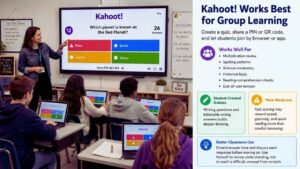
Kahoot! is most useful when several people are learning together. A teacher, parent, or student creates a quiz, shares a PIN or QR code, and participants answer through a browser or app. Players can join without creating individual accounts.
For this age group, Kahoot! works well for:
- Multiplication review
- Spelling patterns
- Science vocabulary
- Historical facts
- Reading-comprehension checks
- End-of-unit revision
Students can also create their own quizzes. That task is more demanding than answering one because they must write clear questions and believable wrong answers. Speed is Kahoot!’s main weakness. Fast scoring can reward reading speed and confident guessing rather than careful reasoning. Students who process information more slowly may understand the topic but still place near the bottom.
Teachers can improve the activity by extending answer time and discussing each response before moving on. Kahoot! should review or reveal understanding. It should not be expected to teach a difficult concept from the beginning.
8. BrainPOP
BrainPOP helps when a student lacks the background knowledge needed to understand a lesson, textbook chapter, or assignment. Its main product is aimed at Grades 3 through 8 and covers science, social studies, English, maths, health, arts, and technology. A typical topic may include an animated video, vocabulary work, quizzes, related reading, and creative activities.
A short introduction to ecosystems, electricity, government, or the water cycle can make later reading easier because the child already knows the main terms and relationships.
The weak use is obvious: Watching several videos and doing nothing with them.
A stronger sequence would be:
- Watch one topic video
- Complete the quiz
- Write three facts from memory
- Explain one idea aloud
- Connect it to current classwork
Full access generally depends on a family subscription or school licence, although selected material may be available without payment. Parents should ask whether the school already provides access before subscribing. BrainPOP is useful, but its dependence on paid or institutional access keeps it below the leading free tools.
9. SplashLearn
SplashLearn offers structured maths and English practice from preschool through Grade 5. Its upper elementary material includes multiplication, division, fractions, decimals, geometry, measurement, grammar, vocabulary, and reading comprehension. Teachers can use classroom tools, while family access follows a separate plan structure.
SplashLearn suits students who need a more guided route than Khan Academy’s broad library. Activities are organised by grade and skill, so children are less likely to wander into material that is far too easy or advanced. The Grade 5 ceiling matters. An eleven-year-old working at sixth-grade level may outgrow the available curriculum even though the app still appears suitable by age.
The platform is also more closely associated with US grade labels. UK and Indian families should check whether the topic order matches current schoolwork rather than assuming Grade 4 or Grade 5 means exactly the same thing everywhere. SplashLearn is most useful for a known maths or English gap. It is less compelling as a general app for a student already working confidently at grade level.
10. Epic
Epic reduces one ordinary barrier to reading: finding a suitable book immediately. Its full collection includes more than 40,000 ebooks, audiobooks, comics, read-to-me titles, and educational media for children twelve and under. The range can help a reluctant reader move from short nonfiction or graphic novels toward longer texts. Access is more complicated than the library size suggests.
Epic’s school offering gives participating students access to a smaller collection during defined weekday school hours. Broader home access depends on the school’s plan or a separate family subscription. The child may therefore see different books at school and at home.
Availability and catalogue details can also vary by region. Families in the UK and India should confirm local access before assuming the US plan applies in the same way. Epic is worth considering when a child reads more because digital choice is immediate. It is poor value when the child already has strong library access, prefers print, and rarely finishes books on a screen.
11. DoodleLearning
DoodleLearning is one of the stronger curriculum-specific choices for UK families. Its products include DoodleMaths, DoodleEnglish, DoodleTables, and DoodleSpell. DoodleEnglish is aimed at ages four to eleven, while DoodleMaths extends into the early secondary years. The apps create personalised practice based on the student’s responses.
The short-session format can work well after school. Ten focused questions are easier to maintain than a full worksheet, especially when the child is already tired. Its close fit with UK schooling is a genuine advantage for families following that curriculum. It also makes the platform less straightforward elsewhere. US and Indian parents should check the regional version, terminology, and topic sequence before paying.
DoodleLearning is not a casual game to open occasionally. It becomes worthwhile when the child completes regular sessions and the adult actually reviews the progress information.
12. Tynker
Tynker is a more guided alternative to Scratch. Its courses cover visual block coding, game design, creative projects, Minecraft-related activities, and later text-based programming. The platform provides clearer lesson sequences for children who are interested in coding but do not know what to build first.
That structure is the main reason to consider paying for it. The free material can introduce the platform, but many longer courses and guided pathways require a subscription. Parents should look beyond the first appealing project and check how much of the chosen route is available without payment.
Scratch remains the better free option for experimentation and original projects.
Tynker becomes more useful when:
- The child needs a defined sequence
- A parent cannot provide coding prompts
- The school is using the same curriculum
- The family expects to use the paid course regularly
It is lower in the ranking because many beginners can learn the same core ideas through Scratch without paying.
13. Sora
Sora may be the best reading app a family never needs to purchase. OverDrive created it for K-12 schools and participating libraries. Students can borrow ebooks, audiobooks, graphic novels, magazines, and other digital material through a web browser or the iOS and Android apps.
It includes useful reading features such as:
- Notes and highlights
- Definitions
- Adjustable text
- Offline downloads
- Reading goals
- Accessibility settings
- A dyslexia-friendly font
- Read-along support for selected titles
The limitation is access. Students normally need a participating school, school credentials, a setup code, or a QR code. Some users can also add a participating public library, but that option depends on local arrangements. The catalogue is determined by the connected school, district, or library. Two students using Sora may see very different collections.
Before paying for Epic or another digital reading service, parents should ask the school librarian whether Sora is already available. When the answer is yes, it can offer substantial value at no direct cost to the family.
How to Match the App to the Student?
The best apps upper elementary students use are usually selected for one current need.
| Current Need | Strong Starting Choice |
| Help understanding maths or science | Khan Academy |
| Creative coding and project work | Scratch |
| More motivation to practise maths | Prodigy Math |
| Geography or environmental research | Google Earth |
| Vocabulary and test revision | Quizlet |
| Regular language practice | Duolingo |
| Group revision or classroom participation | Kahoot! |
| Background knowledge before a lesson | BrainPOP |
| Structured Grade 3-5 maths or English practice | SplashLearn |
| Easier access to digital books | Epic or Sora |
| UK curriculum practice | DoodleLearning |
| Guided coding lessons | Tynker |
Use one app consistently for two or three weeks before adding another. That is long enough to see whether the child is understanding more, becoming independent, reading more often, or simply collecting rewards. The broader resource Best Educational Apps for Kids by Age can help when siblings need tools for different school stages.
Final Thoughts
The best apps upper elementary students can use should remove a specific learning barrier. Choose Khan Academy when a concept needs explaining. Use Scratch when the child needs a creative challenge. Consider Prodigy when repetition is the main obstacle. Use Google Earth for a focused research question rather than open-ended browsing.
Before paying, ask the school whether BrainPOP, Epic, DoodleLearning, Tynker, or Sora is already provided. Check the renewal date, regional curriculum, child-account rules, and device support. Then give the app two or three weeks. Ask the child to explain a concept, demonstrate a skill, show a finished project, or discuss a book. Keep the tool when it leads to stronger understanding, useful independence, or original work.
Remove it when the main result is another streak, another virtual reward, or another subscription nobody remembers using. Families planning for the next learning stage can use Best Educational Apps for Kids by Age to compare options for younger children, middle school students, and older learners.
Frequently Asked Questions (FAQs) About Best Apps Upper Elementary
Which App Is Best for a Student Who Is Falling Behind?
Start with the missing skill, not the broad school subject.
“Falling behind in maths” could mean weak multiplication recall, confusion about fractions, difficulty reading word problems, or gaps in place value. Khan Academy is the strongest free starting point when the child needs an explanation. SplashLearn or DoodleLearning may be more useful when the student needs a smaller daily practice sequence.
A teacher’s assessment is usually more useful than choosing an app based only on a report-card grade.
Do These Apps Match US, UK, and Indian Curricula?
Not equally. Khan Academy provides dedicated Indian curriculum material, and Prodigy offers settings for several regions. DoodleLearning is strongest for UK users. SplashLearn uses US-style grade organisation. Scratch, Google Earth, Duolingo, Quizlet, and Sora depend less on a fixed academic sequence, although vocabulary, available content, and school access can still vary. Parents should compare the app’s topic order with current classwork before paying for a curriculum-based subscription.
Can Children Trust Public Quizlet Sets, Kahoots, or Scratch Projects?
They should not assume the content is accurate or suitable. Public material may be created by teachers, students, companies, or unknown users. Quizlet sets can contain errors. Public Kahoots may use unclear questions. Scratch includes shared projects, comments, profiles, and remixing. Teacher-provided material is usually the safer choice. Adults should review public content and privacy settings before allowing independent use.
How Can Parents Tell Whether an App Is Actually Helping?
Look for evidence outside the app. A useful maths app should help the child solve a similar problem on paper. A reading app should lead to more reading, better comprehension, or clearer discussion. A coding app should produce a finished project or a problem the child can explain. Levels, streaks, badges, and time spent are weak measures on their own.